


How Negative Keywords Work in Google Ads
Introduction
Every Google Ads account is leaking money somewhere. Sometimes it's a bidding issue. Sometimes it's a weak landing page. But in a surprisingly large share of accounts, the leak is simpler: ads are showing for searches that were never going to convert, and nobody has built a proper system to stop it.
Negative keywords for Google Ads are the mechanism that fixes this. They tell Google which searches should never trigger your ads — and unlike most optimizations, the impact is immediate and measurable. You stop paying for irrelevant clicks the moment the negative keyword is applied.
The scale of the problem is worth stating plainly. Google's own data shows that search queries triggering ads can vary significantly from the keywords advertisers actually bid on — especially with broad and phrase match. Without active negative keyword management, you're essentially letting Google decide what's "close enough" to your keyword, which often isn't close enough at all.
What makes negative keywords for Google Ads genuinely interesting is that they're one of the few levers that simultaneously improves multiple metrics at once. Removing irrelevant traffic raises CTR, which improves Quality Score, which lowers CPC, which improves ad position — all from one list of excluded terms. That chain reaction is why experienced PPC managers treat negative keyword lists as a core account asset, not a cleanup task.
This guide provides all negative keyword match types explained, alongside where to apply them, how to find them, and how to maintain them as accounts evolve. Whether you're starting from scratch or auditing an existing account, the framework here applies across campaign types and business models.
The Professional’s Edge: Stability Meets Efficiency
When you aggressively expand negative keyword lists, you’re not just filtering traffic — you’re reshaping how your campaigns behave inside Google’s system. Large-scale exclusions can shift bidding patterns, affect auction participation, and sometimes trigger delivery instability.
On lower-trust or new accounts, these sudden changes may lead to inconsistent delivery or additional payment and policy checks.
This is why teams operating at scale pay close attention to account infrastructure. Many rely on agency-grade setups (such as YeezyPay accounts), where these fluctuations are less likely to cause interruptions, especially when making large structural changes to targeting and exclusions.
How Google matches search queries to your keywords
To understand what are negative keywords in Google Ads, you need to understand how the matching process works in both directions. When someone searches on Google, the system evaluates your keyword list and decides whether your keyword is eligible to enter the auction. Negative keywords act as a veto layer on top of that process — if a search query matches a negative keyword, your ad is excluded from the auction regardless of how well the positive keyword matched.
The matching happens before bidding. This matters because negative keywords don't just save money — they prevent the ad from entering irrelevant auctions entirely, which keeps impression share cleaner and Quality Score signals more accurate.
Google's official documentation confirms that negative keywords work differently from positive keywords in one critical respect: they don't account for close variants. A negative keyword blocks only what you specify — misspellings, plurals, and synonyms are not automatically excluded. This asymmetry is what PPC expert Navah Hopkins specifically flags: "negative keywords do not account for close variants. If you add 'cheap' as a broad match negative keyword, it will block queries containing 'cheap' but may still allow variations like 'affordable luxury hotel' to trigger your ads."
The difference between positive and negative keywords
Positive keywords tell Google when to show your ads. Negative keywords tell Google when not to. That sounds obvious, but the strategic gap between the two is significant.
Positive keywords expand by design — broad match reaches synonyms, phrase match covers variations, exact match includes close variants. Negative keywords work in the opposite direction: they're restrictive and don't expand. This asymmetry means how to use negative keywords in Google Ads effectively requires a different approach from positive keyword strategy.
The biggest practical implication: you can't build a complete negative keyword list before launch and leave it alone. You're building a system that catches irrelevant queries as they emerge — which is why ongoing search term report review matters far more than any initial list. The biggest issue isn't blatantly irrelevant queries but "almost relevant" queries that waste spend without converting — and those only become visible through regular search term audits.
Where negative keywords are applied in the account structure
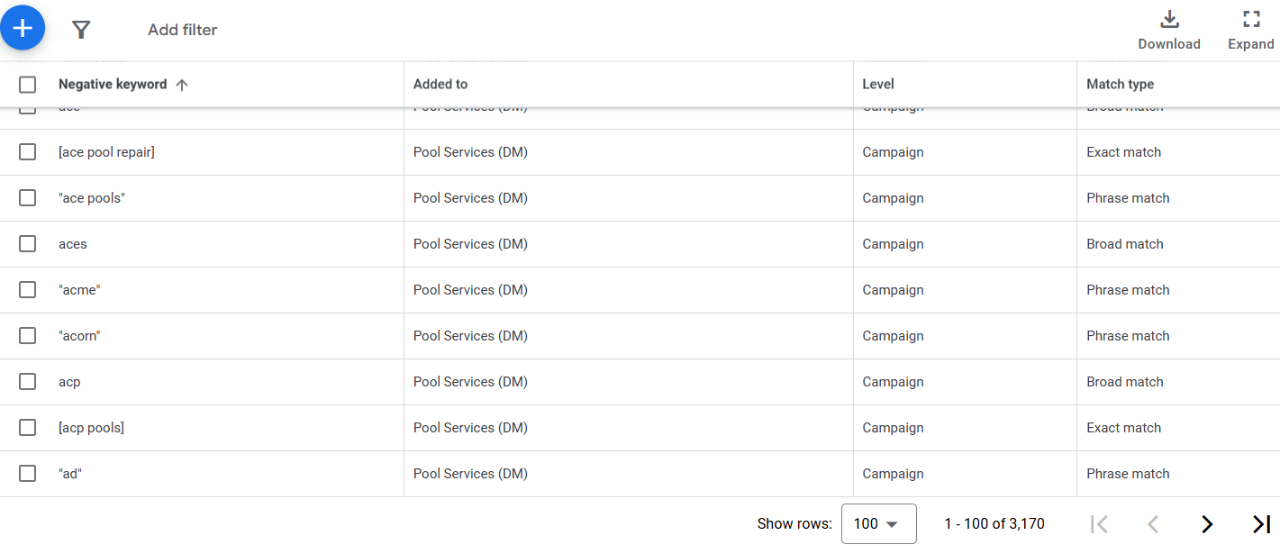
Negative keywords can live at three levels: account, campaign, and ad group. Each has a different scope and a different strategic purpose.
Google's documentation explains the hierarchy: account-level negatives apply across all campaigns, campaign-level negatives apply only within that campaign, and ad group-level negatives apply only to a specific ad group. The right level depends entirely on how broadly a term should be excluded. Some terms are irrelevant everywhere — "jobs," "free download," "how to DIY" for a commercial service. Others are only irrelevant in specific contexts — "running shoes" might be fine in one campaign but wrong in another focused on dress shoes.
Applying negatives at the wrong level is one of the most common structural mistakes. Blocking a term at account level when it should only be blocked at campaign level can cut off valuable traffic in campaigns where that term actually makes sense. As PPC expert Andrew Lolk points out: "We just see people are just overusing negative keywords, and in many cases, you're much more likely to make a mistake and exclude things too broadly."
Types and Match Options for Negative Keywords
When working with negative keywords for Google Ads, match types are the first thing to get right — they work on a fundamentally different logic from positive match types, and confusing the two is one of the most common setup errors in Google Ads. Google's official documentation on negative keywords is clear on this: negative match types control blocking by actual keywords, not by meaning. You can't block queries based on intent — only based on whether specific words appear in the search.
There's one relief: Google confirmed that negative keywords automatically account for casing and misspellings, so you don't need to add those separately. Everything else — synonyms, plurals, related concepts — requires manual additions.
Negative broad match
Negative broad match is the default when you add a negative keyword without any formatting. According to Google, your ad won't show if the search contains all your negative keyword terms, even if the terms appear in a different order. But your ad may still show if the search contains only some of your keyword terms.
Broad match negative keywords usage works best for thematic exclusions — entire categories of intent you want to block across all variations. "Jobs," "careers," "free," "how to," "DIY," "template" — these work well as negative broad match because you want the concept excluded regardless of word order or surrounding context.
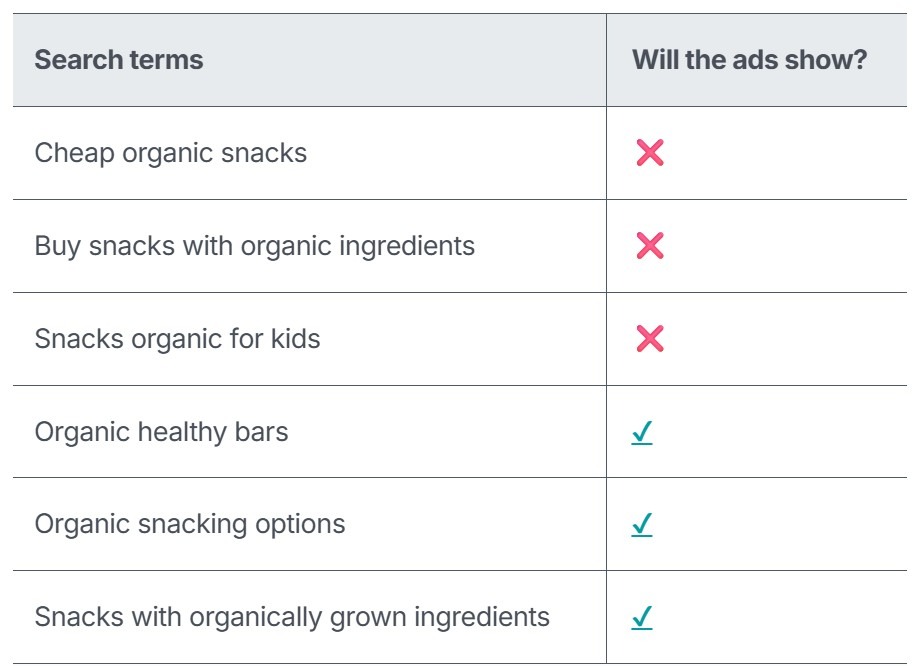
The important limitation: negative broad match does not block synonyms. If "cheap" is your negative, searches for "affordable" or "budget" still come through. As Navah Hopkins notes, "it will block queries containing 'cheap' but may still allow variations like 'affordable luxury hotel' to trigger your ads." For comprehensive intent exclusion you need to add the full range of synonyms manually — which is why intent-based negative lists quickly grow longer than most advertisers expect.
Negative phrase match
Negative phrase match blocks searches that contain your keyword phrase in the exact order you specified, with any additional words allowed before or after. Syntax: quotation marks, exactly like positive phrase match — "free trial."
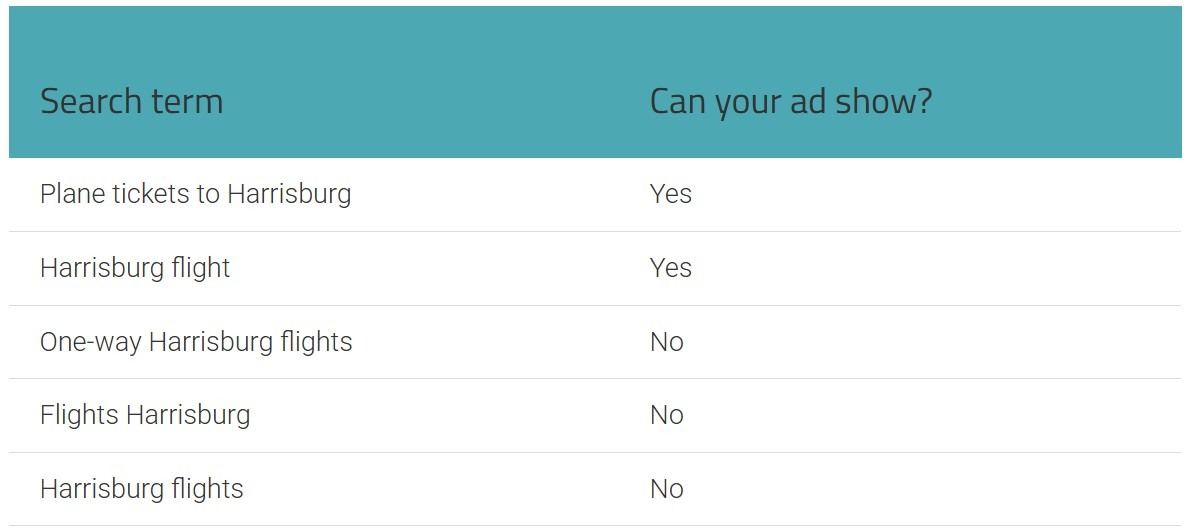
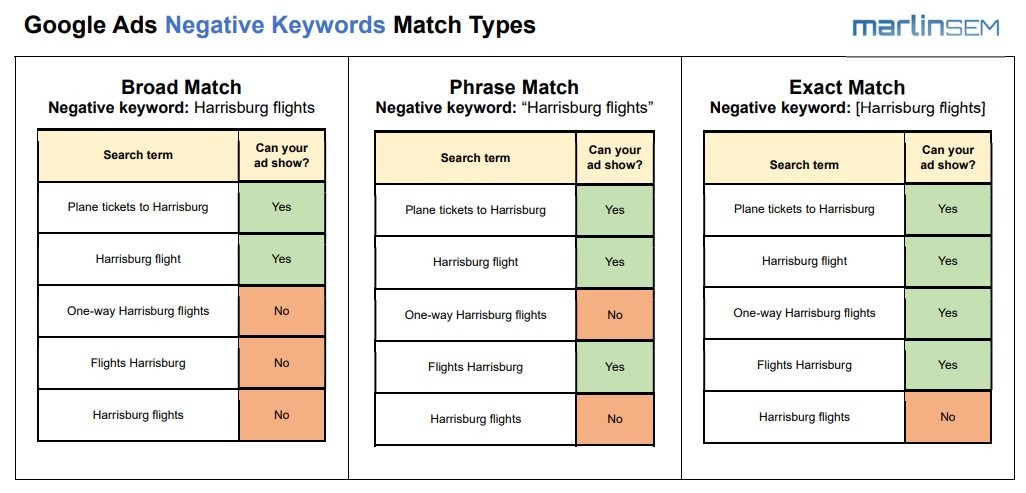
A cheat sheet on negative match types illustrates this with a clear example: a negative phrase match for "Harrisburg flights" blocks "cheap Harrisburg flights" and "book Harrisburg flights today" — but not "flights Harrisburg" because the word order changed. That distinction matters more than most advertisers realize. Phrase match negative keywords usage makes sense when you need to block a specific combination of words in a defined order, but don't need to catch every possible arrangement.
This is often the right match type for multi-word exclusions where word order signals specific intent — "free download," "how to fix," "DIY guide." These phrases carry specific meaning that their word-reversed forms don't.
Negative exact match
Negative exact match is the most surgical option. Google's documentation is precise: your ad won't show only if the search contains your exact keyword terms, in the same order, without extra words. Syntax: square brackets — [free trial].
Exact match negative keywords usage is appropriate when a term is irrelevant in only its specific form, but relevant variations should still trigger ads. A legal services firm might add [law school] as a negative exact match — blocking that precise query from students researching education, while still allowing "law school rankings" or "law school near me" to potentially trigger relevant ads if the context shifts.
Negative exact match is the least restrictive of the three options because it only blocks that precise query with no extra words. Use it when broad or phrase would block too much — particularly for terms where different word orders or additional context words change the intent entirely.
Where to Add Negative Keywords
Where negative keywords live in your account determines how much traffic they block and in which campaigns. Getting the level right matters as much as getting the keywords right — an overly broad application can quietly suppress valuable traffic across campaigns where a term is perfectly relevant.
Account level negative keywords for global exclusions
Account level negative keywords setup applies exclusions across all campaigns simultaneously. Google's documentation confirms that account-level negative keywords automatically apply to all eligible search and shopping inventory in relevant campaign types, with a maximum of 1,000 negative keywords at this level.
This level is appropriate for terms that are universally irrelevant to your business — not just irrelevant in one campaign, but irrelevant everywhere. For a B2B software company: "jobs," "salary," "internship," "free download," "crack," "torrent." For a premium service brand: "cheap," "discount," "free." These belong at account level because there's no scenario where you'd want to pay for that traffic.
The risk of over-applying at account level is real. PPC expert Andrew Lolk warns: "You're much more likely to make a mistake and exclude things too broadly." As product lines expand and campaigns diversify, account-level negatives set years ago can silently block traffic that's now relevant. Quarterly audits of account-level lists are not optional — they're maintenance.
Campaign level negative keywords to shape strategy
Campaign level negative keywords setup gives you control within a specific campaign without affecting the rest of the account. This is the right level for terms that are irrelevant in one campaign's context but potentially valuable in another.
A classic example: an ecommerce retailer running separate campaigns for "running shoes" and "dress shoes" might add "dress" as a negative in the running shoes campaign, and "running" as a negative in the dress shoes campaign. Neither term is universally irrelevant — it's the combination with specific campaign intent that makes the exclusion necessary.
Another important campaign-level application: excluding brand terms from generic campaigns to ensure high-intent branded traffic routes correctly. "Excluding brand terms from generic campaigns ensures that high-intent traffic is routed correctly, improving both performance and data clarity."
Ad group level negative keywords for tight themes
Ad group level negative keywords setup provides the most granular control — blocking terms only within a specific ad group while leaving other ad groups in the same campaign unaffected.
This level works best for preventing cross-contamination between tightly themed ad groups. A precise example from local service advertising: "If someone searches 'stump grinding,' you don't want your general 'tree service' ad group showing up. Add 'stump grinding' as a negative keyword to that ad group so only your stump grinding ad group shows for those searches." The result is cleaner message match, better Quality Score signals, and more accurate performance data per ad group.
Ad group-level negatives are also the right mechanism for intent separation within campaigns — blocking informational queries from conversion-focused ad groups, or filtering out product subcategories from umbrella ad groups.
Using shared negative keyword lists across campaigns
Shared negative keyword lists in Google Ads let you maintain one list and apply it to multiple campaigns simultaneously. When you update the list, the change propagates to every campaign it's attached to — which eliminates the maintenance problem of updating negatives campaign by campaign.
Experts recommend building structured shared lists by category: job-related queries in one list, learning-related queries in another, low-value intent terms in a third. This makes the system scalable — when you find a new job-related term to exclude, you add it once and it applies everywhere that list is attached.
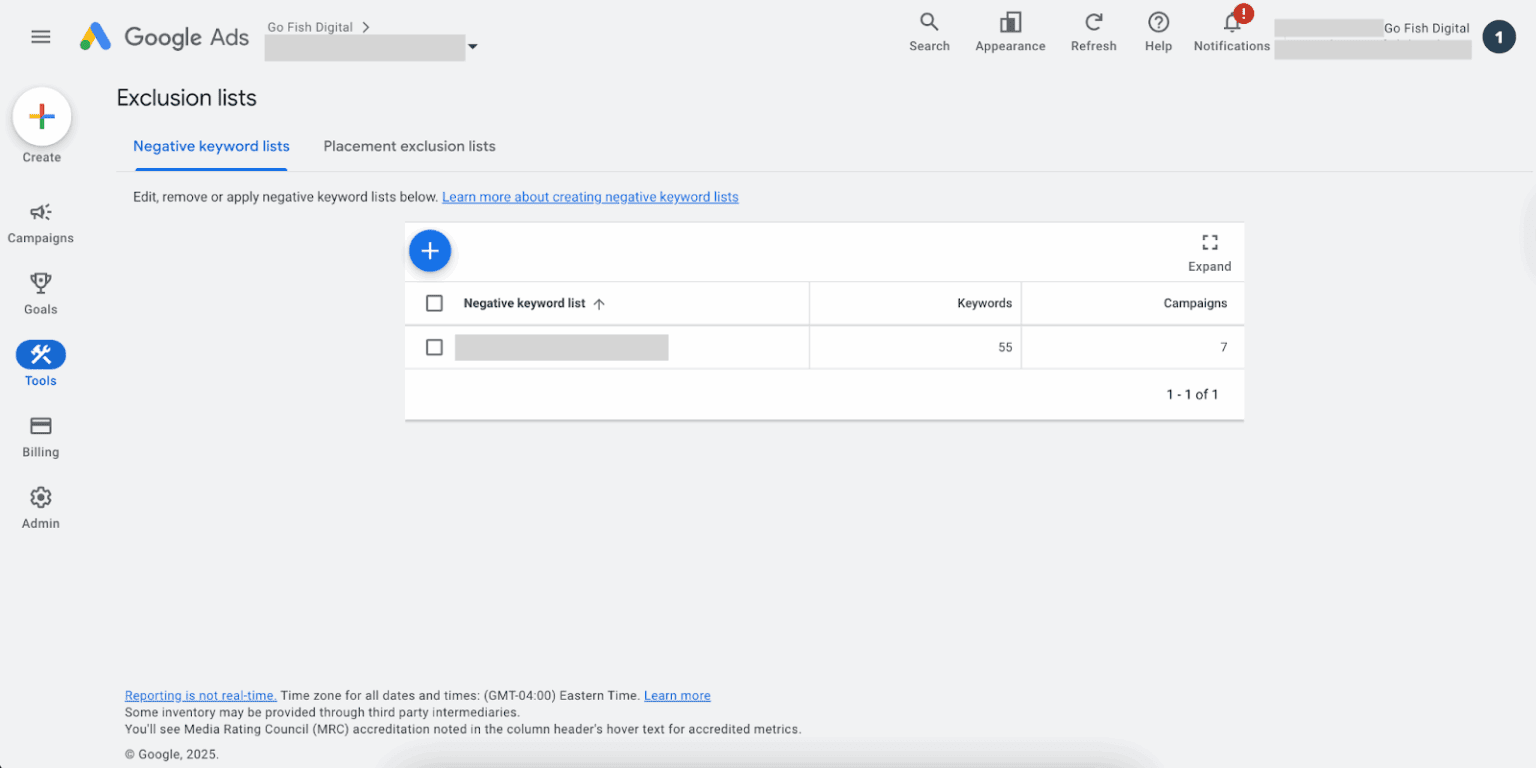
How to add negative keywords in Google Ads at the shared list level: go to Tools & Settings → Shared Library → Negative keyword lists. Create lists by theme, attach them to the relevant campaigns, and review them quarterly. Create lists by theme, attach them to the relevant campaigns, and review them quarterly. For agencies managing multiple client accounts, shared lists reduce the per-account maintenance burden significantly — one update covers every campaign the list touches.
Finding and Building Strong Negative Keyword Lists
Mining the search terms report for bad queries
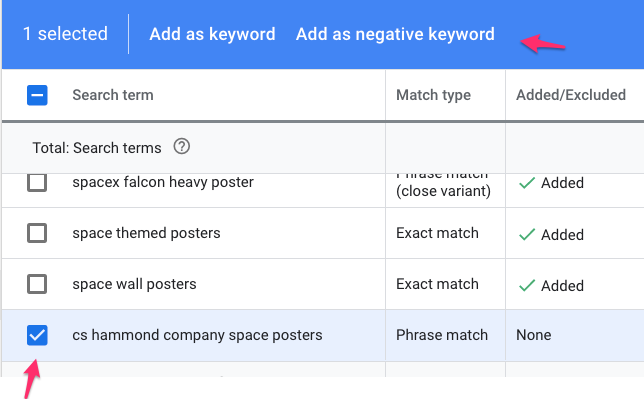
How to find negative keywords from search terms starts with one consistent habit: reviewing the search terms report on a regular schedule, not just when performance drops. Google's official documentation on the search terms report explains the core distinction clearly — a keyword is what you bid on, a search term is what someone actually typed. The gap between the two is where wasted spend lives.
The practical workflow is straightforward: pull the report weekly for new campaigns, every two to four weeks once campaigns stabilize, and sort by cost descending. PPC expert Adam Gorecki from Intigress puts the prioritization logic plainly: "If you don't have time to review everything, start with the search terms getting the most impressions — then move on to the ones costing you the most." That order matters — high-impression irrelevant terms damage Quality Score signals, high-cost irrelevant terms drain budget directly.
One critical step before adding any negative: search your own report for all variations of that word first. A common mistake — an advertiser wants to block "cheap," searches the report for "cheap" variations, and finds that "cheap" combined with specific premium product names actually converts well. Adding "cheap" as a broad negative without that check would cut off converting queries. The extra two minutes of verification prevents weeks of unexplained performance drops.
Negator.io's December 2025 survival Some PPC specialists recommend a specific starting audit for any account: export search term reports from the last 60 days across all campaigns, identify the 50 highest-spending irrelevant queries, and add those as negatives immediately. Then build or update account-level lists to cover at least 200 universal exclusions. That's not a one-time task — it's the baseline from which ongoing management runs.
Using categories like jobs, free, how to and DIY
The most reliable way to build a negative keyword list for beginners is to think in intent categories rather than individual words. Negative keywords for Google Ads examples by category: job-related ("jobs," "careers," "hiring"), informational ("how to," "tutorial," "DIY guide"), price-sensitive ("free," "cheap," "discount"), and academic ("research paper," "thesis," "for class"). Karooya's 2026 analysis recommends grouping exclusions by category — job-related queries, learning-related queries, low-value intent queries — because it makes the system scalable. When a new job-seeking term appears, you know exactly which list it belongs to and can add it once.
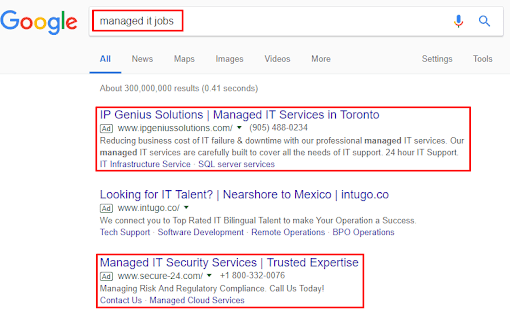
Negative keywords to block job seekers are among the most universally needed exclusions. A real example: two IT services companies were showing ads for "managed IT jobs" — paying for clicks from people looking for employment, not services. The fix is straightforward, but it requires thinking beyond just "jobs" as a single term.
Negative keywords to filter free searches require careful handling. We have to flag a trap: if you offer a "free consultation" as a lead magnet, adding "free" as a broad account-level negative blocks your own offer. The right approach is exact match negatives like [free download] or [free software] at the campaign level for campaigns where free isn't relevant — not a blanket account-level broad match block.
The same nuance applies to "how to" and "DIY" terms. For a commercial plumbing service, blocking "how to fix" and "DIY plumbing" makes sense — those searchers want instructions, not a contractor. For a tool retailer, those same queries are exactly the right audience. The category is right; the application depends entirely on your business model.
Handling brand terms, competitors and sensitive topics
Negative keywords to avoid competitor clicks sit in a different strategic category from waste exclusions — they're about routing intent, not blocking irrelevance. The standard approach: add your own brand terms as negatives in non-brand campaigns so branded searches route to your branded campaign, where bids, messaging, and budget are managed separately. Karooya confirms this practice "ensures that high-intent traffic is routed correctly, improving both performance and data clarity."
Whether to block competitor brand names in your own campaigns depends on intent and economics. A user searching for a competitor by name is in a consideration stage — they're comparing options. Some advertisers want that traffic; others don't. The decision should be based on conversion rate data from those queries, not assumption. Pull the search terms report, filter for competitor names, and check whether those queries have ever converted before deciding to block them.
Sensitive topics require a different kind of attention. Google's documentation on Display campaigns notes that negative keywords work differently for Display — they exclude based on topic rather than exact word matching, which means the blocking logic is broader and needs to be set up with that in mind. For advertisers in regulated industries, ALM Corp's analysis on sensitive categories recommends treating negative keyword strategy as part of policy compliance management — not just a performance optimization layer.
Strategies by Campaign Type and Business Model
The right negative keywords for Google Ads look different depending on what you're selling and how your campaigns are structured.
Negative keywords for lead generation
Negative keyword strategy for lead generation centers on one problem: traffic quality. A law firm paying $150 per click, a SaaS company targeting enterprise decision-makers, a financial services provider looking for qualified applicants — none of these can afford to pay for curiosity clicks, research traffic, or job seekers landing on their forms.
Brian Lasonde frames the core issue directly: "For lead generation, especially in B2B or services, quality is the entire game." His practical recommendation: strict separation between brand and non-brand terms, exact match as a starting point for budgets under $10K per month, and negative keywords as one of the most effective protections for paid media performance. "Negative keywords may not be flashy, but they remain one of the most effective ways to protect paid media performance, especially for teams with limited budgets."
The categories that matter most for lead generation negative lists: informational intent ("how to," "what is," "tutorial," "guide"), job-seeking intent ("jobs," "careers," "salary," "internship"), student and academic research intent ("case study for class," "essay," "assignment"), and free-product seekers. The last category needs nuance — if "free consultation" is your offer, you want that traffic. But "free software," "free template," or "free download" in a paid professional services campaign signals the wrong audience entirely.
Negative keywords for ecommerce and retail
Common negative keywords for ecommerce campaigns cluster around two problems: research-phase traffic that won't buy now, and low-quality intent that will never buy.
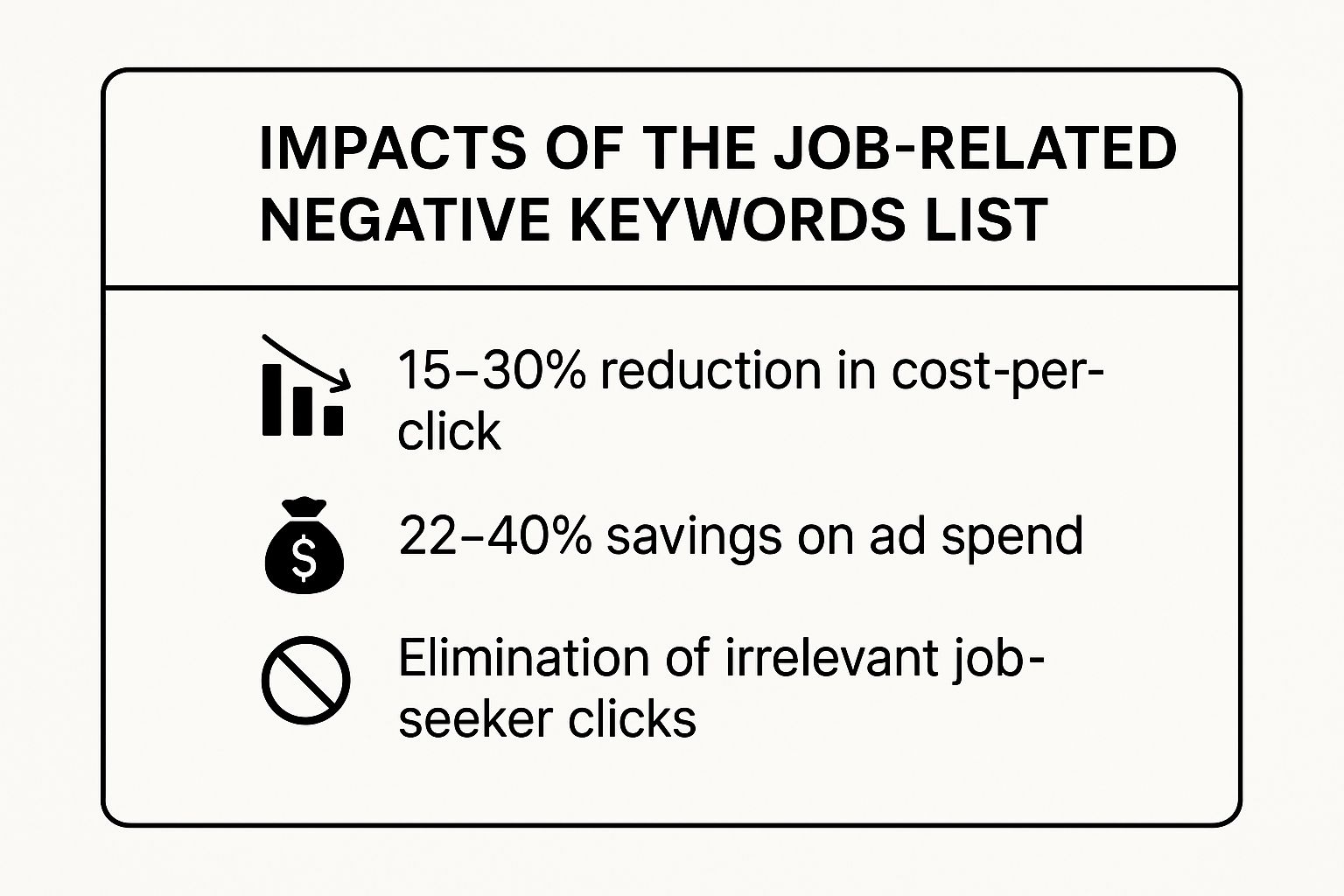
The universal starter list for ecommerce: "free," "DIY," "how to," "tutorial," "used," "repair," "cheap" for premium products, and "review" for campaigns where research-phase users aren't valuable. A concrete example from Dataslayer's PMax guide: a sporting goods retailer added "free" and "used" as negatives and saw an immediate 15% cost reduction — entirely from eliminating "free sneakers" traffic that was never going to purchase.
For ecommerce, product-category cross-contamination is a separate issue from intent. If you sell running shoes and dress shoes in the same account, cross-campaign negatives prevent the wrong campaign from winning the wrong auction. Structural negatives — not just intent negatives — are part of the ecommerce negative keyword architecture.
Negative keywords for local service campaigns
Negative keywords for local service campaigns have an additional dimension beyond intent: geography. A plumbing company in Austin shouldn't show ads for "plumber Dallas" or "plumber Houston," even though those are highly relevant service terms in the wrong location. If broad match or phrase match is pulling in location-modified queries outside the service area, geo-specific negatives at the campaign level fix the problem faster than geo-targeting adjustments alone.
Beyond geography, local service businesses face the same informational traffic problem as everyone else — "how to unclog a drain yourself" is someone trying to avoid calling a plumber, not someone ready to book. We recommend that local businesses monitor their search terms report closely and add negative keywords aggressively — particularly for DIY and instructional queries that broad match will reliably surface.
The job-seeker problem hits local service businesses harder than most. A search for "plumbing jobs near me" and "plumber near me" look similar to a broad match algorithm. Adding job-related negatives before launch — not after paying for the first batch of job-seeker clicks — is standard practice for any local service campaign.
Negative keywords for B2B and niche industries
B2B negative keyword strategy deals with a problem that's specific to enterprise and niche markets: technically relevant terms that carry completely wrong commercial intent. A concrete example: an enterprise software company reduced unqualified trial sign-ups by 80% by excluding terms like "personal use," "home," and "individual license" — words that indicated consumer intent in a B2B product context.
Another B2B-specific issue: internal jargon mismatches. A company that calls its product "maintenance software" may find users searching for "management software" or "business continuity" — and may need negatives to prevent the reverse: their own positive keywords attracting adjacent concepts they don't serve.
Academic and student traffic is a serious budget drain in technical B2B verticals. Our team recommend blocking terms like "research paper," "thesis," "for class," and "academic" in any B2B campaign where the product could theoretically appear in student research contexts — medical devices, scientific instruments, enterprise software. The caveat: "case study" in a B2B context often signals commercial evaluation intent, not student research. That term needs to be evaluated against actual conversion data before blocking it.
Negative Keywords and Automation
How negative keywords interact with Smart Bidding
Smart Bidding learns from every conversion signal in your account. Feed it clean data — queries with genuine purchase intent — and it optimizes toward the right audience. Feed it a mix of real buyers and job seekers, students, and DIY researchers, and the algorithm builds a distorted model of what a converting user looks like.
You're feeding poor-quality signals into the algorithm. And since automated bidding strategies learn from user interactions, allowing low-intent queries into your campaigns can dilute learning signals and impact optimization outcomes. The practical consequence is a Smart Bidding algorithm that gradually shifts budget toward audiences it's been trained to think convert — even if those audiences were always the wrong ones.
This is why negative keywords aren't just a cost-saving measure — they're a data quality tool. Every irrelevant click that Smart Bidding observes as a non-conversion teaches the algorithm something. Remove those clicks through negatives, and the algorithm trains on a cleaner dataset. Ignoring negative keywords is one of the top automation mistakes: even with AI, negative keywords remain crucial. Regular search term reviews prevent wasted spend on irrelevant queries.
Performance Max and limitations around negative keywords
For most of Google Ads' history, Performance Max was essentially a black box for negative keywords. That changed significantly in 2025. Google's official PMax documentation confirms that campaign-level negative keywords are now available, with a limit of up to 10,000 per campaign. Negative keywords apply to Search and Shopping inventory within PMax — they don't extend to Display, YouTube, or Discover placements.
The path to that 10,000-keyword limit is worth knowing. Google launched campaign-level negatives in January 2025 with a 100-keyword limit, which drew immediate criticism from practitioners who noted 100 keywords barely covered basic brand protection. By March 2025, Google quietly increased the limit to 10,000 with minimal announcement. For negative keywords for Performance Max campaigns, the practical setup: apply shared negative keyword lists through the Shared Library, then add campaign-level negatives for PMax-specific exclusions. Store Growers confirms the process is now identical to Search campaigns — go to the PMax campaign, click Keywords in the left menu, then Negative search keywords.
The remaining limitation is significant: negatives in PMax only cover Search and Shopping. Display, YouTube, Gmail, and Discover inventory within PMax campaigns is still outside negative keyword control. For ecommerce accounts running PMax across all inventory types, this means a portion of spend — estimated at 60-70% of PMax budget by some practitioners — requires other management approaches beyond negative keywords alone.
Using scripts and tools to maintain negative lists
At scale, manual search term review becomes the bottleneck. An account with dozens of campaigns generating thousands of daily queries can't be managed efficiently by weekly manual exports. This is where scripts and third-party tools earn their place in the workflow.
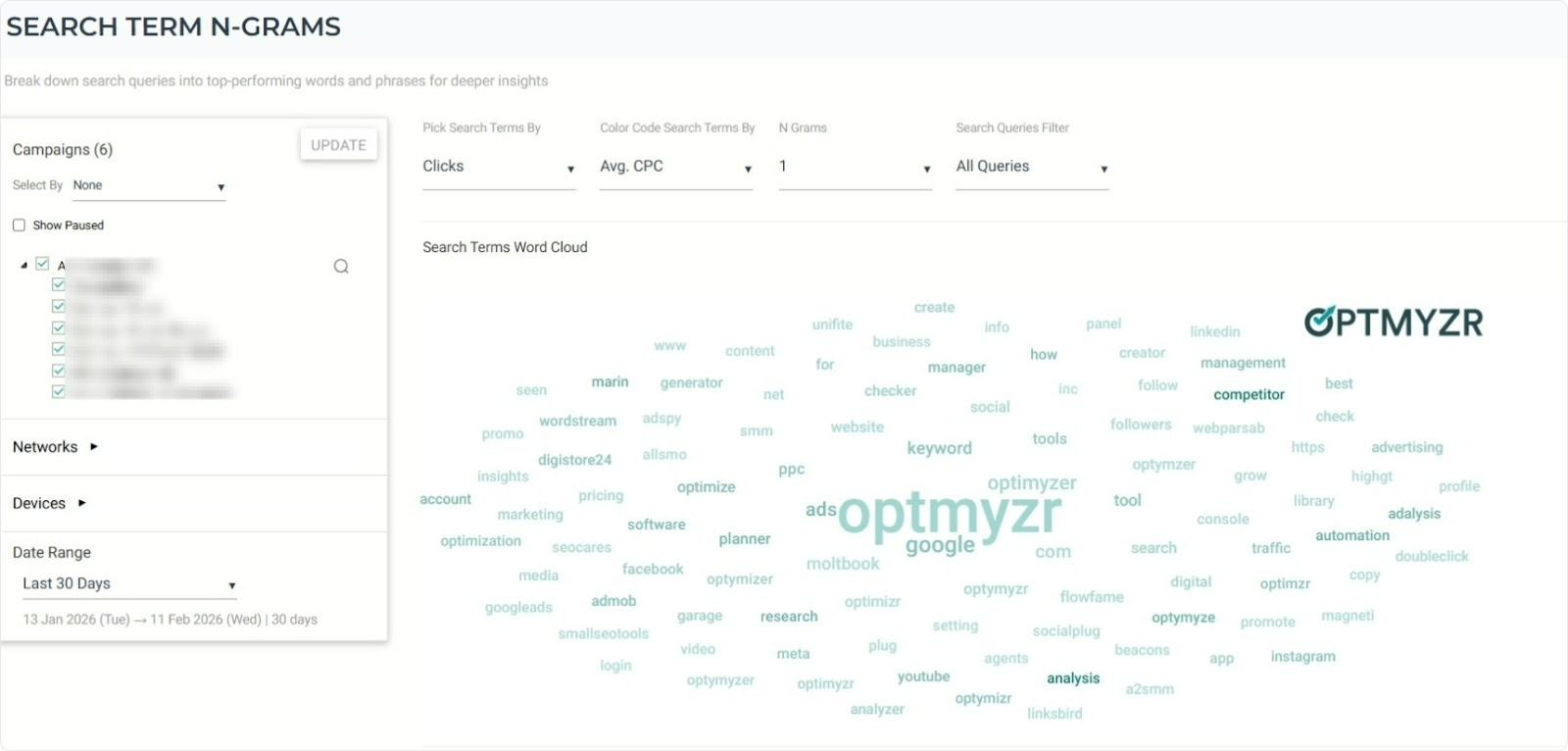
PPC expert Bob Meijer uses AI-assisted n-gram matching to cross-check search term conversion rates against existing exclusion lists — specifically to identify negatives that were accidentally blocking valuable traffic. Search Term N-Grams tool visualizes search term patterns as a word cloud, letting practitioners spot high-cost, zero-conversion query clusters without manually sorting through hundreds of rows.
The minimum viable automation setup for most accounts: a script that flags search terms with spend above a threshold and zero conversions, running weekly and outputting to a Google Sheet for human review. That's not fully automated — a human still decides what to add — but it removes the manual export and filtering step that causes most teams to skip the review entirely.
Balancing automation with manual query control
The central tension in negative keyword strategy in 2026 is between reach and control. Over-restrict and you block queries that convert. Under-restrict and you feed the algorithm bad data. The goal is not to block aggressively, but to block strategically.
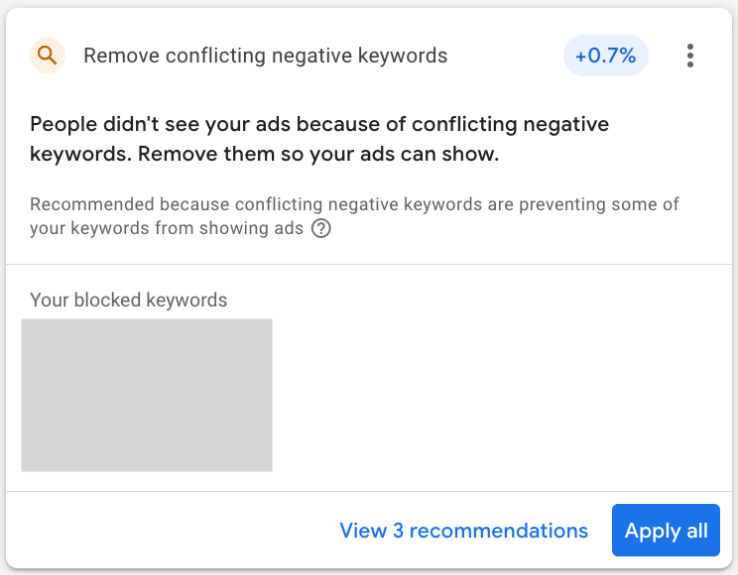
The warning signs that negatives have gone too far: impression share dropping without a corresponding bid change, Search Term insights showing fewer useful query categories over time, or Smart Bidding entering a prolonged learning phase after a large batch of negatives was added. We recommend using Google's "Remove conflicting negative keywords" recommendations to catch overlaps, and checking change history to trace any performance dips back to specific negative keyword additions.
Dennis Moons, who has managed over $5 million in ad spend, captures the right mindset: broad match with Smart Bidding already gives Google room to find relevant queries beyond your explicit keywords. Negative keywords are the mechanism that defines the boundaries of that exploration — not to fight automation, but to ensure the algorithm explores within a useful space rather than everywhere.
Common Mistakes
Overblocking valuable traffic with aggressive negatives
The most counterintuitive mistake with negative keywords for Google Ads isn't adding too few — it's adding too many. PPC expert Andrew Lolk documented a case study where a previous agency had "overly focused on negative keywords and tried to enforce strict control" — the result was an account so tightly blocked that valuable converting queries were being excluded. Taking over an account with an aggressive negative strategy means months of cleanup before performance can recover.
The trigger for over-blocking is usually well-intentioned: an advertiser spots a bad query category, adds a broad negative to eliminate it, and doesn't check what else that negative is catching. "Review" is a classic example — blocking it stops "product review comparison" research traffic, but also cuts off "review our service" queries from high-intent users who've already evaluated competitors. Context matters, and broad match negatives applied without verification eliminate context entirely.
The fix: before adding any broad negative, search your own search terms report for all variations of that word and check which of those queries have converted.
Forgetting match types and unintended exclusions
Negative keyword match types work differently from positive match types, and defaulting to broad match for everything creates gaps in both directions — blocking too much in some cases, too little in others. A cheat sheet illustrates the problem with a concrete example: adding "Harrisburg flights" as negative broad match blocks both "cheap Harrisburg flights" and "flights Harrisburg" — but adding it as negative phrase match only blocks the exact word order, leaving "flights Harrisburg" eligible to trigger ads.
The misspelling update from June 2024 helps: Google now automatically blocks misspellings for negative keywords, so you don't need to add every typo variant manually. But synonyms, plurals, and different word orders still require separate entries — and most advertisers don't account for these systematically.
The practical approach: use negative broad match for concepts you want to exclude entirely — "jobs" blocks all job-related queries in any order with one entry. Use negative phrase match for specific word combinations where order matters. Reserve negative exact match for surgical exclusions where broader blocking would cause collateral damage.
Not updating lists as products and services change
A negative keyword list built at campaign launch reflects the business as it was at that moment. A B2B software company that didn't sell to small businesses in 2022 may have added "small business" as a negative — and may now be actively targeting that segment. An ecommerce retailer that only sold new products may have added "used" and "refurbished" as negatives, then launched a certified pre-owned line. The list doesn't know the business changed.
This as a growing problem: over time, business priorities change, new products are introduced, and previously irrelevant queries may become valuable. Failing to revisit old negatives can lead to missed opportunities. The recommendation is a quarterly audit of all active negative keyword lists — not just adding new negatives, but reviewing whether existing ones still apply.
How often to update negative keywords depends on account activity. Check the search terms report at least once a week for new campaigns, moving to every two to four weeks once campaigns stabilize. High-spend campaigns with broad match keywords need more frequent checks than low-volume exact match campaigns generating few new queries.
Ignoring new queries from emerging trends and seasons
Search behavior shifts constantly. New product categories emerge, terminology evolves, seasonal events create query spikes, and competitor marketing introduces new comparison terms into the search landscape. A negative keyword list that was comprehensive in January may have significant gaps by April.
New irrelevant queries appear constantly as search behaviour evolves and Google's matching algorithms expand. A negative keyword list that was comprehensive last month has gaps this month because new query patterns have emerged. For ecommerce accounts running PMax and broad match at scale, this isn't a theoretical problem — it's a weekly budget leak.
Seasonal spikes deserve specific attention. A home improvement retailer running campaigns year-round will see entirely different query patterns in spring versus winter. DIY queries spike during home improvement seasons. Gift-related modifiers appear before major holidays. Job-seeking traffic increases in January and September. Building a seasonal negative keyword review into campaign planning — not just reacting to the search terms report after budget has already been spent — is the difference between proactive and reactive management.
Conclusion
Negative keywords for Google Ads have always mattered. What's changed in 2026 is why they matter — and the answer has shifted from "cleanup task" to "core control mechanism."
Match types are broader than they've ever been — which is exactly why negative keywords for Google Ads have become a strategic necessity rather than a routine cleanup task. Performance Max now runs across every Google surface. AI Max removes keywords from the equation entirely for advertisers who enable it. In this environment, as Karooya's April 2026 analysis puts it, negative keywords have become "one of the few remaining levers of control in an increasingly automated ecosystem." That's not an exaggeration — it's an accurate description of where the platform has moved.
The framework that holds up across campaign types and business models is straightforward. Build negative lists around intent categories, not individual words — job seekers, researchers, DIY intent, price-sensitive traffic — because categories scale, individual terms don't. Apply negatives at the right level: account for universal exclusions, campaign for strategic routing, ad group for thematic precision. Use shared lists so one update propagates everywhere it needs to go. And review the search terms report on a schedule, not just when performance drops.
The automation angle deserves emphasis one more time. Smart Bidding optimizes toward the conversion signals it receives. If irrelevant clicks flow through unchecked, the algorithm trains on noise alongside signal. YeezyPay identifies ignoring negative keywords as one of the most expensive mistakes in AI-driven accounts — not because it's complicated to fix, but because most teams underestimate how quietly it degrades performance over time.
The two failure modes to avoid: adding negatives too aggressively and blocking converting traffic, or treating lists as set-and-forget infrastructure that never gets audited. Neither extreme works. The goal is to block strategically — not to win a war against Google's matching algorithms, but to define the boundaries within which those algorithms do their best work.
FAQ
What are negative keywords in Google Ads and how do they work?
Negative keywords tell Google which search queries should never trigger your ads. When a user's search contains a term on your negative keyword list, your ad is excluded from that auction entirely — before bidding even starts. Unlike positive keywords, negative keywords don't account for close variants or synonyms, so you block exactly what you specify and nothing more. Google's official documentation confirms that negative keywords do automatically cover misspellings and casing variants, but plurals, synonyms, and related terms must be added separately.
How do I find good negative keywords from my search terms report?
Go to Campaigns → Insights and reports → Search terms in your Google Ads account. Google's search terms report documentation explains that the report shows actual queries that triggered your ads — which is where the gap between what you intended to target and what Google actually matched becomes visible. Sort by cost descending and look for three things: queries with significant spend and zero conversions, queries with clearly wrong intent, and competitor brand names in non-brand campaigns. For new campaigns, review weekly. For established campaigns, every two to four weeks is sufficient. Before adding any broad negative, search your report for all variations of that word first — some variations may be converting well and would be blocked unintentionally.
Where should I add negative keywords: account, campaign or ad group?
The right level depends on how broadly the exclusion should apply. Account-level negatives block terms across all campaigns — right for terms that are universally irrelevant to your business, like "jobs," "free download," or "DIY" for a commercial service. Campaign-level negatives apply only within that campaign — right for terms that are irrelevant in one campaign's context but potentially valuable in another. Ad group-level negatives give the most granular control — right for preventing cross-contamination between tightly themed ad groups. Shared negative keyword lists in Google Ads let you maintain one list and apply it across multiple campaigns simultaneously, which is the most efficient structure for accounts with several campaigns sharing common exclusions.
How often should I review and update my negative keyword lists?
For new campaigns, review the search terms report weekly — new irrelevant queries tend to cluster in the first few weeks as Google calibrates matching. Once campaigns stabilize, every two to four weeks is sufficient for most accounts. High-spend broad match campaigns need more frequent checks than low-volume exact match campaigns. Beyond regular search term reviews, run a full audit of all active negative keyword lists quarterly — checking not just for new terms to add, but for old negatives that may no longer apply as your products, services, and target audience evolve. Seasonal campaigns need a dedicated review before each seasonal period, not just after irrelevant spend has already accumulated.
Can negative keywords hurt performance if I use them incorrectly?
Yes — and this is more common than most advertisers realize. The two main risks are overblocking and stale lists. Overblocking happens when broad match negatives are added without checking what converting queries they'd also catch — a well-intentioned exclusion can silently cut off traffic that was performing well. Warning signs include unexplained drops in impression share, declining conversion volume without obvious external causes, or Smart Bidding entering a prolonged learning phase after a batch of negatives was added. Stale lists cause a different problem: negatives added years ago may now block queries that are relevant to products or audiences you've since added. We recommend using Google's "Remove conflicting negative keywords" recommendations to catch overlaps, and reviewing change history to trace performance dips back to specific negative keyword additions.


