


Google Performance Max Lead Generation: Practical 2026 Guide
Introduction
Performance Max campaigns for lead generation have become one of those unbeatable Google Ads features that help advertisers grow by reworking the way leads are found and handled, especially in ways that are beneficial to you.
Most guides on Google Performance Max lead generation will tell you it's a Google “AI-powered campaign type that runs across all Google properties”. Technically true, yes, but what you need to know is if it generates leads more cheaply than your current search campaigns and if these leads are useful.
Google Performance Max for lead generation runs your ads across Search, Display, YouTube, Gmail, and Discover at once. You don't pick which networks to use: Google decides based on where it thinks conversions are most likely to occur. You give it assets like your headlines, descriptions, images, and videos, set a conversion goal, choose a suitable bidding strategy, and the algorithm sorts out where to show ads, how much to bid, and who to target.
The typical threshold for Performance Max campaigns for leads is 30+ conversions per month: it can vary. But proper conversion tracking, and of course, your offline conversion import should exceed 7 days. Below that, you could be feeding the Ads system with minimal data to work with. You don’t want guesses.
This guide covers the setup decisions that help your campaigns generate qualified leads at an acceptable cost per acquisition (CPA). If you're B2B, home services, or into any businesses where the quality of your lead matters as much as its lead volume, the structure, tracking, and steps to level up are broken down here.
How Google Performance Max Works for Lead Generation
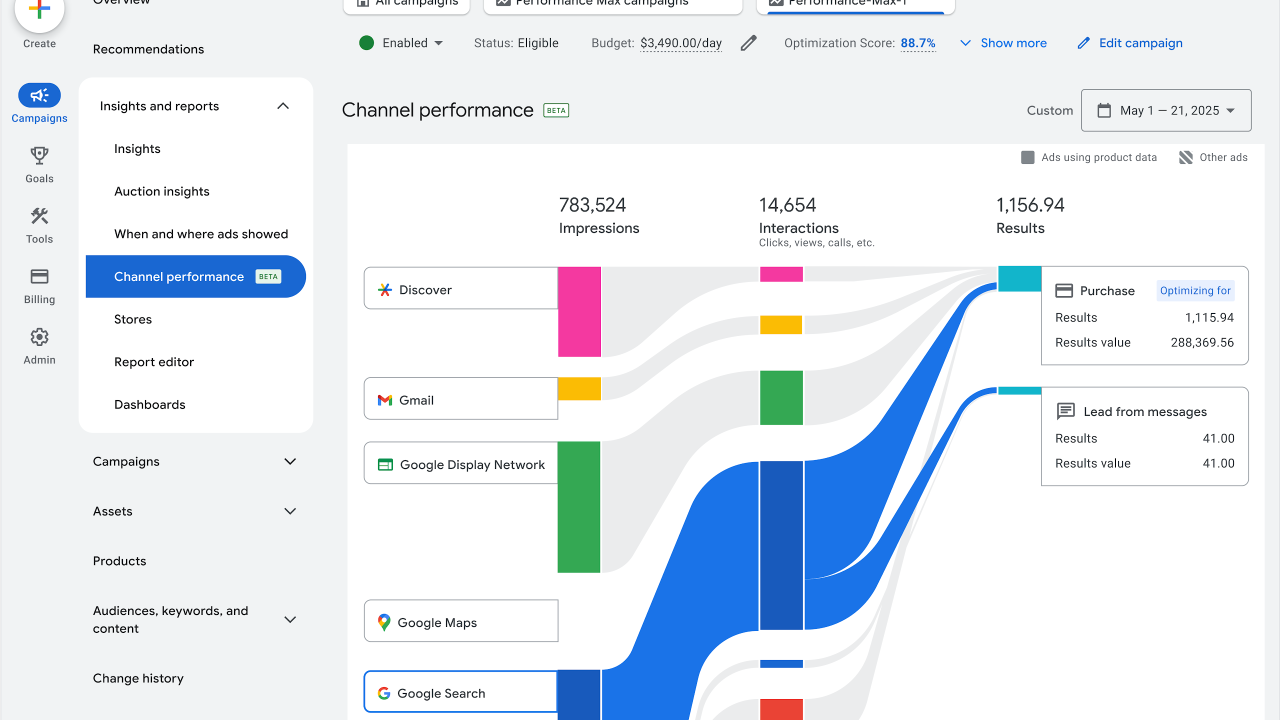
When you launch a Performance Max campaign, Google creates ad combinations from your assets like headlines, descriptions, images, videos, and runs them across Search, like YouTube, Display, Gmail, and discover all at once. You don't control which networks get the most of your budget: the algorithm decides based on how likely any of the networks is to generate conversions for you.
How Google Performance Max works for Lead Generation with auction-time decision
Let’s see how Performance Max works hand-in-hand with Google signals
-
User searches “roof repair near me” > Google checks: Device type, location, time, search history, whether they visited your site before
-
If high conversion signals (mobile user, in your service area, previous site visitor), Google bids intently on Search placement
-
If the same user later watches home organization videos on YouTube, Google might show a video of your ad.
-
If the user checks Gmail > sponsored email placement becomes an option
-
The algorithm allocates a budget to whichever placement has the highest predicted conversion rate at that moment.
This happens because Google processes hundreds of signals per auction that you can't manually track. For a local HVAC company, the algorithm distinguishes between:
-
Mobile user 5 miles away searching at 3 PM (emergency intent, high bid)
-
Desktop user 50 miles away searching at 11 PM (research mode, low bid or skip)
Manual bidding can't make these micro-adjustments. Performance Max can, but only when it has conversion data showing which auction patterns actually produce customers.
Requirements for conversion tracking
Your tag must kick off on form submission, not on page load. To test this, submit a test lead and check Google Ads conversions within 2 hours. If the Ads show 50 conversions but your CRM receives 32 leads, then your tag fires on URL visits, not submissions.
To fix this in Google Tag Manager, you need:
-
Trigger type: Form Submission
-
Validation: Fire on only when the form ID matches your lead form
-
Test with Tag Assistant before going live
Also, offline conversion imports matter because without them, Google optimizes for leads (both big and small) and treats them equally. With imports, Google learns which traffic sources produce the actual potential long-term clients and reallocates the budget accordingly.
Lead vs Value Based Optimization in Performance Max
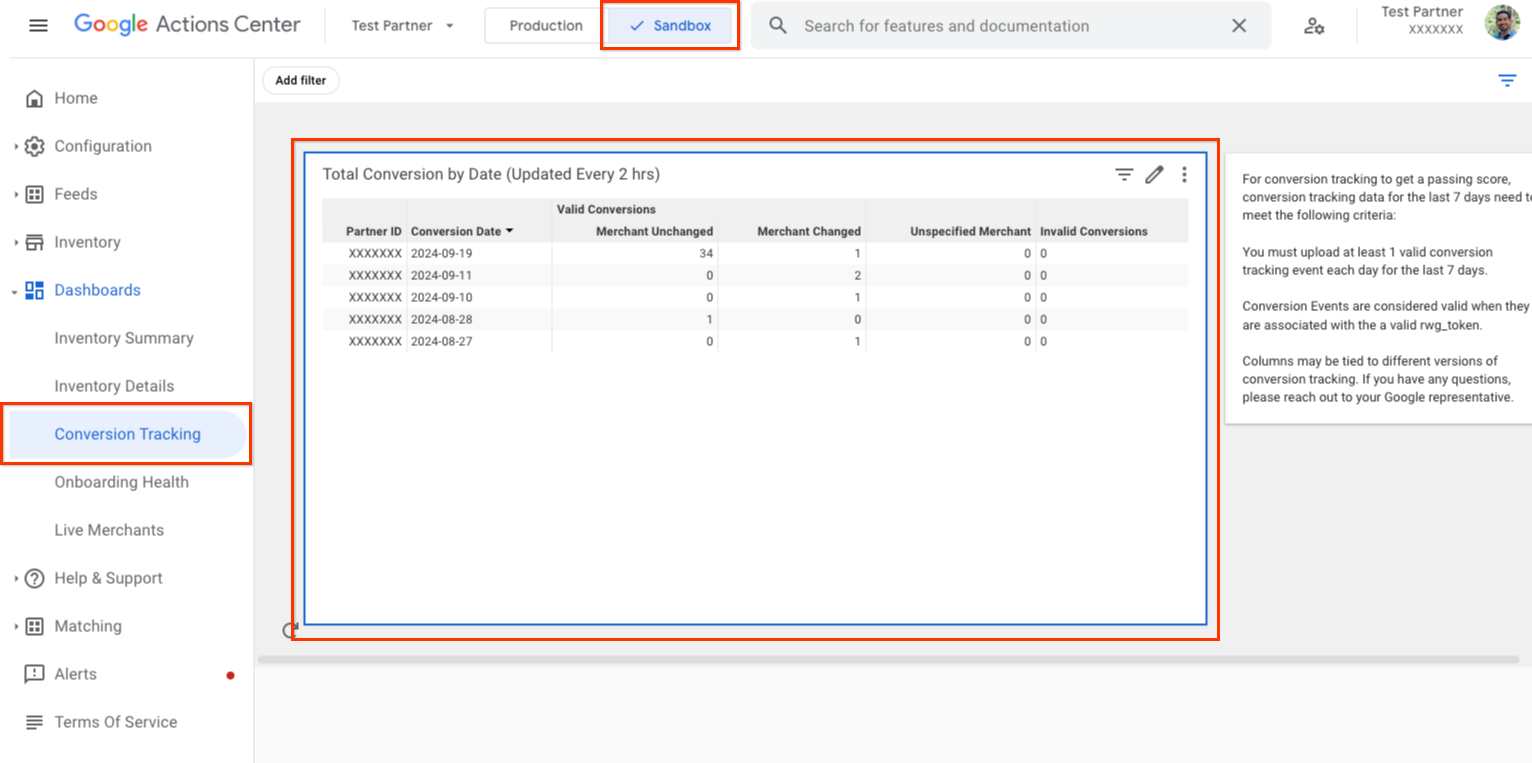
Standard conversion tracking counts every lead equally. A $500 small business inquiry gets the same weight as a $50,000 enterprise deal. Google maximizes lead volume, not the revenue.
How Value-based optimization changes the objective
Instead of “get more leads”, it becomes “get more high-value leads,” where you assign conversion values based on lead quality signals.
To implement this through conversion value, go to:
Tools > Conversions > Select lead conversion action > Value > Use different values for each conversion > Set rules.
Example of rules to set:
Customer Match audience (uploaded email list of past customers) > 3x value- Geographic area with 40%+ close rate > 2x value
-
Audience segment “in-market for professional services” > 1.5x value
-
If the base lead value is $100:
-
Enterprise customer match lead from high-performing geo > $600 value ($100 × 3 × 2)
-
Random cold traffic lead > $100 value
Google algorithm now prioritizes auctions likely to produce $600 leads over $100 leads. This is how Performance Max lead quality improves by teaching the algorithm what “quality” means in revenue terms.
Value-based optimization fails without first-party data. Ensure to upload the following to Google Ads:
1. Customer Match lists (existing customers, high-value prospects)
2. CRM data showing which lead sources close at higher rates
3. Offline conversions with actual revenue values
Also, note that advertisers can make mistakes by setting up value rules without “importing offline conversions”. So Google assigns values at lead capture but never learns if high-value leads are actually closed profitably. This can lead the algorithm to optimize predictions that were not valuable.
When to Use Performance Max vs Search for Leads
Performance Max vs Search for lead generation is about knowing when to match either of the campaign types to your account’s data maturity and business model.
You can use search campaigns when:
-
Conversion volume is less than what is required (e.g., 15/30 per month)
-
High-intent, and specific keywords drive most revenue (“emergency plumber near me”, “personal injury lawyer”)
-
Regulatory compliance requires message control (legal, medical, and financial industries)
-
You need keyword-level visibility to optimize CPL by search intent
-
Sales cycle under 7 days (immediate conversions, offline imports less critical)
And Performance Max works for:
-
50+ conversions/month with stable conversion tracking
-
Search campaigns maxed out and can't get any more impression share (70%+), need more volume
-
Longer sales cycles where you need to build awareness early on (B2B SaaS, enterprise services)
-
You have offline conversion imports (phone calls, physical store sales) showing which leads close
-
Can't spend all day managing Search campaigns
An Exception to this is Performance Max for B2B lead generation.
This works when sales cycles are 60+ days and multi-touch attributions are important. A CFO researching accounting software might:
-
See a YouTube ad (Performance Max, doesn't convert)
-
Visit website, leave (remarketing pool)
-
See Display ad 2 weeks later (Performance Max, doesn't convert)
-
Search branded term, convert (this is where the campaign gets last-click credit)
Without Google Performance Max lead generation, those awareness touchpoints don't happen. But you need a data-driven attribution model(like the GA4) enabled to see the full process.
Scenarios Where Performance Max Adds Incremental Volume
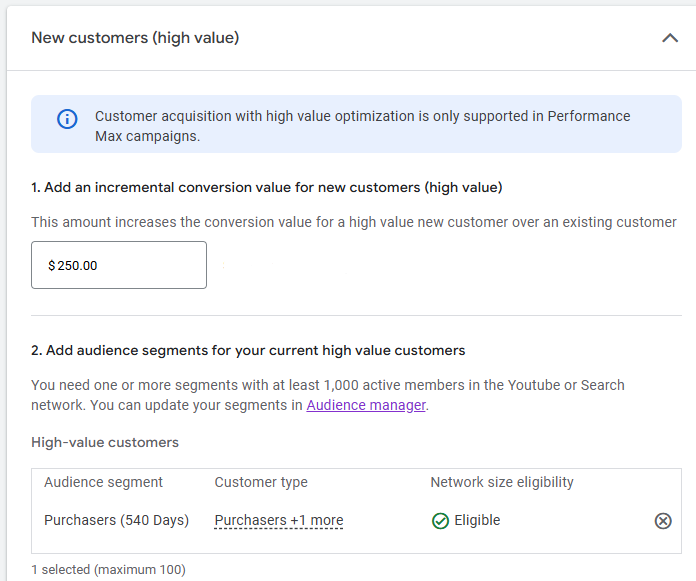
Google Performance Max lead generation stops being a Search replacement and becomes a good tool when Search campaigns hit limits, with search impression share above 70%.
If you're showing ads for 70% of available searches. The remaining 30%, either:
-
Requires bidding 50%+ higher (unprofitable)
-
Happens on search terms you haven't added yet
-
Occurs when your budget is exhausted for the day
1. Geographic expansion:
Say you've dominated Search in your primary market at $60 CPL. Expanding to secondary markets may raise CPL to $95 in Search because competition can differ significantly by location. Performance Max for local service businesses can use YouTube and Display Ads to target less competitive local markets. It is all about optimizing the budget.
2. New customer acquisition vs existing:
Search campaigns convert existing brand awareness, like people searching your company name or the category you're known for, while Performance Max reaches cold audiences who've never heard of you.
Structure this as separate campaigns:
-
Search: Brand + high-intent category terms
-
Performance Max: Exclude Customer Match and website visitors, focus on new customer acquisition
3. Seasonal demand spikes:
Periods such as major seasonal sales, tax-related demand cycles, and back-to-school periods can increase demand sharply for short periods. Search budgets max out. Performance Max absorbs overflow traffic across YouTube, Display, and Gmail that Search can't capture.
Comparing CPL, Lead Quality, and Control
Lower cost per lead doesn't mean better ROI when lead quality varies. An advertiser might see CPL drop from $80 to $55 and celebrate, but then discovers the close rate fell from 25% to 8%. Only the cost per customer increased. What went wrong?
The Performance Max might have delivered 80% more leads at 30% lower CPL, yet a 60% higher cost per customer. This is the optimized cost per lead in the Performance Max trap, optimizing the wrong metric.
The Control balance
Search campaigns provide:
-
Search term reports (see exactly what triggered ads)
-
Keyword-level bid adjustments
-
Ad copy customized per search intent
-
Negative keyword precision
-
Placement transparency
Performance Max removes:
-
Keyword visibility (only query themes)
-
Placement preemptive exclusions (can only react after seeing bad placements)
-
Ad copy control
-
Network-level budget allocation
Control matters more than automation in:
-
Legal/medical/financial (compliance requires message accuracy)
-
Brand reputation concerns (can't risk ads on inappropriate YouTube content)
-
Niche B2B with 10-20 high-value keywords
-
Solo operators who have time to manage campaigns, trade time for lower CPA
Automation matters more than control when:
-
Managing 10+ campaigns across service lines/geos (doesn't scale manually)
-
Limited Pay-Per-Click expertise
-
Need 60+ hours back per month (agency managing 20+ accounts)
Preparing Your Account and Tracking Stack
You can't run Performance Max without this tracking feature. Skipping any piece means optimizing with incomplete data.
Google Ads Conversion Tracking (GA4)
GA4 replaced Universal Analytics in July 2023. If you haven’t migrated, do so now.
The required setup includes:
1. Linking GA4 to Google Ads: Tools > Linked Accounts > Google Analytics > Link
2. Marking key events as conversions in GA4: Admin > Events > Mark as conversion (form-submit, generate-lead, purchase)
3. Import GA4 conversions to Google Ads: Tools > Conversions > New Conversion > Import > Google Analytics 4
To set up GA4 event tracking for lead gen:
Default events won't capture form submissions. Configure a custom event like:
-
Event name: generate-lead
-
Trigger: Form submission on contact page
-
Parameters: form-id, page-location, traffic-source
In Google Tag Manager:
-
Trigger: Form Submission (Form ID > “contact-form”)
-
Tag: GA4 Event
-
Event Name: generate-lead
Enhanced Conversions for Leads:
Captures first-party data (email, phone, name) from forms and sends it to Google in hashed format. Improves attribution when users convert on different devices or block cookies.
Set up: Tools > Conversions > Select conversion action > Enhanced Conversions > Enable
GTM implementation:
-
Add Data Layer variables for email, phone, first name, and last name
-
Configure Google Ads Conversion Tag to include enhanced conversion data
-
Test with Tag Assistant
-
Without enhanced conversions in 2026, attribution is 25-35% incomplete due to privacy restrictions (Consent Mode, cookie blocking, cross-device journeys).
Offline Conversions
If your sales cycle exceeds 7 days, offline conversion tracking for lead gen is non-negotiable. If not, as said earlier, Google optimizes on incomplete data without it.
Business models that require offline imports are:
-
B2B services (30-90 day sales cycles)
-
High-ticket consumer (auto, real estate, education)
-
Professional services (legal, accounting, consulting)
-
Healthcare (appointment to treatment conversion)
To set up offline import:
1. Capture GCLID on form submission (hidden form field or URL parameter)
2. Store GCLID in CRM alongside the lead record
3. When lead converts to customer, export: GCLID, conversion-date, conversion-value
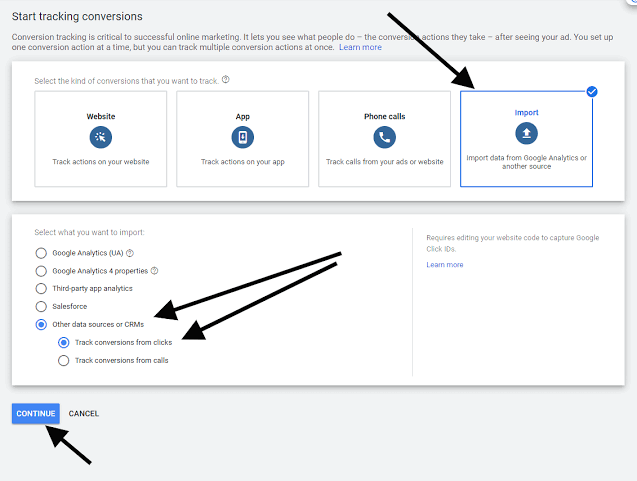
4. Import to Google Ads: Tools > Conversions > Uploads > Click conversions
CRM integration options include:
-
Manual CSV upload (weekly/monthly for low volume)
-
Zapier/Make automation (triggers on CRM deal stage change)
-
Native integrations (HubSpot, Salesforce have Google Ads connectors)
-
API implementation (for custom CRMs)
The strategy to achieve great conversion value is by importing actual revenue or assigning values based on customer tier, like:
-
Enterprise deal closed: $10,000 value
-
Mid-market deal: $3,000 value
-
SMB deal: $800 value
-
Consultation booked but not closed: $100 value
Google's algorithm learns which traffic sources produce $10,000 customers vs. $800 customers and obviously reallocates the budget to the $10,000 traffic.
Also, importing CRM leads to Google Ads frequency, such as:
-
Under 50 conversions/month: weekly imports acceptable
-
50-200 conversions/month: every 3-5 days
-
200+ conversions/month: daily imports or API automation
Delays longer than 14 days mean the algorithm optimizes on old data while real outcomes stay hidden.
Lead Qualification Rules for Businesses
Not all leads deserve to count as conversions: learn to separate filler leads from useful data by implementing these steps.
1. Geographic filtering:
If you serve specific states/cities, exclude conversions from outside service areas. A law firm serving one region does not want leads from outside its service area counted as successful conversions.
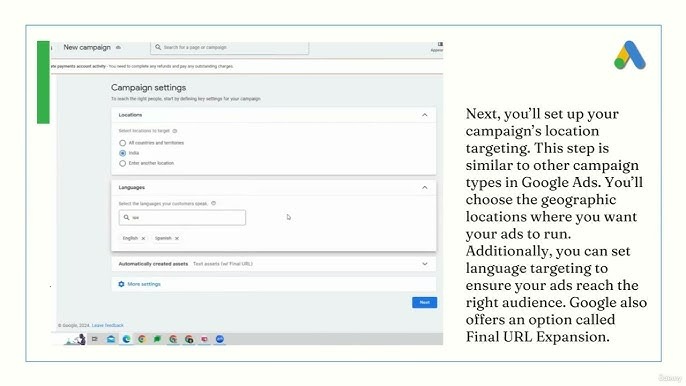
To implement this, go to: Conversion action settings > Add rule > Location does not contain [excluded regions]
2. Spam lead detection:
Common patterns include:
-
Email domains: test.com, example.com
-
Phone numbers: all zeros, sequential (1234567890), too short
-
Names: keyboard mashing (asdfgh), test, admin
3. Form validation and reCAPTCHA:
Google reCAPTCHA v3 blocks 70-85% of bot submissions. It runs invisibly, so you are covered.
4. Setup:
Add reCAPTCHA to form > Set threshold (0.5 = medium security, 0.7 = high security) > Block submissions below threshold.
5. Privacy compliance requirements:
Privacy compliance for lead generation requires adherence to applicable data protection and privacy laws in your target markets.
6. Privacy law requirements in applicable jurisdictions:
-
Disclose data usage in privacy policy
-
Provide any required user rights mechanisms and privacy disclosures based on the laws that apply in your target regions.
-
Implement Consent Mode v2 where consent requirements apply.
7. Consent Mode v2:
Required for California, Colorado, Virginia, Connecticut, and Utah privacy laws. When users decline tracking cookies, GA4 models conversions instead of losing data entirely.
This can be set up in Google Tag Manager:
-
Add consent banner (OneTrust, Cookiebot, or custom)
-
Configure consent parameters: ad-storage, analytics-storage
-
Google estimates conversions when consent is denied
Without Consent Mode, 30-40% of conversions become invisible in privacy-regulated states.
8. Phone and SMS marketing compliance:
If you collect phone numbers, clearly disclose your intent to call or text, use explicit opt-in language, respect applicable contact preferences, and include opt-out instructions in every message.
9. Email marketing compliance:
For email lead nurture:
-
Include all legally required sender and business information in your emails.
-
Provide a visible unsubscribe link
-
Honor unsubscribe requests within 10 days
-
No misleading subject lines or headers
10. Healthcare data compliance:
If you collect protected health information such as diagnosis details, treatment requests, or patient data, you must comply with applicable healthcare data protection requirements, including secure storage, access controls, and vendor safeguards:
-
Use a CRM and data stack that support healthcare-grade security, access controls, and compliant vendor agreements.
-
Encrypt data in transit and at rest
-
Sign Business Associate Agreements with all vendors handling PHI
-
Train staff on HIPAA requirements
Violations of healthcare data protection requirements can lead to significant financial penalties and legal consequences.
Setting Up a Performance Max Lead Generation Campaign
In Performance Max setup for leads, the setup decisions you make before launching matter for your campaign in generating qualified leads.
Choosing Objectives and Primary Conversion Actions
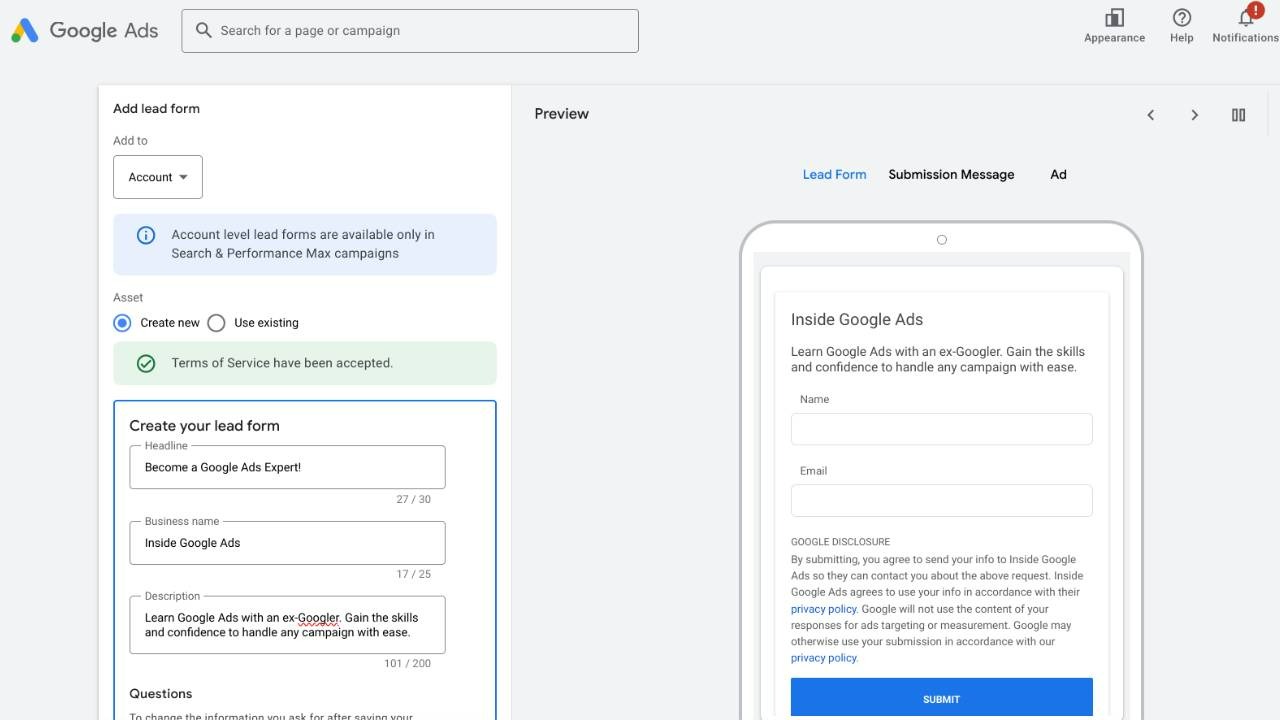
When creating the campaign, Google asks for your objective. Select “Leads” as the campaign goal. This tells the algorithm to place importance on form submissions, phone calls, and other lead-capture actions over clicks or impressions.
Primary conversion action selection:
If you track multiple conversion types (form submissions, phone calls, chat interactions, newsletter signups), choose the one closest to revenue. Don’t optimize for newsletter signups when your actual goal is consultation bookings.
Conversion action hierarchy:
1. Offline conversions (imported closed deals) - highest priority
2. High-intent actions (consultation booked, demo requested, quote submitted)
3. Form submissions (contact form, lead magnet download)
4. Phone calls over 60 seconds
5. Low-intent actions (newsletter signup, content download) should be excluded from optimization
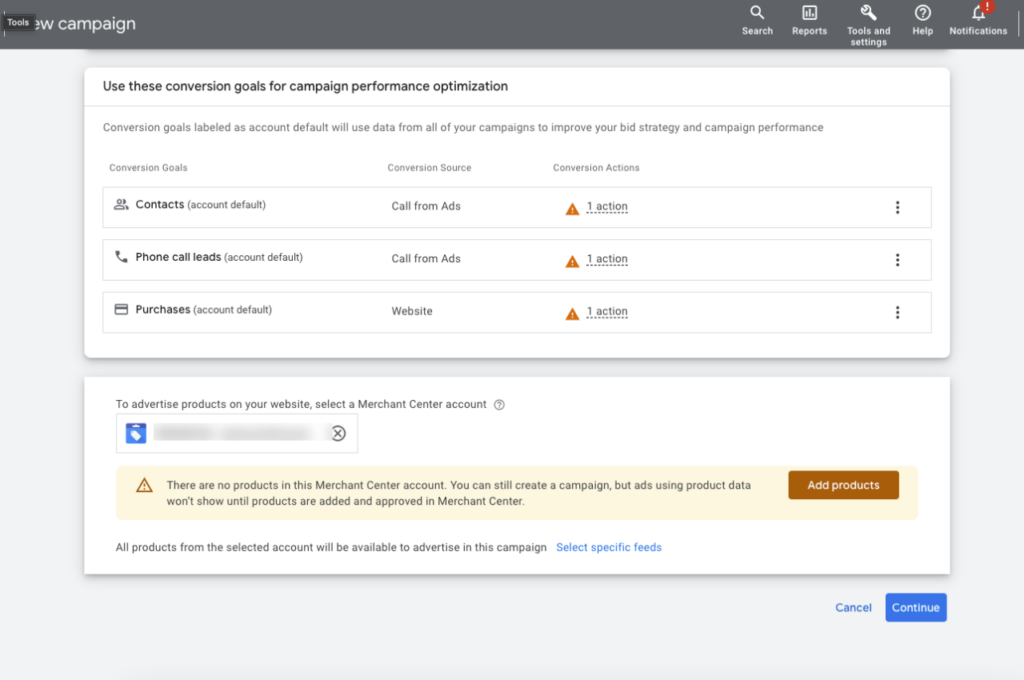
To set up conversion for value, go to Tools > Conversions > Conversion Actions. Set primary action to “Primary” goal. Set micro-conversions to “Secondary.” Google focuses the budget on primary conversions. This prioritizes high-value conversions.
Bidding Strategies and Target CPA for Leads
Performance Max bidding for lead generation offers three smart bidding strategies. Choose based on your data maturity.
1. Maximize Conversions (no target):
With this, Google spends its full budget to get maximum conversion volume. Use when it's your first 30 days of campaign (don't know realistic CPA yet), when you need to build conversion volume quickly (under 30 conversions/month currently, and when you're testing new markets where historical CPA data doesn't exist
2. Target CPA bidding:
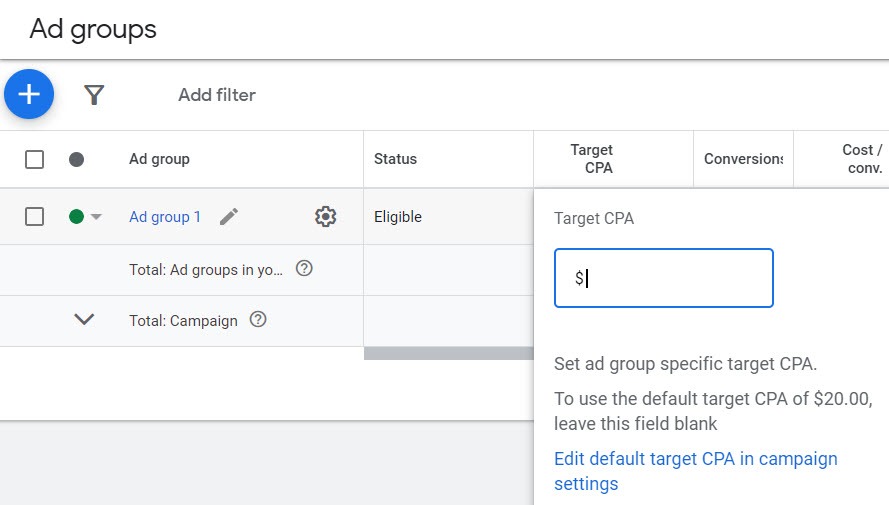
Set a specific cost-per-lead target. Google adjusts bids across all auctions to hit that average. Some leads cost $40, others $85, but over time, it averages to your target.
How to set target CPA:
-
If migrating from Search: Use the Search campaign average CPL as the starting target
-
If starting fresh: Kick off Maximize Conversions for 30 days, then set Target CPA at that average
-
Don't set unrealistic targets: If market CPL is $75, setting a target at $35 means Google can't spend the budget or generate garbage traffic.
-
Target CPA adjustment strategy:
Weeks 1-2: Learning period, performance unstable (CPL might spike 60%) -
Weeks 3-4: Performance stabilizes, check actual CPL vs target
-
Week 5+: If actual CPL is 20%+ below target and lead quality is good, lower target by 10%
-
If CPL is above the target after learning, raise the target by 15% or accept a lower volume
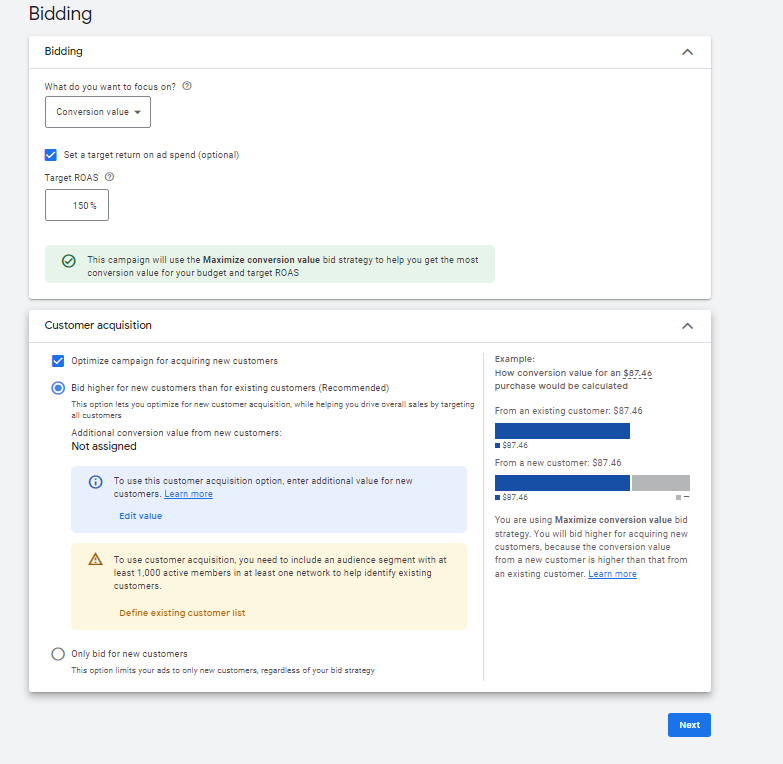
3. Target ROAS (Return on Ad Spend):
Optimize for conversion value instead of conversion count. Requires conversion values tracked (lead scoring, offline revenue imports).
How to Set Target ROAS:
Set target ROAS at 300% (meaning $3 revenue per $1 ad spend). Google prioritizes high-value conversions over high-volume conversions.
This works when you have:
-
50+ conversions/month minimum
-
Conversion values accurately tracked (not all leads marked as $100)
-
Offline conversions imported showing actual revenue
-
Customer lifetime value varies significantly (some customers are worth 10x others)
To set up bid limit safety, go to:
Campaign Settings > Bidding > Maximum CPC bid limit. Set this at 3-4x your target CPA. Prevents runaway spending on single clicks during the learning period. If the target CPA is $60, set max CPC at $180-$240.
Budgets
Your Budget determines learning speed and campaign stability. If it's too low, the algorithm can't optimize, and if it's too high, it wastes money during learning.
A daily budget formula should look like:
Learning period (first 30 days) with 10x target CPA
-
Target CPA $50 = $500/day minimum
-
Target CPA $75 = $750/day minimum
Post-learning (stable performance): with 5x target CPA
-
Target CPA $50 = $250/day
-
Target CPA $75 = $375/day
This is because Google needs volume to test. At $500/day with a $50 target CPA, that's 10 conversions/day. The algorithm tests different audience segments, placements, and bid levels. With 300 conversions over 30 days, the learning is usually considered complete.
If you can't afford the recommended budget:
1. Lower target CPA by 20% to stretch the budget (more auctions within the daily cap)
2. Tighten geographic targeting (focus budget on the highest-converting areas)
3. Start with Search campaigns until conversion volume supports Performance Max
Budget Allocation
Performance Max campaign structure for leads includes 3 types of campaign budget allocation, namely:
Single campaign: This works when all service lines have similar economics (CPL targets within 20% of each other). Use one budget, multiple asset groups.
Multiple campaigns: This is required when service economics differ significantly, like:
1. Legal: Personal Injury, Family Law, Estate Planning.
2. Run 3 separate campaigns with different budgets and target CPAs. Prevents high-volume/low-value service from consuming your entire budget.
3. Shared budgets: This approach lets multiple projects pull from one budget pool. Google allocates budgets for the day based on which campaign performs better for that day. To set up, go to Tools > Shared Library > Budgets > Create shared budget. Useful when running Performance Max + Search simultaneously. Google uniquely allocates a shared budget to whichever campaign is performing better on any given day.
Landing Pages and Lead Capture UX
Google Performance Max lead generation sends traffic, but the landing page determines the conversion rate. A campaign generating $40 clicks that convert at 2% performs worse than a campaign generating $60 clicks that convert at 8%. In short terms, landing pages lower cost per lead in Performance Max.
Message Match Between Ads and Landing Pages
Message match means your landing page headline mirrors the strongest benefit in your ad. If your message match is broken, your conversion rate drops 35-50%.
To implement a good message match, follow these steps:
-
Ensure the landing page H1 shows the main benefits
-
The first paragraph addresses the specific problem the user is trying to solve
-
CTA used matches user intent (“Get Emergency Service” not “Learn More”)
-
Trust signals should appear at the top of your landing page
-
It should be specific enough to maintain relevance for high-intent searches.
-
It should have multiple CTAs for different intent levels (consultation, instant quote, schedule service).
Form Length and Lead Magnets
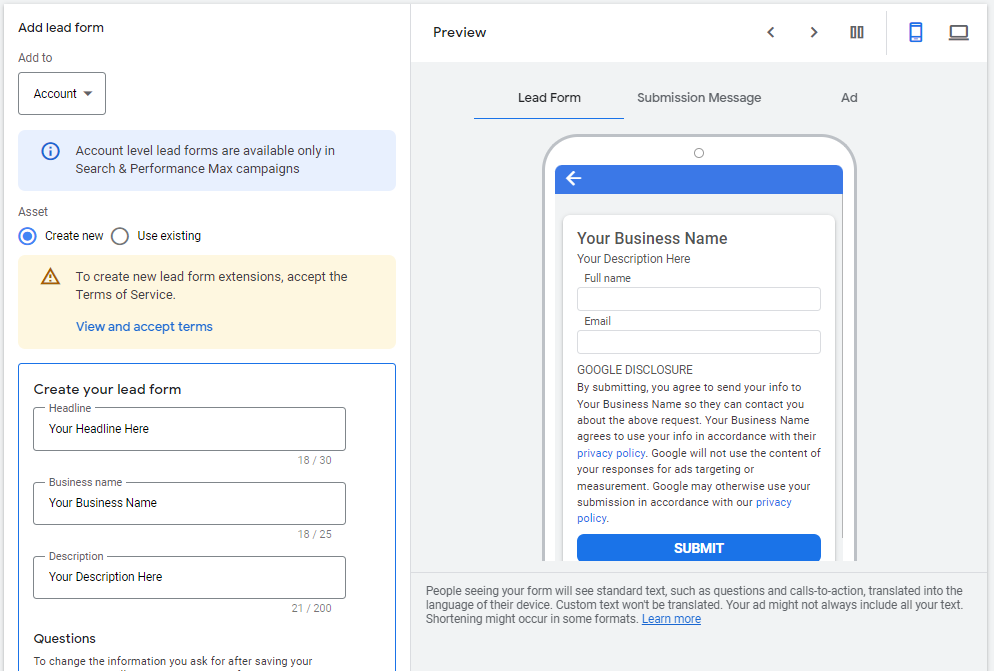
Form length creates a trade-off between quality and volume. The difference in Google Ads lead forms vs landing pages is that short forms convert more users.
You need to know exactly what you want to make decisions like:
-
Can your sales team handle 100 leads/week? Use short forms (higher volume, lower quality)
-
Do you need qualification data before calling? Use medium forms (5-6 fields)
-
Is the deal size over $10K with a stressful sales process? Use long forms with progressive profiling
The best strategy for utilizing a lead magnet:
Instead of “Request a Quote” (high commitment), to offer a lower-friction entry like
-
“Get Free [Audit/Assessment/Guide]”
-
“Download 2026 [Industry] Report”
-
“Claim Complimentary Consultation”
It only works if you have the follow-up habit. Don't offer free downloads and then never follow up. Use email automation to move low-intent leads toward consultation booking over 14-30 days.
Mobile Experience
65-70% of lead gen traffic is mobile. If the mobile conversion rate is half of the desktop, you're losing 35% of potential leads. And here are lists of various actions that kill mobile conversions: page load over 3 seconds, form fields requiring zooming to fill out, CTA buttons under 44×44 pixels (too small to tap accurately), pop-ups with no visible close button, and auto-playing videos that block content
To optimize your mobile so you don't come across these problems, you have to conduct:
1. Speed test: Google PageSpeed Insights. Target: 2.5 seconds or less on 4G
2. Form optimization:
-
Single-column layout
-
Large input fields (minimum 16px font)
-
Minimal required fields (3-4 max)
-
Autofill enabled (name, email, phone auto-populate from browser)
3. CTA placement: Above fold + sticky CTA that follows scroll
4. Trust signals: Reviews, ratings, and certifications are visible without scrolling
5. Click-to-call: Phone number clickable (opens dialer with one tap)
Controlling Traffic Quality and Reducing Spam Leads
Performance Max optimizes for conversion volume. Without quality controls, you get 150 leads/month, where 90 are spam, wrong geography, or unqualified.
Negative Keywords, Brand Exclusions, and Placements
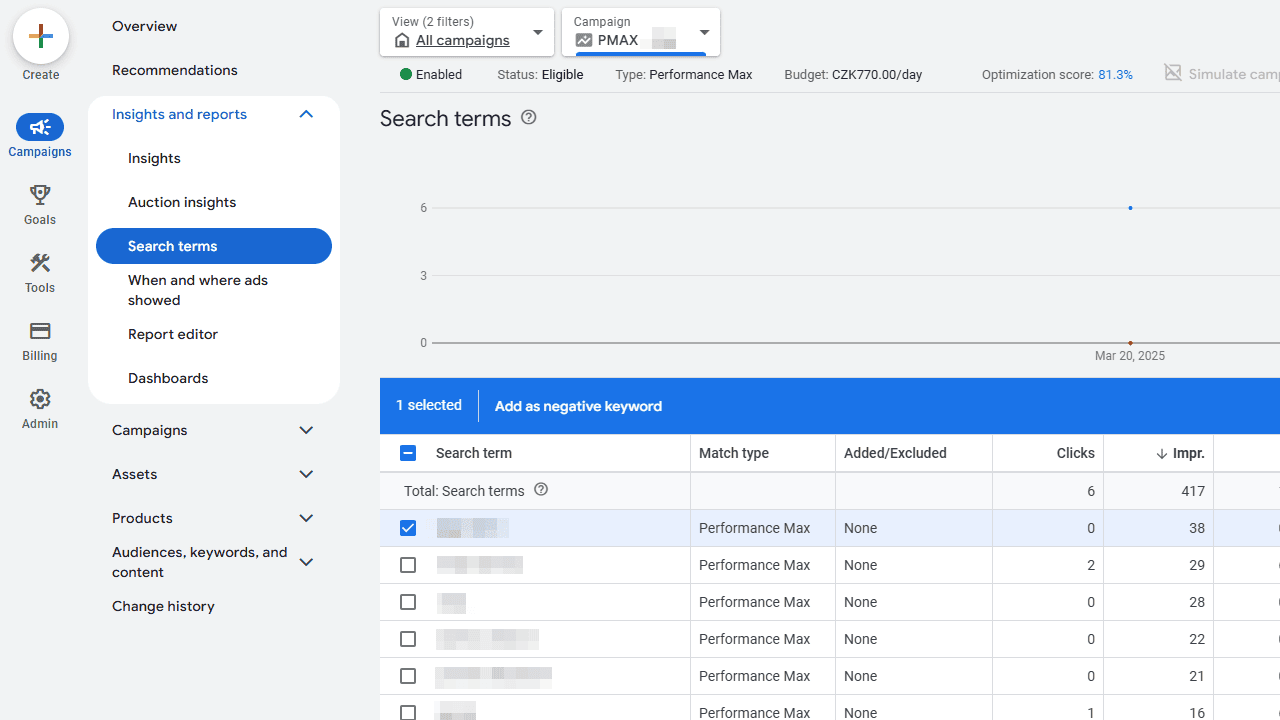
Performance Max doesn't support campaign-level negative keywords, but you can apply account-level negative lists.
To set up Performance Max negative keywords lead gen, go to:
Tools > Shared Library > Negative Keyword Lists > Create list
Standard exclusions for lead gen include:
-
Price qualifiers: cheap, free, discount, affordable, budget- DIY intent: how to, DIY, tutorial, guide, instructions
-
Job seekers: jobs, careers, hiring, employment, resume
-
Competitor brands: [competitor name], [competitor product]
-
Wrong service type: If you're B2B, add consumer terms (home, personal, family)
How to reduce spam leads in Performance Max:
1. Monitor the Search Terms report (Insights > Search terms) every 7 days. Add irrelevant queries to the negative list. Performance Max search terms are grouped by theme, not exact match, but you can still identify bad patterns.
2. If running branded Search campaigns, exclude your brand from Performance Max to prevent cannibalization.
3. Negative keyword list: [Your Company Name], [Your Company Name] + common misspellings.
Performance Max doesn't let you exclude placements preemptively, but you can view placement reports and request exclusions.
Process:
-
Insights > Placements > View details
-
Export placements with conversions
-
Cross-reference with CRM to see which placements produced qualified leads
-
Submit placement exclusion requests through Google support for consistently poor performers
Protecting Against Click Fraud and Bot Traffic
Click fraud monitoring becomes relevant in competitive industries where rivals or bots inflate costs.
You can identify click fraud by the following indicators:
-
Same IP address clicking ads multiple times/day
-
Traffic from known bot farms or VPN services
-
Clicks from countries or regions you do not serve, such as traffic coming from outside your target market
-
Sessions under 5 seconds with no page interaction
-
Form submissions with obvious fake data (email: test@test.com, phone: 1234567890)
There are monitoring tools in place to curb click fraud, such as:
-
ClickCease: Auto-detects and blocks fraudulent IPs
-
PPC Protect: Monitors click patterns, excludes suspicious traffic
-
Lunio (formerly PPC Shield): ML-based fraud detection
The cost ranges from $30-200/month, depending on ad spend. Worth it for industries with 10%+ fraud rates (legal, insurance, locksmith, moving companies).
For manual fraud detection, go to:
Google Ads > Tools > Audience Manager > Exclusions. Add IP exclusions for confirmed fraud sources.
Form validation and reCAPTCHA also identify bots and click fraud, and it stops bot submissions from counting as conversions. Google reCAPTCHA v3 runs invisibly and blocks 70-85% of automated form fills.
Call Tracking and Qualification
For businesses where 40%+ of leads come from phone calls, call tracking is mandatory. Without it, you're optimizing without knowing which campaigns drive calls.
How to activate your Performance Max call tracking setup
Integrate a call tracking platform with Google Ads through:
-
CallRail
-
DialogTech
-
Invoca
-
CallTrackingMetrics
Setting up Performance Max Call Tracking
-
Generate tracking numbers (unique number per campaign/ad group)
-
Integrate with Google Ads (automatic conversion sync)
-
Set qualification rules, call duration above 60 seconds should be qualified, and call duration under 30 seconds should be spam.
Call Qualification Guidelines
-
Not all calls are equal. A personal injury law firm gets:
-
40% wrong number / misdials
-
25% existing clients are calling about active cases
-
20% calls are about unrelated legal matters
-
15% legitimate new case inquiries
Without qualification filtering, Google counts all calls as conversions and optimizes for volume over quality.
To filter call quality, you have to set up your call tracking settings:
-
Minimum call length: 60 seconds
-
Exclude calls from customer match audience (existing clients)
-
Use AI transcription to tag call intent, only count "new case inquiry" as conversion
Reporting, Insights, and Optimization Cycles
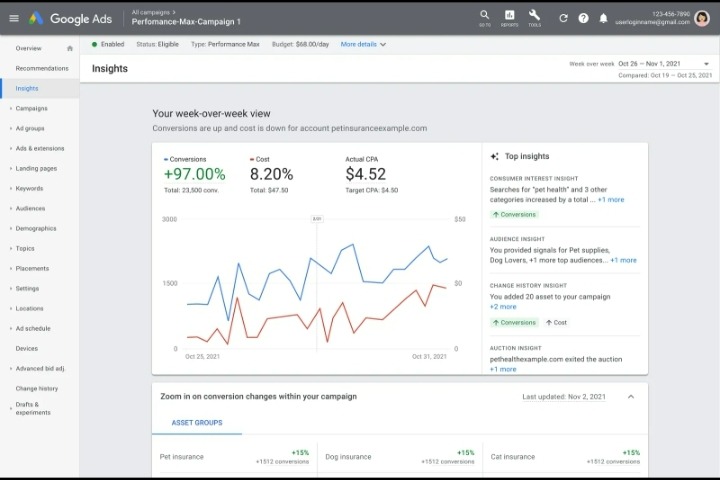
Performance Max hides data compared to Search, but the insights available are sufficient to optimize if you know what to look for.
Reading Performance Max Insights and Search Terms
For Performance Max reporting for lead generation, there are multiple ways to find your data/insights.
Data can be found in Primary reports, which include:
-
Campaign overview: Cost, conversions, CPL, conversion rate
-
Asset groups: Which asset group drives most conversions (tells you which offer/service aligns)
-
Audience segments: Demographic and interest data showing who converts
-
Search categories: Themes of search queries (not exact keywords)
Also, data can be found in the reading search on your page category. Let's see the ways:
1. To get data, go to “Insights” > Search categories show query themes grouped by intent like "emergency roof repair" (high intent, converts 8%), “roof replacement cost” (research intent, converts 2%), and “roof types” (informational, converts 0.5%)
2. For optimization actions, if research-intent themes generate volume but low conversions, adjust asset copy to discourage those clicks. Change the headline from “Learn About Roofing Options" to "Schedule Your Roof Replacement Today.”
3. Also, to access your audience segment insights, go to insights, Audience segments show age ranges that generate conversions the most, In-market categories, and even household income levels.
For example, a B2B software finds 65% of conversions come from the "Business Decision Makers" audience, but only 20% of impressions target them. How do they fix this?
-
To make the best of your audience insights, click Campaign Settings > Audience Signals > Add "Business Decision Makers," "C-Suite Executives," and upload a customer match list of existing customers.
-
Placement reports:
Insights > Placements shows where ads appeared:
-
YouTube channels
-
Display websites
-
Gmail
-
Export conversions by placement. Cross-reference with CRM to see which placements produced qualified leads vs spam.
Lead Quality Feedback Loops and Scoring
You have to import lead quality data back to Google if you want your campaign to soar.
Below are Lead scoring models for Google Ads:
Basic scoring (3-tier):
-
High quality: Decision-maker, budget confirmed, project starts within 30 days >$300 value
-
Medium quality: Interested, timeline unclear, needs internal approval > $100 value
-
Low quality: outside budget range, no timeline = $20 value
Advanced scoring (point-based):
-
Assign points based on CRM data:
-
Company size (1-50 employees: 10 pts, 51-200: 25 pts, 201+: 50 pts)
-
Budget range (Under $5K: 5 pts, $5K-$20K: 20 pts, $20K+: 40 pts)
-
Timeline (This month: 30 pts, This quarter: 20 pts, Exploring: 5 pts)
The total score determines the conversion value imported to Google Ads.
Offline conversion import with lead scores:
-
This exports closed leads from CRM with: GCLID, close date, lead score, revenue
-
Convert lead score to conversion value ($100 per 10 points)
-
Import to Google Ads: Tools > Conversions > Uploads
-
Google learns which campaigns/audiences/placements produce high-scoring leads
Results become available after 60 days(or whatever pertains to you) of imports, and the algorithm shifts the budget toward:
-
Geographic areas producing higher lead scores
-
Audience segments with better close rates
-
Time of day when quality leads convert
-
Asset combinations that attract decision-makers
A/B Testing and Incrementality Checks
Running Performance Max doesn't mean it's adding value. You have to test if it's actually generating incremental conversions or just stealing credit from other channels.
Test 1: Performance Max vs Search only
-
Control: Search campaigns only
-
Variant: Search + Performance Max
-
Duration: 60 days minimum
-
Metric: Total conversions and cost per acquisition
-
Success: 15%+ conversion increase at similar CPA
Test 2: Asset variations
-
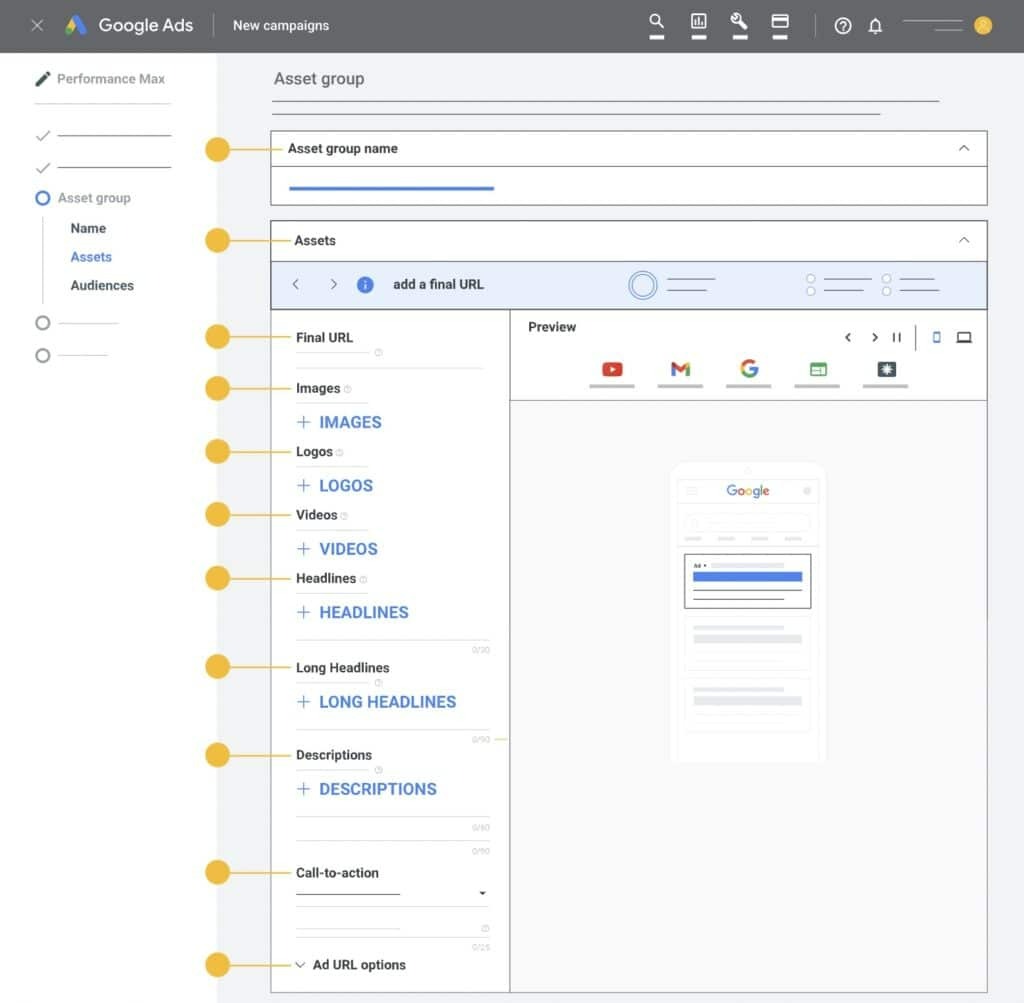
Test different headline approaches: benefit-focused vs feature-focused vs urgency-driven
-
Test image types: product shots vs lifestyle vs before/after
-
Duration: 30 days per test
-
Google auto-optimizes, but manual review shows which assets drive conversions.
Test 3: Target CPA levels
-
Run a duplicate campaign at 20% lower target CPA
-
Compare volume vs efficiency
-
Identifies optimal target that maximizes profit (not just conversions)
Campaign Structures and Playbooks for Lead Gen
Structure determines budget allocation, learning speed, and optimization accuracy.
Single Campaign with Multiple Asset Groups
You can use this when all service lines have similar economics (target CPA within 20% of each other).
Structured by:
-
1 Performance Max campaign
-
3-5 asset groups (one per service line or offer)
-
Shared budget, shared learning
Let's illustrate this using an example of a digital marketing agency ranking charts through client case studies
1. Asset Group 1: SEO services
Headlines: “Rank 1 on Google in 90 days.” “ SEO agency with proven results”
Images: Ranking charts, Client's case studies
2. Asset Group 2: PPC Management
Headlines: “Cut Your Ad Spend by 30%,” “Google Ads Experts.”
Images: Google Ads dashboards, ROI graphs
3. Asset Group 3: Social Media Marketing
Headlines: “10X Your Social Engagement,” “Full-Service Social Media Management”
Images: Social media screenshots, engagement metrics
This results in faster learning because all asset groups contribute to the same conversion goal. The algorithm learns from combined data (90 conversions total vs 30 per separate campaign).
To get full optimization, use conversion value rules to assign different values per asset group, as Google prioritizes higher-value conversions.
New Customer Only, Remarketing, and Local Structures
To focus on new customer acquisition, focus the budget on cold traffic and exclude existing customers.
To set this up:
-
Create Customer Match audience (upload customer email list)
-
Campaign Settings > Audience signals > Exclusions > Add customer list
Also, exclude website visitors (past 540 days). It stops Google from showing ads to people who already know you.
This would be best used in mature businesses with large customer bases, where remarketing consumes the budget that should go to acquisition.
To approach the remarketing structure, go to:
Campaign Settings > Audience Signals > Include Website visitors from the past 30-90 days, YouTube engagers who have watched 50%+ of the video, Customer match, Performance of CPL 40-60% lower than cold traffic, and conversion rate 2-3x higher.
Use this approach when you have a limited budget, need high conversion rates, and have enough traffic (5,000+ monthly site visitors).
B2B and Local Service Examples
Case 1: B2B Corporate Gifting
A UK B2B company, as analyzed by Deepfootprints in the corporate gift space, faced traffic quality issues running shopping campaigns. The problem was that consumer searches and business searches used identical keywords, meaning they could not differentiate between ‘personalised coffee cup’ for a single gift and ‘personalised coffee cup' meaning bulk orders with logo customization. The agency spent months adding thousands of negative keywords to filter consumer traffic, but Shopping campaigns still attracted non-B2B searchers, driving up cost per lead.
Performance Max test approach: So they conducted a test approach where they created 4 PMax campaigns for different product categories. Each campaign used 10-12 highly targeted B2B search themes per asset group, like “corporate branded gifts,” “bulk promotional items,” and “company logo merchandise.” They uploaded a customer match list of past B2B buyers and added “past converters” as an audience signal. The results were remarkable.
Below were the results:
-
Campaign 1 had 44% more conversions and 47% lower CPA
-
Campaign 2 had 38% more conversions and 42% lower CPA
-
Campaign 3 had 51% more conversions and 49% lower CPA
-
Campaign 4 had 41% more conversions and 45% lower CPA
The search insights report showed a clearly improved traffic quality. Google's algorithm understood the B2B signals (customer match + targeted search themes) and stopped bidding on consumer-intent traffic. One campaign showed lower clicks than the previous Shopping campaign, but traffic quality improved, with significantly fewer clicks, more conversions, and lower CPA.
Troubleshooting Common Performance Max Lead Gen Issues
Even properly configured campaigns hit problems. Diagnose quickly to avoid wasting weeks of the budget.
High Volume but Low Quality Leads
A typical example is when you have 150 leads/month at $40 CPL, but only 15 are contactable/qualified.
Common causes are when:
-
Conversion tracking counts page views instead of form submissions
-
No lead scoring, all leads treated equally
-
Traffic from Display/YouTube placements that attract low-intent users
-
Broad match finds irrelevant queries
To Diagnose:
-
Check conversion tag: Use Tag Assistant, submit a test lead, and verify the conversion fires only on successful submission.
-
Export leads from Google Ads vs CRM: If Ads shows 150 but CRM has 90, tracking is broken.
-
Review placement report: Are 60% of conversions from mobile game apps or low-quality sites?
-
Check search categories: Are conversions coming from informational queries instead of transactional?
Fixes:
-
Fix conversion tracking
-
Implement lead scoring, import offline conversions with values
-
Exclude placements producing spam (request via Google support)
-
Add negative keywords for informational intent
-
Tighten geographic targeting (exclude areas outside the service zone)
-
Raise minimum call duration to 90 seconds (filters misdials)
Limited Traffic and Stuck in Learning
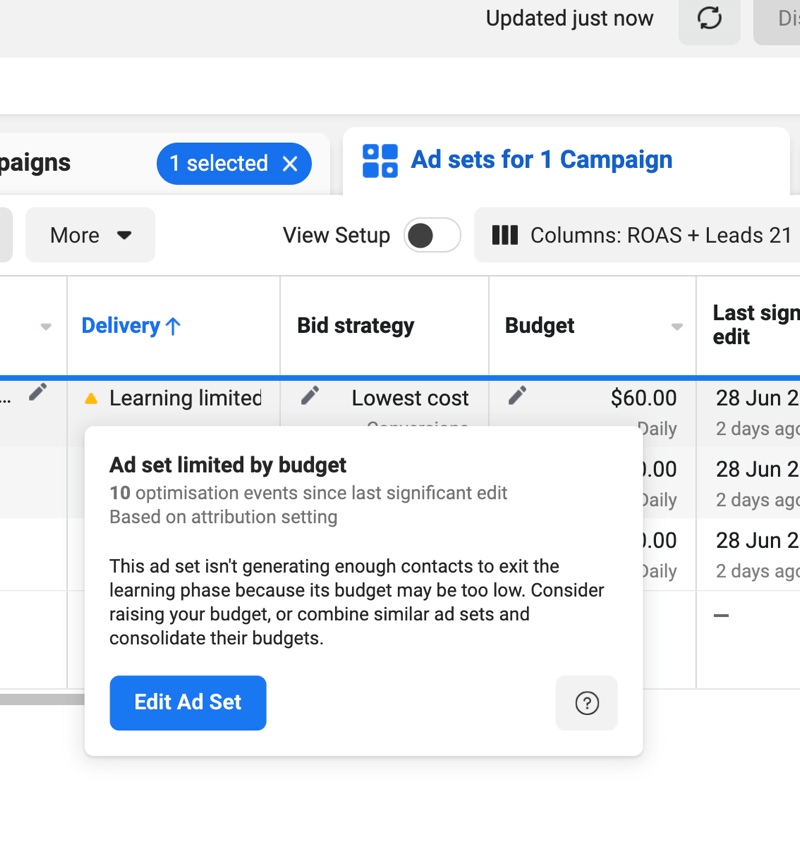
This is when a campaign shows "Learning" for 45+ days. Daily spend is $80 when the budget is $300. This causes the status to show "Limited by budget" despite underspending.
Common causes are when:
-
Target CPA set too low (Google can't find conversions at that cost)
-
Conversion volume under 15/month (not enough data to learn)
-
Geographic targeting is too narrow (not enough auction volume)
-
Audience signals are too restrictive (excluded 90% of potential traffic)
To Diagnose:
-
Compare target CPA to Search campaign average: If Search CPL is $90 and Performance Max target is $45, it's unrealistic
-
Check conversion volume: Under 50/month total? Not enough for Performance Max
-
Review impression share: Under 20%? Budget or targeting is too restrictive
Fixes:
-
Raise target CPA by 25%
-
Expand geographic targeting (like adding neighboring cities)
-
Remove overly restrictive audience exclusions
-
Increase the daily budget to 10x the target CPA during learning
-
If under 30 conversions/month, pause Performance Max and run Search until volume increases
Branded Traffic Cannibalization and Overlap
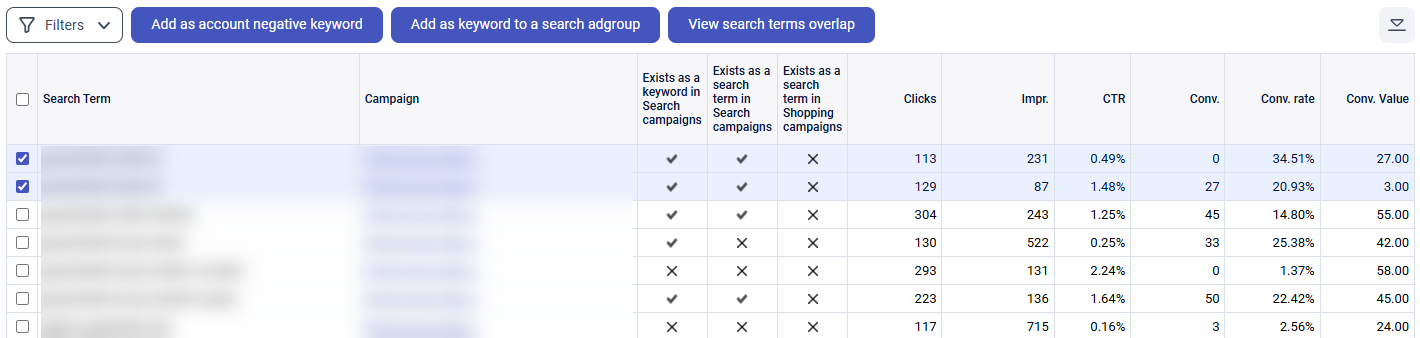
This happens when Search and Performance Max run together. They might count conversions twice because they are both claiming credit for the same lead.
To Diagnose:
-
Compare Search campaign branded keyword conversions to CRM lead volume
-
If Search reports 80 branded conversions but CRM only shows 80 total leads (including non-branded), there's an overlap
-
Check attribution reports: Conversions > Attribution > Path analysis shows if the same user interacted with multiple campaigns
Fixes:
-
Exclude brand from Performance Max: Add brand name to account-level negative keyword list
-
Use different conversion windows: Search branded campaign > 7-day window, Performance Max > 30-day window (reduces overlap)
-
Brand exclusion list, to setup go to Tools > Shared Library > Negative Keywords > Create list > Add: [Your Brand], [Brand + Service], [Brand + Location]
-
Apply to Performance Max only by campaign Settings > Negative Keywords > Select brand exclusion list
This helps Performance Max focus on non-branded traffic. Search handles brand protection. No double-charging for users already looking for you.
Summary
Performance Max campaigns work when you have the foundation, which includes 30+ conversions/month, accurate conversion tracking, offline conversion imports showing which leads close, and a realistic target CPA based on historical data. It fails when advertisers launch with insufficient tracking data, which includes under 20 conversions/month, or unrealistic cost targets.
Use Performance Max when:
-
Search campaigns hit 70%+ impression share.
-
You have 50+ monthly conversions and stable conversion tracking
-
Offline conversions are imported so the algorithm knows which leads become customers
-
You need to scale beyond Search capacity without proportional management time
Stick with Search when you have:
-
Under 30 conversions/month
-
High-intent, bottom-funnel keywords drive most revenue
-
Compliance that requires message/placement control (legal, medical, financial)
-
Lead quality matters more than volume
To have success when optimizing a Performance Max campaign for lead generation, make sure you have:
-
Conversion tracking accuracy
-
Offline conversion imports
-
Lead scoring/value rules
-
Realistic targets
-
Sufficient budget
Performance Max test plan for lead gen:
Days 1-14: Learning period. Performance will be unstable, CPL will fluctuate 40-60%. Don't worry, it's normal.
Days 15-30: Monitor CPL trend. If stabilizing near the target, continue. If 50%+ over target, increase target by 20%.
Days 31-60: Compare to Search baseline. Export lead lists, track consultation booking rate, and close rate. Calculate cost per customer, not just CPL.
Day 60: If the cost per customer is within 20% of Search and volume increased 15%+, scale Performance Max. If the cost per customer is 40%+ higher, pause and reallocate the budget to Search.
FAQs
How does Google Performance Max work for lead generation?
Google Performance Max lead generation runs ads across Search, YouTube, Display, Gmail, and Discover all at once using machine learning to optimize placements and bids. You provide your assets like headlines, descriptions, images, and videos, to set a conversion goal and bidding strategy, and Google automates the rest. The algorithm uses auction-time signals like device, location, time, and search history to predict the likelihood of conversion and adjusts bids for each user accordingly.
Is Performance Max better than search campaigns for leads?
Search gives you keyword-level control, search term visibility, and the ability to write specific ad copy for each intent. Performance Max removes that control for automated optimization across networks. Search typically wins for high-intent and lead generation like emergency services, legal, and healthcare, while Performance Max works better for scaling beyond Search capacity or businesses with longer consideration cycles like B2B SaaS, enterprise services, where multi-touch attribution adds value.
The best approach is to run both for 60 days, compare cost per customer (not just CPL), and lead-to-close rate before committing fully to either.
How can I reduce spam and fake leads in Performance Max lead gen campaigns?
This needs a Performance Max lead gen strategy, like implementing Google reCAPTCHA v3 on all lead forms to block bot submissions. Then add backend form validation to reject fake emails, invalid phone numbers, and keyboard-mashing names. Use account-level negative keywords to exclude terms like "free," "cheap," or DIY-intent searches if you're a premium service. Set up call tracking with spam filtering so robocalls don't count as conversions. Monitor placement reports every 7-10 days and exclude YouTube channels or Display sites consistently sending low-quality traffic.
What is the best bidding strategy for Performance Max lead generation?
Start with Maximize Conversions (no target) if you don't know your realistic cost per lead yet. Run it for 30 days to establish baseline CPL, then switch to the Target CPA set at that average. If you have conversion values tracked correctly, like lead scoring and offline revenue imports, use Target ROAS instead, and always set a maximum CPC bid limit at 3-4x your target CPA to prevent runaway spending during learning.
How do I track offline conversions from Performance Max lead gen campaigns?
Go to Tools > Conversions > New Conversion Action > Import > From clicks. You need three data points: GCLID (Google Click ID) to be captured when the lead submits (hidden form field or UTM parameter stored in CRM), conversion date (when the lead is closed into a customer), and conversion value ( revenue or assigned lead score value).
When a lead closes 30-60 days later, export that data from your CRM and upload it to the Google Ads API. Google matches the GCLID to the original ad click and attributes the conversion back to the correct campaign.
This tells the algorithm which traffic sources produce paying customers, so it can optimize for revenue instead of lead volume.


