


YouTube Ads vs. Google Ads 2026
Introduction
If you’ve spent any time in the digital marketing trenches lately, you know that the "Search vs. Social" debate has largely been replaced by a more nuanced internal struggle: YouTube Ads vs. Google Ads. In 2026, the landscape has shifted. We are no longer just looking at a choice between a text link and a video clip. We are looking at an integrated ecosystem where user intent, visual storytelling, and artificial intelligence collide. For American business owners and marketing directors, the stakes couldn't be higher. With ad spend in the US projected to reach new records this year, choosing the wrong horse can lead to a very expensive lesson in "learning phase" diagnostics.
The core of the matter usually boils down to a single question: where is your audience actually looking when they are ready to pull out their credit card? For years, the answer was simple—Google Search. But as we navigate through 2026, the lines have blurred. People are "searching" on YouTube for reviews, tutorials, and social proof with the same fervor they once reserved for a standard Google query. This makes the difference between YouTube Ads and Google Ads less about the platform itself and more about the mindset of the person behind the screen.

When we look at the data, the reality is that visual commerce is dominating. A standard search ad is fantastic for capturing existing demand, but YouTube is the engine that creates that demand in the first place. Whether you are a local contractor in Austin trying to show off a finished kitchen or a SaaS startup in Silicon Valley pitching a new AI tool, your strategy needs to account for both text and video. Understanding how to balance these two powerhouses is the "secret sauce" of modern PPC.
Many marketers find themselves asking, "Is YouTube advertising worth it in 2026?" given the rising production costs and the complexity of video editing. The short answer is yes, but only if you understand that it isn't a replacement for search—it’s a multiplier. This guide is designed to strip away the jargon and give you a clear-eyed look at how to deploy these tools effectively in the current US market. We aren't just talking about clicks and views; we are talking about sustainable growth and bottom-line ROI.
How YouTube Ads and Google Ads fit the PPC Landscape
To understand the broader Pay-Per-Click (PPC) world, you first have to clear up a common misconception about the relationship between these two platforms. A question that frequently pops up in strategy meetings is, "Are YouTube Ads part of Google Ads?" The answer is a definitive yes. From a technical standpoint, YouTube is a "property" within the Google Ads dashboard. You use the same billing, the same targeting signals, and the same conversion tracking pixels for both. However, from a strategic standpoint, they function like two different departments in the same company.
Google Ads acts as the umbrella for a massive variety of campaign types. When we talk about "Google Ads" in a general sense, we are usually referring to the Search Network—those text ads that appear when you type a specific problem into a search bar. This is "pull" marketing. You are waiting for the user to tell you what they want. YouTube, on the other hand, is the crown jewel of the Google Video Partners network. It allows you to interrupt a user’s flow with content that is relevant to their interests, even if they didn't specifically search for your product two seconds ago.
In a well-oiled PPC machine, these platforms work in a cycle rather than in silos. In the US market, where consumer journeys are often fragmented across multiple devices and sessions, fitting these pieces together is essential for staying top-of-mind.
-
Google Search captures high-intent traffic at the bottom of the funnel. If someone searches for "best plumbing service in Chicago," they have a problem that needs solving right now.
-
YouTube Ads build brand equity and awareness at the top and middle of the funnel. Seeing a 15-second video of that same plumber’s professional team makes the user much more likely to click the search ad when the emergency actually happens.
-
Display and Discovery (now under Demand Gen) bridge the gap by showing visual ads across Gmail and the Google app to keep the conversation going.
-
Performance Max (PMax) campaigns use AI to automatically shift budget between search and video based on where the algorithm thinks a conversion is most likely to happen.
The synergy between these channels is what prevents "ad fatigue." If you only show search ads, you eventually hit a ceiling where you’ve captured all the people actively searching for you. To grow beyond that, you have to venture into the visual world of YouTube to educate the people who don't know they need you yet.
The 2026 US consumer expects a seamless experience. They might see a teaser for a product on YouTube while watching a tech review on their smart TV, then search for that product on their iPhone later that evening. If your PPC strategy doesn't have a presence in both places, you are essentially leaving a massive hole in your net. Viewing YouTube Ads vs. Google Ads as a "versus" battle is the first mistake; the real winners are those who view them as a "plus" equation.
What are YouTube Ads?
When we think about video content today, YouTube isn't just a place for entertainment; it has solidified its position as the world’s second-largest search engine. YouTube Ads are the visual component of the Google advertising machine, allowing brands to place video content directly in front of users as they watch, browse, or search for content. Unlike static images or text, these ads leverage the power of motion and sound to evoke emotion, explain complex products, and build a much deeper connection with the audience. In the US market, where video consumption on mobile and connected TVs is at an all-time high, these ads have become the primary way for brands to bypass traditional "ad blindness."
How YouTube Ads work inside the Google Ads platform
One of the first technical hurdles new advertisers face is figuring out exactly how to run YouTube Ads through Google Ads without getting lost in the menus. The integration is seamless because both platforms share the same backend infrastructure. When you create a new campaign, you simply select "Video" or "Demand Gen" as your campaign type. This allows you to use your existing Google Ads account to manage your video assets, set your daily budgets, and track your conversions. Because they are integrated, you can even use search intent signals—like what someone typed into Google ten minutes ago—to decide which video to show them on YouTube.
Main YouTube ad formats and placements
The diversity of formats available on the platform is staggering, especially with the recent explosion of short-form content. Choosing the right format is often the main difference between YouTube Ads and Google Ads' success and failure. You aren't just limited to the ads that play before a video; you can now show up in the feed, on the home screen, and even in the middle of a viral "Short."
-
Skippable In-Stream Ads: These are the classic ads that play before, during, or after a video. Users have the option to skip after five seconds, which makes them a cost-effective choice because you often only pay if the viewer watches at least 30 seconds or interacts with the ad.
-
Non-Skippable In-Stream Ads: These are 15-second messages that the user must watch to get to their content. These are primarily used for reach and high-impact messaging where you want to ensure the full story is told.
-
YouTube Shorts Ads: Designed for the vertical, mobile-first experience, these ads appear between organic Shorts. They are high-energy and designed for quick engagement, mimicking the style of TikTok or Reels.
-
In-Feed Video Ads: These appear in places where users are discovering content, such as YouTube search results or the "Up Next" section. They look like organic video thumbnails and are great for driving views to your channel.
-
Bumper Ads: These are short, 6-second ads that are non-skippable. They are best used as a "reminder" or a complement to a larger campaign to stay top-of-mind without being intrusive.

Typical goals and use cases for YouTube Ads
While many people ask YouTube Ads or Google Ads which is better for making immediate sales, YouTube’s real strength lies in the upper and middle sections of the sales funnel. It is an unmatched tool for storytelling. If you have a product that requires a demonstration, like a new piece of kitchen tech or a complex software platform, a video ad can convey more information in 30 seconds than a text ad ever could.
-
Brand Awareness: Use YouTube to introduce a new brand to a massive US audience. The visual nature of the platform ensures that your logo and brand voice are recognized.
-
Product Education: If you are launching a "category-defining" product that people don't know exists yet, you can't rely on search ads because no one is searching for it. Video ads allow you to explain the problem and the solution visually.
-
Lead Generation: With the new "Video Action" (now largely transitioned to Demand Gen) formats, you can add lead forms directly onto the video player, making it easy for users to sign up without leaving the site.
What are Google Ads?
Google Ads is the broader ecosystem that houses everything from the famous search results to the ads you see in your Gmail inbox. At its core, the platform is built on the concept of intent. It is the most powerful tool ever created for connecting businesses with people who are actively looking for a solution. When we discuss YouTube advertising vs Google Search Ads, we are comparing a "passive" discovery experience with an "active" search experience. In the US, Google handles billions of queries a day, making it the primary gateway for commerce and information.
Overview of Search, Display, and other Google Ads campaigns
The system is categorized into several distinct campaign types, each serving a different purpose. While YouTube Ads vs Google Display Ads both deal with visual elements, the context is very different. Display ads are banners that show up on millions of websites across the internet, while Search ads are strictly text-based results that appear on the Search Engine Results Page (SERP).
-
Search Campaigns: The "bread and butter" of PPC. These are text ads triggered by specific keywords.
-
Display Campaigns: Visual banner ads that appear on the Google Display Network (GDN). These are excellent for remarketing and broad reach.
-
Performance Max (PMax): An AI-driven campaign type that mixes search, display, video, and shopping to find the best path to conversion.
-
Shopping Campaigns: Crucial for retailers, these show product images, prices, and store names directly in the search results.
Where Google Ads show up across Google properties
The reach of this platform is nearly universal. Your ads don't just sit on a results page; they follow the user’s journey through their day. This ubiquity is a key factor when choosing between YouTube Ads and Google Ads for your marketing budget. You might start your day checking Gmail, where an ad appears in your "Promotions" tab. Later, you search for a local service on Google Maps, and a sponsored pin pops up. Finally, you browse a news site, and a display ad appears in the sidebar.
Typical goals and use cases for Google Ads
Google Ads is the ultimate "closer." It excels at converting people who are already at the bottom of the funnel. If your goal is immediate revenue and measurable ROI, Search Ads are almost always the first place to start. In 2026, the addition of AI Overviews in search has changed the game, but the fundamental desire for a user to find a specific answer remains the same.
-
Immediate Conversions: For "high-intent" services like emergency locksmiths, lawyers, or SaaS trials, search ads offer the highest conversion rates because they meet the user exactly when the need is greatest.
-
Remarketing: Using display ads to follow up with people who visited your site but didn't buy is one of the most effective ways to lower your customer acquisition cost.
-
Local Business Growth: For US-based local businesses, showing up in the "Map Pack" via local search ads is often the difference between a busy storefront and an empty one.
Key differences between YouTube Ads and Google Ads
While both platforms live under the same roof, the experience of running YouTube Video Ads vs Search Ads feels like the difference between directing a movie and writing a classified ad. One is about grabbing attention in a sea of content, while the other is about being the right answer at the right time. For an American business owner, understanding these structural differences is the first step toward avoiding a wasted budget.
Push vs pull
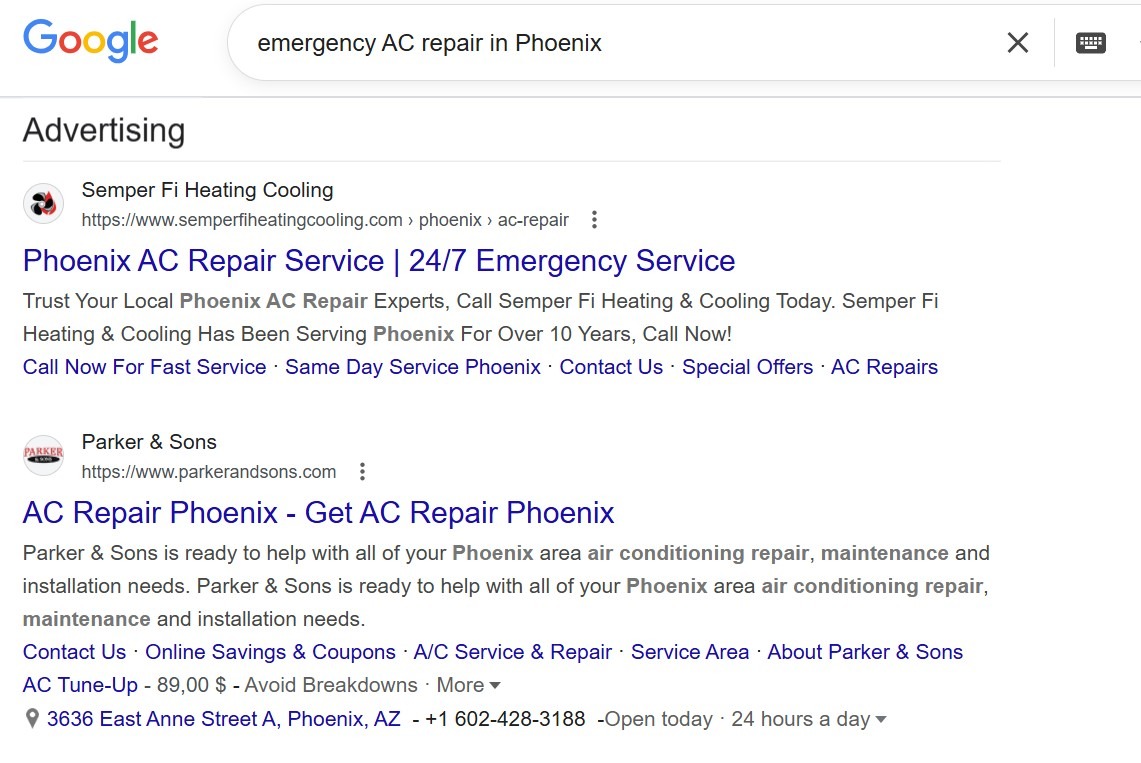
The most fundamental distinction lies in the psychology of the user. Google Search is the ultimate "pull" platform. When a user types a query like "emergency AC repair in Phoenix," they are pulling information toward themselves. They have a problem, and they are actively looking for you to solve it. This high-intent behavior is why search ads often command a premium price—you aren't just buying a click; you are buying a lead that is ready to act.
YouTube, however, operates on a "push" model. A user might be watching a video on how to train their dog, and your ad for a premium pet food brand "pushes" its way into their experience. The user wasn't looking for you at that exact moment, but because your targeting was correct, they are likely to be interested. This requires a much higher level of creativity because you have to convince the user to stop what they were doing and pay attention to you.
Creative requirements and production effort
The barrier to entry for these platforms couldn't be more different. For a standard search campaign, you can have your ads live in fifteen minutes with nothing but a keyboard and a basic understanding of your customer's pain points. For YouTube, the production effort is a major variable in your overall YouTube Ads vs Google Ads cost comparison. You need a script, a hook, high-quality audio, and visual assets that don't look like they were filmed on a toaster from 2010.
When weighing the pros and cons of YouTube Ads vs. Google Ads, creative fatigue is a real factor to consider.
-
Text Ads: You can swap out a headline in seconds to test a new offer or a different call to action. Maintenance is low, but competition for those few characters is fierce.
-
Video Ads: Creating a new video takes time and money. However, a single high-performing video can build brand trust in a way that ten thousand text ads never could.
-
Static Images: Used in Display and PMax, these fall somewhere in the middle—requiring graphic design but not the full production of a video shoot.
The US market in 2026 is incredibly visually literate. If your video looks "cheap," it reflects on your brand. Conversely, if your search ad is too generic, it gets buried. Balancing the low-effort, high-intent nature of search with the high-effort, high-impact nature of video is how you build a resilient campaign.
Comparing performance metrics and pricing models
Measuring success requires you to look through two different lenses. If you try to judge a YouTube campaign by search-ad conversion standards, you will likely turn it off within a week, thinking it’s a failure. Conversely, if you only look at "views" for your search campaigns, you are missing the point of the platform. A deep YouTube Ads vs Google Ads cost comparison reveals that while search is more expensive per click, video is often more efficient for building a long-term audience.
CPV, CPC, CPM
The way you pay for these ads changes based on the format you choose. On Google Search, the standard is Cost Per Click (CPC). You only pay when someone actually interacts with your ad and lands on your site. This is great for budget control because you aren't paying for "browsers," only "clickers."
YouTube introduces Cost Per View (CPV). In a skippable in-stream ad, you typically only pay if a user watches 30 seconds of your video (or the whole thing if it’s shorter) or if they click on an element like a call-to-action overlay. This is a massive advantage for marketers because it means you get the first five seconds of brand exposure for free if the user decided to skip. Finally, Cost Per Mille (CPM), or cost per thousand impressions, is used for non-skippable ads and bumper ads where the goal is maximum reach rather than a specific action.
Benchmarks for CTR, View Rate, and Conversion Rate
To know if your campaigns are healthy, you need to see how they stack up against the 2026 US averages. The YouTube Ads vs. Google Ads ROI debate often settles here: search delivers immediate returns, while YouTube delivers cheaper engagement that converts later.
|
Metric |
Google Search Ads (Avg) |
YouTube Video Ads (Avg) |
|
CTR (Click-Through Rate) |
3.5% – 6.0% |
0.5% – 0.9% |
|
Conversion Rate |
3.0% – 5.5% |
0.5% – 1.5% |
|
Average Cost |
$4.50 – $9.00 (CPC) |
$0.10 – $0.30 (CPV) |
|
View Rate |
N/A |
25% – 35% |
Understanding these numbers helps set realistic expectations.
-
Search CTR: If your search CTR is below 2%, your ads aren't relevant enough to the keywords you’re bidding on.
-
YouTube View Rate: If fewer than 20% of people are watching your video past the skip button, your "hook" is too weak and you’re losing your audience immediately.
-
Conversion Gap: It is normal for search to convert at a 3x higher rate than YouTube. Don't panic; the YouTube traffic is significantly cheaper, allowing you to fill your remarketing lists for pennies.
In 2026, the YouTube Ads vs Google Ads ROI isn't just about the first click. High-performing brands are finding that their search conversion rates actually increase when they are running YouTube Ads simultaneously. The video builds trust, and the search ad captures the final decision.
Targeting options on YouTube Ads vs Google Ads
In the current digital landscape, the way we find our customers has moved far beyond simple spreadsheets of ages and zip codes. When you look at YouTube Ads vs. Google Ads targeting options, you are essentially choosing between targeting a "person" and targeting a "moment." Google Search has long been the king of the moment—the exact second a need arises. YouTube, conversely, has become the master of the person—leveraging deep behavioral data to predict what someone might want before they even realize it themselves. For those operating in the highly competitive US market, mastering these two distinct approaches is the only way to maintain a sustainable cost per acquisition.
Audience targeting and signals available on YouTube
YouTube targeting is built on a foundation of "Audience Signals." Instead of just waiting for someone to type in a word, you are looking at their long-term habits. In 2025 and 2026, Google’s AI has become incredibly adept at stitching together a user’s journey across all its properties to create a profile that is eerily accurate.
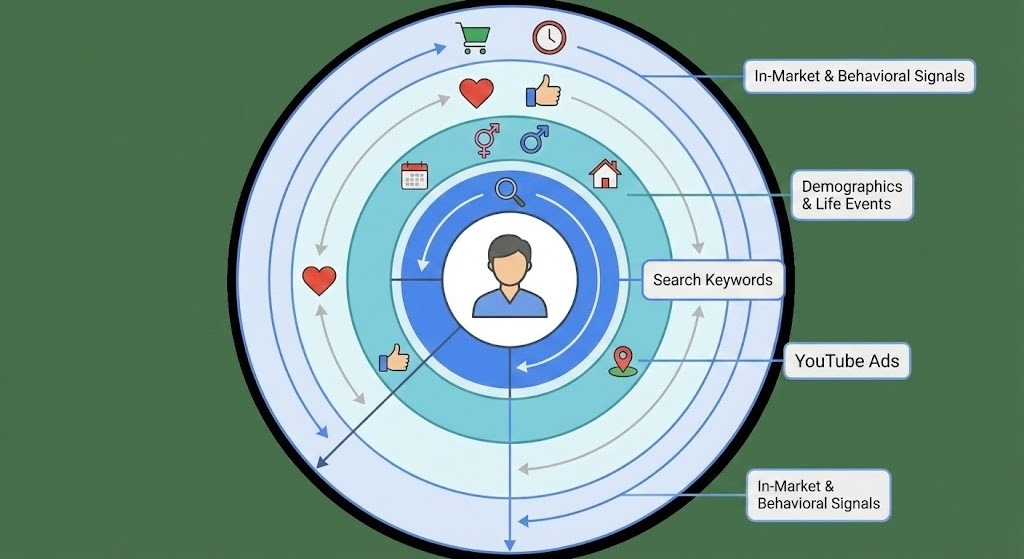
If a user spends their weekends watching home renovation "how-to" videos and their weekdays searching for mortgage rates on Google, YouTube’s algorithm knows they are likely in the middle of a high-value life event.
-
Affinity Segments: These are based on a user’s lifestyle and interests. For example, you can target "Luxury Travelers" or "DIY Enthusiasts." These are best for broad awareness and reaching people who have a general passion for your industry.
-
In-Market Segments: This is where the magic happens for performance marketers. These are users who are actively researching products or services similar to yours. If someone is "In-Market" for a new SUV, they have been looking at car reviews and visiting manufacturer sites.
-
Custom Segments: This is perhaps the most powerful tool in the shed. You can build an audience based on specific keywords people have searched for on Google. If you sell high-end coffee beans, you can target people who recently searched for "best espresso machines 2026."
-
Life Events: You can target people who are about to move, just got married, or are starting a new business. In the US, these transitions are often the biggest drivers of consumer spending.
Keyword and intent-based targeting on Google search
Search targeting remains the most literal form of advertising. It is based on the "Keyword," which is a direct signal of intent. The challenge in the YouTube Ads vs Google Ads for US market comparison is that search keywords have become much broader and more AI-driven. We no longer just bid on "plumber"; we bid on the concept of needing a plumber. This requires a much stricter approach to negative keywords and match types to ensure your budget doesn't get eaten by irrelevant queries.
-
Exact Match: This gives you the most control, showing your ad only when the search query has the same meaning as your keyword. It is the gold standard for high-ticket services where every click counts.
-
Phrase Match: This allows for more flexibility, showing your ad for searches that include the meaning of your keyword. It helps capture variations like "best plumber near me" without having to list every single city.
-
Broad Match: In 2026, Broad Match is heavily powered by AI. It looks at the user’s past behavior and the context of the page to decide if your ad is a fit. It is best used for scaling campaigns that already have a solid conversion history.
-
Negative Keywords: This is your defense. By telling Google what you don't want to show up for (like "free" or "jobs"), you protect your ROI.
Geo, device, and demographic
Both platforms allow you to slice and dice your audience by the basics, but the application differs. In the US, where geographic nuances are massive, you might find that your YouTube Ads perform better in suburban areas where people watch more connected TV (CTV), while your search ads dominate in urban centers where mobile search is the primary tool for finding local services.
The demographic options have also expanded. You can target by household income—a crucial metric for luxury brands in the US—gender, and parental status. Device targeting has become particularly important as "cross-device" journeys become the norm. A user might discover your brand on a tablet while lounging in the evening but finally convert on a desktop the next morning. Tracking this "person-based" journey is why YouTube Ads vs. Google Ads targeting options are now so interconnected.
Account structure and campaign setup
Setting up your first campaign can feel like stepping into a cockpit with too many buttons. However, the process is logical once you understand that everything flows from your objective. Many people still ask how to run YouTube Ads through Google Ads, and the answer is that the Google Ads dashboard is your universal control center. Whether you are launching a global search campaign or a localized video ad, the workflow follows a consistent pattern of "Goal -> Campaign -> Ad Group -> Creative."
How to set up a YouTube video campaign step by step
Before you start clicking "New Campaign," make sure your video is already uploaded to YouTube (it can be "unlisted" if you don't want it on your public channel). A successful YouTube campaign in 2026 relies on clear signals and high-quality assets.
-
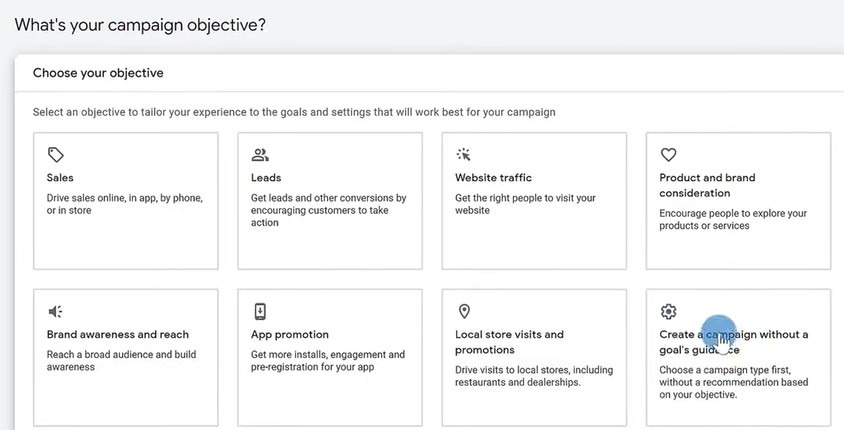
Select your Objective: Choose "Sales," "Leads," or "Brand Awareness." This tells Google’s AI what success looks like so it can optimize your bidding.
-
Choose Campaign Type: Select "Video." You will then choose a subtype, such as "Video Views" or "Efficient Reach." For most performance-driven businesses, "Drive Conversions" (often integrated into Demand Gen) is the preferred path.
-
Set your Bidding and Budget: Decide if you want to pay for views (CPV) or conversions (Target CPA). Start with a daily budget that is at least 10x your target CPA to give the algorithm room to learn.
-
Define your Audience: Use the YouTube Ads vs. Google Ads targeting options we discussed earlier. Layer your In-Market segments with demographic filters to narrow down your "ideal buyer."
-
Create your Ad: Paste the URL of your YouTube video. Add a compelling "Call to Action" button and a catchy headline. Remember to check how your ad looks on mobile vs. desktop in the preview window.
How to set up a Google Search campaign step by step
The setup for search is more about logic and structure than visual flair. The goal here is "relevance." You want the user’s search query to match your keyword, which in turn matches your ad, which finally matches your landing page. This "Golden Thread" is how you achieve a high Quality Score and lower your costs.
-
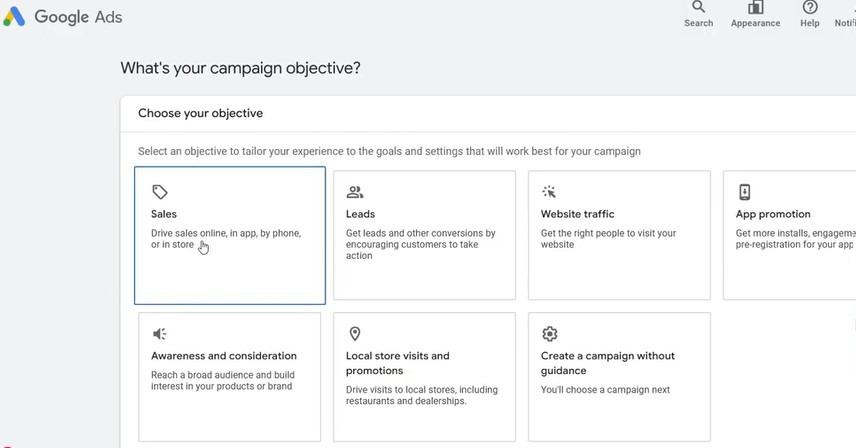
Choose your Goal: Just like with video, select "Sales" or "Leads."
-
Select Search Network: Ensure you decide whether to include "Google Search Partners." For most new campaigns, it is safer to uncheck this initially to keep your traffic quality high.
-
Configure Settings: Set your location (e.g., "United States" or specific zip codes) and language. Choose your bidding strategy; "Maximize Conversions" is usually a great starting point for beginners.
-
Build Ad Groups: Group your keywords into tight themes. For example, if you sell shoes, have one ad group for "Running Shoes" and another for "Formal Shoes." Don't mix them.
-
Write Responsive Search Ads (RSAs): Provide up to 15 headlines and 4 descriptions. Google’s AI will mix and match these to find the combination that performs best for each individual user.
-
Add Assets (formerly Extensions): Include site links, callouts, and your phone number. These make your ad larger and more useful, which significantly improves your Click-Through Rate (CTR).
Transitioning between these two setups becomes easier with practice. While the search setup is more tedious due to the keyword research involved, the YouTube setup requires more "creative" oversight. For a YouTube Ads vs Google Ads for US market strategy, the key is consistency. Your messaging on a search ad should feel like a natural continuation of the story you told in your video ad.
For a hands-on look at the 2026 interface, check out Ammar’s practical walkthrough. He shares his personal framework for building high-ROI campaigns while avoiding common pitfalls:
-
Algorithm Warming: He suggests starting with "Maximize Clicks" to feed the AI data before switching to conversion-based bidding.
-
Budget Protection: Ammar recommends disabling Search Partners and putting prices in headlines to filter out non-buyers before they even click.
-
Intent Focus: Rather than hundreds of keywords, he focuses on 10–15 high-intent phrases for maximum control.
This walkthrough is a great "cheat sheet" for anyone looking to launch a professional campaign without the trial-and-error.
When to choose YouTube Ads vs Google Ads
Deciding where to put your first dollar of ad spend is a high-stakes game. For many entrepreneurs, the question of YouTube Ads vs Google Ads for small business success depends entirely on your industry and your current growth stage. If you are a startup trying to disrupt a market, nobody is searching for you yet, making search ads a lonely place to be. Conversely, if you are a local plumber in a competitive city like Miami, you need leads today, not "brand sentiment" six months from now.
Choosing the best platform YouTube Ads or Google Ads really comes down to identifying the bottleneck in your sales process. Are people seeing your offer and not buying, or are they simply not seeing your offer at all?
Matching platforms to funnel stages and objectives
A sophisticated marketing plan treats the customer journey like a conversation. You wouldn't ask someone to marry you on the first date, and you shouldn't expect a $5,000 purchase from a 6-second bumper ad.
-
Top of Funnel (Awareness): This is where YouTube Ads vs Google Ads for brand awareness becomes a one-sided fight. YouTube allows you to cast a wide net and introduce your brand’s personality to people who fit your ideal customer profile but haven't identified their need yet.
-
Middle of Funnel (Consideration): Here, you are choosing between YouTube Ads and Google Ads to educate the user. Use "How-to" videos on YouTube to show your product in action, or use Google Display ads to stay top-of-mind while they read industry blogs.
-
Bottom of Funnel (Conversion): This is the domain of Search. When someone is ready to buy, they go to Google. If you aren't there with a clear, high-intent search ad, you are handing that customer to your competitor on a silver platter.
B2C vs B2B scenarios in the US
The American market has distinct behaviors depending on whether you are selling to a busy mom in Ohio or a CTO in Seattle. For B2C brands, especially in the YouTube Ads vs Google Ads for the eCommerce space, visual proof is everything. Seeing a dress move on a model or a gadget solving a real-world problem in a video carries more weight than any text description ever could.
In B2B scenarios, the logic shifts slightly. While LinkedIn is the traditional go-to, many US B2B marketers are finding that YouTube Ads vs Google Ads for lead generation is a massive opportunity. Decision-makers often use YouTube for deep-dive research into software or industry trends. A well-placed video ad during a professional tutorial can establish your brand as a thought leader before the prospect even starts their formal vendor search on Google.
Examples of campaigns where each platform wins
To see these principles in action, we can look at some heavy hitters in the US market. A classic case for Search dominance is the "emergency service" industry. If your basement is flooding, you aren't going to YouTube to watch a 20-minute documentary on the history of PVC piping; you are searching for "emergency plumber" on Google.
On the other hand, consider a brand like Volvo. They recently used a multi-length video strategy on YouTube to launch a new electric model. By starting with long-form storytelling and following up with short reminders, they saw a 250% increase in brand-related searches on Google. This is a perfect example of when to use YouTube Ads instead of Google Ads to create demand that didn't exist previously.
Using YouTube Ads and Google Ads together
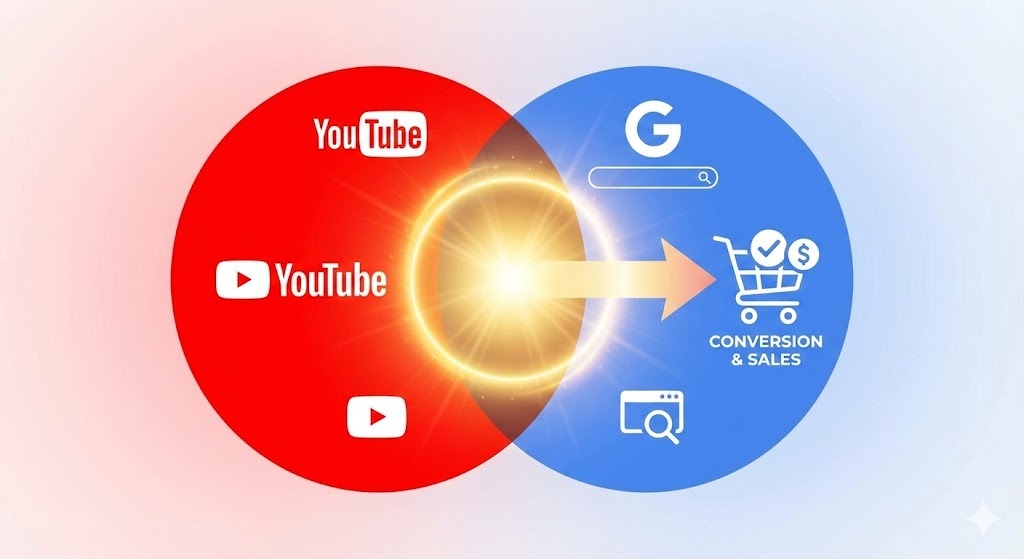
The real power move in 2026 is realizing that these two platforms aren't rivals—they are teammates. When you unify your strategy, you create a "surround sound" effect that makes your business look much larger than it might actually be. Research shows that 70% of users use Google Search to evaluate products they first saw on a social platform like YouTube.
If you are only running Search, you are only catching the "low-hanging fruit." If you are only running video, you are planting seeds but never harvesting the crop. Combining them is how you build a resilient, high-ROI engine.
A case that combines video and search
One of the most effective strategies for a YouTube Ads vs Google Ads for local businesses approach is the "Video Discovery to Search Capture" flow. Imagine a local gym in Dallas. They run a YouTube campaign showing a high-energy "first class is free" video targeted at people interested in fitness within a 10-mile radius.
Even if the user doesn't click the video immediately, they now know the gym exists. Two days later, when that same person searches for "best gym in Dallas," they see the gym’s search ad. Because they’ve already "seen the movie," they are significantly more likely to click the search ad over a competitor they've never heard of. This synergy is what drives a superior YouTube Ads vs Google Ads ROI.
Remarketing flows between YouTube and Google Ads
Remarketing is the "glue" that holds your PPC strategy together. In the 2026 landscape, with the shift toward server-side tracking, your ability to follow a user across platforms has become more sophisticated.
-
Search to Video: If a user searches for a product on Google but doesn't buy, you can show them a detailed "unboxing" or "testimonial" video on YouTube to address their hesitations.
-
Video to Search: You can create a remarketing list of everyone who watched at least 50% of your YouTube ad. You then increase your bids on Google Search for those specific people, ensuring you show up in the top spot when they finally search for you.
-
Display to Video: Use cheap display banners to remind people of your offer, and then use a high-impact YouTube Bumper ad to give them that final nudge.
Budget allocation frameworks for mixed PPC
Setting a budget for a multi-channel campaign shouldn't be guesswork. A common framework for American businesses is the 60/30/10 rule. This ensures that you are covering all stages of the funnel without overextending your resources in any one area.
-
60% to Search and Shopping: This is your "revenue engine." It focuses on capturing existing demand and maintaining a stable daily cash flow.
-
30% to YouTube and Demand Gen: This is your "growth engine." It focuses on reaching new audiences and building a list of people who will eventually search for you.
-
10% to Experimental/Remarketing: This is your "optimization budget." Use it to test new video formats (like YouTube Shorts) or aggressive remarketing tactics to close old leads.
For those wondering about the YouTube Ads vs Google Ads cost comparison, remember that the goal isn't necessarily the cheapest click. It’s about the most profitable customer journey. Spending more on a high-quality YouTube viewer can often make your search clicks significantly more profitable in the long run.
Tracking traffic and optimization
Setting up your campaigns is only the first half of the battle. In the 2026 landscape, the "set it and forget it" mentality is a recipe for a drained bank account. Because the difference between YouTube Ads and Google Ads tracking relies on different user behaviors, your measurement strategy must be sophisticated enough to capture both immediate clicks and long-term influence. In the US, where privacy regulations like the CCPA continue to evolve, relying on basic browser cookies is no longer enough to ensure a positive YouTube Ads vs Google Ads ROI.
Setting up GA4 and conversion tracking correctly
Google Analytics 4 (GA4) is no longer a "new" tool; it is the central nervous system of your marketing efforts. To truly understand YouTube Ads vs Google Ads for eCommerce or lead generation, you must move beyond "Last Click" attribution. In 2026, the most successful advertisers are using the new "Conversion Attribution Analysis" report in GA4. This allows you to see "Assists"—touchpoints where a YouTube ad introduced your brand to a customer who eventually converted via a Google Search ad weeks later.
-
Enhanced Conversions: This is a non-negotiable in 2026. By sending hashed first-party data (like emails or phone numbers) back to Google, you allow the AI to "match" users even if they have blocked cookies or are using Safari. This significantly improves the accuracy of your reporting for both video and search.
-
Server-to-Server (S2S) Tracking: For high-volume advertisers, S2S tracking ensures that 100% of your conversion data reaches Google Ads. This bypasses ad-blockers and browser limitations, giving your "Smart Bidding" the clean data it needs to find more buyers.
-
Consent Mode v2: Ensure your "Advanced Consent Mode" is correctly configured to allow Google’s "conversion modeling" to fill in the gaps for users who opt out of tracking.
Reading performance reports for each platform
Analyzing your data requires a different mindset for each channel. When looking at YouTube Ads vs Google Ads for brand awareness, you should focus on "Earned Views" and "Brand Lift" surveys. For search, your focus remains on "Impression Share" and "Conversion Value / Cost."
If you notice that your search ads have a high conversion rate but your YouTube Ads have almost none, don't immediately assume the video is failing. Look at your "View-Through Conversions." These are people who saw your video, didn't click, but later came to your site and purchased. In the US market, these hidden conversions often account for up to 30% of the total revenue attributed to video campaigns.
Iterative testing roadmaps for 30, 60, and 90 days
Optimization is a marathon, not a sprint. Trying to change everything at once makes it impossible to know what actually worked. A structured roadmap is the best way to handle choosing between YouTube Ads and Google Ads refinements.
-
Day 1–30 (The Learning Phase): Focus on gathering data. Do not make major changes to your bidding or targeting. Your goal is to establish a baseline for your CPC, CPV, and initial conversion rates. Monitor your "Search Terms Report" daily to add negative keywords.
-
Day 31–60 (The Pruning Phase): Start cutting the "dead wood." On YouTube, exclude placements (channels or apps) that have high spend but zero engagement. On Search, pause keywords with low Quality Scores. This is also the time to start A/B testing your headlines for YouTube advertising vs. Google Search Ads.
-
Day 61–90 (The Scaling Phase): Now that you have winners, double down. Shift more budget to your highest-performing audiences. Introduce "Value-Based Bidding" (vBB) to tell Google’s AI to hunt for your highest-spending customers rather than just any lead. This is where you truly maximize your YouTube Ads vs Google Ads ROI.
Common mistakes
Even the most seasoned veterans can fall into traps that burn thousands of dollars before they are noticed. The difference between YouTube Ads and Google Ads means that a mistake on one platform can look very different on the other. In 2026, the most common errors are often related to over-reliance on automation without providing the necessary "human" guardrails.
Misaligned targeting, creative, and landing pages
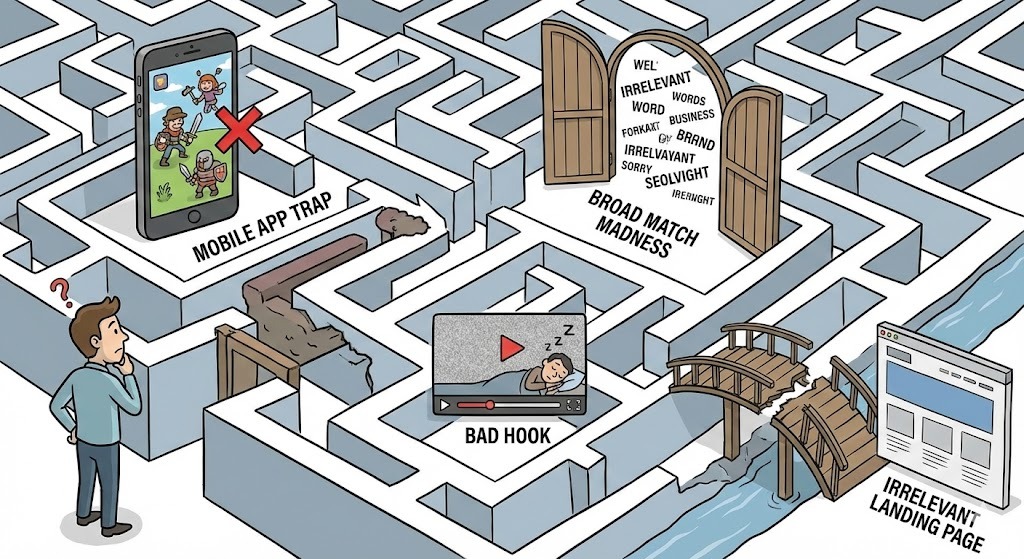
The "Golden Thread" of relevance is where most campaigns fall apart. Imagine you are running YouTube Ads vs Google Ads for lead generation for a high-end real estate firm. If your YouTube ad shows beautiful luxury mansions but your landing page is a generic "Contact Us" form with a plain white background, you have broken the chain. The user’s excitement evaporates the moment they click.
In 2026, the "Search Intent Mismatch" is the biggest killer of search ROI. If a user searches for "how to fix a leaky faucet" (informational intent) and your ad tries to sell them a $500 professional plumbing service (transactional intent), they will bounce immediately. You must ensure your creative matches the exact mindset of the user at the moment they see it.
Wasted spend from poor exclusions and frequency
This is a particular pain point for YouTube Ads vs Google Ads for local businesses. If you don't set a "Frequency Cap" on your YouTube Ads, you might show the same video to the same person 20 times in one day. This doesn't build brand love; it builds brand annoyance.
-
Mobile App Exclusions: By default, Google often shows your ads inside mobile games and "utility" apps (like flashlights or calculators). This traffic is notoriously low-quality and is often the result of accidental clicks. For most B2B and high-ticket B2C campaigns, excluding "All Apps" is the first thing you should do to save your budget.
-
Kids' Channels: If you are selling software or financial services, your ads have no business running on "Cocomelon" or other nursery rhyme channels. Use a pre-built "Kids' Channel Exclusion List" to keep your video ads in front of adults.
-
Search Partners: While it can provide more volume, "Google Search Partners" often includes lower-quality search engines where fraud is more common. If your conversion rate is low, try turning this off first.
How to troubleshoot low performance on each platform
When a campaign "flatlines," you need a diagnostic checklist to find the pulse. If your YouTube Video Ads vs Search Ads are underperforming, start with the "Three Pillars": Offer, Audience, and Friction.
-
High Clicks, Low Sales: This usually points to a "Friction" problem. Your landing page is likely too slow, the form is too long, or the "Offer" on the page doesn't match the promise in the ad.
-
High Impressions, Low Clicks: This is an "Audience" or "Creative" problem. You are either showing your ad to the wrong people, or your creative is too boring to grab their attention. For search, your headlines might be too generic compared to your competitors.
-
High Spend, No Reach: This is often a "Bidding" problem. In the competitive US market, if your Target CPA or Max CPC is too low, Google’s AI won't even try to enter the auctions for high-quality users.
By avoiding these pitfalls, you ensure that your YouTube Ads vs Google Ads strategy remains lean and efficient. The goal isn't to be perfect; it's to be more disciplined than your competitors, who are likely "setting and forgetting" their automated campaigns.
Conclusion
Mastering the balance of YouTube Ads vs. Google Ads is less about picking a winner and more about understanding the rhythm of modern consumer behavior. In 2025 and 2026, the American buyer is more informed, more visual, and more impatient than ever before. They expect a brand to show up with a helpful solution the moment they search for it, but they also appreciate being entertained and educated while they browse their favorite channels. Relying on just one platform is like trying to run a marathon on one leg—you might make progress, but it will be slow, painful, and far more expensive than it needs to be.
The most successful campaigns we see today are those that treat the Google ecosystem as a single, fluid entity. By using video to plant the seeds of desire and search to harvest the final decision, you create a marketing engine that doesn't just chase leads but builds long-term equity. Whether you are scaling an e-commerce giant or managing a local service business, your focus should always be on relevance and trust. If your creative is honest, your targeting is disciplined, and your technical tracking is solid, the question of which platform is "better" becomes irrelevant because you are winning on both.
As you move forward with your PPC strategy, remember that data is your compass, but empathy is your fuel. Always put yourself in the shoes of the person on the other side of the screen. Are you interrupting their day with something valuable, or are you just adding to the noise? By prioritizing the user experience and utilizing the sophisticated AI tools Google has provided, you can navigate the complexities of the US market with confidence. The digital landscape will continue to change, but the fundamental human desire for connection and solutions will remain the same.
FAQs
Navigating the complexities of digital advertising often leads to a few specific sticking points. Whether you are trying to justify a video production budget or deciding which keyword match type to use, these answers provide a quick reference for the strategic decisions discussed in the guide above.
What is the main difference between YouTube Ads and Google Ads?
The most significant difference between YouTube Ads and Google Ads lies in user psychology and intent. When someone uses Google Search, they are in a "pull" mindset—they have a specific problem and are actively seeking a solution. YouTube, however, is a "push" platform where you interrupt a user's entertainment or research to introduce your brand. While Google Search is built on text and immediate intent, YouTube is built on visual storytelling and building long-term interest. Think of Google Search as the yellow pages and YouTube as a high-tech version of a TV commercial that knows exactly who is watching.
Which is better for small businesses in the US, YouTube Ads or Google Ads?
For most US-based small businesses, Google Search Ads (part of the broader Google Ads suite) are typically the best starting point because they offer the most direct path to a sale. If you have a limited budget, you want to spend it on people who are already searching for your specific service, such as "dentist in Seattle" or "roofing contractor." However, the answer to YouTube Ads or Google Ads which is better shifts once you have captured that initial search demand. Once your search campaigns are performing well, YouTube becomes the best tool for local brand awareness, ensuring that when neighbors think of your industry, your face is the first one they remember.
Are YouTube Ads managed inside the same Google Ads account?
Yes, and this is a common point of confusion for those just starting out. Many people ask, "Are YouTube Ads part of Google Ads?" because they expect a separate login. In reality, both platforms are managed through the single Google Ads dashboard. This unified system allows you to share your conversion tracking, audience lists, and billing information across both search and video campaigns. It also enables powerful cross-platform features, such as retargeting someone on YouTube because they clicked a search ad earlier in the day.
When should I prioritize YouTube Ads over Google search campaigns?
You should consider when to use YouTube Ads instead of Google Ads based on the nature of your product and your market's awareness. If you are launching a completely new type of product that no one is searching for yet, search ads will be ineffective because there is no "search volume." In this case, video is your best friend to explain the "why" and "how" of your invention. Additionally, if your product is highly visual—like fashion, home decor, or high-end travel—a video ad can build an emotional connection and desire that a few lines of text on a search page simply cannot match.
How do cost and ROI compare between YouTube Ads and Google Ads in 2026?
A side-by-side YouTube Ads vs Google Ads cost comparison shows that YouTube is generally much cheaper on a "per engagement" basis. You might pay $5.00 for a single click on a search ad, while a view on a YouTube ad might only cost you $0.15. However, the ROI for search is usually more immediate because the users are closer to buying. In 2026, the most successful brands look at YouTube Ads vs Google Ads ROI as a combined metric; they find that running video ads actually lowers the cost of their search leads by building trust before the user even clicks. The bottom line is that search delivers the harvest today, while YouTube ensures you have a crop to harvest tomorrow.


