


Google Merchant Center Suspension Misrepresentation — 2026 Guide
Introduction
If you're dealing with Google Merchant Center suspension misrepresentation issues and you don't seem to be winning, this guide is just what you need. Here, we explain exactly what Google means by “misrepresentation,” why it leads to suspensions and then how to recover from it. This article covers:
-
How to interpret Google Merchant Center policy notice.
-
The most common errors that triggers suspension.
-
The documentation and trust signal you need to demonstrate compliance.
-
How to prepare a strong appeal with supporting evidence.
As an e-commerce business that relies on Google Shopping to drive sales, your account could be flagged for misrepresentation of self or product in Google Merchant Center, often without clear explanations, leaving you scrambling to understand what went wrong.
Understand the Policy
What Google calls “misrepresentation of self or product”
The first ‘puzzle’ we need to solve is to understand how Google defines the term ‘misrepresentation’. It simply means that your store, product listings, or any other business information appear misleading, incomplete, and or inconsistent with what customers actually get.
Google classifies misrepresentation of self or product Google Merchant Center into several categories:
-
Omissions: Missing or unclear policies on refunds/returns and shipping details.
-
Inaccuracies: Product data that does not match reality, such as availability mismatch out of stock errors or inaccurate condition or pricing claims.
-
Deceptive practices: Using false scarcity countdown timers, inaccurate promotions or fake discounts, or hiding fees surcharge until checkout.
-
Identity issues: An “unverified business identity” suspension can occur if your business lacks verifiable contact or registration details, such as a business address, phone number, or official company registration information.
How suspensions are triggered
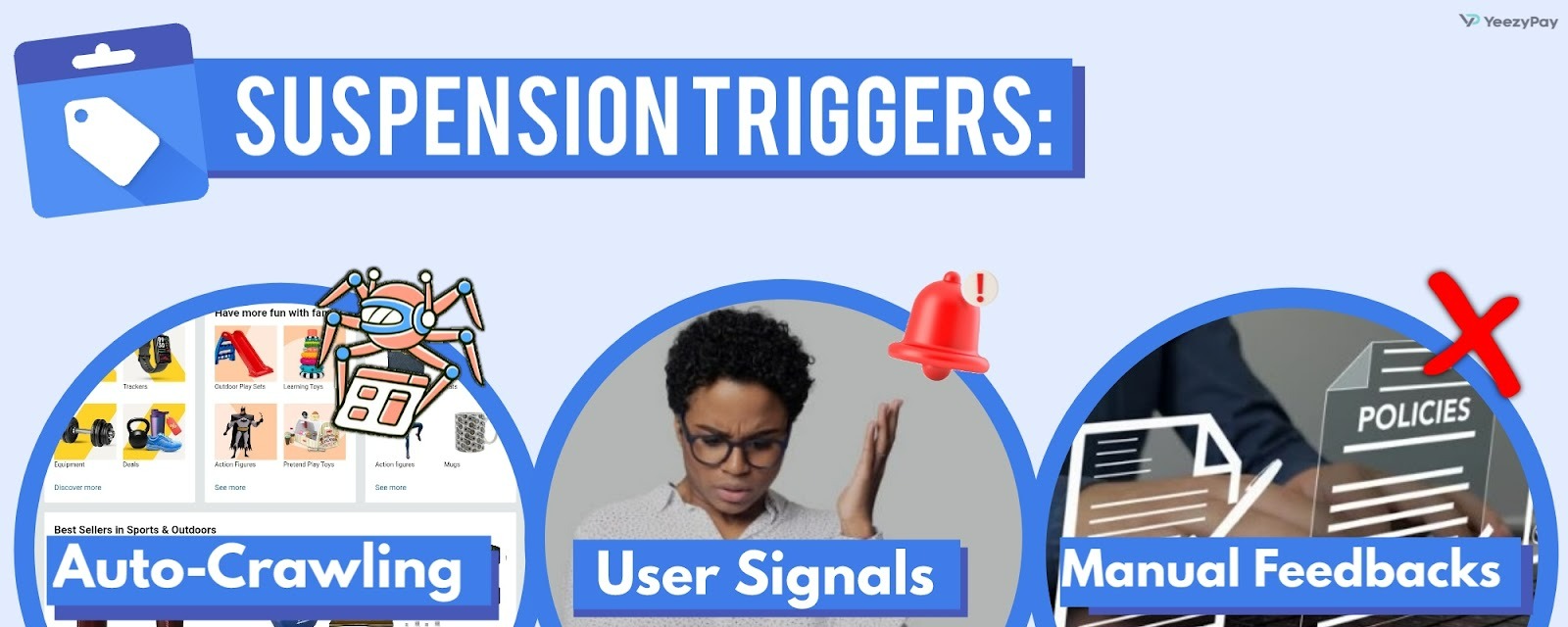
As they say, “there is no smoke without fire”. So, before learning how to fix misrepresentation suspension, you must first understand the triggers. Suspensions are triggered in three main ways:
-
Automated crawling – Google’s bots scan your site and compare it against your product feed.
-
User signals – Complaints, chargebacks, or poor landing page experiences can raise red flags.
-
Manual reviews – A Google reviewer may flag your account if your store lacks trust signals for an e-commerce store, such as transparent policies or accurate product identifiers.
Diagnostics Before Changes
When you receive a Google Merchant Center suspension misrepresentation notice, don’t rush to make blind fixes. You should rather follow a structured diagnostic process to know the exact issue(s). Let’s walk you through the practical steps to take for proper diagnosis.
1. Read policy center and diagnostics tabs
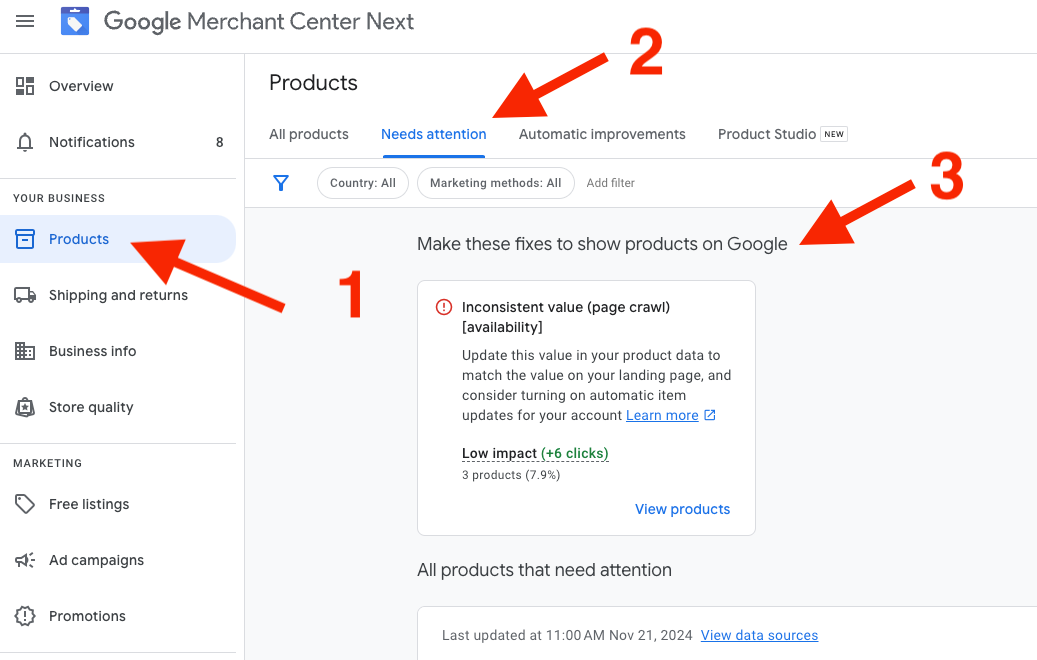
On the left menu of your MCC account, click on “Account Issues”, and you will see the reason(s) for suspension under “Policy Center”. Then you should go to “Products” and click on the “Needs attention” tab (previously known as “Diagnostics”) to show product-level errors. For example, you may see “Availability mismatch” if your feed says “In stock” but your landing page shows that you’re out of stock.
2. Map issues to product pages and feeds
Open the flagged product page in your browser and compare it with the product data in your feed. Any inconsistency you notice there must have triggered the suspension. In case your diagnostics show “Price mismatch policy suspension”, check to see if the price on your product feed corresponds to the latest update on your landing page.
3. Building an evidence pack
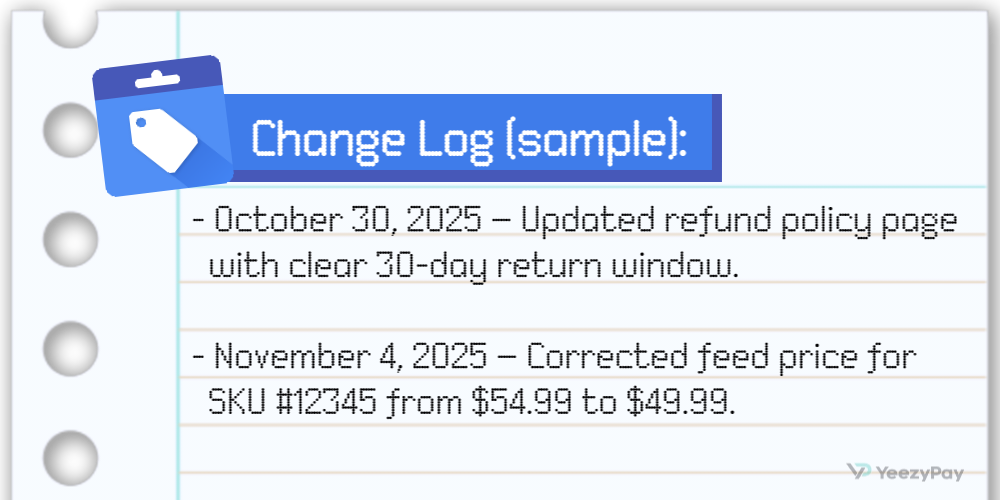
In case you don’t see the justification for your suspension, or you have corrected the issues diagnosed, you will need enough proof for an appeal. Your evidence pack includes screenshots of updated product pages, supplier invoices, relevant business documents, and change log.
A change log is a simple document with dates and URLs of fixes that has been made on your account or landing page. For example:
Site Trust and Transparency Checklist
Google wants to see that your business is real, transparent, and compliant with generally accepted e-commerce standards:
1. Business identity
Missing or unverifiable details can trigger an unverified business identity suspension. To meet the contact information requirements ecommerce, the following details should be clearly displayed on your site:
-
Registered business name
-
Business registration or tax identification number
-
Physical address
-
Phone number
-
A working email address
2. Policies
To maintain transparency and compliance, create pages for refunds, returns, shipping, privacy, and terms of service. These pages should be written in plain English and easy to find on your website.
For Example:
-
Refund Policy: “We accept returns within 30 days of delivery” or “Refunds are processed within 5 business days after inspection”.
-
Shipping Policy: “Orders ship within 2 business days. Estimated delivery: 3–5 business days via standard shipping.”
3. Payments
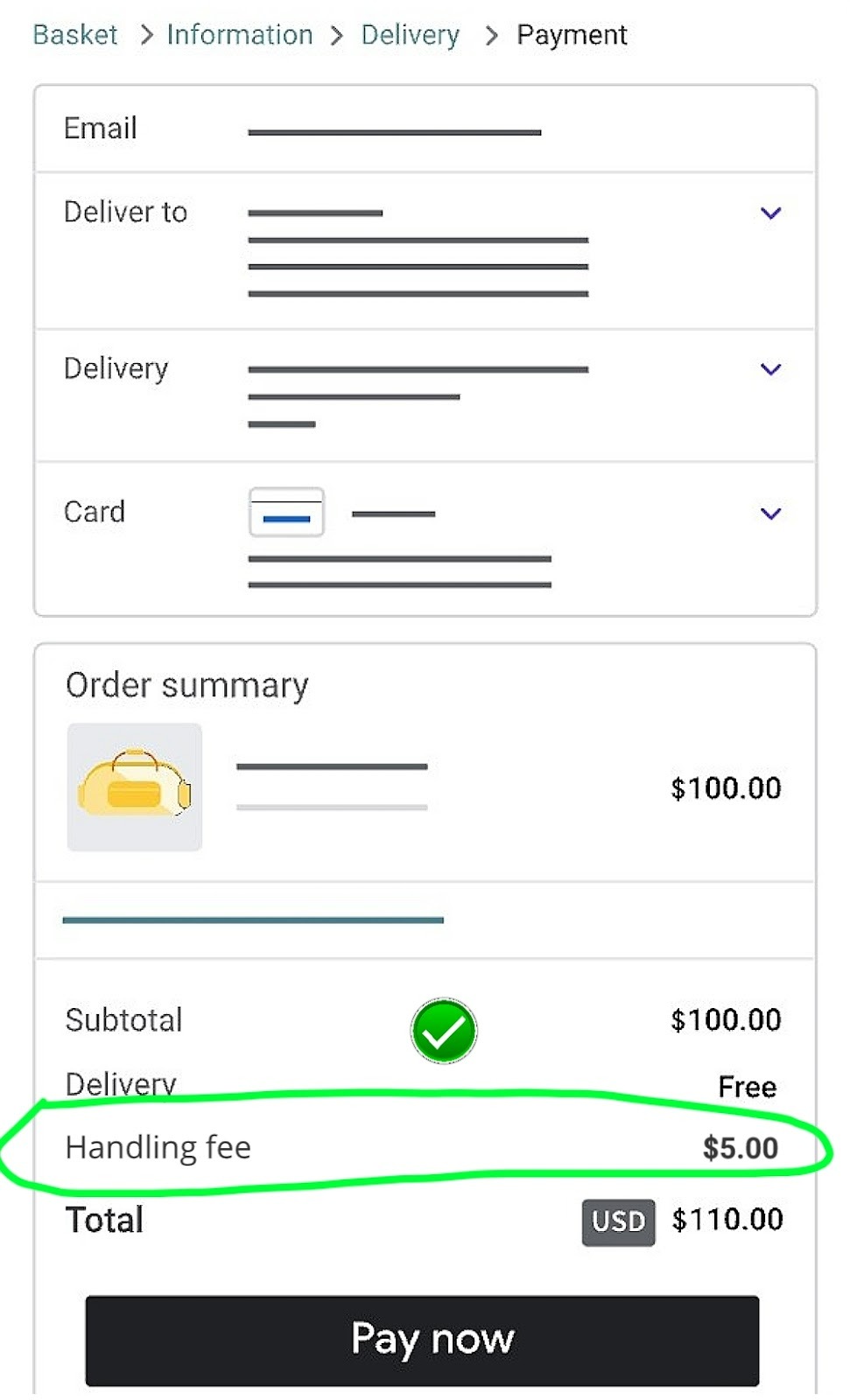
Ensure that checkout is secure (HTTPS, PCI DSS compliant) and disclose all costs upfront. For example, you may charge a $5 handling fee but it should be listed on the product page or cart summary. Hidden charges can lead to a hidden fees surcharge disclosure policy violation.
4. Accessibility
Beyond usability, accessibility best practices such as the Web Content Accessibility Guidelines (WCAG) support a clearer experience for users, so links to business policies should be placed prominently in both the footer and checkout flow. Google reviewers also check to see if they are visible without endless scrolling or clicking through multiple menus.
Product and Pricing Accuracy
One quick way to trigger a Google Merchant Center suspension misrepresentation is when your product data doesn’t match across your feed and landing pages. Google’s systems are designed to detect inconsistencies between your feed, landing pages, and site policies, which is why you need to pay close attention to the following:
-
Check price/availability parity across feed
Take the following steps:
-
Open your product landing page in a browser.
-
Compare the displayed price and availability with your product feed (CSV, XML, or API).
-
Go to Google Search Central to run the same URL through Google’s Rich Results Test, and Schema Markup Validator to see the product markup values.
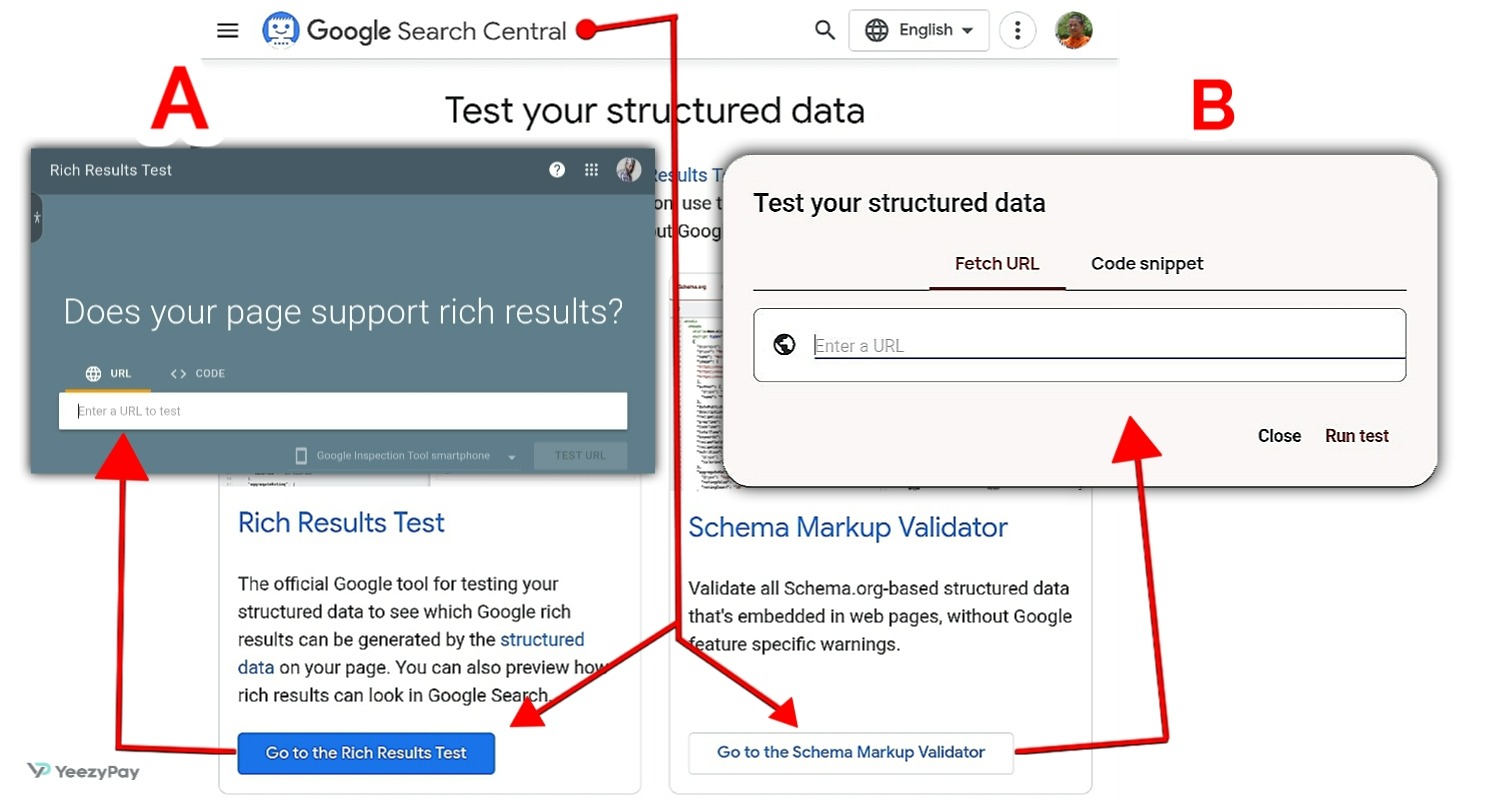
So, for example, if feed price says $99.00, landing page price reads $109.00 (after a recent promotion) and schema.org markup price reads $99.00 (not updated), this result could trigger a price mismatch policy suspension.
-
Verify product identifiers
Your Global Trade Item Number (GTIN), Manufacturer Part Number (MPN), and Brand must be accurate and consistent. Your feed should include these details as provided in the manufacturer or supplier invoices. Incorrect or missing data can lead to product identifiers GTIN MPN brand accuracy errors.
-
Avoid inaccurate promotions or fake discounts, coupons and countdowns
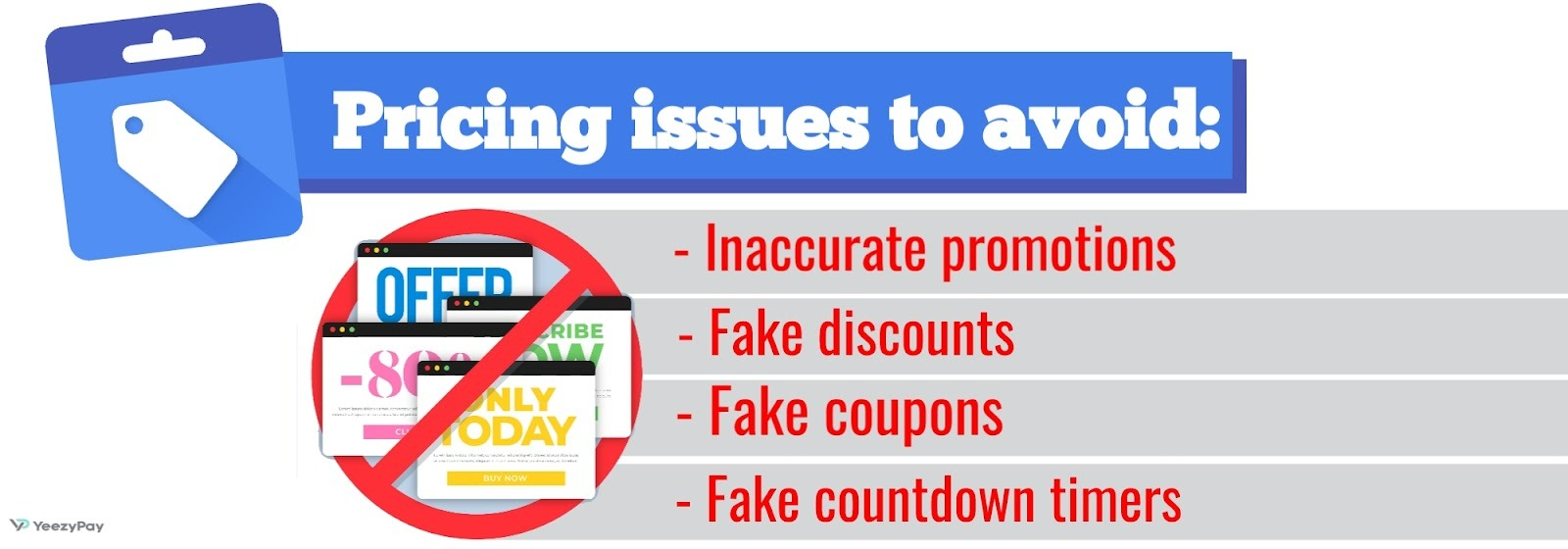
You’ve got to be truthful with your promotions. If you run a sale, the “before” price must be real, not inflated. Listing a product as “$199 now $99” when it never sold for $199 is considered an inaccurate promotions or fake discounts violation.
-
Prevent inaccurate condition or pricing claims
Use the correct condition attribute in your feed (e.g. new, refurbished, used, limited edition, etc.) and make sure it matches the product page. Marking a refurbished electronic as “New” is an inaccurate condition or pricing claims violation.
Operations and Fulfillment Clarity
Despite having a perfect product data, Google Merchant Center suspension misrepresentation can still be triggered by unclear fulfillment practices. Google wants shoppers to know exactly when they’ll receive their order, how it will be shipped, and whether it’s a preorder or backorder.
Handling time, EDD, tracking, backorder/preorder disclosures
You could be risking suspension if your site says “Ships today” but your feed says “Ships in 3 days”. This is why you must set realistic handling times with consideration for cut-off periods (weekends and holidays). In case you’re not sure of how to, go to Shipping and returns >Add shipping policy, and manually add estimated delivery dates for each shipping service.
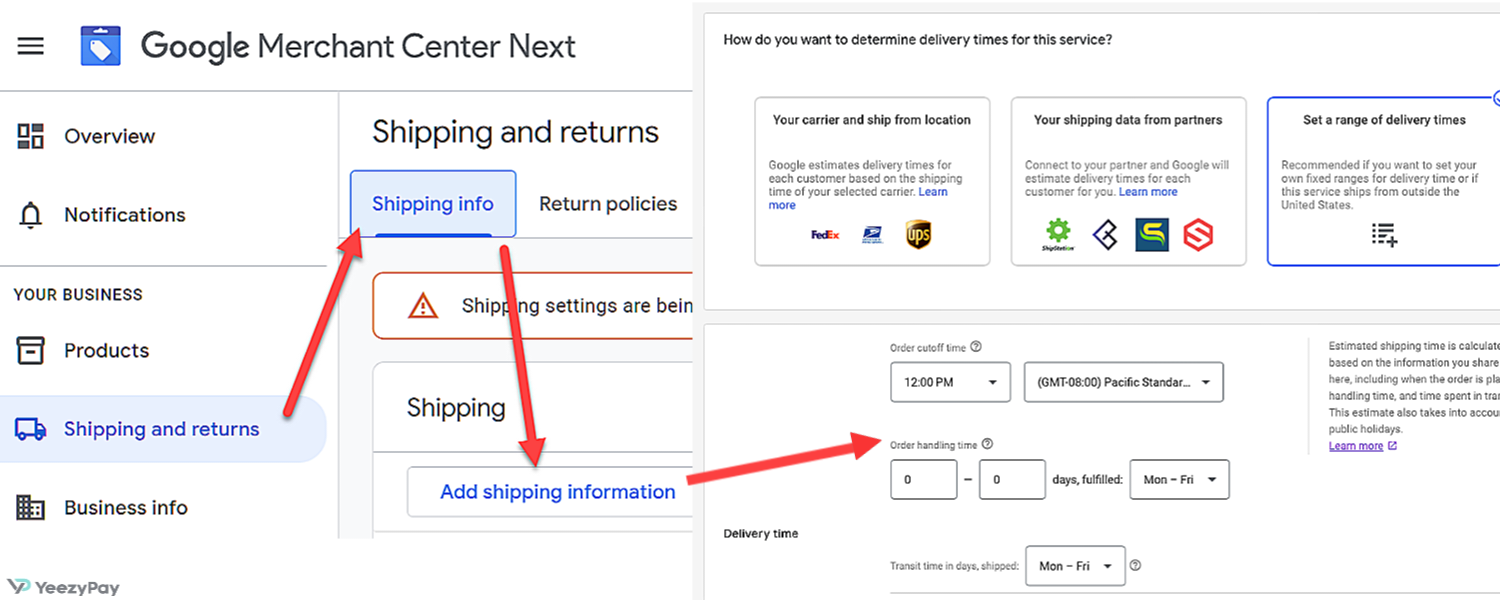
In the same vein, failing to disclose this can trigger a preorder backorder disclosure rules violation. If an item is not readily available, mark it as “preorder” or “backorder” in your feed and on the product page. For example, you can describe it as “Available for preorder. Expected ship date: Feb 15, 2026”.
As regards tracking and transparency, always provide tracking numbers once an order ships. Add an automated email with tracking links of the courier service in use. High chargeback rates or complaints from customers about “no tracking” can lead to account reviews.
Dropshipping transparency and supplier reliability
Google enforces dropshipping transparency requirements, you may risk suspension if your supplier ships late, uses unbranded packaging, or delivers counterfeit goods. If you dropship, clearly disclose it and make sure that your supplier is reliable. You can add “We partner with authorized distributors to ship products directly to you” on your About page.
Content and Patterns that Trigger Flags
There are certain content patterns that may look deceptive to Google’s systems and that erode customer trust on your site. Not to worry, here is a list of such patterns and how to avoid them:
1. False scarcity
You can use countdowns that are tied to real promotions (e.g., Black Friday sale ending at midnight), and if stock is limited, show the actual inventory count from your system. But a banner that says “Only 2 left - sale ends in 5 minutes!” when stock is actually plentiful is a violation of false scarcity countdown timers policy.
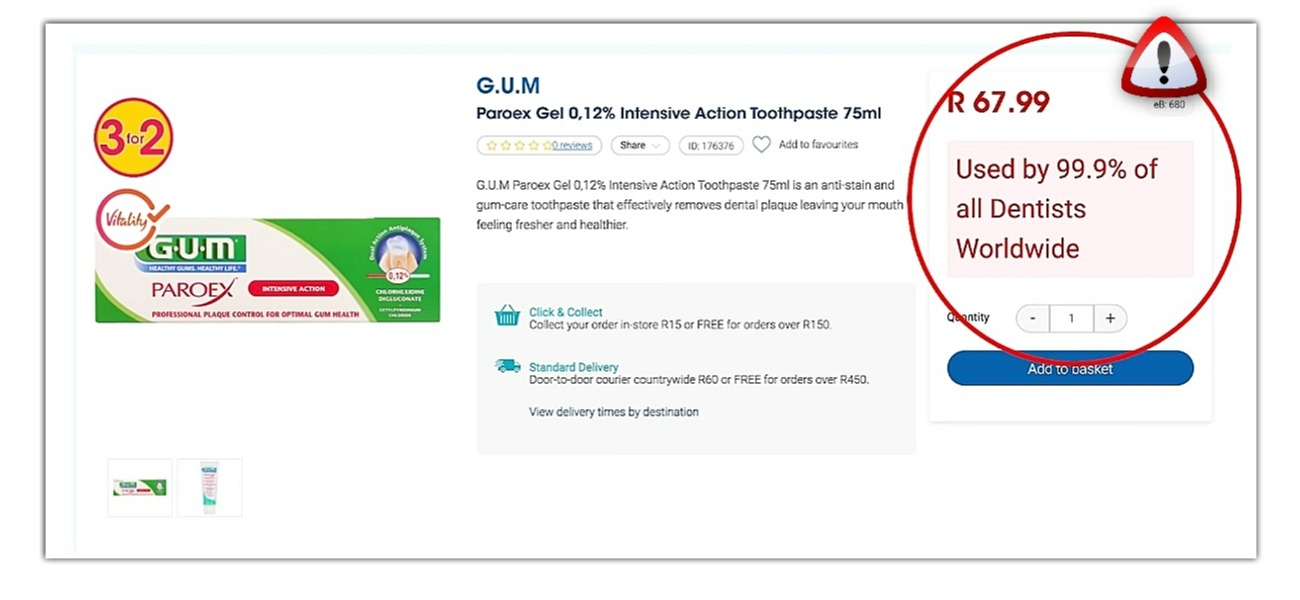
2. Misleading hero claims
It is good to hype your business but you should be able to prove the claims you make on your site. Back them up with third-party reviews, certifications, or awards. A homepage headline like “#1 Rated Laptop” without any verifiable source can damage trust. Google flags unverifiable or exaggerated claims as misrepresentation of self or product Google Merchant Center.
3. Unverifiable testimonials and reviews
Have you heard of the “review gating testimonials policy”? This affects merchants who block negative reviews on their sites and publish only the ones with 5-star. Your review must show both positive and negative feedback. Hiding negative reviews undermines transparency and could erode your business trust, hence trigger suspension.
4. Mirror sites and doorway pages
Google interprets it as manipulative when you run multiple domains with identical content, or create “doorway pages” stuffed with keywords that redirect to the same store. To avoid creating a duplicate or mirror site risk, consolidate into one primary domain. If you must use multiple domains, ensure each has unique branding, policies, and product sets.
5. Aggressive popups and blocked content
Multiple popups that force users to close before they can view a product page is considered a poor landing page experience and potential misrepresentation. Limit popups to one per session (e.g., a newsletter signup) and ensure that product details are visible without barriers.
Feed and Technical Aspects
Technical issues in your product feed or site setup can lead to Google Merchant Center suspension misrepresentation. You can tackle these issues by working on the following areas:
Required attributes, shipping/tax settings, feed rules
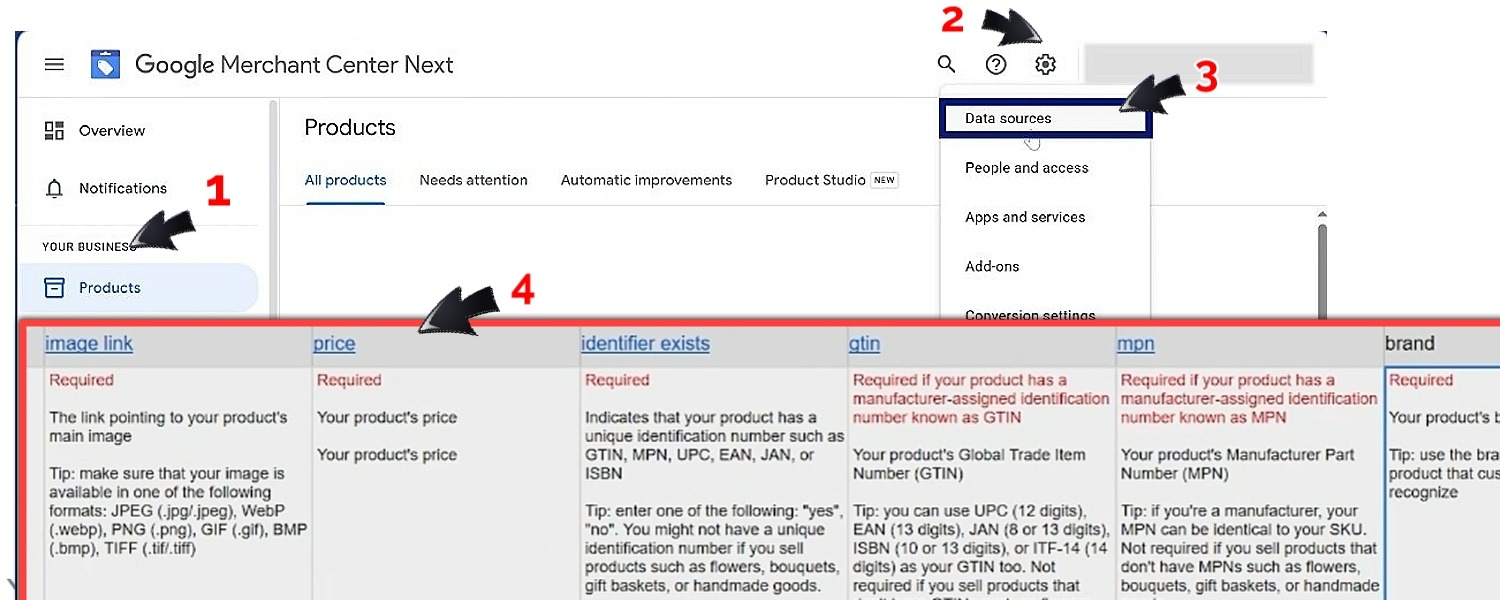
It is mandatory for every product to have a title, description, price, availability, GTIN/MPN, brand, and condition, that is why they are labelled as "Required” when setting up data sources. A missing GTIN for a branded product can trigger errors. Therefore, align shipping and tax settings in your feed with what appears at checkout. You would be in violation if your feed says “Free shipping” but checkout adds $6.99.
Structured data validation and rendering checks
As instructed earlier, run your product URLs through Google’s Rich Results Test to confirm schema.org markup matches your feed and visible page. If schema shows “In stock” but your page says “Out of stock,” there is a case of availability mismatch out of stock errors.
Robots.txt, canonical, and indexing pitfalls
-
Your robots.txt file must not block product or checkout pages. Googlebot won’t be able to verify your listings if it can’t crawl them.
-
Using canonical tags will help you to avoid duplicate content issues (e.g. /product/red-shoes instead of /product/shoes-red).
-
Confirm that your pages are indexable in Search Console for URL Inspection.
Fix Plan by Scenario
When you face an account suspended Google Merchant Center policy, the suspension notice might sound vague until you’re able to identify the specific scenario that triggered it. Knowing the triggers will then inform the Google Merchant Center suspension misrepresentation fix. Below are the most common cases to guide you can learn from:
Price mismatch policy suspension: root causes and remedies
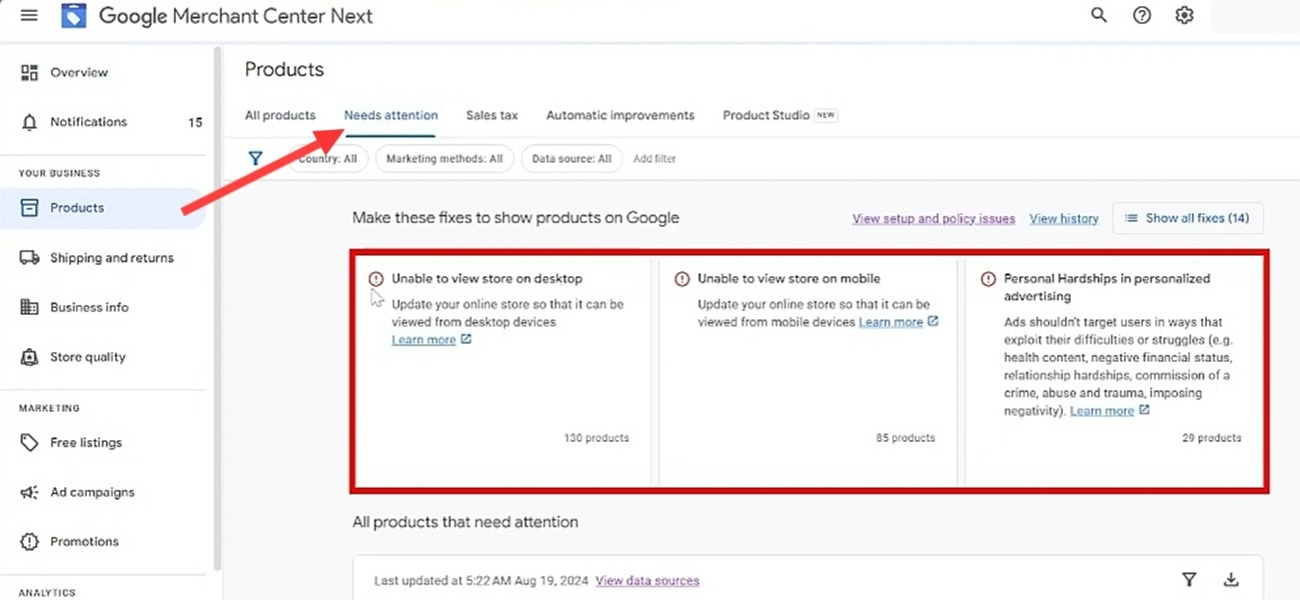
This happens when the price in your feed is different from what is showing on your landing page. Even small differences like $49.99 vs. $50.00 can trigger a violation. The solution to this begins with auditing flagged products in the “Needs Attention” tab and compare feed vs. page vs. schema values.
For instance, if your feed says $49.99 but your page shows $50.99, you will have to update your CMS to $49.99 so that all sources are aligned. Then you can request a re-review after re-uploading the corrected feed.
Missing policy pages: required structure and examples
Your business policies must be simple and very visible. If your account and sites lack clear policies on refund, return, or shipping, Google deems it to be misleading to customers and could trigger shipping policy missing merchant center issues. Here’s our recommendation on this:
-
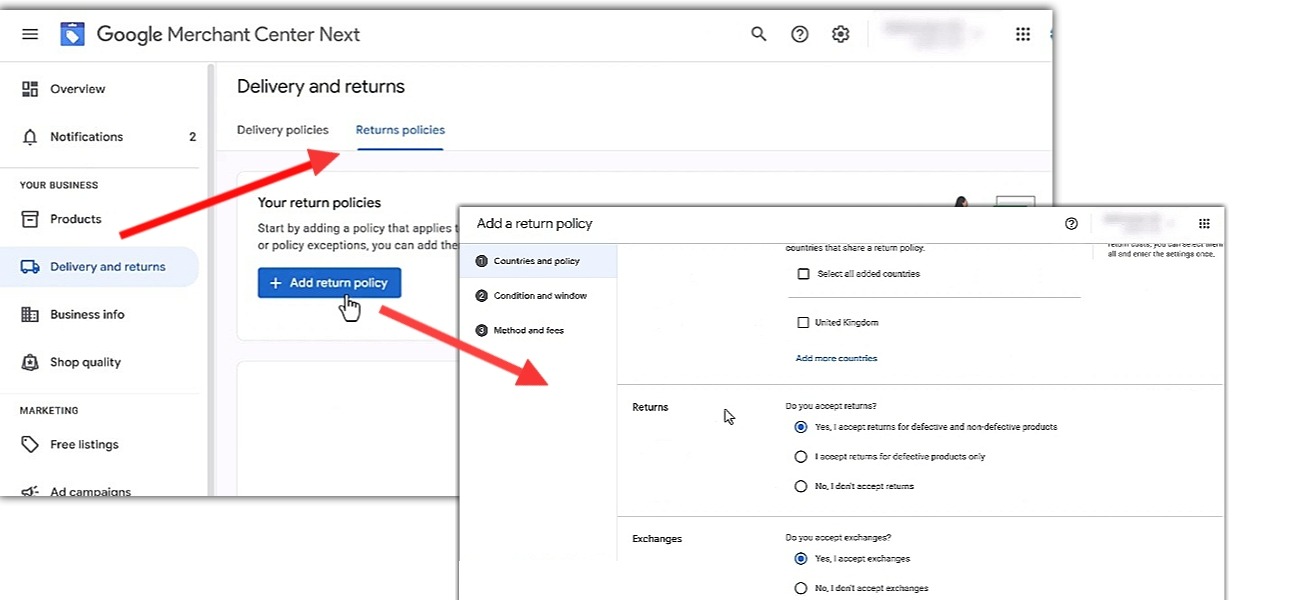
Add or update policies on your Merchant Center account via the “Delivery and returns” tab.
-
Create pages that are dedicated to policies (refund, return, shipping, privacy and terms of service).
-
Use simple statements like “We accept returns within 30 days of delivery. Refunds are processed within 5 business days.”
-
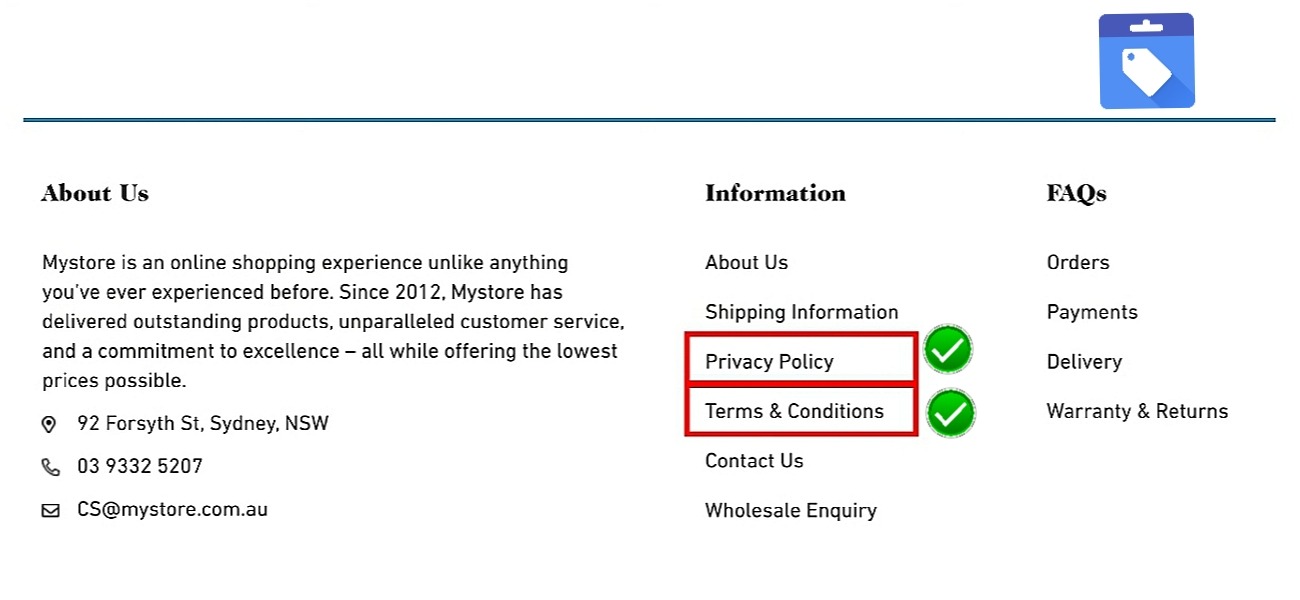
Link these pages in your footer and checkout flow so that they’re easy to find.
Business identity gaps: proofs and verification
Google suspends accounts when they cannot verify that a certain business is real or trustworthy. This is common with new stores or dropshippers. Here’s how to show proofs and verify your business identity:
-
Add your business registration or tax ID, physical business address, phone number, and email address to your site.
-
Upload supporting documents such as a utility bill, company registration document, or bank statement in Merchant Center.
-
Ensure your WHOIS domain registration matches your business name.
Marketplace or third-party checkout mismatches
If your product pages redirect customers to another site for payment, Google sees this as misleading and this results to third-party checkout mismatch issues violations. Hence, you must ensure that checkout is hosted on your domain (e.g., yourstore.com/checkout). If you use a marketplace like Amazon or eBay, make sure your feed reflects it. Products that redirect to third-party shouldn’t even be added to checkout until you can align them.
Documentation for Appeal
The strength of your documentation will determine whether your appeal misrepresentation suspension Google Merchant Center succeeds. Google wants to see proof that you’ve fixed issues and that your business is legitimate.
Building a change log with URLs, screenshots, and dates
Before submitting an appeal, firstly create a clear record of what you've fixed and the time you did the fixing. This shows Google that you’ve taken corrective action.
Creating a change log can be done in three steps:
-
List each violation from the Policy Center
-
Type out what you have done to fix them along with dates, URLs, and screenshots.
-
Save this log in a single PDF or Google Doc
Tip: We recommend that screenshots should show both the “before” and “after” state of the page(s) or feed(s). This will make it easy for reviewers to verify changes.
Collecting proofs
To prove the authenticity of your products and business during an appeal, you should gather the following documents:
-
Supplier invoices
-
Reseller authorization letters
-
Business documents (EIN confirmation letter, utility bill with business address, or bank statement to resolve unverified business identity suspension)
-
Policy screenshots (updated Refund, Shipping, and Terms pages)
How to Appeal and What to Submit
The appeal process is your chance to show that you’ve made corrections, and that your store is trustworthy. If you are able to identify and resolve the issue, you can click on “I fixed the issue” and then “Request review”. But if you think that Google is not correct about their findings based on your understanding of the policies, click on “I disagree with the issue” and then also “Request review”.
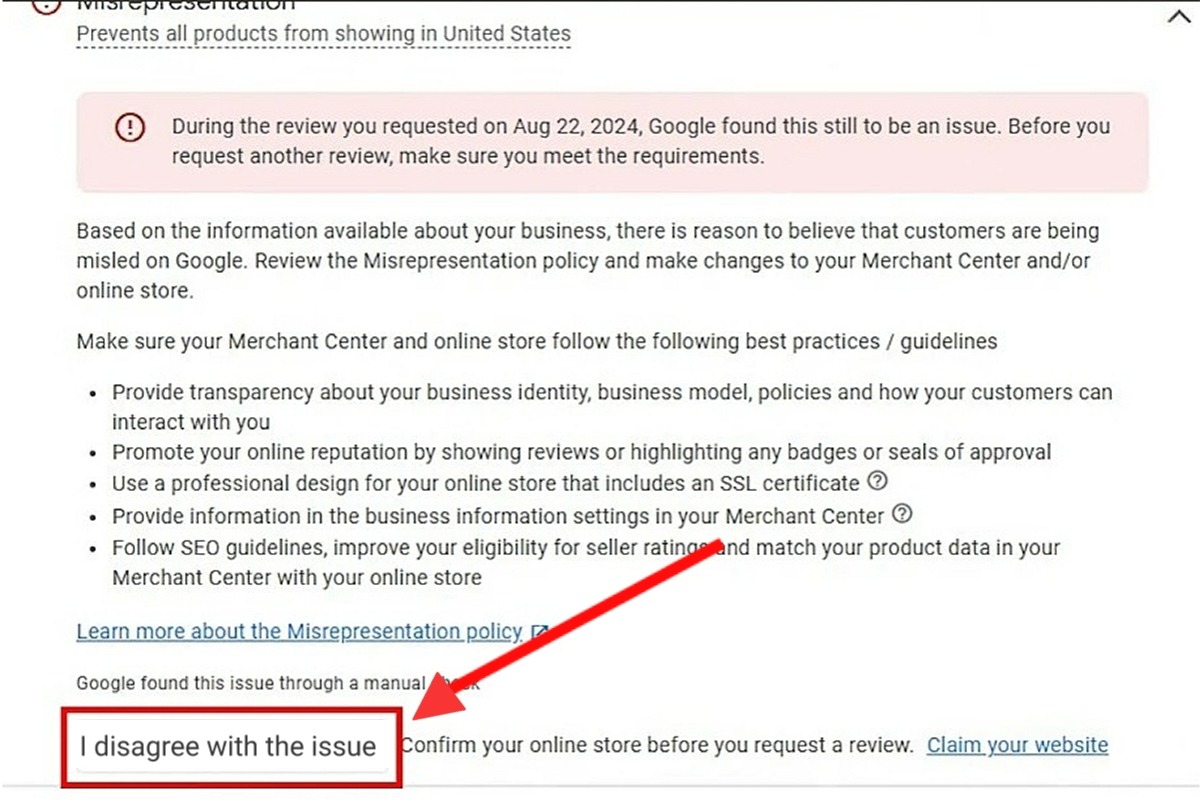
From here, you will be prompted to provide information about your website, products, and business. You might also be required to link your Google Ads account or verify identity before requesting a review.
Reinstatement request form, tone, and structure
For suspended accounts, appeals are submitted via the reinstatement request form, and the way you fill it goes a long way in determining the outcome of the review. Google reviewers will be looking out for clarity and evidence of corrective actions. Take heed of the following instructions and tips on how to properly complete the form:
-
Log in to Merchant Center, go to Account Issues > Policy Center > Request Review.
-
Maintain a formal tone and state only facts. Avoid emotional phrases like “This is unfair” or “We’ve done nothing wrong.”
-
The letter should contain:
-
Clear Statement of the violation (e.g., “Our account was suspended for a price mismatch policy suspension”)
-
Explanation of the root cause (e.g., feed not syncing with CMS, outdated schema markup)
-
Description of corrections made (e.g., corrected feed integration, updated schema, aligned product data)
-
Outline of preventive measures (e.g., weekly audits, automated feed sync, compliance checks)
Sample outline for an effective appeal letter
A good draft of an appeal letter should be crafted in three sections:
-
Introduction: Identify your account issues and acknowledge the suspension reason.
-
Example: “We understand our account was suspended for misrepresentation of self or product due to missing refund and shipping policies.”
-
Body: Here, you should give details about the issue, present the fixes made, and attach screenshots of updated policies, supplier invoices, and company registration documents.
-
Closing: Make a polite request for the reinstatement of your account, and end by thanking the reviewer for their time.
-
Example: “We humbly request reinstatement of our account now that all issues have been corrected and preventive measures are in place”.
Timelines and Outcomes
To avoid the frustration that comes with waiting for the review of your appeal, you will need to know the typical review windows and what to do if your appeal is denied.
Typical review windows, rechecks, and second-level reviews
The review process is not instant, your account enters a queue for manual and automated checks after the submission of reinstatement request. The timelines are as follow:
-
Standard review window: For normal cases, it takes 3-5 business days.
-
Extended reviews: Complex cases that involve multiple violations or unclear documentation may take 7-14 business days.
-
Rechecks: If Google needs to verify additional fixes, they may re-crawl your site multiple times before making a decision, and this takes 7-10 business days.
Knowing these timelines helps you plan your marketing and inventory strategy. For example, if you’re running seasonal promotions, you will want to resolve issues in advance.
What to do if appeal is denied; cooldowns and escalation
Well, it is possible that your appeal is denied. But hey, denied appeal is only a setback, it doesn’t mean that all is over. In actual fact, many merchants succeed on their second or third attempt as long as they're able to make meaningful changes. Do this in case of a denial:
-
Carefully read the feedback.
-
Fix issues before re-appealing.
-
Observe the “Cooldown periods” that Google may enforce (often 7–14 days) before you reapply.
-
If your appeal has been denied more than once, take a pause to conduct a full compliance audit before escalation. Document every fix with screenshots, invoices, and updated policies before submitting again so as not to extend your suspension unnecessarily.
Legal and Regulatory Context
The enforcement of misrepresentation suspensions by Google is referenced on consumer protection and privacy laws. As a merchant, understanding these legal frameworks will help you to align your practices with regulatory requirements that apply in the U.S. and globally. You will surely reduce the risk of repeated suspension by treating compliance as a legal matter.
Consumer protection principles and truthful advertising essentials
Consumer protection authorities generally prohibit unfair or deceptive business practices, and Google reflects similar expectations in its Merchant Center policies.
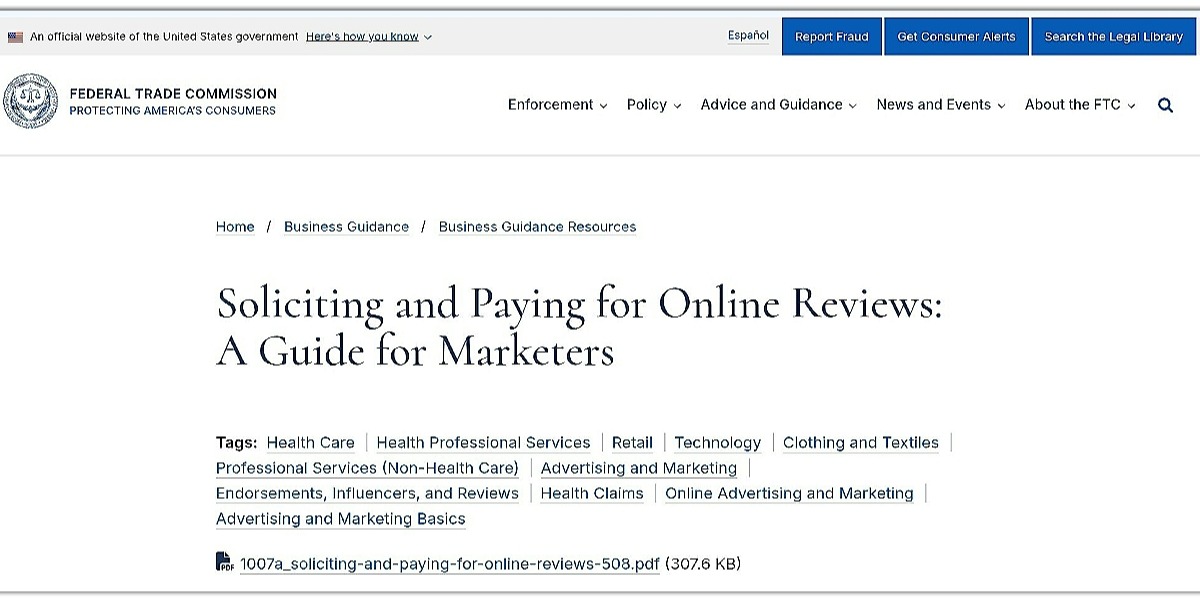
Truthful advertising therefore means that all claims must be factual, not misleading. No fake scarcity should be created using false countdown timers or wrong stock levels. You must also provide substantiation for claims such as “officially certified” or “eco-friendly” with proper documentation.
Privacy disclosures on product pages and checkout
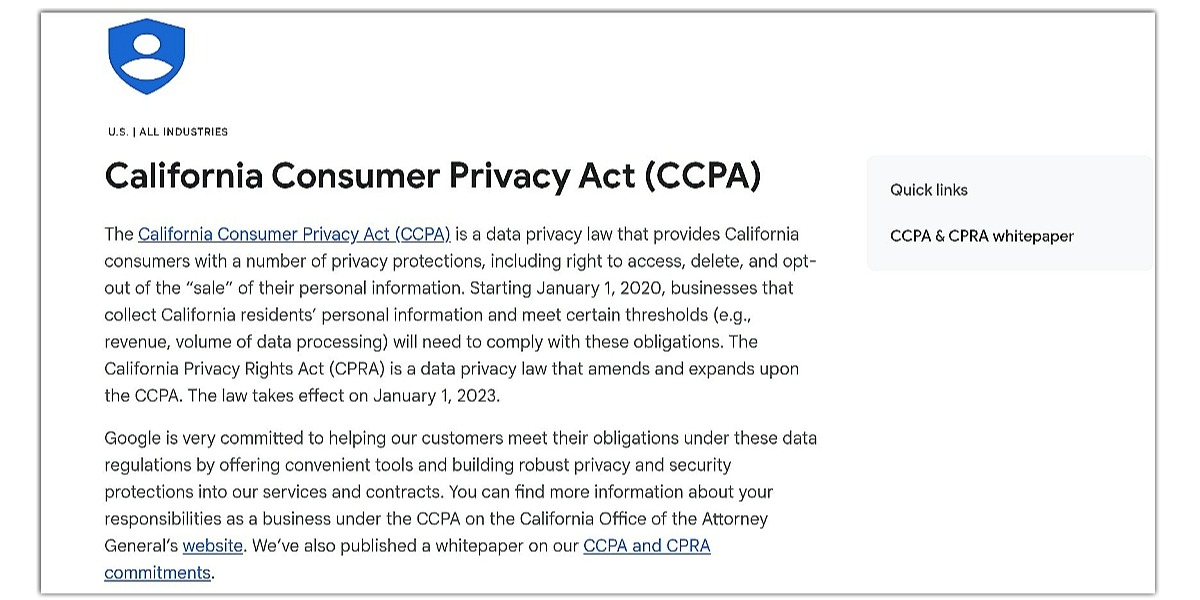
Google also expects merchants to comply with applicable privacy laws and clearly disclose how customer data is collected and used. Compliance can be supported by:
-
Adding a visible Privacy Policy link on product pages and during checkout.
-
Clearly stating what personal data you collect (for example, name, email address, and payment information) and why. For example:
“We collect personal information to process your order and improve customer service. Learn more in our Privacy Policy.”
-
Where required by local law, provide any additional privacy disclosures or user rights notices.
Risk Management and Governance
It is always easier to prevent a Google Merchant Center suspension misrepresentation than to fix it. This is why risk management and governance are critical. You can detect issues before Google by building a system of regular audits and monitoring.
Ongoing audits: monthly policy, feed, and UX checks
Your first line of defense is audits, as they ensure that your product data, policies, and user experience remain aligned with Google’s requirements. Here are the types of audits to do:
-
Policy audits: Reviewing your refund, return, shipping, and privacy policies monthly to ensure they’re still accurate and visible.
-
Feed audits: Randomly checking products every month for price and availability accuracy.
-
User experience (UX) audits: Testing your checkout flow for hidden fees, redirects, or aggressive popups.
Monitoring: account health, diagnostics, and automated alerts
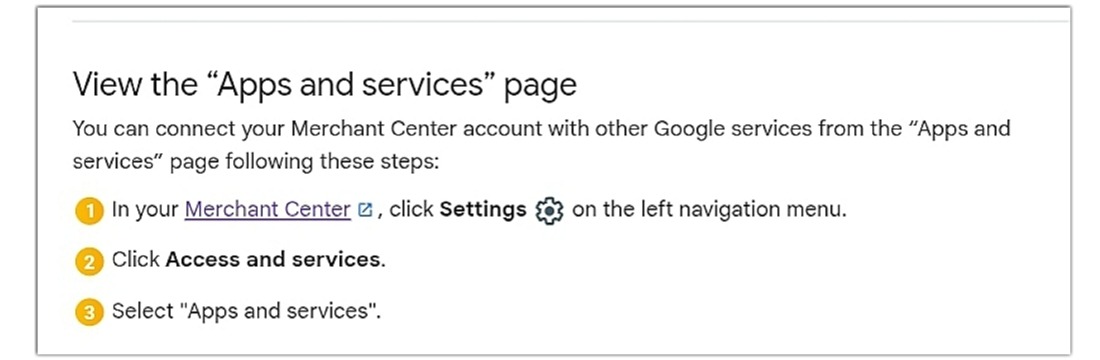
Since audits are periodic, and monitoring is continuous. It is advisable to use Google’s built-in tools to help you track account health in real time and act quickly before leading to suspension. Here are simple ways to monitor your account:
-
Account health: Check weekly for warnings or pending issues.
-
Diagnostics tab: Review errors and disapprovals on the “Needs attention” tab in order to spot patterns like repeated price mismatches.
-
Automated alerts: Enable notifications for feed errors and account warnings.
-
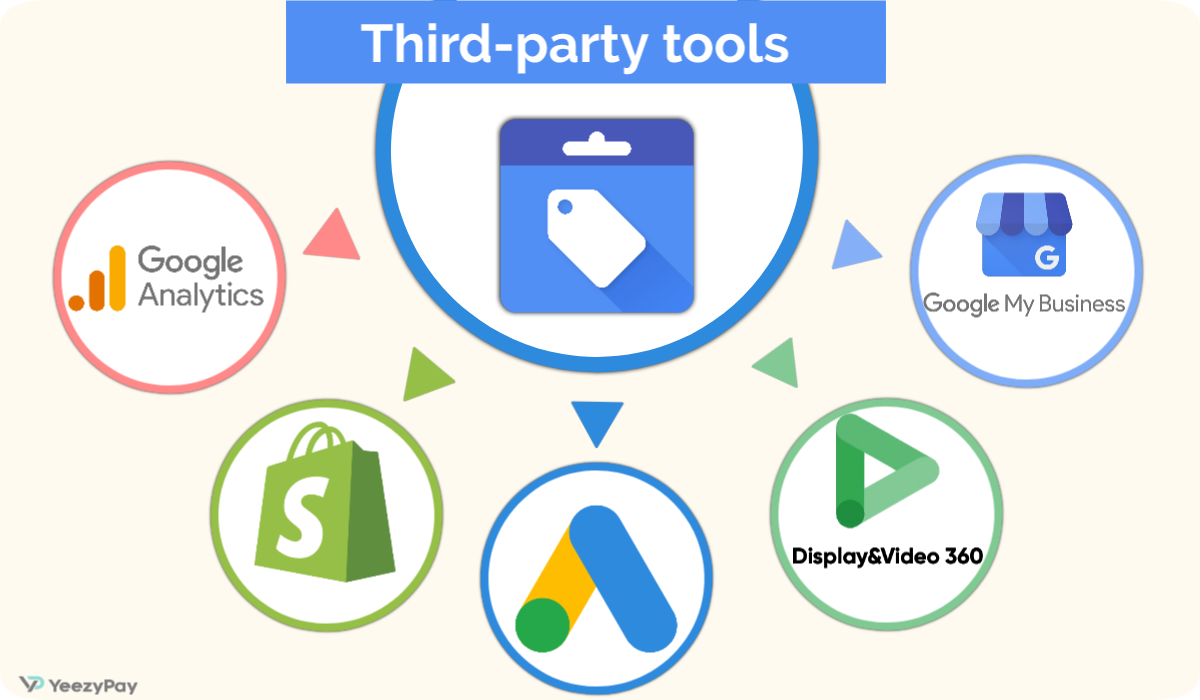
Third-party tools: Consider using monitoring software that integrates with Merchant Center for deeper insights.
Agency and Multi-Store Setups
There are certain compliance challenges that comes with managing multiple stores or accounts under one umbrella (whether as an agency or a brand with multiple domains). Google MCC treats each account as a reflection of business trustworthiness, it therefore follows that one poorly managed sub-account can dent the reputation of the entire group. To stay trusted, strong governance and documentation practices are essential across multiple properties.
MCC governance, domain consistency, brand guidelines
To ensure consistency, a MCC account setup requires strict governance in the following areas:
-
Domain consistency: Each sub-account must use a verified domain that matches the brand identity. Avoid duplicate or “mirror” sites that confuse customers.
-
Unified brand guidelines: Ensure that all accounts follow the same theme and policy templates on refunds, shipping, etc.
Also, you can assign a compliance manager to review all sub-accounts on a monthly basis for feed accuracy and policy alignment. This counts for a centralized oversight, which is necessary because inconsistent branding or mismatched domains can trigger misrepresentation of self or product Google Merchant Center violations, especially if one store looks less trustworthy than the others.
Supplier and reseller documentation management
For agencies and multi-store operators, supplier and reseller documentation is often the first thing Google requests during an appeal. Having this documentation ready across all accounts prevents delays and strengthens your case. The documents include: Invoices and purchase orders, Authorization letters, Centralized repository and Audit trail that shows Google that your supply chain is transparent.
Preventive Checklist
Now that you know what it entails to fix Google Merchant Center suspension misrepresentation, it is needless to say that “prevention is better than cure”. To this end, you should do a pre-launch compliance review to ensure that every new product, campaign, or store you roll out is aligned with Google’s policies and consumer protection laws.
Pre-launch compliance review
A quick pre-launch review can save weeks of dealing with a suspension. So you might want to carefully run through a checklist that will help you reduce the risk of hidden violations that could trigger an immediate suspension:
-
Feed attributes: Confirm that every product has the required fields (title, description, price, availability, GTIN/MPN, brand, and condition).
-
Policy pages: Ensure that the pages for refund, return, shipping, privacy and terms of service are live and linked to the footer of your site. They should be written in plain language.
-
Checkout flow: Test the entire checkout process for hidden fees, redirects and aggressive popups.
-
Structured data: Validate and test to confirm that your feed and visible content match with that of schema.org markup and Google’s Rich Results.
-
Domain and Branding: Verify that your Domain and business name has a consistent WHOIS registration.
Conclusion
A Google Merchant Center suspension misrepresentation can actually feel like a major setback, but you can now see that it is not permanent. You can recover your account and also build a stronger business if you have the right approach. The key is to consider compliance as an ongoing process instead of a one-time fix. In a nutshell, this guide has been able to demystify the path to recovery under four main things:
-
Understand the rules
-
Fix issues systematically
-
Appeal strategically, not emotionally
-
Plan for the future
On a final note, prevention will always be better than a cure. You can avoid suspensions and also build customer trust by embedding compliance into your daily operations. This is the ultimate driver of sustainable growth.


