


Google Consent Mode v2: Complete 2026 Implementation Guide
Introduction
If you're running Google Ads for a US-based business in 2026, there's a good chance you've already heard about Google Consent Mode v2 — or ran into it while trying to figure out why your conversion data looks off. The short version: it's a mechanism that tells Google's tags how to behave depending on what a user has or hasn't consented to. But the longer version matters a lot more if you're trying to actually implement it without breaking your tracking.
This guide is written specifically for US websites and Google Ads accounts. The US privacy landscape is different from Europe — there's no single federal law equivalent to GDPR, but state-level regulations like the California Consumer Privacy Act (CCPA), Virginia's CDPA, Colorado's CPA, and a growing list of others are actively shaping what "compliant tracking" means in practice. Google Consent Mode v2 isn't legally mandated across the US the way it is in the EU — but if you're using Google Ads, GA4, or both, it directly affects how your data gets collected, modeled, and used for bidding.
This article walks through everything from how Google Consent Mode v2 works under the hood, to preparing your account, setting up tags in GTM or gtag.js, working with CMPs, understanding the impact on your Google Ads performance, and troubleshooting when things go sideways. There's also a checklist at the end of each major implementation section so you don't have to hold all of this in your head at once.
One thing this guide won't do: pad out basic definitions to hit a word count. If you already know what a cookie is, we'll skip the primer. The goal is to give you a complete, technically accurate, and genuinely useful Google Consent Mode v2 migration guide — whether you're setting this up for the first time or auditing an existing implementation.
How Google Consent Mode v2 works in 2026
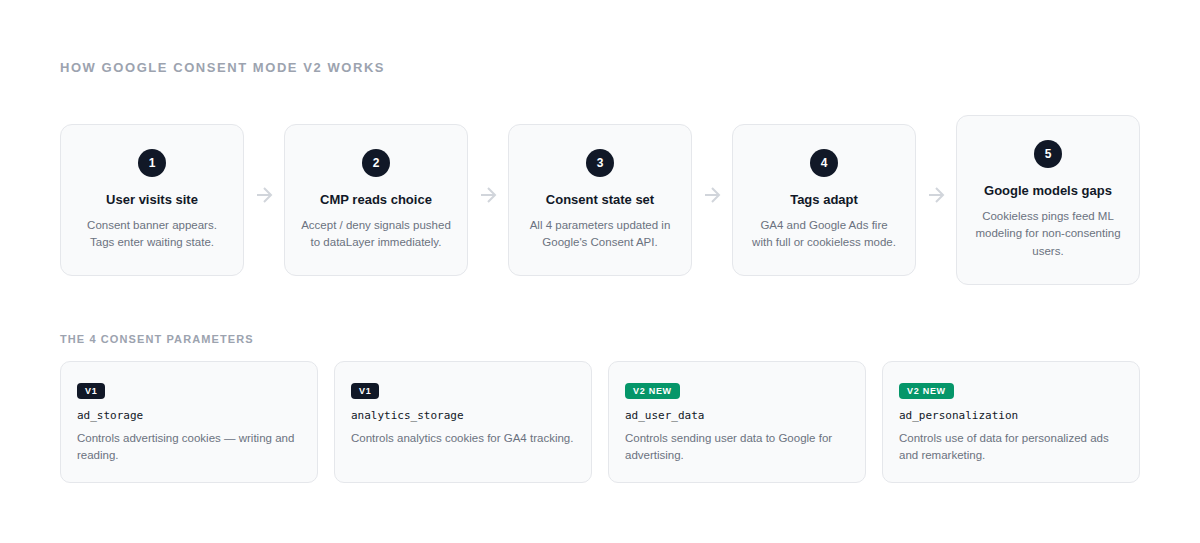
At its core, Google Consent Mode v2 is a signaling layer between your consent banner and Google's tags. Instead of simply blocking or allowing tags to fire, it tells Google's services how to behave depending on what a user consented to — and what to do with data when consent is missing.
The mechanism works through four consent parameters that you set in your implementation:
-
ad_storage — controls whether advertising cookies can be written and read.
-
analytics_storage — controls the same for analytics cookies (GA4).
-
ad_user_data — governs whether user data can be sent to Google for advertising purposes.
-
ad_personalization — determines whether that data can be used to personalize ads.
The first two existed in v1. The last two are new in v2 and give marketers more granular control over how user data flows into Google's advertising systems. In practice, this means you can now separately tell Google: "yes, track analytics" but "no, don't use that data to personalize ads" — which matters as US states keep adding new opt-out requirements around targeted advertising.
When a user lands on your site, Google's tags check the current consent state before doing anything. If consent hasn't been resolved yet — which is the normal situation before a user interacts with your banner — the tags wait. What happens during that waiting period is exactly what separates the two implementation modes.
Basic vs Advanced Consent Mode
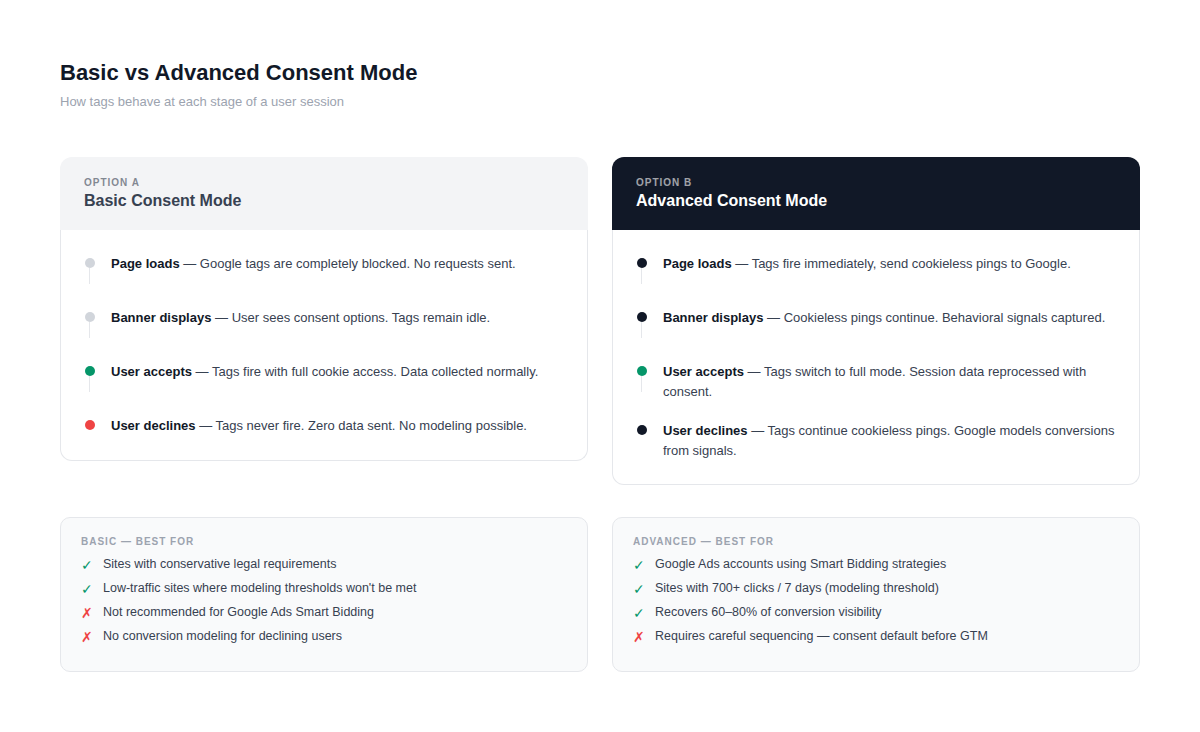
This distinction is one of the most misunderstood parts of the whole setup, so it's worth being precise.
In Basic Consent Mode, Google's tags are blocked from loading entirely until the user makes a consent choice. No data is sent to Google whatsoever while the banner is sitting there. If the user declines, the tags never fire. The upside is simplicity — it's easy to implement and easy to explain to a privacy team. The downside is that you lose all modeling capability for non-consenting users, because there's no data signal to model from.
In Advanced Consent Mode, tags load immediately on page arrival and start sending minimal "cookieless pings" to Google — requests that don't set or read any cookies and don't include persistent identifiers. Unconsented data collected this way isn't surfaced in Google's reports directly — instead, it goes through a modeling process where it's shaped to look like data collected from consenting users. This is what enables conversion modeling and audience gap-filling. When the user grants consent, the tags switch to full data collection mode automatically.
Simo Ahava, one of the most authoritative voices on GTM and consent implementation, describes the practical difference clearly: "Advanced Consent Mode is very easy to implement because it basically requires no changes to tags' existing triggering mechanisms. Basic Consent Mode means that tags wait until appropriate consent has been granted — and is very difficult to implement because the triggering mechanisms are very awkward."
For most US Google Ads accounts, Advanced Consent Mode is the right choice if you want your bidding algorithms to have enough conversion signal to work with. Basic is acceptable when your legal team has specific concerns about any pre-consent data collection — but you should go in with eyes open about the modeling tradeoff.
How Consent Mode interacts with tags and cookies
When ad_storage is set to denied, Google's advertising tags don't write or read any cookies. Instead, they use ephemeral, random identifiers that exist only for the duration of that page session. Ad click identifiers get redacted from advertising requests and consent pings, and page URLs with click identifiers are also redacted.
When analytics_storage is denied, GA4 still fires hits — but without cookie access. The hits are sent to Google Analytics with a gcs parameter that includes the consent status, so Google can identify these cookieless hits and route them into the modeling pipeline rather than standard reporting.
The new v2 parameters work on top of this. Even if ad_storage is granted, setting ad_user_data to denied means Google won't use that user's data for advertising purposes. And ad_personalization: denied prevents remarketing lists from being built from that user's behavior — even if the ad cookies themselves are technically active.
This layering is what makes Consent Mode v2 for Google Ads conversions more nuanced than a simple on/off switch. You can have partial data flowing with very specific restrictions applied — which is increasingly relevant as US advertisers navigate state-level opt-out rights around targeted advertising under CCPA, Colorado's CPA, and similar frameworks.
One technical detail worth knowing: you can configure region-based consent defaults, so that different consent states apply to visitors from specific geographic regions. For example, you might set stricter defaults for California visitors while keeping more permissive defaults for states without active privacy laws. This is done using ISO region codes in your consent default configuration — which we'll cover in the GTM implementation section.
Preparing a US Google Ads account for Consent Mode v2
Before touching a single tag or writing a line of code, it's worth spending time on preparation. Consent Mode v2 isn't just a technical update — it touches conversion tracking, audience lists, bidding strategy, and potentially your legal obligations depending on which US states your visitors come from. Rushing the setup without mapping the full picture tends to create problems that are annoying to unravel later.
Mapping business goals and conversions
Start by listing every conversion action your Google Ads account currently tracks. Not just the main ones — everything. Lead form submissions, phone call clicks, purchases, newsletter signups, chat initiations, add-to-carts. Open Google Ads, go to Tools → Conversions, and export the full list.
For each conversion, answer three questions: where is it fired (GTM, gtag.js, hardcoded), what tag fires it, and how critical is it to your bidding strategy. Conversions that Smart Bidding uses as primary signals deserve the most scrutiny — if those get disrupted during or after the migration, your campaigns will feel it within days.
This mapping exercise also helps you understand the modeling stakes. If ad_user_data is denied, user-identifiable information like hashed emails or phone numbers can't be sent to Google Ads. If ad_personalization is denied, the user can't be added to remarketing audiences or personalized advertising campaigns. Knowing which of your conversions involve Enhanced Conversions (which pass hashed user data) tells you exactly where those restrictions will bite.
For Consent Mode v2 for lead generation forms specifically: if your primary conversion is a contact form submission and a significant chunk of your traffic comes from California, you're already operating under CCPA opt-out requirements for data sales and sharing. That affects how you should configure your default consent states for the US-CA region — more on that in the GTM section.
Auditing existing tags and consent banners
Once you have the conversion map, do a proper tag audit before touching anything. Open GTM (or your tag implementation) and check:
-
Which tags have consent checks already applied and which fire unconditionally.
-
Whether any consent initialization code exists and where it sits relative to the GTM snippet.
-
Whether your current cookie banner actually sends signals to Google's Consent API, or just blocks/shows content visually without doing anything functional.
That last point catches a lot of people off guard. A cookie banner that looks compliant isn't the same as one that's technically integrated with Consent Mode. Your CMP must communicate all four consent parameters automatically without custom development or manual configuration, and consent signals must reach GTM immediately when users make choices. Many older banner implementations — including some that have been running for years — do neither.
If you're not sure whether your current setup is sending signals correctly, the fastest check is opening Chrome DevTools on your site, going to the Console tab, and typing dataLayer. Look for objects with event: 'consent' and the four parameters. If you don't see them — or if you see the consent default being set after the GTM snippet loads — that's a problem that needs to be fixed before anything else. The script with the default consent settings must precede the gtag.js or GTM code snippets. This ordering issue is one of the most common causes of broken Consent Mode implementations.
Also check your tag audit for any tags that might be passing user-level data — hashed emails, user IDs, order IDs — via Enhanced Conversions or custom parameters. As Simo Ahava has noted, collecting things like Order IDs or User IDs from non-consenting users will almost certainly get you in trouble if you're audited, even if the rest of your Consent Mode setup is technically correct.
Coordinating with legal and marketing
This part gets skipped most often and causes the most problems downstream.
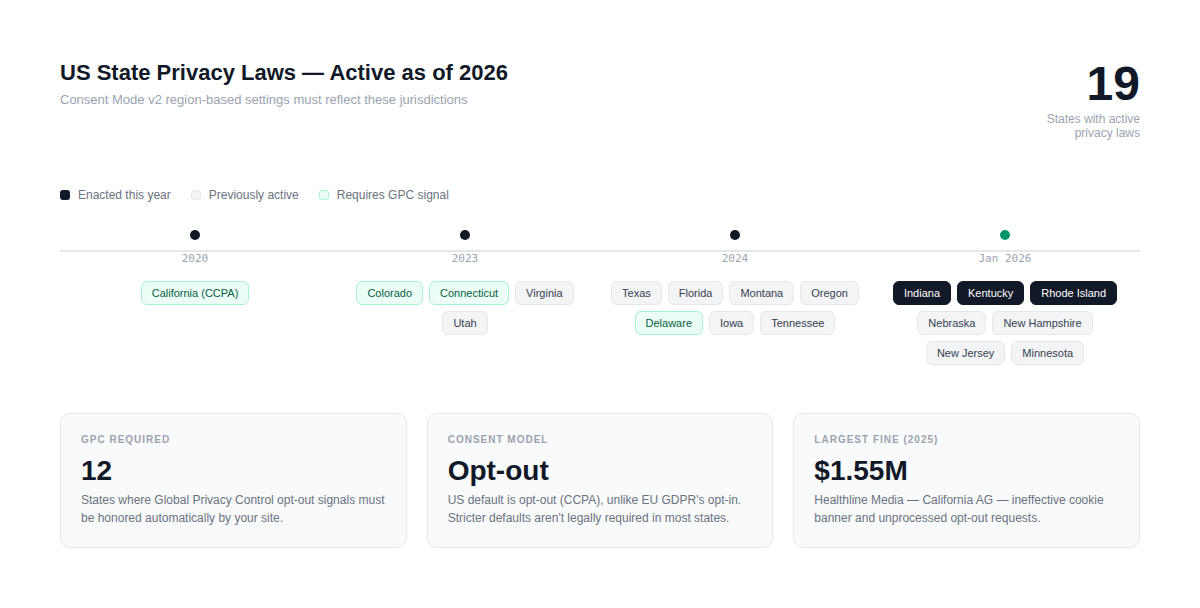
The legal question for US sites isn't binary. CCPA and its amendment CPRA give California consumers the right to opt out of the "sale" or "sharing" of their personal information — and California's regulators have made clear that behavioral advertising data flows can qualify. Colorado, Virginia, Connecticut, Texas, and several other states have similar frameworks. Under CCPA specifically, you can default consent to granted for opt-out scenarios rather than requiring opt-in — which is fundamentally different from GDPR's opt-in requirement. That distinction matters when you're configuring region-based consent defaults.
What this means practically: your legal team needs to tell you which states require what behavior, so you can map that to region codes in your consent configuration. Don't assume GDPR-style defaults (everything denied until the user opts in) are required across the US — they're not, and unnecessarily strict defaults will hurt your data quality without providing any additional legal protection.
On the marketing side, the conversation centers on modeling. Walk your team through what happens to audience sizes and conversion counts during the transition period. Smart Bidding needs time to recalibrate. Campaigns that are currently running Target CPA or Target ROAS may see performance fluctuations for 2–4 weeks post-migration as the algorithms adjust to the new data signals. Setting expectations before launch is much easier than explaining an apparent "performance drop" after the fact.
A useful framing for that conversation: Consent Mode with modeling enabled typically recovers a meaningful portion of the data that's lost to non-consent. Many businesses find that data quality from consenting users provides better campaign performance than incomplete tracking without Consent Mode. The goal isn't to preserve the old tracking — it's to replace it with something more durable.
Implementing Google Consent Mode v2 with GTM and gtag.js
This is where most implementations either succeed cleanly or create problems that take weeks to track down. The good news is that once you understand the sequencing logic — what has to happen before what — the actual code is fairly straightforward.
Setting consent defaults and region-based settings
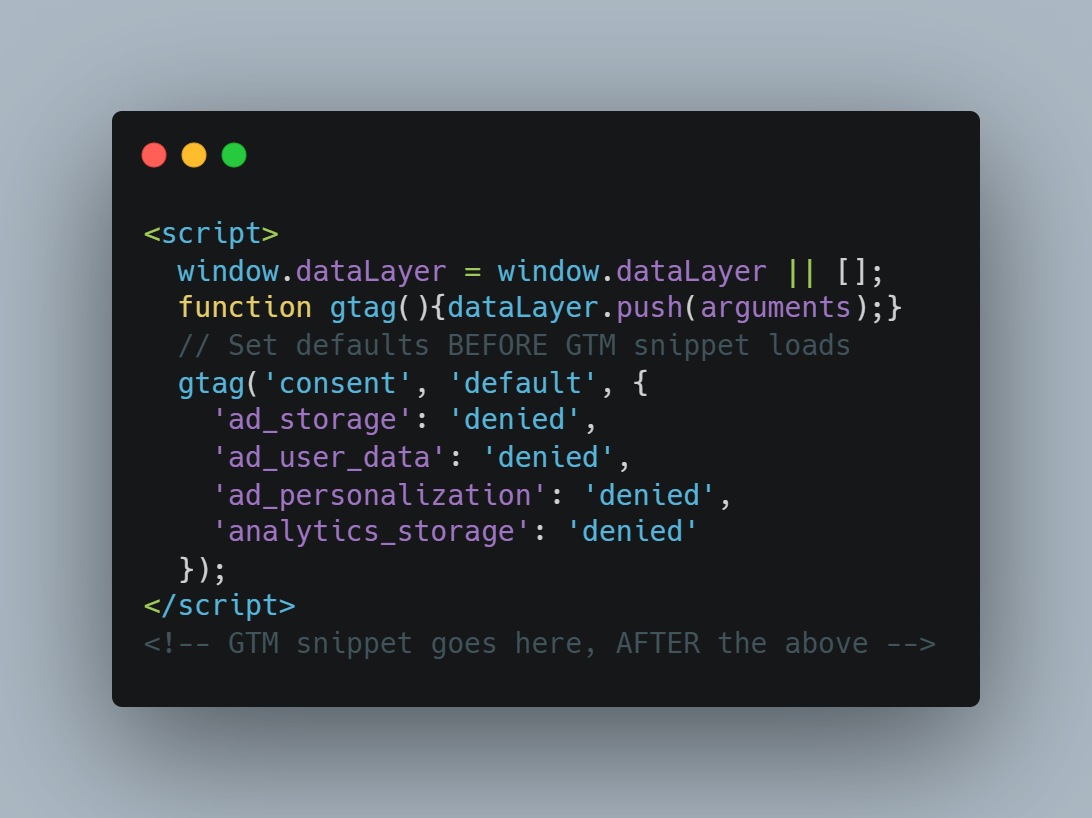
The single most important rule in the entire implementation: the consent default must be set before the GTM snippet or gtag.js loads. Not after. Not simultaneously. Before. If you set consent defaults after your GTM container fires, some tags may already have fired without any consent state applied — which defeats the purpose entirely.
Here's what the correct default setup looks like with gtag.js, as specified in Google's official developer documentation:
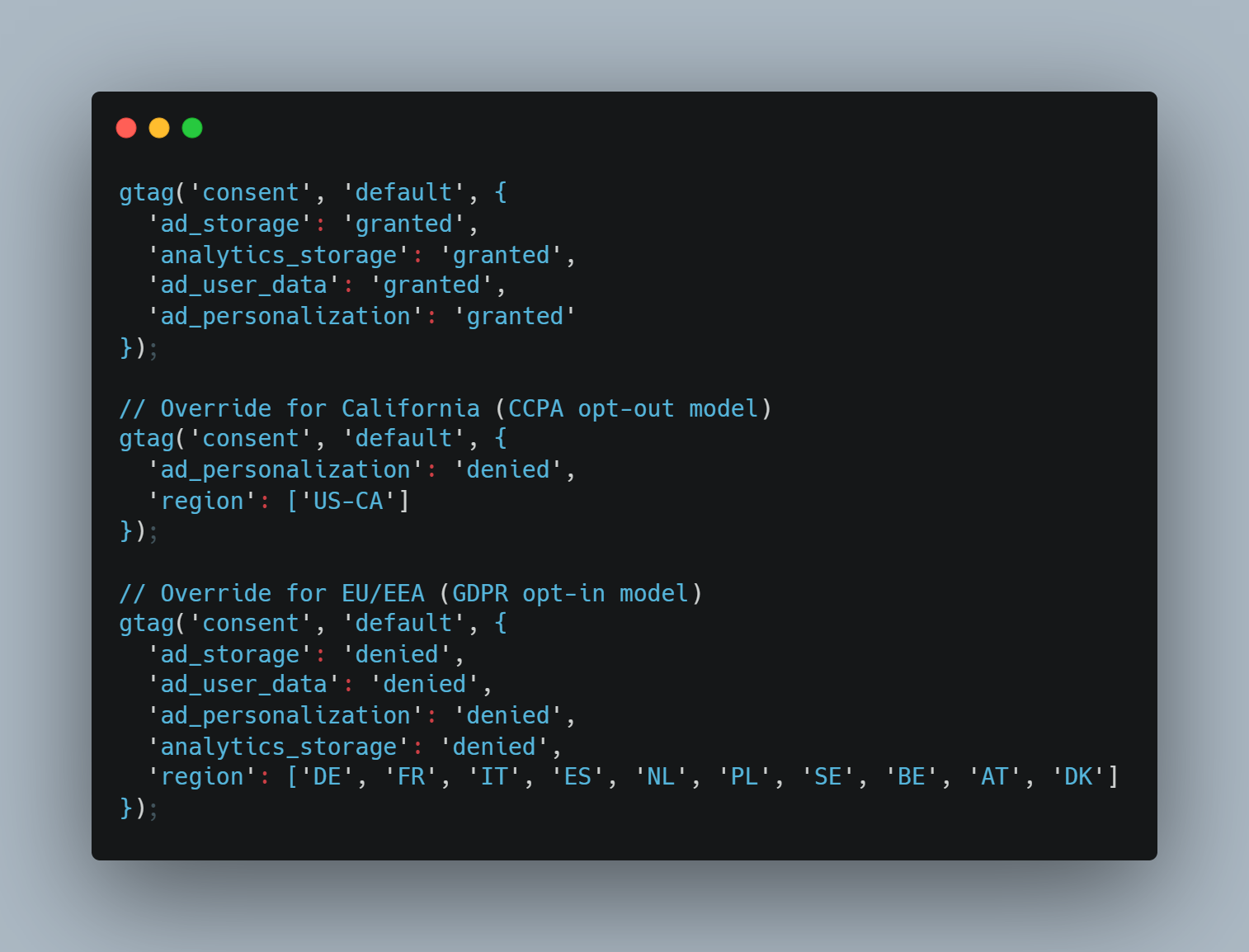
For US sites, you'll likely want to add region-based settings so you're not applying unnecessarily strict defaults to visitors from states with no active consent requirements. Region-based defaults use ISO country and subdivision codes — for California specifically, that's US-CA. For EU traffic you'd add the relevant country codes separately. A practical setup for a US site that also has some European traffic might look like this:
One additional parameter worth adding alongside your defaults is wait_for_update. Setting wait_for_update: 500 gives your CMP up to 500 milliseconds to push the user's actual consent state before Google tags make their first request — which prevents a race condition where tags fire before the CMP has had time to read the stored consent cookie on return visits.
Configuring Consent Mode in Google Tag Manager
In GTM, the implementation has three moving parts: enabling the consent overview, setting the default consent state via a tag, and configuring built-in consent checks on your Google tags.
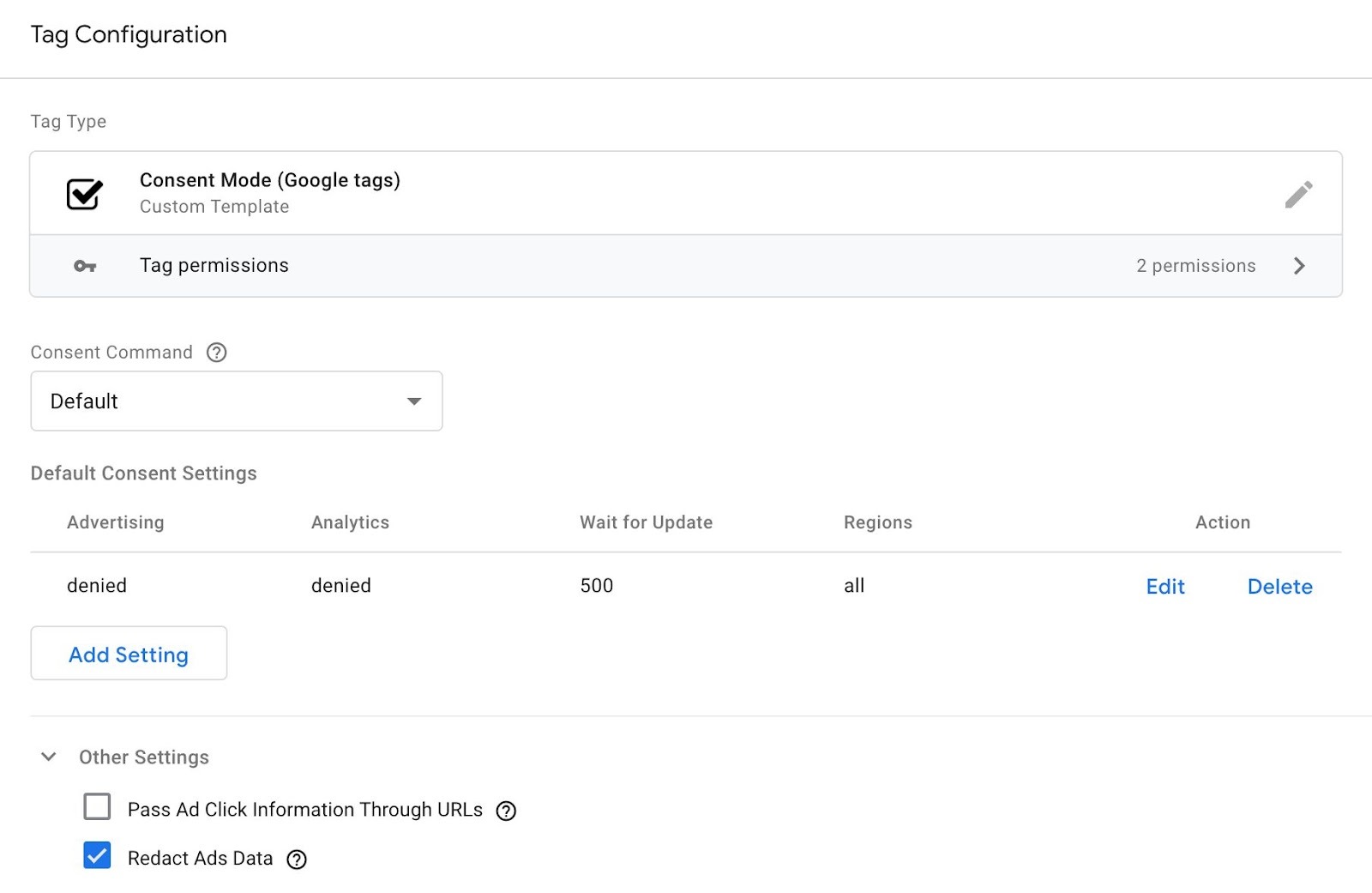
Step 1: Enable consent overview in your container. Go to Admin → Container Settings → check "Enable consent overview." This activates the consent column in your Tags view so you can see at a glance which tags have consent checks applied.
Step 2: Create a Consent Initialization tag. This tag fires the default consent state. The recommended approach is using Simo Ahava's Consent Mode template from the GTM Community Template Gallery. This template uses GTM's native Sandbox APIs — specifically setDefaultConsentState and updateConsentState — which process consent updates immediately after the current event finishes, before any other tags triggered by that same event have a chance to fire.
The trigger for this tag must be Consent Initialization — All Pages. This is a special trigger type that fires before any other triggers, including Page View. If you use a standard All Pages trigger instead, you've already lost the race.
Step 3: Verify built-in consent checks on Google tags. Google Ads Conversion Tracking, Google Ads Remarketing, GA4 Configuration, and Floodlight tags all have built-in consent checks — meaning they automatically adapt their behavior based on the consent state without you needing to add additional trigger conditions. GA4 and Google Ads tags have built-in consent checks only for analytics_storage and ad_storage — ad_user_data and ad_personalization are handled differently, as URL flags that get added automatically to outgoing requests rather than as tag-level blocks.
For non-Google tags — things like Meta Pixel, LinkedIn Insight Tag, or custom conversion scripts — you'll need to add consent-based trigger conditions manually, since they don't have built-in checks. The standard approach is creating a Custom Event trigger that fires when your CMP pushes a consent granted event to the dataLayer, and using that as the firing trigger for those tags.
Step 4: Handle the consent update. When a user interacts with your banner and grants or denies consent, your CMP needs to push an update to the dataLayer. An important nuance here: if a user grants consent on the same page where they were tracked with denied consent under Advanced Mode, you do NOT need to resend those hits — Google automatically reprocesses cookieless pings from that session with the newly granted status.
Implementing Consent Mode directly with gtag.js
If you're not using GTM and are implementing Consent Mode directly through gtag.js — common in headless setups, SPAs, or when a developer has direct control over the HTML — the structure is the same, but you're managing everything in code rather than through the GTM interface.
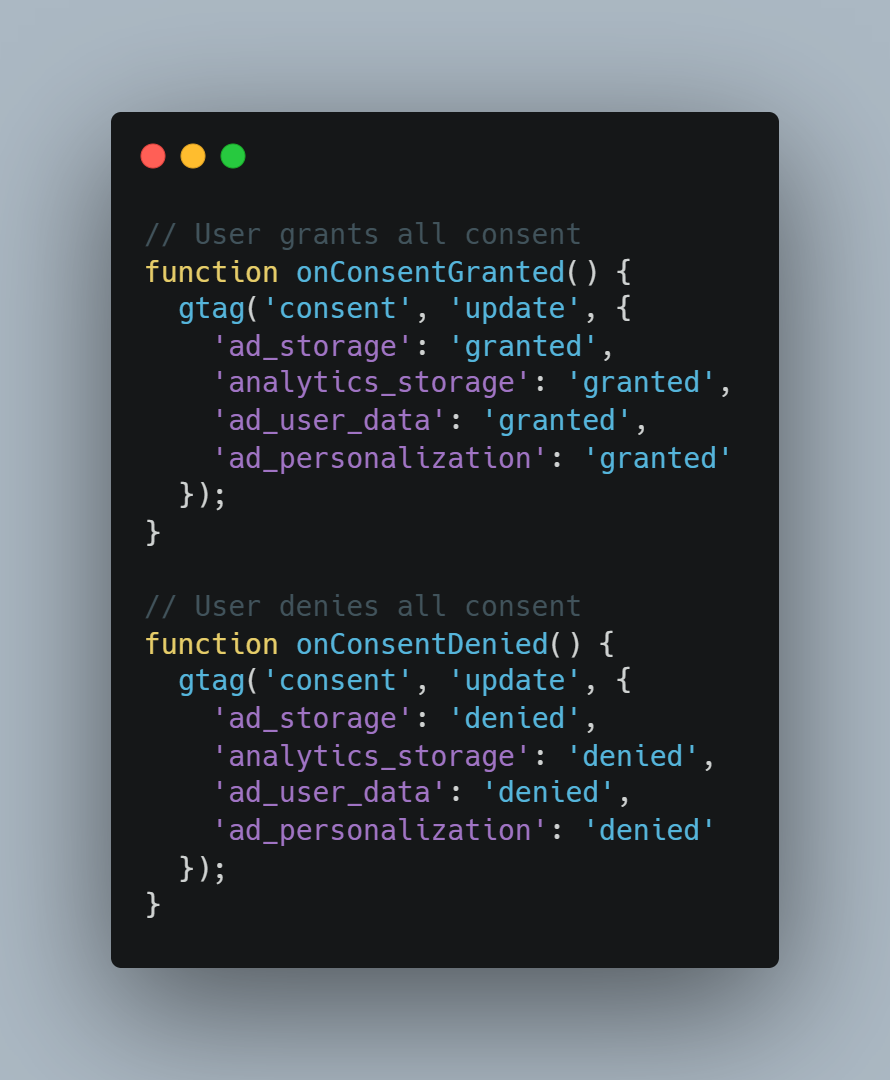
The default setup shown above is the starting point. The update call, fired when a user interacts with the consent banner, looks like this:
For React, Next.js, or Gatsby applications, the timing challenge is real. Framework-based apps don't load scripts the same way vanilla HTML does — the component lifecycle can cause the consent default to fire after the GTM container has already initialized, breaking the sequencing requirement. The solution is to push the consent default directly into the dataLayer array before the GTM script tag loads, treating it as a pre-initialization push rather than a gtag() call.
Two additional flags worth enabling alongside your gtag defaults, especially for Google Ads accounts. First, url_passthrough: true — this appends click identifiers to URLs when ad_storage is denied, allowing conversion attribution to work across page navigations without cookies. Second, ads_data_redaction: true — this strips ad click identifiers from requests when ad_storage is denied, giving you an extra layer of privacy protection on top of the consent signals. Both are recommended defaults for US advertisers running Google Ads, regardless of consent rate, as they ensure attribution continuity without compromising the consent signal integrity.
Working with consent management platforms (CMPs)
A consent management platform is what sits between your visitor and your Google tags — it's what actually collects, stores, and communicates consent choices. The technical side of Consent Mode v2 only works correctly if the CMP is sending the right signals in the right format at the right time. Getting this wrong at the CMP level will undermine everything you've set up in GTM, regardless of how clean your tag configuration is.
When to use a Google certified CMP
For US-only sites, a Google-certified CMP is not legally required. There's no federal law that mandates one, and state frameworks like CCPA don't specify which tools you must use to manage consent. You can implement Google Consent Mode v2 manually — setting defaults yourself and updating consent state through your own banner logic — and it will work perfectly fine technically.
That said, there are real practical reasons to go with a certified platform anyway, particularly as your site grows or as you add states to your compliance scope.
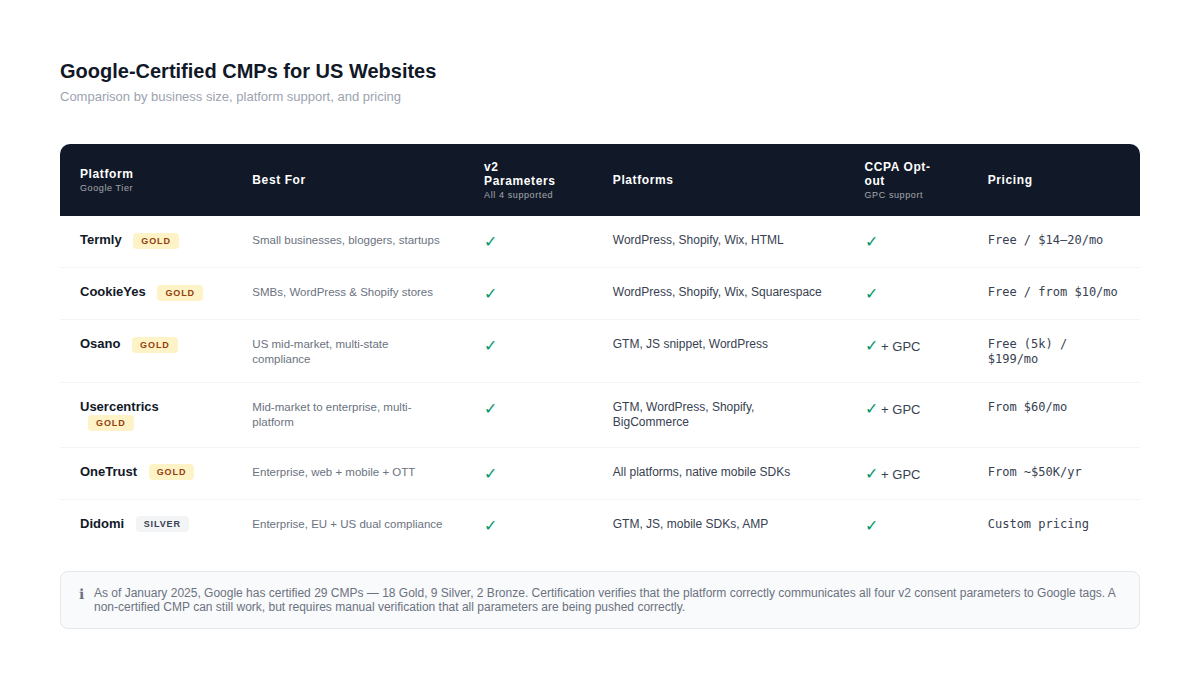
As of January 2025, there are 29 Google-certified CMPs — 18 with Gold tier, 9 with Silver, and 2 with Bronze. Google evaluates and certifies these partners against objective criteria including customer support and ease of technical integration, classified into those three tiers. The certification means the platform has been verified to correctly communicate all four v2 consent parameters to Google's tags — which is the part that tends to break in DIY implementations.
The clearest case for using a certified CMP: if you have any EU traffic at all. Starting March 2024, Google mandated the use of Consent Mode to access measurement, ad personalization, and remarketing features for users in the European Economic Area and the UK. If your Google Ads campaigns run internationally or your organic traffic has a European component, you're already in scope — and a certified CMP handles the EU requirements automatically without you needing to manage separate implementation logic for different regions.
The other case: if your site runs on WordPress or Shopify and you don't have a dedicated developer maintaining your tag setup. Certified CMPs offer native plugins and apps for both platforms that handle the full consent initialization, dataLayer push, and update flow out of the box — typically in under an hour of setup time.
Common CMP integration patterns for US sites
The US market has a few CMP providers that come up consistently depending on company size and technical context.
For small to mid-size US businesses on WordPress or Shopify, Termly and CookieYes are the most common starting points. Termly is a Google Gold CMP partner built for small websites, bloggers, and startups that want straightforward cookie compliance, with a free plan and paid tiers from $14–20/month. CookieYes integrates with Google Consent Mode v2, IAB TCF v2.2, and popular CMS platforms like WordPress, Shopify, and Wix, making setup straightforward for both technical and non-technical users. Both handle the consent initialization timing correctly and push updates to the dataLayer without custom code.
For mid-market US companies, Osano is a strong fit — particularly because it was built with the US privacy landscape in mind rather than GDPR-first. Osano automatically detects where a visitor is located and delivers the corresponding banner — so visitors from opt-out jurisdictions like California see a different experience than visitors from states with no active consent requirements. It also integrates with GTM for conditional tag triggering and supports Google Consent Mode v2. The free plan caps at 5,000 monthly visitors; paid tiers start at $199/month. Notably, Osano offers a "No Fines, No Penalties" guarantee — covering regulatory fines up to $200,000 — which is a differentiator worth noting if your legal team is involved in the CMP decision.
For enterprise US accounts, OneTrust and Usercentrics are the dominant options. Usercentrics integrates with Google AdSense, Ad Manager, AdMob, Google Tag Manager, Google Consent Mode, and GA4, with support for WordPress, Shopify, BigCommerce, and PrestaShop. OneTrust covers consent across web, mobile, OTT, and connected TV — relevant if you're running Google Ads across multiple channels. Most OneTrust enterprise plans start around $50,000/year, but the cost scales based on integrations and volume.
One integration pattern that trips up a lot of US teams: using a CMP that handles CCPA opt-out correctly in the banner UI, but not wiring the opt-out signal to ad_personalization: denied in the Consent Mode update. A user clicking "Do Not Sell or Share My Personal Information" needs to trigger a Consent Mode update — not just a visual change on the page. Under CCPA, consumers must be given the option to opt out of the sale or sharing of their data, and companies must provide a clear and accessible way to exercise those rights. If that opt-out isn't reflected in your Consent Mode parameters, you have a gap between your stated privacy policy and your actual data flows — which is exactly the kind of thing California's AG and the CPPA look for in enforcement actions.
The practical test: after configuring your CMP, open the browser console on your site, trigger a consent denial, and check the dataLayer for a consent update event with ad_personalization: denied and ad_user_data: denied. If those values aren't updating on opt-out, the integration is incomplete regardless of how the banner looks on the surface.
Impact on Google Ads bidding, audiences and reporting
This is the section most Google Ads managers care about most — and where the gap between "technically implemented" and "working correctly" shows up most clearly in your numbers. Consent Mode v2 changes what data Google receives, which in turn affects how Smart Bidding operates, what your audience lists look like, and what you actually see in your reports.
Modeled conversions, data loss and performance
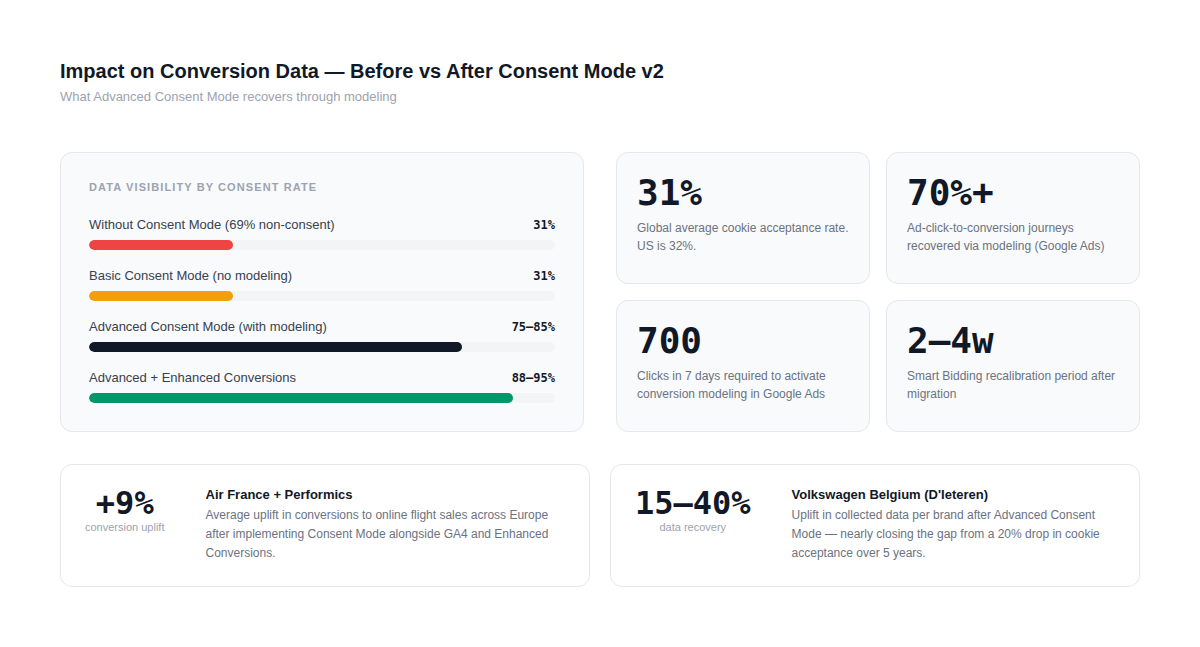
Start with the uncomfortable reality: globally, only 31% of users accept tracking cookies. The US sits at 32%. That means for most Google Ads accounts, roughly two-thirds of your traffic is invisible without some form of modeling. This isn't a Consent Mode problem — it's the baseline you're working with.
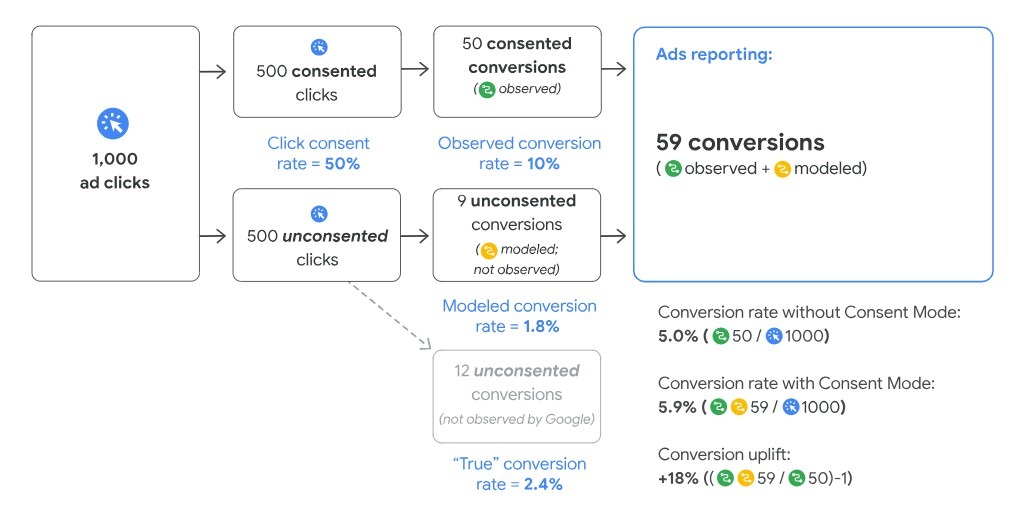
With Advanced Consent Mode properly implemented, Google uses machine learning to fill those gaps. Early results from Google Ads showed that conversion modeling through Consent Mode recovers more than 70% of ad-click-to-conversion journeys lost due to user cookie consent choices. That's not full recovery — but it's enough to keep Smart Bidding strategies meaningfully informed.
The real-world impact of that modeling is documented in two cases worth knowing. Air France, working with their media agency Performics, was facing exactly this problem: tighter privacy regulations in Europe forced them to update their cookie banner, and fewer users were accepting cookies. Rather than accept the measurement gap, they implemented Consent Mode alongside GA4 and Enhanced Conversions. With Consent Mode live, Air France saw an average uplift of 9% in conversions to online flight sales across Europe. Gauthier le Masne de Chermont, Air France's director of e-acquisition, noted that "we're only beginning our privacy journey, and we know there will be further evolution soon — but this important first step gives us confidence in the face of a continually evolving privacy landscape."
A second case comes from Volkswagen Belgium, distributed through D'Ieteren automotive. Their analytics team spotted a troubling pattern: reported campaign performance was declining month over month, while real business results — dealership visits, new car sales — remained flat or positive. The discrepancy pointed to a data gap, not an actual performance problem. They started with one brand to test Advanced Consent Mode implementation. The uplift in data collected was between 15 and 40% depending on the brand — nearly filling the hole left by the 20% drop in cookie acceptance they'd seen over the previous five years. Simon De Pauw, responsible for digital media and analytics at D'Ieteren, described it simply: "Filling our data gaps has helped all our future campaigns. By closing the blind spot we had, we created a view closer to reality, allowing us to make more informed decisions."
For your own account, the modeling math depends heavily on your consent rate and traffic volume. Advanced Consent Mode uses cookieless pings and behavioral modeling to estimate conversions, typically recovering 60–80% of conversion visibility compared to full consent. Below 20% consent rate, modeling accuracy suffers — which is why banner design and language matters. Neutral language like "We use cookies to improve your experience" performs better than aggressive "Accept all cookies now!" popups. Offering granular choices between analytics and advertising consent tends to increase acceptance rates.
One thing to reset expectations on during the transition: Smart Bidding strategies will recalibrate. If you had previously adjusted targets to account for cookie consent changes, you can now go back to setting targets in line with your ROI goals — but expect gradual improvements in reported performance as modeled conversions are recovered over time. Campaigns running Target CPA or Target ROAS may see apparent fluctuations for 2–4 weeks post-implementation as the bidding algorithm adjusts to the new signal volume.
Audience building and remarketing limitations
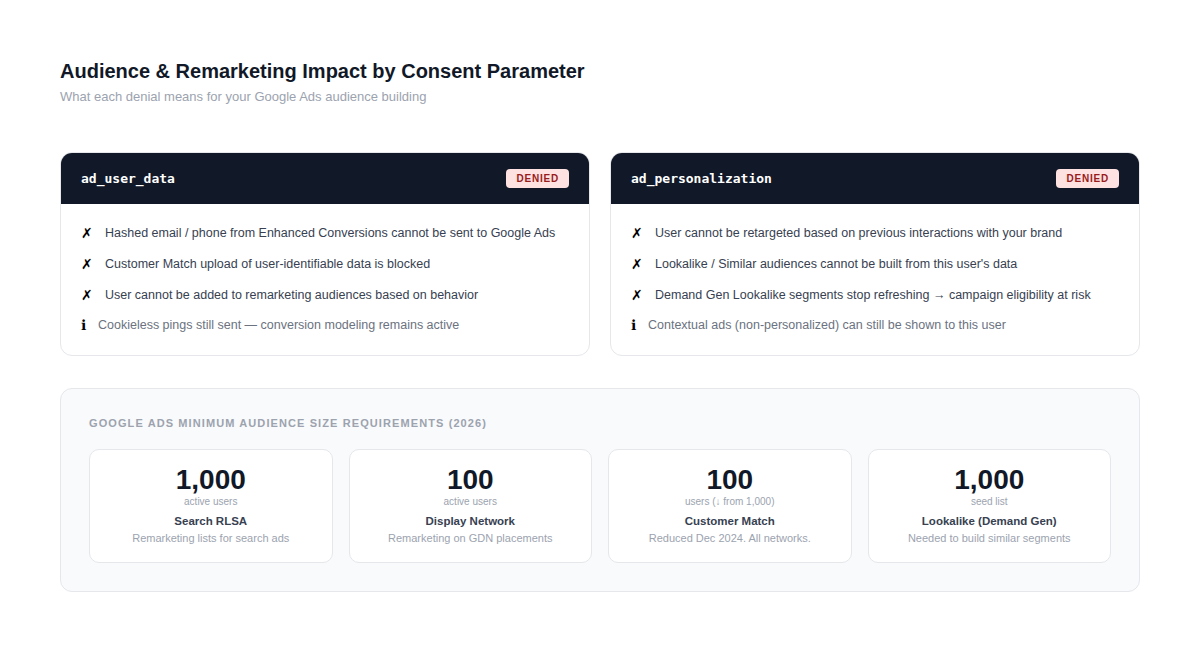
This is where the ad_user_data and ad_personalization parameters have their most direct impact, and where many US advertisers underestimate the consequences of a partial implementation.
Remarketing and Customer Match depend entirely on ad_user_data consent. Users who deny consent cannot be added to remarketing audiences — eliminating the ability to target them with tailored messaging based on previous interactions. When ad_personalization is denied, the user cannot be retargeted based on their past interaction with your brand. You might still be able to show them context-based ads, but not personalized ones based on browsing or purchase behavior.
In practice this means: audience lists stop being populated for non-consenting users and consequently shrink until they're no longer eligible to run due to minimum size requirements. Without Consent Mode v2, Demand Gen campaigns won't be able to run since Lookalike audiences are core to that campaign type.
Current minimum audience thresholds in Google Ads as of 2026: Search Network RLSA requires 1,000 active users; Display Network requires 100 active users; Customer Match now requires only 100 users across all networks, reduced from 1,000 in December 2024; Lookalike segments in Demand Gen campaigns need a 1,000-user seed list. These thresholds become relevant quickly if your consent rate is low and your audience lists stop refreshing with new users.
For Consent Mode v2 for e-commerce tracking specifically, the shopping cart abandonment use case takes a direct hit: you lose the ability to remind customers about the products they left in their cart if those users haven't consented to ad_personalization.
For businesses where retargeting cart abandoners drives significant revenue, this is worth surfacing explicitly in your pre-implementation conversation with stakeholders.
Reading Google Ads and GA4 reports after migration
Post-migration reporting looks different, and if your team isn't prepared for that, it creates unnecessary panic.
In Google Ads, the Conversions, All Conversions, and Conversion Value columns now include modeled conversions for consent gaps in Search, Shopping, Display, and Video campaigns. Modeled conversions are integrated with the same granularity as observed conversions and feed directly into Google's bidding tools. There's no separate "modeled" column — they're blended in, which means your conversion numbers may actually go up post-implementation compared to what you were seeing before, because you're now counting estimated conversions from non-consenting users that were previously invisible.
In GA4, the behavior is slightly different. The consent diagnostics section under Admin → Data Collection shows your consent signal status and consent rate by property. Google has also built troubleshooting features directly into Google Ads — the status column on your conversion summary page indicates whether Consent Mode is properly implemented, and the diagnostics tab shows modeling uplift after initial implementation.
One important comparison to make in your first 30 days post-migration: don't compare month-over-month in isolation. A 15% change in reported conversions might reflect seasonality, not a tracking issue — always compare year-over-year when evaluating the impact of a Consent Mode implementation. Set up a custom date comparison in Google Ads that looks at the same period last year alongside the current period, and use that as your baseline for the first quarter after going live.
Technical troubleshooting
Even a well-planned Consent Mode implementation can have issues that don't surface until you look closely at the data. The good news is that Google has built decent debugging tooling directly into the ecosystem — the bad news is that you have to know what you're looking for, because the signals are subtle.
Using Tag Assistant to test Consent Mode
Tag Assistant is the right starting point for any Consent Mode audit. Open it at tagassistant.google.com, enter your site URL, and connect. Once the session loads, navigate to a page with Google tags and look for the Consent section in the left panel.
What you're checking for: the earliest Consent event in the timeline should fire before any tag fires. If you see a Google tag firing before any consent event appears — or if Tag Assistant shows a warning that says "a tag read consent state before a default was set" — you have a sequencing problem. That warning means exactly what it sounds like: some tag made a decision about data collection before your consent defaults were in place to guide it. This is the most common issue in implementations where the consent initialization code was added after the GTM snippet rather than before it.
In the API Call section for each tag, Tag Assistant shows you the actual consent state values that were active when that tag fired — all four parameters. Check that these match what you expect for the consent scenario you're testing. Run the test twice: once declining all consent on the banner, once accepting all. The parameter values should be different between the two sessions.
Tag Assistant also shows you the gcs and gcd URL parameters appended to outgoing requests. As Simo Ahava explains: "The gcs parameter covers ad_storage and analytics_storage. For the new v2 signals — ad_user_data and ad_personalization — there is an additional URL parameter, gcd, that you need to interpret separately." Both should be present and correctly reflecting your consent state. If gcd is missing entirely, your implementation is likely v1-only — the new parameters aren't being communicated.
Debugging consent signals in GTM and dev tools
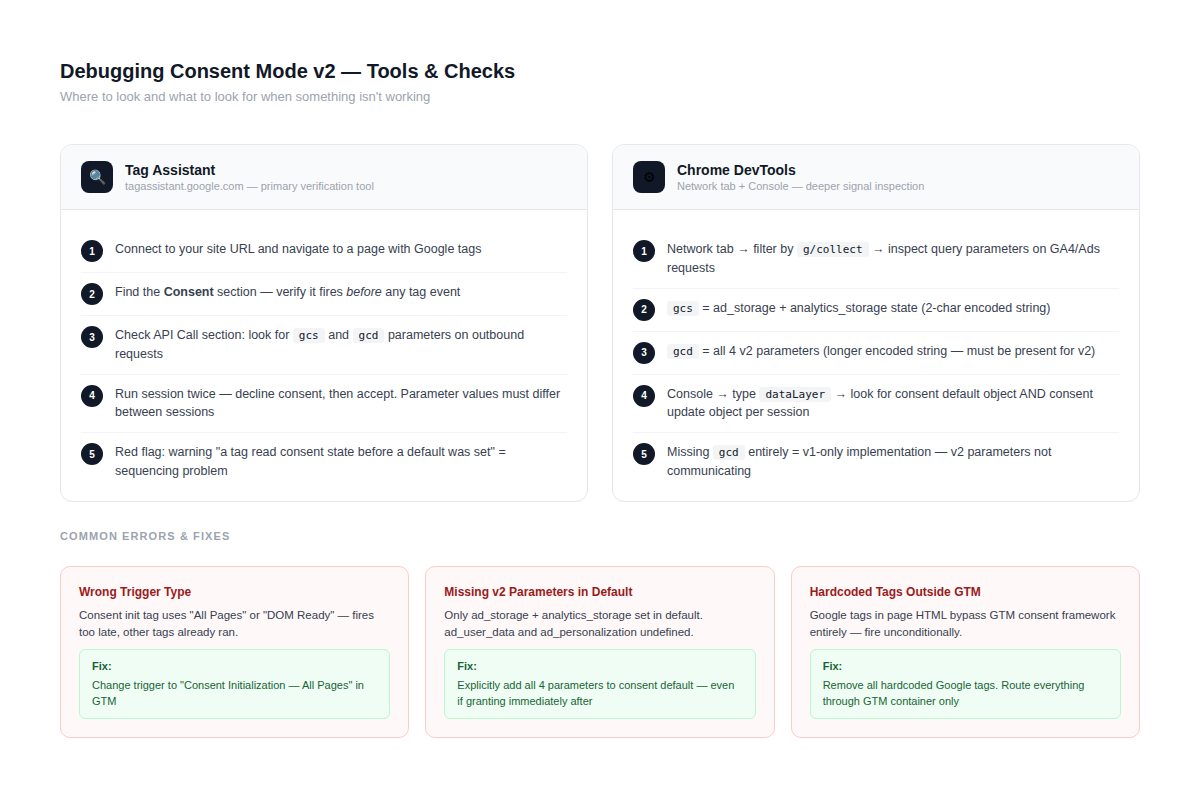
Tag Assistant is great for a high-level view. For deeper debugging, the browser's Network tab and the dataLayer inspector give you more granular information.
In Chrome DevTools, open the Network tab and filter by collect or g/collect. These are the requests sent by GA4 and Google Ads tags. Click into individual requests and look at the query parameters — gcs shows the ad_storage and analytics_storage state encoded as a two-character string, and gcd shows the v2 parameters in a longer encoded format. If you're seeing requests without these parameters at all, your consent defaults aren't being picked up by the tags — which usually means either the initialization tag isn't firing on the Consent Initialization trigger, or the tags are hardcoded outside of GTM and bypassing the consent framework entirely.
That last scenario — tags hardcoded in the page HTML alongside GTM — is one of the most common causes of broken Consent Mode that CookieFirst's support team flags repeatedly. When someone has both a gtag.js script in the page head and GTM managing consent defaults, the hardcoded tag may fire before GTM has had any chance to initialize. The fix is to remove hardcoded Google tags from the page and route everything through GTM.
For a more visual debugging experience, David Vallejo's Analytics Debugger browser extension is worth installing. It shows GA4 and Google Ads hits in real time as you browse your site, including consent state alongside each hit — which makes it much faster to spot inconsistencies between what your banner shows visually and what's actually being sent to Google.
For the dataLayer side, open the browser console and type dataLayer. Expand the array and look for objects with event: 'consent'. You should see at minimum two entries per session: the default consent state pushed during initialization, and an update pushed after the user interacts with the banner. If you only see one — or none — the CMP isn't completing the handoff correctly.
Common configuration mistakes and how to fix them
A few issues come up consistently enough to be worth calling out explicitly.
Wrong trigger type on the consent initialization tag. This tag must fire on the Consent Initialization — All Pages trigger, not All Pages or DOM Ready. Using the wrong trigger means consent defaults are set too late in the page load sequence — other tags have already made their first request by then. Fix: open the tag in GTM, check the triggering section, and replace any non-Consent-Initialization trigger.
Missing ad_user_data and ad_personalization in the default. When teams migrate from v1 to v2, they often update their consent update calls but forget to add the two new parameters to the default as well. This means users arrive with ad_user_data and ad_personalization in an undefined state — which Google treats differently from an explicit denied state. As MeasureMinds documented in their November 2024 audit of CMP template implementations: several GTM Community templates had exactly this issue when v2 launched, where the template correctly set ad_storage and analytics_storage defaults but silently omitted the new parameters. Fix: explicitly set all four parameters to denied in your default call, even if you intend to immediately update them for consenting users.
CMP sending consent signals too slowly. The wait_for_update value you set tells Google's tags how long to hold before making their first request. If your CMP takes 800ms to initialize and you've set wait_for_update to 500, there's a 300ms window where tags may fire before the real consent state is known. Fix: measure your CMP's actual initialization time using the Network tab, and set wait_for_update to a value that comfortably covers it — typically 500–1000ms is the right range.
Consent mode active on GTM but bypassed by non-GTM tags. If you have Google Ads conversion tags or GA4 tags loaded via a separate script manager, a WordPress plugin, or hardcoded in your theme, those tags won't respect the consent state managed by GTM. Fix: audit every method by which Google tags load on your site, and consolidate everything through a single consent-aware container. Brian Clifton's Verified Data auditing approach is useful here — it maps every outbound request from your site and flags any that contain Google collection endpoints outside your expected tag configuration.
Region-based defaults not applying correctly. If you've set up region-specific consent defaults using ISO codes and they don't seem to be working — California visitors getting the same treatment as Texas visitors, for example — the most common cause is that the consent default code is loading after the page location has already been evaluated. The consent default must fire before any pageview tag, which means before the main GTM container initializes. Check the order of scripts in your page head and confirm the consent initialization block is the first script that runs.
Implementation checklists and governance
Getting Consent Mode live is one thing. Keeping it working correctly as your site evolves is a different challenge entirely — and one that most teams underestimate. Websites change constantly: new landing pages, A/B tests, redesigned checkout flows, new GTM tags added by the marketing team, CMS updates that silently alter script load order. Any of these can break a Consent Mode implementation that was working perfectly the week before.
Pre-launch Consent Mode v2 checklist
Before you push the implementation live, run through these verification steps. Each one corresponds to a failure mode that shows up regularly in post-launch troubleshooting.
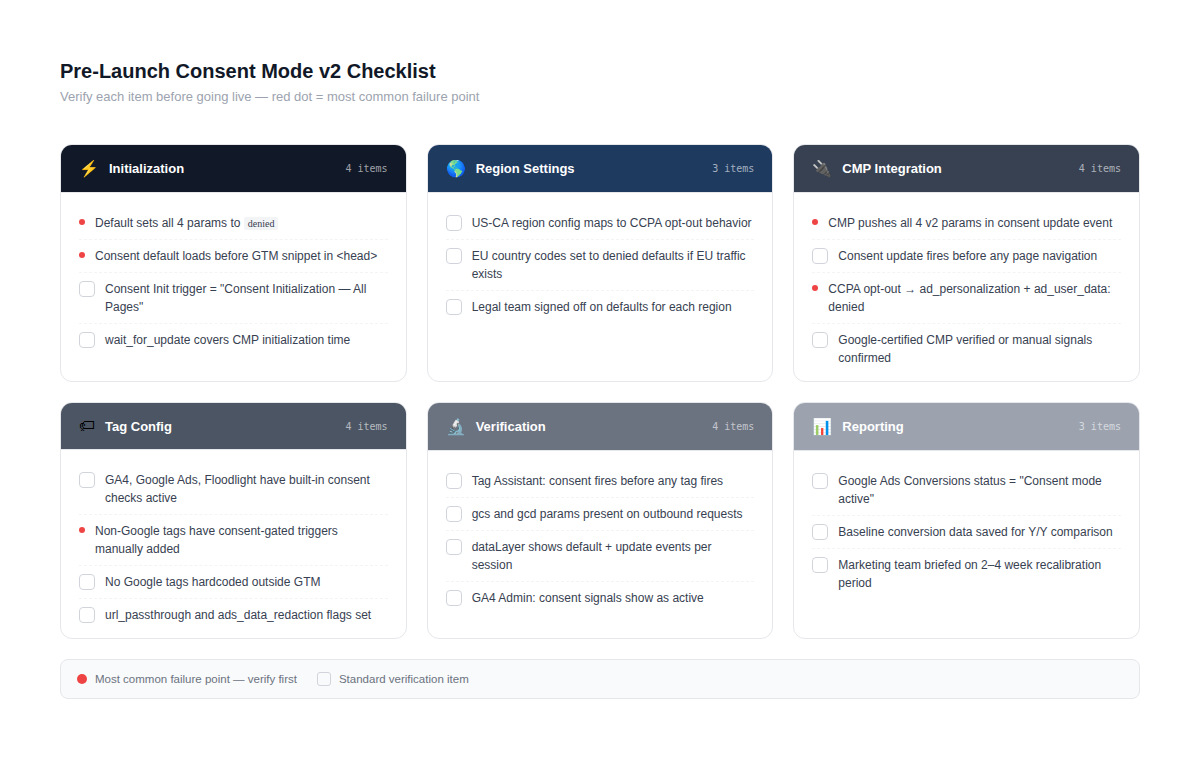
Consent initialization:
-
Default consent state sets all four parameters explicitly — ad_storage, analytics_storage, ad_user_data, ad_personalization — all to denied.
-
Consent initialization code appears in the page source before the GTM snippet or gtag.js.
-
Consent Initialization — All Pages trigger is used for the initialization tag in GTM, not All Pages or DOM Ready.
-
wait_for_update value is set and matches or exceeds your CMP's actual initialization time.
Region configuration:
-
Region-based defaults are correctly mapped to ISO subdivision codes for states where different rules apply (US-CA for California, EU country codes for European traffic if relevant).
-
Default consent states for each region match the legal requirements your legal team has signed off on — not more restrictive than necessary, not less.
CMP integration:
-
CMP pushes all four v2 parameters in its consent update event — not just ad_storage and analytics_storage.
-
Consent update event fires in the dataLayer immediately after user interaction, before any page navigation.
-
Opt-out of targeted advertising (CCPA "Do Not Sell or Share") maps to ad_personalization: denied and ad_user_data: denied in the consent update.
Tag configuration:
-
All Google tags (GA4, Google Ads conversion, Google Ads remarketing) have built-in consent checks active.
-
Non-Google tags (Meta Pixel, LinkedIn, etc.) have consent-gated triggers rather than unconditional firing.
-
No Google tags are hardcoded outside of GTM that could fire without the consent framework.
-
url_passthrough and ads_data_redaction flags are set.
Verification:
-
Tag Assistant session confirms consent defaults fire before any tag fires.
-
Tag Assistant shows correct gcs and gcd parameter values in both declined and accepted consent scenarios.
-
dataLayer in browser console shows both a consent default and a consent update event per session.
-
GA4 Admin → Data Streams shows "ads measurement consent signals active" and "ads personalization consent signals active."
-
Google Ads → Goals → Conversions → Diagnostics tab shows Consent Mode as active and modeling as eligible.
Post-launch monitoring and alerts
The most common mistake after launch is treating Consent Mode as a set-and-forget implementation. It isn't. Gunnar Griese, who documented one of the most detailed technical analyses of Consent Mode v2 behavior, makes this point directly: the complexity of the implementation means that changes elsewhere on the site — a CMS update, a new GTM tag, a CMP version upgrade — can quietly break consent signals without any obvious error appearing in your dashboards.
Set up the following monitoring within the first week after launch, then keep it running permanently.
In GA4, create a custom Exploration report that tracks consent rate over time — the percentage of sessions where analytics_storage was granted versus denied. Segment it by country or region if you have meaningful traffic from multiple jurisdictions. A sudden drop in consent rate without a corresponding change in your banner is a signal that something in the consent flow has broken. The same applies to an unexpected spike — that can indicate consent defaults have accidentally been set to granted somewhere.
In Google Ads, bookmark your Conversions → Summary page and check the Consent Mode status column weekly for the first month. The status should show "Consent mode active" and, if your volume qualifies, "Modeling active." If either reverts to "Not detected," something has changed in your implementation. Set a calendar reminder if automated monitoring isn't available.
For teams using a CMP with its own dashboard — Osano, OneTrust, Termly — most platforms provide consent rate reporting by page, device type, and region. Check that California traffic is showing the expected opt-out behavior and that the consent rate for that region makes sense relative to your banner design. Europcar, working with Didomi, ran a systematic optimization of their consent banner text and layout and achieved an 18% improvement in consent rate alongside a 12% increase in collected events — a useful benchmark for what's achievable through banner optimization alone, separate from any implementation changes.
Change management for future site updates
This is the governance piece that determines whether your Consent Mode implementation stays healthy over time or gradually drifts into a broken state.
The core problem is that the people making changes to your site — developers, marketers, CMS administrators — typically aren't the same people who built and maintain the Consent Mode setup. Without a clear handoff protocol, it's easy for someone to add a new GTM tag that fires unconditionally, or to push a site update that accidentally moves the GTM snippet above the consent initialization script, or to switch CMP versions without verifying that the new version still pushes all four v2 parameters correctly.
A few governance practices that prevent these issues:
Tag request process. Any new tag added to GTM should go through a brief review that asks: does this tag collect user data, and if so, is it configured with a consent-gated trigger? Fifteen minutes of review per tag addition prevents hours of debugging later. Document the consent type each tag requires — analytics_storage, ad_storage, or both — in the GTM tag description field so it's visible to anyone reviewing the container.
CMP update protocol. When your CMP provider releases an update, don't apply it directly to production. Test it in a staging environment first and verify that all four consent parameters still appear correctly in the dataLayer after update. CMP updates are one of the most common causes of silent Consent Mode breakage — the banner looks identical, the user experience is unchanged, but the dataLayer push is missing a parameter.
Site deployment checklist. Add a Consent Mode verification step to your deployment process. It doesn't need to be complex — the minimum viable check is opening the browser console on the deployed version, triggering a consent denial, and confirming that the dataLayer shows a consent update event with all four parameters set to denied. This takes two minutes and catches the most common deployment-related breakage.
Quarterly audit cadence. Schedule a Consent Mode health check once per quarter. Pull the GA4 consent rate data for the period, compare it to the previous quarter, check the Google Ads diagnostics tab, and run a Tag Assistant session on your highest-traffic landing pages. This catches slow drift — issues that don't break anything overnight but gradually degrade your data quality over months.
As US state privacy laws continue to expand — Texas, Oregon, Montana, and Florida all enacted new frameworks in 2023–2024, with more states active in 2025 — the region-based consent defaults in your implementation may need updating as your legal team reassesses which states require what behavior. Build that into your quarterly audit: a standing question of "have any new US state laws gone into effect that require us to update our region configurations?"
Advanced setups and edge cases
Most Consent Mode guides stop at standard GTM-on-a-traditional-website implementations. But a meaningful portion of US Google Ads accounts run on more complex setups — server-side containers, React and Next.js apps, cross-domain flows, or Enhanced Conversions layered on top of consent signals. Each of these adds complexity that's worth addressing directly.
Server-side tagging and Consent Mode
Server-side Google Tag Manager has become increasingly common among US advertisers looking to reduce browser-side JavaScript load, improve data quality, and get ahead of third-party cookie deprecation. The Consent Mode integration with server-side GTM works, but with an important architectural constraint: server-side GTM has no built-in Consent Mode of its own.
The way it actually works: consent is always managed in the web (browser-side) container, and the consent state is passed from the web container to the server container as part of each event's payload. The server container then uses that consent state to decide which tags to fire. As Stape's documentation puts it clearly: "Server GTM doesn't yet have a Consent Mode similar to web GTM. If you want to implement Consent Mode for the server Google Tag Manager, it's necessary to implement Consent Mode in web GTM first."
In practical terms, this means the consent initialization you set up in your web container — with the Consent Initialization trigger and all four v2 parameters — remains the source of truth. The Google Tag in your web container passes consent states to the server container automatically via the gcs and gcd parameters on outbound requests. For Google-native tags like GA4 and Google Ads in the server container, those parameters are read and honored automatically. For non-Google tags on the server side — like server-side Meta or TikTok tags — you need to manually configure blocking triggers that check the consent state parameters from the incoming event data before firing.
One specific behavior from Google's official server-side documentation worth knowing: when ad_storage is denied, Google Ads Remarketing tags in the server container block HTTP requests and cookie use entirely — URL passthrough is not supported server-side the way it is client-side. This means your ad click attribution flow for denied users in a server-side setup needs to rely on modeling rather than URL passthrough, making the Advanced Consent Mode configuration even more important for maintaining modeling quality.
The combination of server-side tagging and Consent Mode v2 does provide a meaningful practical benefit beyond compliance: server-side tags are less visible to ad blockers, which means the cookieless pings that feed Google's conversion modeling are more likely to reach Google's servers even when users have ad blockers installed. This improves modeling accuracy without any additional configuration.
Hybrid apps, SPAs and cross-domain flows
Single-page applications and hybrid setups (a marketing site on one domain, a checkout or app on another) introduce two distinct Consent Mode challenges: the page lifecycle problem and the cross-domain state problem.
The page lifecycle issue is the one developers hit most often in React, Next.js, and similar frameworks. In a standard HTML page, the consent default fires before the GTM snippet in the document head. In a Next.js app, the component lifecycle means scripts mount in an order that's controlled by the framework, not by document order — and @next/third-parties/google, Next.js's own Google Analytics integration package, doesn't support dynamic Consent Mode properly as of early 2025. As one thread on the Vercel GitHub confirmed: "there's no obvious way to handle consent correctly" with that package, and the recommended approach remains a custom implementation that pushes consent defaults directly into window.dataLayer before GTM initializes, using Next.js's beforeInteractive script strategy to guarantee load order.
For SPAs more broadly, there's a page view tracking nuance that intersects with consent. In a traditional site, each page load triggers a new consent state evaluation. In an SPA, navigation happens without full page loads, so consent state from the initial page load persists across route changes. This is generally correct behavior — you don't want to re-prompt users on every route change — but it means your consent update logic needs to fire correctly on the initial load, because it won't get another chance until the user reloads or opens a new tab. The fix is straightforward: listen to route change events in your framework and send a gtag('event', 'page_view') call on each navigation, while keeping the consent state from the initial load. This ensures GA4 sees each SPA route change as a page view without resetting consent.
For cross-domain tracking — a common setup for US ecommerce where the marketing site is on one domain and checkout is on Shopify or another platform — consent state does not carry across domains automatically. Each domain has its own GTM container and its own consent initialization. If a user grants consent on your marketing site and then navigates to your checkout subdomain or separate checkout domain, the checkout domain starts with its default consent state, which should be denied. This is technically correct behavior, but it means you need Consent Mode properly configured on the checkout domain independently — not just on the main site. A practical approach for US ecommerce teams: ensure your Shopify or checkout platform has a separate consent initialization that reads any consent cookie set on the referring domain and uses it to pre-populate the consent update on page load.
Google Ads enhanced conversions and consent
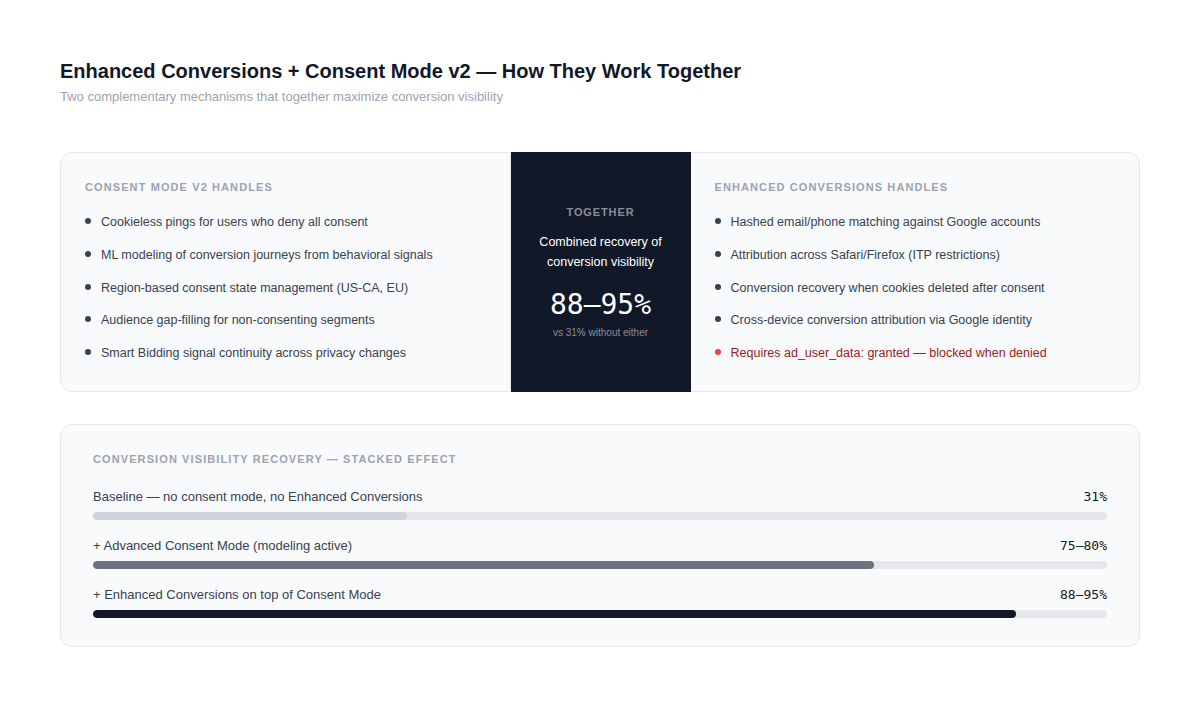
Enhanced Conversions and Consent Mode solve different problems and work together — but the interaction between them is frequently misunderstood, particularly around what happens when ad_user_data is denied.
Enhanced Conversions work by hashing user-provided data (email addresses, phone numbers, names) on the client side and sending those hashed values to Google, where they're matched against logged-in Google accounts to improve conversion attribution. The mechanism is particularly valuable for US advertisers because it improves conversion matching even in Safari and Firefox, where third-party cookie restrictions already apply regardless of Consent Mode.
The consent dependency is specific: Enhanced Conversions require ad_user_data to be granted. If a user has denied ad_user_data, Enhanced Conversions data for that user cannot be sent to Google. As Simo Ahava noted in his analysis of v2, collecting things like order IDs or hashed emails from users who denied consent puts you "in many flavors of jeopardy: legal, if you do not have a legal basis to collect this data; ethical, if you assume that the user is okay with you collecting data even if they denied consent; brand image, if it reaches the public that you are collecting data from users who denied consent."
In practical reporting terms: advertisers who implement both Enhanced Conversions and Advanced Consent Mode see the best conversion visibility, combining two complementary recovery mechanisms. Dataslayer's analysis puts the combined uplift at 15–22% additional recovery on top of what modeling alone provides — Enhanced Conversions handles the cases where cookies were deleted or blocked after consent was granted, while Consent Mode modeling handles users who never consented.
For US advertisers running Performance Max campaigns specifically, the interaction matters at the audience level too. PMax relies heavily on audience signals and automated audience expansion. When ad_personalization is denied, those users don't contribute to audience building, which narrows the pool PMax can use for lookalike expansion. Combined with Enhanced Conversions' improved match rate for consenting users, the practical recommendation is: prioritize getting ad_user_data and ad_personalization consent from users who are willing to grant it, through transparent banner language and clear value exchange, rather than defaulting to maximum restriction and hoping modeling fills the gap.
Conclusion
If there's one thing that connects every section of this guide, it's that Consent Mode v2 isn't a compliance checkbox — it's a measurement infrastructure decision. How well you implement it directly determines how much data your Google Ads campaigns have to work with, how accurately Smart Bidding can optimize, and how defensible your data practices are as US privacy enforcement intensifies.
On the regulatory side, the landscape in 2026 looks different from even two years ago. Nineteen states now have active comprehensive privacy laws — Indiana, Kentucky, and Rhode Island joined that list on January 1, 2026. Twelve states require businesses to honor Global Privacy Control signals automatically. State attorneys general are no longer issuing warnings and waiting for correction: California's AG entered a $1.55 million settlement with Healthline Media in July 2025 specifically over an ineffective cookie banner and failure to honor opt-out requests. Tractor Supply Company paid $1.35 million for similar CCPA violations. California, Colorado, and Connecticut ran coordinated investigative sweeps in 2025 targeting companies that claimed to honor GPC while continuing to fire retargeting pixels in the background. The pattern in enforcement is consistent — regulators are looking at the gap between what your banner says and what your tags actually do. Google Consent Mode v2, correctly implemented, closes that gap.
On the performance side, the business case is straightforward. Without Consent Mode, you're flying blind on somewhere between 30% and 70% of your traffic depending on your consent rate. With Advanced Consent Mode and Enhanced Conversions working together, most advertisers recover the majority of that visibility through modeling — not perfectly, but well enough to keep Smart Bidding strategies calibrated and audience lists functional. Air France's 9% conversion uplift and Volkswagen Belgium's 15–40% data recovery aren't outliers — they're what properly implemented consent infrastructure actually delivers.
The implementation itself is not simple. Getting the sequencing right, configuring region-based defaults correctly, choosing and integrating a CMP that actually pushes all four parameters, handling SPAs and server-side containers, monitoring for silent breakage after site changes — each of these has failure modes that aren't obvious until you're looking at degraded data weeks later. That's what this guide is for: not to make it seem easy, but to make it clear.
The teams that get this right in 2026 will have a meaningful advantage over those still running on incomplete or broken tracking. The teams that treat it as a technical afterthought will keep losing measurement signal while their competitors' bidding algorithms get smarter. In an environment where privacy regulation is only going to expand — California's CPPA has hundreds of open investigations, and more states are moving toward active enforcement — building consent infrastructure properly now is substantially cheaper than fixing it under regulatory pressure later.
FAQs
What is Google Consent Mode v2, and how does it work?
Google Consent Mode v2 is a signaling framework that tells Google's tags — GA4, Google Ads, Floodlight — how to behave depending on what a user has consented to. It works through four parameters: ad_storage and analytics_storage (which control cookie access for advertising and analytics), and ad_user_data and ad_personalization (new in v2, which control whether user data can be sent to Google for ads and whether it can be used for personalization). When a user denies consent, tags switch to cookieless mode — sending minimal pings without setting or reading any cookies. Google uses those cookieless pings to model conversions and fill measurement gaps through machine learning. The mechanism only works correctly when your consent management platform is properly wired to Google's Consent API and the consent defaults are set before your GTM snippet or gtag.js loads.
Do I need a CMP to use Google Consent Mode v2 in the US?
No — there's no federal or state law in the US that mandates a specific CMP. You can implement Google Consent Mode v2 manually by writing your own consent initialization code and updating consent state through your own banner logic. That said, using a Google-certified CMP has real practical advantages: it handles the Consent API integration automatically, manages the dataLayer push timing correctly, and typically supports multi-state compliance rules out of the box. For small to mid-size businesses without dedicated developer resources, the time saved by using a platform like Termly, CookieYes, or Osano is usually worth the cost. For enterprise accounts with significant California or multi-state traffic, a platform like OneTrust or Usercentrics provides the audit trail and legal documentation that an in-house implementation typically doesn't.
What is the difference between basic and advanced Google Consent Mode v2?
In Basic Consent Mode, Google tags are blocked from loading entirely until the user makes a consent choice. No data reaches Google while the banner is displayed. In Advanced Consent Mode, tags load immediately and begin sending cookieless pings — minimal requests without cookies or persistent identifiers — as soon as the page loads. Those pings feed Google's conversion modeling, which is what enables data recovery for non-consenting users. The practical difference: Advanced Mode gives you substantially better modeling accuracy and more complete conversion data, because Google has behavioral signals to model from even before consent is resolved. Basic Mode is simpler to implement and easier to explain to a conservative legal team, but you lose all modeling capability for users who decline. For most US Google Ads accounts where performance data quality matters, Advanced Consent Mode is the right choice.
How does Google Consent Mode v2 affect Google Ads conversion tracking?
Consent Mode v2 affects conversion tracking in two ways: directly, by blocking cookie-based conversion attribution for users who deny ad_storage; and indirectly, through modeling, by estimating those lost conversions from cookieless behavioral signals. In Google Ads reporting, modeled conversions are integrated into the standard Conversions and All Conversions columns — there's no separate column that distinguishes them from observed conversions. For Smart Bidding strategies like Target CPA and Target ROAS, modeled conversions feed directly into the bidding algorithm, which means your campaigns continue to optimize even with a significant portion of non-consenting traffic. The new v2 parameters — ad_user_data and ad_personalization — affect Enhanced Conversions and remarketing separately: if ad_user_data is denied, hashed customer data from Enhanced Conversions cannot be sent; if ad_personalization is denied, users cannot be added to remarketing or lookalike audiences regardless of their ad_storage state.
How can I test if Google Consent Mode v2 is implemented correctly?
The fastest verification is Tag Assistant at tagassistant.google.com. Connect it to your site, navigate through a consent interaction — both declining and accepting — and check three things: that the Consent event fires before any Google tag fires, that the gcs and gcd parameters appear on outgoing tag requests, and that the parameter values change correctly between the two consent scenarios. For deeper debugging, open Chrome DevTools, go to the Network tab, filter by g/collect, and inspect the query parameters on individual GA4 or Google Ads requests. In the browser console, type dataLayer and verify you see both a consent default object and a consent update object per session. Finally, in Google Ads, go to Goals → Conversions → Summary and check that the Consent Mode status column shows "Consent mode active." If it shows "Not detected," your implementation isn't reaching Google's systems correctly.


