


How Much Should I Spend On Google Ads in 2026?
Introduction
The most common Google Ads question — "how much should I spend?" — almost always gets the wrong answer. Either a vague "it depends" that helps nobody, or a confident number pulled from somewhere that has nothing to do with your market, your margins, or your conversion rate.
Here's what actually determines the answer: your target cost per acquisition, your industry's CPC, your funnel's conversion rate, and how much data Smart Bidding needs to stop guessing. Everything else is noise.
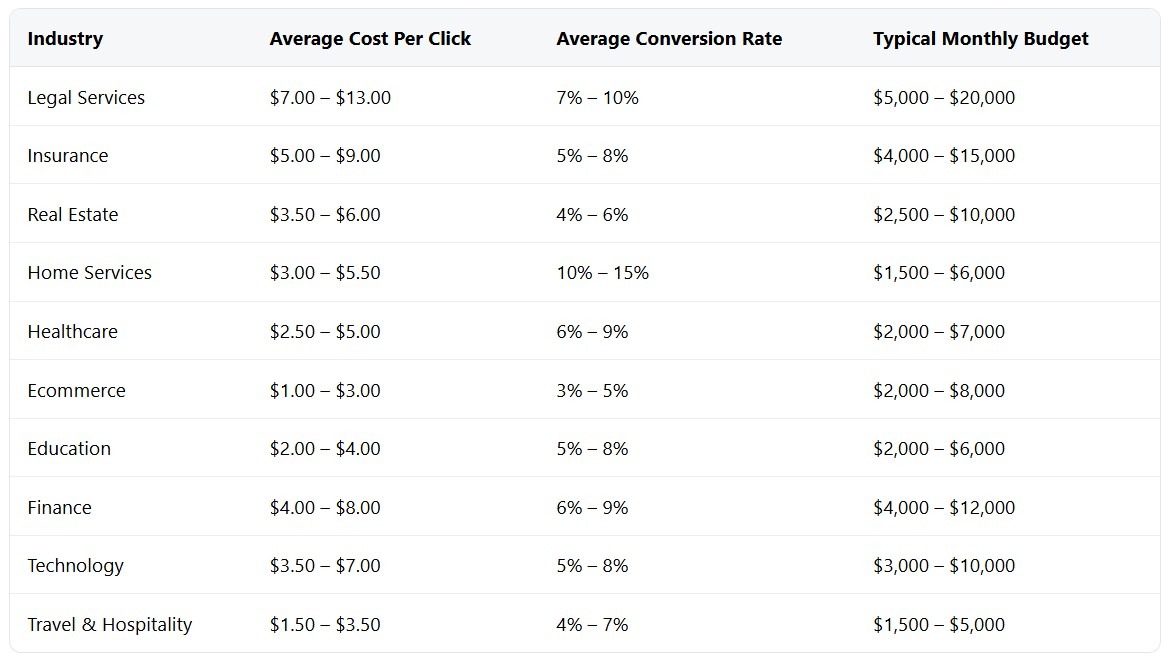
How much should I spend on Google Ads is genuinely one of those questions where the math matters more than the opinion. This guide builds that math from the ground up — with real benchmark data, real formulas, and the logic behind why underfunding campaigns costs more than overfunding them. Spend too little and the algorithm never learns. Spend without a framework and you're just donating to Google's quarterly earnings.
One practical note before the numbers: if you're managing Google Ads from an agency account, the infrastructure matters as much as the budget. YeezyPay offers trusted agency Google Ads accounts that help teams run campaigns without the account suspension risk that comes with standard setups — worth knowing before you build a budget around an account that might get flagged.
What Determines Google Ads Spend
Budget isn't a number you pick. It's a number that falls out of four variables: competition, offer strength, location, and seasonality. Get those wrong and no budget setting saves you.
Market competition and auction dynamics
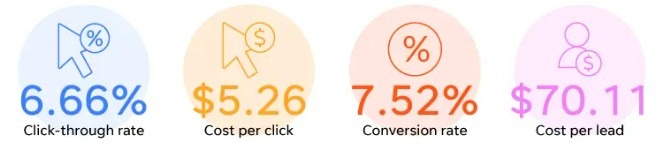
Every Google Ads auction is a real-time bidding war, and the cost of entry varies wildly by industry. Сovering thousands of advertiser accounts, the average CPC across all industries is $5.26. But that average hides a brutal spread. Attorneys and legal services average $8.58 per click. Dentists and home improvement services hit $7.85. Arts and entertainment sits at $1.60.
How much does Google Ads cost per click in 2026 depends almost entirely on who else is bidding in your category. Legal and finance CPCs are high because a single converted lead can be worth thousands of dollars — firms are bidding $15-50 on some keywords because the math still works. The average CPC in legal is $6.75, but that spans from $1.50 for informational queries to $50+ for high-intent terms like "mesothelioma lawyer."
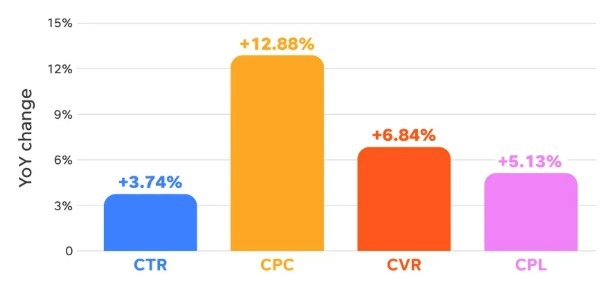
The competitive pressure is also trending upward. CPC increased for 87% of industries in 2025. That's not a blip — it's a structural trend driven by more advertisers competing for the same high-intent queries. Average Google Ads spend by industry is rising across the board, which means budget decisions made in 2023 are probably already underfunded.
Offer strength and funnel conversion rate
Budget and conversion rate are directly linked — and most advertisers only think about one of them. If your landing page converts at 3% and your competitor's converts at 9%, they need to spend one-third of what you spend to get the same number of leads. That's not a bidding advantage — that's an offer and funnel advantage that no amount of budget compensates for.
Poorly managed campaigns waste 30-40% of their budget on irrelevant clicks, wrong match types, and no conversion tracking. The four biggest budget killers they identified: wrong keyword match types, no negative keywords, sending traffic to a homepage instead of a landing page, and not tracking conversions. Together, these mistakes can waste 40-60% of total ad spend before the funnel even gets a chance to work.
The average conversion rate in Google Ads in 2025 is 7.52% across all industries. But automotive repair converts at 14.67%, while travel accessories converts at 2.63%. Your budget needs to reflect where your offer sits in that range — not the average.
Metro vs rural cost differences
Location has a bigger impact on Google Ads budget than most small business owners expect. A personal injury lawyer in Manhattan pays dramatically different CPCs than one in rural Kansas — same keywords, same ad, completely different auction dynamics. The recommended Google Ads budget for local business varies not just by industry but by population density and the number of competing advertisers in the area. Google Ads budget by location and competition isn't a footnote — in dense metros it can be the single largest variable in your budget math.
The mechanics: Google's auction is hyperlocal. If you're running a service area business targeting a single city, you're competing with every other advertiser targeting that same geography. Dense metros have more advertisers, which drives up CPCs. Rural markets have fewer competitors but also lower search volume — which creates a different problem: insufficient data for Smart Bidding to optimize on.
Google Ads budget for a service area business should account for this directly. A $1,500/month budget that produces 300 clicks in a mid-size city might only produce 80 clicks in a major metro at the same CPC range — because metro CPCs can be 2-4x higher for identical keywords. Check Google Keyword Planner with location filtering before setting any budget.
Seasonality and demand volatility
Google Ads budget planning for seasonal demand is one of the most consistently mismanaged aspects of PPC. Flat monthly budgets on inherently seasonal businesses bleed money in slow months and miss volume in peak months.
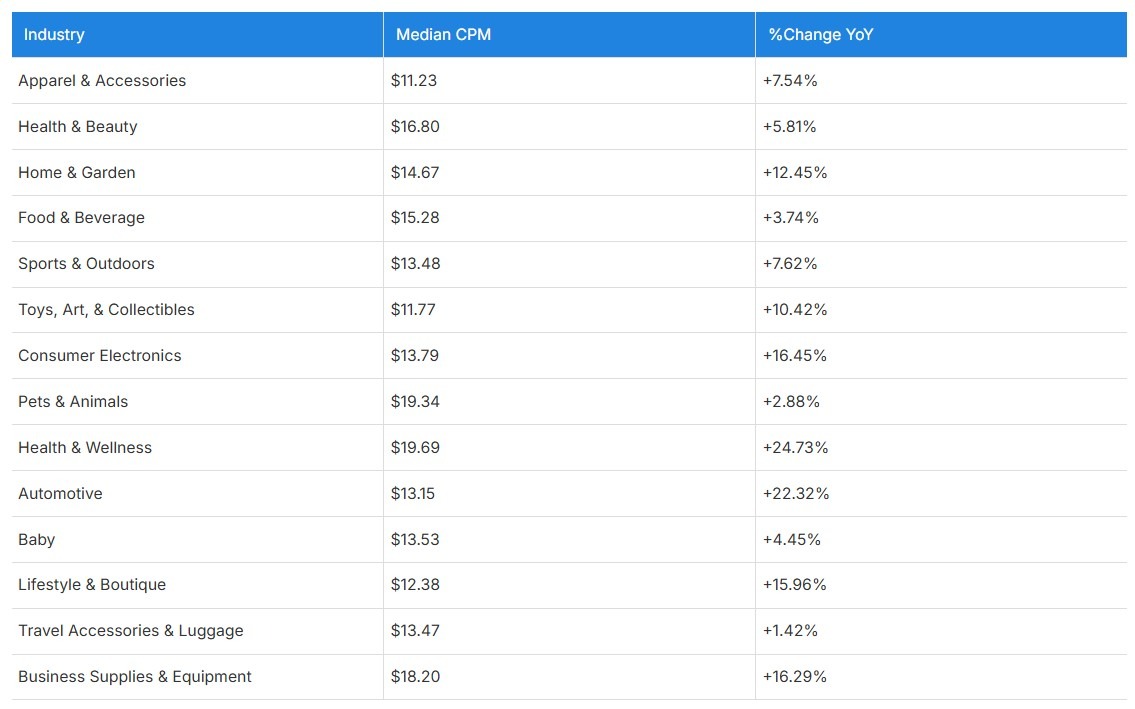
ROAS and conversion rates declined across 13 of 14 industries in 2025, while CPMs rose universally. That kind of market-wide pressure means seasonal budget allocation matters more now than it did two years ago. A home improvement company running identical monthly budgets in January and May is effectively overspending in winter and underspending in spring — in a market where spring CPAs are already under pressure from rising costs.
The practical fix: plan budgets quarterly with a monthly adjustment mechanism. Track search impression share by month from prior years to see where demand spikes. Build a reserve — 10-15% of quarterly budget — that you can deploy into high-demand periods without restructuring the entire campaign.
Define Goals Before Setting a Budget
The number one budgeting mistake isn't picking a number that's too low or too high. It's picking a number before defining what success looks like. Budget without a target KPI is just spend.
Choose the primary KPI
Every campaign needs one primary KPI that drives budget decisions. For lead generation — cost per lead or cost per qualified lead. For ecommerce — ROAS or cost per purchase. For brand — impression share. Mixing KPIs across a single campaign produces campaigns that optimize for nothing in particular.
Google Ads budget for lead generation and Google Ads budget for ecommerce look structurally different because the conversion economics are different. A law firm generating $5,000 per client can sustain a $300 CPL. A $30 ecommerce product cannot. The KPI isn't just a reporting metric — it's the anchor that makes every budget decision defensible.
Google Ads budget for brand vs nonbrand campaigns should also be separated from the start. Brand campaigns almost always show better CPA and ROAS than nonbrand — because they're capturing demand that already exists. Mixing them makes nonbrand look worse than it is and brand look more scalable than it is. Separate budgets, separate KPIs.
Set a break-even CPA/ROAS from margins
How much ad spend for target CPA starts with one question: what is one customer worth to your business? Work backwards from margin, not from what competitors are spending.
For lead generation: Break-even CPA = (Revenue per closed deal × Close rate from lead) × Gross margin. If a closed deal is worth $2,000, your close rate from lead to client is 20%, and gross margin is 60%, your break-even CPA is $2,000 × 0.20 × 0.60 = $240. Anything below that is profitable. Most teams set a target at 50-70% of break-even to leave room for margin.
For ecommerce: Break-even ROAS = 1 ÷ Gross margin. If your margin is 40%, break-even ROAS is 2.5x (250%). How much ad spend for target ROAS depends on where you want to sit above that break-even — typically 3-5x for healthy ecommerce, but this varies wildly by category and average order value.
One thing that kills campaigns before they start: setting targets based on aspirational numbers rather than real margin data. If your actual blended margin is 35% and you're targeting 600% ROAS, you're asking the algorithm to find conversions that don't exist at that economics. Google's own guidance flags this directly — setting a target CPA too low causes the algorithm to forgo clicks that would have converted, resulting in fewer total conversions. We've seen campaigns die in three days because a founder set tCPA at half the industry average without checking whether that number was mathematically possible at current CVRs.
Decide acceptable ramp time and learning budget
Google Ads budgeting for new accounts is different from ongoing campaign management. New campaigns need a learning phase before Smart Bidding stabilizes — and that learning phase costs money that won't show immediate ROAS.
Google requires at least 30 conversions in the past 30 days for tCPA to function reliably, and recommends 50+ for tROAS. Below those thresholds, the algorithm guesses. That's not a bug — it's the system working as designed. The implication: the ramp budget is the cost of buying enough conversion data for the algorithm to stop guessing.

Practical framing: treat the first 60-90 days as an investment in data, not a revenue-generating period. Set daily budgets at 3-5x your target CPA during learning. Allow 4 weeks minimum after any significant change before evaluating performance. The budget you set for ramp isn't wasted — it's what makes the next 12 months of automated optimization possible.
That framework is also how to choose a Google Ads starting budget that isn't just a guess — it's anchored to the data volume the algorithm needs.
Budget Math You Can Trust
The formula is simple. How much should I spend on Google Ads stops being a vague question the moment you run the actual numbers — most people skip it because they'd rather guess than do math. The math is always better.
Estimate clicks needed from expected conversion rate
Start with your conversion goal — say, 50 leads per month. Divide by your expected conversion rate. If your landing page converts at 5%, you need 1,000 clicks. If it converts at 2%, you need 2,500. That's not a small difference when CPC is $7.
The average conversion rate across all Google Ads industries in 2025 is 7.52% — but that average hides brutal variance. Automotive repair converts at 14.67%. Travel accessories converts at 2.63%. Use your industry rate, not the cross-industry average, and stress-test the math at both 50% above and 50% below your estimate.
Convert clicks to spend using CPC ranges
Clicks needed × expected CPC = minimum monthly budget. That's the formula. The Google Ads budget calculator built into Keyword Planner lets you run this by keyword before spending a dollar.
Average CPC across all industries in 2025 is $5.26, but how much does Google Ads cost per click in 2026 varies enormously: attorneys and legal services average $8.58, dentists and home improvement average $7.85, arts and entertainment sit at $1.60. Using the wrong CPC benchmark in your math produces a budget that's either 3x too low or 3x too high — both are expensive mistakes.
Lead gen math
Here's a worked example for a B2B service business. How much to spend on Google Ads for B2B leads — real numbers, not ranges:
-
Target: 20 qualified leads per month.
-
Expected landing page CVR: 4%.
-
Clicks needed: 20 ÷ 0.04 = 500 clicks.
-
Average CPC for the category (professional services): $6.50.
-
Monthly budget: 500 × $6.50 = $3,250.
That's the floor — and the clearest answer to how much to spend on Google Ads per month for a B2B service at this volume. Add 15-20% for learning inefficiency in the first 60 days, and the realistic starting budget is $3,750-$4,000/month. How much to spend on Google Ads for calls adds another variable — call conversion rates typically run lower than form submissions, so budget for additional volume.
Ecommerce math
Google Ads budget for ecommerce starts from ROAS target, not clicks.
Target: $50,000 monthly revenue from ads. Target ROAS: 400%. Required ad spend: $50,000 ÷ 4 = $12,500/month. That's the budget.
Stress-test it: if ROAS drops to 300% (common in early campaigns), the same $12,500 generates $37,500. Is that still acceptable? If yes, proceed. If not, the revenue target needs to come down or the budget needs to go up.
Sensitivity table
Run your numbers through at least three scenarios before committing to a budget:
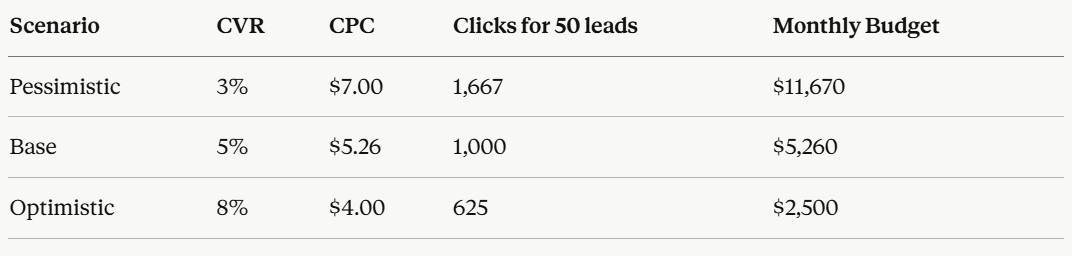
The gap between pessimistic and optimistic is 4.6x. Anyone who gives you a single budget number without this range is guessing. How to estimate Google Ads spend and ROI requires acknowledging the uncertainty — the sensitivity table forces that conversation before the campaign launches, not after the first month's bill arrives.
Daily vs Monthly Budgets in Google Ads
How Google paces spend across days
Daily vs monthly spend in Google Ads is one of those mechanics that looks simple until you actually need to control spend tightly. The core rule: Google uses your average daily budget to calculate a monthly spending limit of 30.4 × daily budget. On high-traffic days, it can spend up to 2× your daily budget. On slow days, it spends less. The monthly cap never moves.
What this means in practice: a $100/day budget doesn't mean $100 every day. It means Google has $3,040 to distribute across the month however it judges best. Some days you'll see $180. Some days $60. Over the month, it balances out — but mid-month budget reviews based on daily spend are almost always misleading.
One genuinely important 2026 update: starting March 1, 2026, Google changed how it paces budgets for campaigns using ad scheduling. Previously, if you ran ads only Monday through Thursday (roughly 17 days a month), the system paced against those 17 days — leaving the rest of the monthly envelope unused. Now, Google proactively attempts to spend up to the full 30.4× monthly cap regardless of your ad schedule, compressing that budget into your active days.
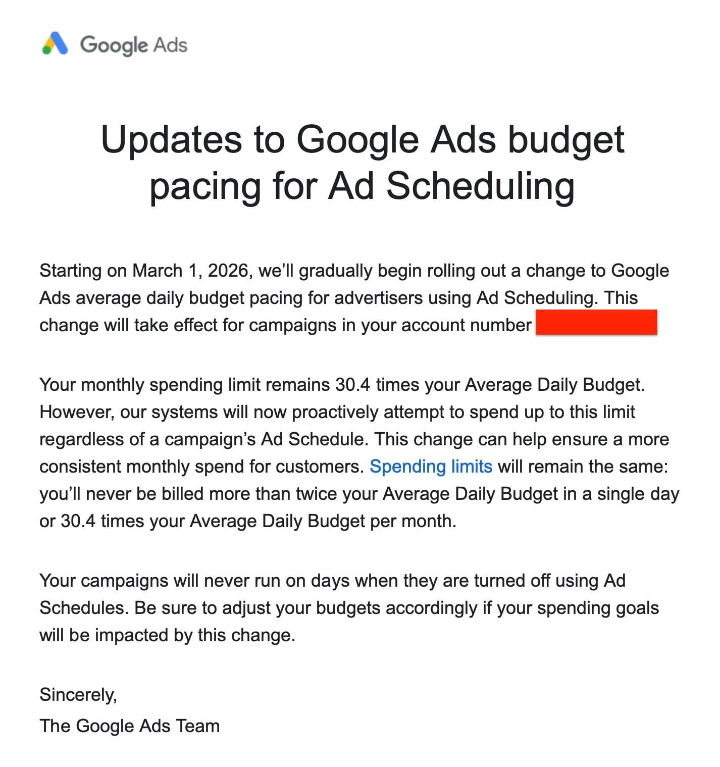
The practical consequence: an advertiser running weekday-only ads with a $100 daily budget was previously spending around $2,200/month. After March 1, the same setup can push toward $3,040 — roughly 38% more spend packed into the same active days. If you use ad scheduling and haven't recalculated your daily budget against your actual monthly cap, you may be overspending right now.
Setting daily budgets to hit monthly caps
The reverse math is straightforward: monthly budget ÷ 30.4 = daily budget to set. If your monthly cap is $5,000, set daily at $164.47. Don't round aggressively — $150/day produces a $4,560 monthly cap, not $5,000.
How to set a Google Ads daily budget that accounts for ad scheduling: if you run weekday-only (22 days/month) and want to stay under $3,000/month, the correct daily budget is $3,000 ÷ 30.4 ≈ $99 — not $3,000 ÷ 22. That's the post-March 2026 reality. Google paces against the full monthly envelope now, not just your active days.
For campaigns with hard monthly caps — client retainers, fixed quarterly budgets — the Campaign Total Budget feature launched globally for Search, Performance Max, and Shopping in January 2026 offers a cleaner solution. You set a fixed spend ceiling for the entire campaign flight (3 to 90 days), and the system cannot exceed it. No daily overspend surprises, no pacing arithmetic. The catch: it's only available for new campaigns, so existing campaigns with accumulated Smart Bidding history can't be migrated without restarting the learning phase.
Shared budgets
Shared budgets let you pool a single budget across multiple campaigns, with Google allocating spend dynamically based on where it sees the best conversion opportunity. Useful when you have campaigns with unpredictable volume — rather than each campaign having its own daily budget that either runs out or underspends, the shared pool flows toward whichever campaign is performing.
The problem: shared budgets make it harder to diagnose which campaigns are actually consuming budget and why. A Performance Max campaign and a Search campaign sharing a budget can produce reporting that looks fine at the account level while one campaign starves the other. Use shared budgets for campaigns with genuinely complementary goals — not as a shortcut to avoid setting individual budgets properly. Google Ads budget allocation across campaigns is cleaner with dedicated per-campaign budgets when campaigns have different objectives, audiences, or conversion types.
Budgeting Around Bidding Strategies
Google Ads budget vs bid strategy is not two separate decisions. They're one decision. The budget you set determines how much room the algorithm has to operate. The bid strategy determines what the algorithm does with that room. Set them independently and you'll get campaigns that either starve or overspend.
Manual CPC vs automated bidding
Manual CPC is the right starting point for new campaigns that don't yet have conversion history. Smart Bidding needs at least 30 conversions in the past 30 days to function reliably for tCPA, and 50+ for tROAS. Below those thresholds, automated bidding guesses — and guessing with your budget is expensive.
With Manual CPC, you control maximum bid by keyword. Budget pacing is more predictable because bids don't fluctuate with algorithmic signals. The tradeoff: you miss the auction-time optimization that Smart Bidding provides once it has data. Note that Enhanced CPC was deprecated for Search and Display campaigns as of March 31, 2025 — accounts that hadn't migrated are now effectively running Manual CPC. If your performance shifted unexpectedly around that date, check your bid strategy settings first.
Target CPA
How much ad spend for target CPA: the daily budget should be at minimum 2-3× your tCPA target, and ideally 5× during the learning phase. If tCPA is $50, the daily budget floor is $100 — and $250 is better. Why? The algorithm needs room to test auctions, find converting queries, and average out days where conversion costs are higher. A budget too close to your CPA target means Google either underspends or runs out of room before finding enough conversions.
Setting tCPA at a level the algorithm can't reach doesn't make the campaigns cheaper — it makes them stop spending. Google's own documentation is explicit: a target that's too low causes the system to forgo clicks that would have converted. The result looks like the campaign isn't working when it's actually just constrained by an impossible target.
Target ROAS
How much ad spend for target ROAS follows the same logic, with one additional layer. tROAS requires conversion value data — not just conversion volume. The algorithm needs to understand what different conversions are worth to bid accurately. An ecommerce account where all orders are tagged as the same conversion value gives tROAS nothing to optimize against.
The budget floor for tROAS campaigns is higher than for tCPA because conversion value variance requires more data to model. 50+ monthly conversions per campaign is the practical minimum — below that, tROAS behaves erratically. For new ecommerce accounts, start with Maximize Conversion Value (no target) to build value data, then layer in tROAS once you have consistent volume and a clear average order value baseline.
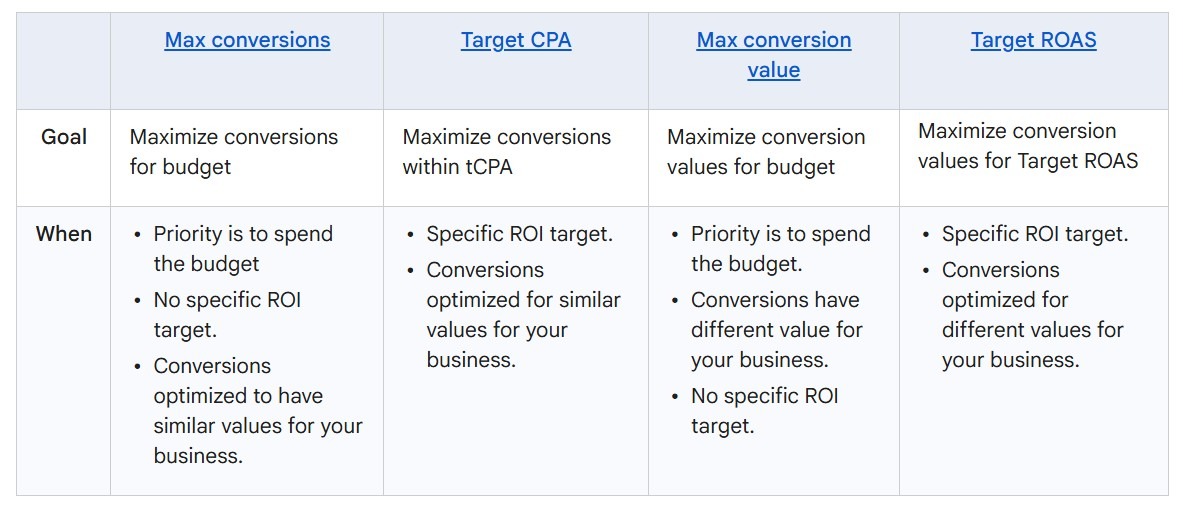
Maximize strategies
Maximize Conversions and Maximize Conversion Value are the right starting strategies for new campaigns — they don't require a target, they spend the full daily budget, and they generate the conversion data that makes tCPA and tROAS viable later. The risk: without a target, these strategies will spend your entire budget regardless of CPA outcome.
The practical guardrail: set a daily budget that represents acceptable risk during the learning phase, not your final operating budget. A $200/day budget during a 30-day learning phase ($6,000 total) to generate 50+ conversions is a reasonable data-acquisition cost for a campaign that will then run on tCPA at $50/day for 12 months. Think of it as paying for the algorithm's education. Most teams who skip this step and launch tCPA on day one spend the same money more slowly while wondering why the campaign won't scale.
Scaling Rules
Scaling isn't a gut call. It's a sequence — and skipping steps is how profitable campaigns turn into expensive ones.
Increase Cadence
The rule is 15-20% per step, with a minimum 14-day evaluation window between increases. That's not conservative — that's the mechanics of how Smart Bidding recalibrates. Every budget increase pushes the algorithm into new auction territory where it hasn't yet mapped which queries convert at the new spend level. CPA typically spikes 25-50% for one to two weeks after a large jump before stabilizing — and most teams reverse the increase during that window, which is exactly the wrong move.
The step-by-step cadence looks like this: confirm performance is stable and at or below target CPA/ROAS → increase by 15-20% → hold for 14 days, make zero other changes → evaluate → repeat if stable. If you need to double spend urgently, do it in two or three increments spaced two to three weeks apart. There is no shortcut that doesn't cost you in learning inefficiency — and the 15-20% rule is the closest thing to a proven answer on how to scale Google Ads budget safely.
One number worth memorizing: for Performance Max campaigns, the daily budget should be at least 3× your target CPA for the algorithm to have enough auction room to test, fail, and find efficient conversions. If your tCPA is $50, a $50/day budget isn't a scaling budget — it's a starvation budget dressed up as efficiency.
Also: since the March 2026 budget pacing update, every 20% daily budget increase translates immediately to a 20% increase in your monthly ceiling. Don't just check daily spend when scaling — check projected monthly total against your actual cap before hitting save.
Watchouts
The signals that tell you to stop scaling before you've gone too far:
CPA climbing more than 20% above target for more than two weeks. One week of elevated CPA after a budget increase is normal learning behavior. Two weeks without stabilization means either the new spend level is reaching lower-quality inventory, or the bid strategy needs more conversion volume to handle the additional budget.
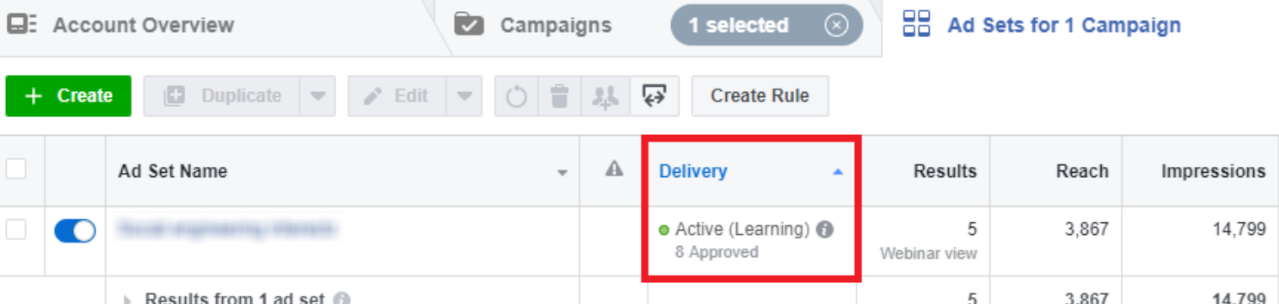
Impression share already above 70-80%. More budget at this point doesn't generate proportionally more conversions — it generates more expensive impressions. The auction is near saturation. The next scaling lever is expanding keywords or geographies, not budget.
Conversion rate dropping while click volume rises. The algorithm is reaching auctions it previously avoided because the budget constrained it. Those auctions are cheaper for a reason.
One critical mechanics trap: on any day you make multiple budget edits, Google's daily spending limit is calculated from the highest budget set that day — multiplied by 2. Adjust from $200 to $500 and back to $150 on the same day, and the daily spend ceiling is still $1,000. Most advertisers discover this after the fact.
Finally: scale budget first, then expand keywords. Adding new keyword themes simultaneously introduces two variables at once — more spend and new targeting — which makes it impossible to attribute performance shifts accurately. One change at a time.
When to Expand
Four conditions need to be true before scaling spend is justified:
-
CPA or ROAS is at or below target — proven unit economics, not projected ones
-
Conversion tracking is verified accurate — scaling on misattributed data amplifies bad decisions
-
Bid strategy is out of the learning phase — stable Smart Bidding, not guessing
-
At least one campaign shows "Limited by budget" — that status column flag is the cleanest signal available. It means Google has profitable inventory it can't access because you run out of budget first
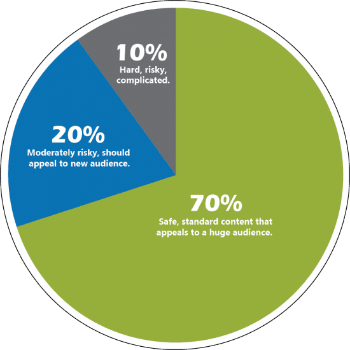
If all four are true, the 70-20-10 framework governs where the new budget goes: 70% to campaigns already hitting targets, 20% to promising campaigns building toward stable performance, 10% to controlled experiments. On a $5,000/month budget: $3,500 to proven performers, $1,000 to campaigns showing potential, $500 to testing.
If even one condition isn't met — especially the unit economics one — scaling is paying more to learn the same lesson the current budget already taught you.
Practical Checklists
Starter Budget Checklist
Before any campaign goes live:
-
Break-even CPA or ROAS calculated from actual margin data — not industry averages or aspirational targets
-
Industry CPC pulled from Keyword Planner with specific location and match type filtering applied
-
Budget math run at three scenarios: pessimistic, base, optimistic
-
Monthly budget target divided by 30.4 to set correct daily budget — not rounded aggressively
-
Bid strategy matched to conversion volume: Maximize Conversions for new campaigns with fewer than 30 monthly conversions; tCPA or tROAS only after volume is established
-
Daily budget set at minimum 2-3× target CPA; 5× recommended during learning phase
-
Ad scheduling reviewed: if weekday-only or restricted hours, daily budget recalculated against the full 30.4× monthly cap (March 2026 pacing update)
-
Conversion tracking verified with a test conversion — installed isn't the same as firing accurately
-
Negative keyword list in place before spend begins
-
Campaign Total Budget feature considered for fixed-flight campaigns or hard monthly caps
Weekly Pacing and Budget Control Checklist
Every week during active campaigns:
-
Pacing check: (spend to date) ÷ (days elapsed) × 30.4 — running ahead or behind monthly target?
-
Impression Share Lost to Budget: above 10% on a profitable campaign is a scaling signal, not just a metric
-
CPA/ROAS trend vs. target: is the gap widening or closing over the past 7 days?
-
Any campaigns in "Learning" status for more than 4 weeks post-launch — investigate before adding budget
-
Search term report: new irrelevant queries accumulating since last week's review
-
Budget allocation check: is any shared budget being monopolized by one campaign at the expense of others?
-
Billing alerts active at 80% and 95% of monthly cap — if not set, set them now
Scaling Checklist
Before each budget increase:
-
All four expansion conditions met: CPA/ROAS at target, tracking verified, bid strategy stable, "Limited by budget" showing
-
Proposed increase is 15-20% or less — if larger is needed, plan multi-step increments 2-3 weeks apart
-
No other campaign changes planned in the same 14-day window — one variable at a time
-
Projected monthly spend recalculated: new daily budget × 30.4 vs. actual monthly cap
-
For PMax campaigns: daily budget is at least 3× tCPA after the increase
-
Impression share on target campaigns below 70-80% — if already near saturation, the next lever is keyword expansion, not budget
-
70-20-10 allocation reviewed: new budget going to proven performers first, not spread equally across all campaigns
Conclusion
How much should I spend on Google Ads is a math problem. The answer comes from four inputs — break-even CPA or ROAS, industry CPC benchmarks, your funnel's conversion rate, and the conversion volume your bid strategy needs to stop guessing. Everything else is noise.
The most expensive mistake isn't overspending. It's underspending to the point where the algorithm never accumulates enough conversion data to optimize — permanent low-data purgatory where campaigns run indefinitely, cost money, and never stabilize. The second most expensive mistake is scaling before unit economics are proven, which turns a marginal campaign into a much more expensive marginal campaign.
The framework this guide builds — calculate from break-even, stress-test the math at pessimistic and optimistic scenarios, match bid strategy to actual conversion volume, scale in 15-20% increments with 14-day evaluation windows — works because it makes the math explicit before the spend decision. That's the difference between a budget that's defensible and one that's a guess with a number attached.
One infrastructure note worth carrying forward: if you're building campaigns on an account with suspension risk — a recurring problem in competitive verticals and with new accounts — the analysis above is moot if the account gets flagged before it accumulates data. YeezyPay's trusted agency Google Ads accounts solve that specific problem, keeping campaigns live on infrastructure that doesn't introduce account-level risk into the budget equation.
Build the math. Set the budget. Give the algorithm room to learn. Scale what proves itself.
FAQ
How much should I spend on Google Ads as a small business?
Google Ads budget for small business starts at the conversion threshold, not at an arbitrary dollar figure. Enough to generate at least 30-50 conversions per month — that's the functional minimum for Smart Bidding to optimize rather than guess. In most small business categories, that means $1,000-$2,500/month as a floor. Average small business monthly spend runs in that range; larger companies typically start at $10,000+. Budget below the conversion threshold and you're funding a campaign that can't stabilize regardless of how long you run it.
What is the minimum Google Ads budget to see results?
There's no universal minimum, but there's a functional one: enough to generate 30+ conversions per month in your target campaign. Below that threshold, Smart Bidding stays in learning mode and performance data isn't statistically meaningful. For most industries, $1,500-$3,000/month is the practical floor for a campaign that can actually optimize.
How do I calculate a break-even CPA or ROAS for Google Ads?
This is basic math, but surprisingly often skipped.
For lead generation: Break-even CPA = Revenue per client × Close rate × Margin
Example: $1,000 per client × 20% close rate × 50% margin = $100 CPA
For e-commerce: Break-even ROAS = 1 ÷ Margin
If your margin is 40%, your break-even ROAS is 2.5x.
Important detail: if you set targets below break-even, campaigns don’t become “more efficient” — they just stop spending. We’ve seen campaigns stall completely within days because tCPA was set unrealistically low.
How long should I run Google Ads before changing the budget?
At least 2 weeks. Ideally 3–4.
The system needs time to exit the learning phase and stabilize. If you change budgets every few days, you keep resetting that process and end up making decisions on unstable data.
A very common pattern: increase budget → CPA spikes → revert within a week.
In reality, short-term CPA spikes after scaling are normal. Killing changes too early is one of the fastest ways to stall growth.
Should I set a daily budget or a monthly budget in Google Ads?
You set a daily budget — but you should think in monthly terms.
Google uses your daily budget to calculate a monthly cap (daily × 30.4) and distributes spend unevenly across days. Some days will overspend, others underspend — that’s normal.
The correct approach: calculate your monthly budget first, then divide by 30.4 to set the daily budget.
Trying to control performance day by day usually leads to wrong conclusions. Google Ads should always be evaluated on a monthly pacing basis.


