


How to set up Dynamic Search Ads in 2026
Introduction
As an advertiser in 2026, if your websites contain broad product catalogues or frequently changing inventory, Google can automatically generate headlines from your sites and select landing pages that match relevant search queries. You don't have to be in the dark anymore. This guide will show you how to set up Dynamic Search Ads in 2026, because that’s exactly what you need now.
Google’s automation now relies heavily on high-quality site signals and first-party data. This means that advertisers who prepare clean landing pages and robust measurement can see better results when they use Dynamic Search Ads (DSA). With DSAs, you will not have to deal with keyword lists because relevant queries are dynamically matched to the content of your website. Sounds cool, right?
Here, we have put together a practical step-by-step guide for advertisers who want to use site content and automation to capture increased search demand. This article presents concise explanations and expert opinions on how to create Dynamic Search Ads campaigns and when to use them. It covers the preparation and account checks you must complete before launch. We also compare Dynamic Search Ads vs Responsive Search Ads, and give optimization tactics for 2026.
What Are Dynamic Search Ads and How They Work
If you already have an idea of how Google Ads work, you can just see Dynamic Search Ads as advertisements on the search network that will run based on the content of your website. Basically, DSA uses your website content to match relevant search queries and automatically generate ad headlines and landing pages. You won't be supplying keywords; all you need to do is to provide the description lines, targeting rules, and bids. DSA is a coverage-and-automation tool that complements keyword campaigns rather than replaces them.
What Google does is to literally ‘comb’ your website or feed on the webpages to index page content and identify landing pages that match what users are searching for. When a search query aligns with indexed content, Google generates a headline and selects the most relevant landing page based on the description text and bidding strategy you have supplied.
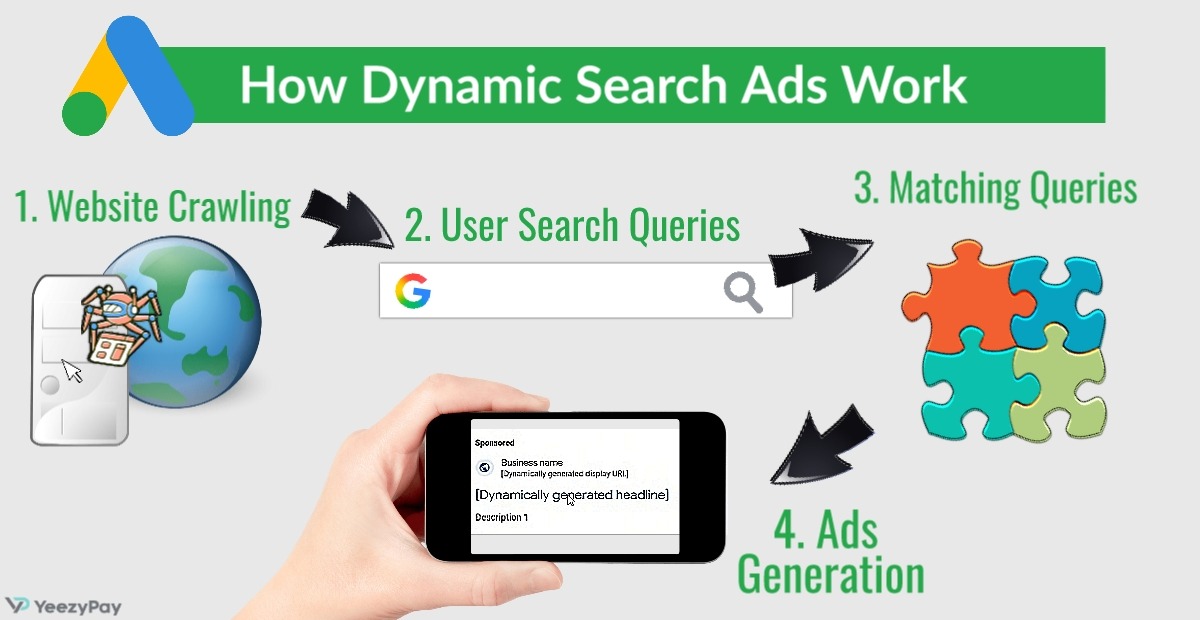
For many years, Google Ads practitioners have discovered the benefits of DSA and have testified to its effectiveness. In 2026, DSAs are still useful for discovering new keywords and also for capturing long-tail searches. Retailers with large and high-volume SKUs are increasingly using it to drive incremental sales without having to write many ads.
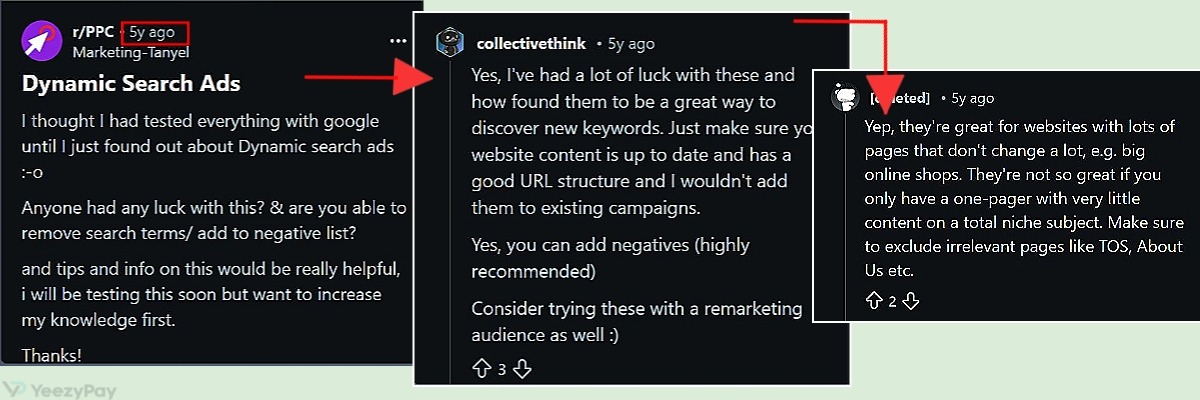
Pros and Cons of Dynamic Search Ads
So, what's the good thing about Dynamic Search Ads?
-
As you will see in the processes outlined in this guide, it is pretty easy to navigate your way around DSA.
-
DSA gives advertisers broader coverage, filling in for the inability to maintain exhaustive keyword lists, and this helps to reduce missed opportunities.
-
It is blissful to know that DSA campaigns are a good way to quickly discover lengthy search queries.
-
Creative efficiency is assured with the use of DSA as headlines are automatically generated and are linked to appropriate landing pages, so large inventories are not going to be a concern.
-
When you think about it, auto-generated headlines and not having to bother about keywords when using DSA help advertisers save time.
-
It is easy to scale your ads with DSA. When conversion tracking and first-party signals are in place, specific budgets and automated bidding can optimize business outcomes.
-
Lastly, you don’t have to worry about changes made to your sites because DSAs keep updating alongside linked websites.
As good as DSAs are, there are a few itches to their use. For instance, experienced advertisers avoid the broad “All categories” dynamic target because it’s too indiscriminate; they rather use specified categories from page feeds or just select specific pages. Also, in order not to waste budget on poor matches and not attract account suspension due to unpaid balance, you can pause campaigns to inspect targets and exclude irrelevant pages (homepage, blog, contact).
When to use DSA vs Standard Search vs Performance Max
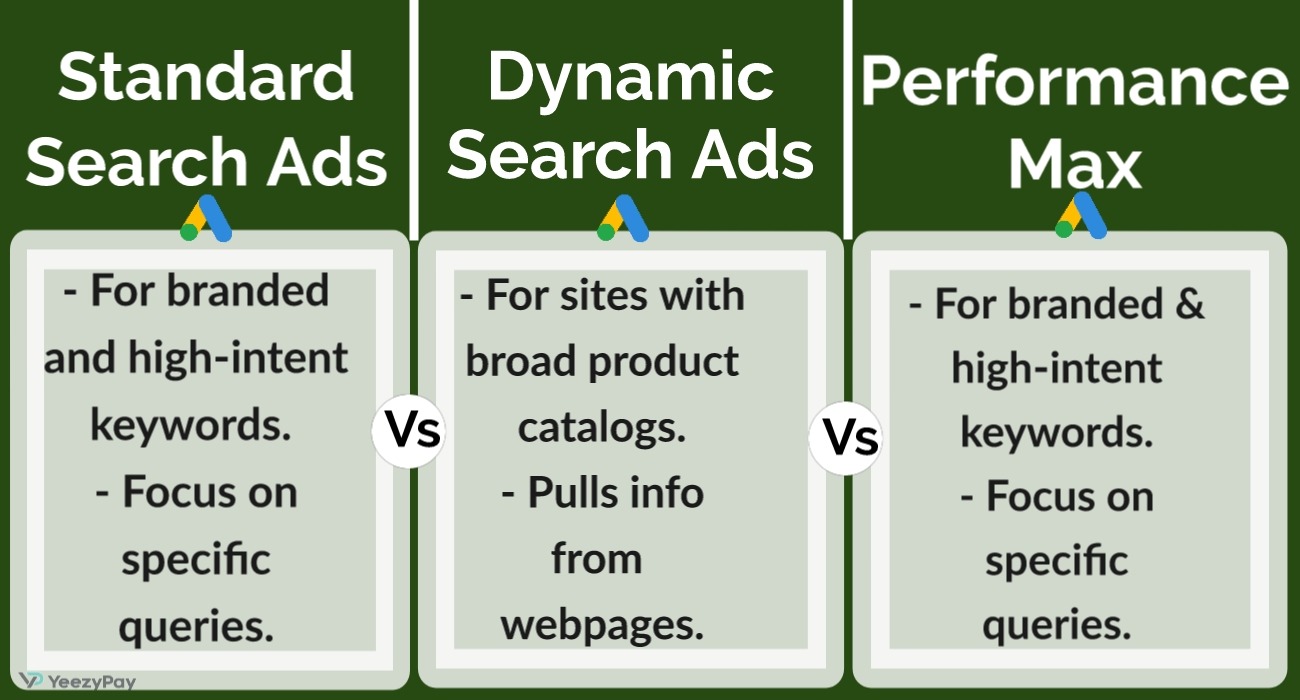
Dynamic Search Ads is the best option when you need broad, low‑maintenance coverage of a large website with rapidly changing information about products and services. Unlike Standard Search, it does not give tight control over keywords and bids, and it is not ideal for cross‑channel reach like Performance Max (PMax).
Standard Search is suited to branded and high‑intent keywords, allowing advertisers to determine keywords, ad copy, and bids while focusing on specific queries. Performance Max on the other hand, gives advertisers the least control as placements are automatically chosen. It has the capacity for creating a wide range of ad campaigns (Search, Display, YouTube, Discover), thereby needing strong conversion/value data for tROAS.
DSAs are handy when it is impractical to maintain exhaustive keyword lists. It helps in discovering incremental demand, showing queries that aren’t anticipated and can be later added to keyword campaigns. For example, it is advisable for a travel company with a constantly changing hotel inventory to run DSAs for capturing searches that combine niche with specific locations (e.g., “hotels with pool in Miami”) and later promote top-performing queries into dedicated search campaigns for tighter bidding control.
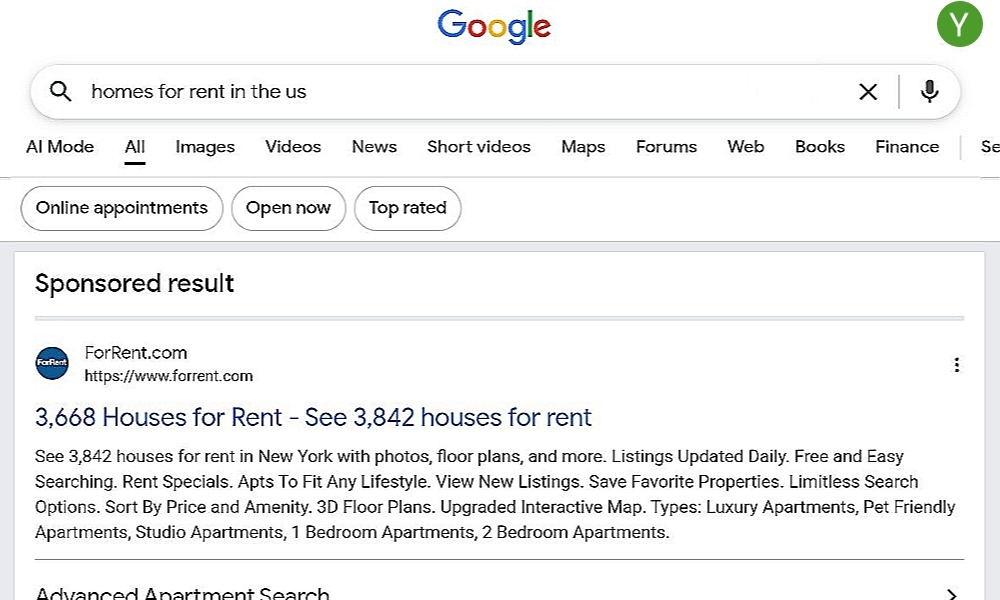
A classic example is that of ForRent.com, a website that helps people find apartments. They wanted more people to see their listings online, but the rental market was crowded with lots of competitors. So, they decided to use DSAs, letting Google scan their site and automatically create ads that match what people are searching for. This saved them the stress of having to write ads for every single keyword.
They also compared the new DSA ads to their regular keyword campaigns and tracked the results. The outcome included an impressive rise in their click-through rate by 26%, dropping their cost per click by 30%, and cost per acquisition also dropped by 37%. DSAs now bring in 22% of all their leads, enabling them to reach more renters while spending less money per click. The website became more popular, with more people signing up simply because Google’s system builds ads from their site content.
Requirements and Preparation for a Dynamic Search Ads Campaign
Aside from having well-structured websites and a healthy Google Ads account, let's look at some of the most important things to put in place for effective use of the DSA feature in Google Ads.
Website and Landing Page Prerequisites
Here are some Dynamic Search Ads landing page best practices to take note of:
-
Crawl Access: Since the efficiency of DSA is based on what Google can pull from your site, it is important to ensure that robots.txt does not block product or category paths and your XML sitemap is current so Google can index pages used for targeting.
-
Unique Page Metadata: Every commercial page should have a unique title and meta description that reflect the page’s primary intent in terms of product, category, etc.
-
Single Intent Per Page: Each landing page should serve one clear commercial intent; avoid mixing product listings, blog content, and checkout flows on the same URL.
-
Mobile UX and Load Performance: Pages must load quickly and be mobile-friendly; slow or broken pages increase bounce rates and waste spend.
-
Clear CTAs and Conversion Paths: Ensure visible calls to action and working forms/checkout flows so conversions are attributable and useful for Smart Bidding.
Content and SEO for Better Crawling
The most crucial Dynamic Search Ads SEO requirements is having structured content. Use clear H1/H2 hierarchy, descriptive product names, and schema.org product markup (price, availability, GTIN) to help Google match queries to the correct page.
Consistent URL Patterns are also important. Product and category URLs should be predictable (e.g., /category/product-name) so that page feeds and exclusions are easier to manage.
Advertisers are to ensure that product titles and meta descriptions align with the commercial intent and common search phrases for that product. It is also good to include high-value pages in your sitemap and use lastmod to surface frequently updated pages
If you plan to use a page feed, add custom labels (e.g., in stock, season, priority) to control targeting and exclusions. Then regularly check Search Console for crawl errors and fix redirect chains, 404s, and server errors that prevent pages from being indexed.
Compliance, Data Privacy, and Google Ads Policies
You may already know that Google has some strict rules that must be followed to avoid ads or account suspension. Here are some specific policies that are noteworthy before you set out to use DSA features on Google Ads.
Policy-Compliant Landing Pages
Since the efficiency of DSAs depends on crawling your website, it is therefore non-negotiable that webpages must comply with Google Ads content policies in terms of transparent pricing, accurate product claims, and refund/shipping policies. You have to be sure that there are no pages that could trigger a misrepresentation flag.
Verification and Availability of Documents
For such times when Google will request verification, you should be prepared to present important documents that show your business identity, proof of address, and tax forms.
Privacy and Consent
You have to implement consent management for tracking (Consent Mode v2) and ensure enhanced conversions are enabled only where permitted by user consent and local law.
Data Minimization and Retention
Limit personal data collection to what is necessary for conversion tracking and follow your stated retention policy to comply with applicable privacy and data protection laws.
Secure Payment and PII Handling
When it comes to payment, use HTTPS across the site and follow PCI best practices for payment pages. Also, avoid sending sensitive PII in URL parameters.
Audit Trail and Access Controls
Use least-privilege access in Google Ads and your CMS; enable two-factor authentication and maintain change logs for page feed and exclusion edits.
How to Set Up a Dynamic Search Ads Campaign Step by Step
If you are now willing to give Dynamic Search Ads a try based on what you have read so far, the following steps will guide you to successfully set up DSA campaign in Google Ads.
Step 1: Choosing the Right Campaign Goal and Type in Google Ads
This is where you set the ball rolling by determining how you want your ads to operate and what you hope to achieve with them.
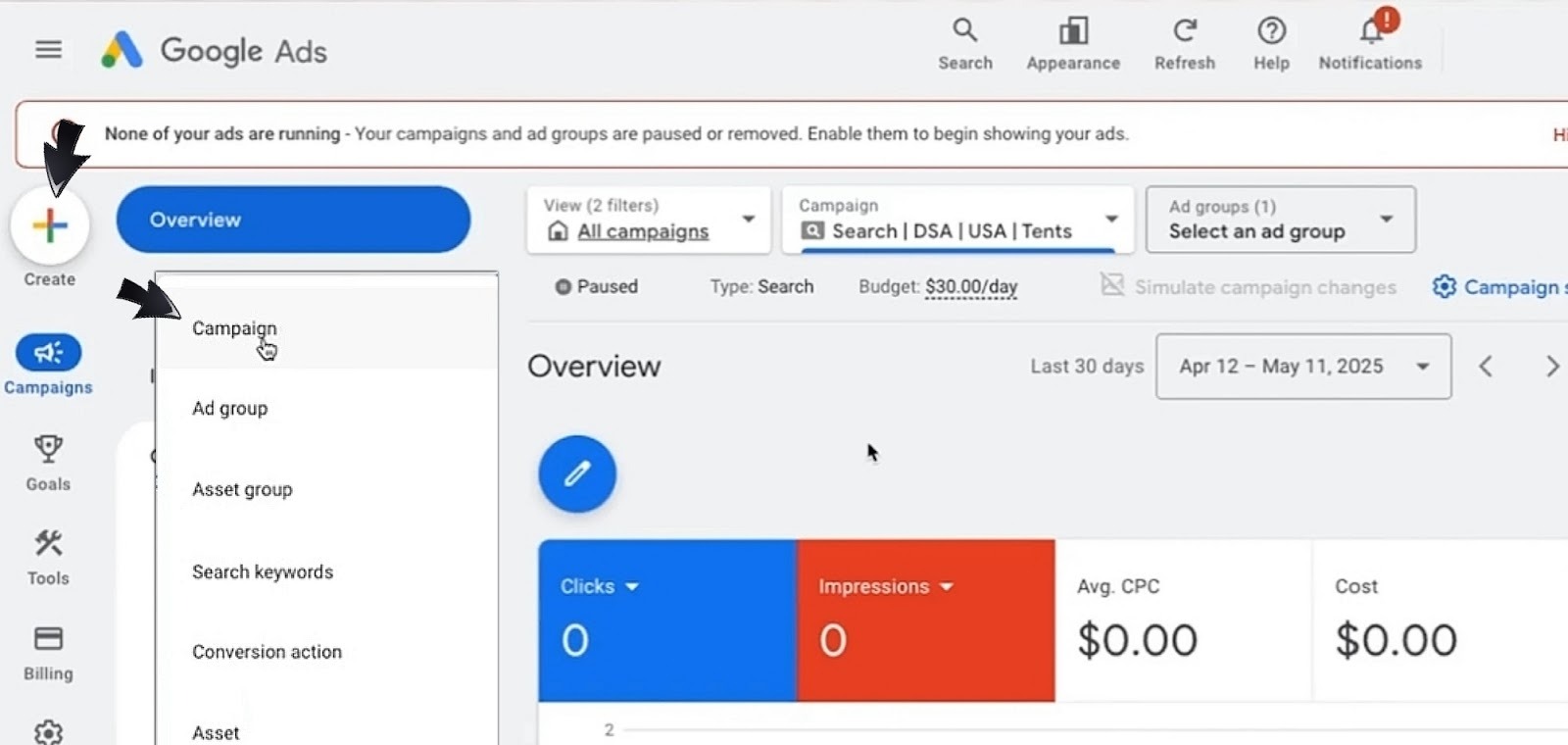
Start by creating a campaign: In Google Ads, click on ‘Create’ and select ‘Campaign’.
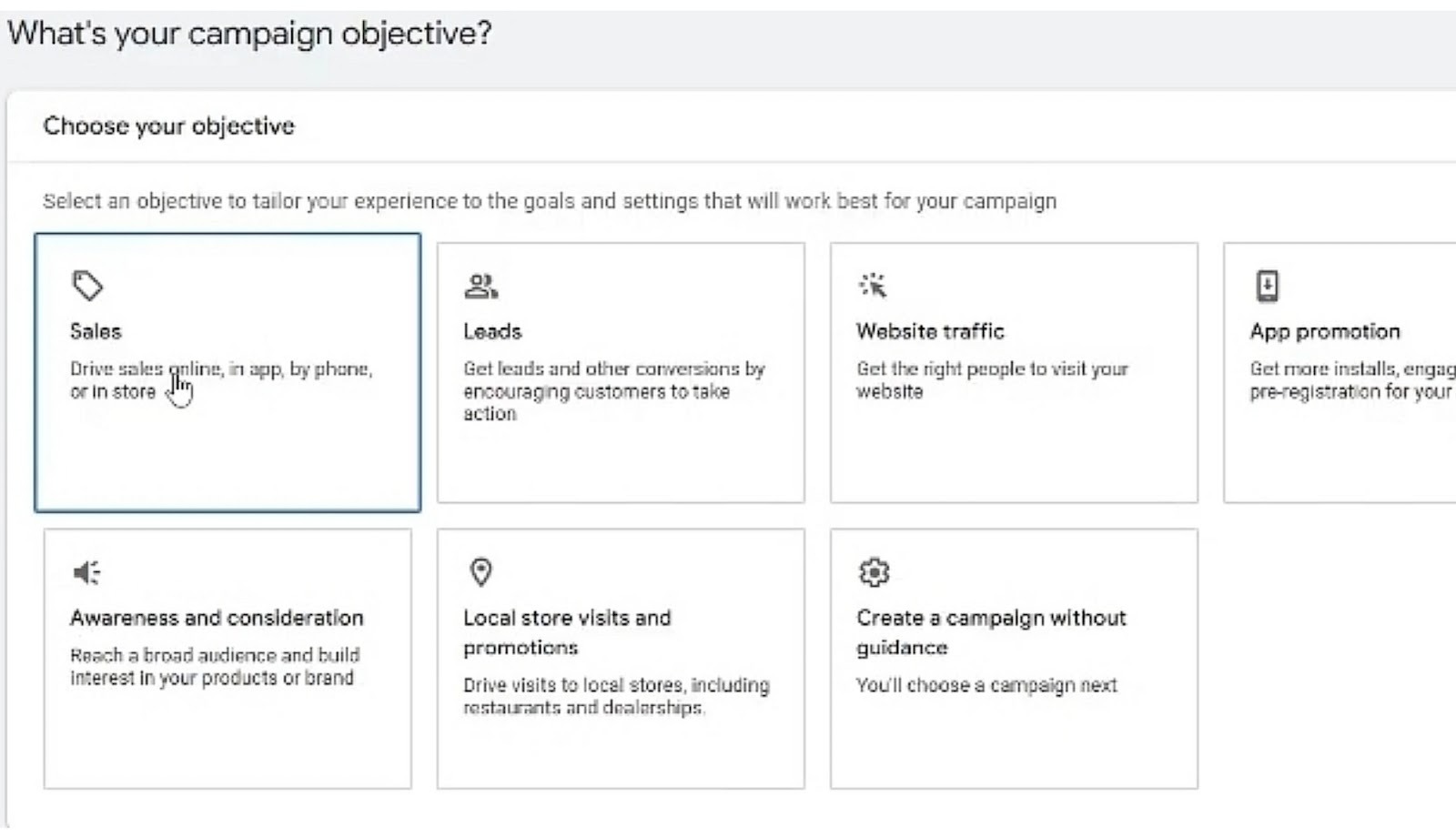
Proceed to choose a campaign objective that matches your business outcome. Ask yourself if you want sales, leads, app promotion, or website traffic. For example, an e-commerce store aiming for transactions will have to pick ‘Sales’, but if your goal is to get people to fill lead forms, select ‘Leads’.
Now you will have to select your campaign type, and since we are focusing on ads that show up in searches, your choice has to be ‘Search’.
To use DSA, you will now choose ‘Dynamic Search Ads’ under the campaign subtype. This is what enables site-based targeting and tailored headline generation via site crawling. You can now add your website URL and name your campaign before clicking on ‘Continue’.
Step 2: Setting Locations, Language, Budget and Network
This step is all about how far you want your ads to go, and the specific audience you intend to reach. Location and Language work together to ensure that your target audience understands your ads, your budget determines how much you want to pay to push your ads to your targeted audience, and your network preference will establish a pathway for your ads to pop up.
It all begins in your campaign settings, that's where you will be able to make the following adjustments:
-
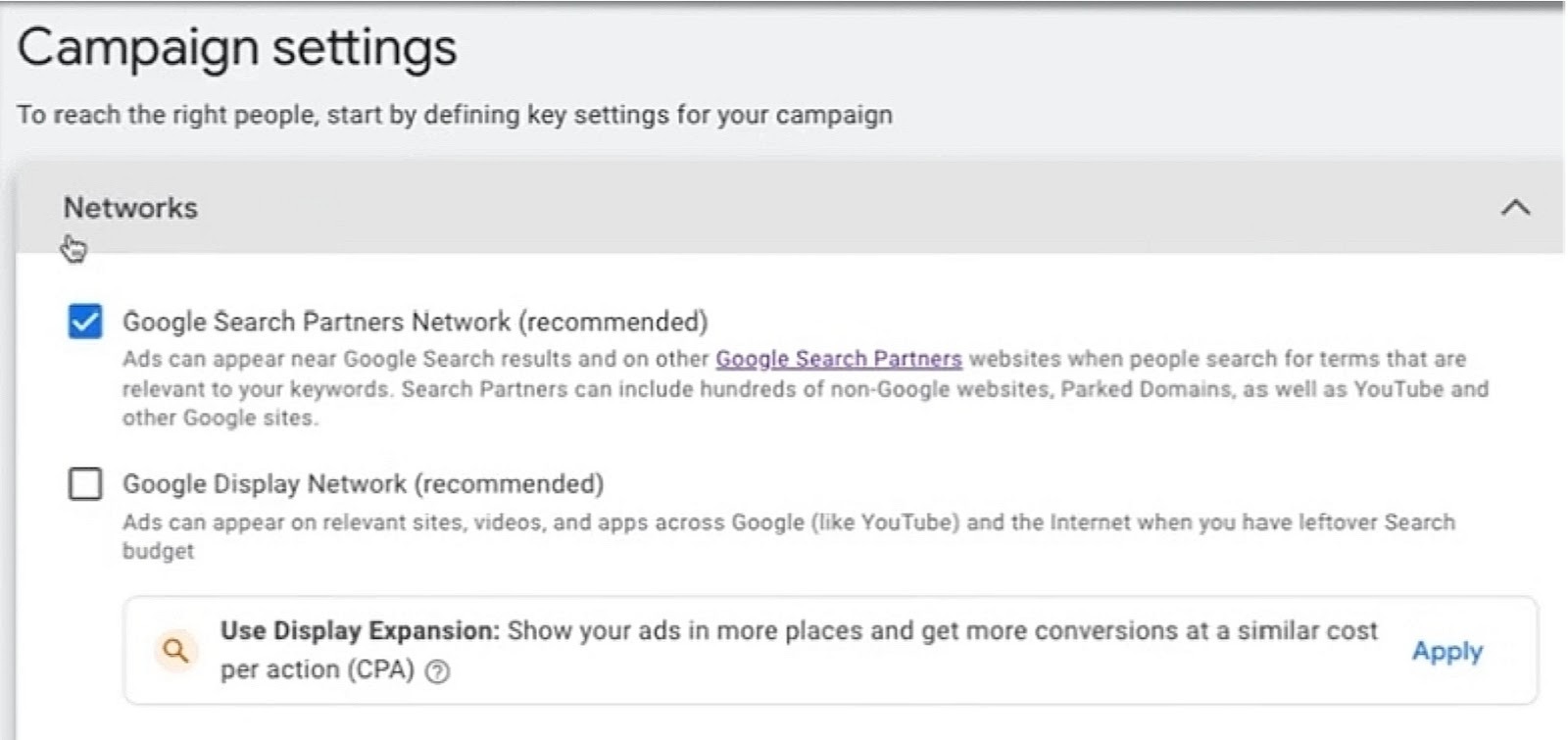
Networks: Dynamic Search Ads campaigns perform best when focused on Search intent and paired with clear location/language settings. So, you might want to uncheck ‘Display Network’ and enable ‘Search Network’ to maintain your search intent.
-
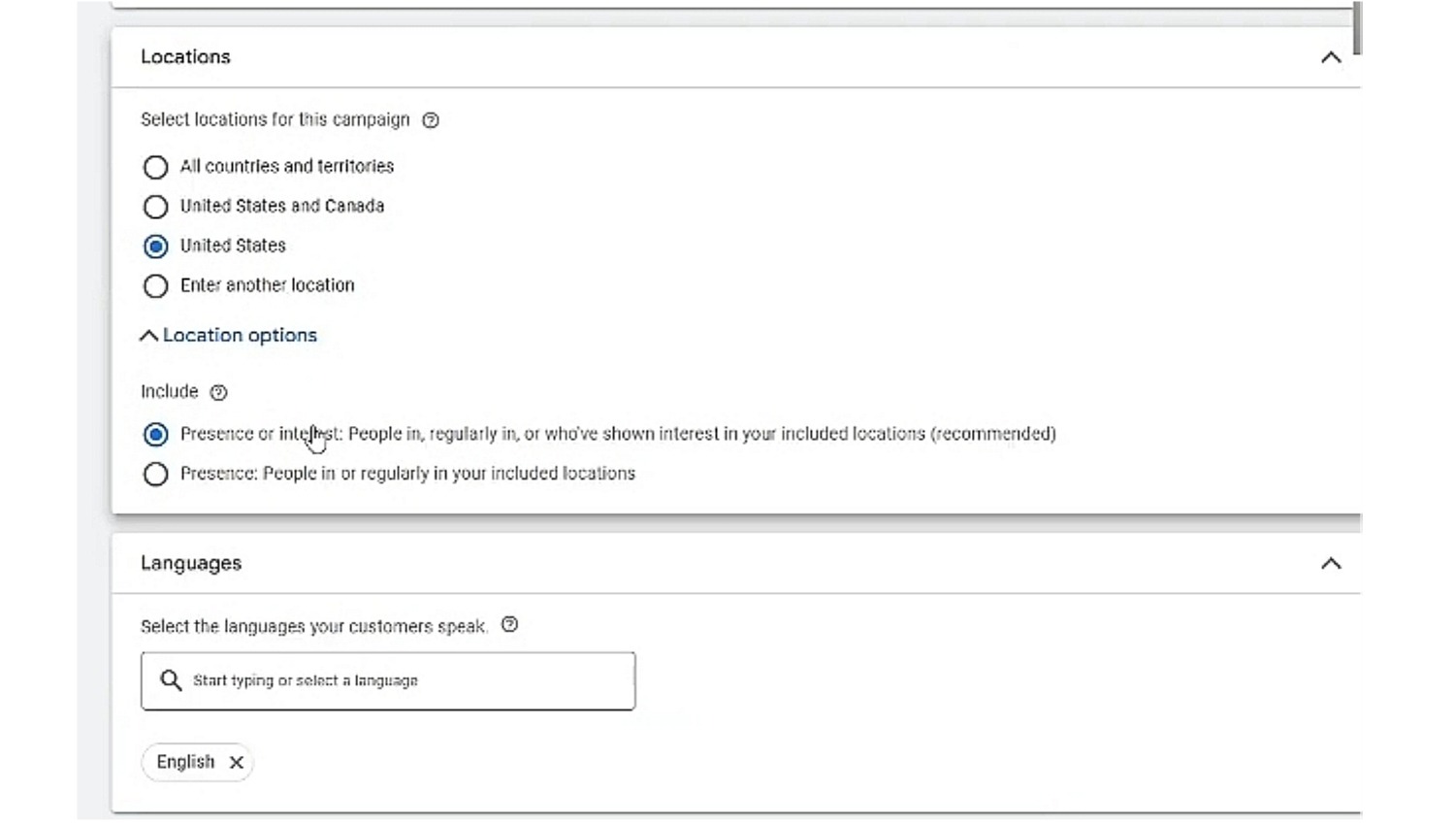
Locations and Language: Set geographic targeting to the markets you serve and then choose the primary language of your landing pages to match.
-
Budget: How much are you willing to pay to push your ads to your desired audience? The plan is to start with a moderate budget and plan a learning window, after which you can increase it when there is a stable CPA. It could be a daily budget of $5 that will be gradually increased on a monthly basis to set measurable results and gather campaign data.
Step 3: Selecting Bidding Strategy for Dynamic Search Ads In 2026
When it comes to the Dynamic Search Ads bidding strategy, it is advisable to start with ‘Maximize Conversions’ because it offers a simple approach that gets advertisers the most conversions within their budget. It is also a smart choice if you have reliable conversion value data.
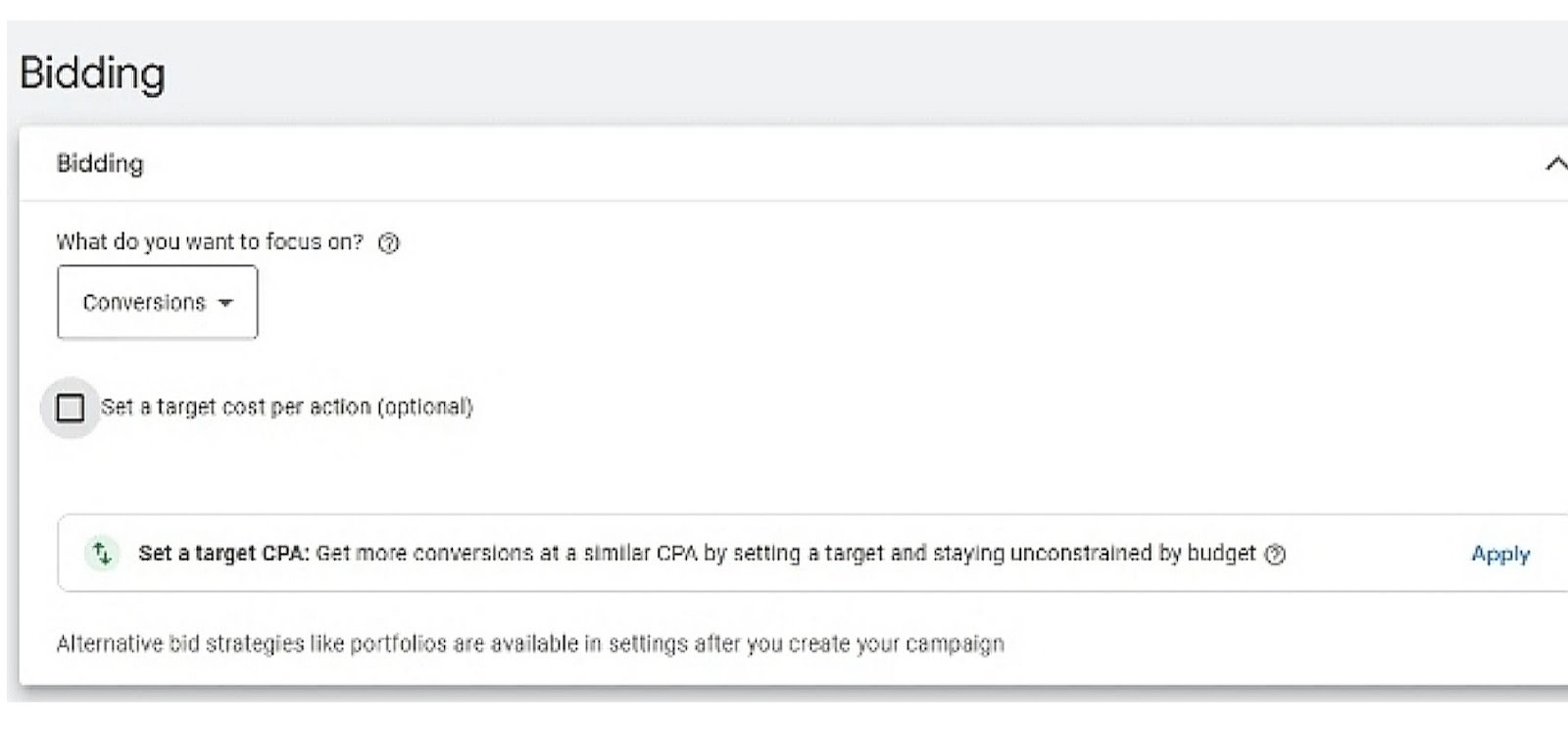
Conversion-based strategies like Target CPA (Cost-Per-Acquisition) also work well if you have existing conversion data. As soon as you have substantial data, you can move to Target ROAS (Return on Ad Spend) to maximize profitability. However, you need to link your GA4, and make sure that enhanced conversions or offline conversion imports are active before using tROAS/tCPA. This is because the signals have a real-time effect on automated bidding. assumes measurement readiness for Smart Bidding to work effectively.
Step 4: Building Ad Groups and Switching to Dynamic Ad Group Type
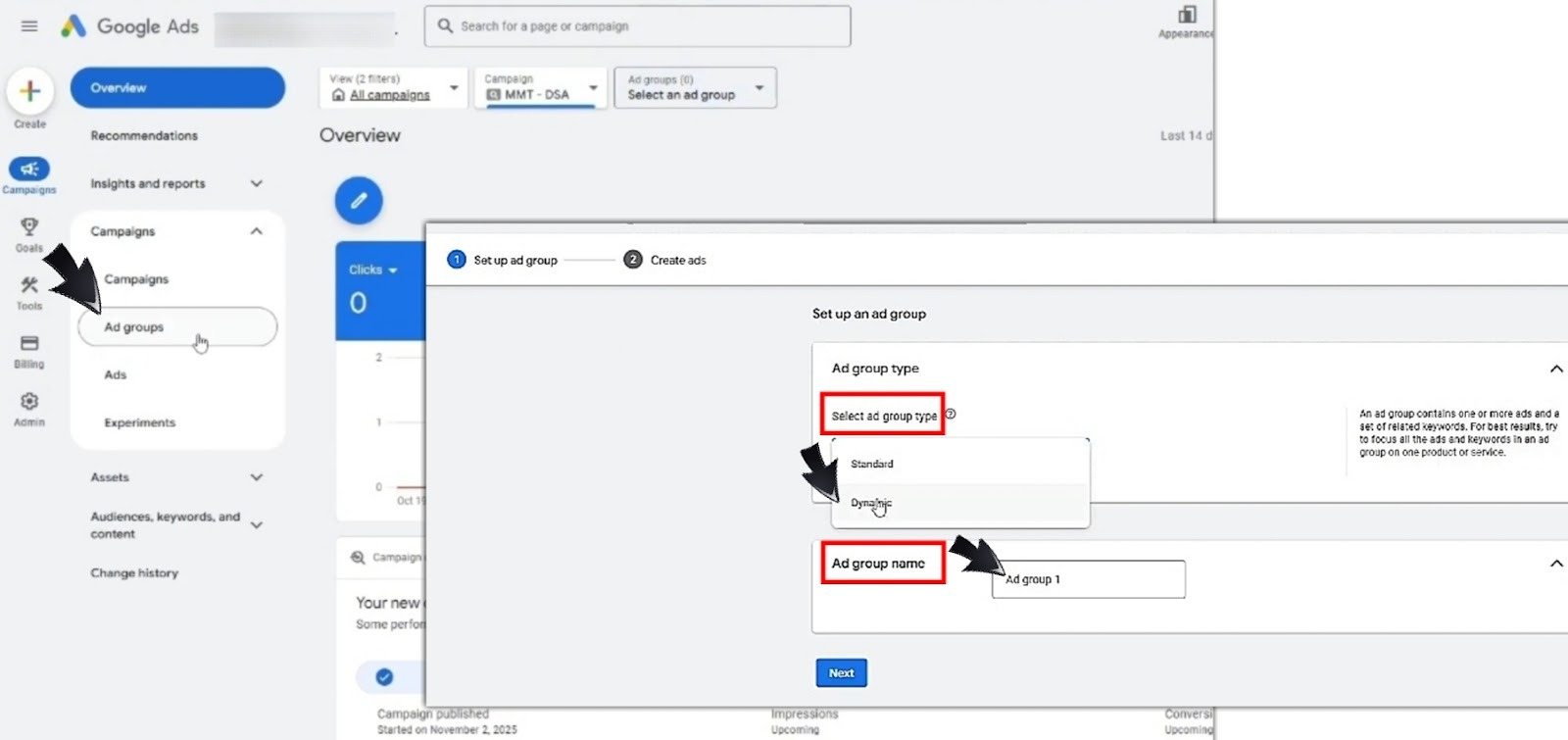
DSA campaigns usually start with empty ad groups. This means that you have to create and configure a new ad group. Here are the steps
-
Under the DSA campaign you've already created, click on ‘create ad group’ and then select ‘Dynamic’ as the ad group type (not keyword-based).
-
Provide a short description line in the space provided, this will aid the Google-generated headlines.
-
Name your ad group by theme or site section in order to maintain clear reports (e.g. Electronics - TVs).
-
Dynamic Search Ads ad group structure requires one dynamic ad group per logical site section for easier optimization, so you can create as many ad groups as the number of categories or sections your business has. For example, a shoe retailer may create separate dynamic ad groups for Men’s Shoes, Women’s Shoes, Kids’ shoes, indoor footwear, etc.
Step 5: Configuring Dynamic Ad Targets and Categories
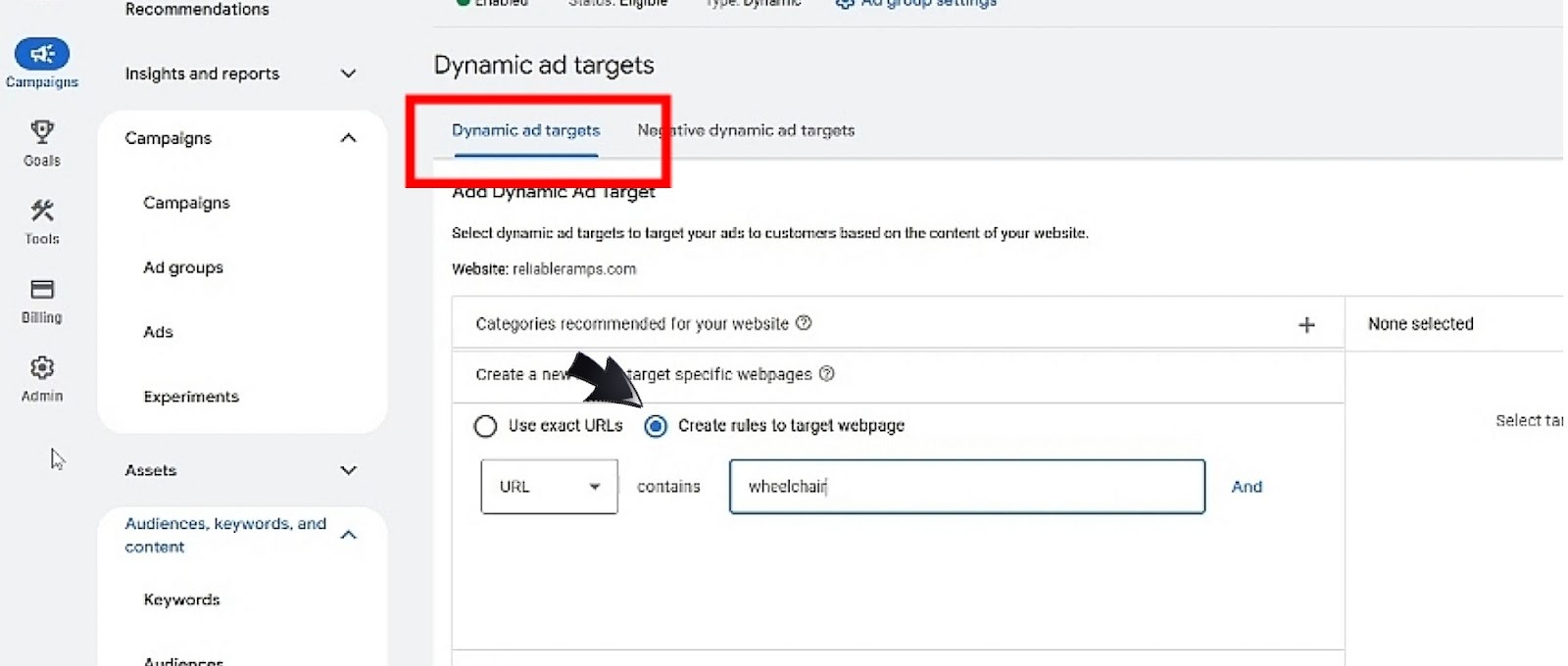
There are a number of Dynamic Search Ads targeting options to choose from. Targeting is straightforward and easy to configure in Dynamic Search Ads. You can always choose auto-targeting for broad discovery as it allows Google to just sweep through the entire website to find content that relates to whatever people are looking for, some of which you may not be aware of.
But then, if some pages do not fit into your DSA goals, how do you control this? You can add specific URLs of pages you want for precision on your standard ad groups. And if your focus is on pages that convert well, this option expands your reach on landing pages that have proven performance.
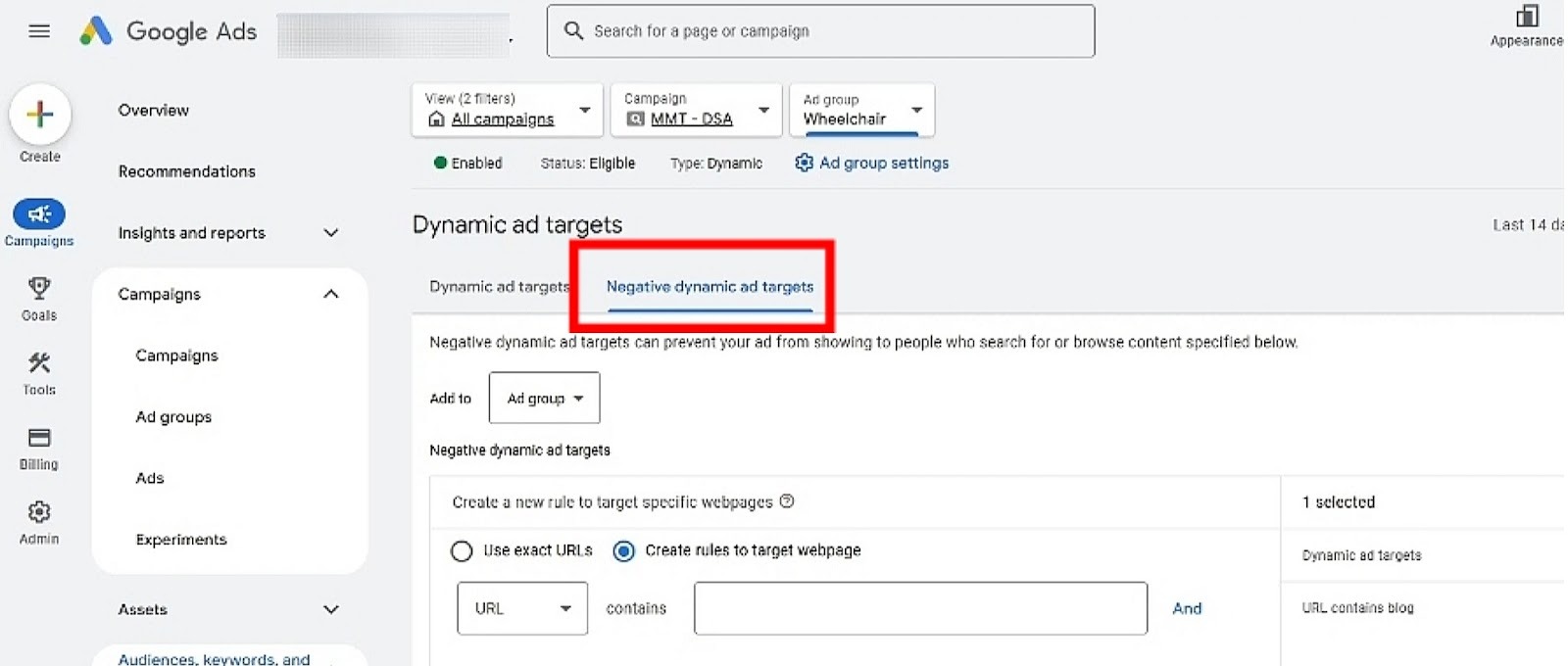
Also, you may add URL exclusions to prevent low-value matches. In all, Dynamic Search Ads best practices 2026 emphasize that most of the control you have on your DSA campaigns is on your webpages. This implies that what you have on your site determines the outcome of your ads.
Working with Page Feeds and Auto Targets
While navigating how to set up Dynamic Search Ads in 2026, you may be indecisive about whether to use page feeds or stick with auto targeting while using DSA.
Don’t overthink it. You can use either one in different ad groups depending on the structure of the pages on your website. Let’s discuss how to use page feeds for Dynamic Search Ads.
When to Use Page Feeds Vs All Webpages
Whenever you need precise control over which URLs Google may use for Dynamic Search Ads, let's say you want to include only in-stock SKUs, seasonal collections, or pages that are meant for specific regions, then using page feed is your sure bet.
But in a situation where you want broad discovery across a well-structured site, and you are cool about Google matching queries to any indexed page, using ‘all webpages’ (aka site indexing / auto-targeting) is a good choice.
In short, choosing page feed is efficient for determining specific URLs to be added or excluded (e.g. clearance, out-of-stock, legal pages) or prioritizing a subset of pages, but choosing ‘all webpages’ is ideal if your site is clean and you want maximum coverage.
For clarity, a retailer can use page feed to exclude clearance and sample-sale URLs to shift DSA traffic towards full-price inventory, thereby initiating a rise in conversion rate. A publisher on the other hand can use auto-targeting for his well-organized category pages in order to discover queries about long-tail services that later became monetized.
Building, Formatting and Uploading A Page Feed
If you have decided to instruct Google to target your site based on a page feed, you must know how to prepare one.
So, what exactly is a page feed?
A page feed is a spreadsheet you upload to Google Ads for listing the exact URLs you want Dynamic Search Ads to target or exclude. It gives you control over which landing pages Google may use and lets you tag those pages with custom labels for prioritization and bidding.
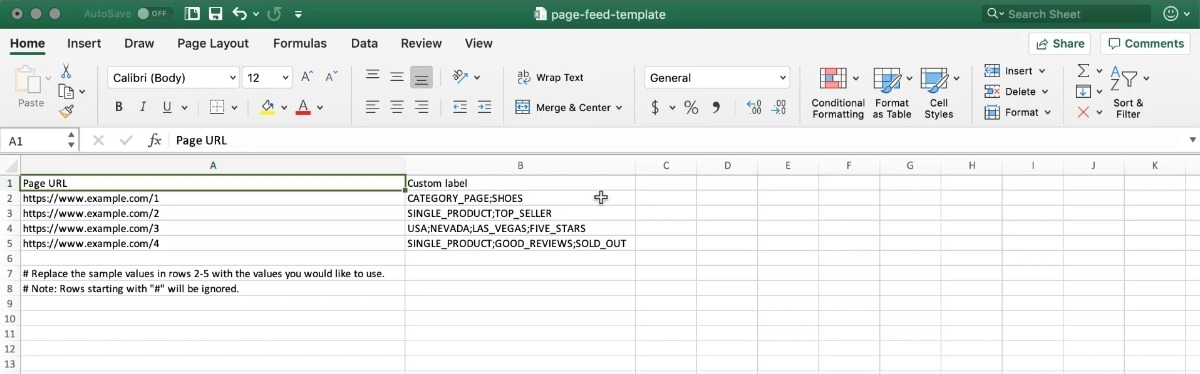
The spreadsheet is to be prepared in CSV format and should contain a column for Page URL and another for Custom Labels. Under the first column, you will list the full web address for various pages in your site, and the second column will be for decisions that Google will take regarding the listed URLs (e.g. include, exclude, or sections on the page to focus on). For more controls, optional columns like Page Title and Priority can also be included (we’ll discuss more on these soon).
For best practices, use full canonical URLs (starting with ‘https://’). You also want to keep feed size manageable, splitting very large feeds by theme (e.g., /mens/, /womens/). Update your feeds frequently for inventory changes and keep tabs on your updates.
To upload a page feed, follow the following steps:
-
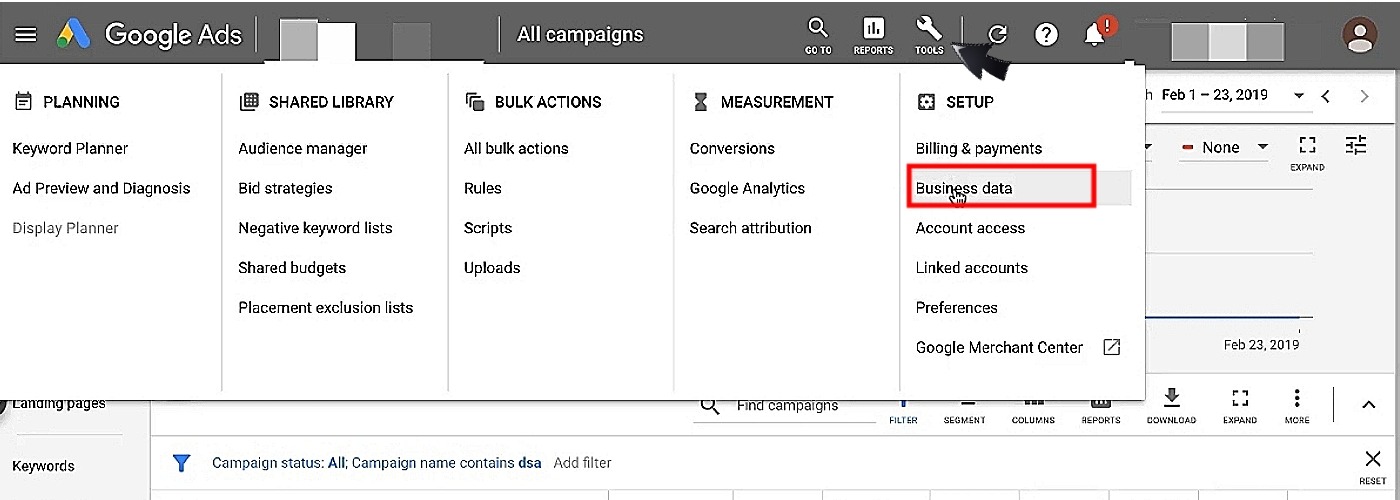
In Google Ads, go to ‘Tools & Settings’, click on ‘Setup’ and then ‘Business data’.
-
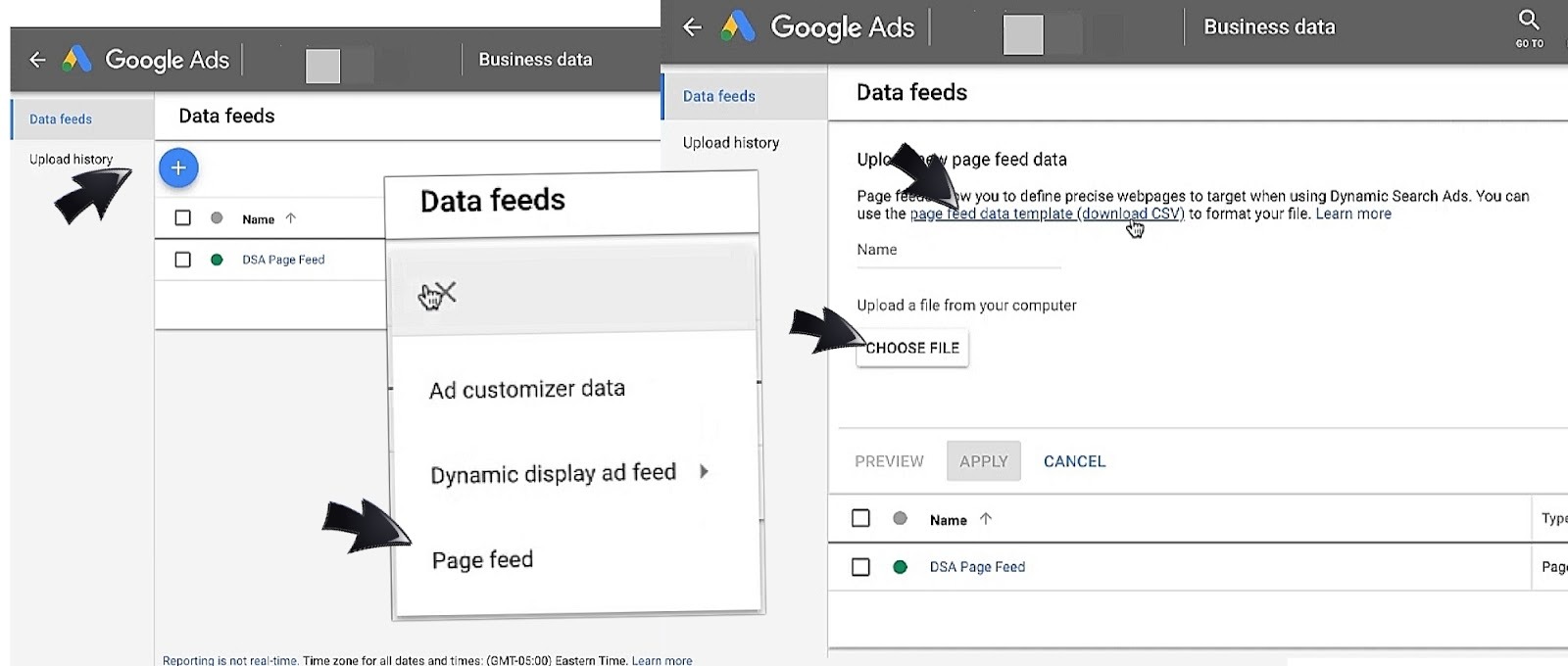
Click the addition sign (+) on the top right of the screen and choose Page feed (or Data feed depending on your user interface).
-
If you don’t have a page feed document yet, click on the ‘page feed data template’ to download it, input your data, save, and return to this business data page in Google Ads.
-
Click on ‘Choose File,’ and a small window will be displayed for you to choose the saved CSV file in your device storage, select the appropriate file, and click ‘Open’.
-
CSV will be uploaded, you will be prompted to name the page feed, and then click on ‘Apply’.
After upload, you now have to attach the feed to the DSA campaign by going to your created DSA Campaign, navigating to the settings. Click on ‘Dynamic Search Ads’, scroll down to ‘select a targeting source’ and then click on ‘Use URLs from my page feeds only’. You should save and now proceed to check the feed status and resolve any URL errors. Feel free to use the Google search console to confirm that pages are indexable. You now have a Google Ads dynamic ad targets setup.
Using Custom Labels to Control Traffic and Themes
Do you remember the “optional columns” we mentioned in the Page Feed?
They could accommodate more Custom Labels that let you tag URLs with attributes (e.g., in_stock, margin_high, priority, region_primary) and then target or exclude those labels in DSA ad groups.
One strategy for using multiple Custom Labels is to assign a two-way attribute to each one. For example, Custom Label 1 could be for inventory status (in_stock / out_of_stock), while Custom Label 2 is for commercial priority (priority_high / priority_low), etc.
To use these Custom Labels in Google Ads, take the following steps:
-
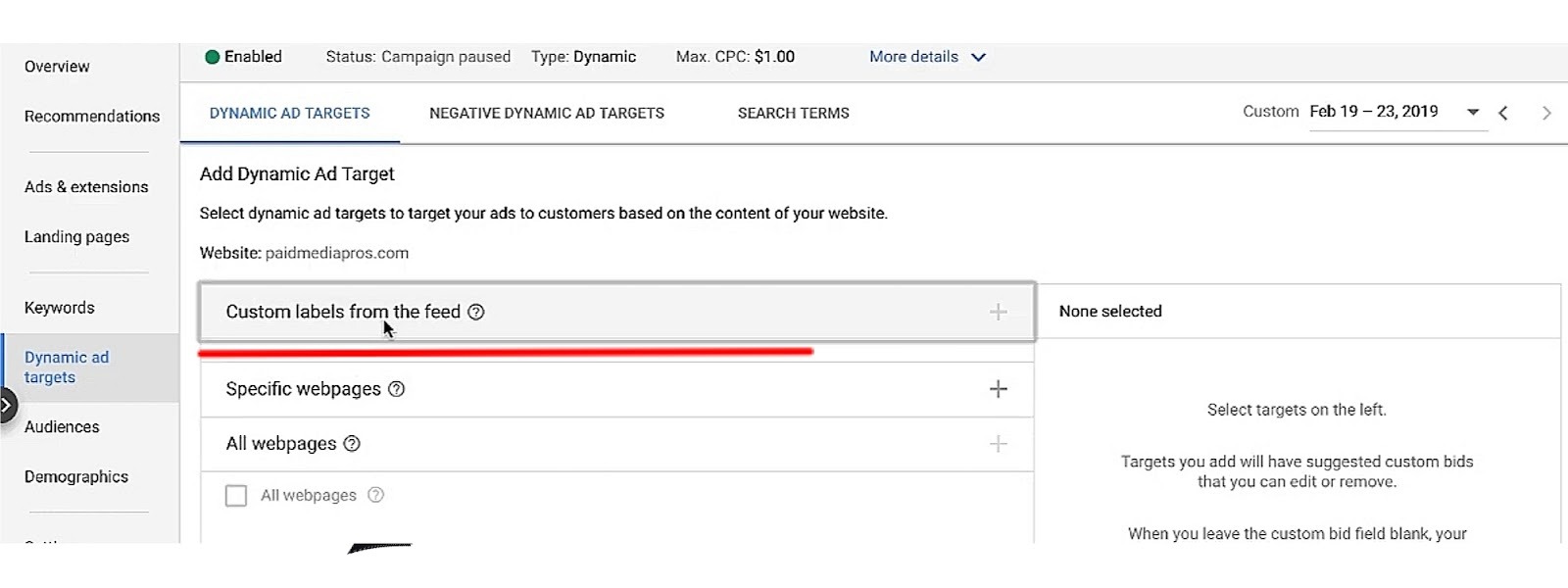
After uploading the feed, create a dynamic ad target and choose page feed as the source.
-
Select the custom label(s) to include (e.g., Custom Label 1 = in_stock) or exclude (e.g., Custom Label 2 = low_priority).
-
Combine labels with URL rules for more control (e.g., include in_stock + priority_high).
Writing and Testing Dynamic Search Ads
At this point in this Dynamic Search Ads Step by Step Guide, you should be ready to launch your first Dynamic Search Ads campaign, so let’s walk you through the gimmicks of an efficient Dynamic Search Ads campaign structure.
Creating Effective DSA Descriptions
First, write a single, action-oriented description line that complements the dynamically generated headline. Keep it concise (not more than 20 words) and focused on one value proposition, it could be price, speed, warranty, free shipping, etc.
Then you should use a clear call to action and one measurable benefit. For example:
-
Buy Now — Free 2-Day Shipping”
-
Request Demo — 24-Hour Response”
Avoid repeating page content in the exact same words. Your descriptions are meant to add meaning to the headline such as a unique selling point or promotion details. For example, a furniture retailer can use a description that says “Shop Mid-Century Sofas — Free Returns, 30-Day Trial.”
Aligning DSA Messaging with Landing Page Content
It is common knowledge that ads become less efficient if people don’t find what they’re looking for on your site, and it doesn’t matter how many times they appear on search queries. This is why you must ensure that your ads description and the dynamically generated headline match the intent of the landing page. If the DSA description promotes “Free Installation,” for example, the landing page must clearly show the free installation offer and any eligibility conditions.
You also need to prevent landing-page mismatch by excluding pages that don’t satisfy commercial intent. You can achieve this by using page feed or exclusions to remove policy pages, contact pages, and generic blog pages.
Product pages are meant to contain the product name, price, and availability visible above the fold so that users will instantly make decisions. Be sure to verify semantic alignment too. If the DSA targets category pages, the description should reference the benefits of each category e.g., “Wide Selection of Running Shoes — Sizes In Stock”.
Additionally, most advertisers use schema.org product markup (price, availability, GTIN) and visible H1/H2 text that mirrors likely headline language so Google’s headline generation and user expectations align.
A/B Testing and Ad Rotation for Dynamic Search Ads
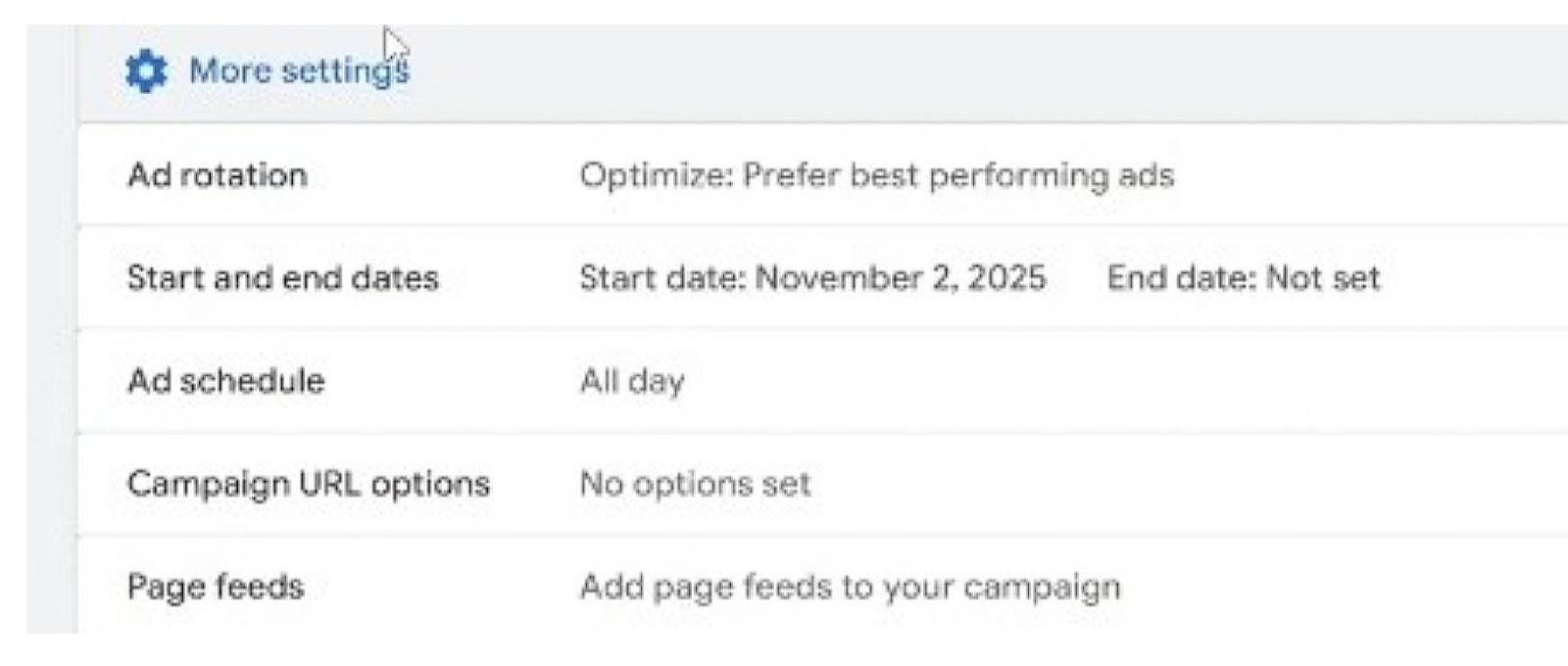
A/B testing is a kind of “controlled experiment” whereby you serve two or more description variants or landing‑page combinations to the same DSA traffic, and then rotate them evenly to measure which version drives the best outcome. Now, ad rotation is the setting that ensures each variant receives comparable impressions while the test runs.
You will need only 3 things to run A/B testing:
-
A clear primary KPI (CPA, conversion rate, or ROAS).
-
A predefined sample or time window (commonly 30–60 days or until a target number of conversions).
-
Statistical significance before declaring a winner and switching to optimized rotation.
For your experiment to work, you will need to first define a single primary KPI, which could be CPA, ROAS, or conversion rate. Then set a minimum test window, which could be 30 days or until 100–200 conversions per variant. Now you have to determine the different variants that are competing. There will be a first variant, which could be a baseline description, and then another variant, such as a benefit-led description, like price or warranty.
The experiment is set up by creating separate dynamic ad groups or using ad variations within the same dynamic ad group to serve different descriptions. Keep targeting, bids, and landing pages identical across variants to isolate description impact.
Be sure to use even rotation during the test period, and you should optimize rotation for the winning description after you have been able to gather significant statistics on conversion rate, CPA, ROAS, bounce rate, and post-click engagement (time on page, pages per session). You should also track search-term quality to ensure no variant drives low-intent queries.
Optimizing and Scaling Dynamic Search Ads
Yes, Dynamic Search Ads are great, but optimizing and scaling is where the work you set up starts to really pay off.
If you’ve started running DSAs already, it’s about time you learnt how to get more value by leveraging the Negative Keyword Strategy, Bidding/budgeting strategies, and Remarketing. This section shows exactly what to check daily, which experiments to run, how to adjust bids and budgets for peaks, and how to use audiences and reporting to convert DSA discoveries into owned, high‑value keyword campaigns.
Search Terms Analysis and Negative Keyword Strategy
DSAs only reach their potential when you treat them as a discovery channel. And in the channel, you can use continuous search‑term analysis and maintain negative keywords to ascertain that everything you find is actually useful for the progress of your business. Hence, while learning how to set up Dynamic Search Ads in 2026, the following routine will help you with the Dynamic Search Ads negative keywords strategy:
-
Daily Review During Learning: For the first month of running DSAs, try reviewing the Search Terms report daily. Export the queries that drive clicks and conversions, then classify them into high-value, irrelevant, or informational. You can go ahead and pause those queries that are irrelevant or don't show commercial promise.
-
Structured Negative Lists: Create a negative keyword list based on whom you don't want your ads to show up for (e.g., job seekers, free resources) and apply them at the campaign level. Keep one master list for the entire ads account and then smaller lists for campaign-specific exclusions.
Bidding, Budgets, and Seasonality Adjustments
Next, we'll discuss how to set up Dynamic Search Ads in 2026, focusing on how smart bidding, budget phasing, and seasonality controls can be utilized to stabilize and optimize Dynamic Search Ads performance. Let’s get to it!
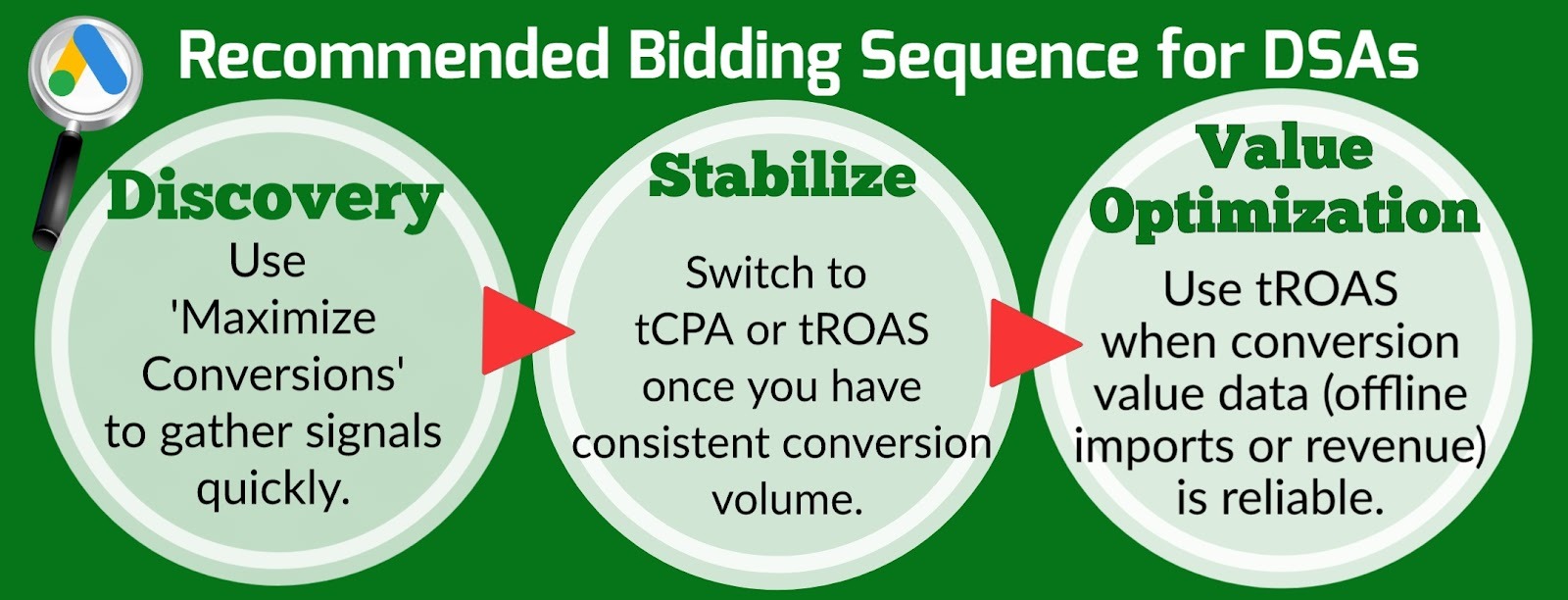
Practice phase budgeting by starting your DSAs at a conservative share of search spend (10–20%) during discovery. After 30–60 days, reallocate the budget to labels or targets that meet CPA/ROAS thresholds. Scale incrementally (10–20% increases) rather than doubling budgets. Then, your bidding strategy should be sequential, starting with Maximise Conversions at the point of discovery then switching to ‘Target CPA’ and ‘Target ROAS’ later when you have a stable yield, and when optimising your DSA campaigns.
Implement seasonality adjustments or seasonality events in the bidding settings for known peaks (sales, holidays). As for short, predictable spikes, apply a temporary multiplier rather than changing long-term targets.
You should also set portfolio bid caps and daily spend alerts to prevent runaway spend during rapid traffic shifts. Use automated alerts for CPA spikes >30% day-over-day.
Lastly, run controlled experiments when changing bidding strategies: hold out a portion of traffic or run parallel campaigns to compare Maximize Conversions vs Target CPA under identical targeting.
Using Audiences and Remarketing with Dynamic Search Ads
Audience layering and remarketing are useful for lifting intent and recovering warm prospects and rigorous measurement in GA4 and Google Ads, so automated bidding learns from clean, deduplicated conversion signals.
How is this achieved?
Start by applying Dynamic Search Ads audience targeting (in-market, custom intent, customer match) as bid modifiers to prioritize higher-value users surfaced by DSAs. Now create remarketing lists for users who visited product pages but didn’t convert; apply these lists to DSA campaigns with higher bids or separate campaigns to recover warm traffic.
Next, exclude converters or low-value segments (e.g., past purchasers within a certain period) to avoid wasted spend. Combine these exclusions with page feed labels for precise control.
Measuring Performance in GA4 and Google Ads Reports
To measure how your Dynamic Search Ads are doing, link Google Analytics 4 (GA4) to your Google Ads account. You will be able to see your conversion volume, conversion value, CPA, and ROAS. Use GA4 to analyze post-click engagement (bounce rate, time on page) and Google Ads for auction and search-term insights.
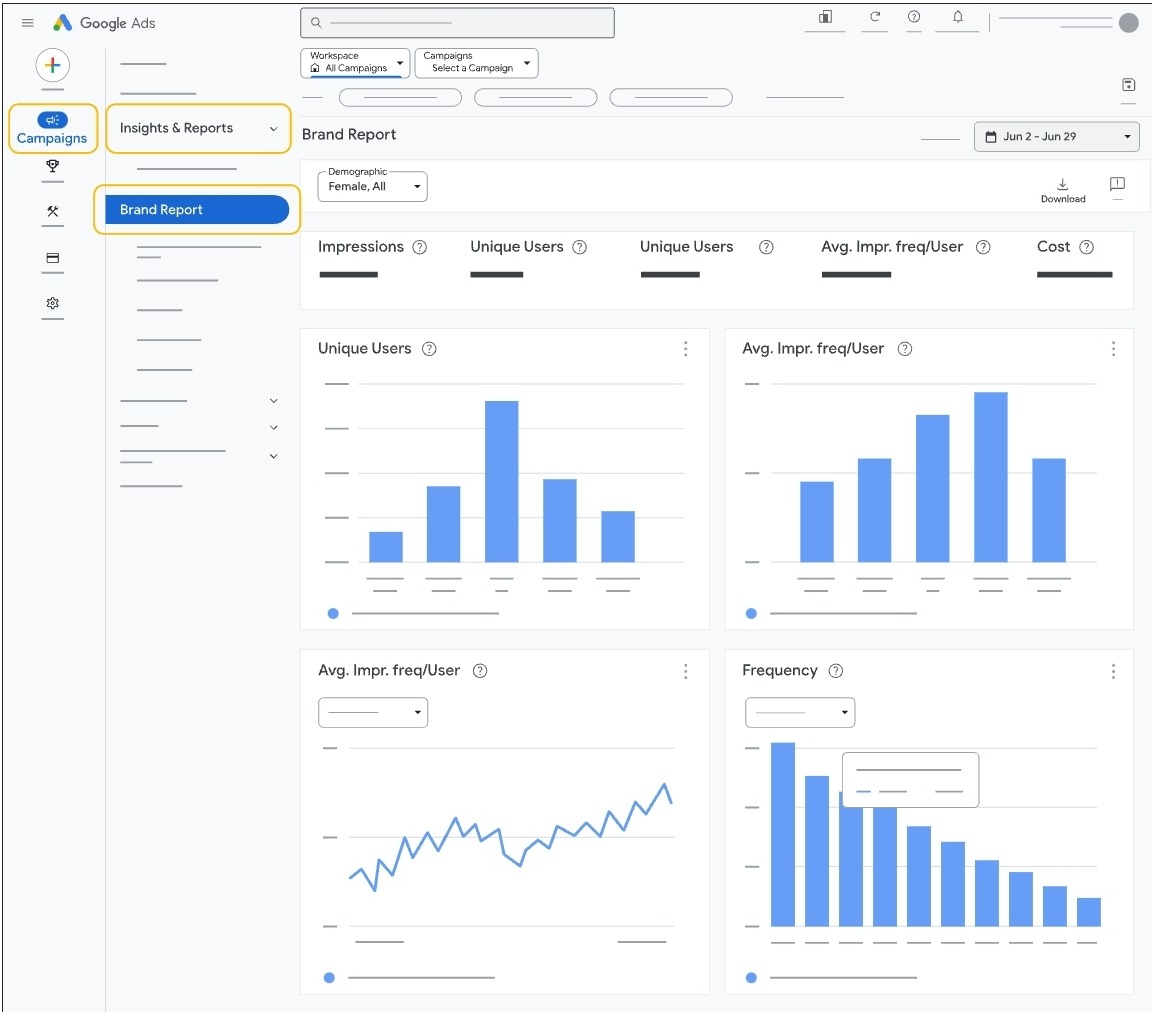
In your dashboard, there are a number of widgets that will inform you about the performance of your DSA within a given period. You can click on any of the following:
-
Conversions by Dynamic Target (table)
-
CPA 30-Day Trend (line)
-
Top 20 Search Terms by Conversion Value (table)
-
Page Feed Health (errors/warnings)
You can also build Custom Dashboards that show conversions by dynamic target, CPA by custom label, top search terms by conversion value, and incremental conversions vs keyword campaigns. Include a 30-day CPA trend and a table of promoted queries.
Beyond conversions, you can monitor engagement metrics (pages per session, session duration) for DSA traffic; deep impressions with low engagement indicate landing-page mismatch or poor targeting.
Use Cases by Industry
Dynamic Search Ads is becoming popular among advertisers, from e-commerce stores that need broad coverage across large or changing catalogs, to businesses that combine it with Standard Search and Performance Max for more lead generation.
Dynamic Search Ads for E-commerce Stores
DSAs come in handy for large online retailers because page feeds allow them to include specific SKUs and exclude certain pages so that traffic is directed only to high-value pages. Pages can be tagged with custom labels (e.g., in_stock, high_margin, free_ship) and prioritize high_margin in early scaling. Let’s look at some Dynamic Search Ads examples.
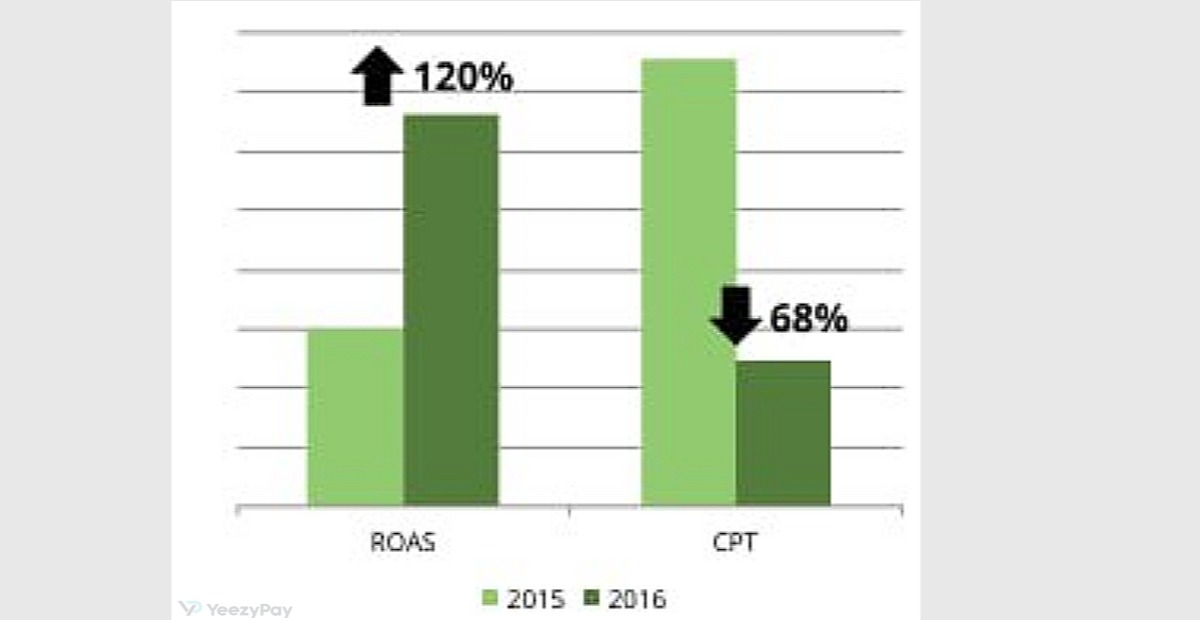
First, we can look at GroopDealz, an e-commerce retailer that used Dynamic Search Campaigns to increase transaction volume. First, the team split the site into groups like clothes, jewelry, and home items, and set a goal for how much each sale should cost. They turned the campaigns on but kept them paused at first to check which pages and search words Google wanted to match, added lists of words and pages to block so bad matches wouldn’t waste money, tested different ad texts, and adjusted timing based on how long people usually take to buy.
Within a year, the store’s return on ad spend went up 120%, and both the cost per click and the cost per transaction dropped by 68%. In short, using DSAs plus careful checking, exclusions, and testing helps e-commerce stores to show the right ads to the right shoppers and spend much less for each sale.
Scaling 1.5 Million SKUs: The Grainger Strategy
Managing a massive inventory is the ultimate test for any advertiser, and Grainger is a strong example of how to handle it. With over 1.5 million products ranging from simple bolts to complex machinery, manual keyword management simply isn’t an option. Their team realized that even the most exhaustive keyword lists covered less than 20% of the actual search demand coming from engineers and procurement officers.
To bridge this gap, Grainger turned to a "Double-Layer" DSA strategy. Instead of a basic setup, they used high-quality Page Feeds to point Google exactly toward their most profitable inventory, effectively turning their website content into a real-time keyword database.
The real "pro move" here was layering RLSA (Remarketing Lists for Search Ads) on top of their DSA campaigns. The logic was surgical: if a user had already visited Grainger’s site and was now searching for a highly specific part number or technical term, the system would bid significantly more aggressively. This ensured they captured high-intent "long-tail" traffic without wasting budget on generic, low-converting queries.
The results were a game-changer for their operations:
-
ROAS spiked by 1,000% in several key product categories by combining dynamic headlines with smart bidding.
-
The system uncovered thousands of unique search terms that their human team would have never found in a keyword planner.
-
By automating the "discovery" phase, their marketing team stopped being spreadsheet operators and started focusing on strategic feed optimization.
For any large-scale e-commerce business, Grainger’s approach proves that in 2026, your website can be your best keyword list. If you prepare your pages correctly, DSA doesn't just find traffic—it finds the exact niche queries your competitors are completely missing.
Dynamic Search Ads for e-commerce websites
Advertisers also pair DSAs with product-level schema such as price, availability, and GTIN so that generated headlines and landing pages match user intent. Then it is easy to track incremental conversions against existing keyword campaigns, CPA by custom label, and return on ad spend (ROAS) by landing-page group.
Dynamic Search Ads for Lead Generation and B2B
DSA is good for lead generation when using complex product catalogs and many service pages where users search with diverse word combinations. Salesforce dominated the CRM market by using Dynamic Search Ads to catch lots of specific searches about CRM features that their regular keyword lists missed.
Here’s their process: they let Google scan product and feature pages, ran DSAs separately from their main keyword campaigns so automatic matches wouldn’t mix into reports, reviewed the search‑term reports to find useful queries, and added negatives to block irrelevant matches. They also tested and optimized landing pages and moved the best‑performing queries into controlled keyword campaigns for tighter bidding and messaging.
The result was more qualified leads and broader visibility in a crowded B2B market. DSAs helped uncover long‑tail, high‑intent searches that the team could then nurture with tailored ads and follow‑up, improving lead volume and the efficiency of their paid search program.
Combining Dynamic Search Ads with Performance Max and Standard Search
PPC experts like Nils Rooijmans and Soscinova recommend running DSAs in separate campaigns to avoid clutter and ensure that keyword discovery is clean. As a smart advertiser, you can still run DSA campaigns with PMAX and Standard Search campaigns for massive outcomes. But how does this work?
The gimmick is to use shared audiences and conversion imports so all campaign types optimize from the same signals. You will be promoting high-value queries discovered by DSAs in standard search and PMAX campaigns, then excluding those queries from DSA negatives once migrated.
To spend wisely, treat DSAs as a discovery channel during the first 4 weeks of advertising, so it can take only about 20% of your search spend, then reallocate based on incremental lift and CPA. Run holdout experiments: keep a control group of traffic on standard search while enabling DSAs to measure true incremental value.
Common Mistakes and Troubleshooting
Learning how to set up Dynamic Search Ads in 2026 is not complete without knowing how to avoid common mistakes that cause issues for advertisers running DSA campaigns, and how to fix these issues.
#1: Misaligned Landing Pages and Poor UX
If you notice deep impressions with low clicks, high bounce rate, short session duration, or low conversion rate, it might be a result of generic category pages used for product queries, or there is a missing price/availability.
This can be corrected by prioritizing pages with single commercial intent and visible CTAs. Then it will be helpful to use product schema (price, availability) and unique titles so that Google can generate accurate headlines.
Common issues with user experience include slow load times and broken forms. The simple fix is to improve page speed and mobile UX on your sites. Then ensure that redirect chains are fixed while GCLID is preserved.
#2: Overlapping with Other Campaigns and Cannibalization
Not excluding negative exclusions and sharing audiences when combining multiple campaigns without priority rules can lead to duplicate impressions across Search, Performance Max, and DSA. It also causes rising CPCs and unclear attribution.
To mitigate this issue, promote high-value queries from DSA into dedicated keyword campaigns and add those queries to campaign negatives. Always use shared audiences and conversion imports so that bidding decisions use the same signals across channels.
#3: Disapproved Ads and Policy Violations
Ad disapproval in DSA campaigns is usually triggered by landing-page mismatch, misleading claims, unsupported promotions, and restricted content categories.
If you ever find yourself in this situation, check the Policy Center for the specific disapproval reason and fix the landing page to match ad claims (price, availability, shipping). Be sure to also remove or reword prohibited claims and ensure required disclosures are visible.
Checklists Templates, and Next Steps
Dynamic Search Ads setup checklists and Dynamic Search Ads troubleshooting tips.
While DSA might be easy and effective, you have to pay attention to your webpages because they are your main asset. The following is a checklist to maintain a clean website that enables you to get the best from your campaigns:
-
Verify robots.txt and sitemap accessibility.
-
Validate GA4 link, enhanced conversions, and gclid persistence.
-
Review Search Terms for irrelevant queries, and add negative keywords/pages.
-
Inspect top DSA targets for landing-page intent alignment.
-
Check for compliance with advertising and consumer protection requirements, and review the Google Ads Policy Center for disapprovals and documented fixes.
If you've gotten so far in this Dynamic Search Ads tutorial for beginners, all you need to do now is start. You may adopt this 90-day (three-months) roadmap for starters:
-
Day 1-30: run daily Search Terms reviews, fix top 10 landing pages, run discovery budget at conservative level.
-
Day 31-60: promote proven queries to search, tighten negatives, switch to Target CPA/tROAS where data supports.
-
Day 61-90: split high-volume labels into separate campaigns, scale budgets incrementally, document outcomes, and update playbooks.
Conclusion
So, Dynamic Search Ads work by using your website to find searches and make headlines for you. Your job is to make webpages easy to crawl, keep each page focused on one product or service, track conversions properly, and use page feeds or exclusions to control which pages show ads.
On a final note, treat DSAs as a discovery channel or tool in the first 1-2 months, then optimize after you have gained stability. You can move proven queries into other campaigns, then scale only the labels and targets that meet your CPA/ROAS projections.
FAQs
How do I set up a Dynamic Search Ads campaign in Google Ads in 2026?
The setup begins by creating a new Search campaign and selecting the Dynamic Search Ads subtype during the configuration phase. You must provide your website URL and select your targeting source (either Google’s index of your site or a specific page feed). Once the campaign shell is created, you set your location, language, and initial bidding strategy—typically Maximize Conversions to start the discovery process. Finally, you create a "Dynamic" ad group where you write the description lines that will accompany Google’s auto-generated headlines.
What prerequisites does my website need before using Dynamic Search Ads?
Your website is the "keyword list" for DSA, so it must be technically sound. Key prerequisites include:
-
Crawl Access: Your robots.txt file must allow Googlebot to access all product and category paths.
-
Structured Content: Pages should have a clear H1/H2 hierarchy and use Schema.org markup (price, availability, GTIN) to help the AI match queries accurately.
-
Unique Metadata: Every commercial page requires a unique, descriptive title tag and meta description.
-
Mobile Performance: Pages must load quickly and be mobile-friendly to prevent high bounce rates and wasted spend.
When should I use Dynamic Search Ads instead of standard search or Performance Max?
-
Use DSA when you have a large or rapidly changing inventory and want to capture "long-tail" search queries that are impractical to manage with traditional keyword lists.
-
Use Standard Search for your core branded terms and high-intent keywords where you need absolute control over the exact ad copy and bidding.
-
Use Performance Max when your goal is cross-channel reach (YouTube, Display, Discover) and you have sufficient conversion data (tROAS) to let the AI manage the entire funnel.
How do page feeds work for Dynamic Search Ads campaigns?
A page feed is a CSV spreadsheet containing a list of specific URLs you want Google to target. This offers more precision than "All Webpages" because it allows you to:
-
Apply Custom Labels: Tag URLs with attributes like "In Stock," "High Margin," or "Seasonal" to prioritize them in your bidding.
-
Control Eligibility: Ensure Google only sends traffic to high-value pages, excluding legal, blog, or out-of-stock pages.
-
Group Themes: Organize your feed into logical sections (e.g., Men’s vs. Women’s apparel) for better reporting and ad group structure.
What are the best practices to optimize Dynamic Search Ads for competitive audiences?
To maximize performance in competitive markets:
-
Treat DSA as a Discovery Channel: Use it to find new, profitable keywords, then move those high-performers into dedicated Standard Search campaigns for tighter control.
-
Aggressive Negative Keyword Strategy: Review the Search Terms report daily during the first 30 days to exclude irrelevant or non-commercial queries.
-
Audience Layering: Apply Remarketing Lists (RLSA) to your DSA campaigns to bid more aggressively for users who have previously visited your site.
-
Bidding Transition: Start with "Maximize Conversions" to gather data, then switch to Target CPA or Target ROAS once you achieve 30–50 conversions in a 30-day window.
-
Compliance: Ensure your landing pages follow applicable advertising and consumer protection requirements regarding transparent pricing and accurate product claims to avoid account suspensions.


