


A Guide To Google Ads Verification
Introduction
Most advertisers think of verification as a hassle; they just want to run ads and make sales, and we get it. But as you go through a guide to Google Ads verification like this, you will see how completing the process sets your business apart.
We’ve seen exactly where verification breaks down, and what a clean, first-submission approval actually looks like. So whether you need to verify advertiser in the US for a sole proprietorship or navigate Google Ads MCC verification for an agency, you will understand how to verify Google Ads account correctly. The information we’ve provided here in a guide to Google Ads verification will help you verify your Google Ads account successfully, keep your account active, and securely out of suspension.
Here’s what you stand to benefit when you complete verification:
-
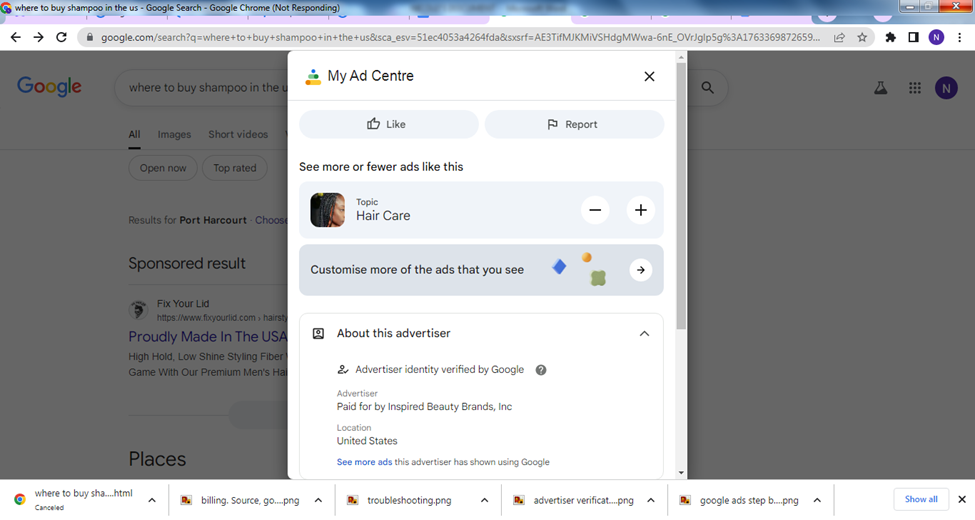
You gain access to more professional features: As a verified advertiser, you receive access to the business name and logo extensions. These extensions give you a more professional look and help your ads stand out visually on search result pages. While your competition has standard text-based listings, your ad displays your logo. Isn’t that amazing? It gives you a tremendous advantage over your unverified competitors. Providing your business name, logo, and verified badge also builds trust with potential customers, resulting in higher click-through rates.
-
Ability to Advertise in Regulated Industries: If you are in categories like healthcare, finance, or legal, you cannot run ads without verification. Verification enables you to advertise in regulated industries.
-
Protection Against Fraud: The verification steps you find cumbersome to complete also protect you by making it difficult for fraudulent individuals to create fake accounts and run scam ads. With verification, scammers will find it hard to run ads using your business information.
What Google Ads Advertiser Verification Program Is
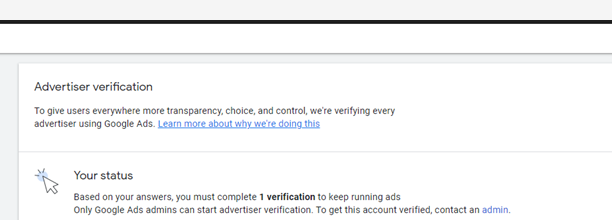
Google performs verification at two different levels to ensure transparency. The first level is called identity verification. At this level, Google wants to confirm that an advertiser is indeed who they claim to be. As a result, you will be asked to prove your identity. For instance, Google wants to verify that you are John Smith from John Holding Company and not just someone posing as John Smith.
The second level is called Business Operations Verification Google (BOV). This process is to confirm your business model matches what you're advertising. This is Google asking, "You say you're a medical practice, but are you actually a medical practice, or are you an affiliate promoting someone else's telehealth service?"
Most advertisers complete only the identity verification; however, for a small number, the types of products they advertise may trigger automatic business operation verification. Business operations verification is a separate process from identity verification, which we will discuss later in more detail.
The verification standards for Google Ads verification requirements 2026 were aligned across Google Ads, Google Business Profile, and Local Services Ads. This means that the information about your business must be identical on each platform, including the name, address, etc.
Additionally, new strict website verification guidelines were developed for advertising on Google Ads. From now on, your landing pages must contain explicit descriptions of your services, operational details, and contact information. If your site is just a landing page with a form and no real information about your business, you'll likely trigger a BOV request.
Who Must Verify And When
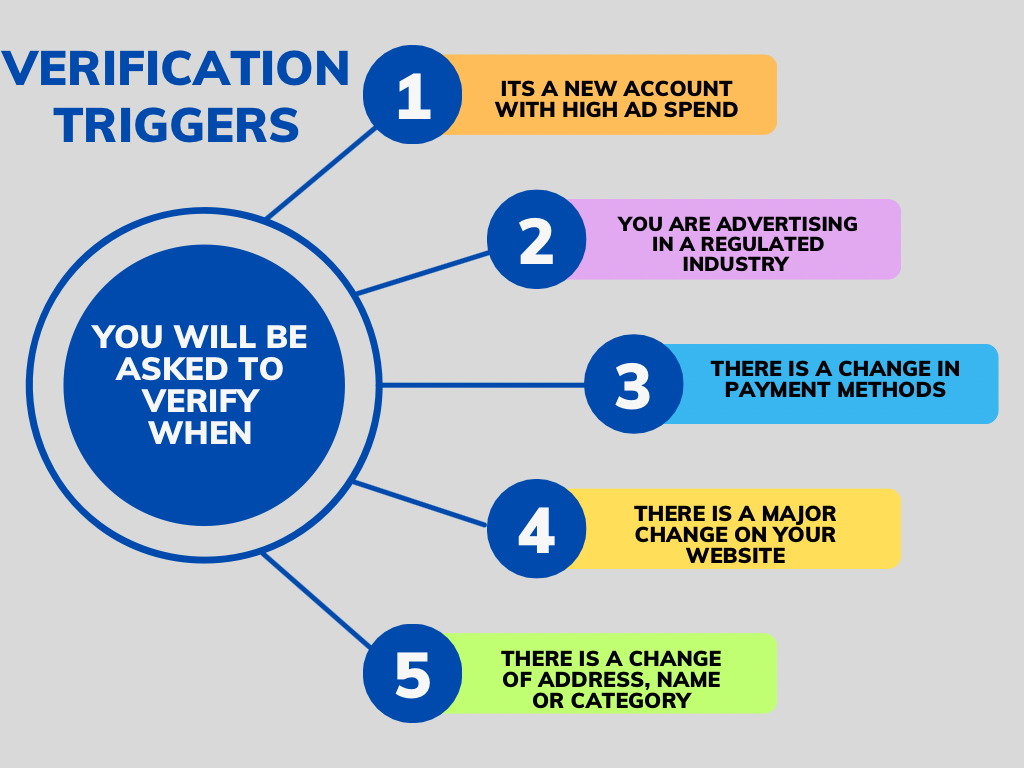
Google verifies accounts using certain criteria, so if you learn the specific criteria that Google monitors for verification purposes, you will also learn when to expect a verification request from Google. The following situations are examples of when you would typically receive a verification request:
-
You’re a brand-new account spending aggressively: If you just created an ad account, and spend at least $500 within the first week after creating the ad account, expect your account to be verified by Google within 72 hours from the time the account was created. Since Google has established fraud detection systems, Google will flag newly created accounts that spend large sums of money during this time period as potentially being fraudulent until otherwise indicated.
-
You run ads mentioning regulated topics: If you run an advertising campaign for health-related products, political candidates, financial services, or Legal Services, you will automatically be flagged by Google for possible verification, oftentimes within hours of launching your campaign.
-
You’re targeting audiences outside your business location. If you are advertising your products or services to customers outside your local area, you need to have some sort of verification process in place. An example here would be if you are a plumber in Texas and you want to expand to cities B, C, and D, it will raise a red flag with Google if you aren't really able to service those cities as a plumber. In this case, Google will require you to indicate that you provide service globally on your website for you to run ads there.
-
Your payment behavior looks suspicious: Your payment behavior may also trigger the need for verification. For instance, if you previously had been running your monthly invoices through Google, but then you suddenly switched to credit card payment with a significant jump in your daily budget (300% or more), again, this would set off a red flag with Google.
-
Your landing page content changes drastically: When a business changes its landing page content significantly, Google will notice. For example, if you have been promoting one particular product and then switched to a different one, Google may think you are doing a bait-and-switch.
When verification hits, you typically get 30 days to start the process and another 30 days after you begin to complete it. That's 60 days total if you start immediately.
Businesses have lost the opportunity to make tens of thousands of dollars because they treated verification as something to deal with "later." Later became a missed deadline, which led to a suspended account during their busiest sales period.
If you have received a verification notice from Google, drop everything else and do it now. Don’t wait until day 29 before the end of your 30-day verification deadline. Google does not extend its verification deadline, so there is no leniency whatsoever. When the Google Ads verification deadline hits, Google will stop running your ads, prevent you from editing any campaigns, limit your ability to create new ads, and only allow you to see minimal reporting on your account until verification is complete, all of which make it extremely difficult to manage your business until the process is finished.
Documents And Requirements For USA

This is where most rejections happen. People submit the wrong documents for Google Ads verification, or they submit the right documents with tiny formatting errors that Google's system can't process.
Let’s walk you through exactly what you need based on your business structure.
For sole proprietor Google Ads verification, you will need to present a valid US Government-issued photo identification card, with your name printed exactly as it appears in your billing profile. For example, if you have an identification card issued to you that says, "Robert James Anderson," and your billing profile indicates "Bob Anderson," then this discrepancy will result in rejection.
It should be noted that your ID must still be current; if it has an expiration date from last month, Google will not accept it, even though the State may consider it still valid.
When advertising under a "Doing Business As" (DBA) name, your legal name must appear in addition to your DBA on both your Payment Profile and your DBA Entity Registration documents. For example, your legally recognized name is Sarah Chen. You utilize the business name of "Chen Creative Studio" for your freelance design enterprise. Furthermore, the billing profile for your business in the Google Ads program only reflects your legal name of "Sarah Chen" since that is the name on the credit card. Consequently, while Google will publish the ads of "Chen Creative Studio," it has no way of associating that title with "Sarah Chen." Your verification request, therefore, will be denied by Google unless you provide your state DBA certificate that exhibits both "Sarah Chen" and "Chen Creative Studio." These certificates are typically available through your state's secretary of state at a cost of $25 to $100, with a processing time of one week or less.
If you are either an LLC or a corporation, you will be required to submit two types of documents: organizational documentation and identity document for advertiser verification. The types of documents you can submit for your organization's organizational documents include any of the following:
-
An IRS document that states your organization's name. These include Form CP575 (your initial EIN assignment), Form 147C (EIN letter for advertiser verification), or other IRS correspondence like CP299, 988, 937, 1050, or 5822. The key here is that the document must show your exact legal business name as registered with the IRS.
-
Alternatively, you can provide your state-issued certificate of incorporation. This was the official document you received from your Secretary of State when you established your corporation or LLC.
-
Recent SEC filings are acceptable for publicly-traded companies; this does not apply to most people, but if it applies to you, Google will accept either a 10-K or 10-Q filing.
-
Other acceptable documents include: acceptable business credit reports from Experian, Equifax, and TransUnion that reflect your organization’s name.
For an identity document, a current government-issued ID from your authorized representative is acceptable. Authorized representatives, as a general rule, are your CEO, founder, largest owner, or controlling person listed on the official organization documents. For instance, if three partners own an LLC, you would have to submit the ID of the partner who is either the founder, CEO, or largest owner.
As a Nonprofit or Educational Organization, you must submit everything required for LLCs and Corporations, including: IRS determination letter (the letter from the IRS that confirms your 501(c)(3) status) and state registration documents showing that your organization is registered as a Nonprofit within your state.
Note: The verification of Nonprofits may fail if the Federal Determination Letter was submitted but not the State Registration Documents; both are required by Google.
If you are a government agency, you will need to send an official letter on your agency's letterhead. The letter must include:
-
The full legal name of your department (or agency).
-
The official registered business address for your department (or agency).
-
The date the letter was written/sent.
-
A government-issued ID for the person listed in the letter as being your Authorized Contact.
Government Agencies can face long verification delays if the ID provided by the Authorized Contact does not match the name on the original letter sent by the Government Agency. Make certain that whoever signs the letter is the same person as the one providing the ID.
If you're an agency (MCC Account), this is where verification gets complicated. You face double verification: your agency needs verification, and every client account under your Manager Account must be verified as well. The smart move is to build document collection into your client onboarding process. Get everything you need before you launch their first campaign.
For your agency verification Google Ads, you need:
-
All the standard LLC or corporation documents mentioned above.
-
Client authorization letters for every account you manage
-
Signed service agreements or contracts with clients
-
Reseller documentation for every account
For each client account, you'll need your client’s business documents (as required by their business structure). You cannot use your agency's paperwork to verify a client's account. Google requires independent verification of each advertiser.
Regardless of your business structure, you need proof of address for advertiser verification. This is usually a recent utility bill or bank statement showing your business address. The address must match exactly across all documents: billing profile, registration papers, everything. Here's where people mess up: They write "123 Main Street" on one document and "123 Main St" on another. To us, those are the same address, but to Google Ads address verification system, they're different. The system doesn't interpret abbreviations. Pick one format and use it everywhere.
Step-By-Step Verification Workflow
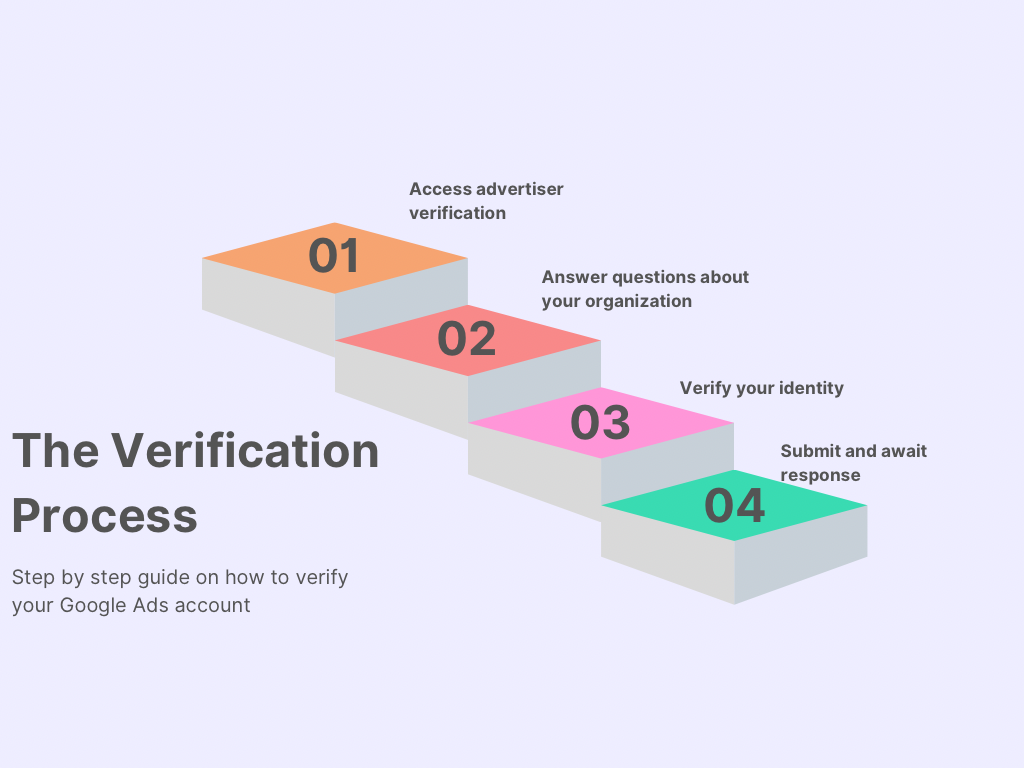
Let us walk you through the exact process, screen by screen.
Step 1: Access the Advertiser Verification Google Ads Page
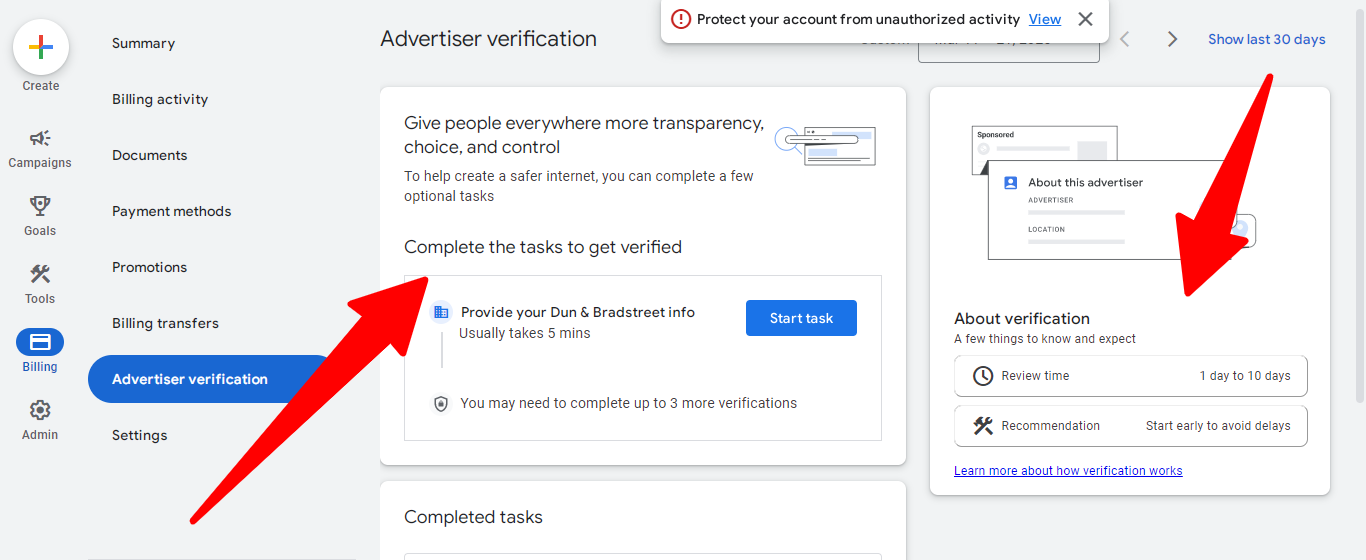
Log in to your Google Ads account. On the left side, click "Billing." You'll see a section called "Advertiser Verification." Click it. If verification has been triggered for your account, you'll see a page that says "Complete tasks for verification." Click "Start task."
Step 2: Answer Questions about Your Organization
Google asks three questions to determine what documents you need. These questions include:
-
"Is your organization an advertising agency?"
Only answer yes to this if you are managing client accounts using a manager account. If you run ads only for your own business, even if you call yourself an agency, you should answer no to this question. It will help Google determine at a future date if client authorization documents are required.
-
"Who pays for your ads?"
This will determine the tax information that Google will collect for you. Most advertisers will answer my business. If you are a client agency and the client pays you directly for advertising expenses, then you should select someone else.
-
"What is your industry (or industries)?"
Select all applicable industries for this question. Be careful to be accurate because certain industries are examined more closely and, in some cases, require specific documentation and authorizations to be verified.
Some users go straight to their preferred industry in order to avoid submitting verifications on their ads. Don't do that. If Google finds your advertisement promoting financial services down the road and you have not disclosed it, you will have your account suspended due to misrepresentation.
After answering all three questions, click "Save and continue."
Step 3: Identity Verification
You will now be taken back to the page that allows you to verify your identity. Under verifications of identity, click on the "Start Task" button to complete four important fields:
-
Confirm your organization's name:
You must enter your company name as it appears on your official documents. Do not enter the way you would like it to be; do not enter a shortened version; enter it exactly as it is written. If, for example, your incorporation documents state "A.B.C. Marketing LLC" with the letters followed by a period, and if it was written "ABC Marketing LLC", you will enter the periods. Google's systems will be mapping exactly to your company's name. "A.B.C. Marketing LLC" is not equal to "ABC Marketing LLC". That's why a guide to Google Ads verification stresses copying character-for-character.
-
Confirm your organization's address:
Copy the full character format as listed in your Certificate of Incorporation. Note that Street is not the same as St.; Suite 100 is not the same as #100; Avenue is not the same as Ave.. Use the exact format used on your official business registration.
-
Provide your name and ID:
Enter your full legal name exactly as it appears on your government-issued ID. Then upload a clear photo of your ID. To avoid errors when uploading a scan or photograph of your ID, please follow these guidelines:
-
Find a well-lit area with natural light near a window.
-
Use a dark, solid color surface for laying down the ID.
-
Hold your phone directly above the ID.
-
Ensure that the entire edge of the photo is visible in your frame.
-
Do not have any glare or shadows obstructing your view of the ID.
-
Ensure that your fingers are not covering any part of the ID in the photo.
-
Take the photograph using your phone's highest quality setting.
-
Provide your address:
The address you provide here should be the address on your payment profile. For example, say your business is located at 123 Business Park Blvd., but what is on your billing profile is 456 Home St. because that's the billing address on your credit cards. Put in 456 Home St.
Step 4: Submit and Await Response
Click "Save and continue." Google reviews identity verification submissions in 1-3 business days and 10-15 business days for Business Operations Verification. Once the submission is reviewed, you'll receive an email detailing whether your submission was accepted or rejected. If rejected, please take time to read the email informing you of the errors in your submission, as Google's rejection emails contain a detailed explanation of the issues. Follow their guidelines to only fix the items they identified; any additional changes you might want to make that have not been flagged could create a new set of problems, leading to a second rejection.
Even after you're verified, Google might ask you to re-verify. This happens when there is:
-
A change in your business structure. Any business that has changed its structure will be required by Google to submit documents related to its new structure. For instance, if you formerly operated as a sole proprietor but you now operate as an LLC, Google will ask you to reverify.
-
A change in your location. If your business changes addresses, Google would need to see proof of your new address.
-
Significant changes in payment activity. Google will conduct a verification review of an account in the event of a month-to-month increase in payment activity from $500/month to $10,000/month.
-
Expanding into new advertising categories. For example, if a business has been advertising retail goods and is now going into health care services, this is a new advertising category that will require a further verification submission.
-
Annual compliance reviews. Google also randomly selects accounts for annual re-verification. If your account is flagged, there's nothing you did wrong; it's just routine compliance. We mentioned this because we don't want you to panic if you get a re-verification Google Ads request. It doesn't necessarily mean anything is wrong.
Business Operations Verification (BOV) Deep Dive
Some businesses are required to go through another verification called "Business Operations Verification" (BOV). This is distinct from Identity Verification, and it is much more complicated than just verifying someone's identity. Google wants to ensure that the business is being run as advertised. You will probably be required to go through a BOV if you:
-
Have an affiliate offer (advertising another company's product and earning a commission);
-
Provide white-label services (reselling another company's services under your own brand);
-
Sell drop-shipped products (selling products without holding physical stock);
-
Have a business that relies on retail partners or third-party logistics, or
-
Have ads running in any of the following industries: healthcare, finance, legal services, etc.
For example, your website says "Our online medical practice". However, the person operating the website is not medically trained nor has the authority to operate as a medical professional. Rather, they have an affiliate arrangement with a telemedicine company and receive commission for clients who purchase from that company through their link. This situation violates BOV, as the person misrepresents themselves as a medical provider when all they're doing is providing a referral service.
Google is trying to eliminate these types of misleading advertising representations because they decrease trust in Google among its users.
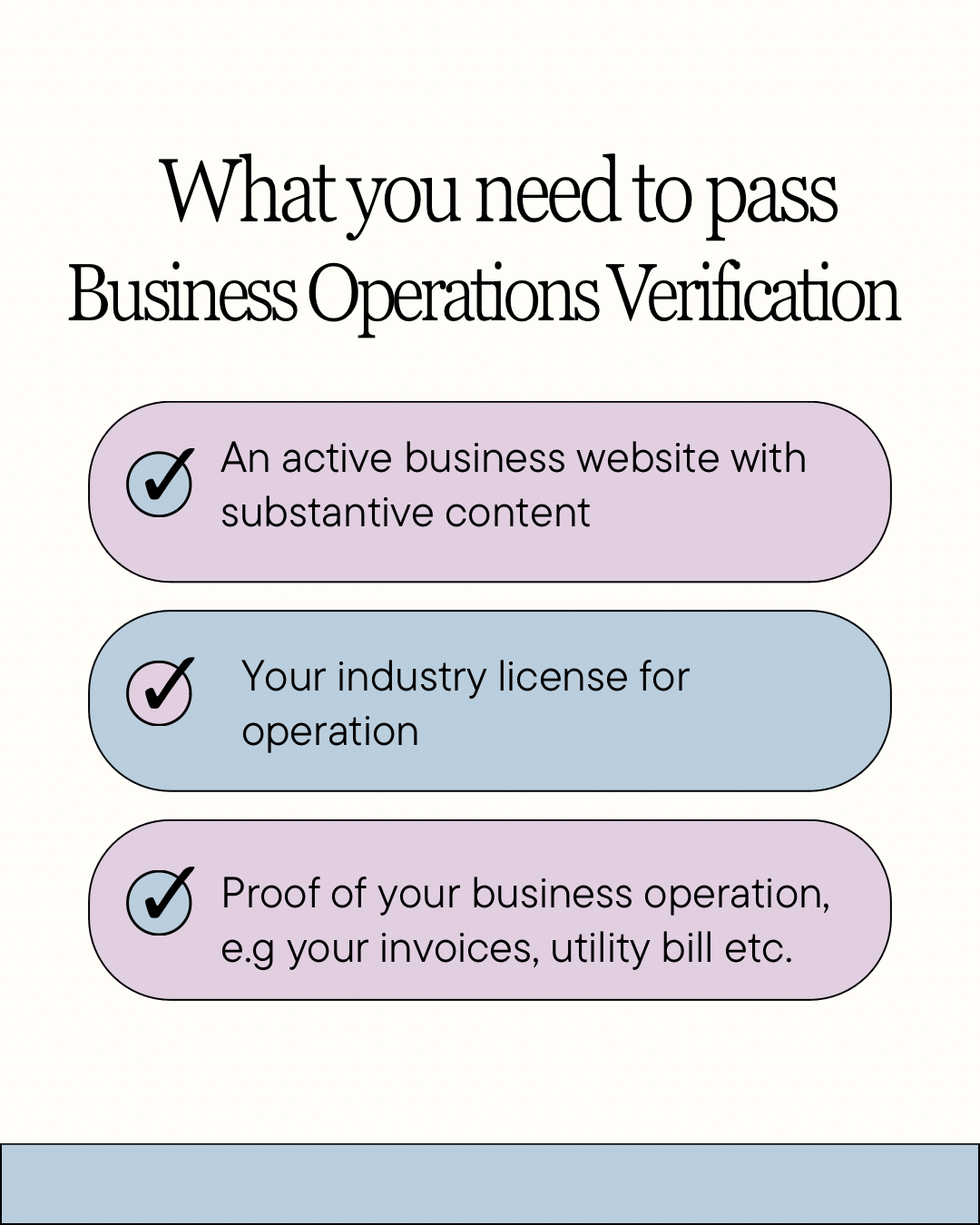
To pass Business Operations Verification, you need to prove you're the actual provider of the services you advertise. To prove this, you need:
-
An active business website with substantive content. Your website can't just be a landing page with a form. It needs:
-
A visible business name
-
Telephone and email contact information, and a physical address
-
Full descriptions of your products and services
-
Explanation of your business model. It is highly recommended to clearly state on the website that you are a "dropshipper" by saying something like "We partner with verified suppliers to deliver products directly to your door." If you are not making or stocking any of the products you sell, do not say you are.
-
Industry-specific licenses:
For instance, if you are a healthcare business, you will need a medical practice license or a pharmacy license. If you offer financial services, you will need either a state insurance license or investment advisor registration. If you are a car rental service, you will need to have a commercial car rental permit or other types of permits.
-
Proof your business actually operates. This can be shown through:
-
Current utility bills similar to those you would receive for your home office, a commercial lease in your business name (and not your individual name)
-
Business bank statements that include all transactions
-
Client contracts (changes to contracts or invoices) reflecting the services that you provide
-
Business tax return(s) from the previous year
-
Professional liability insurance policies (which are required for certain types of business operations).
Sometimes, BOV can be triggered just because of the industry you advertise in. Let's say you manage a crypto education site (Crypto Learning Hub), and you’re very clear about how you operate. Your site says: "We teach newbies how to invest in crypto. We get paid a commission on every exchange that you make through our links. We are educational affiliates, not financial advisers." You also run ads that read: "Learn how to invest in crypto basics" or "See the best exchanges to sign up with."
You’re still likely to receive a BOV. Crypto is a form of financial service and a high-risk industry subject to a high degree of licensing and regulation. Google will request a BOV from any affiliate or lead generation service within the industry, regardless of whether you are being forthright or transparent.
The pattern is consistent: Google wants proof that you're the actual provider, not a middleman obscuring who's really providing the product or service. Be transparent about your exact role in providing whatever you're advertising.
Payment, Billing, and US Tax Information.
Google requires your tax information to match exactly what's on file with the IRS. Even one wrong digit leads to rejection. The specific US tax info Google Ads advertisers need depends on the legal structure of your business.
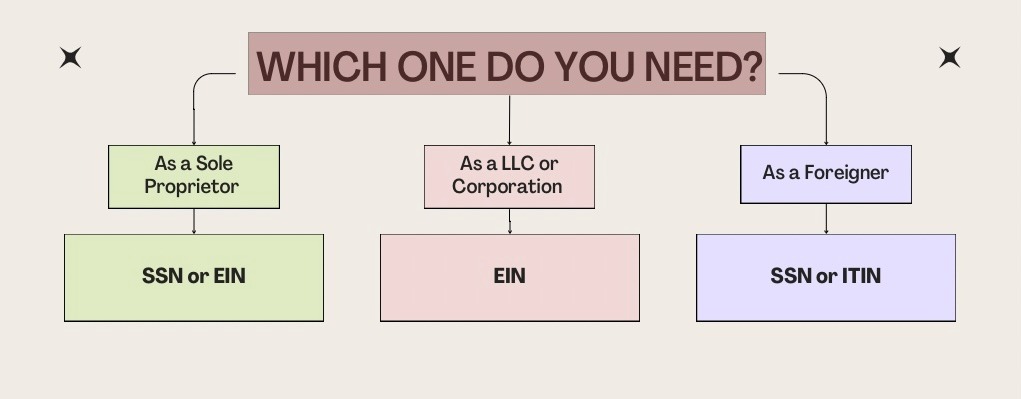
If you are a Corporation or LLC, you will need an Employer Identification Number (EIN), which is a nine-digit ID number assigned by the IRS to your business.
If you are a Sole Proprietor, you can provide either an EIN or your Social Security Number (SSN). It is advisable to obtain an EIN even as a Sole Proprietor, since it helps protect your SSN from being exposed in the event that your Google Ads account is compromised. Also, Google may still require the SSN for verification if the SSN is the primary taxpayer ID on file.
If you are a foreign individual and are unable to obtain a SSN, you can apply for an Individual Taxpayer Identification Number (ITIN).
If you are not in the U.S., you must complete a W-8BEN (for individuals) or W-8BEN-E (for businesses). These forms provide evidence of your foreign tax status and establish the amount of tax that Google is required to withhold on your ad spending. Depending on any treaties that exist between the U.S. and your country, Google may withhold a percentage of your ad spend for tax purposes.
You will also need to confirm that your payment profile for Google Ads is accurate. You have to ensure that your payment profile matches your verification documents. You can verify payment profile Google Ads by navigating to: Billing > Settings > Payment Profile and:
-
Ensure your billing country, currency, and time zone all match your business location. For example, if you are located in the U.S.A., you will want to match all these items to the United States, U.S. dollars, and the appropriate time zone.
-
Also, make sure that the physical address listed in your payment profile matches exactly with the physical address on your verification documents. Use the same street address, city, zip code, etc. Use the same abbreviations, capitalization, etc., in your payment profile as you used on the verification documents.
-
If you are an LLC or Corporation, you will need to enter your EIN (Employer Identification Number) into the tax ID field. If you are a Sole Proprietor, you will enter your SSN (Social Security Number) or ITIN (Individual Taxpayer Identification Number) into the tax ID field. Also, if you are a Sole Proprietor, we recommend obtaining an EIN (Employer Identification Number) because it helps keep your Social Security number private, and it can be obtained from the Internal Revenue Service (IRS) free of charge in approximately ten minutes online. However, Google may request your SSN if it is the primary taxpayer ID on file.
-
Submit your completed Form W-9 if you are a U.S. Entity, submit Form W-8BEN if you are a foreign individual, and submit Form W-8BEN-E if you are a foreign entity that uses Google Ads. The forms W-8BEN and W-8BEN-E are required to confirm the tax status of foreigners and prevent them from paying the US withholding tax for advertisers.
-
Confirm your payment method is the same name as your verified business entity. If you're an LLC or corporation, you need a business bank account and a business credit card in your exact business name. Don’t make use of your personal accounts.
Troubleshooting and Error Codes
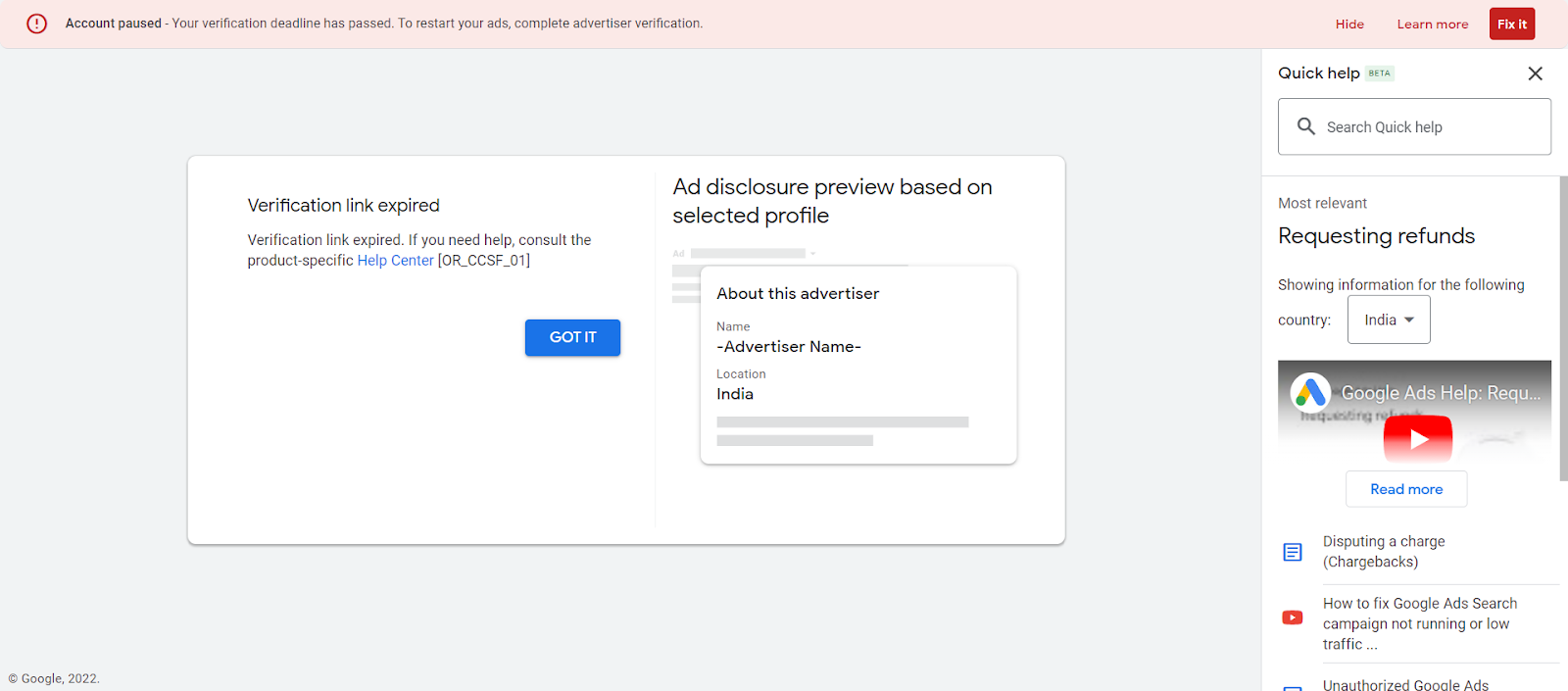
Even when you think you've done everything right, verification can still fail. The good news is Google usually tells you exactly what's wrong. The rejection emails are surprisingly specific; they don't just say "denied" and leave you guessing. A guide to Google Ads verification, like this, helps you navigate when verification failed Google Ads fix. Here are the most common rejection reasons and how to fix them:
Name & Business Matching Issues:
-
Organization name mismatch:
This means your billing profile differs from the information on your incorporation papers. For example, your incorporation document states "ABC Marketing LLC," whereas your billing profile states "ABC Marketing, LLC." The easiest way to fix this is to change the name on your billing profile so it matches exactly, letter for letter (including all commas, periods, and spaces), the way it appears on your incorporation document. -
Personal name mismatch:
For example, the verification submission lists your name as "J.T. Smith," whereas the identification document lists your legal name as "John Thomas Smith." The best way to fix this is to submit your full legal name, exactly as it appears on the legal identification document; do not include any initials or nicknames.
Document Quality Issues:
-
Expired documents:
The notice should indicate that one of your documents has expired. For instance, you provided your current ID, but it just recently expired, or you provided a utility bill dated more than 3 months ago. The easiest solution for this is to provide your current state or federally issued identification and a current, accurate statement from a financial institution dated within the last 90 days. -
Blurry, cropped, or poor lighting:
This means that Google’s system can’t read your documents clearly enough to verify them. Maybe you took the picture at night or under bad lighting, and the shadows made it hard to read. To fix this, take a new photograph near a window in natural light to avoid glare and blurriness. Ensure that all four corners of the document are in frame. -
File size too small:
This means your image resolution is too low for Google to read the fine print. For instance, you might have taken the photo from a far angle and resized it, or you used the lowest resolution of your camera to save space. When you zoom in, it will be hard to read the fine print on the document. To fix this, use your phone’s highest quality camera setting and don’t compress or resize images before uploading. -
Document not fully visible:
This means part of your document is cut off, or the edges blend into the background. To fix this, capture the entire document on a contrasting surface so the document's borders are visible. For instance, if your document has a white paper background, place it on a dark surface. This would help distinguish where the document starts and ends.
Address Issues:
-
The address doesn't match the account:
This means that the address on your documents doesn’t match what you entered in your verification form. For example, your utility bill shows ‘2847 Riverside Drive Unit 5B, Portland, OR 97204’ but you filled in ‘2847 Riverside Dr Unit 5B, Portland, OR 97204’ on the verification form. To fix this, copy your address exactly as it appears on your documents. Remember, Google does not recognize abbreviations -
The address formatting is inconsistent:
This simply means that your address appears differently across different documents or fields. For instance, your driver's license reads: ‘1523 North Main Street,’ your billing profile reads ‘1523 North Street,’ and you filled ‘1523 N. Main Street’ in the verification form. Google will see each of them as three different places. To fix this, choose one format and use it everywhere. To be safe, use the format found on the document that proves your address. -
Country mismatch:
This happens when you select a country other than the one where your business is legally registered. For example, your business is registered in Canada, but when setting up your account, you selected the United States, thinking it would give you access to US residents. That’s not how things are done; Google will flag your account as a potential risk. To fix this, ensure your country selection matches where your business is legally registered
Business Information Issues:
-
Insufficient business relationship info:
Essentially, you stated that you have partners or have been classified as an agency, but you have not provided any documentation to support this. For instance, you’re a marketing agency running ads for a local restaurant, but you didn’t upload the proof of your association with them. To fix this, submit a copy of a signed contract, invoice, or associated documents. -
Unclear provider of goods and services:
This means Google can't tell if you're the actual provider of what you advertise. For example, you’re running ads for ‘Affordable Electronics,’ but when Google visits your website, it’s just a comparison blog with Amazon affiliate links. To fix this, stop claiming you sell the products in your ads. On the other hand, if you actually sell the products you advertise, provide your licenses, supplier contracts, or explain your business model properly. -
Missing licensing documentation
This means your industry is regulated, and you need to provide your operating license. For instance, your business is an HVAC repair service, but you did not provide your contractor license for verification. To fix this, submit the required license for your business.
Website Issues:
-
Invalid website or not associated
This means that Google can’t either access your website, or can’t figure out how it connects to your business. For instance, your ads redirect people to your website, but your site is down or blocked. To fix this, ensure your URL works and matches the links in your ads. -
Website content mismatch
This means your website shows different products than what you advertise. For instance, your ads promote emergency and 24/7 plumbing services, but this information cannot be found on your website. To fix this, update your website. You can add a section to your homepage to address service or adjust your ads to match what’s on your page.
Payment & Tax Issues:
-
Individual and business type mismatch
This means your payment profile lists "Individual," but your document shows “Business.” For instance, when you filled the verification form, you put in individual but your business documents read LLC. To fix this, adjust your payment profile to the correct type. Individual is for sole proprietors, and organization is for LLCs and Corporations. -
Payment method mismatch
This happens when you use your personal card for your business account. For example, your business is called John’s Holding Company, but you provided your personal credit card with the name John Smith. Google wants you to provide your business credit card and not your personal credit card. -
Tax info doesn't match IRS
This means your EIN or SSN is incorrect. For example, your ITS number reads 45-443322, but when filling the form, you omitted the last digit and put in 45-44332. To fix this, request Form 147C from the IRS to confirm your EIN and enter it exactly as shown.
If you believe your suspension was an error, you can engage in the Google Ads verification appeal. But here's the reality: Google upholds most suspensions. They only overturn them when there's a clear mistake. Thus, only appeal if you genuinely believe it was wrong. Don't appeal just because you disagree with the policy. Here's the process:
Step 1: Log in to your Google Ads account and locate the Google Ads suspension verification notification. There will be a banner at the top of your account or a notification in your alerts.
Step 2: Click "Contact Us". This takes you to the appeal form.
Step 3: Fill out every single field in the form. Don't skip optional fields; fill them all out.
Step 4: In the explanation section, be extremely specific. Don't write vague statements like "I didn't violate anything," or "This is unfair," or "Please review my account." Instead, write something like this:
"My ad states 'Acme Medical Center, Board Certified Physicians' which clearly shows our business name and our physicians' credentials. Our website, AcmeMedical.com, prominently displays our business name, physical address, and contact information on every page. The phone number in my ad is the one listed on our verified business license. All three physicians are board-certified, as shown in the state medical licenses I'm attaching to this appeal. We are not hiding our identity or making misleading claims."
See the difference? You're addressing exactly why the suspension shouldn't apply to your specific situation.
Step 5: Attach supporting evidence. This includes screenshots of your website showing your business name prominently displayed, copies of licenses that validate your claims, documents proving your business identity, and Before-and-after screenshots if you've made changes.
Step 6: Click "Submit" and wait. Google typically responds within 1-3 business days. Sometimes faster for clear-cut cases.
If Google upholds the suspension, that decision is final. You can't keep appealing with the same information. If you've made substantive changes to your ads or website based on their feedback, you can submit a new appeal explaining the changes you made. But don't just resubmit the same appeal, hoping for a different result.
Security Best Practices
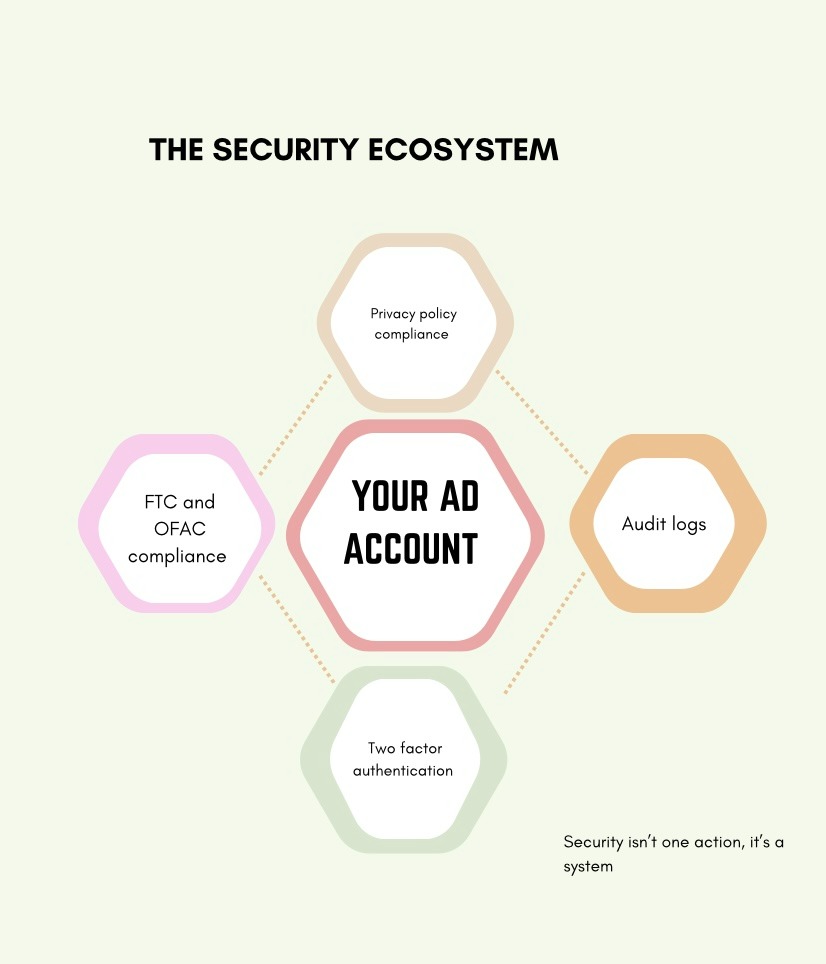
Verification is your baseline. It proves you're legitimate. But it doesn't protect your account from all threats. Here's how to actually secure your account:
-
Monitor your audit logs regularly: Go to Tools > Setup > Change history. Look for unusual activity such as:
-
Campaign changes you didn't make
-
Payment method changes
-
Login attempts from unfamiliar locations
-
Budget increases you didn't authorize
-
Require two-factor authentication (2FA) for all users: If you're an account admin, you can mandate 2FA for everyone who accesses your account. Go to Tools > Access and security > Security. Turn on "Require 2-step verification for all users." This prevents someone from accessing your account even if they steal your password. They'd also need your phone to get the verification code.
-
Understand FTC advertising requirements: The FTC requires advertisers to substantiate all claims before running ads and follow three core rules:
-
Truthfulness: Ads must be truthful and not misleading. This seems obvious, but it's violated constantly. Saying your product "cures" something when it only "may help" is untruthful. For example, instead of putting out ads that say “our weight loss pill burns 30 pounds in 30 days!” You put out ads that read: “customer reviews show an average weight loss of 8-12 pounds over ninety days when combined with diet and exercise.” The latter shows a form of truthfulness.
-
Non-deceptiveness: Ads can't mislead consumers by what they claim or what they omit. For example, saying a book is free but failing to put out there that you have to pay a membership subscription to access the book. That kind of ad is deceptive. Instead, your ads can say, “With just a $199 monthly membership, you get access to any book of your choice for free!”
-
Substantiation: Claims must be backed by evidence. If you say "clinically proven," you need actual clinical studies to back it up. If you say "most customers," you need data to back it up. For example, you can’t say 9 out of 10 dentists recommend your toothpaste when you surveyed 10 dentists, and only 1 recommended the product.
-
Know OFAC restrictions: Google complies with the Office of Foreign Assets Control (OFAC) restrictions. As a result, certain entities and individuals can never create or use Google Ads accounts. Individuals such as:
-
Anyone on OFAC's Specially Designated Nationals (SDN) list
-
Anyone in embargoed countries or territories (currently Cuba, Iran, North Korea, Syria, and the Crimea, Donetsk, and Luhansk regions of Ukraine)
If you're a US business, this doesn't affect you directly. But if you work with international clients or partners, be aware of these restrictions. For instance, you run a marketing agency in New York, and a client from Iran approaches you to manage their Google Ads account. Even though you’re in the US, you cannot provide this service because Iran is under an OFAC embargo.
-
Comply with privacy laws (e.g, CCPA, CPRA, etc.): Google is an IAB Privacy Multi-State Privacy Agreement (MSPA) certified partner. As a result, advertisers are required to comply with applicable privacy laws. In California, that's CCPA and CPRA. What this means is:
-
If you collect email addresses, phone numbers, or any other personal data through your ads, you need a privacy policy that explains how you use that data.
-
You need to give people the option to opt out of data collection.
-
You can't sell personal data without explicit consent.
-
If someone requests their data or asks you to delete it, you have to comply.
For example, if your landing page has a section to input emails, also include a link to your privacy policy that explains why you collect the emails, how the emails will not be given to third parties and how you can opt out. It could be something like this, we collect your email address to send newsletters and promotional offers. We do not sell your email to third parties. You can request deletion of data at landingpage123@gmail.com.
For Agencies and Resellers (MCC)
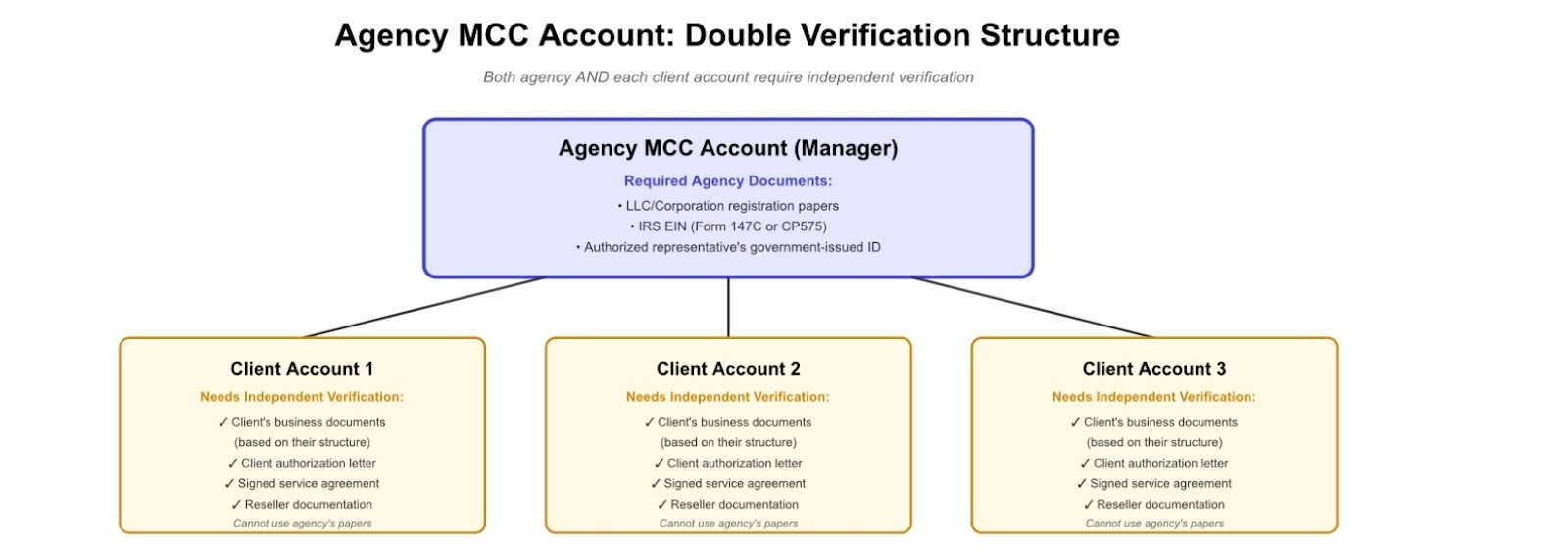
If you manage multiple client accounts through a Manager Account (MCC), verification becomes exponentially more complex. Each client account must be verified individually on Google's timeline using their own documents. Here's how to make this manageable:
-
Build verification into your client onboarding process from day one: Before you launch a single campaign, collect:
-
Business registration documents
-
Government-issued ID for the authorized representative
-
Proof of address
-
Tax ID information
-
Industry-specific licenses, if applicable
Make this part of your standard onboarding checklist. Don't wait for Google to trigger verification; be proactive.
-
Set expectations early with clients: In your initial sales call or contract, explain that Google may require verification at any time. Tell them what documents they'll need. Make it clear that if they don't provide documents quickly, their ads will pause.
Most agency-client relationships get tense when verification hits, and the client doesn't understand why they need to deliver sensitive documents. Set expectations early so this doesn't catch anyone by surprise.
-
Use a tracking system: You cannot manually track verification status for 20, 30, 40+ clients. You need a system. Use a CRM, a spreadsheet, or an automation dashboard and track:
-
Verification status for each account (Not Started, In Progress, Pending Review, Approved)
-
Documents collected and still needed
-
Verification deadlines
-
Contact person for each client responsible for providing documents
Review this weekly. Don't let deadlines sneak up on you.
-
Keep a shared documentation library: Store verified documents securely in systems such as Google Drive, Dropbox, or your client management platform. When a client needs re-verification (which happens periodically), you'll already have most documents on file. You just need to verify they're still current.
Make sure your storage complies with data security requirements. You're storing sensitive information such as EINs, addresses, and tax forms. Use encrypted storage and limit access to only people who need it.
-
Create a standard verification guide for clients: Don't reinvent the wheel for every client. Create a guide to Google Ads verification that explains:
-
Why Google requires verification
-
What documents they need based on their business structure
-
How to photograph documents properly
-
Common mistakes to avoid
-
Your agency's process for handling verification
Send this guide to every new client during onboarding. When a verification request is sent to an existing client, send it to them with a personalized email that explains their specific situation. This saves you hours of back-and-forth emails answering the same questions for every client.
FAQ
Q: What documents are required for advertiser verification in the US?
A: It depends entirely on your business structure:
-
For sole proprietors, you need a government-issued ID, proof of address (a utility bill or bank statement), a tax ID (SSN or EIN), a Form W9 for Google Ads advertisers, and a DBA certificate for business name verification Google Ads.
-
For LLCs and corporations, you need an organization registration document (incorporation certificate or IRS letter), an EIN verification letter (Form 147C), proof of business address, an authorized representative's government ID, and DBA paperwork if you advertise under a name other than your legal name.
-
For nonprofits, in addition to the documents provided by LLCs and corporations, you need your IRS determination letter showing 501(c)(3) status and state registration documents.
-
For agencies, you need all LLC and corporation documents, plus client authorization letters for every account they manage.
The key is matching your business structure exactly. Don't submit LLC documents if you're actually a sole proprietor, even if you plan to become an LLC later.
Q: How long does Google Ads verification actually take?
A: How long Google Ads verification takes depends on the verification type and how complete your submission is. Google Ads identity verification usually takes 1-3 business days because it's mostly automated. Google's system reads your documents, verifies them against databases, and approves or rejects them quickly. Business Operations Verification (BOV) takes 7-10 business days because it is reviewed by humans. Google employees review your website, assess your business model, verify licenses, and make judgment calls about whether you're legitimately providing what you advertise.
If Google requests additional information, which happens in about 30% of cases, add another 3-5 days for each round of back-and-forth. Complex situations can stretch to two weeks or more.
Q: My verification was rejected. How do I fix it?
A: First, read the rejection email carefully. Google tells you exactly what's wrong; they don't send vague rejections. Common rejection reasons:
-
Organization name doesn't match exactly (check for commas, periods, abbreviations).
-
Personal name doesn't match ID (use full legal name, no nicknames).
-
Documents expired or are too old.
-
Photos are blurry or poorly lit.
-
Address formatting is inconsistent
-
The payment method doesn't match the verified entity
Fix only what Google flagged. Don't try to "improve" other parts; you'll likely create new problems.
If you're genuinely confused about what's wrong, use the "Contact Us" option in Google Ads. Explain your situation and ask specific questions. Google's support team can clarify what needs to change.
Q: Do agencies need to verify each client account under an MCC?
A: Yes, absolutely. Your agency's MCC needs its own verification. Then, every single client account you manage needs independent verification with their own business documents. You cannot use your agency's documents to verify a client's account. Google requires each advertiser to be independently verified.
Q: What happens if I miss the verification deadline?
A: Your ads stop immediately. Not at the end of the day, but the moment the deadline passes. When your account enters suspension, you cannot:
-
Create new campaigns
-
Edit existing campaigns
-
Run any ads
-
Access full reporting (you get basic metrics only)
You're essentially locked out until you complete verification. Google never extends the deadline. Google enforces the deadline rigidly. The only way forward is to complete verification as quickly as possible. Gather your documents, submit verification, and wait for approval. Your ads will resume once you're verified.


