


Google Ads Enhanced Conversions Setup Guide
Introduction
Conversion tracking in Google Ads has always had a measurement problem. Cookies get blocked. Users switch devices. Privacy regulations chip away at the data advertisers could once rely on. The result: reported conversions drop, Smart Bidding loses signal, and campaign performance suffers — even when the actual business results are fine.
Google Ads Enhanced Conversions is the solution Google built specifically for this environment. Instead of relying entirely on cookies, it lets advertisers send hashed first-party customer data — things like email addresses or phone numbers — alongside a conversion event. Google then matches that data against signed-in Google accounts to recover conversions that would otherwise go unmeasured.
According to Google's own documentation, advertisers who implement enhanced conversions typically see a 5% or greater improvement in measured conversions, though results vary significantly by industry and traffic mix. For advertisers running high-volume ecommerce or B2B lead generation, that gap in measurement can mean thousands of dollars in misattributed spend.
This guide covers everything from how enhanced conversions work under the hood, to step-by-step setup for both web and leads, to testing, troubleshooting, and understanding the downstream effect on Smart Bidding. Whether you're migrating from older tags or setting this up from scratch, this is the full picture.
How Google Ads Enhanced Conversions Work
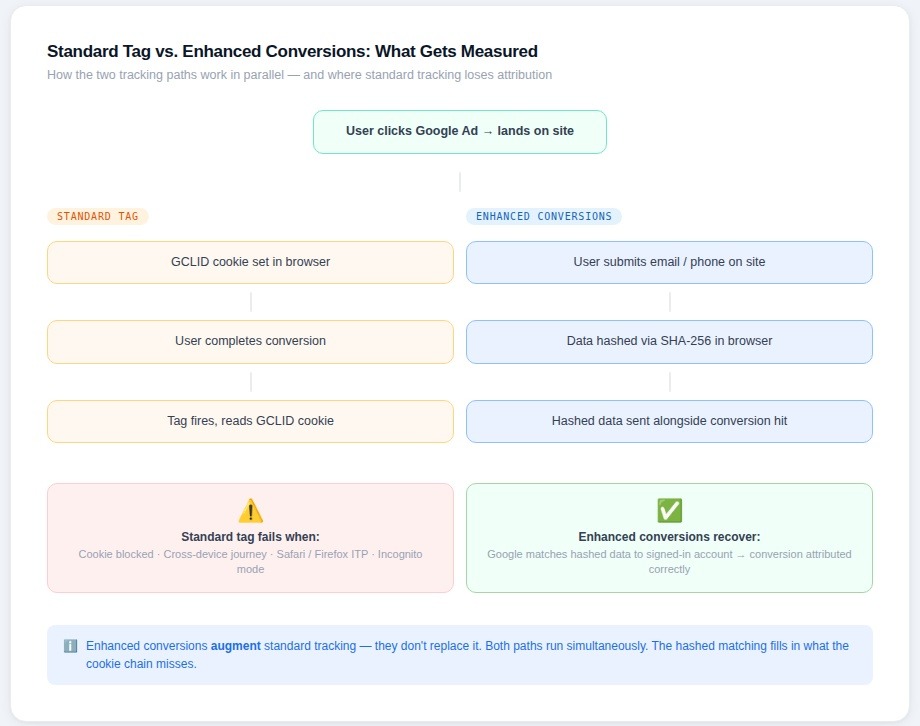
At a basic level, enhanced conversions close the gap between what Google's conversion tag can measure on its own and what actually happened. Standard conversion tracking depends on cookies placed in a user's browser when they click an ad. If that cookie gets deleted, blocked by a browser like Safari or Firefox, or simply doesn't survive a cross-device journey, the conversion goes unrecorded. Enhanced conversions add a parallel matching path using customer-provided data.
What Data Is Collected and How It Is Hashed
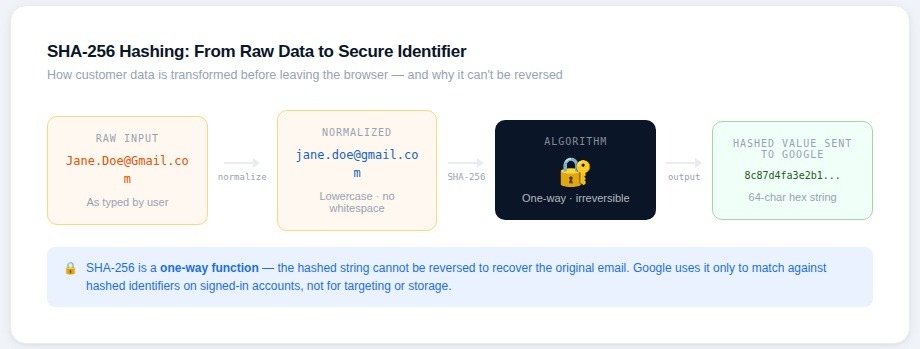
When a user completes a conversion — a purchase, a form submission, a sign-up — your page or tag captures certain pieces of identifying information they've already provided: typically an email address, but optionally a phone number, name, or physical address. Before any of that data leaves the browser, it's run through the SHA-256 hashing algorithm and converted into a fixed-length string of characters. The original value is never sent to Google in readable form.
On Google's side, that hashed value gets compared against hashed identifiers associated with signed-in Google accounts. If there's a match, Google can attribute the conversion to the correct campaign, even without a cookie. The matching happens entirely server-side, and Google states that hashed data used for enhanced conversions is not used for ad targeting or stored beyond the matching process.
SHA-256 is a one-way function — it can't be reversed to recover the original email address. This is a meaningful technical privacy control, and it's one reason enhanced conversions have fared better in privacy reviews than some older tracking approaches.
How Enhanced Conversions Improve Measurement and Modeling
The impact shows up in two places: direct attribution recovery and improved modeling inputs for Smart Bidding.
On the attribution side, Google can recover conversions from users who converted on a different device than the one they clicked the ad on, users whose cookies were blocked or expired, and users in privacy-focused browsers where third-party cookies were never set. These are real gaps in standard measurement — not edge cases. Research from the Boston Consulting Group, commissioned by Google in 2022, estimated that roughly 70% of cross-device conversions go untracked without solutions like enhanced conversions.
On the modeling side, Smart Bidding strategies like Target CPA and Target ROAS are statistical models trained on conversion signal. When that signal is sparse or distorted — because some conversions aren't being recorded — the model makes worse predictions. Enhanced conversions feed more accurate, higher-volume signal into those models, which stabilizes bidding behavior and typically reduces the volatility that advertisers see when conversion volumes dip.
Differences Between Enhanced Conversions and Standard Tags
Standard conversion tracking in Google Ads places a tag on a confirmation page or event, captures a cookie-based click ID (GCLID), and sends a conversion event when the user reaches that page or triggers that action. It's straightforward, but it's entirely dependent on that cookie chain staying intact.
Enhanced conversions don't replace that mechanism — they augment it. The standard tag still fires and still captures GCLID-based conversions when possible. Enhanced conversions add the hashed customer data as a supplementary signal, allowing Google to fill in attribution gaps the cookie-based system misses. This is an important point: you're not switching from one system to another. You're adding a layer on top of what already exists.
There's also a meaningful difference in what gets measured over time. As third-party cookies continue to be deprecated across browsers — Chrome's phased restrictions are still rolling out as of early 2026 — the gap between standard tag measurement and actual conversions will widen. Enhanced conversions are designed specifically to remain effective in that environment.
Enhanced Conversions for Web vs Enhanced Conversions for Leads
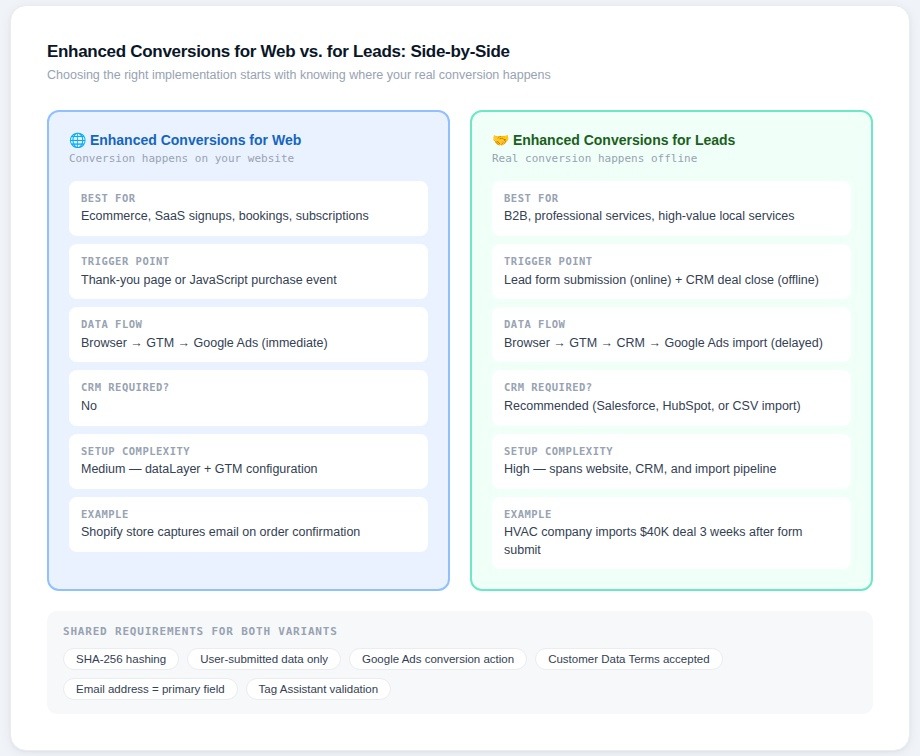
Google offers two distinct implementations under the enhanced conversions umbrella, and they serve different business models. Choosing the wrong one — or trying to use both without understanding the distinction — is one of the most common setup mistakes advertisers make.
Enhanced Conversions for Web is built for situations where the conversion happens directly on your website: a completed purchase, a subscription sign-up, a booking confirmation. The customer data is captured at the moment of conversion, hashed in the browser or via server-side tag, and sent to Google alongside the standard conversion event.
Enhanced Conversions for Leads is designed for businesses where the actual conversion value isn't determined on the website itself. A contact form submission might be the tracked event online, but the real conversion — a closed deal, a qualified appointment, a signed contract — happens days or weeks later, offline. This variant lets advertisers import that offline outcome back into Google Ads and match it to the original ad click using the hashed lead data captured at the form submission stage.
A concrete example: a commercial HVAC company running Google Ads captures a lead form submission and hashes the customer's email. Three weeks later, the sales team closes a $40,000 installation contract. With Enhanced Conversions for Leads, that revenue can be imported back into Google Ads and attributed to the campaign that generated the original lead — giving Smart Bidding accurate revenue signal instead of treating all form submissions as equal.
Key Similarities and Differences in Implementation
Both variants use the same SHA-256 hashing approach for customer data, and both require that users have voluntarily provided their information — you cannot hash and send data that wasn't submitted by the user as part of the conversion flow. Both also require a Google Ads conversion action to be configured before implementation begins.
The differences are largely about where and when the data gets processed. With Enhanced Conversions for Web, everything happens at the point of the on-site conversion event. The tag fires on a thank-you page or is triggered by a JavaScript event, and the hashed data goes to Google immediately. Implementation typically happens through Google Tag Manager using either the Google tag or gtag.js, with customer data pulled from a dataLayer push or form field values.
With Enhanced Conversions for Leads, the on-site tag captures and stores the hashed lead identifier — usually an email — and associates it with the GCLID from the ad click. When the offline conversion is recorded (typically by a CRM system like Salesforce or HubSpot), that hashed identifier is used to match the import back to the original Google Ads click. The data flow is longer and involves more moving parts: the website, the CRM, and Google's offline conversion import system all need to work in sequence.
Salesforce Marketing Cloud, for instance, has native integration support for Google Ads offline conversion imports, which simplifies the technical lift for B2B teams already running Salesforce as their CRM. HubSpot similarly offers a Google Ads integration that can be configured to pass conversion events back to Google, though the enhanced conversions matching layer often requires additional custom configuration beyond the out-of-the-box setup.
Frederick Vallaeys, co-founder of Optmyzr and a former Google engineer who worked on the AdWords Quality Score system, has noted publicly that offline conversion imports — particularly when combined with enhanced conversions matching — represent one of the most underutilized levers in B2B paid search. In his view, most B2B advertisers are still optimizing toward lead volume when they should be optimizing toward pipeline or revenue, and enhanced conversions for leads is the technical infrastructure that makes that possible.
The choice between the two variants ultimately comes down to where your real conversion happens. If it's on the website, use Enhanced Conversions for Web. If the website event is just the beginning of a longer sales process, Enhanced Conversions for Leads — combined with CRM integration — is the path that will actually move the needle on bidding performance.
Step-by-Step Setup: Enhanced Conversions for Web
Before touching any tags or code, it's worth being clear about what "ready to implement" actually means. The setup process has three distinct phases: preparing your data infrastructure, mapping that data to tag parameters, and validating that everything is firing correctly. Skipping straight to tag configuration without completing the first phase is the single most common reason implementations fail or produce low match rates.
Preparing Your Site, Tags and dataLayer
The first thing to confirm is that you have a Google Ads conversion action already created and that it's set to use enhanced conversions. Inside Google Ads, navigate to Goals > Conversions > Summary, open the relevant conversion action, and under "Enhanced conversions" toggle the setting to on. Google will prompt you to choose between the Google tag, Google Tag Manager, or the Google Ads API as your implementation method. For most advertisers, Google Tag Manager is the practical choice.
On the site side, the key question is whether the customer data you need — typically an email address — is available in the page's dataLayer at the moment the conversion fires. For a standard ecommerce checkout, this usually means the order confirmation page needs to push customer data into the dataLayer before the conversion tag fires. A typical dataLayer push for this purpose looks like this:
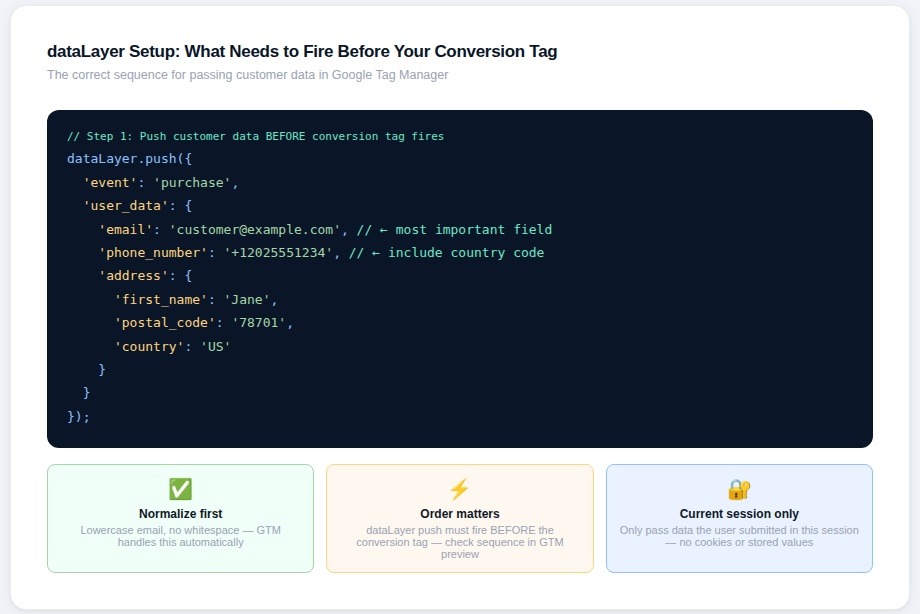
Google handles the SHA-256 hashing automatically when you use the Google tag or GTM implementation — you don't need to hash the data yourself before pushing it to the dataLayer. If you're using the Google Ads API or a server-side implementation, hashing must happen before the data is sent.
One important technical note: the email address must be normalized before hashing. That means lowercase, no leading or trailing whitespace. Google's automatic hashing via GTM handles this, but server-side implementations need to normalize explicitly or match rates will suffer.
Mapping Customer Data Fields to Tag Parameters
Inside Google Tag Manager, once you've updated to the latest Google tag template, you'll see an enhanced conversions section within your conversion tracking tag. This is where you map the dataLayer variables you've pushed to the corresponding tag parameters.
The fields Google accepts are email address, phone number, first name, last name, street address, city, state/region, postal code, and country. Email is by far the most impactful — it has the highest match rate against Google account data. Phone number is the second most useful. Name and address fields add marginal improvement and are worth including if they're readily available, but they shouldn't be the focus of troubleshooting effort if match rates are low.
The mapping process in GTM is straightforward: create a dataLayer variable for each field you want to pass, then reference those variables in the enhanced conversions fields within the tag configuration. The tag handles normalization and hashing before sending data to Google's servers.
A practical point that often gets overlooked: only pass data that the user actually submitted during the current session. Don't pull stored customer data from a cookie or localStorage to pre-populate these fields. Google's terms require that the data sent via enhanced conversions was provided by the user as part of the conversion event itself.
Publishing, Testing and Validating in Tag Assistant
Before publishing the GTM container, use GTM's built-in preview mode to walk through the conversion flow on your site. Confirm that the dataLayer push is happening with the expected values, that the conversion tag is firing on the correct trigger, and that the enhanced conversions fields are populated in the tag output.
The next layer of validation is Google Tag Assistant. Navigate to tagassistant.google.com, connect it to your site, and complete a test conversion. Tag Assistant will show you the full tag firing sequence, and — critically — it will show whether the enhanced conversions data was included in the hit and whether it passed Google's format validation.
One thing Tag Assistant won't tell you immediately is your actual match rate. That data appears in Google Ads reports with a delay of 24 to 48 hours after implementation. To find it, go to Goals > Conversions > Summary, select the conversion action, and look for the "Enhanced conversions" diagnostic column. Match rates above 40% are generally considered acceptable; rates above 60% are strong. If match rates are low, the most common culprits are an email field that isn't being captured correctly, normalization issues, or a dataLayer push that's firing after the conversion tag rather than before it.
Shopify merchants worth noting: Shopify's native Google channel integration added support for enhanced conversions in 2023, which means many Shopify stores can enable this without custom GTM work. However, the native integration has limitations around which customer data fields it passes, and advertisers running high-volume stores often find custom GTM implementation gives them more control over match rates.
Step-by-Step Setup: Enhanced Conversions for Leads
Enhanced Conversions for Leads solves a problem that every B2B advertiser eventually runs into: the thing you can track on your website — a form submission — isn't the thing that actually determines whether the campaign worked. The gap between a submitted contact form and a closed deal can be weeks or months, and without a way to connect those two events, Smart Bidding is flying blind.
The setup is more involved than Enhanced Conversions for Web because it spans multiple systems. But for businesses where average deal values are high, getting this right can meaningfully change how much confidence you have in your paid search investment.
Identifying Lead Forms and Thank-You Pages
The starting point is mapping every place on your site where a user can submit their information. This includes contact forms, demo request forms, quote request pages, gated content downloads, and any multi-step forms that capture an email address at any stage. The goal is to identify where customer data is available in the page at the moment of submission — because that's when the tag needs to fire and capture the hashed identifier.
Thank-you pages are the simplest trigger point. If your form redirects to a confirmation URL after submission, you can fire the enhanced conversions tag on that page load and pull the email from a dataLayer push or, in some cases, directly from a hidden field or URL parameter. Inline form submissions — where the page doesn't redirect but instead shows a success message — require an event-based trigger in GTM tied to the form submission event.
A real-world complication that comes up frequently with B2B lead forms: many don't redirect to a dedicated thank-you page — they use inline confirmation messages instead. In those cases, a GTM form submission trigger combined with a CSS selector that confirms the success state before firing any conversion tags is the reliable approach. This prevents false fires on failed or incomplete submissions, which would corrupt the data sent to Google. If your form uses a JavaScript-based success state, a custom event listener is often cleaner than relying on GTM's built-in form trigger, which can fire before the submission actually completes.
Passing Form Data to Tags or Server Containers
Once the trigger is identified, the next step is getting the email address — and any other available customer data — into the tag. The cleanest approach is a dataLayer push on form submission that includes the user's email:
dataLayer.push({
'event': 'generate_lead',
'user_data': {
'email': 'prospect@company.com'
},
'lead_id': 'LEAD-00492'
});
The lead_id field is worth including even if it feels optional. When you later import the offline conversion from your CRM, Google can use either the hashed email or the GCLID to match the record. Having a consistent lead ID that also gets written to your CRM makes the matching process significantly more reliable, particularly for businesses with longer sales cycles where the CRM record may go through multiple updates before a deal closes.
For advertisers using server-side GTM, the lead data can be passed to a server container and processed there before being forwarded to Google. This approach has privacy advantages — the raw email never touches the browser layer — and it's increasingly common among regulated industries like healthcare, financial services, and legal, where data handling requirements are stricter. Simo Ahava, one of the most widely cited technical voices in the tag management space, has written extensively on server-side GTM architecture at simoahava.com, and his documentation on handling PII in server containers is the practical reference most implementation teams use.
Working With CRM Systems and Offline Event Flows
The on-site tag setup is only half of Enhanced Conversions for Leads. The second half is importing the offline outcome — the closed deal, the qualified appointment, the signed contract — back into Google Ads and matching it to the original ad click.
The matching works like this: when the lead is submitted on your site, the tag captures the hashed email and the GCLID from the ad click. Both get stored — ideally in your CRM alongside the lead record. When the deal closes, your CRM or a connected data pipeline sends that record to Google Ads via the offline conversion import API, using the hashed email or GCLID as the matching key.
HubSpot users have a relatively straightforward path here. HubSpot's Google Ads integration can be configured to send deal stage changes back to Google as offline conversion events. The limitation, as noted by multiple practitioners on the r/PPC subreddit and in HubSpot's own community forums, is that the standard integration sends the conversion at the contact level rather than the deal level, which can cause issues when a single contact has multiple active opportunities. Custom workflows using HubSpot's API typically resolve this but require developer involvement.
Salesforce users, as noted in the previous section, now route this through Google Ads Data Manager following the deprecation of the legacy integration in May 2025. The Data Manager setup requires connecting your Salesforce instance, mapping the opportunity stage that represents a conversion, and defining the conversion value field.
For teams without a CRM integration path, Google Sheets can serve as a manual import mechanism. Google Ads supports uploading offline conversions via a CSV template, and for lower-volume businesses — say, fewer than 50 leads per month — a weekly manual export from the CRM into the Google Ads import template is a workable interim solution while a proper integration is being built.
One important timing constraint: offline conversions must be imported within 90 days of the original ad click. For businesses with very long sales cycles — enterprise software deals that take six months to close, for instance — this creates a real limitation. In those cases, importing an intermediate signal like "opportunity created" or "demo completed" rather than "deal closed" gives Smart Bidding a more timely and statistically useful conversion signal, even if it's not the final revenue event.
For B2B advertisers with longer sales cycles, the timing of what you import matters as much as the import itself. Davis Clark, Senior Strategist at Tinuiti, made the case clearly in Tinuiti's 2023 Google Ads Trends report: "All B2B and lead-gen advertisers should make CRM data importing their primary goal in 2023." The practical implication is that importing an intermediate pipeline signal — an opportunity created, a demo completed, a proposal sent — gives Smart Bidding more timely and statistically useful data than waiting for closed-won events that may only occur a handful of times per month. Smart Bidding needs sufficient conversion volume to model effectively, and for low-volume B2B advertisers, closed-won alone rarely clears that threshold.
Verifying and Testing
Getting enhanced conversions live is only half the job. An implementation that looks correct in GTM can still fail silently — passing empty fields, firing on the wrong trigger, or sending data that doesn't match Google's format requirements. A structured verification process catches these issues before they affect your data and bidding signal.
Using Tag Assistant and Real-Time Debugging
The first layer of verification happens in the browser, before any data reaches Google's servers. Google Tag Assistant, available at tagassistant.google.com, lets you walk through a conversion flow on your live site and inspect every tag that fires in sequence. For enhanced conversions specifically, the key thing to confirm is that the "em" parameter is present in the outgoing network request to googleadservices.com/pagead/conversion/. According to Google's own setup documentation, the value should appear as tv.1~em. followed by a long string of hashed characters. Three outcomes indicate different problems:
-
If the em parameter is missing entirely, enhanced conversion data isn't being sent at all — the tag is likely misconfigured or the trigger isn't firing correctly.
-
If it appears as tv.1~em. with nothing after it, the parameter is present but the data is empty — the variable mapping isn't capturing the email field.
-
If it appears as tv.1~em.e1, there's a formatting error in the data being sent — typically a normalization issue or an invalid email format.
For GTM implementations, Google's documentation recommends using GTM's native preview mode alongside Tag Assistant rather than relying on Tag Assistant alone. In GTM preview, you can click directly on the Google Ads conversion tag that fired and inspect the Variables tab to see exactly what values are being passed in the enhanced conversions fields. This is particularly useful for catching case sensitivity issues or whitespace problems that would fail normalization.
Chrome Developer Tools offer a second verification path that doesn't require any extensions. Right-clicking the conversion page, selecting Inspect, navigating to the Network tab, and filtering for "google" lets you find the outgoing conversion request directly. The Payload tab shows the full parameter list, including the em value. This approach works regardless of whether you have Tag Assistant installed and is often faster for experienced developers.
Confirming Enhanced Conversions in Google Ads Reports
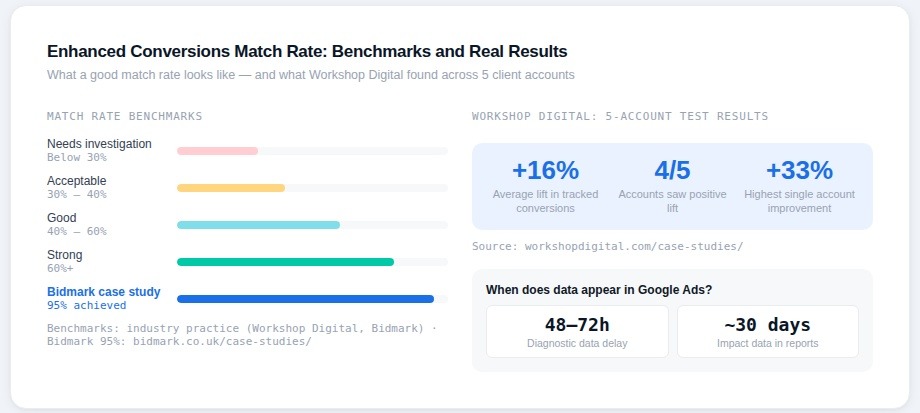
Tag Assistant confirms the tag is firing — it doesn't confirm that Google's servers are processing the data correctly or that match rates are acceptable. That data lives in Google Ads itself, and it has a meaningful delay. According to Google's enhanced conversions diagnostics documentation, the diagnostic report takes 48 to 72 hours to populate after implementation goes live. Checking it immediately after publishing will show no data, which is expected.
Once data appears, navigate to Goals > Conversions > Summary, select the relevant conversion action, and look for the enhanced conversions diagnostic column. Google's own data on first-party matching rates shows that most advertisers land somewhere between 29% and 62% match rate. If your implementation is producing match rates consistently below 30%, that's a signal worth investigating — it usually points to an email field that isn't being captured on the conversion page, a normalization problem, or a mismatch between the data being sent and what users actually have associated with their Google accounts.
Workshop Digital, a Richmond-based digital marketing agency, ran a structured multi-month test of enhanced conversions across five client accounts to actually measure the impact rather than assume it. Their findings, published in a detailed case study, showed an average lift of 16% in tracked conversions after enabling enhanced conversions — and 4 out of 5 clients saw a positive lift, with the highest account seeing a 33% increase in recorded conversions. The one account that didn't see a lift had a tracking change mid-test that complicated the comparison.
About 30 days after a successful implementation, Google also surfaces impact data in the conversion action table — showing the additional conversions recovered specifically through enhanced matching that wouldn't have been recorded by the standard cookie-based tag.
Common Implementation Issues and How to Fix Them
The most frequent problems fall into a predictable set of patterns. Growth marketer Abhi Bavishi, quoted in HawkSEM's enhanced conversions guide, put it directly: "A big one was misconfiguring the setup that dropped our customer acquisition cost (CAC). You need clean, structured data for seamless integration. Don't rush the setup. Take time, test, then proceed." That advice applies broadly.
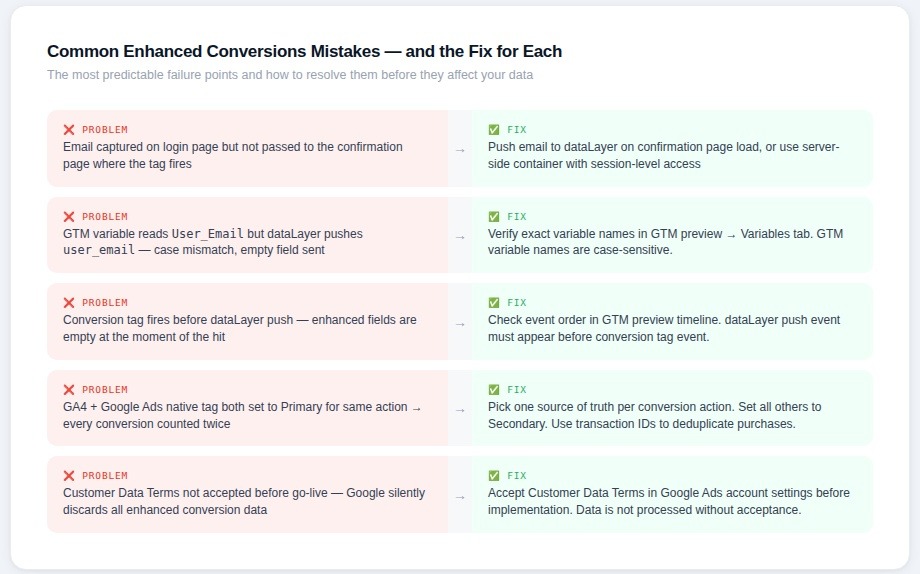
The most common issues practitioners run into are these. Email not being captured on the conversion page is the most frequent root cause of low match rates — it happens when customer data is collected on a previous page (like a login or billing page) but isn't carried forward to the confirmation page where the tag fires. The fix is either to pass the data through a dataLayer push on the confirmation page load or to use a server-side container that can access session-level data across page transitions.
Variable name case sensitivity is a subtler issue. GTM dataLayer variable names are case-sensitive, and a mismatch between what the site pushes (user_email) and what the GTM variable is configured to read (User_Email) will result in an empty field being sent. This is easy to miss in initial setup and only shows up clearly in GTM's preview mode.
Tag firing order is the third common failure point. If the conversion tag fires before the dataLayer push that contains the customer data, the enhanced conversions fields will be empty even though the data is technically on the page. Confirming the sequence in GTM preview — looking at the order of events in the left-hand timeline — catches this before it becomes a live data problem.
Rambod Yadegar, co-founder and president of HawkSEM, has noted that accurate conversion tracking is central to how his team measures client campaign success, and sees enhanced conversions as a meaningful step forward: "We're happy that Google has released enhanced conversion tracking to help provide more accurate tracking data."
Impact on Bidding, Attribution and Reporting
The practical reason most advertisers care about enhanced conversions isn't the measurement itself — it's what better measurement does to campaign performance. Smart Bidding is only as good as the signal it's trained on. When conversions are missing or distorted, the algorithm makes worse predictions, and those worse predictions translate directly into wasted spend and missed targets.
How Enhanced Conversions Support Smart Bidding
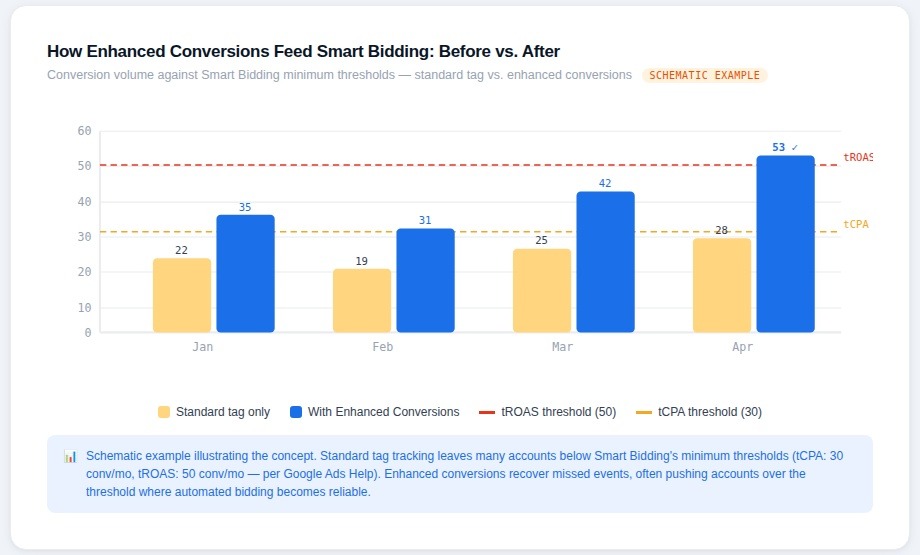
Google's Smart Bidding documentation explains that the system uses Bayesian learning to continuously improve bid predictions as it accumulates conversion data — updating models at increasingly granular levels across search queries, ad copy, landing pages, device types, locations, and time of day. The key implication is that more conversion signal doesn't just improve average performance — it improves the specificity of predictions. An algorithm with richer data can distinguish between a user who's likely to convert at $80 CPA and one who's likely to convert at $120 CPA. One with sparse data can't.
Google's own guidelines recommend at least 30 conversions per month for Target CPA campaigns to function effectively, and 50 conversions per month for Target ROAS. These thresholds matter because campaigns that fall below them tend to exhibit erratic bidding behavior — high variance in CPAs, difficulty hitting ROAS targets, and sensitivity to any individual conversion event. Enhanced conversions directly address this by recovering conversions that standard tags miss, often pushing accounts above these thresholds where they previously fell below them.
Emina Demiri-Watson, Head of Digital Marketing at Vixen Digital, put the data quality argument clearly in Optmyzr's bidding strategy impact study: "We've already been developing strategies to improve the data quality and the study confirms the need. Strategies such as server-side tracking which in testing is showing 18% uplift in main conversion event relative to client-side. This is all data that helps us and the system make informed decisions that manage risks. But again, it only works if the setup and measurement framework are solid from the start."
Tennis Express, a US-based sports and apparel retailer, offers a documented example of what this looks like in practice. After identifying untagged site URLs, the company grew sitewide tagging adoption to over 98% of pages using Google Tag Manager, then activated enhanced conversions for web to fuel Search campaign performance and increase the accuracy of their conversion tracking. The full case study is referenced in Google's enhanced conversions privacy hub at
Effect on Target CPA and Target ROAS Strategies
The effect on Target CPA and Target ROAS plays out in two ways: faster learning periods and more stable performance once the algorithm is past the learning phase.
During the learning period — typically two to four weeks after a strategy change — the algorithm is working from limited data to calibrate its predictions. If the conversion volume feeding into that calibration is artificially low because standard tags are missing cross-device or cookie-blocked conversions, the learning period takes longer and the initial performance is more volatile. Enhanced conversions accelerate this by giving the algorithm a more complete and accurate data set from day one.
Post-learning, the stability improvement is documented in client data from multiple agencies. Andrea Atzori, co-founder and director of Ambire, published results in Search Engine Journal showing that after implementing enhanced conversions and feeding offline lead outcomes back into Google Ads, one of his clients saw conversion rates from leads improve by over 25% and average cost-per-lead decrease by nearly 40%. His explanation for the mechanism: "Being able to 'educate' the system and train it, feeding back which leads resulted in an external conversion, improved the quality of the data available, and therefore improved the automated bidding significantly."
One practical constraint worth understanding: enhanced conversions improve the signal quality going into Smart Bidding, but they don't change how the bidding model interprets that signal. If Target ROAS is set to an unrealistic level, or Target CPA is too aggressive relative to historical performance, enhanced conversions won't fix that. The bidding configuration still needs to be sensible — enhanced conversions just make the underlying data more reliable.
Use Cases and Examples
Enhanced Conversions for E-commerce Retailers
For e-commerce, the core problem enhanced conversions solves is cross-device attribution. A user browses a product on a mobile device, doesn't convert, then completes the purchase on a desktop later that week. Standard cookie-based tracking often misses this entirely because the two sessions look like separate users. Enhanced conversions, by matching the hashed email from the purchase confirmation against the user's Google account, can connect those sessions and attribute the conversion to the correct campaign.
Bidmark, a UK-based digital marketing agency, published a detailed case study on a mid-sized e-commerce retailer specializing in premium home goods that was experiencing exactly this problem — standard tracking missed conversions when users switched devices or browsed in incognito mode. After implementing enhanced conversions through Google Tag Manager with properly normalized and hashed customer data, Bidmark achieved a 95% match rate — significantly above the industry average they cited — along with a 30% increase in conversion tracking accuracy. The improved attribution gave the retailer a clearer picture of which campaigns were actually driving revenue versus which only appeared to be driving revenue in incomplete reporting. Full case study: bidmark.co.uk/case-studies/95-match-rate-with-google-ads-enhanced-conversions.
Shopify merchants should also note that the platform's native Google channel integration added enhanced conversions support in 2023, which removes some of the implementation overhead for smaller stores. However, advertisers running high-volume catalogs or complex customer journeys typically find that a custom GTM implementation gives better control over which data fields are sent and when.
Enhanced Conversions for B2B and High-Value Leads
The B2B use case is arguably where enhanced conversions have the highest potential impact — and where they're most commonly underimplemented. Dreamdata, a B2B revenue attribution platform, published analysis showing that the average B2B customer journey spans 192 days. Within a journey of that length, relying on standard cookie-based attribution to connect an ad click to a closed deal is essentially futile. Enhanced Conversions for Leads, combined with CRM-based offline import, is the infrastructure that makes this connection possible.
The practical setup for high-value B2B leads typically involves capturing the hashed email and GCLID at the lead form submission stage, storing both in the CRM alongside the lead record, and then importing offline conversions at meaningful pipeline milestones — not just at closed-won. As noted in the Davis Clark quote from Tinuiti referenced earlier, getting CRM data into Google Ads should be a primary goal for B2B advertisers, and the enhanced conversions for leads framework is the mechanism that makes the matching work reliably even when GCLIDs expire or aren't available.
For enterprise SaaS companies with deal cycles of six months or more, importing intermediate signals — such as "demo completed" or "qualified opportunity created" — rather than waiting for closed revenue gives Smart Bidding the conversion volume it needs to function. The alternative is running Target CPA on closed-won events that happen a handful of times per month, which is below the threshold where Smart Bidding can make reliable predictions.
Enhanced Conversions for Local Services and Regulated Niches
Local service businesses — HVAC, plumbing, roofing, legal services, dental practices — typically run Google Ads with phone calls and contact form submissions as their primary tracked events. The challenge is identical to B2B: the on-site event is just the beginning of a longer process that ends in a booked appointment, a signed estimate, or a completed service call. Enhanced Conversions for Leads allows those downstream outcomes to be imported back and matched to the original ad interaction.
One important caution for regulated industries comes from Workshop Digital, who published explicit guidance advising against enhanced conversions in situations where forms collect healthcare-related information or other sensitive PII. Their reasoning is that while SHA-256 hashing provides meaningful technical privacy protection, health-related data sent to Google — even in hashed form — creates legal and compliance exposure under HIPAA that most healthcare advertisers should avoid. For healthcare providers, the safer path is typically to track phone call conversions or appointment booking completions that don't pass clinical or diagnostic information.
For legal services and financial services — both subject to strict advertising restrictions in certain states — the implementation itself is generally permissible as long as the customer data terms are accepted and the data collected is limited to standard contact information (email, phone, name) rather than case details or financial account data. These industries often see strong match rates because their clients tend to have Google accounts, which increases the likelihood that hashed emails will find a match in Google's signed-in user database.
Common Mistakes and How to Avoid Them
Most enhanced conversions implementations that fail don't fail because the concept is wrong — they fail because the execution has one of a small number of predictable problems. Knowing what those problems are before building the implementation is faster than diagnosing them after the fact.
Sending Incomplete or Low-Quality Customer Data
The match rate is only as good as the data being sent. The most impactful single field is the email address — it has the highest match rate against Google account data. If the email field isn't being captured on the conversion page, or if it's being captured incorrectly (with whitespace, incorrect casing, or invalid format), the entire value of the implementation drops significantly.
Google's diagnostics documentation for enhanced conversions specifies that email addresses must include an "@" symbol to be considered valid, that phone numbers must include a country code, and that address fields (if used) must follow specific format standards — including a 2-letter ISO country code and the correct number of postal code digits. Data that fails these format checks is silently dropped rather than causing a visible error, which is why match rates can look fine on the surface while the actual data quality is poor.
One specific risk that's easy to miss: Google's "Automatically detect user-provided data" setting is turned on by default in some configurations. As documented in implementation guidance published at groas.ai, this automatic detection can capture placeholder text, example email addresses from form fields, or sensitive information that shouldn't be transmitted — and can create legal compliance issues by collecting data without proper user consent. The recommendation is to disable automatic detection and configure explicit variable mappings instead, so you have complete control over exactly what data is sent and when.
Double Counting, Tag Duplication and Misconfigured Events
Double counting is one of the most damaging and most common problems in Google Ads conversion tracking, and enhanced conversions add a new way to create it. If both a Google Ads native conversion tag and a GA4 event imported as a conversion are active for the same action — both set to "Primary" — every conversion gets counted twice. As documented in conversion tracking guides, the reported CPA looks half of what it actually is, and Smart Bidding optimizes toward phantom data. The fix is to pick one source of truth per conversion action and set all others to "Secondary."
A second form of duplication that affects enhanced conversions specifically is the case where a thank-you page is accessible via a direct URL — meaning users can land on it without completing a conversion. If the conversion tag fires on page load without a guard condition, every direct visit to that URL registers as a conversion. Google recommends using transaction IDs to deduplicate purchase conversions: if two conversions are sent with the same transaction ID for the same conversion action, Google will recognize and discard the duplicate.
Ignoring Privacy Reviews and Internal Stakeholder Alignment
Enhanced conversions involve sending customer data — even in hashed form — to a third party. In most US states, that doesn't require explicit opt-in consent as long as it's disclosed in a privacy policy and the data handling is consistent with what users are told. But accepting Google's Customer Data Terms is a prerequisite for the data to be processed at all. Data sent before those terms are accepted is not processed by Google, which means implementations that were built before the terms were reviewed and signed are effectively sending data that goes nowhere.
The internal alignment issue is less technical and more organizational. Passing customer data from a website to Google Ads often requires sign-off from legal, privacy, and sometimes compliance or security teams — particularly in industries with regulatory exposure. Implementations that are built by a marketing or analytics team without those conversations happen tend to get flagged in privacy audits and either pulled back or modified after the fact, which disrupts the data continuity that Smart Bidding depends on. Starting the privacy and legal review before writing any GTM code avoids this.
Conclusion
Google Ads Enhanced Conversions isn't a patch for broken tracking — it's a structural response to a measurement environment that's changed permanently. Third-party cookies aren't coming back. Browser privacy restrictions will continue tightening. The advertisers who build first-party data infrastructure now will have a durable measurement advantage over those who wait.
The implementation path is well-defined. For web conversions, the work is getting customer data into the dataLayer at the conversion point, mapping those fields correctly in GTM, and validating with Tag Assistant. For leads, it requires coordinating the on-site tag with CRM workflows and offline import pipelines — more moving parts, but the same underlying principle. The payoff in both cases is more complete conversion data feeding into Smart Bidding, which translates to more stable CPAs, more reliable ROAS, and campaign decisions based on what actually happened rather than what the cookie chain managed to record.
The data supports doing this sooner rather than later. Workshop Digital's multi-account test showed an average 16% lift in tracked conversions. The Bidmark case study showed a 95% match rate and 30% improvement in tracking accuracy. Andrea Atzori's client at Ambire saw a 25% improvement in lead-to-close rate and nearly 40% reduction in cost per lead after feeding offline outcomes back into the system. These results come from clean implementations with high-quality data — which is entirely achievable if the setup follows the process outlined in this guide.
FAQs
What are Google Ads Enhanced Conversions and how do they work?
Enhanced conversions supplement standard cookie-based conversion tracking by sending hashed first-party customer data — typically an email address — to Google alongside a conversion event. Google matches that hashed data against signed-in Google accounts to recover conversions that standard tags miss due to cookie restrictions, cross-device journeys, or browser privacy settings.
When should I use Enhanced Conversions for Web vs. Enhanced Conversions for Leads?
Use Enhanced Conversions for Web when the conversion happens directly on your site — a purchase, a booking, a sign-up. Use Enhanced Conversions for Leads when your on-site event is just the beginning of a longer process — a contact form that leads to a sales call, a quote request that leads to a signed contract. The latter requires CRM integration to import the downstream outcome back into Google Ads.
How do I set up enhanced conversions step-by-step?
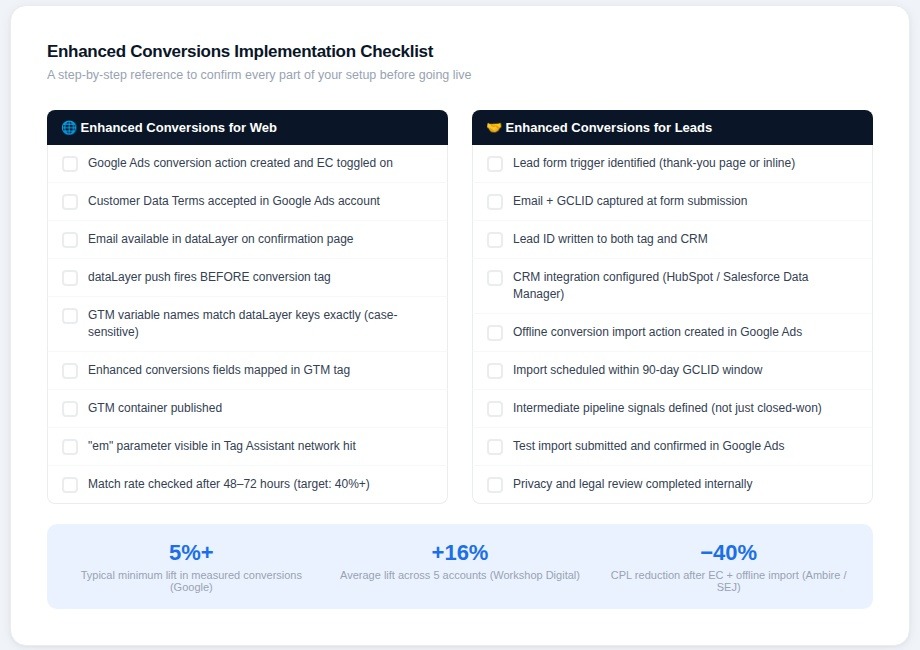
The core steps are: enable enhanced conversions on your conversion action in Google Ads, ensure customer data is available in your dataLayer at the conversion point, map those fields in your Google Tag Manager conversion tag, accept Google's Customer Data Terms, publish and validate using Tag Assistant, then monitor match rates in the enhanced conversions diagnostics report after 48 to 72 hours.
Do enhanced conversions work with all Smart Bidding strategies?
Yes. Enhanced conversions improve the signal quality available to all Smart Bidding strategies, including Target CPA, Target ROAS, Maximize Conversions, and Maximize Conversion Value. The benefit is most pronounced for accounts that are close to or below the minimum conversion thresholds Smart Bidding requires — 30 conversions per month for tCPA, 50 for tROAS.
What happens if match rates are low after implementation?
Low match rates — below 30% — typically point to one of three issues: the email field isn't being captured correctly on the conversion page, the data isn't being normalized before hashing (lowercase, no whitespace), or the dataLayer push is firing after the conversion tag rather than before it. Google's diagnostics report and GTM preview mode are the two tools for diagnosing which problem applies.


