


Automated vs Manual Bidding in Google Ads: 2026 Guide
You must have probably heard a lot of discourse on which bidding method works better between Automated vs Manual Bidding in Google Ads, but it's not necessarily about which one works better. Most of the comparisons between automated vs manual bidding in Google Ads show that both strategies work, but differently.
The decision comes down to data, budget, and honest assessment of where your account is at the moment. This guide walks you through when manual CPC can be used, when to use automated bidding without blowing up your budget, and how to switch between them without losing three weeks to a learning phase that dips your money with no results.
If you're running bidding for small budgets PPC, or you just launched last month, this manual is your best bet. And if you've been running steady for six months with just conversion tracking, you're likely leaving money on the table by not testing smart bidding. Let's figure out which one fits your current situation.
How Google Ads Decides Bids in 2026
Field evidence across Google Ads communities suggests that Google doesn't just hand the top spot to whoever bids the highest. If that were true, every auction would go to the advertiser with the deepest pockets, and small businesses/startups would never stand a chance. It depends on how relevant the bid is. Now here's the breakdown of what happens at every auction:
Google looks at your bid, sure. But it also evaluates how likely someone is to click your ad (based on your ad copy performance), how relevant your ad is to their search, and how good your landing page experience is. Then it factors in auction-time bidding signals by taking note what device the viewer is with, where they're located, what time it is, and whether they've been to your site before.
Now here's why this matters for manual CPC vs smart bidding:
With manual CPC, you set one max bid, let's say $4, and Google uses that $4 in every auction. Doesn't matter if the searcher is on mobile in your city at 4 PM (high intent) or on desktop 200 miles away at midnight (low intent).
You can add adjustments for device or location, but you're still setting those rules manually based on last week's data.
With smart bidding, Google adjusts your bid in each auction based on how likely that specific person is to convert at the moment. So, if it notices a high-intent mobile user near your store? The bid goes up. Desktop users far away who've never heard of you? The Bid drops or skips the auction entirely.
That's the difference! Manual uses static rules. Smart Bidding uses live predictions. When Smart Bidding has enough conversion data to learn from, it beats manual because it's processing signals you can't track manually, like browser type, past search behavior, time since last visit, all of it. But without enough data, it's just an expensive guess.
Manual Bidding Deep Dive
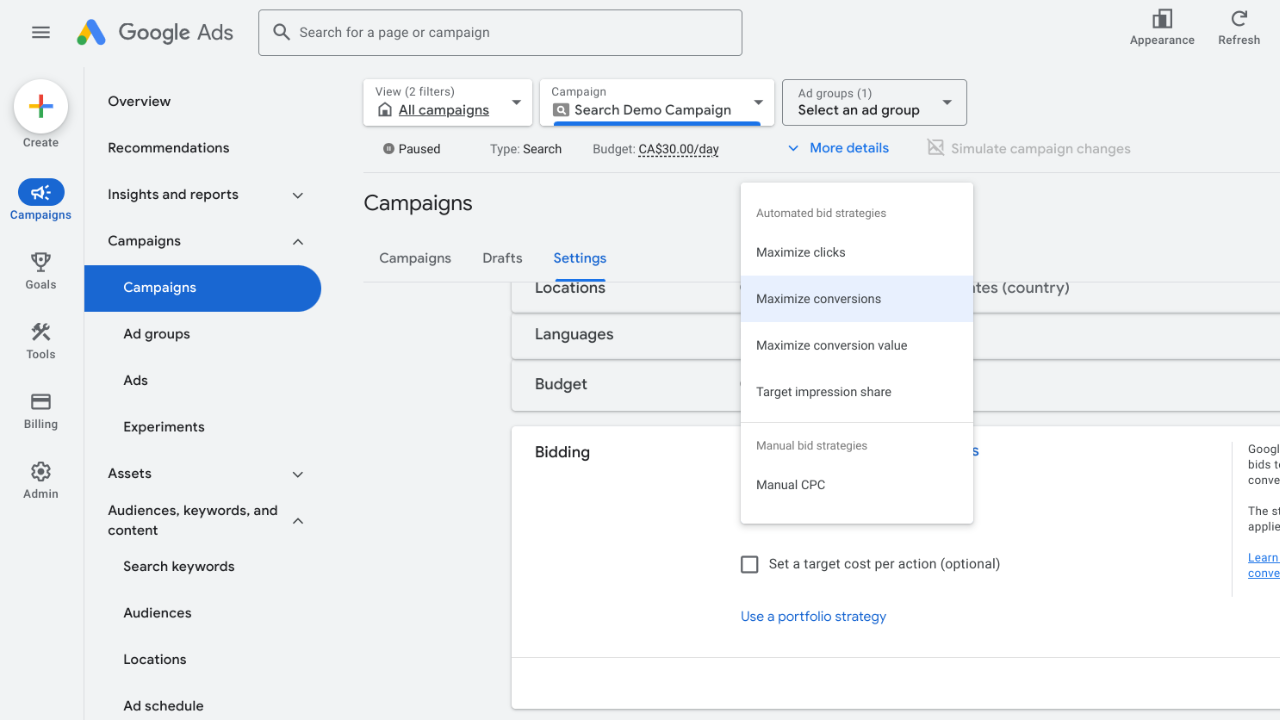
Manual CPC is where you're in full control. You set the max you wish to pay per click, and Google won't go over it, even if the algorithm thinks it could get you a conversion by bidding higher.
Some advertisers love this, others find it exhausting. Across PPC forums and communities, one recurring pattern stands out. Experienced media buyers often report that manual bidding gives them tighter control in niches with unpredictable CPC spikes.
Manual Bidding comes down to this: it works when you need tight cost control, when you're testing a new market and don't know what is most profitable yet, or when you have enough conversion volume for smart bidding to learn from. If you're bidding for small budgets PPC say, under $2000/month, manual CPC is usually the safer starting point because you can't afford to spend half your budget on a learning phase.
So, what do you actually control?
Cost-Per-Click bid: You can bid $10 on “emergency plumber near me” and $3 on “how to fix a leaky faucet” because you know the first one converts and the second one doesn't.
Ad group defaults: If you don't want to manage every keyword separately, set one default bid for the whole ad group.
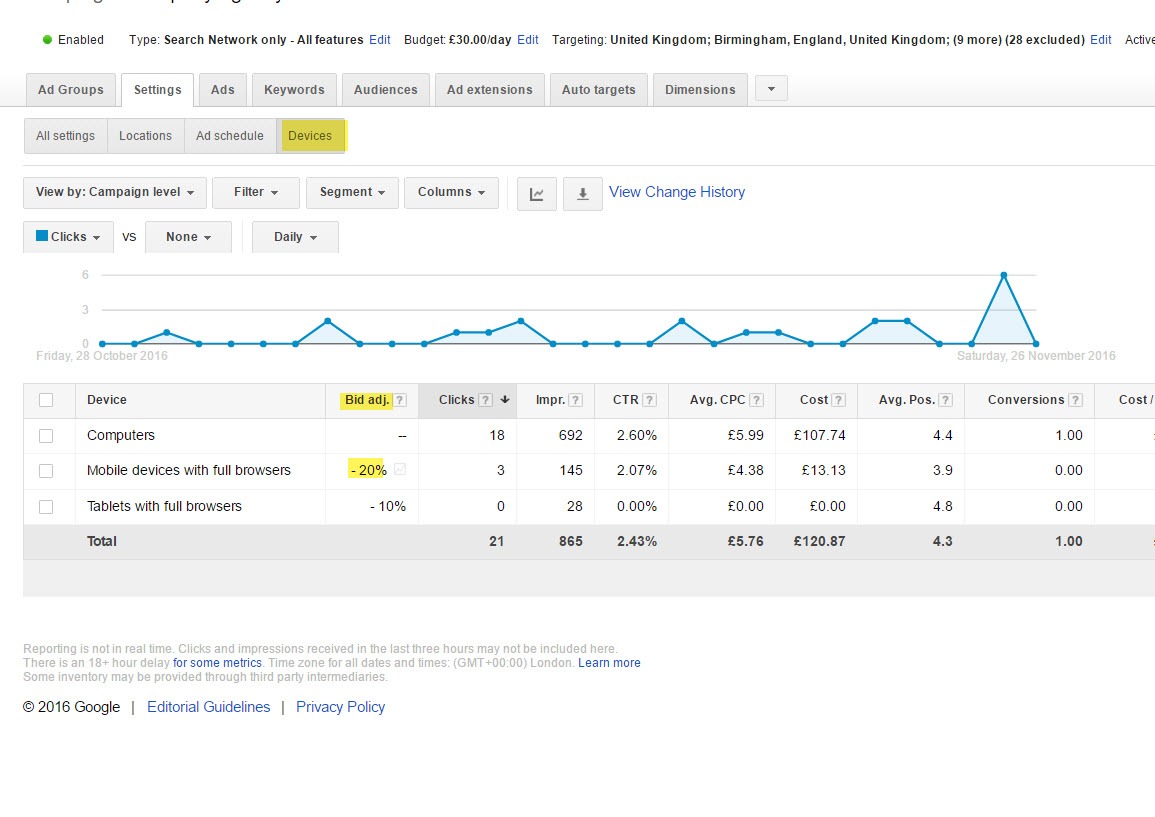
Bid adjustments: You can raise or lower bids by percentage based on device and location bid modifiers, like bidding 30% more on mobile if it converts better, or 50% more for searches in your city.
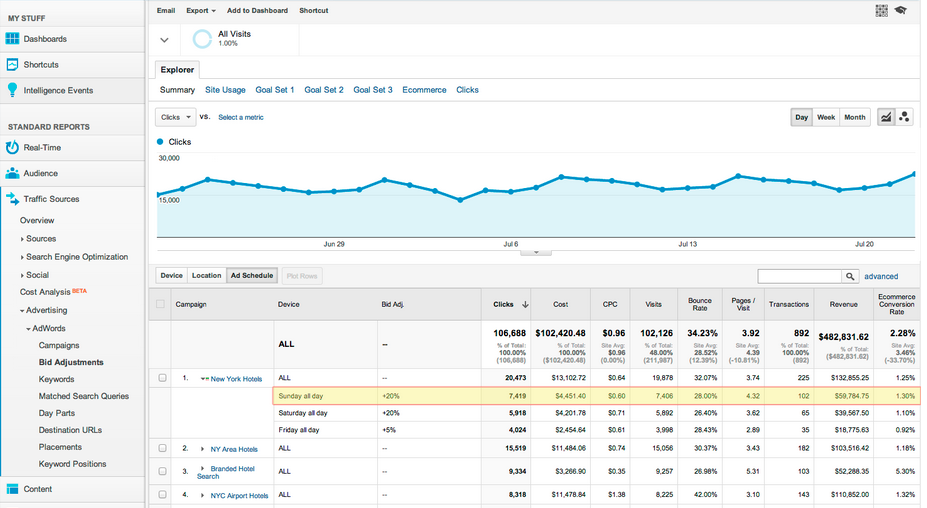
Ad schedule: You can set ad schedule bid adjustments to bid higher during business hours and lower (or turn off entirely) during early and less busy hours of the day.
Enhanced CPC vs Manual CPC: There's also a hybrid option called Enhanced CPC (ECPC). Because it is ‘hybrid’, after setting manual bids, Google can increase or decrease them slightly if it thinks a conversion is more or less likely.
ECPC still exists in 2026, not as a standalone option, but has been integrated into Smart bidding (Target CPA and Maximize Conversions).
When can Manual CPC be used?
Manual CPC makes sense in a few scenarios:
-
You're under 30 conversions per month and don't have enough data for Smart Bidding to work.
-
You're testing a brand new campaign or market and have no idea what converts yet.
-
You're in a regulated industry (legal, medical, finance) with a strict cost-per-lead requirement.
-
You have a small budget and can't afford to let Google “learn” by spending too much in a short period.
-
You're targeting a small niche, long-tail keywords that get 10 searches monthly, which isn't enough volume for an algorithm to optimize.
Smart Bidding works with signals to figure out what is best for you. Manual CPC lets you bid precisely on the handful of searches that matter, but it has limits.
You can adjust bids as you please and check in once a week to make changes based on last week's data. But by the time you are able to get this done, the market may have already shifted.
So you miss contextual signs. You don't know if the person searching is on a brand new iPhone around you or an old Android far from you. Google does, and it adjusts automated bids accordingly, s you're walking blind on that.
It takes time. If you're managing 10 campaigns with 200 keywords, manual bidding is a part-time job. We've seen solo business owners spend a lot of time adjusting bids when they should've been running their actual business.
And mistakes are expensive. If an advertiser accidentally set a $75 max CPC instead of $7.50, they will run a huge loss in hours before it is noticed. Manual CPC won't save you from human error. Now, how do you set it up without wrecking your budget?
Checklist: Building a manual CPC account the right way
Let’s look at some of the manual bidding Google Ads best practices that have yielded maximum results from lessons with Corey Zieman, a PPC expert, founder of Guaranteed PPC with 20 years of experience, and:
Start with Keyword Planner: Go to Tools > Keyword Planner and check the bid range estimates for your keywords. Google shows “Top of page bid (low range)” and “Top of page bid (high range).” Don't just bid at a high range just because someone told you to. Start at the low range or even 10-20% below. You'll get fewer impressions, but you'll see what you can actually afford before you scale.
Set conversion tracking from day one: Manual bidding without conversion data is just gambling. You need to know which keywords drive sales, form fills, or phone calls. Use Google Tag and GA4. (We'll cover conversion tracking for bidding setup in sections below.)
It’s tempting to optimize after 3 days, but early data is garbage. You need at least 100 clicks per keyword (or ad group). We've seen advertisers pause a keyword after 30 clicks and zero conversions, then find out it converts at 8% after 200 clicks. Patience pays.
Adjust based on performance: After two weeks, look at conversion rate by keyword, cost per conversion, and impression share. Raise bids on keywords that convert well and hit your target cost per lead. Lower or pause keywords that burn 200+ clicks with zero conversions. Once you've got a few hundred clicks, check performance by device, location, and time of day. If mobile converts at 3% but desktop converts at 6%, you can lower mobile bids by 30-40%. But don't apply this formula blindly until you've had at least 300–500 clicks in that dimension. Small sample sizes can be misleading.
Consider a company in Denver with a $1200/month budget targeting keywords like “emergency furnace repair Denver” and “AC installation near me.” They start with manual CPC at $8 per click (keyword planner suggested $6-$12). After 10 days and 150+ clicks, the results were:
“Emergency furnace repair Denver” > 12% conversion rate, $45 cost per lead
“AC installation near me” > 2% conversion rate, $180 cost per lead
They raised the bid on “emergency furnace repair” to $10 and dropped “AC installation” to $5. What do you think happens? There would be a significant deduction in the average cost per lead, which would save them a lot of extra expenses.
That's the advantage of Manual CPC: You control spending, and make changes based on what's working for you instead of letting an algorithm guess. But it only works if you have time to monitor it and the discipline to wait for real data before making those changes.
Automated Bidding Deep Dive (Smart Bidding)
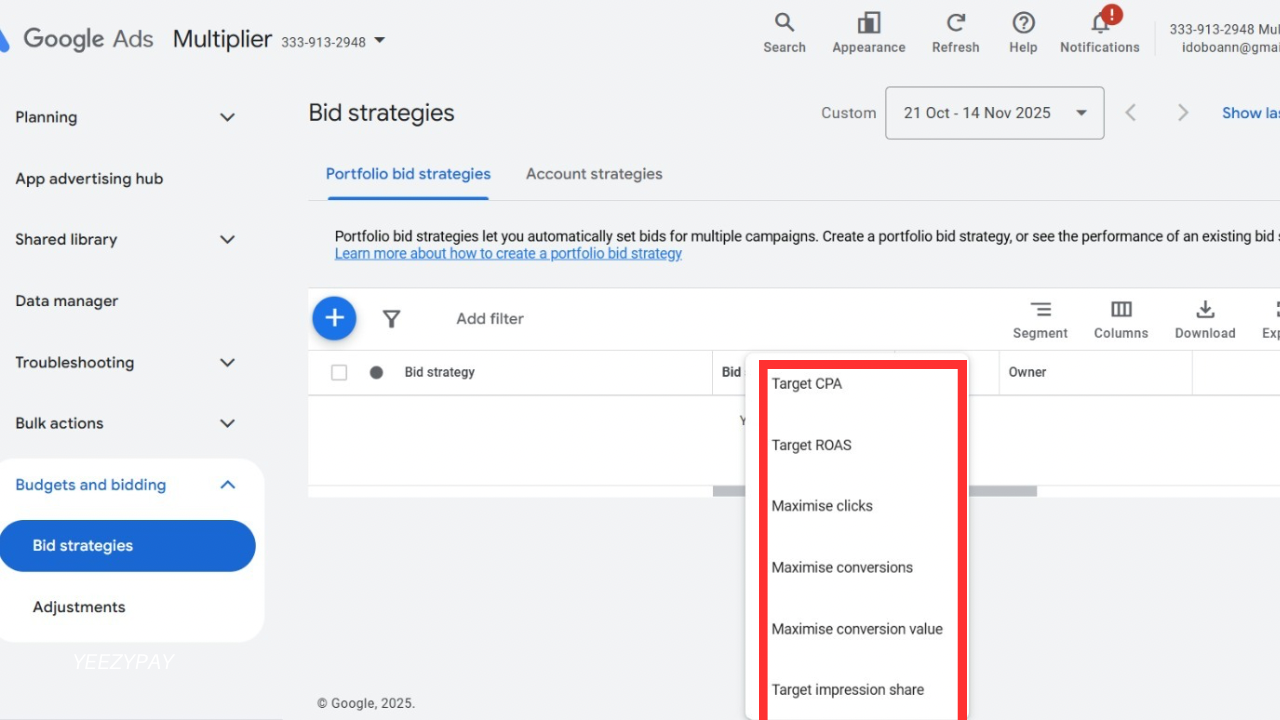
Smart Bidding is Google's machine learning does the work you'd do manually, except that it's processing hundreds of signals per auction that you couldn't track even if you tried.
In a few community discussions, advertisers noticed that after switching to Target CPA, Google immediately started picking up auctions they had been missing for months. Same budgets, but a different logic that came from the algorithm reallocating money to traffic segments that manual could not reach.
But there are cases where Smart Bidding can destroy accounts. Veteran Google Ads practitioners always highlight how automated bidding can underperform when there isn’t enough conversion history. Several case discussions show campaigns stalling until a switch back to manual bidding restored stability.
When to use automated bidding depends entirely on whether you've got enough conversions for the algorithm to learn from. So when going into smart bidding, some strategies are needed to scale through like a pro, and here's what matters:
Maximize Conversions: Google spends your budget to get as many conversions as possible. It doesn't care what they cost. A common maximize conversions strategy guide is to use this when you're testing Smart Bidding for the first time and don't know your ideal CPA yet, or when volume matters more than cost per lead.
Maximize Conversion Value: Instead of counting conversions, Google prioritizes high-value conversions. If you've got conversion values tracked (revenue, lead scoring), this bids higher on $500 orders and lower on $50 orders.
Target CPA (tCPA): You tell Google your target cost per conversion, say, $40 per lead. It adjusts the bids across all auctions to hit that average. Some leads cost $28, others $55, but over time, it should average near $40. When people debate target CPA vs manual CPC, the real question is, do you have 30+ conversions per month? Yes, tCPA usually wins. If not, stick with the manual strategy.
Target ROAS (tROAS): tROAS bidding explained in simple terms is telling Google Ads to set a return on ad spend target, like 400% (meaning $4 revenue per $1 spent). Google adjusts bids to hit that return by bidding higher on searches likely to produce high-value conversions. You need 50+ conversions per month for this to work. This is no rule, but below that? You would be guessing.
Target Impression Share: This feature shows your ad in a specific position (top of page, absolute top) for a certain percentage of time. It’s more about visibility and presence than conversions or clicks. One of the best impression share bidding tips is to increase bids for high-priority keywords.
How does Smart Bidding work?
Every time someone clicks the search button, Google evaluates them immediately based on device, location, time, search history, and whether they've visited your site before.
It uses auction-time bidding signals to predict conversion likelihood for that specific person at the moment, then adjusts your bids according to high or low probability.
This is why broad match with smart bidding outperforms exact match with manual in most cases. Broad match gives Google more auctions to evaluate, and Smart Bidding sorts out which ones are worth bidding on. Manual CPC can't do that. It treats every auction equally. But for all of these to work, you need to undergo the learning period. When you launch Smart Bidding or change your target, Google enters “Learning” mode. The learning period smart bidding length is typically around 7 to 14 days, but it can stretch to 30+ days if the conversion volume is low.
During learning, performance is unstable. CPA might spike 60% one week and drop to 40% in the next. Google tests bid levels to figure out what works. If you've got 10 conversions per day, learning concludes faster. If you've got 3 per week, it drags on.
You can disrupt the learning process if you do these things:
-
Changing your target CPA mid-learning
-
Pausing and restarting the campaign
-
Cutting the budget by 50%. Every major change resets the clock.
Data Requirements For Smart Bidding
Data requirements for smart bidding are not fixed. Nevertheless, take note of the actions below:
1. Maximize Conversions/Target tCPA with 30 conversions in the last 30 days and;
2. Maximize Conversion Value/Target ROAS with 50 conversions in the last 30 days
Below these thresholds, smart bidding is guessing more than learning.
Smart Bidding might fail when:
-
Conversion volume is under 30/month
-
Tracking is broken (Google optimizes towards bad data)
-
You set an unrealistic target (historical CPA is $89, you set the tCPA at $40, so Google can't hit it as the volume collapses)
-
Budget is too small to support learning (Google shows “Limited by budget” and can't optimize)
Side-by-Side Comparison
Here's how automated vs manual bidding in Google Ads compares across important factors:
Data Volume:
Manual CPC works with zero conversion history. You can launch today and set bids based on what you can afford. Performance improves as data accumulates, but you don't need conversions for the strategy to function.
Smart Bidding needs 30+ conversions per month minimum (50+ for tROAS). Below that, it's guessing. Above that, it beats manual because it's processing more variables than you can track.
Budget Size:
Manual CPC is better for bidding for small budgets PPC under $2000/month. Learning phases can burn 30-50% of small budgets before smart bidding figures anything out. The manual keeps the spending more predictable.
Smart Bidding needs room to test. Works best with a $3K/month budget that can absorb a 2-week learning period without killing the account.
CPA/ROAS Goals:
In Manual CPC, you can manage cost per lead indirectly by adjusting bids weekly based on performance. If your target is $50 CPL and you're averaging $68, you lower bids on underperformers.
In Smart Bidding, you set an explicit target, Target CPA at $50 or Target ROAS at 400% and Google adjusts every auction to hit that average.
If you've got a hard cost ceiling (legal, finance, healthcare, where $80 CPL breaks profitability), the manual gives you tighter control early on. Once you know your sustainable CPL from months of manual data, target CPA vs manual CPC usually favors the tCPA because it maintains your target more consistently than weekly manual adjustments.
Seasonality:
In Manual CPC, you handle it manually. If Black Friday drives 3x normal conversions, you raise bids before the spike and lower them after. If competitors launch a sale and CPCs jump to 40%, you adjust or pause.
For Smart Bidding, Google has built-in seasonality adjustments Google Ads for short-term shifts (7 to 14 days). For recurring patterns such as December retail spikes, smart bidding learns over time if you've run multiple cycles.
Match Types and Control:
Manual CPC works with any match type, but most advertisers use phrase or exact matches to keep control. Broad match with manual CPC wastes money because you're using the same budget whether the query is high intent or irrelevant.
Smart Bidding performs best with broad match because as previously said, broad match gives Google more auctions, and smart bidding evaluates each one individually.
Time Investment:
Manual CPC requires weekly check-ins. You're reviewing which keywords have CPL targets, adjusting bids, and adding negatives. For 50 keywords, expect 2–3 hours/ week. For 10+ campaigns, it doesn't scale without hiring help.
Smart Bidding needs less frequent monitoring. You check if learning is done, if CPA is near target, search items for new negatives, and budget pacing. Once stable, reviewing every 7–10 days is enough. Portfolio bid strategies setup will be helping you apply one strategy across multiple campaigns.
If you're managing 1–2 campaigns with time to optimize weekly, a manual is fine. But managing 5+ or don't have 10 hours/week? Smart Bidding is the only scalable option.
Data and Tracking Readiness
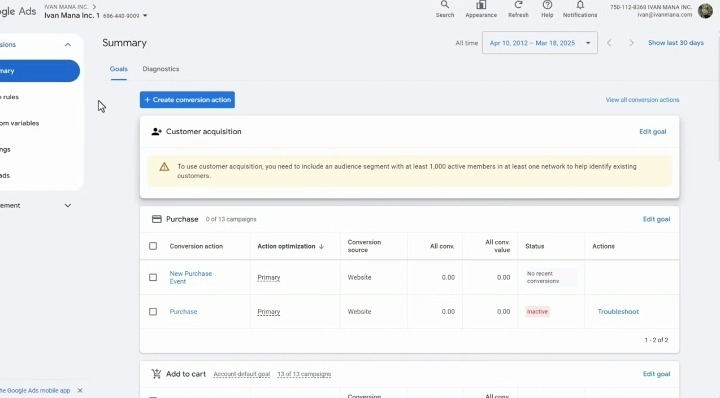
Smart bidding optimizes towards what you've told Google to count as a conversion. If your tracking is broken or measuring the wrong actions, the algorithm acts accordingly.
There are cases of accounts switching to Target CPA, and watching performance tank, only to discover that their conversion tag was firing on every page load, not just purchases. Google was optimizing for visitors, not buyers. Your tracking foundation has to be solid to run smart bidding and even manual CPC effectively. For the best Data collection and analysis, check the following in your list of things to do:
GA4 Linking and Conversion Import
Google Analytics 4 is the analytics backbone for Google Ads in 2026. Universal Analytics is dead. And you need to migrate if you haven't yet. Linking GA4 to Google Ads lets you import conversion events like purchase, signups, add-to-cart, and build remarketing audiences based on user behavior. You link using Tools > Linked accounts > Google Analytics > Link
Once linked, mark key events as conversions in GA4, then import them into Google Ads under Tools > Conversions > Import > Google Analytics 4
If you only track purchases but ignore add-to-cart or signups, smart bidding optimizes for a lesser slice of intent and misses high probability audiences. This is foundational conversion tracking for bidding.
Enhanced Conversions for Leads
This captures first-party data from your forms and sends it to Google in hashed format. Google matches it to signed users and improves attribution accuracy. Now this is important for lead gen because many users don't convert immediately after clicking. They click on mobile, research on desktop, and convert 3 days later by typing your URL directly. Without enhanced conversions, Google Ads doesn't credit that conversion, and Smart Bidding underbids on queries that bring in leads. For your set up, you need to go to Tools > Conversions > Select action > Enhanced conversions > Enable. This is table-stakes for conversion tracking Google Ads in GA4 in 2026, without it, attribution is 20-30% incomplete.
Offline Conversion Import
When conversion happens offline, you have to import that data back into Google Ads manually or via API. This is important for B2B, professional services, auto sales, real estate, basically anywhere the sale happens days or weeks after the ad click. To set it up, you go to Tools > Conversions > Create action > Import > From clicks to successfully set this up, you need GCLID (Google click ID) from the original click, conversion time, and conversion value.
Consent Mode v2
Privacy laws (CCPA, CPRA, state laws) require user consent for tracking. Consent Mode v2 is Google's framework for handling this. When users decline cookies, consent Mode v2 uses conversion modeling to estimate conversions without individual tracking. Without this feature, 20-40% of conversions go invisible, and Smart Bidding optimizes on incomplete data. To set up, you have to implement via Google Tag Manager or directly in Google Tag. Then add consent parameters (ad storage ‘analytics storage’) if you haven't set this up and you're running ads in the US, do it now.
Value Rules for Bids
Value rules let you assign different values to conversions based on audience, location, or device. Smart Bidding then prioritizes higher value conversions. For instance, if a SaaS company knows users from Enterprise companies with 500+ employees) convert at 40%, while SMB(Small and Medium-sized Businesses) convert at 8%, they set up a value rule. Enterprise trial = $500 value, and SMB trial=$50 value, Google now bids more on queries likely to produce enterprise trials. This is value bidding in Google Ads in action, which is very effective when not all conversions are equal. To set it up, go to Tools > Conversions > Select action > Value > Use different values > Set rules
Respect ADA / WCAG landing compliance
ADA stands for Americans with Disabilities Act, while WCAG is the Web Content Accessibility Guidelines. Since 1 in every 4 adults has a disability, the collective goal is to make websites usable for people with disabilities. Plus, businesses could get sued up to $75,000 for being inaccessible.
Match Types and Bidding Synergy
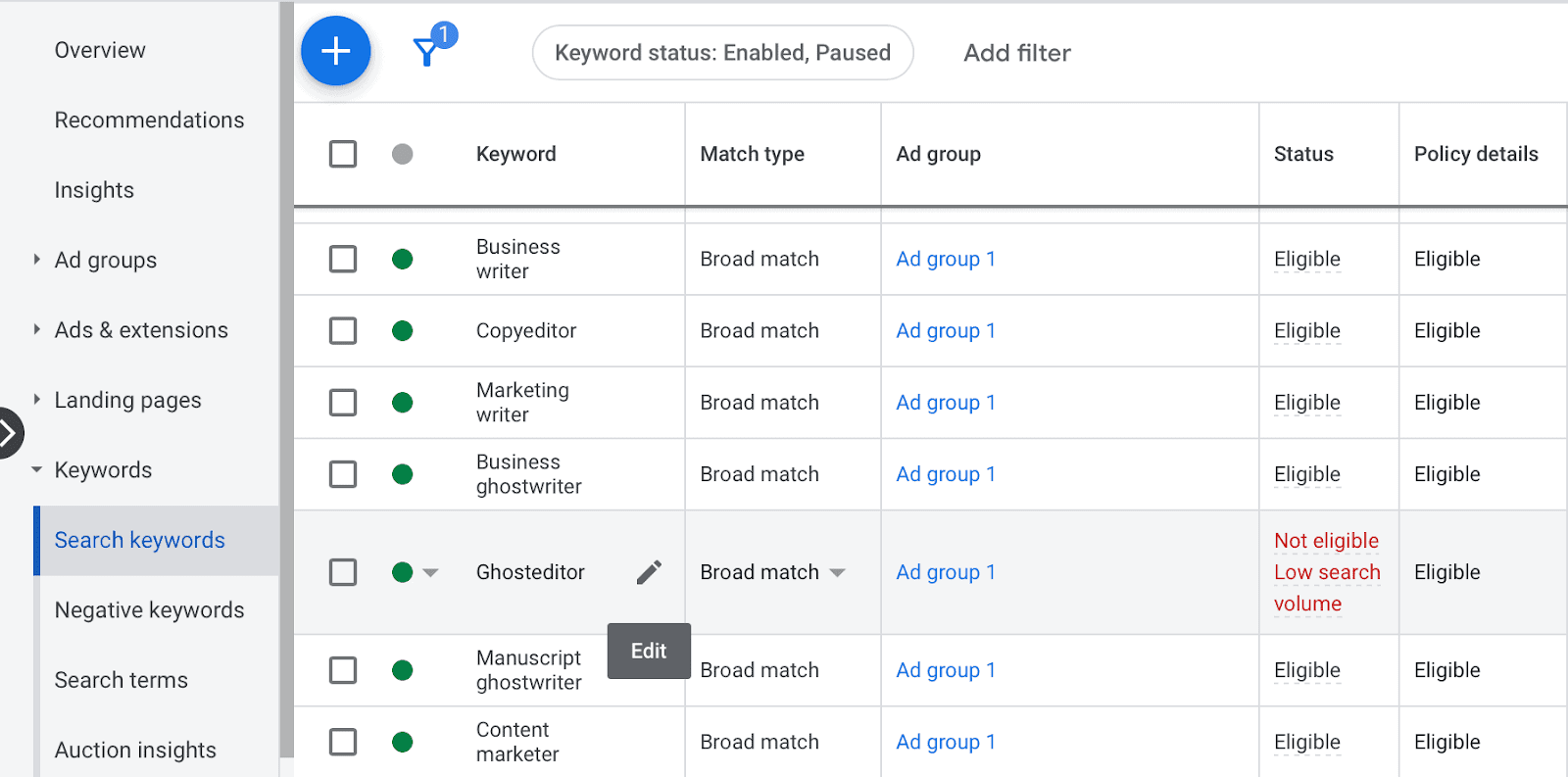
In automated vs manual bidding in Google Ads, Match types control which searches trigger your ads. The choice changes depending on whether you're running manual or automated bidding.
There are 3(Three) Match Types in 2026
Broad match: This shows ads for searches related to your keyword, including synonyms and user intent variations. Keyword: "running shoes" triggers "best sneakers for jogging," "athletic footwear," "marathon training shoes."
Phrase match: Shows ads when the search includes the meaning of your keyword. Keyword: "running shoes" triggers "buy running shoes online," "women's running shoes," but not "shoes for running a business."
Exact match: Shows ads for searches that share the same intent as your keyword. Keyword: [running shoes] triggers "running shoes," "shoes for running," "runner shoes" not "trail running gear."
Match Types + Manual CPC
With manual bidding, most advertisers use phrases or exact matches because you're setting one max CPC for all auctions. You can't adjust bids based on search intent in real time, so tighter match types prevent wasted spend on low-intent queries. Also, you'll need a strong negative keywords list. If you sell premium products, add "cheap," "free," and "used" as negatives. Check the search terms report weekly and add irrelevant queries to your negative list.
Match Types + Smart Bidding
Broad match with smart bidding is Google's recommended pairing because smart Bidding evaluates each search individually. Google's 2024 performance summit highlighted that broad match paired with smart bidding delivered 20-30% more conversions at similar CPA compared to exact match with manual bidding but only for accounts with 30+ monthly conversions. This stat has been confirmed by multiple agencies testing both the ecommerce bidding strategies discussed in this article.
If someone searches "best running shoes for flat feet" (a broad match expansion), Google checks: Is this user likely to convert based on device, location, time, past behavior? If yes, it bids. If not, it skips the auction or bids low.
Broad match gives the algorithm more auctions to learn from. More data = better predictions.
Operating Playbooks - Checklists
Manual CPC Setup Checklist
-
Use Keyword Planner to get bid range estimates (Tools > Keyword Planner)
-
Start bids 10-20% below the suggested range, not at the high end
-
Set conversion tracking before launching (Google Tag + GA4)
-
Use a phrase or exact match to control query relevance
-
Build a negative keywords list (add "free," "cheap," and brand names you don't sell)
-
Set ad schedule if business hours matter (e.g., local services)
-
Add geo-targeting for specific cities/states if you're local
-
Wait 7–14 days and 100+ clicks before making bid changes
-
Review search terms weekly, add negatives, and raise bids on converters
Smart Bidding Setup Checklist
-
Confirm 30+ conversions in the last 30 days (50+ for tROAS)
-
Link GA4 to Google Ads (Tools > Linked accounts)
-
Enable enhanced conversions (Tools > Conversions > select action > toggle on)
-
Set up offline conversion import if sales happen offline (CRM or CSV upload)
-
Implement Consent Mode v2 (GTM or Google Tag)
-
Choose strategy: Maximize Conversions (testing), tCPA (known CPL), tROAS
-
Set realistic targets based on data history (don't lower tCPA by 50% and expect it to work)
-
Enable the seasonality adjustments tool if running a promotion (Tools > Bid strategies > Adjustments)
-
Set a maximum CPC bid limit to prevent runaway spend (optional but recommended for new accounts)
-
Don't change settings for 14 days during the learning period
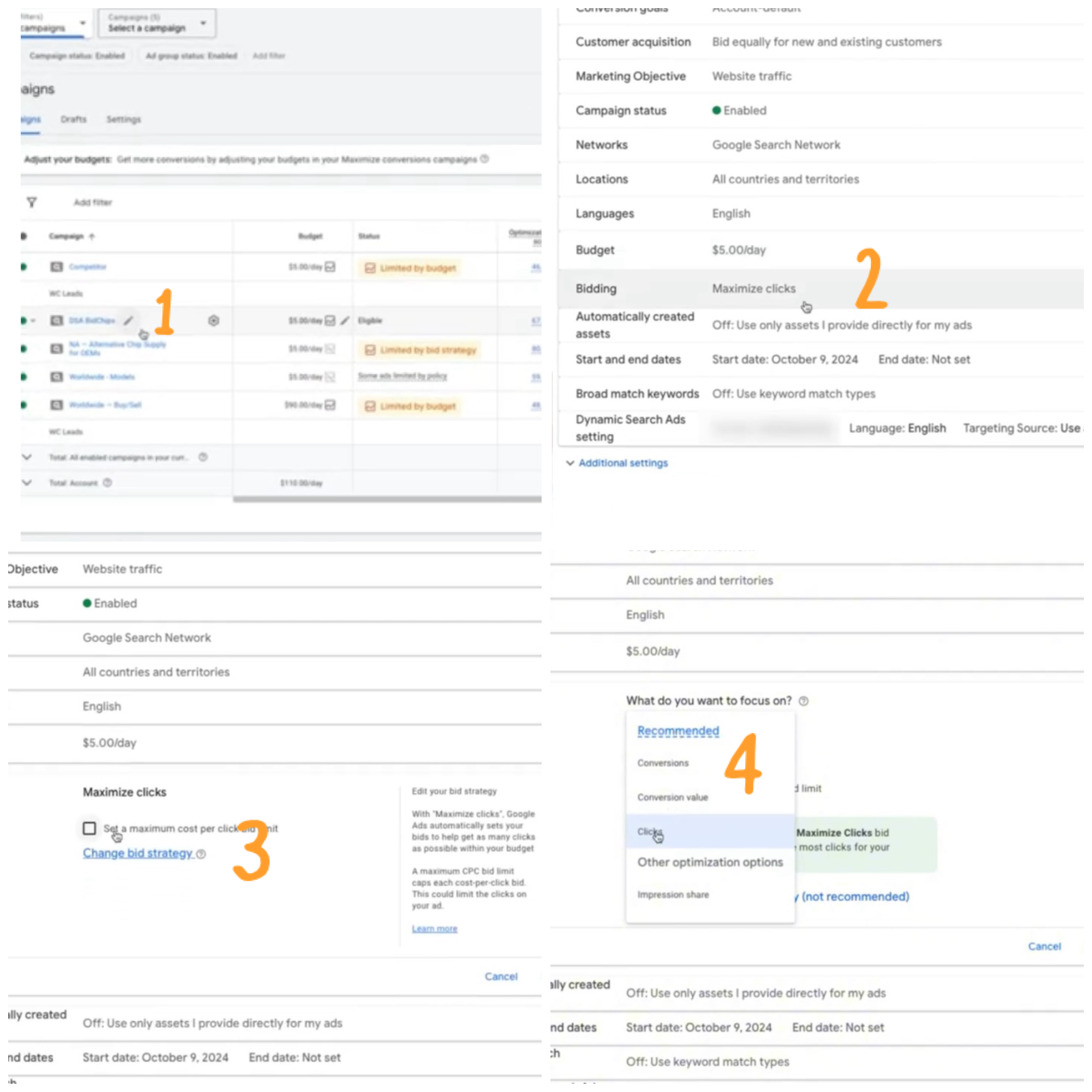
Switching from Manual to Automated
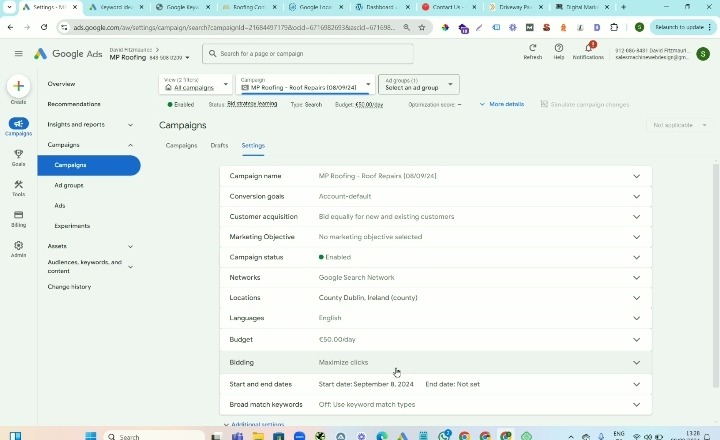
Switching from Manual to Automated bidding strategy is easy. Follow the steps below:
-
Verify you have 30+ conversions per month
-
In Google Ads, go to “Campaigns” and select > Settings (gear icon) > Open “Bidding” > “Change bid strategy” > Select a new automated strategy
-
Click Save
Expect 7–14 days of learning performance will fluctuate, after 21 days, compare CPL and conversion volume to the manual CPC baseline and if CPL is within 10–15% of the target and volume increased, keep it. If CPL spiked 40%+ with no volume gain, revert or adjust the target.
Use campaign experiments (Tools > Experiments) to test Smart Bidding on 50% of traffic while keeping 50% on manual CPC. Compare results after 30 days before fully committing.
Measurement and Attribution
Measurement decision requires:
Data-Driven Attribution (DDA)
Data-driven attribution (DDA) is Google's default attribution model in 2026. It assigns conversion credit across all touchpoints in a customer's journey based on how much each interaction contributed to the conversion.
Smart Bidding uses DDA to understand which keywords and campaigns drive conversions, even if they're not the last click. Without DDA, you'd under-invest in top-of-funnel keywords that assist conversions.
Conversion Lag Windows settings
Conversion lag is the time between an ad click and a conversion. If someone clicks your ad on Monday but converts on Thursday, that's a 3-day lag. In campaign settings, you set a conversion window (default: 30 days for Search, 1 day for Display). If someone converts after the window closes, Google doesn't count it.
If your average sales cycle is 14 days but your conversion window is set to 7 days, you're missing half your conversions. Smart Bidding then under-bids because it thinks performance is worse than reality.
Conversion Value Modeling
If you're tracking leads but not all leads close, Google can model the value of conversions based on patterns. Google's algorithm then bids higher on queries that historically produce high-value demos.
It handles the following:
-
Lifetime value modeling: Builds a model of your customers' lifetime value (LTV) and predicts which customers are likely to become high-value.
-
Assigns value rules for bids: This tells Google which customers are most valuable to you (e.g., high-spending customers).
-
First-party audience data: Shares your customer data (like email lists) with Google.
-
Customer Match: Allows you to use online and offline data to reach audiences from other Google platforms, such as Gmail and YouTube.
Troubleshooting and Diagnostics
Troubleshooting smart bidding is almost unavoidable when running ads. Here's what goes wrong and how to fix it before it costs you thousands.
Common issues are:
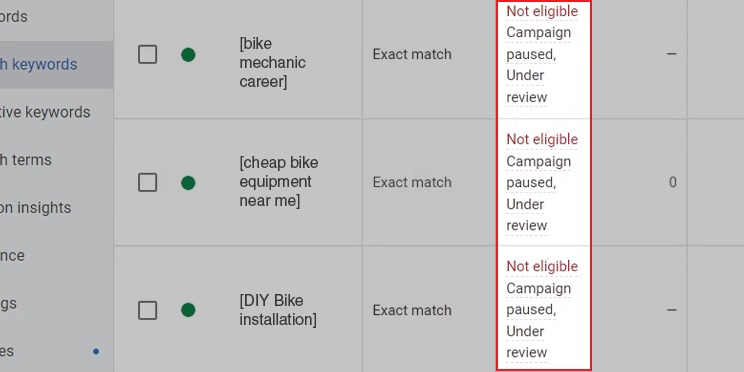
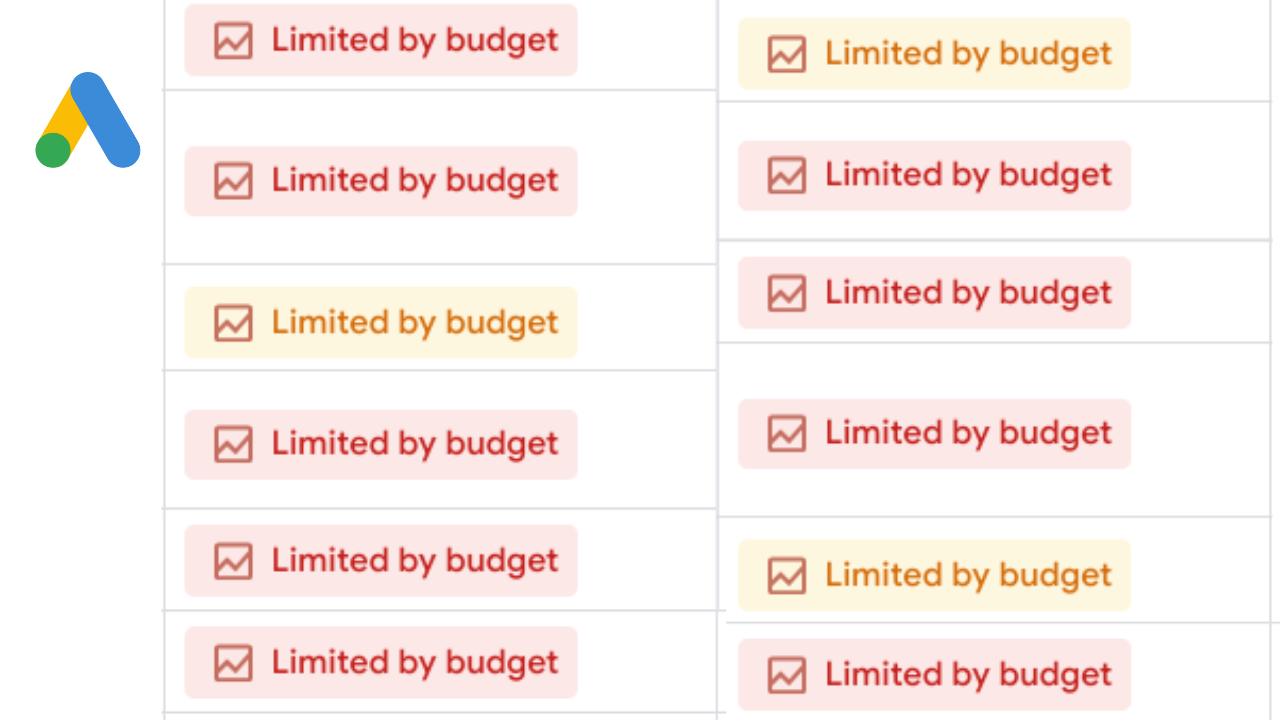
Limited by Budget
Budget limited campaigns bidding implies ads could show more often, but the daily budget is maxed out. Google is hitting the cap before exhausting auction opportunities.
You can fix this by:
-
Raising the daily budget by 20-30% if CPL is acceptable
-
OR reducing Target CPA by 10-15% to stretch budget (only if current CPL allows it)
-
OR reducing geographic targeting to focus spend on the highest-converting areas
Don't just keep raising the budget. Check if CPL is sustainable first.
“Learning" Status Stuck for 30+ Days
This is when the campaign won't exit the learning phase. Usually caused by:
-
Not enough conversions (under 15-20 per month)
-
Frequent campaign changes (pausing/restarting, changing targets)
-
Conversion tracking issues (conversions not firing correctly)
You can fix this by:
-
Checking conversion tracking in Tag Assistant (are tags firing?)
-
Stop making changes for 14 days. Letit stabilize
-
Switching back to manual CPC if conversions are under 20/month until volume increases.
Conversion Lag
This is when conversions take 7+ days to appear in reports. Smart Bidding optimizes on incomplete data during the lag period, causing underbidding.
You can fix this by:
-
Extending conversion lag window to match actual sales cycle (e.g., 45 days for B2B)
-
Using data exclusions in bidding if a specific date range had tracking errors (Tools > Bid strategies > Data exclusions)
-
Importing offline conversions to fill gaps
Seasonality Overrides
Black Friday, holiday sales, or promotions temporarily change conversion rates. Smart Bidding hasn't adapted yet. Always use seasonality adjustments Google Ads:
Tools > Bid strategies > Adjustments > Create adjustment > Set date range and expected conversion rate change (e.g., "+50% for 7 days")
Google will adjust bids during that window and revert after.
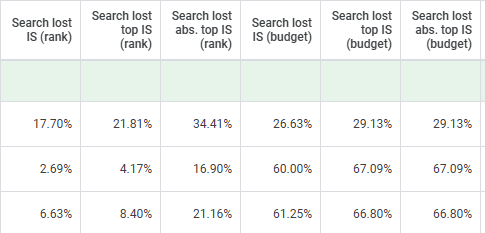
Search Lost IS (Budget)
You're losing more than half of possible impressions due to budget limits.
You can fix this by:
-
Increasing daily budget
-
Reducing keyword list to focus on top performers
-
Using shared budgets across campaigns to reallocate dynamically
For manual campaigns, watch out for:
1. High Average CPC: This implies your cost per click is too high and eats into your budget. Consider adjusting bids or targeting.
2. Dropping Impression Share metrics: Your ads aren't showing as often as they used to. Check your bids, targeting, and ad relevance.
Governance and Safety
Account Safety
Prevent runaway spending by setting maximum CPC limits, even in automated strategies.
In your “Campaign settings,” go to Bidding > Set maximum CPC bid limit (e.g., $50). Google won't bid above this in any auction, even if Smart Bidding predicts a conversion. Use this when testing new automated strategies or in high-CPC industries (legal, insurance, finance) where a single mistaken bid could cost $200+.
Alerts: Stay up to date by receiving notifications for important changes within your account.
Geo targeting granularity: Use this feature to precisely target your audience.
Budget pacing controls: Google can spend up to 2x your daily budget on high-traffic days, then balance it over the month. If your daily budget is $100, Google might spend $200 on Monday and $50 on Tuesday. So, make use of features like Target ROAS and Target CPA to avoid overspending. Another way is to exclude keywords using the Negative keyword feature, so your ads don't make you spend on clicks that don't convert.
Legal safety:
FTC advertising guidelines: Stay truthful in your advertising and recommendations.
CCPA / CPRA privacy laws: Comply with California's data protection and privacy laws.
HIPAA advertising constraints: Follow healthcare industry regulations for advertising and data handling.
TCPA compliance for calls: You are mandated to comply with regulations for calls and texts.
ADA / WCAG landing compliance: Ensure accessibility for users with disabilities
2026 Updates to Watch out for
Google changed some things in the last 12 months that matter in how you bid. Most of them went under the radar because Google doesn't announce updates like Apple launches, they just roll them out and update a help doc no one reads.
Here are things to currently adjust:
Advanced value-based bidding Google Ads
Value based bidding Google Ads used to be simple; Assign a dollar value to conversions, and Google bids higher on valuable ones. Now, new profitable changes have been made. Some of which are:
Cart Value Optimization: if someone adds $400 worth of products to the cart, Google adjusts the bid based on cart Value, not a static value you probably set months ago.
Profit Margin: You can now upload product-level margins to Google Merchant Center, and Smart bidding will prioritize high margin items over high revenue.
Repeat Customer Prediction: Google's algorithm now predicts which new customers are likely to become repeat buyers and bids higher on those conversions. This is all great news for e-commerce! A $200 order from someone likely to buy again in 60 days is worth more than a $300 one-time order.
For setup, you need conversion value tracking live and, for the margin feature, your Google Merchant Center feed has to include cost-of-goods-sold data.
Privacy Laws and First-Party Data Requirements
Third-party cookies are gone in Chrome as of mid-2025. CCPA and CPRA in California set the standard, but Colorado, Virginia, Connecticut, and Utah as others have similar laws in effect now. This means without third-party cookies, Google loses visibility into 30 to 40% of user behavior unless you're feeding it first-party data. So Smart Bidding performance degrades if you're not actively building:
-
Customer Match lists (upload emails, phone numbers from your CRM)
-
Enhanced conversions for leads (capture email/ phone data from forms)
-
Server-side tagging (more accurate tracking under privacy restrictions)
The algorithm needs better signals to replace what third-party cookies used to provide. If you haven't done this yet, it's not optional anymore.
Performance Max and Smart Bidding Coordination
Performance Max campaigns now share bidding signals with search campaigns when they're targeting the same conversion goals. Google coordinates bids so it's not competing with itself for the same user across both campaign types. In 2024, you'd sometimes see PMAX and search both bidding on the same query, driving up your costs because Google was essentially bidding against itself. In 2026, if both campaigns target the same user, Google evaluates which campaign type is more likely to convert them and suppresses the other one from the auction. As an advertiser, if you run Search + PMAX simultaneously, make sure both are using Smart Bidding with the same conversion goal. Otherwise, the coordination breaks.
Broad Match Signals
Broad match had a bad reputation for years, advertisers complained it wasted spend on irrelevant searches. Google has refined the system significantly in 2025-2026.
Broad match now interprets user intent more accurately by analyzing:
-
Search context (previous queries in the session)
-
Location signals (searcher's city, proximity to businesses)
-
Device behavior (mobile users show different intent than desktop users)
-
Historical conversion patterns (which broad-match expansions actually converted)
Conclusion
Automated vs Manual Bidding in Google Ads is something you revisit every quarter based on where your account actually is. There are advertisers who cling to manual CPC with 100 conversions per month because they like control; meanwhile, they're spending a lot of time adjusting bids and still getting outbid on high-intent searches. There are also advertisers who jump to Smart Bidding with 14 conversions per month and watch Google burn through their budget because the algorithm didn't have enough signal to work with.
Know when to stick with manual CPC and set realistic bids based on what you can afford, track conversions early and wait for data before you make changes. Don't change first page bids because Google suggests them. Start low, identify what converts, and scale.
When you scale, expect 7 to 14 days of unstable performance during learning. Don't panic and revert after a few days, give it 21 days minimum. And remember, broad match with Smart Bidding only works when you have the data. Don't do broad matches with manual CPC, that'll be termed a financial mistake. The advertisers who scale in 2026 are the ones who are smart enough to know when rules apply and adjust when conditions change. Pick the strategy that fits where you are today.
FAQ
Is manual CPC better than Smart Bidding for small budgets?
Yes, bidding for small budgets PPC almost always means starting with manual CPC, if your expenditure is below $2,000 per month. Manual CPC offers expenses while you develop conversion data. Smart Bidding requires a learning period that may use up 30-50% of a budget during the initial two weeks. When your spend reaches $3,000+ per month with over 30 conversions, Smart Bidding generally surpasses manual since Google's algorithm analyzes auction signals that you could manually monitor.
At what point should I transition from Smart bidding to Target CPA?
When deciding between Target CPA vs manual CPC, it is good to know that Google is better at identifying auction signals…Change once you have achieved more than 30 conversions in the past 30 days. If you have fewer than that, Smart Bidding doesn’t have data to accurately forecast conversion chances and may overspend while learning. Begin by setting your Target CPA at your existing average cost per conversion; avoid reducing it by 40% right away. Allow the algorithm to settle for 21 days ,then modify your target according to the results.
What amount of data is required for tROAS to function effectively?
Google suggests achieving 50 conversions within 30 days for Target ROAS. Additionally, conversion values must be monitored precisely (transaction amounts for e-commerce, designated lead values for services). With more than 50 conversions, tROAS estimates instead of optimizing, causing unstable results. If your conversions range from 30-50, start with Target CPA. Then transition to tROAS as volume grows.
Is Smart Bidding necessary for broad match to function effectively?
Yes. Using match without Smart Bidding squanders budget on unrelated searches since you apply the same max CPC regardless of whether the query is high-intent or low-intent. Smart Bidding assesses each search query separately. Modifies bids according to the likelihood of conversion. Broad match combined with Smart Bidding is effective, whereas broad match with CPC is not.
How long is the Smart Bidding learning period?
The learning period smart bidding length can take 7-14 days, but this varies based on the number of conversions. If you achieve over 10 conversions weekly, the learning phase completes quickly. With 2–3 conversions per week, it may extend to 30 days. While learning, your campaign will display a "Learning" status badge. Avoid altering your Target CPA, pausing the campaign, or making adjustments as each modification restarts the learning cycle.
What's the best bidding strategy for lead generation in the US?
Among the top lead gen bidding strategies, beginning with Maximizing Conversions is the way to go if you don't know your target CPL yet. After 30-60 days of data, depending on what is recommended, switch to Target CPA and set your target at the average CPL from the Maximize Conversions phase. Enable enhanced conversions for leads to improve tracking accuracy. If you have a long sales cycle (leads close 30+ days after the ad click), set up offline conversion import so Google knows which leads became customers; otherwise, Smart Bidding optimizes for form fills, not actual revenue.


