


Google Ads Seasonality Adjustments Explained
Introduction
If you’ve ever managed a high-spend Google Ads account during a flash sale or a 48-hour holiday window, you know the specific anxiety that comes with Smart Bidding. You know the conversion rate is about to spike, but the algorithm is still looking at the last 30 days of "normal" data. By the time the automated bidding catches up to the excitement, the sale is often over, leaving you with missed opportunities on day one and over-inflated bids on day three. This is exactly where Google Ads Seasonality Adjustments Explained becomes the most important part of your technical toolkit.
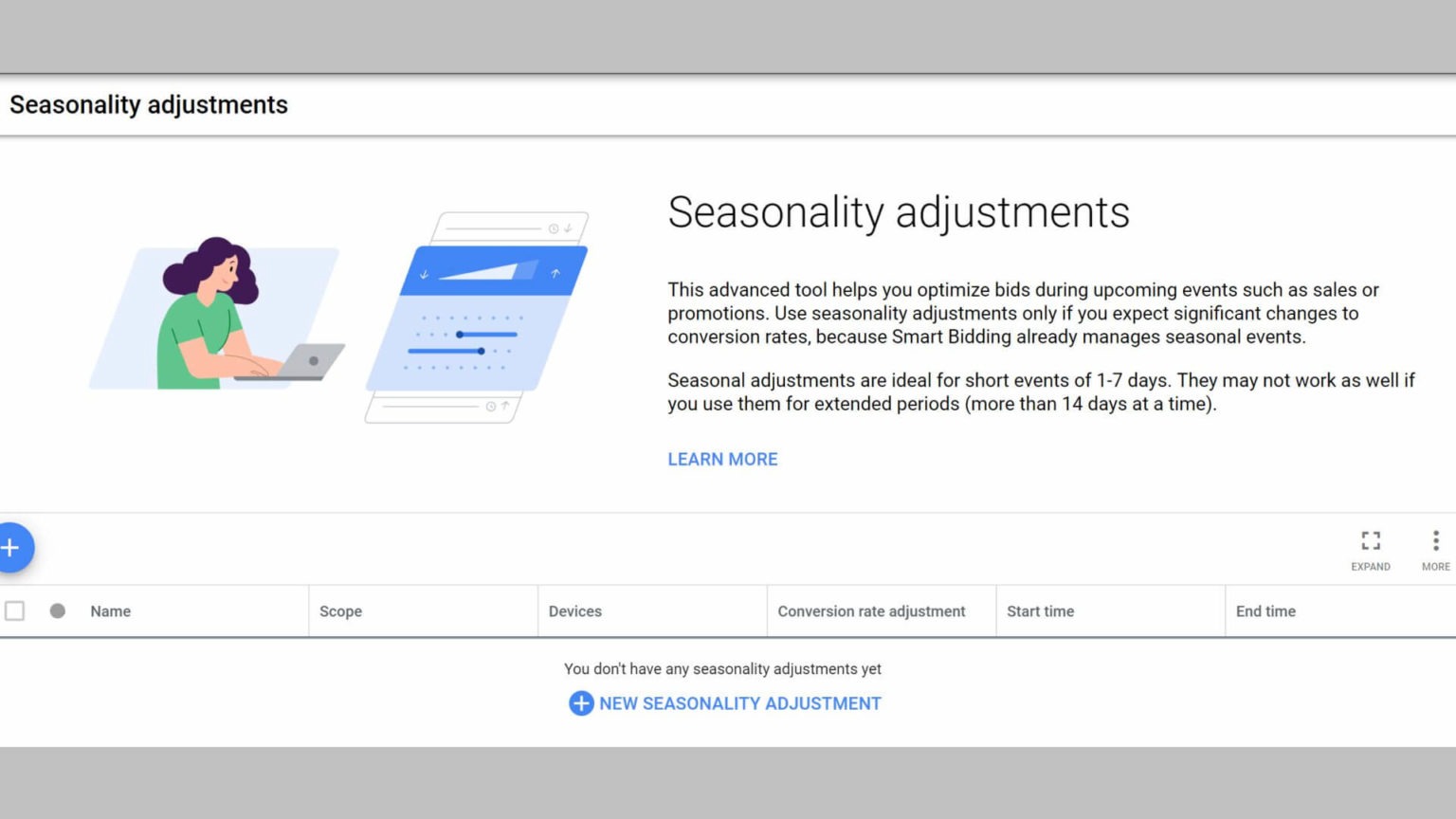
Think of these adjustments as a way to "whisper" in the ear of Google’s AI. Instead of letting the machine guess, you are providing a heads-up that a significant, temporary shift in user behavior is coming. It’s not a permanent change to your strategy; it’s a surgical strike designed to handle short-term volatility that the standard bidding models aren't built to predict.
Take the case of a mid-sized retailer specializing in camping equipment. During their 2025 "Summer Kickoff" 72-hour flash sale, they anticipated a massive short-term conversion rate uplift based on historical email list engagement. Instead of manually doubling bids and breaking their tROAS (Target Return on Ad Spend) model, they applied a 35% seasonality adjustment across their Search and Shopping campaigns.
The results were telling for their bottom line:
-
Initial Velocity: The campaigns hit peak spend within 4 hours of the sale launch, whereas previous years without adjustments saw a 14-hour "ramp up" period.
-
Conversion Efficiency: They maintained a $4.50 ROAS despite a 50% increase in average CPC, because the system knew the traffic was higher intent.
-
Post-Event Recovery: Within 6 hours of the adjustment period ending, the account returned to its baseline $6.00 ROAS without the "bidding hangover" that usually occurs when manual bid changes confuse the Smart Bidding learning phase.
This guide is designed for the practitioner who is tired of the "black box" of automation and wants to take back control during the most critical windows of the business year. We aren't just looking at buttons to click; we are looking at the strategic application of data to ensure your budget goes exactly where the intent is highest. Whether you are prepping for a B2B end-of-quarter push or an e-commerce holiday blitz, understanding how to communicate with the algorithm is the difference between a record-breaking weekend and a wasted budget.
How Google Ads seasonality adjustments work
At its core, a seasonality adjustment is not a traditional bid modifier. Unlike device or location modifiers that simply multiply your bid by a set percentage, a seasonality adjustment is a proactive data signal. When you apply one, you are manually overwriting the algorithm's internal conversion rate (CVR) forecast. Essentially, you are telling Google: "Ignore your typical 30-day rolling average for this specific window because I am certain the conversion rate will be exactly X% higher."
This distinction is vital for digital marketing managers to grasp. Because the tool targets the predicted conversion rate rather than the bid itself, it allows the system to remain in its automated state while still being "steered" by human intuition. This is particularly useful for seasonal trends in conversion rate Google Ads data often misses—like a surprise influencer shout-out or a localized weather event that drives indoor shopping.
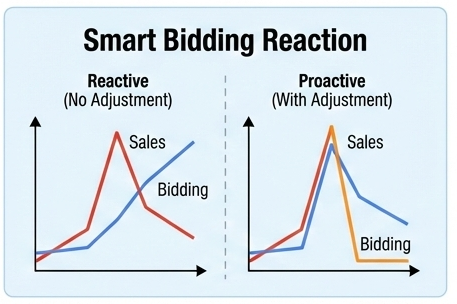
The beauty of this mechanism lies in its temporary nature. Unlike changing your tCPA (Target Cost Per Acquisition) manually, which can trigger a 14-day "Learning Phase" reset, a seasonality adjustment has a built-in expiration date. Once the clock hits your specified end time, the system seamlessly reverts to its baseline data.
How adjustments interact with Smart Bidding strategies
Understanding when to apply seasonality adjustments in smart bidding requires a look under the hood of how Target CPA and Target ROAS actually function. These strategies look for patterns. If you have a steady stream of conversions, the algorithm builds a high-confidence model of what a "converter" looks like. But Smart Bidding is naturally "conservative"—it is designed to avoid overspending on sudden anomalies.
When an adjustment is active, the Smart Bidding engine incorporates your percentage change as a primary variable in the auction-time bidding calculation. It takes your predicted CVR increase and uses it to justify higher CPCs (Cost Per Click) for that duration. If you’ve forecasted a 50% uplift, the system will effectively allow for a 50% higher bid because the math suggests the final CPA will remain stable despite the higher cost of the click.
There are specific ways these adjustments communicate with different bidding models:
-
Target ROAS (tROAS): The system prioritizes high-value users. If you signal a conversion rate spike, the algorithm will seek out users who have a history of making larger purchases during sales events.
-
Target CPA (tCPA): The engine focuses on volume. It will widen the net, bidding on queries that might usually be slightly above your target because the anticipated conversion boost brings the projected cost back into your acceptable range.
-
Maximize Conversions: Even without a specific target, the adjustment acts as a "gas pedal," telling the system that the current environment is twice as fertile as usual.
Using these best practices for Google Ads seasonality adjustments ensures that you are providing the algorithm with the one thing it can’t see: the future. While Google’s AI is excellent at analyzing what happened five minutes ago, only you know that your "Buy One, Get One" promotion starts tomorrow at a specific time.
When to use seasonality adjustments versus other tools
A common pitfall for many account managers is treating every calendar event like a nail that requires the same hammer. While the concept of Google Ads Seasonality Adjustments Explained often centers on the idea of "more power," it is actually a surgical instrument intended for specific circumstances. If you use it for a three-month-long winter peak, you’re not helping the algorithm; you’re effectively confusing it by feeding it a "new normal" that it already sees coming through its own historical data.
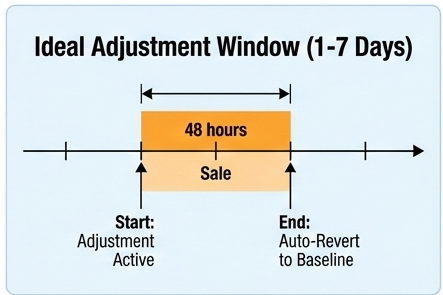
The rule of thumb in 2026 is that seasonality adjustments should be reserved for anomalies—events that represent a significant departure from your account’s baseline performance that will last between 24 hours and 7 days. If the shift in user behavior is gradual, Smart Bidding is actually better at "feeling out" the market than you are at guessing a static percentage.
Short term promos, flash sales and special events
For a 48-hour flash sale or a "deal of the day" event, your short-term conversion rate uplift adjustments are non-negotiable. Smart Bidding is fundamentally reactive; it needs to see a few conversions at a higher rate before it decides to raise its hand in more competitive auctions. By the time it "learns" that your conversion rate has jumped from 2% to 10% during a flash sale, the sale is likely half over.
Handling predictable seasonal peaks with bid strategies
When planning your holiday season Google Ads bidding strategy, it's important to differentiate between a "promotion" and a "season." If you sell ski gear, your conversion rate will naturally climb from October through December. Google’s Smart Bidding already understands this macro-trend. Applying a seasonality adjustment for the entire month of December is counterproductive because the system is already adjusting its internal benchmarks based on the millions of other data points it sees across the web.
However, a major one-day promotional spike is the exception to this rule. Even though Black Friday is predictable, the sheer magnitude of the conversion spike in a 24-hour window (often 5x to 10x the November average) is too sharp for Smart Bidding to handle perfectly on its own.
Using budgets, ad schedules and bid modifiers instead
Not every increase in traffic means an increase in conversion rate. Sometimes, you just have more people looking, but the probability of an individual buying remains the same. In these cases, using Google Ads smart bidding during sales events isn't about telling the system the CVR is higher—it’s about giving it more gas.
-
Budget Increases: If you are running a general awareness campaign where you expect 2x the traffic but the same 1% conversion rate, simply raising your daily budget is the correct move. A seasonality adjustment here would cause you to overpay for clicks.
-
Ad Schedules: If your B2B service sees a spike in leads specifically on Tuesday mornings during "Back to Work" weeks in early January, use an ad schedule bid modifier. This tells the system to be more aggressive during specific hours without claiming the underlying conversion rate has changed.
-
Location Modifiers: For retailers selling weather-protection products, an extreme weather warning in a specific region can trigger a significant surge in demand. This is a localized volume shift, not necessarily a broader change in CVR. Increasing budgets for specific delivery areas or regions is more effective than an account-wide seasonality adjustment.
Planning seasonal events for advertisers
Successful seasonal planning requires a dual focus: capturing the immediate "sugar high" of holiday sales while maintaining a sustainable CPA. For any marketing team, Google Ads Seasonality Adjustments Explained in the context of a 12-month roadmap is the difference between a reactive strategy and a proactive one. You cannot wait until November to decide how your bidding algorithm should behave; the groundwork for peak performance is laid during the quieter months of Q1 and Q2.
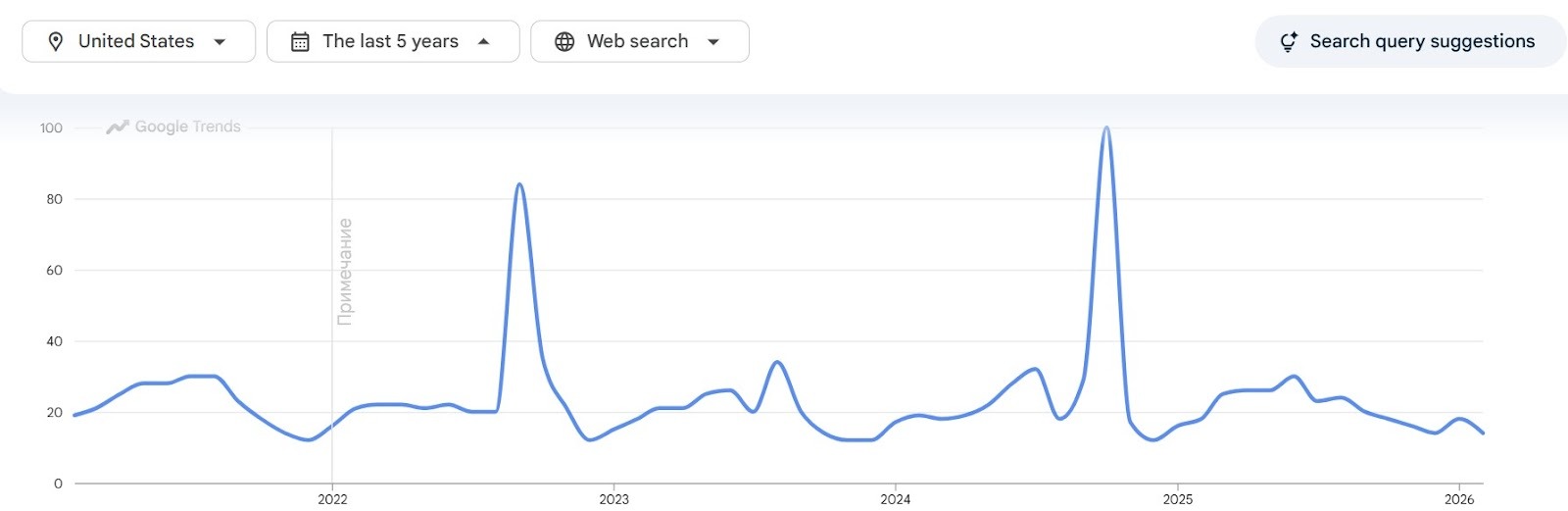
In the 2026 landscape, we are seeing a significant shift in how "peak" periods are defined. It’s no longer just about the "Big Five" (Thanksgiving through Giving Tuesday). We now see "micro-peaks" driven by quick-commerce and localized events. For example, Valentine's Day in 2026 saw a 60% YoY surge in last-minute gifting through on-demand delivery platforms, which heavily influenced Google Search intent for local D2C brands.
Key retail and B2B seasonal patterns
Retailers often navigate a dense calendar that balances public holidays with cultural shopping periods. For seasonal PPC budget planning, the focus is often on the transition from browsing to buying intent. In some markets, major holiday weekends have evolved into important clearance windows for big-ticket items like mattresses and electronics, with conversion rates often rising well above the monthly average.
When it comes to B2B seasonality planning in Google Ads, the patterns are more tied to the "fiscal calendar" than the "holiday calendar." B2B intent often peaks at the end of each quarter (March, June, September, and December) as departments look to utilize remaining budgets.
Real-World Success Story: Matt Sleeps (Retail)
Challenge: Matt Sleeps, a European mattress retailer, faced the challenge of managing the massive traffic and conversion spike during Black Friday. They needed their AI-driven campaigns (Search and Performance Max) to react instantly to the peak demand without overspending after the event.
Strategy: The team implemented Google Ads Seasonality Adjustments for the Black Friday window. By informing the Smart Bidding algorithm about the expected 48-hour conversion surge, they allowed the system to bid more aggressively the moment the sale started.
Result: The brand achieved a 3x increase in purchases via Google Ads compared to the previous year's November, maintaining a stable and efficient ROAS throughout the peak period.
Building a 2026 promotional calendar for Google Ads
Building this calendar involves more than just marking dates; it requires assigning an "intensity score" to each event to determine which tools to deploy.
-
Low Intensity (0-10% CVR change): Use standard Smart Bidding. Example: St. Patrick's Day for a non-apparel brand.
-
Medium Intensity (10-30% CVR change): Use budget increases and ad schedule modifiers. Example: Mother’s Day (May 10, 2026) for a boutique florist.
-
High Intensity (30%+ CVR change): This is where you apply seasonality adjustments. Example: The 48 hours of Amazon Prime Day or the week of Black Friday.
The goal is to create a visual roadmap that identifies these "High Intensity" windows at least 60 days in advance. This allows your team to prepare the e-commerce peak season Google Ads checklist which includes creative refreshes, landing page load-speed audits, and audience segment updates. Without this lead time, you risk applying an adjustment to a campaign that is technically "broken," which only serves to waste your budget faster.
Coordinating Google Ads with email, social and offline
A seasonality adjustment doesn't live in a vacuum. Its effectiveness is directly tied to the "hype" generated by your other channels. If your email team sends out a "Flash Sale" blast to 500,000 subscribers at 9:00 AM, your Google Ads account will see a surge in "Brand + Sale" searches almost instantly. If your bidding algorithm isn't prepared for this via an adjustment, you will lose those highly valuable, warm leads to competitors bidding on your brand terms.
Real-World Success Story: Coco & Eve (Beauty & Personal Care)
Challenge: High-growth beauty brand Coco & Eve wanted to scale their revenue during major shopping holidays but struggled with the volatility of manual bidding and the lag of standard automated strategies.
Strategy: They transitioned to fully automated bidding strategies combined with Seasonality Adjustments. This allowed them to feed the algorithm precise signals about upcoming promotional peaks, ensuring the AI didn't miss out on high-value traffic during the first hours of their sales.
Result: The strategy led to a 32% increase in revenue and a 26% decrease in cost per conversion, proving that human-guided AI is significantly more effective than "set-it-and-forget-it" automation.
This "omnichannel" approach ensures that the signal you send to Google's AI (the seasonality adjustment) is backed by real-world demand. When the algorithm sees the predicted spike in CVR actually manifesting across your social and search traffic, it builds "trust" in your data, allowing it to bid more efficiently in future auctions.
Step by step setup guide
Setting up a seasonality adjustment is technically simple, but strategically demanding. If you treat it as a "set it and forget it" task, you risk feeding the algorithm junk data. The "backstage" work—the math and the auditing—is actually more important than the clicks you make inside the Google Ads interface. Before you even open your browser, you need to have a clear understanding of your baseline and a realistic projection of your peak.
Think of this process as preparing a flight plan. You wouldn't take off without knowing your current altitude and your target destination. In the context of Google Ads Seasonality Adjustments, your altitude is your standard conversion rate, and your destination is the temporary peak you expect during your promotion. For most US advertisers, this requires looking back at at least two or three similar events from the previous year to account for market shifts.
Collecting historical data and defining a baseline
The first rule of a successful Google Ads seasonality adjustments tutorial is to look at the right data set. You need to identify a "normal" period that mirrors your upcoming event in terms of day-of-week and month-over-month trends. If you are planning for a major recurring sale in 2026, don't just look at the week before; look at the equivalent event from the previous year.
To find your baseline, follow these steps to ensure your data is clean.
-
Segment your performance by day in the Google Ads UI for the previous year’s sale window.
-
Calculate the average conversion rate for the 14 days leading up to that sale.
-
Identify the peak conversion rate during the actual sale days.
-
Note any external factors that might have skewed that data, such as a site crash or a competitor’s massive aggressive campaign.
Once you have these numbers, you can determine your "Uplift Percentage." For example, if your baseline CVR was 2.0% and during the sale it hit 3.0%, your uplift was 50%. This is the number you will eventually feed into the adjustment tool.
Estimating expected conversion rate change
This is where many advertisers get stuck. They wonder if they should be aggressive or conservative. To effectively forecast conversion rate changes for promotions, you need to look at more than just last year’s Google Ads dashboard. You need to talk to your inventory and email teams. If the discount is deeper this year (e.g., 40% off instead of 25%), your CVR will likely be higher than the historical 50% uplift.
You can use a simple formula to find the expected change:
CVR Uplift % = ((Predicted CVR - Baseline CVR) / Baseline CVR) x 100%
For instance, if a premium footwear brand normally sees a 4% conversion rate but expects a 6% rate during its "Spring Marathon" event due to a high-converting influencer partnership, the calculation would be:
((6 - 4) / 4) x 100 = 50%
Beyond the math, consider the "quality" of the traffic you are expecting. If you are running a brand-heavy campaign, your CVR will naturally be higher. If you are casting a wide net with broad-match keywords to find new customers, your CVR might not jump as high as you think, even with a great sale. Balancing these factors is a key part of how to use seasonality adjustments in Google Ads without overshooting your CPA.
Creating and removing seasonality adjustments
Now that you have your numbers, it’s time for the implementation. You need to decide whether to apply these at the account level or the campaign level. For most retailers, account level vs campaign level seasonality settings depend on the scope of the sale. If your entire site is 30% off, use the account level. If only your "Running Shoes" category is on sale, apply it only to those specific Search and Shopping campaigns.
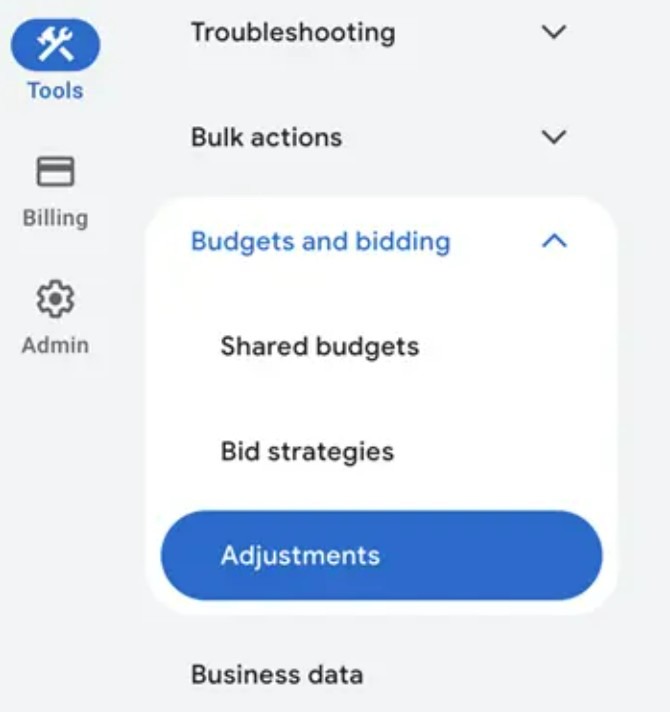
Follow this path in your Google Ads account to set the adjustment.
-
Navigate to "Tools and Settings," and click on "Budgets and bidding."
-
Click on "Adjustments."
-
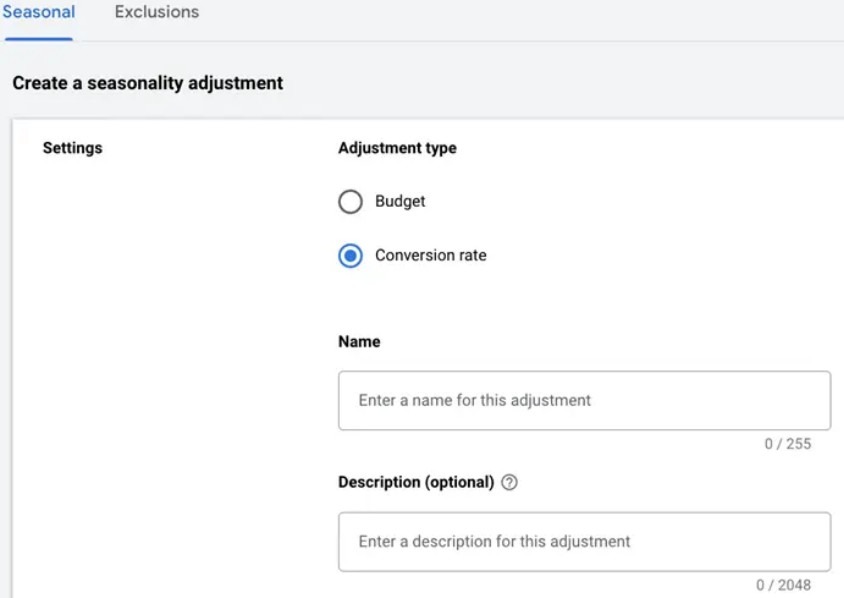
Click the blue plus button to create a new adjustment and give it a clear name like "2026_FlashSale_Search_Shopping."
-
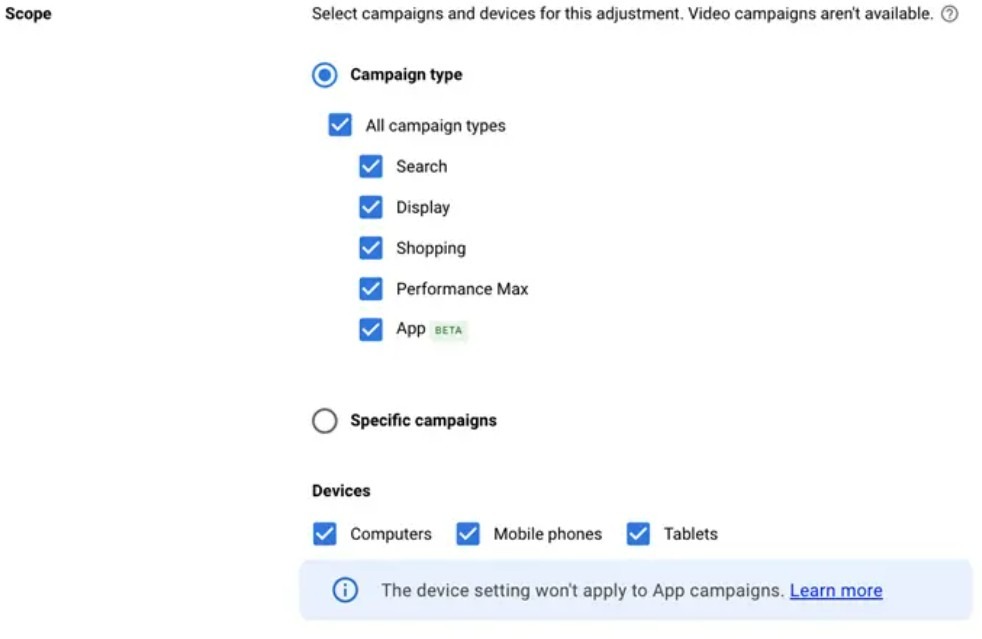
Select your campaign types (usually Search, Shopping, and Performance Max).
-
Carefully set start and end dates for seasonality adjustments to match your exact sale window, down to the hour.
-
Enter your predicted conversion rate uplift and click "Save."
One of the most critical best practices for Google Ads seasonality adjustments is the removal—or rather, the expiration—of the adjustment. The system is designed to stop the adjustment automatically at your chosen end date. However, as a professional, you should always double-check your change history 12 hours after the sale ends. You want to ensure that the "bidding fever" has broken and that your CPCs are returning to their baseline. If the sale is extended, you must manually update the end date; if the sale ends early, you must remove the adjustment immediately to prevent the algorithm from overspending on non-sale traffic.
Measuring impact and optimizing
Once the dust settles after a major sale, the real work of a performance marketer begins. Applying a seasonality adjustment is an educated guess based on data, but measuring the delta between your prediction and the actual outcome is what separates the veterans from the amateurs. In this phase of Google Ads Seasonality Adjustments Explained, we look at whether the algorithm actually leaned into the curve or if it simply spent more money without the requisite return. If you find that your actual conversion rate was significantly lower than your adjustment, you haven’t just overspent—you have also potentially skewed your account’s bidding models for the next several weeks.
Evaluating success isn't just about looking at the "Total Conversions" column. You need to look at the "Impr. (Abs. Top) %" to see if the adjustment gave you the aggressive positioning you paid for. You also need to scrutinize the CPC trends to ensure the "bidding fever" cooled down exactly when the adjustment ended. This post-mortem analysis is the primary way you refine your forecast conversion rate changes for promotions for the next event on your calendar.
Reading reports and the change history after the event
The Change History tool is your best friend when auditing the aftermath. It provides a timestamped record of exactly when the "whisper" to the algorithm was active. When you cross-reference this with your performance reports, look specifically for the "Conversion Rate" and "Cost Per Conversion" metrics during the hours the adjustment was live.
A successful post-event audit usually follows a specific checklist to ensure no data point is missed.
-
Compare the Actual CVR during the event to the "Baseline" you established in the setup phase.
-
Check the "Bid Strategy Status" in the campaign view to see if the system flagged any "Limited by Budget" warnings during the peak.
-
Review the Search Terms report to see if the increased aggressiveness led the system to bid on lower-intent, broader terms that you should have excluded.
-
Analyze the "Auction Insights" to see if your top-of-page share increased significantly compared to your main competitors during the sale.
By analyzing these factors, you can see if the adjustment was the primary driver of success.
Building experiments and A/B tests around events
If you have a high-volume account, you shouldn't just take the tool’s effectiveness for granted. The gold standard for optimization is testing seasonality adjustments vs no adjustments. This is often done by splitting your campaigns into a test and control group—applying the adjustment to one set of high-performing products while letting the other set rely solely on standard Smart Bidding.
Adjusting targets, bids and budgets post event
The "hangover" is a real phenomenon in Google Ads. After a period of high conversion rates, the algorithm often wants to keep bidding high, expecting the party to continue. This is where you might need to know how to remove or reset seasonality adjustments if they were accidentally extended or if the "tail" of the sale is dragging down your efficiency.
The reality is that your post-event strategy is just as important as the launch.
-
Monitor your account closely for 48 hours after the adjustment ends to ensure CPCs are trending downward.
-
If you see your CPA remain high even after the adjustment is gone, consider lowering your tCPA or raising your tROAS temporarily to force the algorithm to "re-calibrate" to the lower post-sale CVR.
-
Reset your daily budgets to their standard levels immediately; many advertisers leave "peak" budgets active, leading to significant overspend on low-intent traffic.
-
Update your ad copy to remove all mentions of the sale; nothing kills a post-sale conversion rate faster than an ad promising a discount that is no longer active on the site.
In some cases, if the performance was exceptional, you might find that your new "baseline" has actually moved up.
Real-World Success Story: Chronopost (Logistics/B2B)
Challenge: As a major delivery service, Chronopost experiences massive spikes in B2B and B2C shipping requests during the end-of-year holiday season. They needed to capture this demand without manually adjusting thousands of keywords.
Strategy: Chronopost utilized AI-powered Search campaigns enhanced with seasonal signals. By aligning their bidding behavior with predicted peak shipping dates, they optimized their budget for the days with the highest intent.
Result: The company saw an 85% growth in revenue during the holiday period, demonstrating how seasonal adjustments can benefit service-based and B2B industries just as much as traditional e-commerce.
Legal, policy, and UX considerations
When you are deep in the weeds of bidding algorithms and CVR percentages, it’s easy to forget that at the other end of that data point is a real person making a purchasing decision. In 2026, the intersection of Google Ads Seasonality Adjustments Explained and consumer protection is tighter than ever. If your aggressive bidding strategy drives a user to a page where the promotion has already expired, or where the "fine print" is buried, you aren't just losing a conversion—you are risking a policy violation or a permanent hit to your brand's trust.
Consumer protection scrutiny around urgency tactics and fake countdown timers in digital advertising has increased significantly. Transparency is the only way to scale long-term.
Staying within Google Ads and FTC advertising policies
Google’s internal policy bots have become incredibly sophisticated at cross-referencing your ad copy with your landing page content. If you are applying advanced bid adjustments for seasonal events to promote a "50% Off" sale, but the landing page shows "Up to 50% Off" with only a few items actually at that discount, your Quality Score will suffer. In a high-competition auction, a low Quality Score combined with aggressive bids is a recipe for a massive, unoptimized spend.
To stay compliant, follow these core principles:
-
Ensure that the "Start" and "End" times of your seasonality adjustment match your site’s promotional banners exactly.
-
Avoid using "dark patterns"—if your ad says a sale ends at midnight, ensure the price actually reverts to the baseline at 12:01 AM.
-
Clearly state if a promotion is "Online Only" or if it excludes certain high-demand categories (like electronics or clearance items).
-
Keep your "Personalized Advertising" settings in mind; even during a sale, you cannot target users based on sensitive categories like health conditions or financial distress.
Clear pricing, time limits, and promotional disclaimers
From a User Experience (UX) perspective, your seasonality adjustment is only as good as the landing page it points to. n many markets, mobile-first shopping accounts for the majority of holiday traffic. If your "Black Friday" adjustment drives a user to a mobile page that takes 5 seconds to load because of a heavy promotional hero image, that user is gone before they even see the price.
Consider the approach of a sustainable clothing brand. For their 2025 24-hour promotional sale:
-
The Adjustment: They applied a 30% CVR uplift.
-
The UX: They created a dedicated, lightning-fast "Sale" landing page with a clear "Ends in X hours" timer that was synced with their Google Ads schedule.
-
The Disclaimer: They placed a simple, readable text block at the bottom of the page detailing exclusions, which kept their bounce rate low and their customer satisfaction high.
This level of detail ensures that your holiday season Google Ads bidding strategy isn't just a technical success, but a win for the customer. When the user sees a promise in the search results and finds that exact promise fulfilled on the site, the "trust" signal translates into a higher conversion rate, justifying the higher CPCs your adjustment is generating.
Common mistakes
Even seasoned professionals can trip up when managing Google Ads Seasonality Adjustments Explained across multiple accounts. Because the tool is so powerful, the consequences of a mistake are magnified. A typo in the percentage field or a wrong date can lead to an entire month’s budget being burned in a weekend. Here are the landmines you need to avoid based on thousands of audited accounts.
Overusing seasonality adjustments for normal seasonality
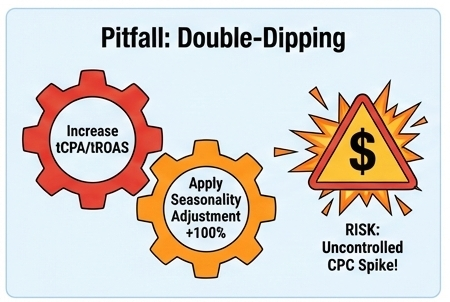
This is the most frequent error. If you sell "Back to School" supplies in August, you do not need a seasonality adjustment for the whole month. Smart Bidding sees the 5-year history of August being a peak month and is already prepared for it.
-
The Mistake: Applying a 20% adjustment for 30 days.
-
The Result: The algorithm "double counts" the seasonality, bidding far too aggressively and destroying your ROI.
-
The Fix: Only use the tool for a specific short-term promotional window or the final 48-hour last-minute push.
Wrong assumptions about conversion uplift and timing
Many advertisers assume that a sale will automatically double their conversion rate. However, if your competitors are all running the same sale, the "market baseline" rises, and your individual CVR might stay flat or only increase slightly.
-
Example: Company A assumed a 100% CVR jump for their 2025 New Year sale. In reality, every other gym equipment brand was also at 50% off. Their CVR only rose by 10%.
-
The Lesson: Because they set a 100% adjustment, they overbid by a massive margin, leading to their highest-ever CPA and a failed campaign. Always start with conservative estimates (e.g., 20-30%) unless you have definitive data.
Forgetting to end, update or remove adjustments
Google Ads is built on schedules, but human error is the "X-factor." How to remove or reset seasonality adjustments should be a recurring task on your calendar.
-
The Nightmare Scenario: An electronics retailer set a 50% adjustment for a major one-day promotion but accidentally set the end date for the following year. The account continued to bid as if it were the busiest shopping day of the year for three weeks of quiet December traffic.
-
The Prevention: Always set a "Calendar Alert" for 1 hour after your adjustment is set to end. Check your "Live" bids to ensure they have returned to the normal range. Use the common mistakes with seasonality adjustments checklist during every setup to ensure the "End Date" is verified by a second pair of eyes.
Conclusion
Mastering Google Ads Seasonality Adjustments Explained is about moving from a reactive mindset to a predictive one. In the 2026 digital landscape, where AI-driven bidding is the standard, your value as an advertiser lies in providing the business context that a machine simply cannot see. Whether it’s a 48-hour flash sale, a localized event, or a major holiday promotion, these adjustments allow you to steer the algorithm toward maximum efficiency during the moments that matter most.
By following a structured approach—analyzing historical baselines, setting realistic CVR uplift targets, and meticulously auditing post-event data—you ensure that your budget is an investment rather than an expense. Remember that the goal is not to override the machine indefinitely, but to partner with it. Use the tool for the "spikes," let Smart Bidding handle the "seasons," and always keep your eye on the data to refine your next big move.
FAQs
What are Google Ads seasonality adjustments, and how do they work?
They are an advanced tool that allows you to inform Smart Bidding strategies about expected short-term changes in your conversion rate (CVR). Unlike bid modifiers that change the bid price directly, seasonality adjustments tell the system to expect a specific percentage increase or decrease in the likelihood of a conversion. The algorithm then adjusts its real-time auction bids to account for this change, returning to its normal baseline once the event's end date is reached.
When should I use seasonality adjustments instead of changing bids?
You should use seasonality adjustments for short-term events (typically 1 to 7 days) where you expect a dramatic, temporary shift in user behavior that the algorithm hasn't seen in its recent 30-day history. For gradual changes or long-term trends—like a three-month summer peak—it is better to let Smart Bidding adjust on its own or use budget increases, as seasonality adjustments are designed for surgical, high-velocity "anomalies."
How do I set up a seasonality adjustment for a holiday promotion?
To set one up, navigate to "Tools and Settings" > "Shared Library" > "Bid Strategies" > "Advanced Controls." Click the plus button to create a new seasonality adjustment. You will need to define a clear name, set the exact start and end dates/times, choose the scope (account-level or specific campaigns), and enter your estimated conversion rate increase percentage based on historical data.
Do seasonality adjustments work with all Smart Bidding strategies?
They are primarily designed to work with Target CPA (tCPA) and Target ROAS (tROAS) bidding strategies across Search, Shopping, and Display campaigns. In 2026, they also fully support Performance Max (PMax) and App campaigns (currently in beta). They do not, however, apply to manual bidding or strategies like "Maximize Clicks," as those do not rely on a predicted conversion rate to set the bid.
What happens if I forget to remove a seasonality adjustment?
Fortunately, seasonality adjustments have a mandatory end date and time, meaning they will expire automatically. However, if you enter the wrong end date or set it too far in the future, the algorithm will continue to bid aggressively based on your inflated CVR projection. This can lead to a "bidding hangover" where you significantly overpay for traffic during a period when your actual conversion rate has returned to normal levels.


