


Google Ads Account Suspended: Recovery Guide Tips
Introduction
For businesses that rely on Google Ads for sales and brand visibility, the worst nightmare is to get the notification “Google Ads account suspended”. It means that you are denied all access to running ads until the issue is resolved, and this translates to missed opportunities and revenue loss.
By the end of 2024, Google has made over 50 updates to their AI models and enforcement systems, increasing the rate of account suspension by 300% of the previous year. But not to worry, this recovery guide is like a “spell book” to help you out of the nightmare, or prevent it if you haven’t been there yet.
Whether you own a small business and you’re trying to understand why your account was flagged, or you run an agency/enterprise that manages multiple client accounts under the MCC structure and you want to ensure the safety of your client accounts, this article educates you on:
-
The difference between ad disapprovals and suspensions.
-
The most common triggers for suspension.
-
How to diagnose the exact reason using Google’s tools.
-
Practical fixes for different scenarios.
-
How to prepare a strong appeal with evidence.
-
Preventive steps to avoid future suspensions.
Google Ads disapproved vs suspended
It is important to clarify the distinction between ads disapproval and Google Ads account suspended. In simple terms, disapprovals are like warnings, while suspension is like a“full stop”.
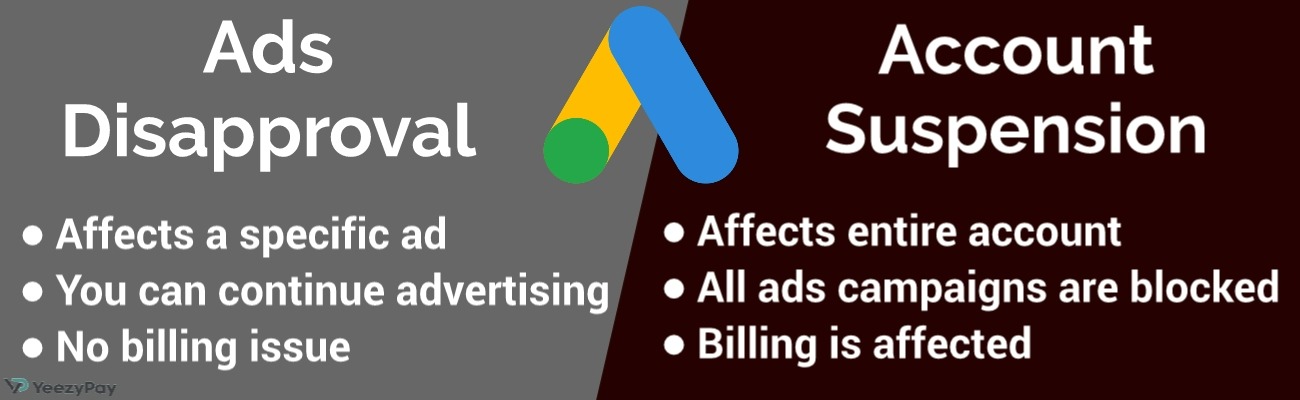
Try to imagine an e-commerce store that sells supplements. One of their ads gets disapproved for misrepresentation because the landing page claims “guaranteed weight loss in 7 days” (with no proof), the advertiser could ignore this warning and keep running similar ads. After some time, it may lead to a Google Ads account suspended status where all campaigns are blocked until the site’s claims are corrected and verified.
Types of Suspensions and Common Triggers
The first step toward ending a chronic nightmare for good is to understand its nature and what triggers it. It could be a psychological thing, but then you could be living in a haunted house and the ghosts are offended.
So, you should ask, “why was my Google Ads account suspended?”
The simple answer to this is that Google only suspends an account when they detect any policy violation or risk signal on either the landing page or the account itself. There are different categories of suspension based on what triggered them.
1. Circumventing systems

This is a very serious offense under what Google calls “Egregious violations” because it could cause significant harm to users. It occurs when advertisers try to bypass Google’s review process with deceptive activities like showing different content to users, using hidden redirects, or manipulative tracking templates to trick Google’s crawlers (cloaking). For example, a gambling company that tricks people with ads leading to a landing page for “cheap flights”, but later redirects users to a gambling site might eventually trigger a circumventing systems policy Google Ads suspension.
2. Misrepresentation
Advertisers are required to be truthful about products and business identity. Misrepresentation includes misleading claims, unverifiable offers and hiding key terms. You cannot advertise supplements as officially approved or certified without concrete evidence to support your claim, because it could lead to a Google Ads suspension for misrepresentation.
3. Unacceptable business practices
This category covers exploitation of users with vices like fake scarcity or avoiding refund. If your site promotes “limited-time offers” that never expire, or declines requests for refund after advertising “money-back guarantee”, you may be dancing on the edge of an unacceptable business practices Google Ads suspension.
Another example of unacceptable business practice is a site that offers “free trials” but does not include visible options /steps for cancellation. This is deemed as manipulation or mistreatment of users.
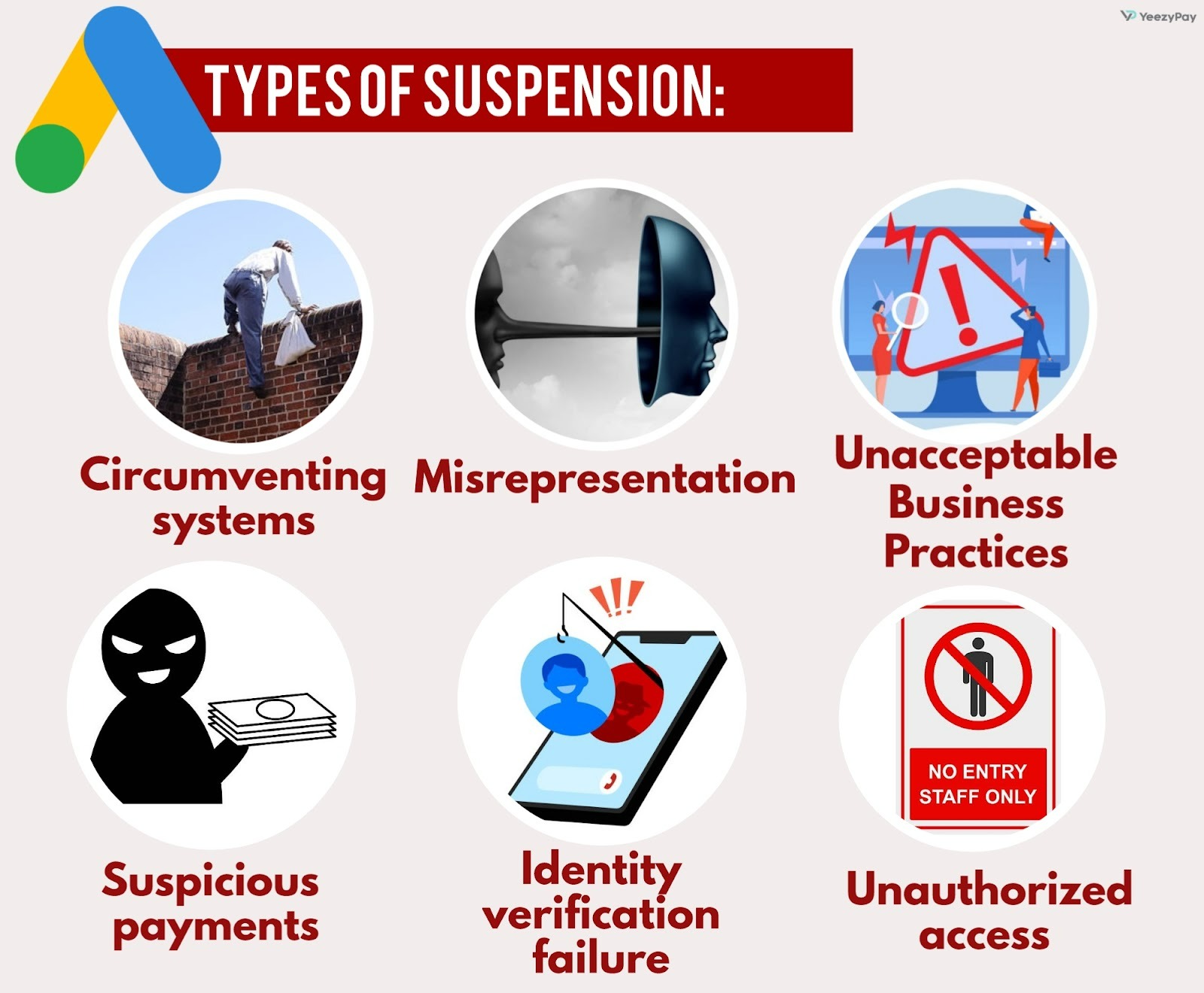
4. Suspicious Payments
Google can also flag an account when there are suspicious billing activities or irregularities in the details on the payment profile vs payment method. A lot of advertisers fall into the trap of believing that Google needs their payment, and so they won’t be too strict about payment policies. But this is not the case; we’ve seen advertisers' profiles getting suspended just for using a personal card for a corporate account.
So, some of the causes of suspension aren’t necessarily ‘serious things,’ but you can’t afford to be careless with payment issues. Suspicious payment activities include the following:
-
Longstanding unpaid balance and no working payment method that can be charged
-
Making series of failed payment attempts within a short period of time
-
Using a card that is connected to another suspended Google Ads account
-
Paying with a stolen card
-
Using cards that are not directly issued by a verified bank
-
Linking a card outside the region/country on your account settings
-
Selecting a different currency from the one in your account

Chargebacks are one of the quickest ways to trigger suspicious payments Google Ads suspension. It is possible that you are debited more than once for the same payment, but in this event, it is safe to request for a refund from Google instead of approaching your bank.
Initiating a chargeback against Google through your bank usually leads to immediate account suspension as it appears suspicious that someone is trying to reverse an already concluded transaction. A refund request can be submitted on your Google Ads account by navigating Billing > Transactions, and it is usually processed within 30 days.
5. Identity verification failure
It is mandatory for advertisers to verify their business identity and address. Failure to submit valid documents leads to Google Ads identity verification failed suspension. Also, submitting expired business registration papers for your company will surely trigger suspension at some point.
6. Unauthorized access
Lastly, Google might temporarily suspend your account to protect you. In 2024, 39 million advertisers accounts were suspended by Google for safety reasons. This shows that the issue of compromised access is quite common. If an unauthorized access or account takeover (ATO) signals are detected, this could trigger a Google Ads account compromised security suspension. This mostly happen when a hacker gains access into your account and tampers with billing details.
Diagnostics: Find the Exact Reason Fast
Just as you would inquire about the psychological or mystical causes of actual nightmares, you've got to explore the exact reasons behind your Google Ads account suspended status. Diagnostics is the deliberate effort you make to map your account issue to the exact ad, extension, landing page, or billing profile that may be in violation of Google’s policies.
Most advertisers will skip diagnostics and jump straight to appeals. In my experience, 80% of those appeals eventually fail because the main issues were not addressed. Many agencies later discovered that their suspension wasn’t about ads at all, it could have resulted from a mismatch of billing details between their MCC and client account. So, before making an appeal that may fail, you should first address the root cause by doing the following:
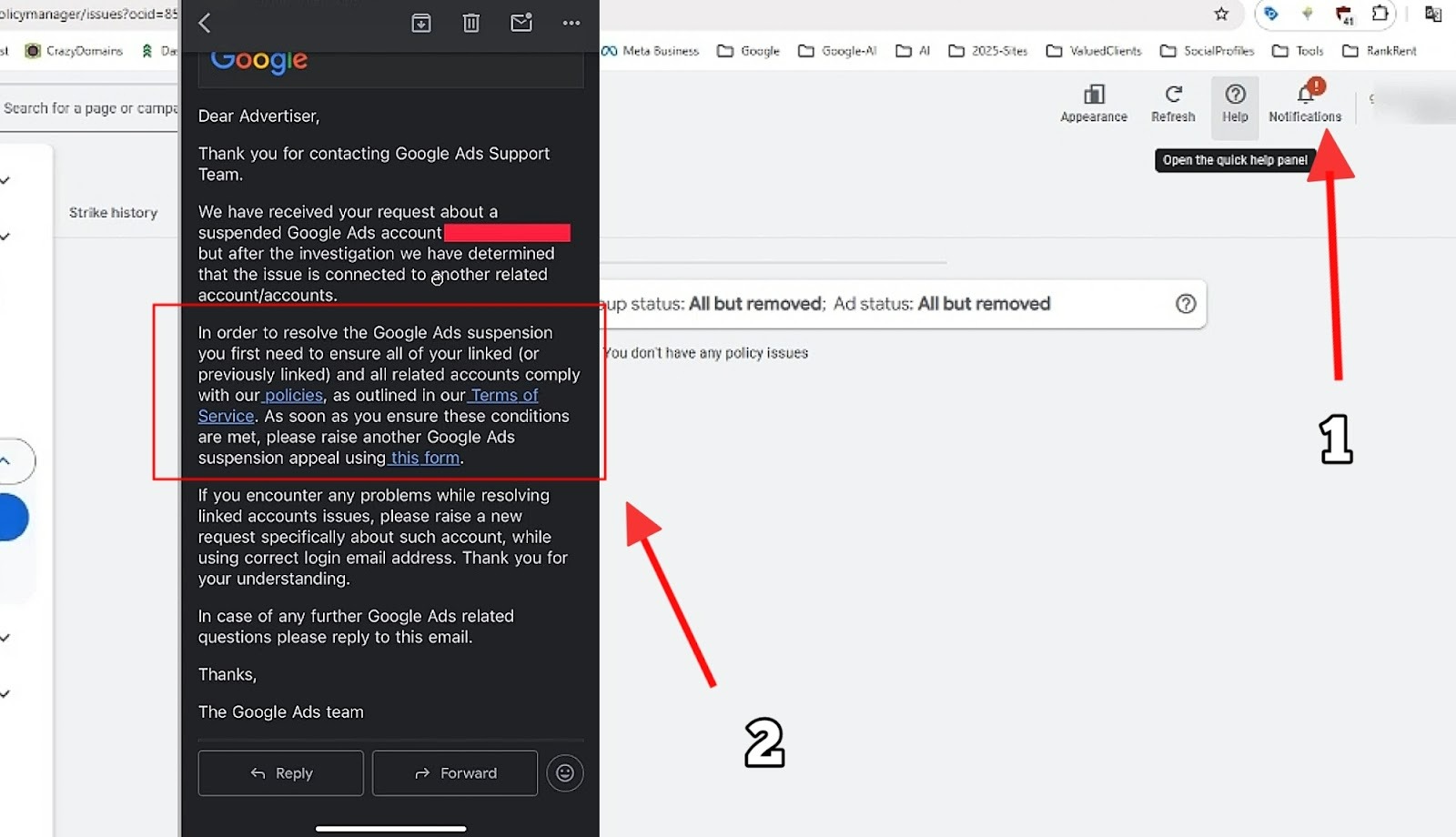
1. Read notifications
Google’s alerts in your account dashboard or via email contain useful information on activities that lead to suspension. The Google Ads Policy Manager review tool also highlights which policy was violated. For example, if your ad was flagged for “misrepresentation,” the Policy Manager will show the specific ad group or landing page involved.
2. Map violations
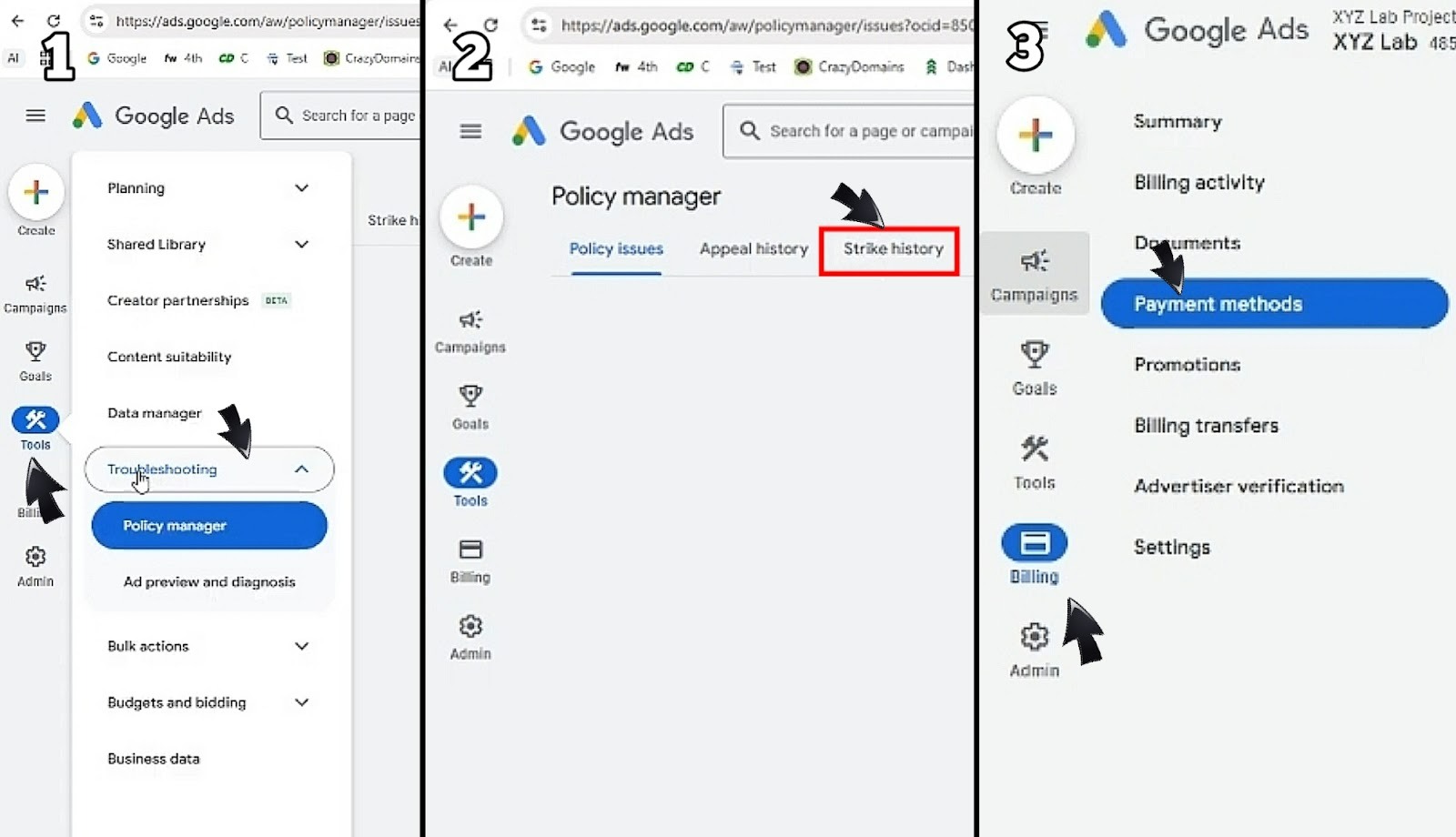
The issue with your account could emanate from a specific ad, extension, landing page or billing option. Pinning down the exact fault ensures that you don’t waste time fixing the wrong thing. Mapping violations in your Google Ads begins in the “Policy Manager” tab, it's like the ultimate diagnostic board
To access Policy Manager in the new Google Ads interface, go to “Tools & Settings”, and then click on “Troubleshoot”. You will then be able to see all the campaigns, ad groups, or assets, and identify the one that is flagged. To see when the violation happened, click on “Strike history” on the top pane and you can view the series of activities that built up to the suspension of your account,
For billing related issues, check your “Payment Profile” under “Billing” to see if matters like payment profile issues suspension are listed. Then you should also review extensions, and landing pages for lack of compliance.
3. Use change history and logs
To get a list of the modifications that were made in your account before suspension, you will need to visit the “Change history” tab under “Campaigns”. The change log can be filtered in four ways:
-
User: This is the person who made the change (shown as email address). Changes can be made by someone who has access or sometimes, Google itself
-
Campaign: This will show changes that are made to Ad Groups and assets within the different campaigns that's being run in the account.
-
Performance: This is a chart that shows how your ads have been fairing, it gives a visual representation of when significant changes happened in the performance so that you can now look into that period.
-
Duration: You can use the “Custom” bar to set the specific period of time for which you want to see all changes made.
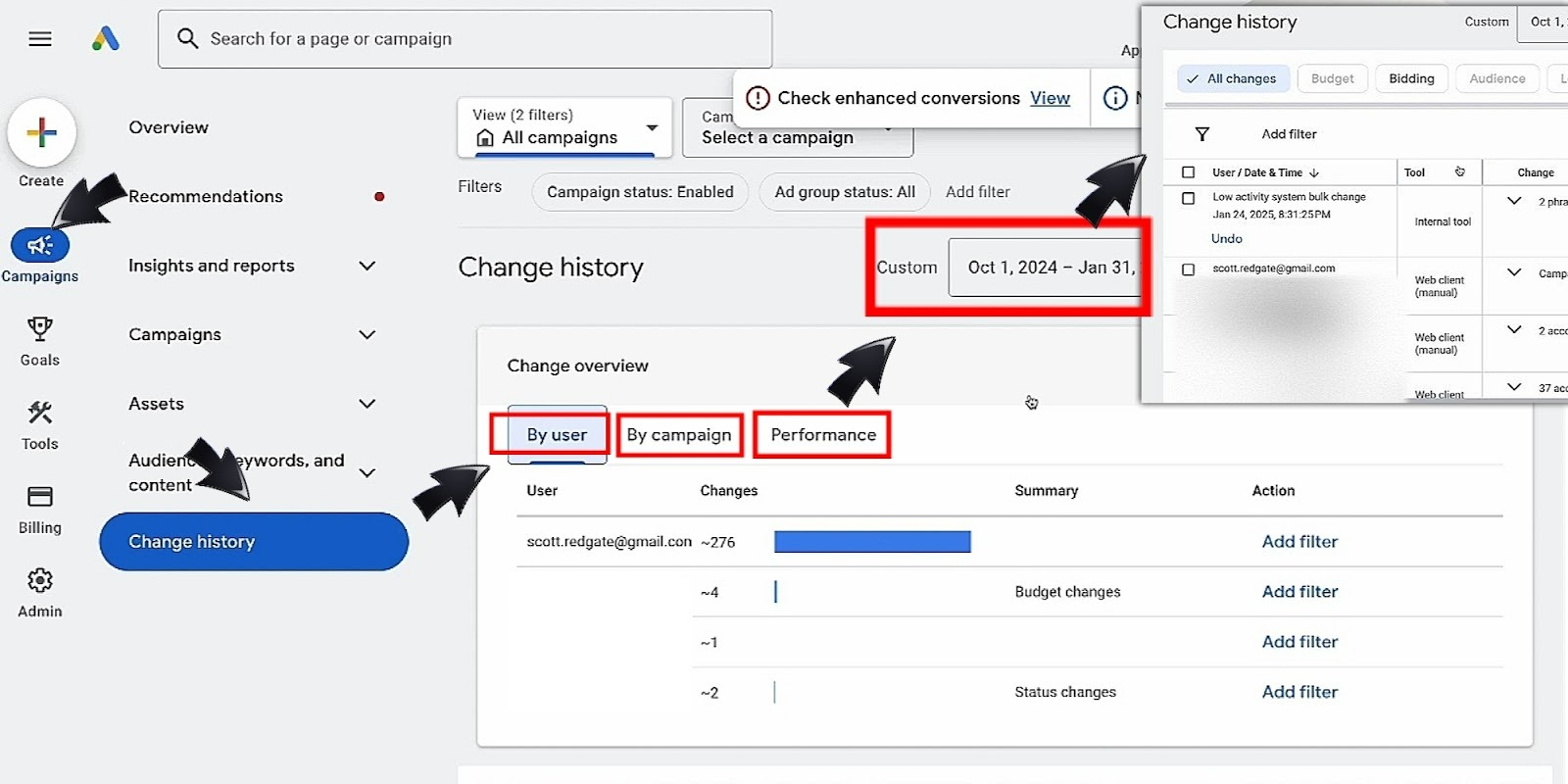
Seeing the activities in the change log gives you insight to what might have led to the nightmare, and how you can treat it. So you will have to export the change log and keep it as part of the evidence pack for your appeal.
4. Build an evidence pack
You need to gather evidences to prove that you have been able to identify and correct the issues with your account. Take screenshots of changes made on your billing profile and landing pages, take pictures of invoices and corporate documents.
Then, you should collect server logs from your landing page as soon as you start making fixes. For example, if your site previously redirected users and your account was suspended for circumventing systems, you must be able to provide logs showing the removal of redirects in order to aid your appeal.
Fixes by Scenario
After diagnosing the causes of a nightmare, you will agree that the next thing is either psychotherapy, or exorcism (in case we’re dealing with ghosts).
Likewise, the next thing to do about Google Ads account suspended is to apply the right fix. Every type of suspension that we’ve identified requires a specific corrective action, here is how to resolve some common scenarios of suspension:
Circumventing systems
-
Remove cloaking scripts, hidden redirects, or manipulative tracking templates.
-
Update tracking templates to comply with Google Ads guidelines.
-
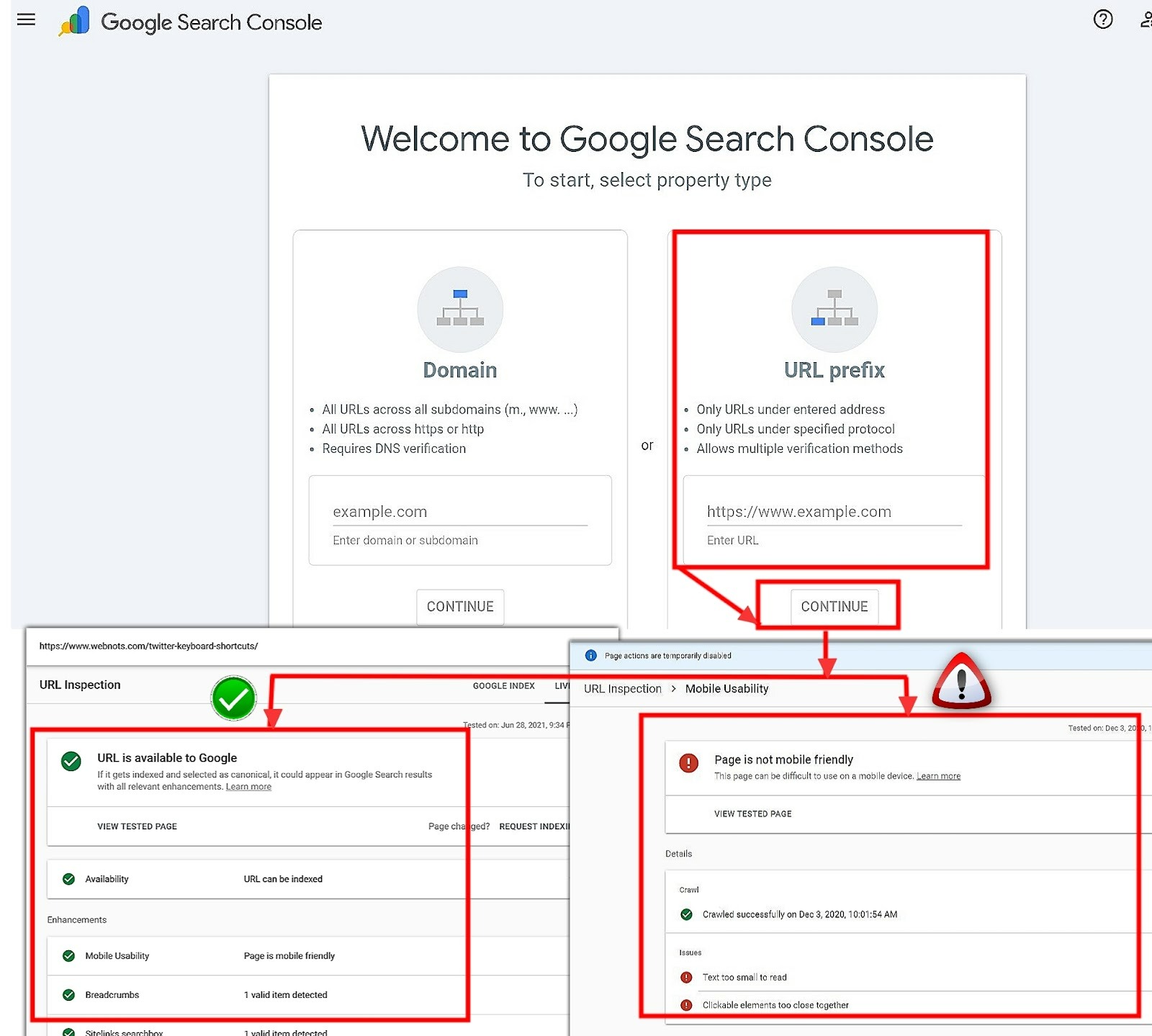
Test your landing pages with Google’s “Fetch as Google” tool or a crawler to confirm the same content is shown to both users and Google.
To use “Fetch as Google” in the most recent Google Webmaster interface, search for “Google Search Console” and click on “URL Prefix”. Enter your web address and then click “Continue”. You will be able to navigate through the URL Inspection to see the current status of your landing page according to Google.
Misrepresentation and trust gaps
Applying fix is all about rebuilding trust. Behind the online gizmos you see, Google reviewers are human, and all they want to see is proof that you are doing the right thing. Google will resolve your misrepresentation issues if you apply the following fixes:
-
Review all claims on your site and ads.
-
Remove unverifiable statements.
-
Add clear disclosures about pricing, refund policies, and product limitations.
-
If you make claims of a regulated product or service, provide supporting documentation (licenses, and regulatory approvals).
Unacceptable business practices
This is where you ask yourself if there is anything on your website that is unfair to users. Once you fix it, then your account suspension due to unacceptable business practice is as good as lifted. I know a SaaS company that was suspended for misrepresentation, and all they did was to add a clear cancellation button on their subscriptions, and their appeal was approved in 4 days.
Here are a 4 things to fix in cases of Unacceptable business practices:
-
Stop using deceptive tactics such as fake scarcity (“only 2 units left” when stock is unlimited).
-
Ensure that refund and chargeback policies are transparent and honored.
-
Update subscription models to show clear terms and cancellation options.
-
Cancellation options for free trials must be visible and easy to navigate.
Suspicious payments
Payment-related suspensions often come without warning, so how will you get things right?
-
Verify that your billing profile matches your business entity and location.
-
Use one consistent payment method, and avoid multiple cards from different countries.
-
Stop any chargebacks requests with your bank before re-submitting payment details.
Google Ads account compromised security
It’s not just about payments and ads, in fact, Google’s ads safety reports in 2023 and 2024 show that most accounts were flagged before they started running ads. This means that you also have to pay close attention to non-payment related aspects when fixing your suspended account. Try the following too:
-
Reset your Google Ads password.
-
Enable two-step verification (2SV) for all users.
-
Audit user permissions and remove unauthorized access.
-
Check server logs for suspicious IPs and secure your DNS/SSL setup.
-
Submit proof of ownership as part of your evidence pack.
Site, UX, and Compliance Requirements
As much as we’ve learnt from horror movies, no amount of spells or therapy can take away nightmares if someone keeps sleeping in a haunted house. Similarly, if the user experience on your website does not meet regulatory standards, your account might still not be reinstated even after fixing other issues. This is because Google evaluates the entirety of the ads system that include landing pages, disclosures, accessibility, and data safety.
See your landing page as your “e-store”, and imagine how wrong it feels for customers not to have clear information about products, or a desk for complaints and refunds in a said store. Yes, Google deems it that these things are deliberately hidden for “mischievous” reasons, hence it is no surprise that accessibility issues account for roughly 15% of site-related suspensions.
Advertising transparency and disclosure requirements
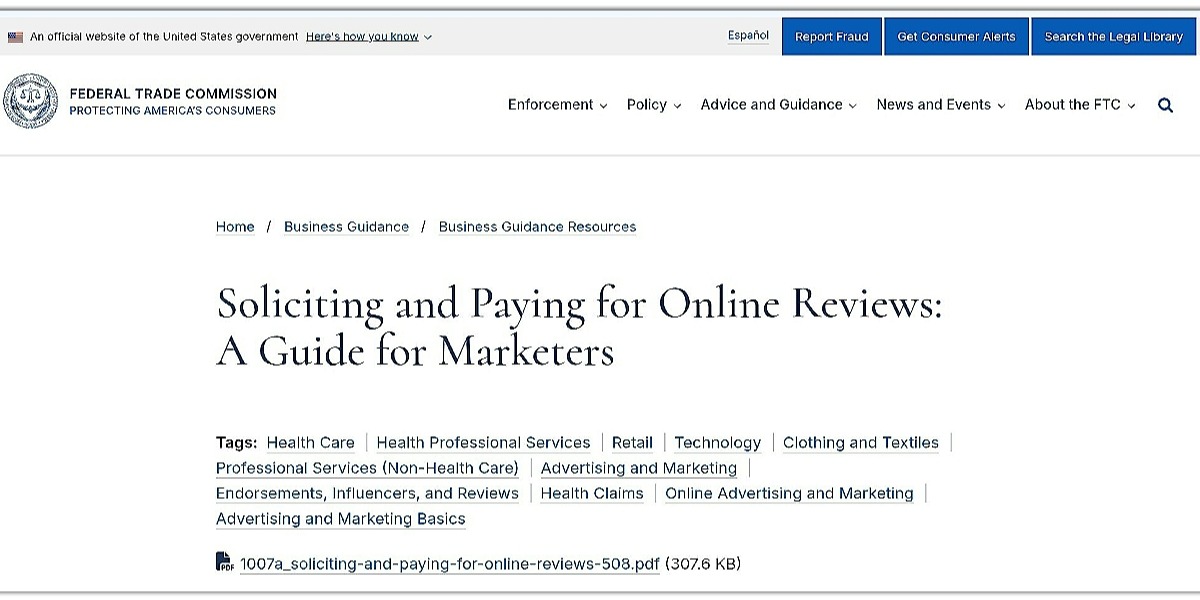
Advertisers are expected to follow truthful advertising principles and ensure that their claims are properly substantiated.. This means that claims must be substantiated and not misleading. Follow these instructions to comply:
-
Frequently review all product/service claims to ensure that they are true to the current reality of your business.
-
Ensure that all customer reviews are published, not just positive or solicited ones.
-
Remove exaggerated promises.
-
Add clear refund, pricing, and cancellation policies on landing pages.
-
Ensure that disclaimers are visible. A subscription service must clearly state the recurring monthly price after free trial instead of masking the cost in small texts.
Privacy disclosures and consent requirements
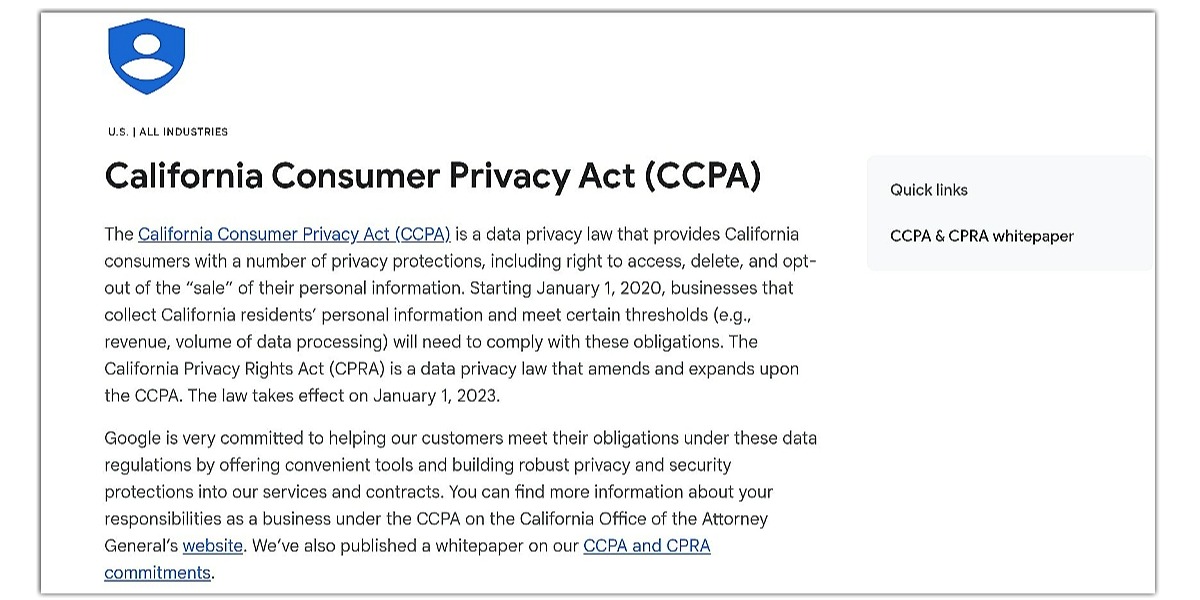
Privacy laws in many jurisdictions require transparency about how user data is collected and used. Compliance with this law means that you must:
-
Be clear about pricing and clearly disclose any additional charges for handling or delivery fees.
-
Add a privacy banner or consent pop-up for cookies and tracking.
-
Add any required privacy notices or user rights links based on the laws that apply to your target market.
-
Update your privacy policy to reflect the legal requirements that apply to your business and target regions.
Accessibility basics and WCAG requirements
Google expects advertisers to maintain accessible landing pages in line with recognized accessibility standards such as the Web Content Accessibility Guidelines (WCAG). Here are accessibility basics to uphold:
-
Use readable fonts.
-
Use alt text for images.
-
Ensure color contrast meets WCAG standards for financial services that demands that landing page must allow visually impaired users to navigate forms with screen readers
-
Provide keyboard navigation for forms and menus.
-
Business policies should be boldly placed in both the footer and checkout flow.
Billing and Payments After Suspension
While still finding a permanent solution to a terrible nightmare, you cannot afford to be meddling with anything “spooky”. Spooky things in this case refers to billing and payment activities that can complicate your Google Ads account Suspended fix. So, understanding how to handle billing and refunds after suspension will help you to avoid unnecessary disputes and ensure a smoother reactivation.
Refunds, holds, and thresholds
Google typically refunds unused balances automatically, but funds may be held if there are pending investigations. No need to be worked up, check your “Transactions” tab under “Billing” for pending charges or credits. Then you will have to wait for Google’s refund timeline (usually 30 days, depending on your bank). If funds are not returned, then contact Google Ads support with your transaction ID and unused credit be refunded once the suspension is cleared.
Fixing payment failures and verifying identity
Payment failures may occur when Google detects inconsistencies in your payment setup. To fix payment issues:
-
Go to Billing > Settings > Payment Profile.
-
Update business name, address, and tax information to match official records.
-
Use a verified credit card or bank account that is tied to your business. An advertiser using a personal card for a corporate account may face payment profile issues suspension until it is corrected.
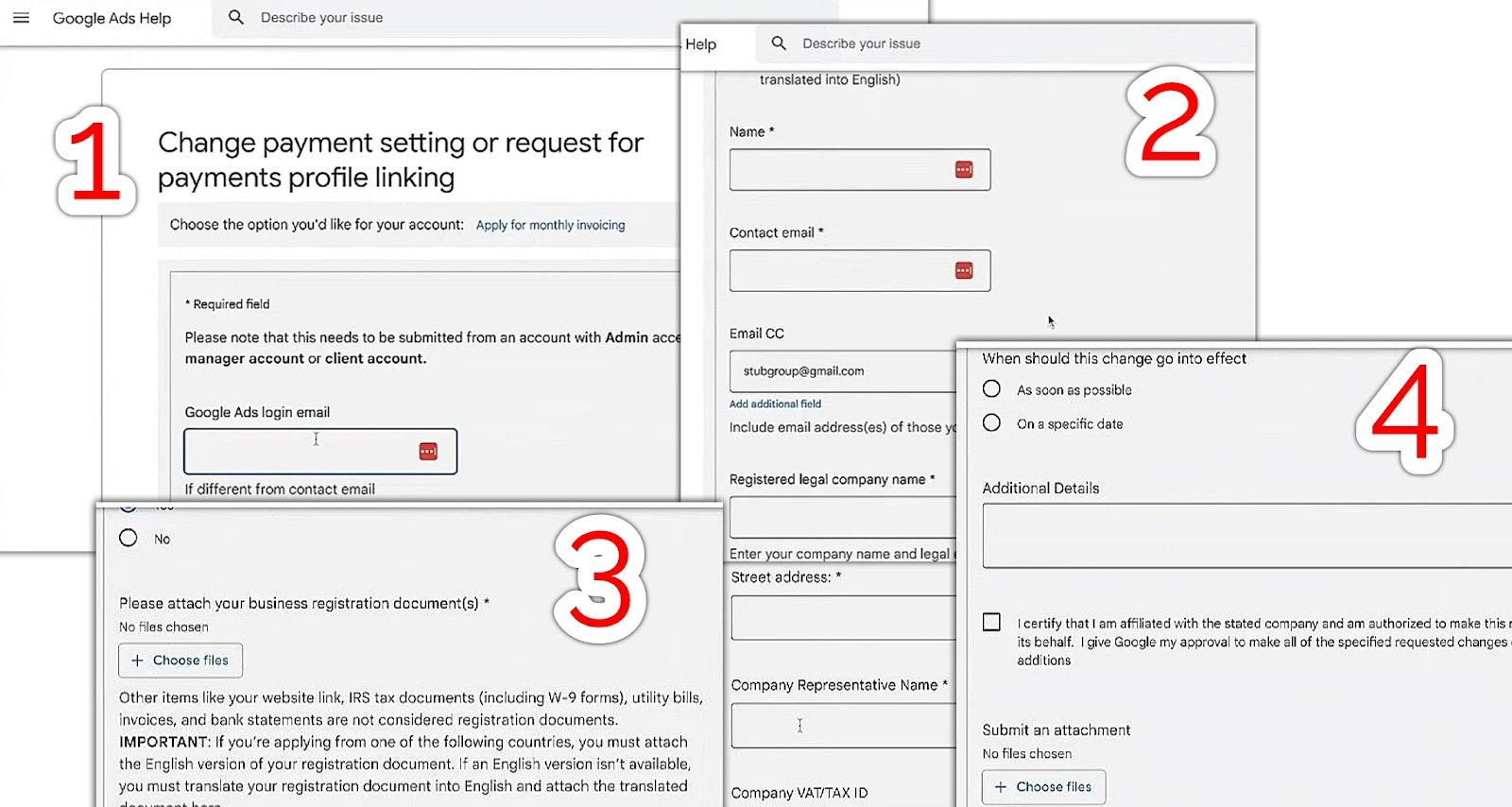
Advertisers are also required to verify their identity for billing compliance. Identity verification involves the following:
-
Submit government-issued ID and proof of business entity.
-
Upload utility bills or bank statements showing your business address.
-
Provide an authorized representative letter if someone else manages billing. A marketing agency managing client accounts must submit both agency documents and client authorization letters to clear billing suspensions.
Prepare a Winning Appeal
Remember the horror movies? The cure of a nightmare sometimes requires the victim to perform a ritual that will appease the ghosts or whatever is haunting them. Yes, it works the same way with Google!
As long as you can make a compelling appeal, the “ghosts” can restore access to Google Ads accounts. Your preparation for a winning appeal starts by getting the following items (see them as the materials for the ritual):
1. Change log and documentation
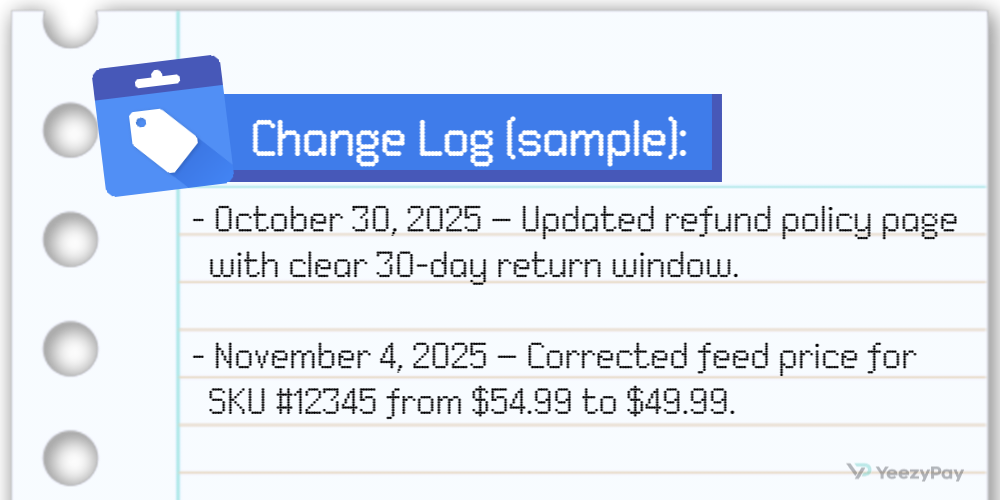
A change log is simply a list of changes you have made after the suspension, you want the “ghosts” to see that you are making efforts to appease them. Take the following steps to create a change log:
Step 1 - The same way you used the “Change History” to check the modifications in your account before suspension, you can also export edits made afterwards. To view the changes on each campaign or ad group:
-
Click on “Campaigns” or “Ad Groups” within the Campaigns menu
-
Select a campaign or ad group by ticking the checkbox on the left
-
Now click on “Change History” on the blue menu bar above the table to see changes within the selected date range.
Step 2 - Record updates made to ad copy, landing pages, or billing details.
Step 3 - Add specific dates that these changes are made, and URLs of the affected landing page.
Step 4 - Include screenshots of before and after corrections to demonstrate compliance.
Supporting documents
Appealing is like a courtroom defense, and you know that evidence always wins against emotions.Evidence for appeal screenshots invoices will further strengthen your case. Gathering evidence involves:
-
Collecting bank statements and invoices that prove legitimate transactions.
-
Providing corporate registration documents and proof of address.
-
Adding server logs that show removal of cloaking or redirects.
-
Taking screenshots of updated privacy banners or refund policies.
Sample Outline
Your appeal letter should be well articulated and professional. Here’s a recommended Google Ads appeal letter template:
-
Begin with a short summary of the violation.
-
Explain the corrective actions that you have taken, with supporting evidence.
-
List the preventive measures to avoid recurrence.
-
State only facts and avoid emotional language.
Example:
-
“Our account was suspended for misrepresentation. We have removed unverified claims from our landing page, updated disclosures, and attached screenshots. We have also implemented monthly compliance audits to prevent future issues.”
How to Submit and What to Expect
If there is one thing we can pick up from Harry Potter, it is the fact there is an order in which every ritual is carried out. Sometimes, following the procedure is more important than spells.
The appeal process on Google Ads has a structure to it. There are timelines and a number of escalation options that you must take note of. Let’s go over the details of the submission process:
Appeal forms and submission
Here are the steps to submit your appeal:
-
Access the appeal form by navigating Contact Us > Fix a Suspended Account.
-
Fill out the appeal form (as directed in the previous section).
-
Attach your evidence pack.
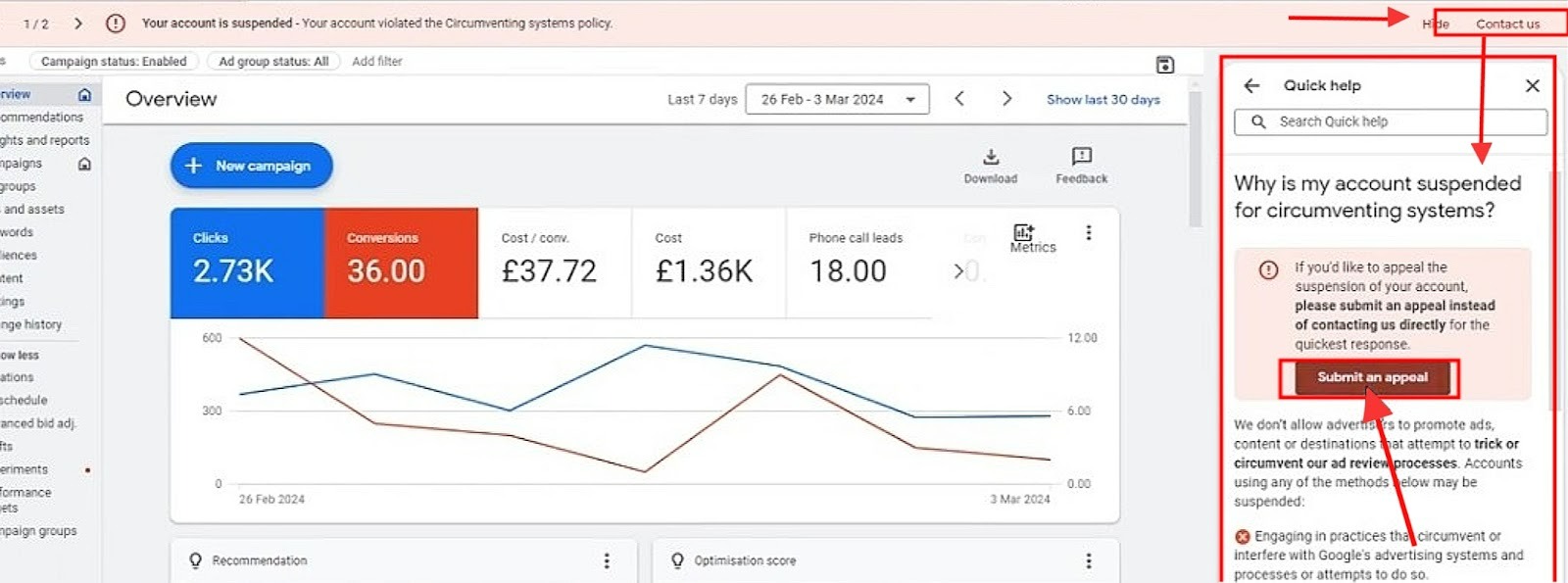
Your appeal must reflect three things: Thoroughness, accuracy and honesty. It is very important to keep your explanations concise and factual, devoid of emotional statements like “I have done nothing wrong” or “what have I done ”.
Review windows and SLAs
It usually takes within 3–5 business days for Google to review an appeal, but complex cases may take longer.
But, to answer the question of “How long does Google Ads appeal take?”, most advertisers receive a response within a week. The response often comes as a decision to either lift the suspension or reject the appeal if it lacks proper structure or and merit, but Google may also respond by requesting for more documents before making a decision.
Escalation routes
If your appeal is denied, you will firstly need to wait for the cooldown period which is 7 days. After that you can either:
-
Submit a second appeal with additional evidence.
-
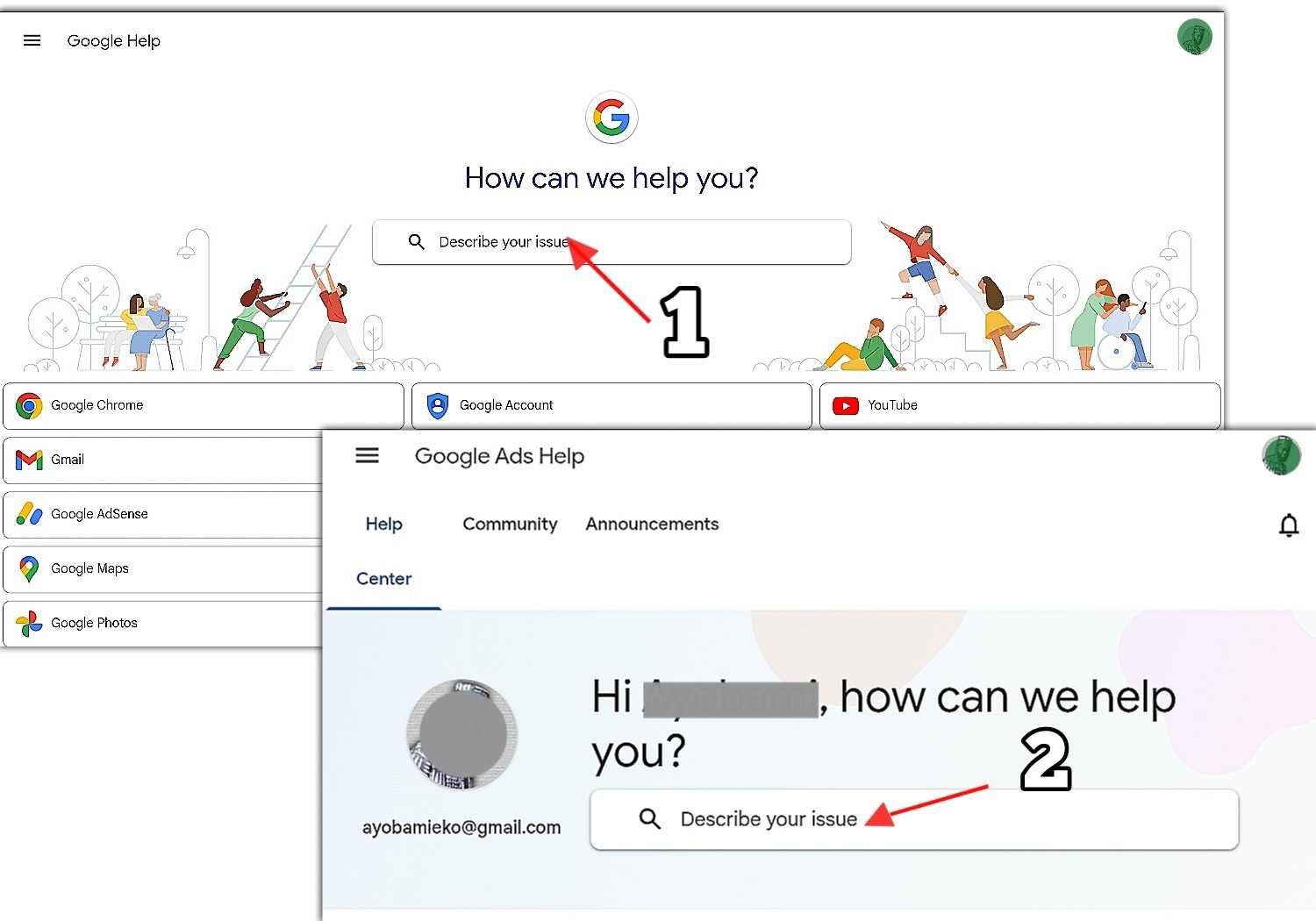
Escalate through Google Ads support or Google Help if you believe the decision was incorrect.
Governance for Agencies and Enterprises
Google Ads account Suspended can affect multiple client accounts within an agency or an enterprise. Think of it as several students at Hogwarts being haunted by nightmares…what would Dumbledore do?
It requires strong governance to manage risk across board, especially when using Manager Accounts (MCC). Google expects agencies to comply with MCC policies by maintaining clear accountability, examining role-based access, and using incidence playbooks.
MCC policies
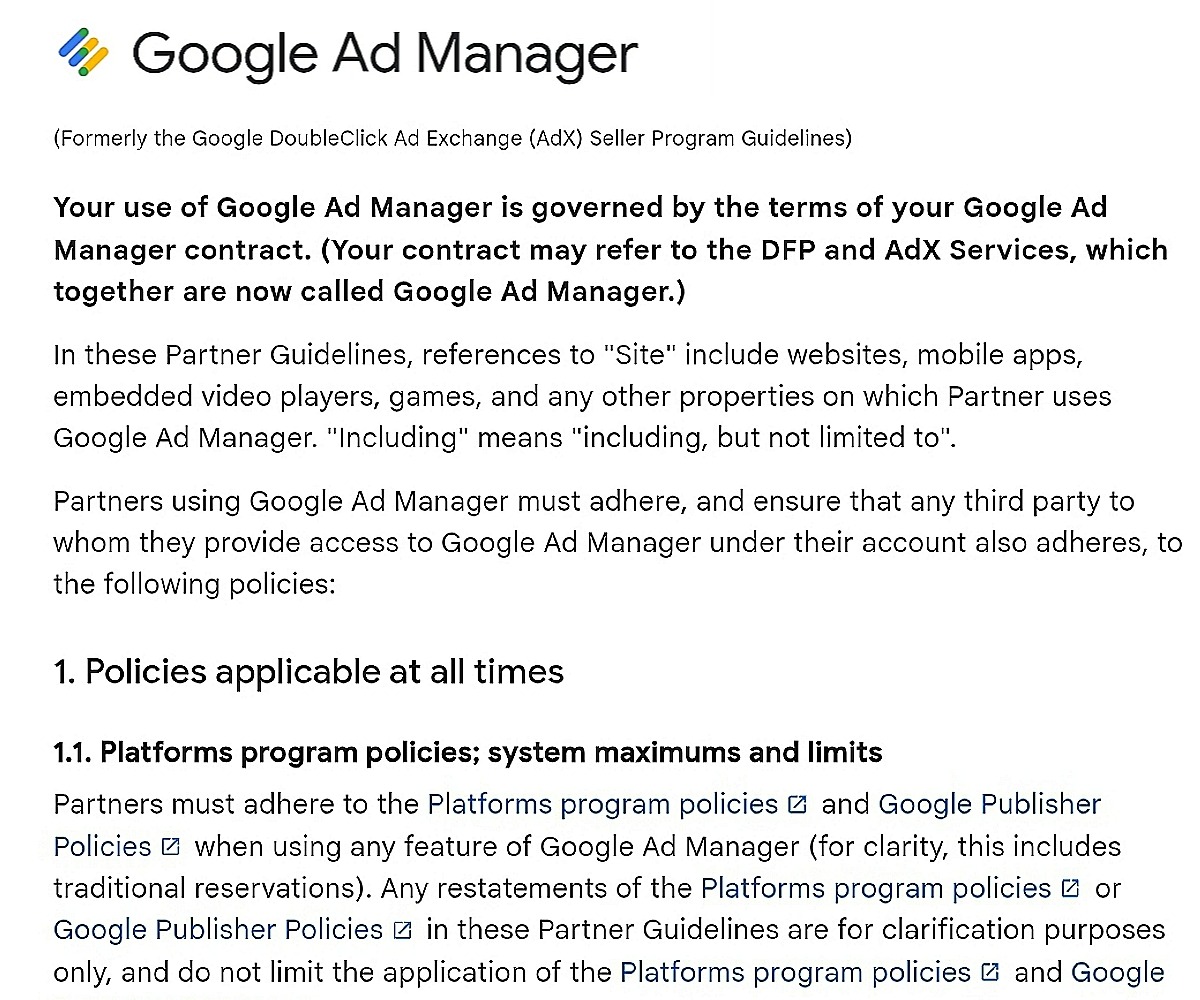
Using Google Ad Manager comes with a set of rules and regulations to which both the ads manager and every ads account under them must adhere. These policies cover every other regulation that applies to regular Google Ads accounts, with the inclusion of Multiple Customer Management (MCM) and Scaled Partner Management (SPM) policies.
Role-based access and permissions
In order for agencies to properly manage access to their accounts, they are expected to:
-
Assign roles (e.g., Admin, Read-only) based on responsibilities.
-
Enable two-step verification (2SV) for all users.
If role-based access and permissions are not monitored, it is possible for a junior staff member with admin rights to accidentally change their billing details, thereby triggering a suspicious payments google ads suspension. Restricting access will prevent such risks.
Audit cadence and incident playbooks
Large advertisers should run regular audits to detect issues before they lead to suspension of account(s). This will involve:
-
Creating a monthly compliance checklist covering ads, billing, and site policies.
-
Documenting incident response playbooks for suspensions.
-
Training staff on Google Ads policies and escalation procedures.
Recover suspended Google Ads MCC
If your MCC is suspended, it may likely affect all linked accounts. Here are the steps to take towards recovery:
-
Identify which client account triggered the suspension.
-
Correct violations in that account before appealing at the MCC level.
-
Submit an MCC appeal with evidence from the corrected linked account. This appeal also requires the same evidence pack with a regular Google Ads account.
Prevention Checklists
It is definitely a relief to recover from a Google Ads account Suspended status, but your ultimate goal should be to prevent the nightmare from coming back.
To avoid future suspensions Google Ads, you must ensure that your ads account stays healthy. That's why you will need checklists of important actions that will help you maintain compliance and transparency.
According to Google Ads community reports, running monthly compliance audits reduces suspension risk by up to 40%. For example, retailers can avoid suspension during major seasonal sales by pre-checking all ad copy against truthful advertising requirements.
Pre-launch policy checklist
-
Review Google Ads policies before launching new campaigns, especially the compliance requirements relevant to your industry and target markets.
-
Check for site policy violations ecommerce before publishing ads
-
Keep billing details consistent and up to date.
-
Enable two-step verification (2SV) for all users.
-
Verify ad copy against truthful advertising principles and make sure all claims can be substantiated.
-
Ensure landing pages have clear pricing, refund, and privacy disclosures.
-
Test site accessibility (WCAG basics) and SSL security.
Monthly compliance and security audit
Regular audits catch problems before they escalate. Steps to implement:
-
Review active campaigns for policy violations.
-
Audit billing profiles and payment methods.
-
Update privacy policies to reflect new regulations.
-
For MCC accounts, check user permissions and remove inactive accounts.
Conclusion
Recovering from a Google Ads account Suspended is all about being able to demonstrate to Google that your business operates with transparency, compliance, and trust. Diagnosis will help you fix the exact cause, while a strong appeal with evidence will increase your chances of reinstatement.
As regards prevention, running monthly compliance audits as highlighted above and monitoring Policy Manager alerts will help you avoid future suspensions. Agencies and enterprises should go further by implementing MCC governance, role-based access, and incident playbooks to protect multiple accounts across board.
Advertisers should comply with applicable advertising, privacy, and accessibility requirements, including truthful advertising principles and recognized accessibility standards such as WCAG.
Key takeaway and links to official sites
-
Always document changes with screenshots, logs, and invoices.
-
Submit appeals with concise, factual explanations.
-
Use suspensions as an opportunity to overhaul your account and make sure it stays compliant.
For verified guidance and a Google Ads suspension and policy compliance checklist, consult Google’s official resources:


