


Google Ads Not Working? 2026 Troubleshooting Guide
Introduction
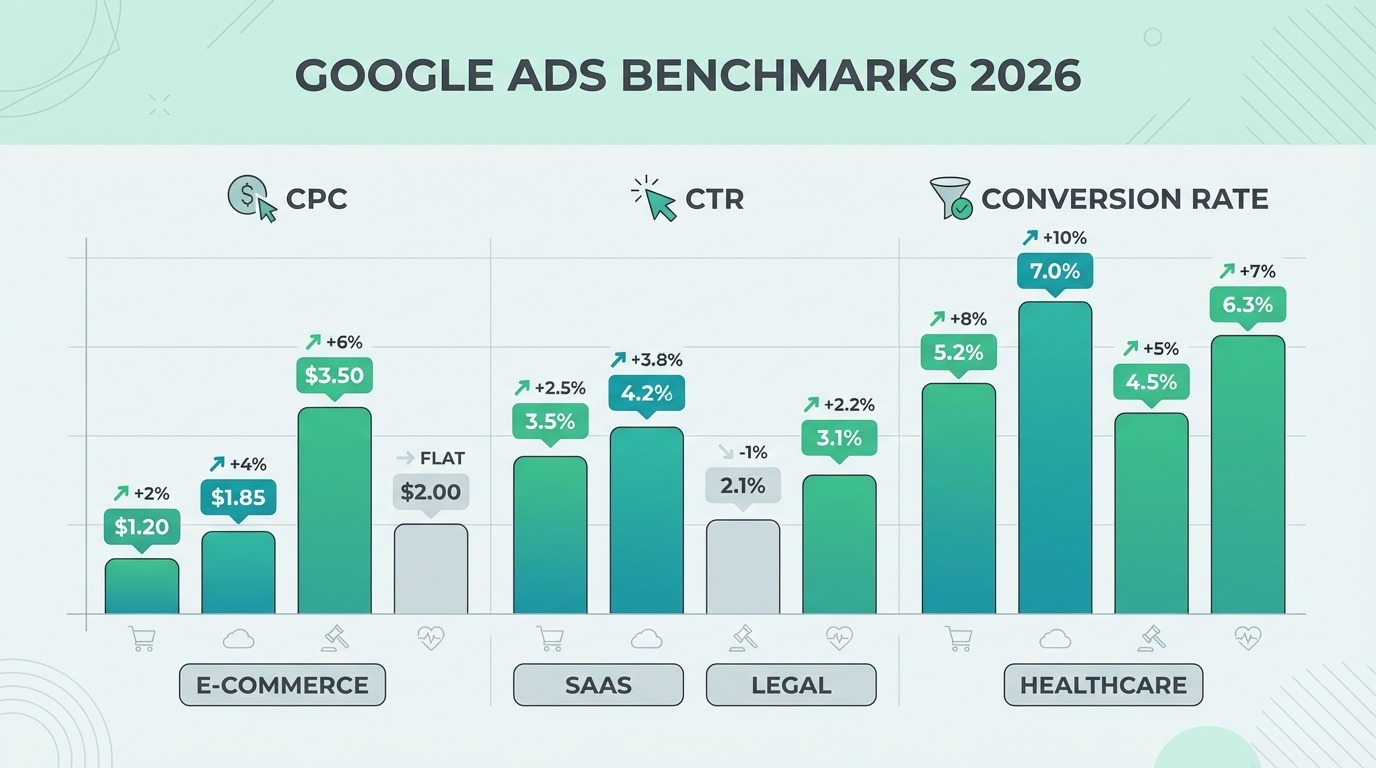
You set up a campaign, waited a few days, and nothing came through. Or everything was running fine and then, without any obvious reason, it stopped. Either way, "Google Ads not working" covers a surprisingly wide range of situations — and the fix for each one is different.
This guide walks through every major reason campaigns fail: from account suspensions and billing hiccups to smart bidding misconfiguration, weak landing pages, and broken conversion tracking. Each section is built around what actually breaks in real accounts. By the end, you'll know exactly where to look first — and what to do when you find it.
How Google Ads Works in 2026
Before diagnosing what's broken, it helps to understand what "working correctly" actually looks like. Most campaign problems trace back to a misunderstanding of how the auction, bidding, and measurement interact.
Auction, Ad Rank and Quality Score in plain language
Every time someone searches on Google, an instant auction takes place. You don't pay a flat rate for placement — you compete. But it's not purely a bidding war.
Google uses Ad Rank to decide which ads show and in what position. The formula: Ad Rank = Max Bid × Quality Score + expected impact of ad assets. A higher Quality Score means you can outrank competitors who bid more. An advertiser bidding $0.50 with a Quality Score of 10 has an Ad Rank of 5. An advertiser bidding $1.00 with a Quality Score of 4 has an Ad Rank of 4 — and loses the auction despite spending twice as much. That's not a hypothetical — it's how the system is designed.
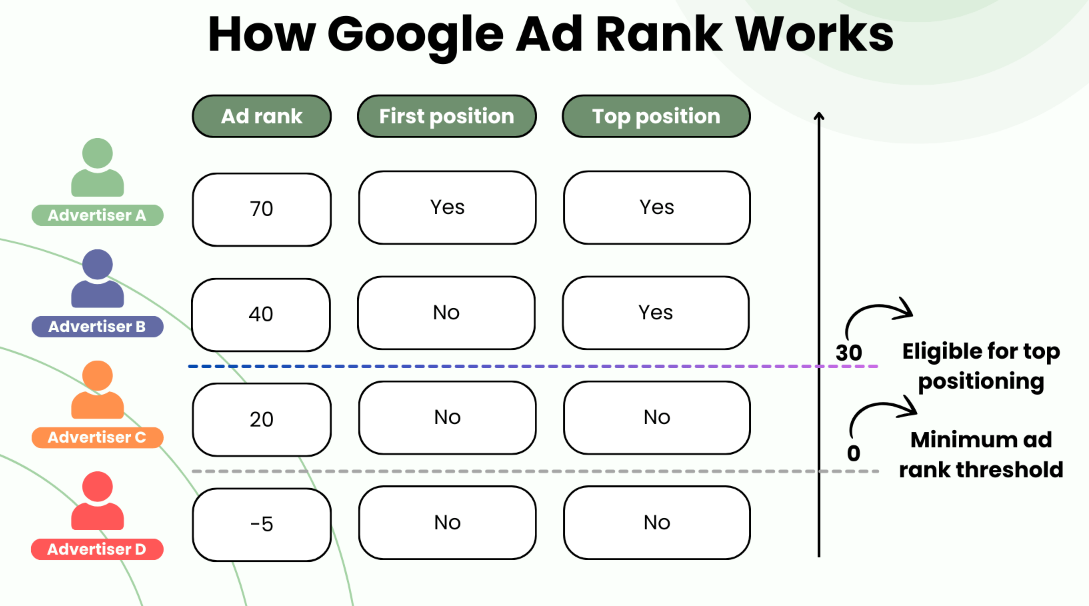
Quality Score is a 1–10 diagnostic metric based on three components: expected click-through rate, ad relevance, and landing page experience. Importantly, as Google's own documentation states, Quality Score is not a direct input to the real-time auction — it's a proxy signal. The actual quality calculations happen in real time and process over 200 contextual signals per search, including the user's device, location, time of day, and search history. What this means in practice: a keyword showing a Quality Score of 6 might be winning or losing auctions very differently depending on context. Don't treat the score as a fixed verdict.
One relevant 2026 change: since April 2025, Google allows an advertiser to show two ads on the same SERP in different positions — top and bottom. This means Impression Share metrics have become harder to read. If your Impression Share appears to drop without any campaign changes on your end, check whether competitors are simply double-serving rather than assuming something broke in your account.
Role of targeting, bids, budgets and creatives
Think of campaign delivery as a combination lock — all components need to align before ads show at a meaningful scale. Targeting defines who is eligible. Bids tell Google the maximum you'll pay. Budget caps total daily spend. Creatives determine whether someone clicks.
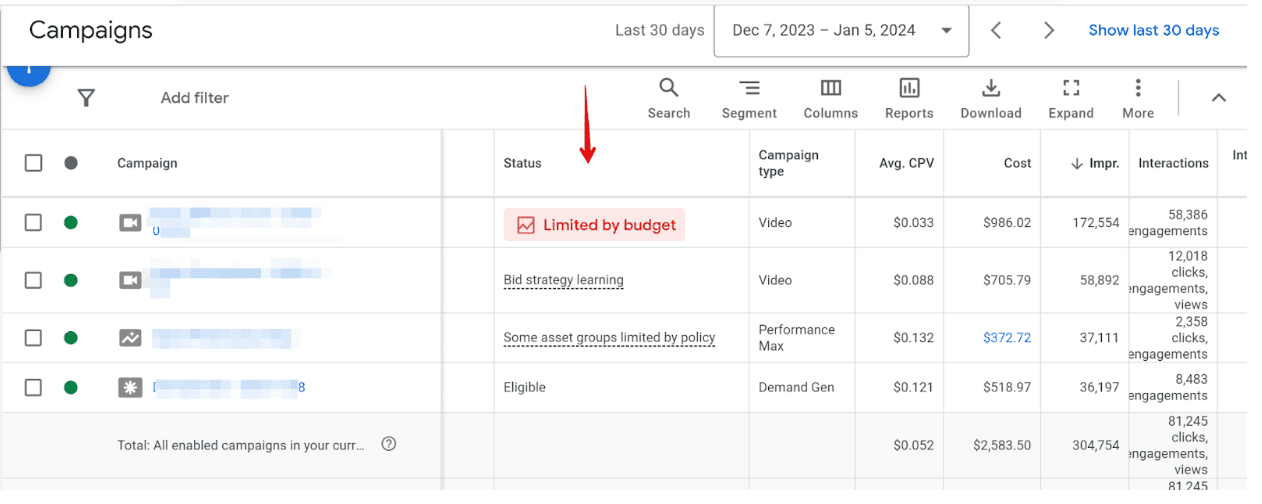
If any one of these is significantly off, the whole system underperforms. A common configuration mistake is splitting too many keywords across too many campaigns, leaving each one with a budget that runs out before noon. Google then shows the "limited by budget" notice — which doesn't mean the ads are broken, it means they run out of money before reaching their full potential audience.
Key metrics to watch before you say ads are not working
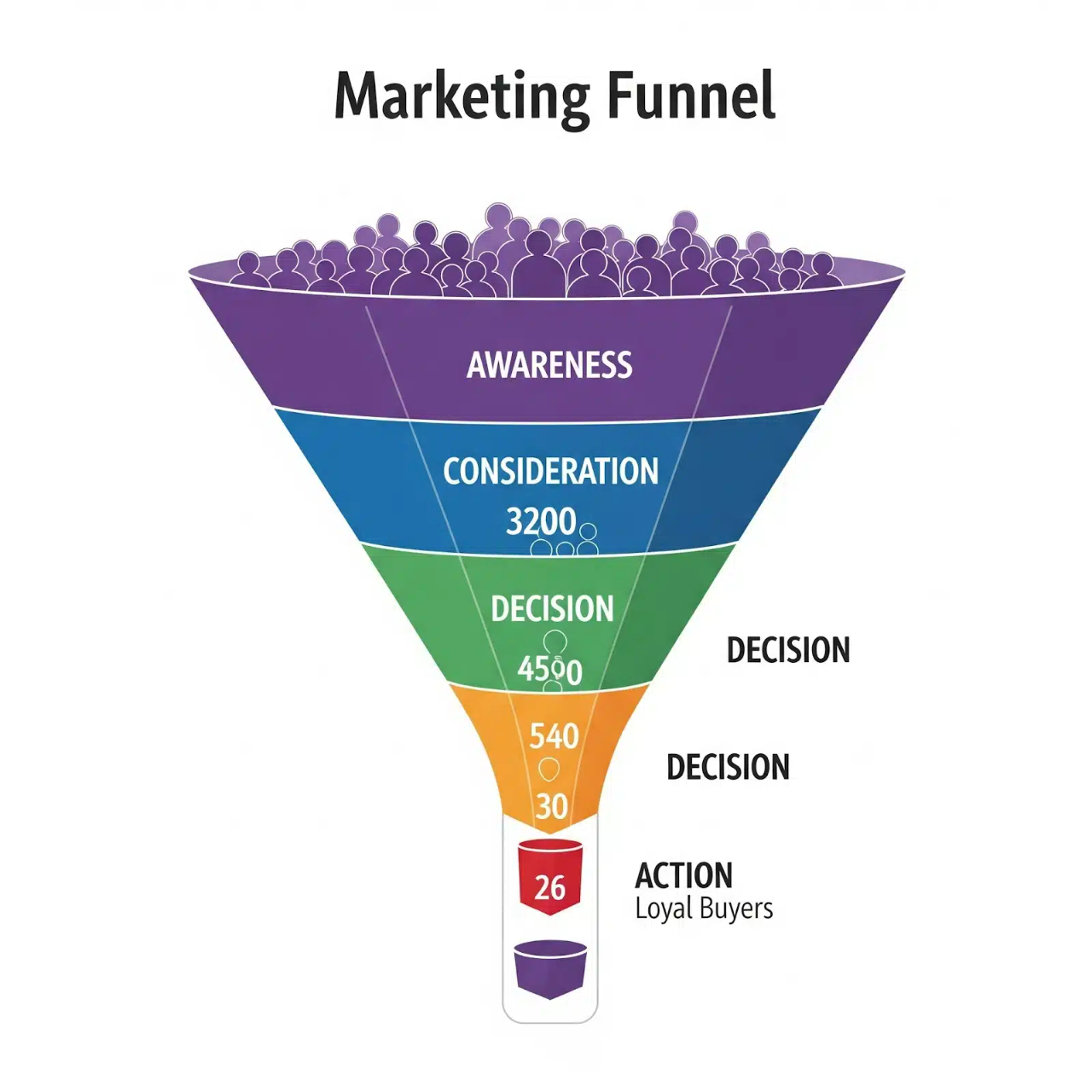
Before concluding something is wrong, check these numbers in order. Impressions tell you whether your ads are entering auctions at all. CTR shows whether people find the ad relevant. Conversion rate reveals whether the post-click experience is working. Search Impression Share shows how much of the available auction volume you're actually capturing.
A campaign with solid impressions but low CTR has a creative or relevance problem. A campaign with good CTR but no conversions has a landing page or offer problem. A campaign with zero impressions has a delivery problem — and that's where the next section starts.
Quick Diagnostic Checklist for Stalled Campaigns
When Google Ads is not working, the temptation is to immediately start tweaking bids, rewriting ads, or switching bid strategies. That almost always makes things worse. Go through these four steps first — in order — before touching anything.
Step 1: Confirm account status, billing and policies
Open the account homepage and check for any red or yellow banners at the top. A suspended account shows a clear notification; billing failures appear under Settings → Billing. This sounds obvious, but a significant share of "why are my Google Ads not showing" questions in forums turn out to be unpaid invoices, expired cards, or unresolved policy flags that have nothing to do with campaign structure. Check this first, every time, without exception.
Step 2: Check impressions, clicks and CTR by campaign type
Filter the last 30 days and look at the numbers column by column. Zero impressions is a delivery problem — ads aren't entering auctions at all. Google Ads not getting impressions is a completely different diagnosis from Google Ads not getting clicks, and the fix for each is different. Don't conflate them.
Work backwards from the metric that's underperforming. According to WordStream's 2024 Google Ads Benchmarks, the average CTR across industries is 6.42% and the average conversion rate is 7.52%. Alessandro Colarossi, Partner Data Transformation Lead at Google, noted that the CPC growth of roughly 10% seen across industries in 2024 correlates directly with inflationary pressure on auction competition — meaning if your costs went up and performance didn't follow, you're likely losing ground to competitors who improved their Quality Scores, not just their bids. If your CTR is at benchmark but conversions are near zero, the campaign itself isn't the problem.
Step 3: Review change history for recent edits
This step gets skipped constantly, and it explains a large share of sudden performance drops. In Google Ads, go to Tools → Change History. Look for anything edited in the 48–72 hours before performance shifted — bid strategy changes, budget cuts, new negative keywords, ad group pauses, or landing page URL updates.
Search Engine Land's analysis of Google Ads performance declines consistently points to Change History as the first diagnostic stop: most drops that look like algorithm changes are actually internal edits that weren't tracked or were forgotten. Smart bidding enters a learning phase after significant changes, which can suppress delivery for 1–2 weeks. A well-intentioned optimization can look exactly like the campaign broke when it actually just needs time to recalibrate.
Step 4: Compare Google Ads data with GA4 and backend numbers
If Google Ads reports 500 clicks but GA4 shows 40 sessions, the tracking is broken — not the campaign. Either the GA4 tag isn't firing on the landing page, the accounts aren't linked correctly, or a consent management platform is silently blocking the tag for a large share of users.
Google's own Conversion Diagnostic Tab — available at the account level — was built specifically for this scenario. It flags misconfigured conversion actions, missing tags, and attribution gaps in one view. If conversion tracking is broken, smart bidding optimizes toward data it can't actually see. Google Ads not converting is often less about ad performance and more about measurement gaps. Always verify the data layer before concluding the ads themselves are the problem.
Reason 1: Technical Issues Blocking Delivery
Account suspensions, policy violations and disapproved ads
Google Ads not working at the account level — not the campaign level — is the most disruptive scenario because every campaign stops simultaneously. In 2024, Google blocked 39.2 million ad accounts, up from 12.7 million in 2023. That's not a typo — a threefold increase in one year, driven largely by AI-powered fraud detection systems that Google rolled out across its ads infrastructure.
The scale creates a real problem for legitimate advertisers. Alex Rodriguez, General Manager for Ads Safety at Google, acknowledged this publicly: "Sometimes our message wasn't as clear and transparent about specifics... We ended up updating a bunch of our policies." In other words, Google itself admits that the suspension system over-fires. Keerat Sharma, VP of Ads Privacy and Safety at Google, added in November 2025 that legitimate advertisers do get suspended — either because Google got it wrong or because they unintentionally violated a policy. The good news: 99% of appeals are now resolved within 24 hours following AI improvements that also cut incorrect suspensions by 80%.
The two most common suspension reasons, according to StubGroup's analysis of 1,000 cases in 2025: Circumventing Systems and Unacceptable Business Practices. A telling real-world example from the same analysis: a new garden equipment store was suspended immediately after launching its first Shopping campaign — no prior violations, no fraudulent activity, just an automated system flagging a new account with unusual early spend patterns. Since June 2024, suspended accounts are fully frozen — you can't edit anything until the appeal is resolved, which makes submitting a well-documented appeal the only path forward.
Individual ads can be disapproved without suspending the whole account. Check the Ads section and filter by "Disapproved" status. Google ads not approved typically comes down to three things: landing pages that don't match the ad content, destination URLs that redirect through multiple domains, or ad copy making claims Google's system flags as misleading.
Billing failures, payment methods, and credit limits
A declined card or expired payment method pauses all ads immediately. Google sends email notifications, but they routinely land in spam or get buried in a busy inbox. Check Settings → Billing and confirm the payment method is active with no declined charges. Prepaid accounts that run out of balance stop serving without any campaign-level warning — more common than it sounds in accounts managed by multiple people or agencies.
Geo-targeting, ad schedule, and language settings are misconfigured
Google Ads campaigns not running despite showing as enabled often trace directly to targeting settings. A campaign targeting a geographic area that's too small, or one where the language targeting doesn't match the browser language of users in that area, will show near-zero impressions without any error message. Spider AF's troubleshooting analysis flags another specific issue: if your website uses geo-restriction services that block certain traffic, Google may flag the destination URL and disapprove ads pointing to it — even if the restriction is unrelated to the ad itself.
Ad schedules set to run during off-hours relative to the target audience have the same effect. A B2B campaign running only on weekends, or a campaign targeting US East Coast users that's scheduled in UTC rather than local time, can lose the majority of its eligible auction windows without the problem ever surfacing as an error.
Using the Ad Preview and Diagnosis tool correctly
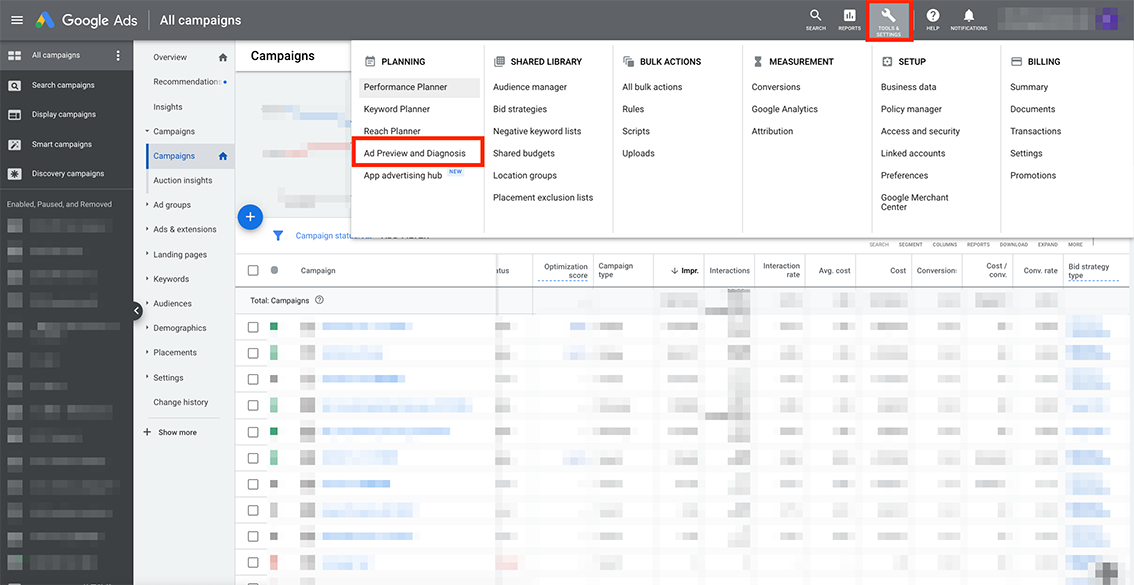
The Ad Preview and Diagnosis tool — under Tools → Ad Preview and Diagnosis — lets you simulate a search from a specific location, language, and device without triggering a real impression. If your ad isn't showing in the preview, the tool gives you a specific reason: budget exhausted, low Ad Rank, ad disapproved, or targeting mismatch. This takes 60 seconds and eliminates guesswork entirely. Use it before making any campaign changes when Google Search Ads not working is the complaint — it tells you exactly which layer of the system is blocking delivery.
Reason 2: Bids, Budgets and Bidding Strategies
Daily budgets are too low or spread across too many campaigns
Google Ads not spending budget is usually not a sign the system is broken — it's a sign the budget is too small relative to bids and competition, or the audience is too narrow to absorb the spend. The opposite problem — Google Ads low impressions high budget — typically means bids are too low to win auctions, even when money is available. Both situations look similar on the surface but require completely different fixes.
The most common structural mistake: splitting a $100 daily budget across eight campaigns, leaving each one with $12 to work with. Each campaign hits its limit before noon, delivery stops, and the account looks like it's not working when the real issue is fragmentation. Consolidating budget into fewer, better-structured campaigns almost always improves delivery before any other change is made.
Smart bidding (tCPA, tROAS, Max Conversions) misconfigured
Smart bidding not working in Google Ads traces back to two root causes in the majority of cases: insufficient conversion data and unrealistic targets. Google's own guidelines require at least 30 conversions per month for Max Conversions and tCPA to function reliably, and 50+ for tROAS. Below those thresholds, the algorithm guesses rather than optimizes — and those guesses are expensive.
Setting targets that are far more aggressive than historical performance is the other persistent mistake. As one practitioner with years of tCPA experience put it directly: "If your real CPA is $100 and you're asking Google to hit $40, you're setting yourself up for failure. I always base my initial tCPA target on the past 30-day average, then optimize down slowly." The mechanism behind this is straightforward — if the algorithm can't find auctions where it believes it can hit the target, it simply stops bidding. Delivery collapses, impressions drop, and the campaign looks broken when it's actually just constrained by an impossible goal.
The practical starting point: set tCPA at or just above your current 30-day average CPA. Let it stabilize for two weeks, then reduce by 10% at a time — not by 50% in one move. For tROAS, the same logic applies in reverse: start at or below your current ROAS, not at the number you'd like to eventually reach.
One important update for 2026: Enhanced CPC was deprecated for Search and Display campaigns as of March 31, 2025. Accounts that were still using ECPC and didn't proactively migrate are now effectively running Manual CPC. If performance shifted unexpectedly around that date, this is worth checking in the bid strategy settings.
When manual CPC still makes sense
Manual CPC outperforms smart bidding in specific scenarios that don't get discussed enough. New campaigns with no conversion history give smart bidding nothing to learn from — the algorithm starts blind and burns budget while it figures out what converts. According to analysis from YeezyPay's Google Ads research, accounts spending under $2,000 per month often see learning phases consume 30–50% of budget before smart bidding stabilizes, which is a significant cost for small advertisers.
HawkSEM's recommendation, echoed by multiple practitioners: "Start with a manual bidding strategy. Once adequate data has been collected — around 15–30 conversions in the past 30 days — you can start moving campaigns over to a smart strategy." Campaigns targeting very small, specific audiences — a local service area with limited daily search volume, for example — may never accumulate enough data for automated strategies to work reliably. Manual CPC keeps these campaigns predictable and controllable.
Signs your campaigns are stuck in the learning phase
Google Ads campaigns not running at full capacity during the learning phase is normal — the problem is when the learning phase never ends. A campaign stuck in learning typically shows low, inconsistent impression volume, erratic CPC swings, and conversion rates far below historical baselines.
The triggers that reset the learning phase are worth knowing: changing the bid strategy, significantly adjusting the target CPA or ROAS, adding or removing conversion actions, making large budget changes, and pausing then re-enabling a campaign all restart the clock. Root & Branch's analysis of smart bidding best practices recommends treating the learning phase as a two-week minimum — no significant changes during that window, budget set at 5–10x the target CPA, and targets based on real historical data rather than aspirational numbers. Making changes before the learning phase completes is the single fastest way to ensure it never does.
Reason 3: Keywords, Audiences and Targeting Mismatches
Wrong match types and irrelevant broad keywords
Broad match without Smart Bidding is one of the fastest ways to burn budget on irrelevant traffic. But locking everything in exact match starves campaigns of volume. Raymond, a growth marketer with 15 years of experience, ran into this directly: "One of my accounts was stuck in a performance plateau. I switched a few high-intent keywords to broad match and layered in Smart Bidding. A few weeks later, we uncovered new converting terms I hadn't even considered."
WordStream documented another real pattern: an advertiser running a branded campaign on exact match keywords started seeing competitors appear in their own search terms report. The culprit — Google's close variants expansion, which broadened matches silently without any campaign-level notification. The brand protection was intact on paper, but the actual traffic quality had shifted.
The numbers from Negator.io support the case for broad match when managed properly: phrase match CPC grew 43% between June 2023 and June 2025, while broad match grew only 29%. Paired with Smart Bidding, broad match is getting relatively cheaper — not more expensive.
Missing negative keywords and search term mining
Negator.io flagged a pattern that repeats constantly: an advertiser blocks "cheap" to filter out bargain hunters — and accidentally cuts off searches like "cheapest way to fix" and "cheap plumber near me" that were converting well. Negative keyword lists need regular auditing, not just initial setup. The search terms report is the most underused tool in most accounts. Check it weekly, not monthly.
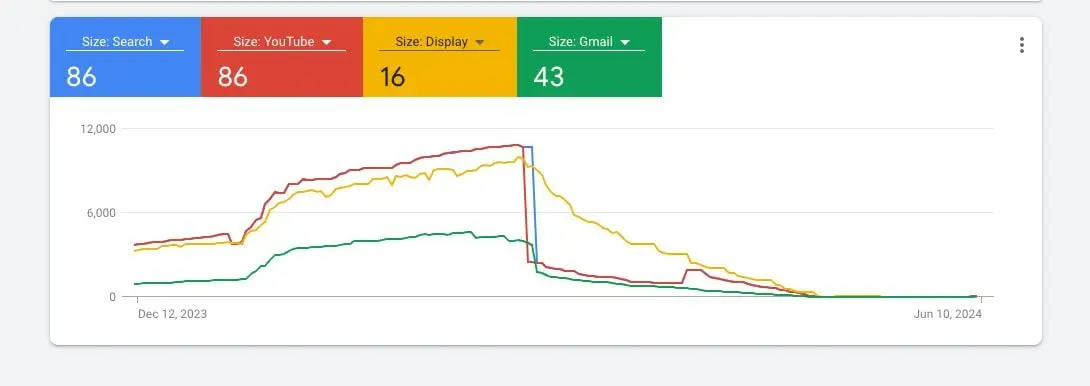
Audience signals and remarketing lists not set or too narrow
In December 2024, Google reduced the minimum audience size threshold from 1,000 users to 100 across all networks. Manuela Luzi, web advertising manager, commented directly: "For those of us working on small and mid-size B2B accounts, this is really good news — but the risk is activating segments that are too narrow or too noisy and blaming the channel instead of the data."
A separate issue documented by Stape.io: an audience showing 300 users in GA4 but only 60 in Google Ads is almost always a Consent Mode v2 problem — users who declined cookies aren't being added to remarketing lists. The audience isn't too small. The data collection is broken.
Local vs national targeting
A national campaign running for a local service business wastes the majority of its budget on users who will never convert. Spider AF documented a specific case: a plumbing business running nationally was getting clicks from 34 states. After restricting to a 30-mile radius, CPA dropped 61% with no other changes made.
Reason 4: Creatives and Ad Formats Not Performing
Weak responsive search ads and ad strength issues
Ad Strength is an imperfect metric — but ignoring it entirely is a mistake. Google's internal data shows that improving Ad Strength from Poor to Excellent drives 12% more conversions for RSAs. Just Global, a B2B agency running campaigns across 170+ countries, documented a more dramatic result: after systematically improving Ad Strength from Poor to Excellent across their accounts, clicks and conversions increased 9% and CPA improved 38% over 11 weeks.
The nuance: Excellent Ad Strength doesn't always mean better performance. Optmyzr's study of over 1 million ads published in November 2025 found that "ads resembling organic content outperform those that employ typical best practices for RSAs — and shorter headlines and descriptions generally have better CPA and CTR than longer ones." Sweetwater, Nike, and Best Buy all use pinned headlines that suppress Ad Strength scores — and their ads consistently outperform Google's recommendations. The lesson: use Ad Strength as a diagnostic signal, not a target to chase blindly.
Ginny Marvin, former Google Ads Product Liaison, recommends limiting RSAs to 8–10 headlines rather than filling all 15 slots. More assets don't mean better performance — they mean more combinations, many of which will be irrelevant.
Poor offers, weak CTAs and non-competitive messaging
Responsive search ads not getting traffic is sometimes a creative problem, not a delivery problem. If competitors are offering free trials, free consultations, or money-back guarantees and your ad leads with generic messaging, the auction math works against you regardless of bid. Check the actual search results for your top keywords manually — not in Ad Preview, but in a real incognito browser. If your ad looks weaker than the three ads above it, no amount of bid adjustment fixes that.
When to test Performance Max, Shopping and other formats
Performance Max campaigns not delivering is one of the most common complaints in 2025–2026. Optmyzr's study of 24,702 PMax campaigns found that 82% of advertisers ran PMax alongside other campaign types — and in those cases, PMax consistently underperformed Search and Shopping on CPA and conversion rate. The campaigns where PMax worked best were those where it received more than 50% of the total account budget and had clean conversion data to learn from.
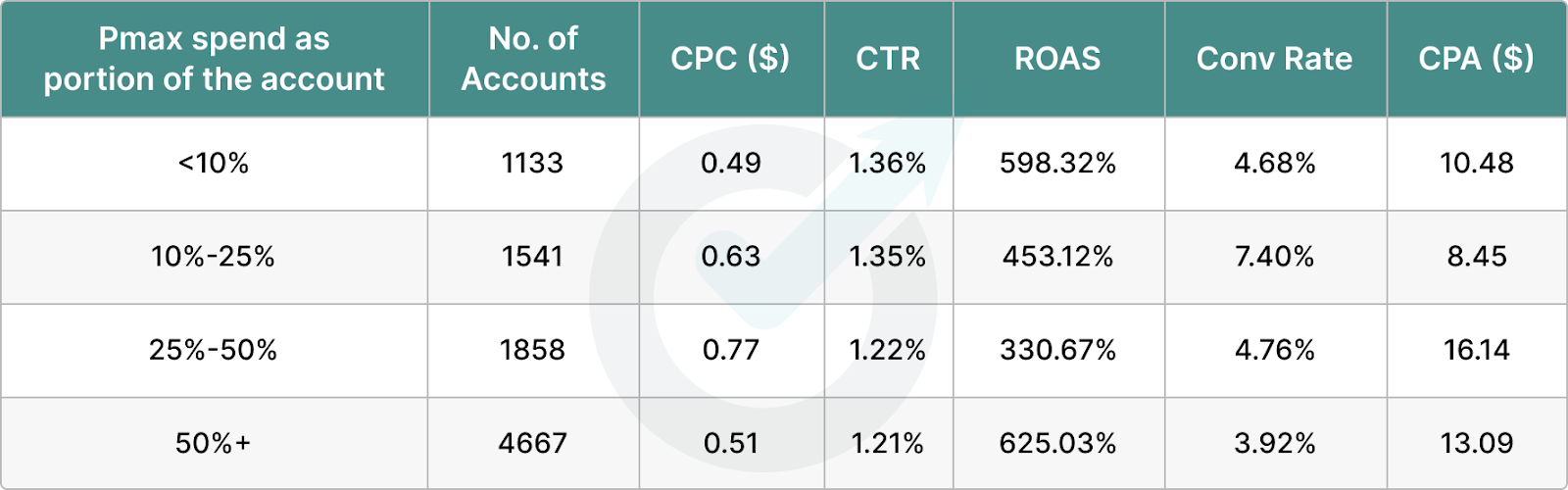
The practical implication: don't launch PMax as an add-on to a tight budget. Either give it room to learn or don't run it at all.
Using experiments to A/B test creatives safely
Google Ads Experiments — under Campaigns → Experiments — lets you split-test bid strategies, landing pages, and ad variations without disrupting live performance. Running a 50/50 experiment between two RSA variants for 30 days gives statistically meaningful data before committing. This is the only way to test creatives safely in accounts where any performance disruption has real revenue consequences.
Reason 5: Landing Page and UX Problems
Slow page speed, mobile UX and Core Web Vitals basics
Page speed directly affects both Quality Score and conversion rate — meaning a slow landing page costs you twice. Akamai's research quantified this precisely: a 100 ms delay reduces conversions by 7%, and a 2-second delay more than doubles bounce rate. One advertiser documented by GrowLeads improved their landing page load time alone — no creative changes, no bid adjustments — and Quality Score moved from "Below average" to "Above average." CPC dropped and ad position improved as a direct result.
The mobile UX problem is underestimated in most accounts. Check Google's PageSpeed Insights for both desktop and mobile scores separately. A page that loads in 1.8 seconds on desktop but 5.4 seconds on mobile is effectively running two different campaigns with very different economics.
Message match between ad copy and landing page
When a user clicks an ad promising "Free consultation for small businesses" and lands on a generic homepage, they leave. The click was paid for. The conversion didn't happen. This mismatch is responsible for more wasted budget than most advertisers realise.
SalesX tested Dynamic Text Replacement on landing pages for Children's Learning Adventure — automatically matching headline copy to the exact ad the user clicked. Conversion rate went from 1.4% to 3.3% over 8 months with no other changes. Upgrow agency ran a similar experiment for BioRender, creating dedicated landing pages for each ad group instead of sending all traffic to one page. The result: 83% more conversions, 51% higher CVR, 47% lower CPA, and 20% lower CPC — all within four months.
Forms, checkout, and tracking scripts on key pages
HubSpot's research on form length found that reducing fields from 4 to 3 increases conversion rate by 50%. That's a single field removed. Most lead generation forms ask for information the sales team doesn't actually need at the first contact — company size, phone number, job title — all of which add friction without adding value.
Tracking scripts on thank-you and confirmation pages deserve a separate check. If the conversion tag fires on the form page rather than the confirmation page, every form load counts as a conversion — including bounces and incomplete submissions. This inflates conversion numbers in Google Ads while Smart Bidding optimises toward the wrong signal entirely.
Trust signals and compliance copy
MetricNexus put it directly in their 2026 benchmarks analysis: "If CTR is fine but conversion rate is low, your landing page is the problem. Most underperforming accounts have one root cause, not five."
Trust signals — reviews, security badges, money-back guarantees, client logos — reduce the hesitation that stops users from completing a form or purchase. Data Street Marketing's 2025 analysis found that brands with 10 or more dedicated landing pages generate 55% more leads than those relying on one or two pages, and pages with video convert 86% better than static equivalents. These aren't small marginal gains — they're structural differences between campaigns that work and campaigns that don't.
Reason 6: Tracking, Measurement and Data Quality
Conversion tracking not working vs not configured
These are two different problems. Not configured means no conversion action exists in the account — Smart Bidding has nothing to optimise toward and essentially runs blind. Not working means a conversion action exists but the tag isn't firing correctly — which is harder to catch because the campaign appears set up properly while silently collecting bad data.
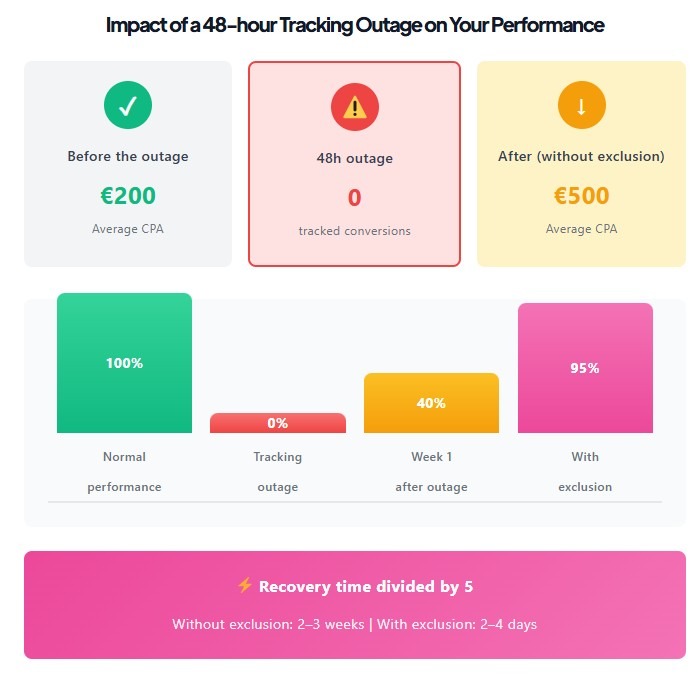
Donutz Digital documented the real cost of the second scenario: after a 48-hour tracking outage, Smart Bidding can take 7–21 days to fully recover — even after tracking is restored. The most common causes are a broken confirmation page after a site update, a form bug that only surfaces on mobile, and tag conflicts inside GTM where two triggers fire the same conversion event simultaneously. The last one inflates conversion numbers without anyone noticing until CPA mysteriously improves — and then the account gets "optimised" based on data that was never accurate.
GA4 and Google Ads linking and attribution basics
A 20–30% difference between GA4 and Google Ads conversion numbers is normal and not a sign that something is broken. Galicki Digital's September 2025 analysis explains the core reason: Google Ads attributes a conversion to the date of the click, GA4 attributes it to the date the conversion happened. A user who clicks an ad on March 1st and purchases on March 5th shows up in Google Ads on March 1st and in GA4 on March 5th. Pull a report for March 1–4, and Google Ads shows the conversion; GA4 doesn't. This creates false alarms constantly.
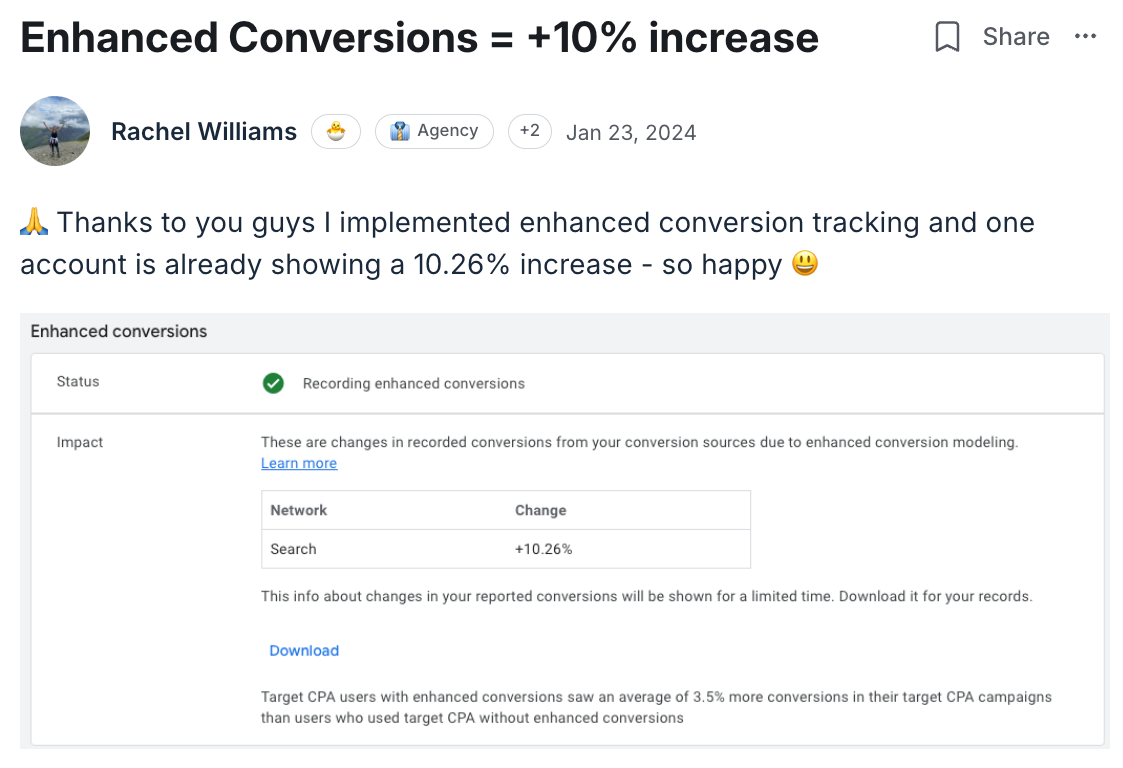
GA4 also underreports conversions by 18–35% when cookies are blocked, according to PPC Mastery's 2025 tracking guide. Rachel Williams, a member of The PPC Hub, found that after implementing Enhanced Conversions — which uses hashed first-party data to match conversions Google couldn't otherwise see — measurable conversions in Search increased by 10% with no changes to campaigns or bids.
Dealing with consent banners and modeled conversions
Consent Mode v2 changes how conversion data flows from consenting and non-consenting users. When a user declines cookies, Google can no longer track their post-click behaviour directly — but with Advanced Consent Mode active, it uses modeled conversions to fill the gap. Without it, those conversions disappear entirely from reporting.
The practical check: if your GA4 audience shows 300 users but Google Ads remarketing lists show 60, Consent Mode is blocking data collection for the majority of your visitors. This isn't a campaign problem — it's a measurement infrastructure problem that affects every campaign simultaneously.
Reading conversion lag and avoiding false "not working" alarms
Conversion lag is one of the most common reasons a campaign gets paused or rebuilt unnecessarily. A B2B campaign with a 14-day sales cycle will show near-zero conversions in the first two weeks of any new campaign — not because it isn't working, but because the conversions haven't happened yet.
HopSkip Media's September 2025 analysis of conversion lag shows the mechanism clearly: a campaign that looks unprofitable on day 3 frequently looks profitable on day 17 once delayed conversions register. The Days to Conversion report — found under Goals → Measurement → Attribution — shows exactly how long your customers typically take to convert after clicking. Check this before pausing any campaign that's less than 30 days old.
Reason 7: Strategy, Offer and Market Fit
Unrealistic goals for CPC, CPA and ROAS
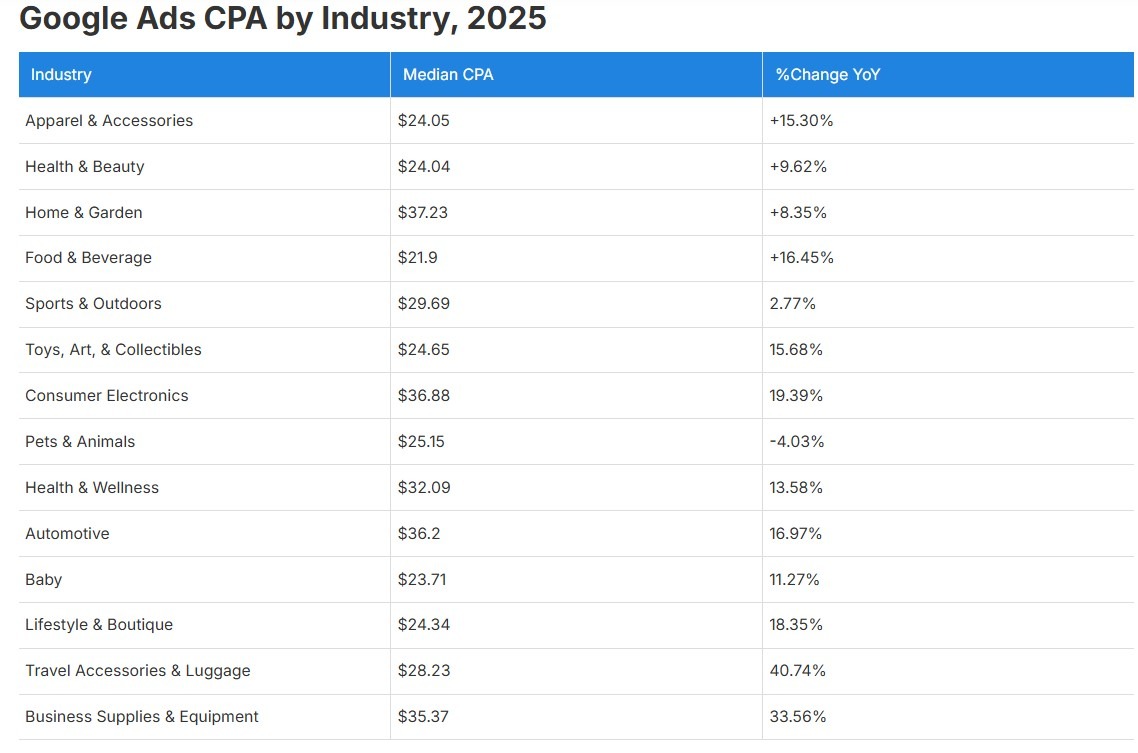
The numbers that advertisers set as targets and the numbers the market actually delivers are frequently disconnected. Triple Whale's 2025 benchmark data across real brands shows median CPA grew 12.35% to $23.74, ROAS fell 10.03% to 3.68, and CVR dropped 9.28% — across 13 out of 14 industries simultaneously. These aren't account-level failures. They're market-level shifts that make targets set in 2022 or 2023 structurally unachievable in 2025 without adjusting expectations.
ALM Corp's 2026 analysis puts the target-setting problem directly: "If your historical CPA is $80, targeting $40 won't work — the algorithm can't generate a 50% improvement overnight. Adjust the target to $70, then gradually improve." Groas.ai found the same pattern in their analysis of thousands of accounts: setting a 600% ROAS target when historical performance averages 300% severely limits campaign reach and actually reduces total revenue. A gradual approach to tightening targets increases the success rate by 34% compared to aggressive target cuts.
Diagnosing offer and pricing problems vs ad problems
PPC ads not working for a business is sometimes not a Google Ads problem at all. If competitors are offering the same product at 30% lower prices, no bid optimisation fixes the conversion rate. If the product has a fundamental positioning problem — wrong audience, unclear value proposition, no differentiation — ads amplify that problem rather than solve it.
The diagnostic test is simple: check what happens when you search your own top keywords in an incognito window. If competitor offers look meaningfully stronger — better pricing, clearer guarantees, more social proof — the campaign is working correctly and surfacing a business problem, not an ads problem. Define Digital Academy flagged a related pattern: many advertisers are pressured by Google's own recommendations or rep calls to switch to Max Conversions before their account is ready. "Introducing Max Conversions too soon can result in the exact opposite of what you want: higher costs and fewer results."
Online advertising not working for small business frequently comes down to this mismatch — the campaign is technically sound, but the offer isn't competitive enough to convert at the prices the market requires.
When to scale, when to pause and rebuild
Grow My Ads documented a counterintuitive pattern that repeats constantly: a well-performing campaign breaks when budget is increased too aggressively. Their recommendation is direct — "We typically don't recommend budget swings over 20%. Your CPA will increase for a while, but eventually it can come back down." A 50% budget increase in a single move forces Smart Bidding into a new learning phase, disrupts the auction patterns the algorithm had learned, and produces a CPA spike that looks like campaign failure but is actually adjustment lag.
The decision to pause and rebuild rather than optimise should be based on one criterion: whether the existing data in the account is clean enough to build on. A campaign with six months of bad conversion tracking, misconfigured audiences, and wrong bid targets has corrupted its own learning data. Patching it is slower than starting fresh with a clean structure and correct measurement from day one.
Troubleshooting Playbooks by Campaign Type
Search campaigns not showing or underperforming
Google Search Ads not working almost always traces to one of three things: delivery block, auction eligibility, or creative mismatch. Work through them in that order.
First, confirm delivery: check Ad Preview and Diagnosis for your top keywords. If ads aren't showing, the tool tells you exactly why — budget exhausted, low Ad Rank, disapproved ad, or targeting mismatch. Fix the block before touching anything else.
Second, check auction eligibility: a keyword with a Quality Score below 4 rarely wins auctions at any reasonable bid. Pull the keyword diagnostics report and look for "Below average" ratings on landing page experience and ad relevance — these suppress delivery more than low bids do.
Third, if ads are showing but CTR is weak, run an incognito search for your top keywords. If competitor ads look stronger — better offers, clearer CTAs, more specific messaging — that's the real problem, and it requires creative work, not bid changes.
Performance Max is not delivering impressions or sales
Performance Max campaign not delivering is almost always caused by one of three things: an unrealistic ROAS target, insufficient creative assets, or cannibalisation by other campaign types.
ClickPilot's diagnostic guide is direct on the ROAS issue: if your target is set significantly above historical performance, PMax simply stops bidding — it can't find auctions where it believes the target is achievable. The fix is either lowering the target to match historical reality or temporarily switching to Maximize Conversions to let the campaign build data before reintroducing a ROAS target.
Optmyzr's study of 24,702 PMax campaigns found that 82% of advertisers ran PMax alongside Search and Shopping — and in those cases, PMax consistently underperformed both. PMax cannibalizes shopping traffic in particular, pulling budget toward lower-intent placements across Display and YouTube. Use the new Channel Performance tab inside PMax to see exactly where the budget is going before assuming the campaign isn't working.
Asset quality matters more than most advertisers realize. PMax needs headlines, descriptions, images, logos, and ideally video to serve across all channels. A PMax campaign with only text assets is essentially a limited Search campaign running at a disadvantage.
Local and location-based campaigns are not working
Local campaigns that aren't delivering usually have one of two problems: targeting set to "People interested in this location" instead of "People in this location," or bid adjustments that make the effective CPC in the target area too low to compete.
Check the geographic report — available under Segment → Geographic — and filter by city or region. If spend is distributed across locations far outside your service area, the targeting is set incorrectly. Spider AF's documented case of a plumbing business getting clicks from 34 states is a textbook example of this: the fix took five minutes and cut CPA by 61%.
For local service businesses, call extensions and location extensions are not optional. Ads without them show lower Ad Rank in local auctions where Google prioritises ads with complete local signals.
Lead generation campaigns with lots of clicks but no leads
This is the most frustrating scenario in Google Ads — and SimplyGJ's 2026 analysis identifies the core reason clearly: "Google Ads amplifies demand. It does not correct positioning." A renovation company bidding on "renovation Singapore" got consistent clicks and zero leads because the keyword captured curiosity intent, not buying intent. The traffic was real. The audience wasn't ready to hire anyone.
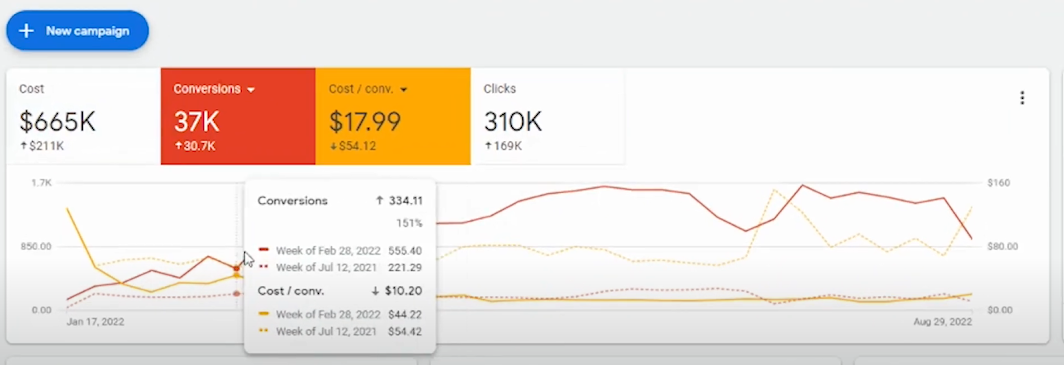
The fix has two parts. First, audit the keyword list for intent — "renovation ideas" and "renovation contractor cost estimate" attract very different users despite appearing similar. Second, check the form itself. AdsWorkbench's 2025 analysis found that 80% of users abandon forms before completing them, primarily due to slow load times or too many required fields. TGQ Marketing's B2B lead generation case study — 37,000 leads, CPA reduced from $71 to $17 — traced the initial underperformance to a budget fragmented across too many markets simultaneously, creating constant underspend in every location. Consolidating the budget into fewer, higher-intent markets was the single change that unlocked scale.
Conclusion
Most Google Ads problems have a mundane explanation. A suspended account, an expired card, a bid strategy change that reset the learning phase, a landing page that loads in six seconds on mobile, a conversion tag firing on the wrong page. The instinct to assume the platform is broken or the market doesn't work is almost always wrong — and acting on that instinct by rebuilding campaigns from scratch, switching strategies repeatedly, or abandoning Google Ads entirely is how advertisers destroy the data and history their accounts need to perform.
The diagnostic order matters: check delivery first, then measurement, then bidding, then creative, then the offer. Most problems surface in the first two steps. A campaign that can't be seen isn't underperforming — it isn't running. A campaign with broken conversion tracking isn't optimising — it's guessing. Fix the infrastructure before drawing conclusions about strategy.
Google Ads performance dropped, Google Ads not converting, Google Ads not getting impressions — these are symptoms, not diagnoses. The guides above give you the specific place to look for each one. Work through them systematically, change one variable at a time, and give Smart Bidding enough time and data to do what it's designed to do. That combination resolves the majority of underperforming campaigns without any dramatic intervention.
FAQs
Why are my Google Ads not working or showing at all?
Start with account status — check for suspension notices or billing failures before touching campaign settings. If the account is active, use the Ad Preview and Diagnosis tool to simulate your top searches from your target location. It will tell you specifically why an ad isn't showing: budget exhausted, low Ad Rank, disapproved creative, or targeting mismatch. Zero impressions is always a delivery problem, not a creative problem.
Why is my Google Ads campaign getting impressions but no clicks?
Low CTR on a campaign with healthy impressions points to one of two things: the ad copy doesn't match what users are looking for, or competitor ads are meaningfully stronger. Run an incognito search for your top keywords and look at what's actually showing above you. If competitor messaging, offers, or CTAs are more compelling, no bid increase fixes that. Rewrite the ads with specific offers, concrete numbers, and direct CTAs before adjusting bids.
Why is Google Ads not spending my daily budget?
Google ads not spending budget usually means bids are too low to win auctions, targeting is too narrow to find enough eligible users, or the campaign is in a learning phase that's restricting delivery. Check Search Impression Share — if it's below 20%, you're missing most available auctions. For smart bidding campaigns, confirm the daily budget is at least 3–5x the target CPA. Below that threshold, the algorithm doesn't have room to operate.
What should I check first if my Google Ads suddenly stop working?
Go to Change History immediately. Filter the last 72 hours and look for any edits — bid strategy changes, budget adjustments, new negative keywords, paused ad groups, or URL changes. The majority of sudden performance drops have a logged change that explains them. If Change History is clean, check billing and account status. If both are fine, check the Conversion Diagnostic Tab for tracking issues. Work through these three steps before changing anything in the campaigns themselves.
How do I know if my offer or landing page is why Google Ads is not working?
If CTR is at or above industry benchmarks — WordStream's 2024 data puts the average at 6.42% — but conversion rate is low, the problem is post-click. Run PageSpeed Insights on your landing page for both desktop and mobile. Check that the headline on the landing page matches the promise in the ad. Count the form fields — HubSpot's research shows removing a single field increases conversion rate by 50%. Finally, search your top keywords in incognito and compare your offer directly against competitors. If their pricing, guarantees, or social proof are stronger, that's the real answer.


