


Guide to Remarketing in Google Ads
Introduction
Most visitors who land on your site aren't ready to buy. They browse, compare, and leave — and without remarketing, they're gone. According to remarketing statistics compiled by SHNO, 97% of website visitors leave without converting, and without active re-engagement, the vast majority never return.
That's the problem remarketing solves. Instead of treating every visitor as a one-time opportunity, remarketing lets you follow up with targeted ads after they've already shown interest — across Google Search, Display, YouTube, and beyond. The numbers are hard to ignore: retargeted users are 70% more likely to convert than first-time visitors, and the average ROAS for retargeting campaigns reached 4.2x in 2025, up from 4.0x in 2024.
This Google Ads remarketing guide covers everything from how the tracking works to campaign setup, audience segmentation, creative strategy, and measurement — including what's changed in 2026 with GA4 and first-party data becoming the new foundation.
What Is Remarketing in Google Ads?
Remarketing is the practice of showing ads to people who have previously visited your website or interacted with your app. Within Google Ads, it works across the Display Network, Search, YouTube, Gmail, and Shopping — making it one of the most versatile tools in the platform.
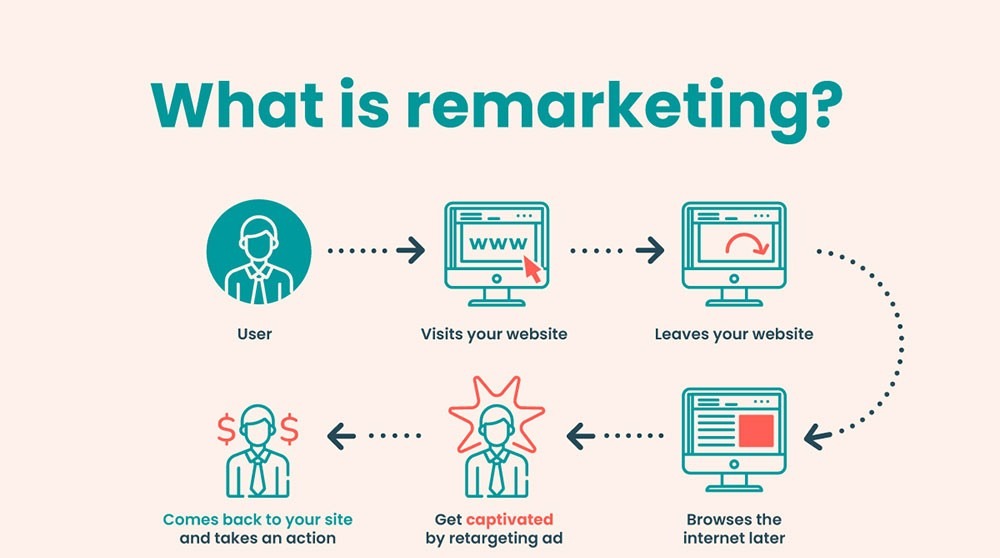
Core definition
Remarketing in Google Ads explained: when someone visits your site, a tag fires and adds them to an audience list. That list is then used to target those specific users with ads as they continue browsing the web, watching YouTube, or searching on Google. The key difference from standard prospecting is that the audience has already demonstrated intent — they know your brand, they've seen your product or service, and they left for a reason your ad can address.
According to Marketing LTB's 2025 Google Ads statistics, remarketing ads on the Google Display Network increase conversion rates by 150%, and remarketing lists typically achieve double the CTR of standard campaigns. That performance gap exists because you're not introducing yourself — you're following up.
Remarketing vs retargeting
The remarketing vs retargeting distinction trips people up because the terms are used interchangeably in most conversations — including by Google itself. Technically, retargeting refers specifically to cookie-based ad targeting of past visitors across ad networks, while remarketing originally referred to re-engaging past customers via email. In Google Ads, "remarketing" is the official term for what is functionally retargeting: serving ads to audiences based on prior interaction with your site or app.
For practical purposes, treat them as synonyms. When Google Ads documentation says "remarketing audience," it means a list of users you can target with ads based on their past behavior — whether that's a site visit, a page view, a video watch, or a customer email list you've uploaded directly.
How Remarketing Works
User tracking and audience creation
The mechanics behind how remarketing works in Google Ads start with a tag. When someone visits your site, the Google Tag fires and drops a cookie in their browser — adding them to a remarketing audience based on the pages they visited or actions they took. That audience is then available in Google Ads for targeting across Search, Display, YouTube, Gmail, and Shopping.
The audience definition is where strategy begins. A blanket "all website visitors" list is a starting point, not a strategy. The highest-performing remarketing audience lists are built around specific intent signals: cart abandoners, pricing page visitors, product viewers, lead form starters. According to Whitehat SEO's 2026 remarketing guide, these high-intent segments consistently outperform broad site visitor lists because they capture users who demonstrated clear purchase intent — not just anyone who happened to land on your homepage.
Cookies, first-party data, and GA4
The cookie landscape in 2026 is more stable than it looked two years ago. In July 2024, Google reversed its plan to phase out third-party cookies in Chrome, and by October 2025 retired the Topics API and Protected Audience API due to low industry adoption. Third-party cookies still work in Chrome — for now. But Safari and Firefox have blocked them for years, which means a meaningful portion of your audience is unreachable through cookie-based tracking alone.
The practical response is to build around first-party data rather than depending on it. As Google's official GA4 documentation explains, linking GA4 to Google Ads exports your behavioral audiences automatically — including GA4's predictive audiences, which can identify users likely to purchase within 7 days. For EU/UK advertisers, Consent Mode v2 is mandatory since March 2024 — without it, remarketing lists stop growing. It works by sending anonymized "pings" even from users who declined cookies, allowing Google's AI to model the conversions you would have seen from non-consenting users without tracking them individually.
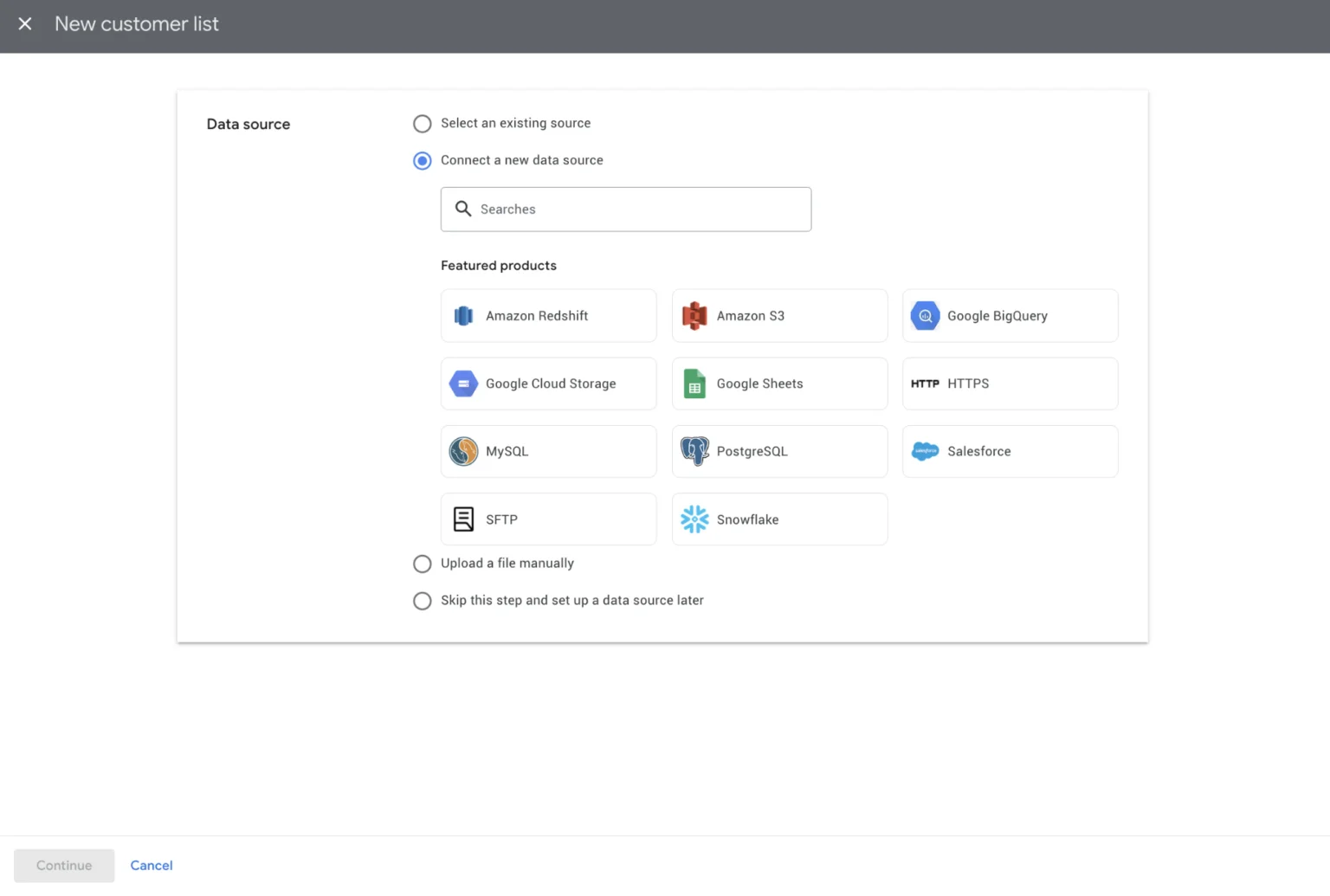
Customer Match — uploading hashed email lists directly — is the most durable remarketing signal available because it's entirely independent of cookies. The minimum list size for Customer Match dropped to 100 users in December 2024, opening this capability to smaller advertisers who previously couldn't meet the 1,000-user threshold.
Cross-device considerations
One of the most underappreciated advantages of GA4 remarketing is cross-device tracking. Enabling Google Signals in GA4 allows Google to associate activity across devices for users signed into their Google accounts — meaning a user who browsed your pricing page on mobile at lunch can see your remarketing ad on desktop that evening. Without Google Signals, each device creates a separate session with no connection to the others, and your audience segments miss a large share of multi-device journeys.
Types of Remarketing Campaigns
Google Ads remarketing 2026 covers four main campaign types — each suited to a different audience, intent level, and creative format.
Display remarketing
Display remarketing is the most widely used format — your ads follow past visitors across millions of websites in Google's Display Network as they read news, check email, and browse. It's the channel most people think of when they hear the word "remarketing." According to Marketing LTB's statistics, display remarketing ads increase brand awareness by 33% and convert at 150% higher rates than standard display campaigns targeting cold audiences.
Display remarketing ads run best as Responsive Display Ads — you supply headlines, descriptions, images, and a logo, and Google assembles the combinations most likely to perform for each placement and audience. The creative goal at this stage is reinforcement and friction reduction: remind the visitor what they looked at, address the likely objection, and give them a clear reason to come back.
Search remarketing (RLSA)
Search remarketing strategy via Remarketing Lists for Search Ads (RLSA) is different in nature from display — instead of following users around the web, you adjust your Search campaign behavior based on whether someone is on your remarketing list. Two modes exist: targeting mode, where your ads only show to list members searching your keywords, and observation mode, where you collect data and apply bid adjustments without restricting reach.
The most common RLSA use case: bid significantly higher on high-intent keywords for users who've already visited your pricing page or product pages. Someone who's already evaluated your offer and is now searching again is far closer to converting than a first-time visitor — and your bid strategy should reflect that gap. According to Google's official RLSA documentation, RLSA lists require a minimum of 1,000 cookies before they activate, and the maximum list duration is 540 days.
Video remarketing
Video remarketing targets users who have watched your YouTube videos, visited your channel, or interacted with your YouTube ads. It's particularly effective for remarketing for lead generation in B2B and high-consideration categories — someone who watched 75% of your explainer video is a fundamentally different prospect than someone who bounced from your homepage after 10 seconds.
Within Demand Gen campaigns — which replaced Video Action Campaigns in July 2025 — video remarketing audiences can be combined with lookalike expansion. Demand Gen is now the only campaign type supporting lookalike segments, making it the natural home for video-based audience sequencing: awareness creative to cold audiences, then follow-up creative to engaged video viewers.
Dynamic remarketing
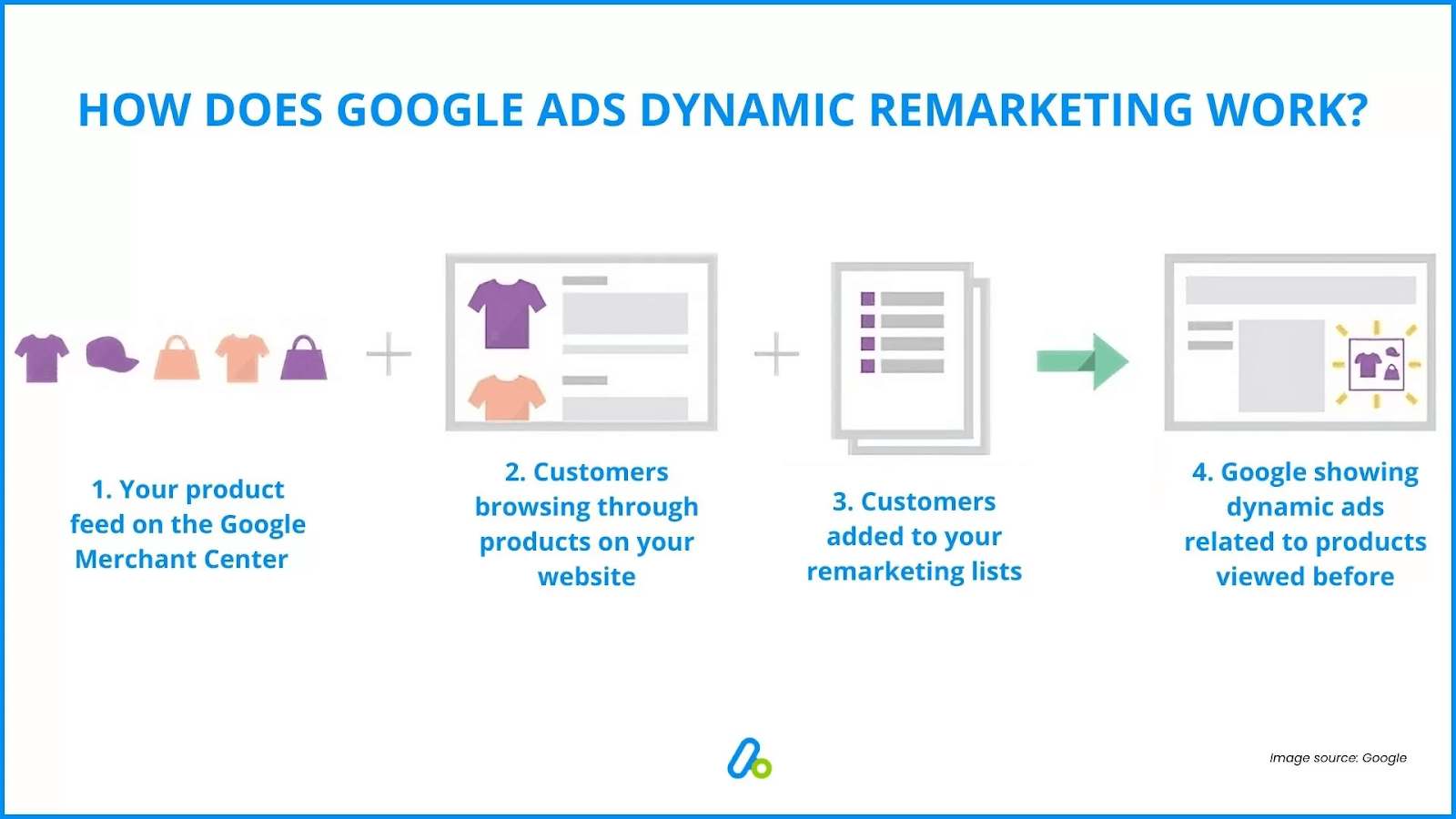
Dynamic remarketing overview: instead of showing a generic ad to a past visitor, dynamic remarketing automatically pulls the specific product or service that user viewed and shows it back to them in the ad. For remarketing for ecommerce, this is the highest-converting format available — a user who added a product to their cart and left sees that exact product in the ad, with current pricing, sometimes with a discount incentive layered in.
Dynamic remarketing requires a product feed connected to your Google Ads account — for ecommerce, this means a Google Merchant Center feed. For B2B and service businesses, a custom feed can surface specific service pages, case studies, or offers based on what the user viewed. The setup overhead is higher than standard remarketing, but the conversion rate uplift typically justifies it. According to Criteo's retail data, personalized dynamic ads generate significantly higher CTRs than static display ads targeting the same audiences.
Setting Up Remarketing in Google Ads
Remarketing campaign setup requires three things in place before a single ad runs: a tracking mechanism, a defined audience, and the link between GA4 and Google Ads. Skip any one of these and the campaign either won't serve or will target the wrong people.
Account prerequisites
The Google Tag must be installed on every page of your site — this is what drops cookies and populates audience lists. If you're already running GA4, you don't need a separate remarketing tag: linking GA4 to Google Ads is the faster route and gives you access to behavioral audience segments that a standalone tag can't build.
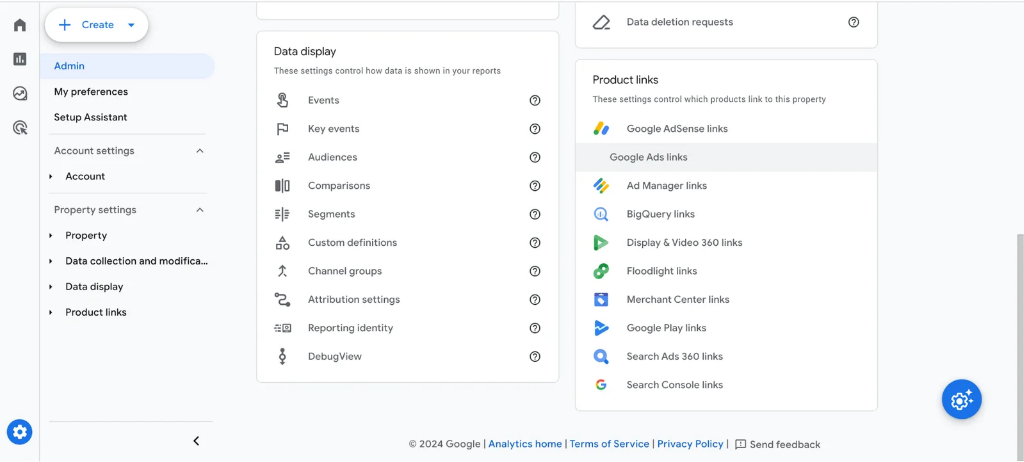
Two settings must be active before audiences flow correctly. First, auto-tagging in Google Ads — without it, GA4 can't associate clicks with sessions, and conversion data breaks. Second, the Personalized Advertising toggle in the GA4-Google Ads link must be switched on — as Google's official Analytics documentation confirms, disabling this blocks audience data from passing to Google Ads entirely, regardless of how your tag is configured.
For EU and UK advertisers, Consent Mode v2 is mandatory since March 2024. Without a Google-certified CMP implementing it correctly, remarketing lists stop growing for non-consenting users — which in many European markets means the majority of your traffic.
Creating remarketing audiences
The audience builder is in GA4 under Configure → Audiences. You can start from a template — "All Users," "Purchasers," "Non-Purchasers" — or build a custom audience from scratch using any combination of events, page paths, session properties, and user properties.
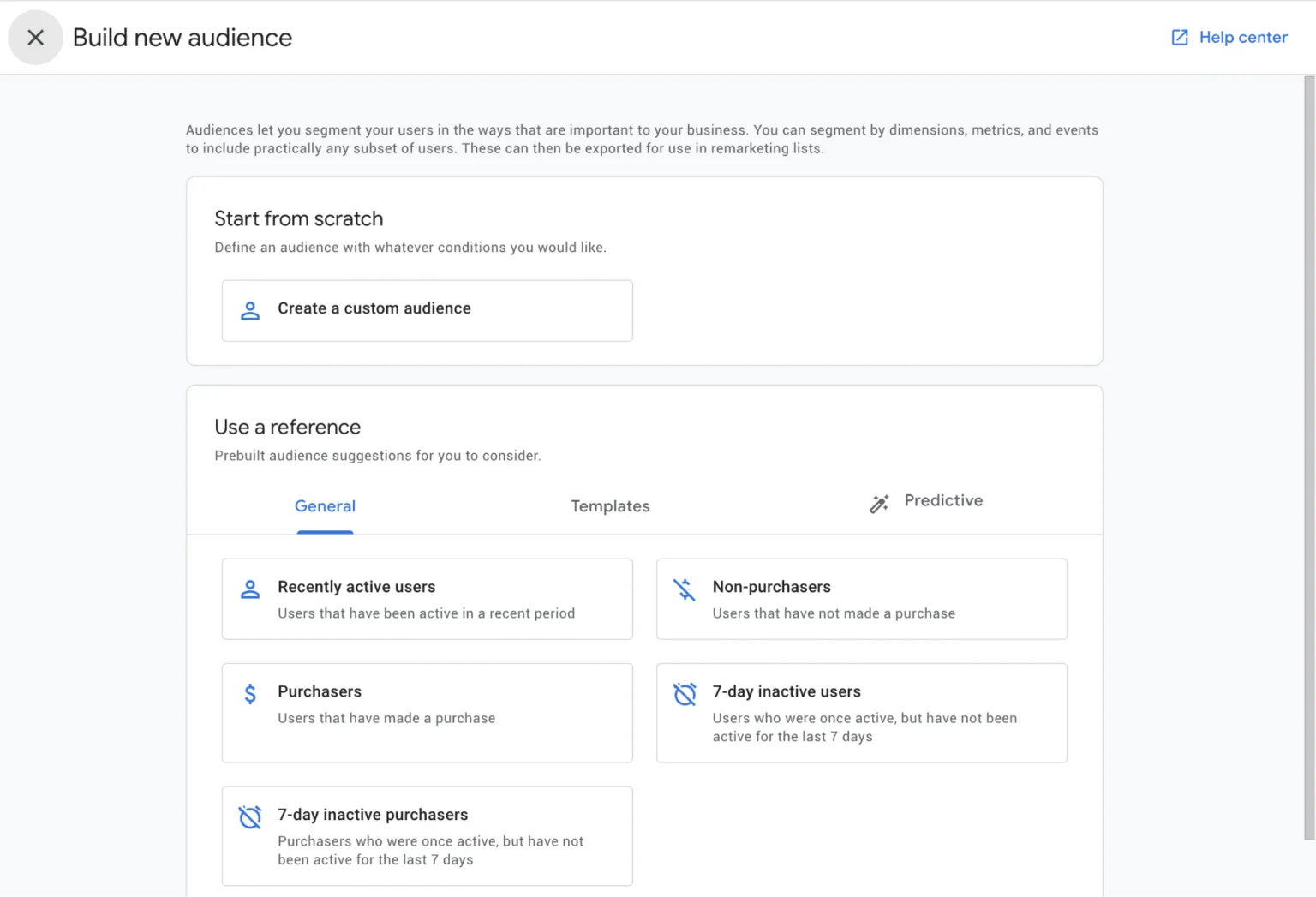
Name audiences descriptively from day one: "Pricing Page Visitors — Last 30 Days" tells you something actionable. "Remarketing List 3" tells you nothing six months later.
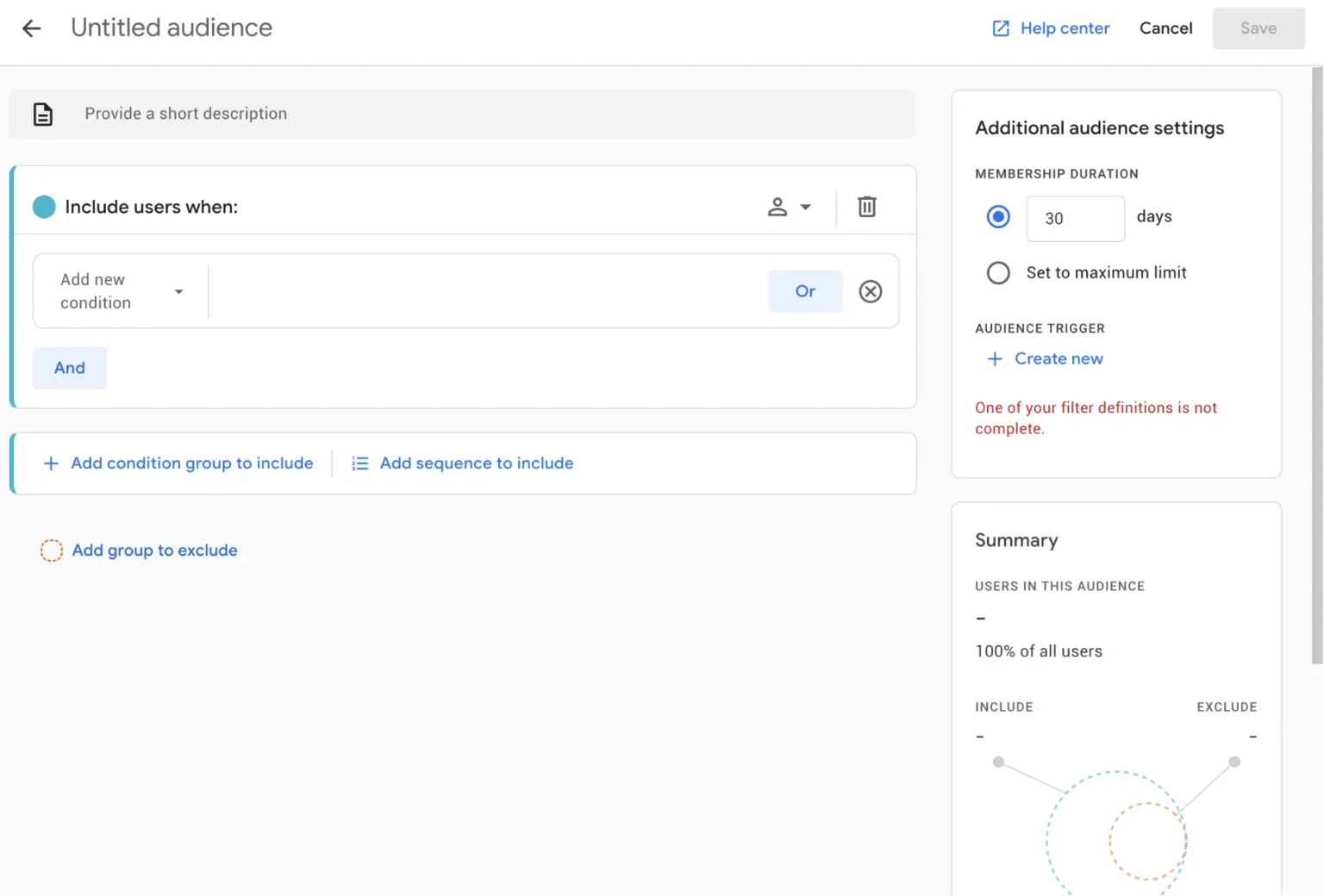
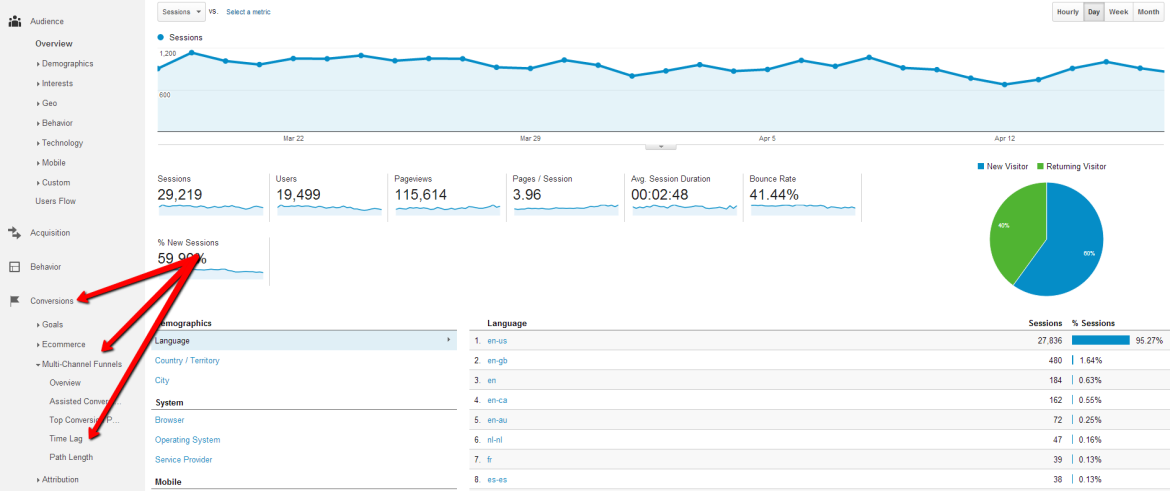
Set membership duration to match your sales cycle — use GA4's Time Lag report to see how long your typical buyer takes from first visit to conversion, then set list duration accordingly rather than defaulting to 30 days for everything.
As Whitehat SEO's 2026 technical guide notes, minimum list sizes to remember: 100 users for Display campaigns, 1,000 for RLSA. GA4 predictive audiences — "likely purchasers in 7 days," "likely churners" — require minimum thresholds of 1,000 returning users and 1,000 purchase events in 28 days before they activate.
Linking GA4 and Google Ads
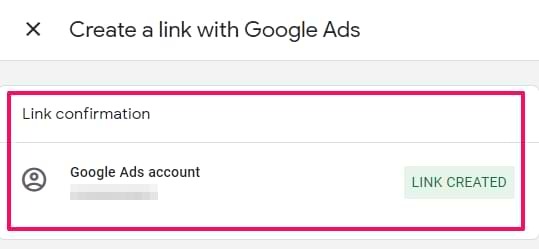
The link is created from either platform. In GA4: Admin → Product Links → Google Ads Links → Link. In Google Ads: Tools & Settings → Linked Accounts → Google Analytics. Once linked and with personalized advertising enabled, audiences appear in Google Ads Audience Manager within 24–48 hours under the naming convention [audience name] of [GA4 property name]. Enable Google Signals in GA4 simultaneously — this activates cross-device tracking for signed-in Google users and unlocks demographic data that otherwise isn't available.
Audience Segmentation Strategies
A remarketing funnel strategy built around generic "all visitors" lists leaves significant conversion potential untouched. The real leverage comes from segmenting by behavior, intent level, and position in the sales cycle — then matching message and bid to each segment.
Behavioral segments
Start with intent signals, not page visits. A user who viewed your homepage and bounced in 8 seconds is not the same as a user who spent 4 minutes on your pricing page and then visited your case studies. Both are "website visitors" — but treating them identically wastes budget on the first while potentially underinvesting in the second.
According to Whitehat SEO's 2026 segmentation analysis, the highest-priority behavioral segments for most businesses are cart abandoners, pricing page visitors, product or service page viewers, and lead form starters. These groups demonstrated specific intent before leaving — and the ad that brings them back should directly address whatever stopped them from converting.
For B2B, add: repeat visitors (three or more sessions), users who viewed case studies or customer pages, and anyone who spent more than 3 minutes on any page. These engagement signals correlate with evaluation-stage buyers who are actively considering options.
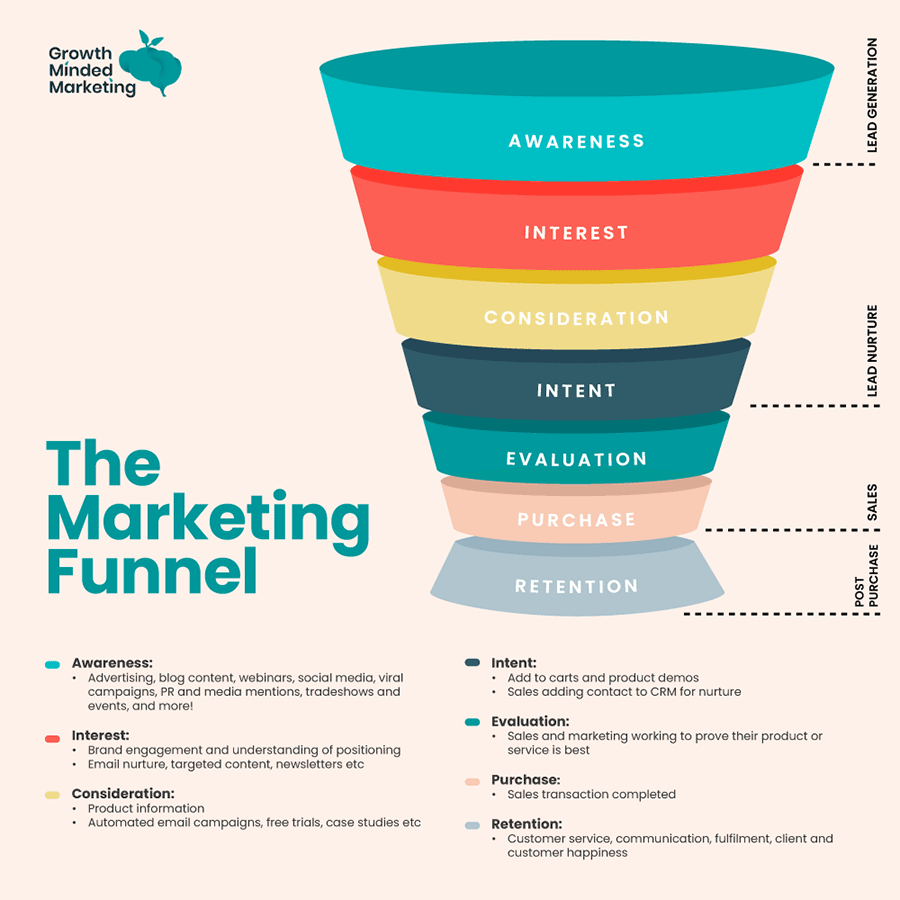
Funnel-based audiences
Remarketing best practices for funnel-based segmentation mean treating the funnel as a series of distinct lists — not a single pool. A practical architecture for most accounts:
-
TOFU remarketing — all visitors, excluding bounced sessions under 10 seconds. Goal: brand reinforcement. Bids: low. Offer: content, insight, social proof.
-
MOFU remarketing — product/service page viewers, repeat visitors, video watchers. Goal: move toward evaluation. Bids: medium. Offer: case studies, comparison pages, free trials.
-
BOFU remarketing — pricing page visitors, cart abandoners, lead form starters, high-intent page sequences. Goal: convert. Bids: highest. Offer: demo, consultation, discount, urgency.
Exclude lower-funnel audiences from upper-funnel campaigns — this prevents showing brand awareness ads to someone who's already been on your pricing page three times and needs a direct conversion message, not another explainer video.
Membership duration best practices
Duration should mirror your actual sales cycle — not default settings. GA4's Time Lag report shows the real distribution of time between first visit and conversion in your account. If 80% of conversions happen within 14 days, a 90-day list is mostly wasted reach. If your B2B sales cycle averages 60 days, a 30-day list misses the majority of the pipeline.
As Whitehat SEO confirms, the maximum Customer Match list retention is now capped at 540 days following the April 2025 policy change. For site-visit-based audiences, the maximum is 540 days in Display and 180 days in Search. Short-cycle products — e-commerce impulse purchases, local services — should use 7–14 day windows for BOFU segments to maintain relevance. Long-cycle B2B deals can run MOFU lists at 90–180 days without the audience going stale.
Remarketing Ads and Creatives
Creative is where most remarketing campaigns underperform. The tracking is set up, the audiences are built — and then everyone gets the same generic banner. That's not remarketing strategy, it's remarketing infrastructure without the strategy on top.
Messaging by funnel stage
The message a cart abandoner needs is completely different from what a first-time homepage visitor needs. As Young Urban Project's 2026 guide to ad fatigue explains, sequenced messaging respects where buyers are in their thinking — top-of-funnel creative builds curiosity and relevance, mid-funnel addresses doubts and comparisons, bottom-funnel reinforces trust and urgency. Running the same creative across all three stages is one of the fastest ways to burn through budget without meaningful results.
A practical messaging framework by segment: TOFU visitors see brand reinforcement — a headline that names the problem they were researching, paired with a proof point or insight. MOFU visitors — product page viewers, repeat visitors — see case studies, comparison angles, or specific feature benefits. BOFU visitors — cart abandoners, pricing page viewers — see direct conversion messages: "Complete your order," "Book a 15-minute call," or a time-limited incentive. Boomcycle's RLSA case study for a local electrical company illustrates this precisely: past visitors searching generic terms saw "Schedule Your Electrical Repair — You've Seen Our Work," while cold audiences saw trust-based messaging. The RLSA bids were 150% higher for remarketing audiences — and conversion rate improved 34%.
Creative formats and sizes
For Display remarketing, Responsive Display Ads are the standard — upload a full asset set (headline, description, logo, landscape image, square image, portrait image) and Google assembles combinations per placement. The Google Ads remarketing examples that consistently perform are those with specific copy — "You left something behind," "Still thinking it over?" — rather than generic brand ads. Personalization at this stage doesn't require dynamic feeds; even a reference to the user's intent ("Looking for project management software?") outperforms a cold awareness message.
For dynamic remarketing specifically, feed quality matters as much as creative quality. Product titles, images, and prices must be accurate and current — an ad showing an out-of-stock product or an incorrect price destroys trust faster than any creative failure.
Frequency and ad fatigue management
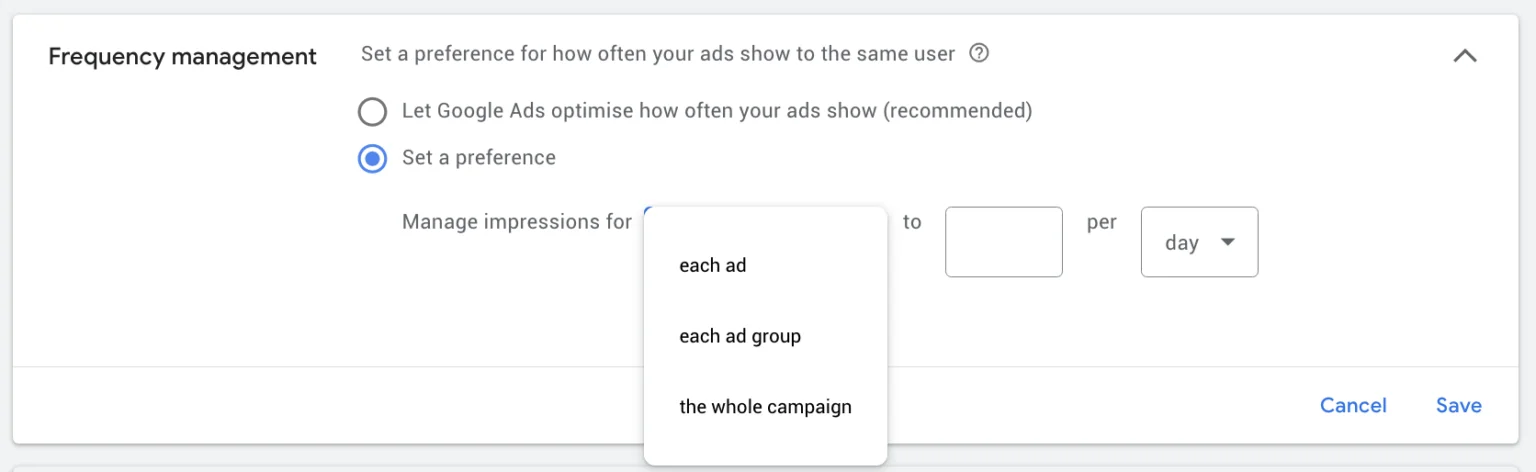
According to 7 Mile Media's advanced remarketing guide, most successful remarketing campaigns cap ad exposure at 3–5 impressions per user per day. InBeat Agency's 2025 remarketing analysis puts the optimal frequency at 2–3 impressions per week for maintaining engagement without triggering avoidance — anything higher produces diminishing returns as users start ignoring repeated ads.
Creative refresh cadence should be tied to impression volume, not an arbitrary calendar. According to ALM Corp's 2025 Google Ads year-in-review: high-impression campaigns (1M+ monthly impressions) need static creative refreshed every 4–6 weeks; medium-impression campaigns (100K–1M) every 6–8 weeks; low-impression campaigns every 8–12 weeks. The trigger for an early refresh: CTR drops 25%+ from initial levels or conversion rate declines without a corresponding change in offer or landing page.
Spotify's remarketing approach is worth noting here — their sequential campaigns targeting non-converting users with personalized premium upgrade offers based on listening behavior resulted in 35% higher subscription rates. The key was not just frequency management but message progression: each exposure advanced the conversation rather than repeating the same pitch.
Measuring Remarketing Performance
Numbers without context mislead. A remarketing campaign showing a 10x ROAS looks outstanding — until you realize it's entirely composed of users who would have converted anyway through organic search, and you're just claiming credit for traffic that didn't need a nudge.
Key metrics and KPIs
The remarketing performance metrics that matter most depend on campaign type. For Display remarketing: CTR (benchmark: 0.35–0.5% for remarketing vs 0.07% for standard display), conversion rate by audience segment, CPA vs. prospecting CPA, and view-through conversions with appropriate skepticism. For RLSA: conversion rate lift vs. non-remarketing Search traffic, impression share among target segments, and bid adjustment efficiency. For dynamic remarketing: product-level ROAS, abandonment recovery rate, and feed health (rejected products, price mismatches).
Remarketing cost considerations typically run lower than prospecting — CPMs on the Display Network for remarketing audiences average $0.66 vs. $2+ for cold audiences, according to industry benchmarks. But watch for audience exhaustion in small lists: a 500-person audience running at full speed will see frequency spike quickly, inflating CPM and degrading performance.
Attribution and assisted conversions
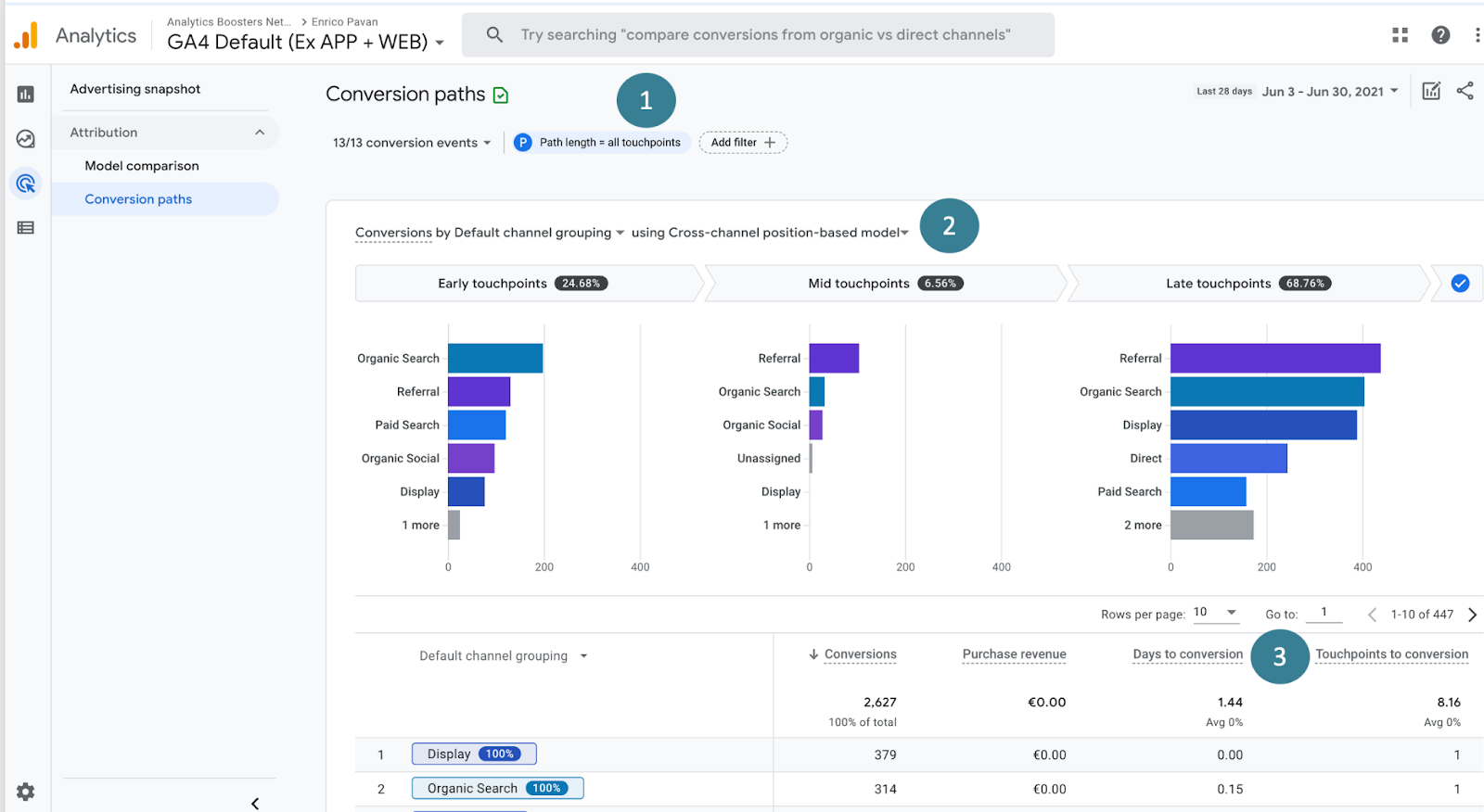
The conversion credit problem is the central measurement challenge in any guide to remarketing in Google Ads. Last-click attribution assigns 100% of conversion credit to remarketing if it was the final touchpoint — which overstates its contribution. Data-driven attribution distributes credit across the full conversion path, giving remarketing credit for its actual role: reinforcement and re-engagement rather than sole origination.
In GA4, the Advertising → Attribution → Conversion paths report shows how often remarketing appears as an assist versus a last-click conversion. Use this to calibrate how much budget remarketing actually deserves — if 80% of its conversions also had a prior organic or paid Search touchpoint, you're looking at an assist channel, not a standalone acquisition channel.
Optimization signals
The optimization signals worth acting on regularly: audience overlap reports (if your BOFU segment is too small to exit the learning phase, broaden it), search term reports for RLSA campaigns (ensure the queries are actually high-intent), placement reports for Display (exclude low-quality sites, apps, and irrelevant content categories), and frequency distribution (if average frequency exceeds 7 per week on a small audience, pause or expand the list).
According to Analytify's 2026 remarketing guide, adjusting bids based on audience segment performance is one of the highest-leverage optimizations available — if cart abandoners convert at 3x the rate of general visitors, bid 3x higher for that segment and reduce waste across lower-intent lists accordingly.
Common Remarketing Mistakes
Over-targeting and poor segmentation
As Gezar's 2026 remarketing guide notes, one of the most reliable ways to waste remarketing budget — and a gap this guide to remarketing in Google Ads sees in almost every account audit — is treating bounce traffic as a warm audience. Someone who spent 3 seconds on your site and left is not a qualified prospect — they got there by accident, misread the ad, or immediately saw it wasn't relevant. Filter out sessions under 10 seconds or with zero page scrolling from every primary remarketing list. The remaining audience will be smaller and significantly more valuable.
The opposite problem is equally common: over-segmentation. Creating too many granular audience segments produces lists too small to exit Google's learning phase — especially now that Google has raised the effective threshold for Smart Bidding optimization. A list of 80 cart abandoners sounds specific and targeted. In practice it delivers irregular impressions, erratic CPMs, and bidding algorithms that never stabilize. Consolidate where you can, segment where the behavioral difference is actually meaningful.
Ignoring exclusions
Showing a "Buy now" ad to someone who bought yesterday isn't just wasted spend — it's a trust signal in the wrong direction. According to Gezar, failing to exclude converted users is one of the costliest and most avoidable mistakes in this guide to remarketing in Google Ads. Set up a converters exclusion list and apply it to every acquisition campaign as standard. Then segment it: recent purchasers should be excluded from purchase-focused ads, but can remain in upsell or cross-sell audiences for complementary offers.
As Analytify's 2026 guide confirms, exclusion architecture also matters at the campaign level. High-funnel awareness campaigns should exclude pricing page visitors and cart abandoners — those users need a conversion message, not more brand awareness. Failing to implement these exclusions means the wrong message reaches the wrong person at every stage simultaneously.
Weak creative rotation
According to Gezar's frequency analysis, no frequency capping is the fastest route to negative brand association. Running the same banner at 15 impressions per week on a small list doesn't increase conversion probability — it increases the likelihood that users actively start avoiding your brand. The fix is straightforward: cap frequency at 3–5 impressions per day, refresh static creatives every 4–6 weeks for high-impression campaigns, and build a rotation of at least 3–5 ad variants per audience segment so the algorithm has meaningful combinations to test.
Creative rotation failure compounds with poor segmentation. A user who's seen the same "Don't forget your cart" banner 40 times over two weeks isn't unconverted because they need more reminders — they're unconverted because the message or offer isn't working and needs to change. Inbeat Agency recommends testing urgency and exclusivity variants systematically: a limited-time discount or a "only 3 left" message in one variant against standard copy in another consistently reveals which lever actually moves that specific audience.
Practical Checklists
Remarketing setup checklist
Before launching any remarketing campaign, verify the following are in place:
-
Google Tag is installed site-wide and firing correctly on all pages including thank-you and confirmation pages.
-
GA4 is linked to Google Ads with Personalized Advertising toggled on and auto-tagging enabled.
-
Google Signals is enabled in GA4 for cross-device tracking and demographic data.
-
Consent Mode v2 is implemented via a Google-certified CMP for EU/UK traffic.
-
Audience lists are named descriptively with behavioral logic documented — not generic labels.
-
Minimum list sizes are confirmed: 100 users for Display and Search/YouTube, 1,000 for RLSA.
-
Converters exclusion list is created and applied to all acquisition campaigns.
-
Bounce traffic exclusion is configured — sessions under 10 seconds or zero page views filtered out.
-
Customer Match lists are scheduled for refresh within the 540-day window.
-
GA4 Time Lag report has been reviewed to set membership durations aligned to actual sales cycle.
Ongoing optimization checklist
Once campaigns are live, run through these checks weekly and monthly:
-
Frequency report reviewed — average impressions per user per week should stay below 5–7 for Display.
-
Search term report reviewed for RLSA campaigns — confirm queries match intended intent tier.
-
Placement report reviewed — exclude low-quality sites, irrelevant apps, and content categories.
-
Audience overlap report checked — ensure BOFU segments aren't bleeding into TOFU campaigns.
-
Conversion path report in GA4 reviewed monthly — verify remarketing's role as assist vs. last click.
-
Creative CTR monitored — if CTR drops 25%+ from initial baseline, refresh assets before performance degrades further.
-
Audience list sizes monitored — flag lists below minimum thresholds and consolidate or expand as needed.
-
Customer Match list updated — remove lapsed contacts and add new qualified emails on a rolling basis.
Conclusion
Remarketing in Google Ads is not a set-and-forget channel. The technical foundation — tag, GA4 link, consent compliance — sets the ceiling for what's possible. Everything above that ceiling is determined by segmentation quality, message relevance, and how rigorously you manage exclusions, frequency, and creative freshness.
The fundamentals haven't changed: reach the right person with the right message at the right moment. What has changed is the infrastructure — GA4 predictive audiences, Consent Mode v2, Customer Match at 100-user thresholds, and the disappearance of third-party cookie alternatives — means the gap between accounts doing this correctly and those doing it approximately is wider than it was two years ago.
This guide to remarketing in Google Ads has one central argument: the channel works when the infrastructure is clean and the message matches the moment. Google Ads remarketing 2026 is a first-party data game. The advertisers building clean Customer Match lists, layering behavioral segments onto real sales cycle data, and refreshing creative on a disciplined cadence are seeing the performance numbers that make remarketing worth running. The ones still relying on "all visitors — last 30 days" with a generic banner are wondering why the channel isn't delivering.
Start with the setup checklist. Build the audience architecture before the campaigns. Match the message to the funnel stage. The results follow.

FAQ
What is remarketing in Google Ads?
Google Ads remarketing guide definition: remarketing is showing ads to people who have previously visited your website, used your app, or interacted with your content — targeting them as they continue browsing the web, watching YouTube, or searching on Google. It works by placing a tracking tag on your site that adds visitors to audience lists, which are then used in Google Ads campaigns to re-engage those specific users with tailored messaging.
How does Google Ads remarketing work?
How remarketing works in Google Ads: when someone visits your site, the Google Tag or GA4 fires and adds them to a remarketing audience based on their behavior — pages visited, actions taken, time spent. That audience syncs to Google Ads within 24–48 hours and becomes available for targeting across Display, Search (RLSA), YouTube, Gmail, and Shopping. Smart Bidding uses these audience signals to adjust bids in real time, bidding higher for users with stronger conversion signals.
What is the difference between remarketing and retargeting?
In practice, remarketing vs retargeting is a terminology distinction more than a functional one. Technically, retargeting refers to cookie-based ad serving to past site visitors across ad networks; remarketing originally described re-engaging known customers via email. Google Ads uses "remarketing" as its official term for both. For operational purposes, treat them as interchangeable — the mechanics inside Google Ads are the same regardless of which word you use.
Is remarketing effective for lead generation?
Remarketing for lead generation is most effective when campaigns target high-intent behavioral segments — pricing page visitors, lead form starters, repeat visitors — rather than broad site traffic. RLSA is particularly powerful for B2B lead gen: past visitors searching high-intent queries can receive 150–200% bid adjustments and personalized copy that acknowledges their prior visit. The key is matching the offer to the funnel stage — pushing demo requests at visitors who've only seen your homepage once converts poorly; pushing them at users who've visited your pricing page three times converts well.
How do privacy laws affect Google Ads remarketing?
For EU and UK advertisers, Consent Mode v2 is mandatory since March 2024. Without it, remarketing lists stop growing for non-consenting users — in many European markets, that means a significant share of traffic. GDPR also requires that you disclose remarketing in your privacy policy and provide users with a mechanism to opt out. For US advertisers, CCPA applies in California — users must be informed of data collection and given opt-out rights. The practical response for all markets is to implement a Google-certified CMP, build Customer Match lists as a cookie-independent fallback, and treat first-party data infrastructure as a core business asset rather than a compliance checkbox.


