


Guide to Google Customer Match: Setup, Use Cases, and Compliance
Introduction
Third-party cookies are dying. GA4 audiences have gaps. And if you're still relying purely on pixel-based remarketing to re-engage your customers, you're working with incomplete data.
Customer Match is the fix most advertisers underuse. You take the email list sitting in your CRM, the phone numbers from your loyalty program, the contacts who converted offline — and turn them into targetable Google Ads audiences. No cookies and behavioral inference needed. Just your data, matched against Google accounts.
Google dropped the minimum list size to 100 users in December 2024, which removed the last excuse smaller teams had for ignoring it. If you've been searching for a practical google customer match guide that goes beyond the official docs, this is it. And with Consent Mode v2 now mandatory in the EU and UK
This guide to Google Customer Match covers setup, segmentation, compliance, and the use cases where it actually moves performance metrics. Practical, not theoretical.
What Is Google Customer Match?
Core definition
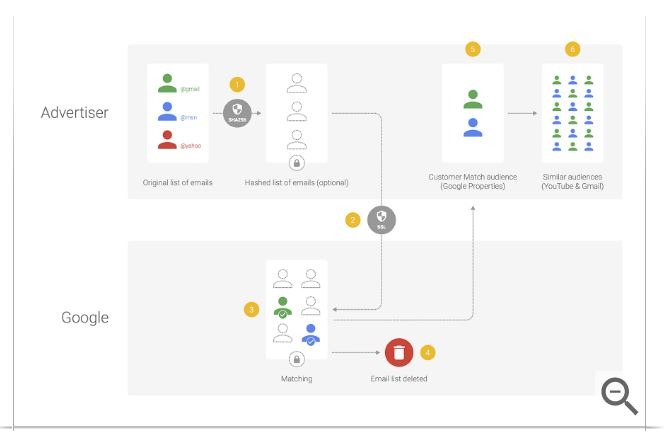
Customer Match lets you upload first-party data — emails, phone numbers, mailing addresses — into Google Ads. Google hashes it, matches it against signed-in Google accounts, and hands you back an audience of real people from your database. That audience works across Search, YouTube, Gmail, Display, and Shopping.
Customer match google ads explained in one sentence: you bring the data, Google finds the accounts. What makes it different from most targeting options is that the audience quality is entirely in your hands. A well-maintained CRM with verified emails will produce match rates of 40–60%. A list of three-year-old unsubscribed contacts might get 15%. Seer Interactive's analysis puts email as consistently the strongest match field — phone numbers and addresses help but rarely compensate for weak email data.
Customer match eligibility requires a Google Ads account in good standing: clean payment history, no active policy violations, and sufficient spend history. New accounts typically don't have access on day one. If you're just getting started, Google's official documentation is the right companion to this guide to Google Customer Match.
How Customer Match differs from remarketing
Remarketing tracks behavior on your site. Someone hits your pricing page, the GA4 tag fires, they land in an audience. That's the whole mechanism — observe, cookie, target.
Customer Match doesn't care whether someone visited your site. An in-store buyer who's never clicked a Google ad, a B2B prospect who came through a trade show, a subscriber who's been on your list for two years without converting — all reachable, as long as you have their contact details and they have a Google account.
The durability difference is significant. Cookie-based remarketing audiences shrink every time someone clears their browser or switches devices. Customer Match audiences don't — they're tied to Google account identity, which is far more stable. DeepSync notes that this makes Customer Match particularly valuable for longer B2B sales cycles, where a 90-day cookie window cuts off remarketing before the deal closes.
The short version on customer match vs remarketing: one is behavioral, the other is relational. Both have a place, but they answer different questions. Both have a place, but they answer different questions.
How Google Customer Match Works
Data sources
Customer Match accepts four types of first-party data: email addresses, phone numbers in E.164 format, mailing addresses (first name, last name, country, zip code), and mobile device IDs. You can combine multiple fields for the same contact — the more fields you include, the better the match rate.
The data can come from anywhere in your customer stack: Salesforce, HubSpot, Klaviyo, loyalty databases, point-of-sale systems, offline purchase records. This is where Customer Match does something no pixel-based tool can — it bridges offline customer relationships with digital ad targeting. A customer who bought in-store and never visited your website is still reachable, as long as you have their email and they have a Google account.
For teams already running GA4, Customer Match works alongside behavioral audiences rather than replacing them. The practical split: GA4 identifies who visited your pricing page three times this month — Customer Match identifies which of those visitors are already paying customers you shouldn't be spending acquisition budget on.
Hashing and data security
Before upload, all customer data must be hashed using SHA-256 — a one-way encryption that converts raw contact details into a fixed string that can't be reversed. If you upload via the Google Ads UI, hashing happens automatically. If you're using the API, you hash on your side before the data ever reaches Google.
Google's matching process works entirely at the hashed level — Google compares your hashed data against its own hashed account identifiers. No raw PII is ever stored on Google's servers. Once matching completes, the uploaded file is deleted. What remains is only the matched audience segment.
This architecture is what makes Customer Match workable under GDPR — but the compliance responsibility stays with the advertiser. Google handling data securely doesn't mean you're automatically compliant. You still need a legal basis for using the data you upload, which in most jurisdictions means explicit consent from the people on your list.
Audience matching process
After upload, Google's engine compares your hashed list against signed-in Google accounts and returns an audience with a reported match rate — the share of uploaded records that successfully matched.
Seer Interactive's research consistently shows email as the strongest match field, with rates typically between 30% and 60% depending on list freshness and whether the emails are tied to active Google accounts. Phone numbers and physical addresses match at lower rates individually, but including them alongside email addresses improves overall results.
A matched audience also generates a similar segments list — users who share characteristics with your Customer Match audience but aren't in it. Useful for prospecting when you want to extend reach beyond your existing contacts.
One operational detail worth knowing: after you upload or refresh a list, it takes 6 to 12 hours before the updated audience is fully active. Don't upload a suppression list an hour before a campaign launch and assume it's live.
Customer Match Requirements and Limitations
Minimum list sizes
Customer match requirements differ by campaign type. The across-the-board minimum dropped to 100 users in December 2024 — down from 1,000 — which opened the feature to smaller advertisers who previously couldn't qualify.
In practice, 100 matched users is a technical floor, not a useful working size. DeepSync recommends a minimum of 1,000 matched users for any campaign where Smart Bidding needs to optimize — below that, delivery is inconsistent and performance data is too thin to act on. For RLSA bid adjustments in Search campaigns, the 1,000-user threshold still applies regardless of the general minimum.
Eligible data fields
Google accepts: email address, phone number (E.164 format with country code), first name, last name, country, zip code, and mobile device ID. Each field has formatting requirements — phone numbers without country codes, names with inconsistent capitalization, or emails with trailing spaces all reduce match rates without triggering an error.
Stape.io's technical guide makes a straightforward point: normalizing email addresses before upload — lowercase, trimmed whitespace, no punctuation artifacts — can lift match rates by 10 to 15% compared to raw CRM exports. It takes 20 minutes of data cleaning and meaningfully improves audience size.
Common disapproval reasons
Customer match limitations show up most often at the policy level, not the technical one. Lists get disapproved for: uploading unhashed data via API, including data fields outside what Google permits, and using data collected without proper consent in regulated markets.
More serious are account-level restrictions. Advertisers in sensitive categories — certain healthcare verticals, financial products targeting users based on hardship signals, political advertising in restricted regions — face additional scrutiny and may find Customer Match access limited or removed entirely.
The silent disapproval problem is real: a list can upload without error but never activate. After every upload, check Audience Manager for status flags. A list showing "Too small" or "Processing" for more than 24 hours needs investigation — don't assume a clean upload means a live audience.
Setting Up Google Customer Match
Preparing customer data
The quality of your Customer Match audience starts before you touch Google Ads. A poorly prepared list doesn't just produce low match rates — it wastes the time you spent building the campaign around it.
The preparation process comes down to three things: format, clean, normalize. Format means structuring your CSV with the column headers Google expects — Email, Phone, First Name, Last Name, Country, Zip. Clean means removing duplicates, hard bounces, unsubscribes in jurisdictions where consent is required, and contacts with obviously malformed data. Normalize means standardizing everything: emails to lowercase, phone numbers to E.164 format (+12025551234), names without special characters or extra spaces.
Stape.io's breakdown of customer list uploads flags one consistently overlooked step: checking for encoding issues in CSV exports. Non-UTF-8 characters in name fields — common in CRM exports that include international contacts — can corrupt entire rows without generating a visible error during upload. Run the file through a UTF-8 validator before submitting.
A practical data hygiene checklist before any upload:
-
Remove contacts added without explicit consent where legally required.
-
Deduplicate by email address, not just by customer ID.
-
Strip unsubscribes and hard bounces from email marketing platforms.
-
Validate phone number format for every country in your list.
-
Confirm the list was updated within the last 90 days — older data drops match rates significantly.
Uploading customer lists
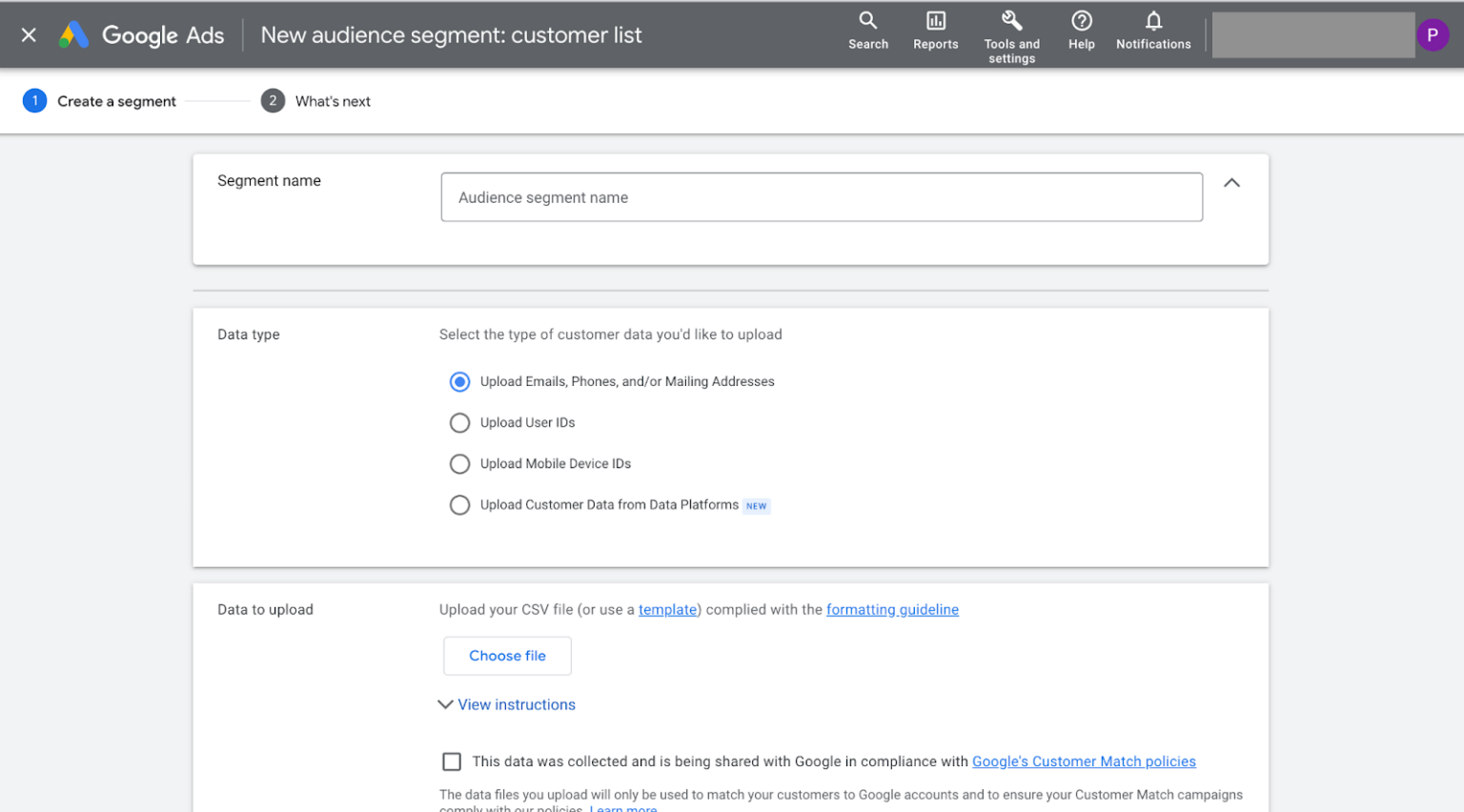
The customer match setup google ads process has two routes: manual upload via the Google Ads UI, or automated via the Google Ads API.
For manual uploads, go to Tools & Settings → Audience Manager → Your Data Segments → + and select Customer List. Choose your data type, upload the CSV, and Google handles SHA-256 hashing automatically. The audience appears in Audience Manager within a few hours, though full activation takes 6 to 12 hours.
For teams running ongoing CRM sync — refreshing lists weekly or monthly — the API route makes more sense. LeadsBridge and similar data onboarding platforms automate this by connecting your CRM directly to Google Ads, handling formatting, hashing, and upload on a set schedule. This removes the manual step and ensures your Customer Match audiences reflect current CRM state rather than a snapshot from three months ago.
List refresh cadence matters more than most advertisers realize. A Customer Match audience built from a year-old export of your email list includes churned customers, changed email addresses, and contacts who've long since converted. Google's documentation caps data retention at 540 days — but from a performance standpoint, monthly refreshes for active segments and quarterly for suppression lists is a more practical standard.

After upload, apply lists to campaigns through the Audiences tab at the campaign or ad group level. For Search campaigns, you can add lists in observation mode first — this lets you collect performance data by audience segment without restricting reach, before committing to targeting mode or bid adjustments.
Customer Match Use Cases
Search campaign targeting
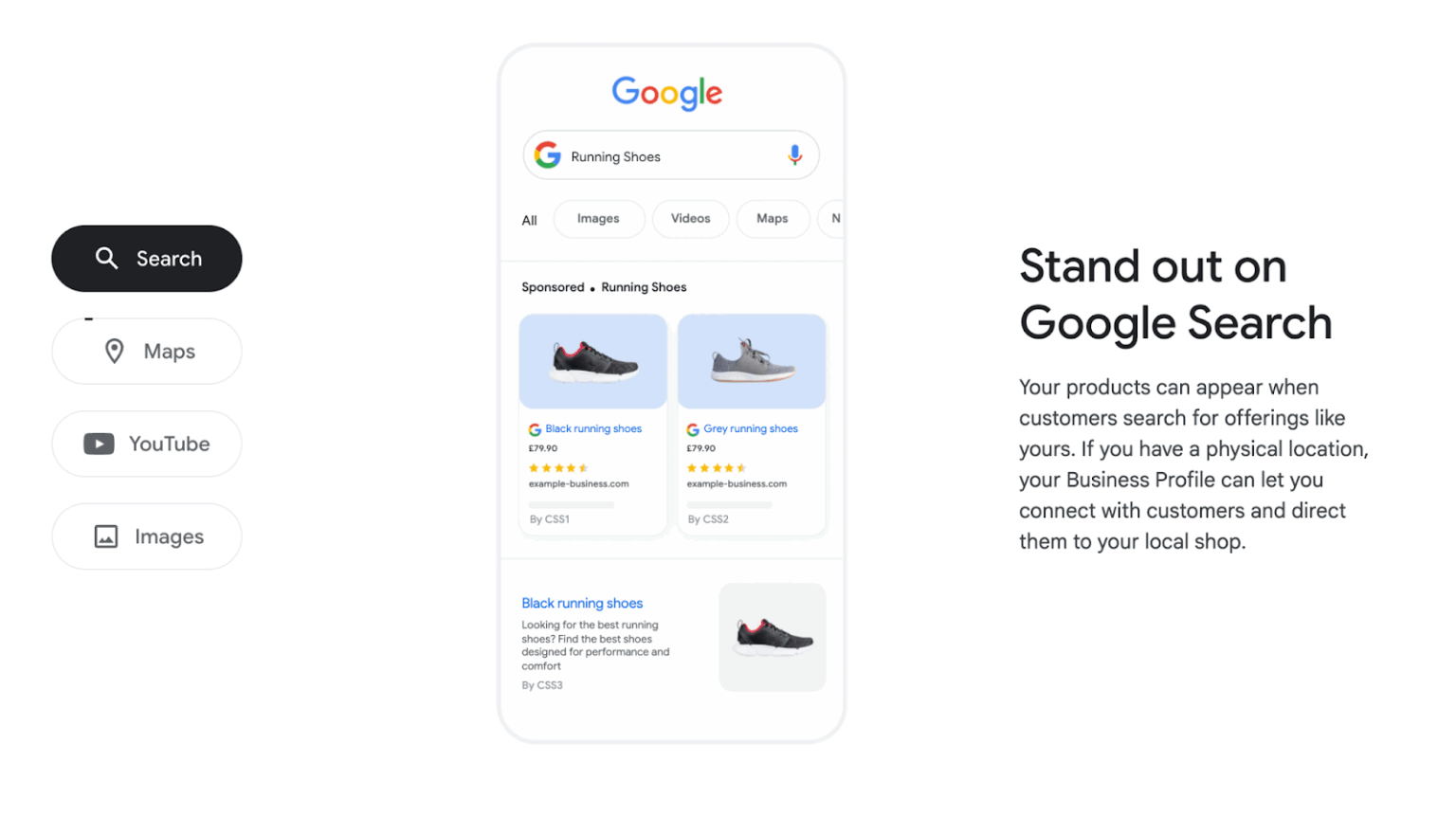
Customer match for search ads works through RLSA — Remarketing Lists for Search Ads. You add a Customer Match audience to a Search campaign and either restrict delivery to list members only (targeting mode) or collect data and apply bid adjustments (observation mode).
The most common application: bid significantly higher on high-intent keywords for users already in your CRM. A prospect who requested a demo three weeks ago and is now searching "best [your category] software" is far closer to converting than a cold visitor running the same search. The bid logic should reflect that gap — many advertisers apply 50–150% bid adjustments for high-intent Customer Match segments on bottom-funnel keywords.
Customer match targeting strategy in Search also works well for suppression. If you're running acquisition campaigns, excluding current customers from seeing those ads prevents wasted spend and avoids the awkward experience of showing a "Sign up free" ad to someone already paying for your product.
YouTube and video personalization
Customer match for YouTube ads lets you serve video content to known audiences — existing customers, lapsed subscribers, high-value prospects — rather than relying purely on interest or demographic targeting.
The segmentation logic that works here is sequential. Show a product education video to leads who haven't converted. Show a loyalty offer to customers approaching their renewal date. Show a win-back message to subscribers who churned six months ago. Each of these requires a different Customer Match list, but the creative investment pays off because you're talking to people with existing context about your brand — not cold audiences who need a full introduction.
Google confirms Customer Match is available for YouTube in-stream, Shorts, and in-feed formats within Demand Gen campaigns — the campaign type that replaced Video Action Campaigns in July 2025.
Display and Gmail campaigns
Customer match for display ads follows the same targeting logic as YouTube — you're reaching known contacts across the Google Display Network as they browse. The match rate tends to be lower than Search or YouTube because Display inventory is broader and less tied to Google account identity, but for brand reinforcement and lifecycle messaging it still adds precision that standard Display targeting can't match.
Gmail campaigns using Customer Match place ads directly in the Promotions or Social tabs of matched users' inboxes. For ecommerce, this works well for cart abandonment follow-up and promotional campaigns targeting past purchasers. For B2B, it's useful for nurturing warm leads who aren't actively searching but are still evaluating options.
Lead generation vs ecommerce
The customer match use cases differ enough between lead generation and ecommerce that they're worth separating.
For customer match lead generation, the highest-value application is suppression and acceleration. Suppress converted leads from acquisition campaigns. Accelerate warm leads — people who filled a form but went quiet — by targeting them with case studies or testimonials on YouTube and Display. Upload a list of MQLs to Search and bid aggressively on bottom-funnel keywords they're likely searching during their evaluation phase.
For customer match ecommerce strategy, the focus shifts to lifetime value. Upload your top 20% of customers by revenue and use that list as a seed for Similar Segments — prospecting for users who look like your best buyers rather than your average ones. Use purchase history segments to cross-sell: customers who bought product A but not product B get targeted with product B campaigns. Lapsed customers who haven't purchased in 180 days get a win-back offer with a specific discount, served through Gmail or Display.
Seer Interactive's guide highlights a pattern that repeats across ecommerce accounts: advertisers who segment Customer Match by purchase frequency — one-time buyers vs. repeat buyers vs. high-LTV customers — consistently outperform those running a single "all customers" list. The audiences behave differently, so the messaging and bids should differ too.
Audience Strategy and Segmentation
Lifecycle-based audiences
Most advertisers upload one Customer Match list — "all customers" — and call it a strategy. That's the baseline, not the ceiling. The real leverage comes from splitting your database by where customers are in their relationship with you, then matching message and bid to each stage.
A practical lifecycle segmentation for most businesses looks like this:
-
New customers (first purchase within 90 days) — exclude from acquisition campaigns, target with onboarding and cross-sell content.
-
Active customers (two or more purchases, last purchase within 180 days) — loyalty offers, upsell campaigns, referral program messaging.
-
Lapsed customers (no purchase in 180–365 days) — win-back campaigns with a specific incentive, served through Gmail or Display.
-
High-risk churners (subscription customers approaching renewal with low engagement signals) — proactive retention messaging before the renewal date, not after.
This isn't theoretical. The approach mirrors what Grammarly implemented when they replaced manual list-building with AI-driven segmentation in Salesforce — the result was 30% more MQLs converting and deals closing in 30 days instead of 60–90. The mechanism was the same: stop treating all customers as one audience, start acting on where they actually are in the lifecycle.
For B2B teams, lifecycle segmentation maps naturally onto CRM stages. Leads at MQL stage get one message. SQLs get another. Closed-lost opportunities from the last 12 months — a segment most B2B advertisers completely ignore — are often worth a dedicated Customer Match campaign because the buying context and objections are already known.
High-value customer segments
Once lifecycle segmentation is in place, the next layer is value-based segmentation — identifying your best customers and building targeting strategy around them rather than around your average customer.
The mechanics: export your top 20–25% of customers by lifetime value, revenue, or order frequency and upload them as a separate Customer Match list. Use that list in two ways — direct targeting with loyalty and upsell messaging, and as a seed audience for Similar Segments to find new prospects who resemble your best buyers rather than your median ones.
Seer Interactive documents this pattern consistently across their client accounts: advertisers who seed Similar Segments from high-LTV Customer Match lists see meaningfully better prospecting performance than those seeding from broad "all visitors" remarketing lists. The logic is straightforward — if you're going to prospect at scale, model your targeting on customers who actually generate revenue, not everyone who ever clicked an ad.
For ecommerce, this connects directly to Smart Bidding. Assign conversion values to Customer Match segments based on actual LTV data — a repeat buyer who averages $800 annually gets a higher assigned value than a one-time buyer at $40. Feed that into tROAS bidding and the algorithm starts optimizing toward customers who look like your high-value segment, not just anyone likely to complete a transaction. Jyll Saskin Gales, a Google Ads coach who spent six years at Google working with major advertisers, makes this point directly: "No amount of AI optimization can salvage a poor offer or a confusing landing page" — but equally, Smart Bidding optimizing toward the wrong conversion signal produces expensive, low-quality results regardless of how good the creative is. High-value Customer Match segments fix the signal problem at the source.
Measuring Customer Match Performance
Match rate analysis
Match rate is the first number to look at after every upload — and one of the most telling signals in any guide to Google Customer Match worth reading. A match rate below 20% usually means stale emails, formatting issues, or a list heavily weighted toward contacts who don't have Google accounts. A rate above 50% typically indicates a clean, current list of active contacts.
Seer Interactive's benchmarks put typical email-based match rates between 30% and 60%. Phone numbers match lower on their own but add incremental matches when combined with email. Physical addresses are the weakest field in isolation but help round out records for contacts where email matching fails.
If match rate drops significantly between list refreshes — say from 45% to 22% — that's a signal worth investigating before assuming campaign performance will hold. Common causes: the underlying CRM data hasn't been cleaned recently, the list now includes a large batch of older contacts with abandoned email addresses, or a formatting change in the export broke normalization.
Key metrics and KPIs
Customer match performance metrics worth tracking regularly go beyond the standard campaign dashboard. The ones that matter most:
-
Match rate per list, tracked over time — declining rates signal data quality problems before they hit campaign performance.
-
Audience size after matching — a list of 10,000 uploaded contacts that produces 1,200 matched users is a data quality problem, not a targeting problem.
-
Conversion rate by Customer Match segment vs. non-Customer Match traffic — this is where the real performance delta shows up.
-
CPA and ROAS by segment — high-LTV Customer Match segments should be producing better CPA and ROAS than cold audiences; if they're not, the segmentation or messaging needs work.
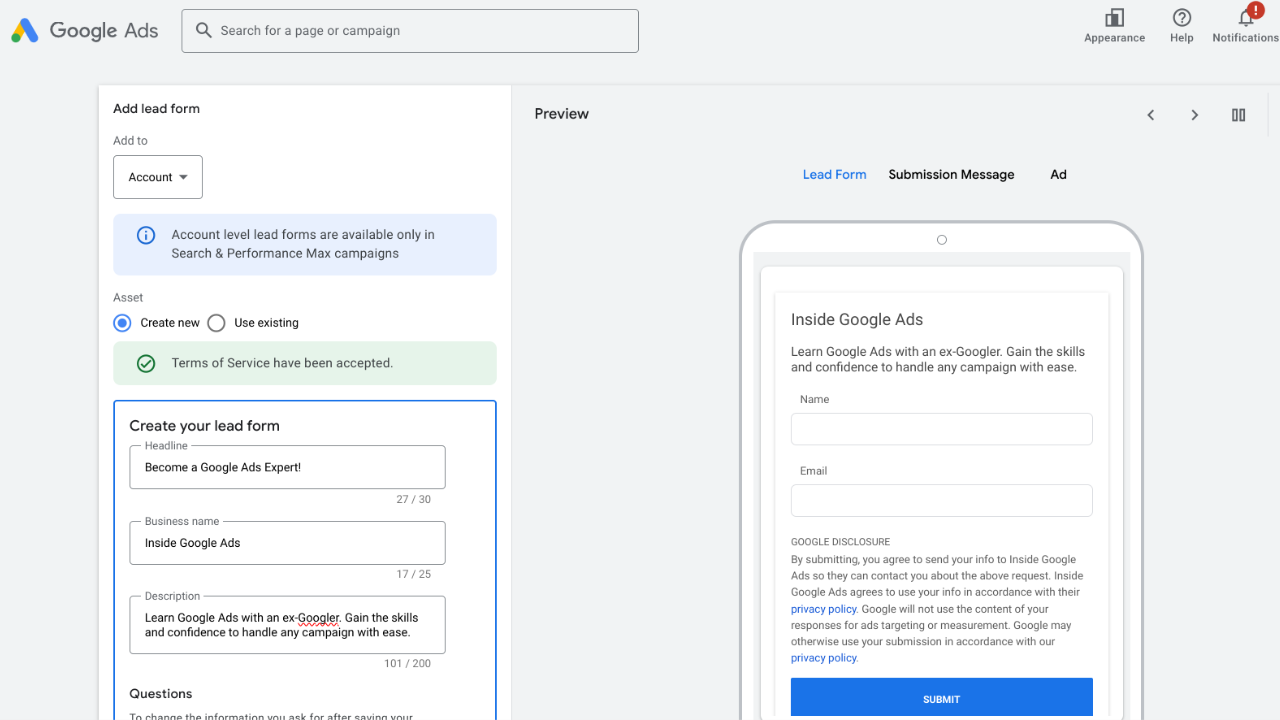
For lead generation accounts, the metric that matters most isn't CPL — it's MQL-to-SQL conversion rate by Customer Match segment. MarketJoy's pipeline data shows B2B teams with advanced audience segmentation reaching MQL-to-SQL conversion rates of 40%, compared to an industry average of 12–18%. Customer Match is one of the inputs that gets you there — but only if you're tracking quality, not just volume.
Attribution considerations
Customer Match creates an attribution challenge that's easy to overlook. If someone is in your Customer Match audience and also visits your site organically before converting, last-click attribution assigns the conversion to organic search — not to the Customer Match campaign that kept your brand visible during their evaluation period.
Data-driven attribution in GA4 handles this better by distributing credit across touchpoints, but it still doesn't fully capture the influence of impression-based exposure from Display and YouTube Customer Match campaigns. View-through conversions with a short window — 1 to 7 days — give a partial picture, but should be read alongside assisted conversion data rather than treated as standalone performance proof.
The honest approach: run Customer Match alongside a holdout group — a portion of your audience excluded from Customer Match targeting — and compare conversion rates between the two groups over 4 to 6 weeks. That's the only way to isolate Customer Match's actual incremental contribution rather than attributing conversions it didn't cause. Google's Conversion Lift studies, now available at lower spend thresholds after the September 2025 Demand Gen updates, make this measurable without building a custom experiment from scratch.
Common Mistakes and Risks
Poor data hygiene
The most common reason Customer Match underperforms has nothing to do with campaign structure or bidding strategy — it's the data going in. A CRM export that hasn't been cleaned in 18 months will contain churned customers, changed email addresses, role-based emails like info@ or support@ that nobody checks, and contacts collected before proper consent mechanisms were in place.
The downstream effect is predictable: low match rates, small audience sizes, and Smart Bidding optimizing on too little signal to do anything useful. Stape.io's technical guide makes the point clearly — normalizing emails to lowercase, trimming whitespace, and validating phone number format before upload consistently improves match rates. These aren't complex operations, but they're skipped constantly because the upload technically succeeds without them.
The other data hygiene problem is list staleness. A Customer Match audience built from a list that hasn't been refreshed in six months is increasingly inaccurate — people change email addresses, cancel subscriptions, and move on. Monthly refreshes for active targeting segments, quarterly for suppression lists, is a reasonable minimum. Google caps data retention at 540 days, but treating that as permission to ignore refresh cadence is a performance mistake.
Over-reliance on small lists
The 100-user minimum threshold is a technical floor, not an operational baseline. Running a Customer Match campaign against a list of 150 matched users creates several compounding problems: delivery is inconsistent because the audience is too small to exit Google's learning phase reliably, frequency caps are hard to enforce on tiny segments, and the performance data you get back is too thin to make confident optimization decisions.
DeepSync's analysis recommends 1,000 matched users as a practical working minimum for any campaign where Smart Bidding is active. Below that threshold, the algorithm doesn't have enough signal to optimize meaningfully — it's effectively guessing. For RLSA bid adjustments specifically, the 1,000-user threshold still applies regardless of the general minimum, so small B2B lists often can't use Customer Match in Search at all without first growing the underlying dataset.
The fix isn't always more data — sometimes it's consolidation. Instead of five granular lifecycle segments each with 200 matched users, combine them into two or three larger segments that clear the functional threshold, then add granularity as list sizes grow.
Ignoring privacy compliance
Customer Match compliance isn't a checkbox — it's an ongoing operational requirement. The legal basis for using contact data in Customer Match varies by jurisdiction, and getting it wrong has consequences that go beyond Google disapproving a list.
Under GDPR, using a contact's email address for ad targeting requires a valid legal basis — typically explicit consent, though legitimate interest arguments exist in some contexts. Consent Mode v2, mandatory for EU and UK advertisers since March 2024, governs how consent signals flow through Google's infrastructure, but it doesn't automatically make your Customer Match lists compliant. You're responsible for ensuring the contacts you upload consented to the specific use of their data for advertising purposes — not just to receiving your newsletter.
The practical compliance requirement: document where each Customer Match list came from, what consent was obtained, and when. If you're uploading a list of trade show contacts collected two years ago with no explicit ad targeting consent, that's a liability regardless of whether Google's systems flag it. LeadsBridge's compliance guidance recommends building consent documentation into your CRM workflow — tagging contacts by consent type and date at the point of collection, not retroactively when you need to upload a list.
For US advertisers, CCPA applies in California — users must be informed of data collection and given opt-out rights. The practical standard is the same: know what consent you have before uploading, and don't treat Customer Match as a place to activate data you couldn't legally use in email marketing.
Practical Checklists
Customer Match setup checklist
Before uploading any list and attaching it to a live campaign, work through these steps in order. Skipping any one of them typically shows up as a match rate problem or a silent audience disapproval.
-
Export customer data from CRM and validate column structure against Google's required format.
-
Normalize all email addresses to lowercase with no trailing whitespace or punctuation.
-
Format phone numbers in E.164 format with country code for every entry.
-
Remove duplicates, hard bounces, unsubscribes, and role-based email addresses.
-
Confirm the list contains at least 1,000 contacts before upload — accounting for the fact that match rate will reduce the active audience size.
-
Verify UTF-8 encoding on the CSV file before upload, especially for lists with international contacts.
-
Upload via Google Ads UI for automatic SHA-256 hashing, or hash manually if using the API.
-
After upload, check Audience Manager for status — confirm the list shows as active within 24 hours.
-
Apply the list to campaigns in observation mode first to collect performance data before switching to targeting mode or applying bid adjustments.
-
Set a calendar reminder for list refresh — monthly for active targeting segments, quarterly for suppression lists.
Compliance and governance checklist
This checklist applies every time you create a new Customer Match list, not just at initial setup. Compliance requirements don't change between campaigns, but the data sources do — and each new source needs its own verification.
-
Confirm the legal basis for using this specific list for ad targeting in each jurisdiction represented.
-
Check that consent obtained covers ad personalization specifically, not just email marketing or general contact.
-
Document the list source, consent type, consent date, and data collection method in your CRM or compliance log.
-
For EU and UK contacts, verify Consent Mode v2 is implemented via a Google-certified CMP on your website.
-
Remove any contacts who have exercised opt-out or deletion rights under GDPR, CCPA, or equivalent legislation since the last export.
-
Confirm data retention policy — Customer Match lists should not contain contacts whose consent has expired or whose data retention period has ended.
-
For sensitive category advertisers — healthcare, financial services, political — review Google's category-specific Customer Match restrictions before upload.
-
Schedule a quarterly compliance audit of all active Customer Match lists, including a review of match rate trends and consent documentation.
Conclusion
This guide to Google Customer Match has covered the full operational picture — and the through-line is straightforward: the feature works when your data is clean, your segmentation reflects real customer behavior, and your compliance documentation is in order before the first upload.
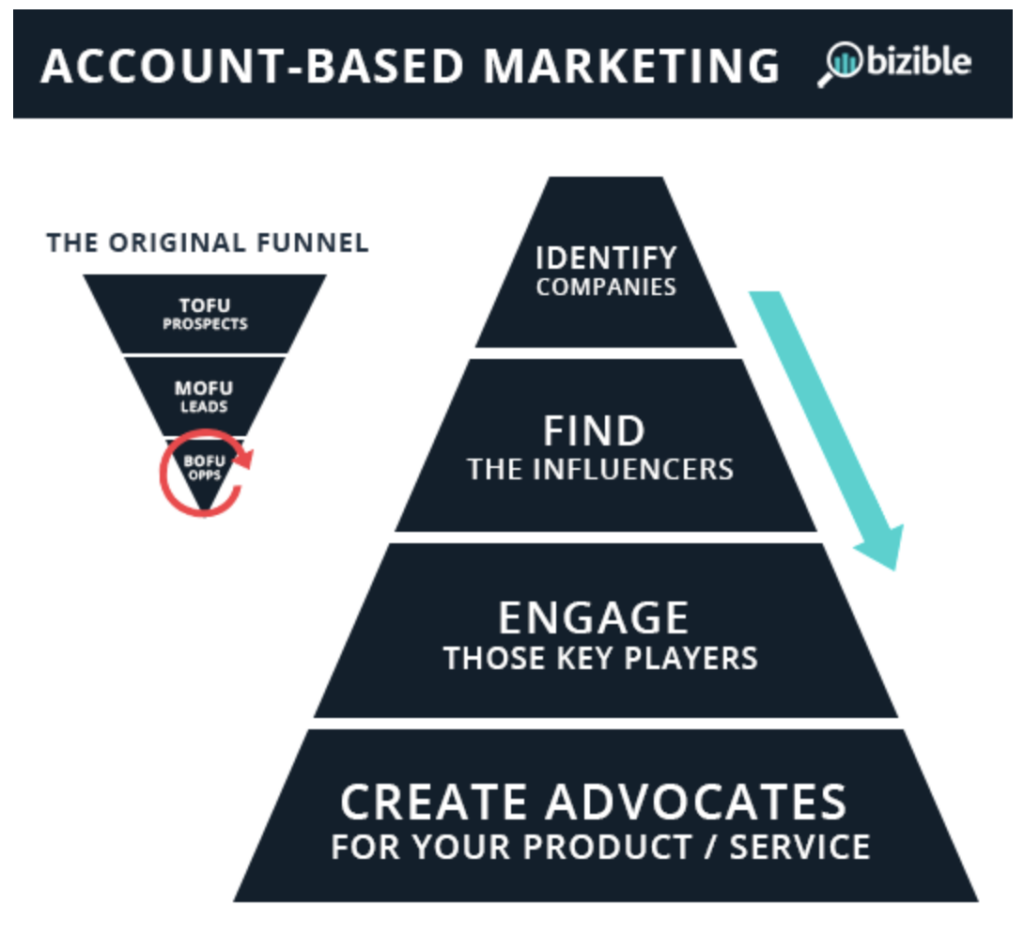
The advertisers getting the most from Customer Match aren't doing anything exotic. They're maintaining CRM hygiene consistently, refreshing lists on a schedule rather than whenever they remember, and segmenting by lifecycle stage instead of dumping everyone into a single "all customers" list. They're using high-LTV segments as Smart Bidding signals rather than letting the algorithm optimize toward average buyers. And they're running suppression lists actively — which often produces more measurable impact than any new targeting layer, simply by stopping spend on audiences that were never going to convert.
The first-party data shift that's been discussed for years is no longer coming — it's here. Consent Mode v2 is mandatory in the EU and UK. Third-party cookies remain technically functional in Chrome for now, but Safari and Firefox have blocked them for years, which means a meaningful share of any audience is already unreachable through cookie-based tracking alone. Customer Match is the most direct response to that gap: it's built on data you own, tied to Google account identity rather than browser state, and durable across devices in a way that pixel-based remarketing isn't.
The practical starting point for most accounts: pull your last 12 months of customer emails, clean the list properly, upload it, and run it in observation mode on your top Search campaigns for 30 days. The performance data you get back — conversion rate by Customer Match segment vs. non-Customer Match traffic — will tell you more about where to invest next than any amount of theoretical planning.
Customer match best practices aren't complicated. They're just consistently applied.
FAQ
What is Google Customer Match?
Google Customer Match is a Google Ads feature that lets advertisers upload first-party customer data — email addresses, phone numbers, mailing addresses — and use it to target those specific people across Search, YouTube, Gmail, Display, and Shopping. Google hashes the uploaded data and matches it against signed-in Google accounts to create targetable audience segments.
How does Google Customer Match work?
How Google Customer Match works comes down to three steps: you upload a formatted CSV of customer contact data, Google hashes it using SHA-256 and compares it against its own hashed account database, and returns an audience segment of matched users. The original file is deleted after matching. The resulting audience is available for targeting or bid adjustment across all major Google Ads campaign types.
What data is required for Customer Match?
Customer match data upload accepts email addresses, phone numbers in E.164 format, mailing addresses (first name, last name, country, zip code), and mobile device IDs. Email address is the strongest match field and should always be included when available. All data must be formatted correctly before upload — formatting errors reduce match rates without generating visible errors in the interface.
Is Google Customer Match privacy compliant?
Customer Match is designed to be privacy compliant at the infrastructure level — Google handles data at the hashed level and deletes uploaded files after matching. However, compliance responsibility sits with the advertiser. You need a valid legal basis for using the contact data you upload for ad targeting purposes — in the EU and UK, that typically means explicit consent. Consent Mode v2, mandatory since March 2024 for EU and UK advertisers, governs how consent signals flow through Google's systems but doesn't automatically make your lists compliant.
What campaigns can use Customer Match?
Customer Match audience lists are available across Search (via RLSA), YouTube, Display, Gmail, and Shopping campaigns. Customer match for search ads works through bid adjustments or audience targeting on existing Search campaigns. Customer match for YouTube ads and customer match for display ads work within Demand Gen and standard Display campaigns respectively. The minimum list size is 100 matched users across all networks, though 1,000 matched users is the practical minimum for Search bid adjustments and meaningful Smart Bidding optimization.


