


Google Ads for Lead Generation: Best Strategy
Introduction
Most businesses run Google Ads. Fewer of them actually generate leads from it. The gap usually isn't the budget — it's the strategy.
Google Ads is one of the few channels where you can reach someone at the exact moment they're searching for what you offer. That's a significant advantage. But it only works if the campaign is built around a real lead generation goal — not just traffic, clicks, or impressions.
What lead generation means in Google Ads
In the context of Google Ads, lead generation means getting someone to take a meaningful action that moves them into your sales process. Not a pageview. Not a bounce. A name, an email, a phone number, an intent signal — something your sales team can actually work with.
That sounds straightforward, but in practice most campaigns track the wrong things. Clicks get optimized. Impressions get reported. And then someone asks why there are no qualified prospects in the CRM.
A proper Google Ads strategy for lead generation starts by defining what "lead" means for your specific business — and making sure the entire campaign is built backward from that definition.
The numbers give a sense of what good looks like. According to WordStream's 2025 Google Ads benchmark report, the average conversion rate across all industries is 7.52%, and the average cost per lead sits at $70.11 — though that number varies dramatically by sector. Legal services average $131.63 per lead, while auto repair comes in at $28.50. The point isn't to chase the average — it's to understand the range and know where your industry sits.
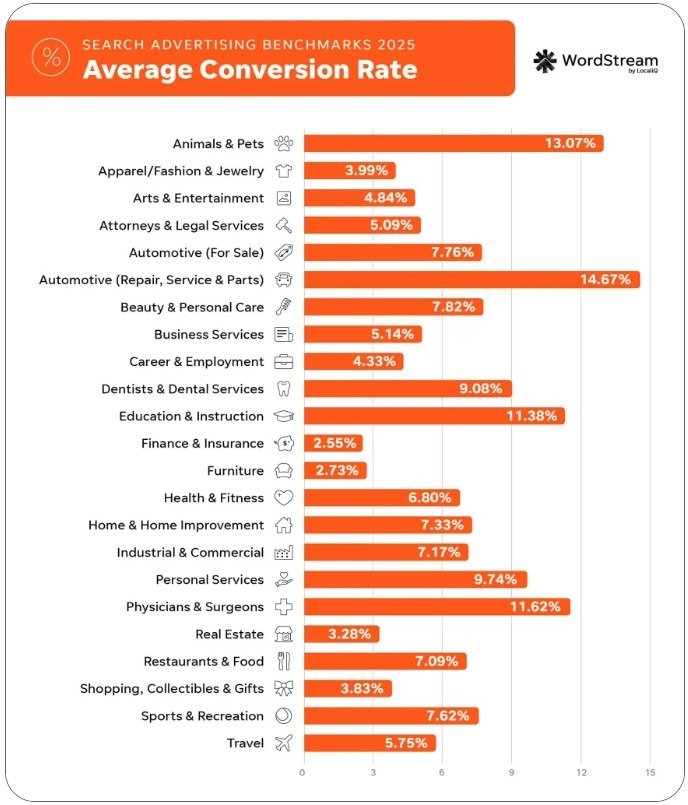
As Cliff Sizemore, Senior Marketing Manager at LocaliQ, put it: "Costs are rising, but so is performance — 65% of industries saw better conversion rates in 2025. The main takeaway is that a smart strategy beats cheap clicks."
This guide covers the full Google Ads lead generation strategy from scratch — campaign types, measurement architecture, bidding, keyword strategy, and troubleshooting. Step by step, in the order it actually matters.
Define the Lead You Actually Want
Before touching a single campaign setting, you need to answer one question: what exactly counts as a lead for your business? This sounds obvious, but it's where most accounts go wrong from day one. If you don't define it clearly, Google's algorithm will optimize for whatever conversion action you feed it — and that might be a newsletter signup, not a qualified sales opportunity.
Lead types: form fill, call, chat, demo request, quote
Different businesses use different entry points, and each one carries a different weight in the sales process. The main lead types you'll encounter in a Google Ads lead generation strategy are:
-
Form fill — the most common type. Someone fills in their name, email, and phone number either on your landing page or directly inside a Google Ads lead form asset. Fast to collect, easy to track, but quality varies widely depending on what you ask.
-
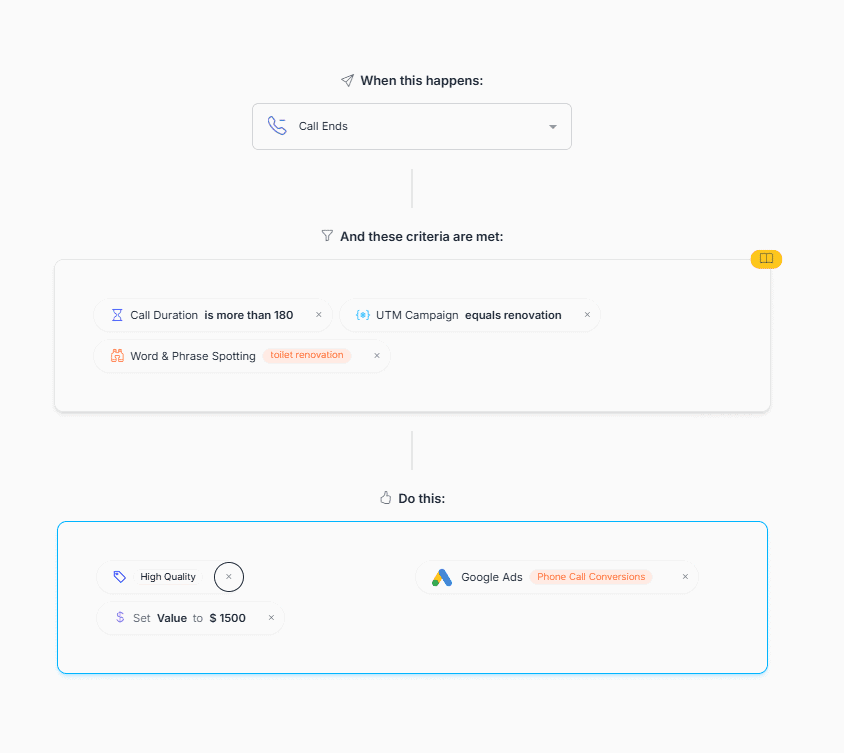
Phone call — often the highest-intent lead type, especially for local and service businesses. According to Nimbata's call tracking research, calls that last over five minutes and include specific product or service phrases are significantly more likely to convert than short or misdirected calls.
-
Live chat — works well for SaaS and e-commerce support funnels, but requires integration with your chat platform to track correctly inside Google Ads.
-
Demo request — typically a B2B signal with high intent. Someone who books a demo has already made a micro-commitment, which makes this one of the most valuable conversion actions you can optimize toward.
-
Quote request — common in insurance, construction, legal, and home services. Usually indicates purchase readiness, but quality depends on whether the person has realistic budget expectations.
Each of these requires a different tracking setup and a different bidding approach. Mixing them all into one conversion action and calling it "leads" is one of the fastest ways to confuse Smart Bidding and inflate your reported numbers.
Lead quality criteria and stages
Not all leads are equal, and your campaign structure should reflect that. As Google's own Performance Max best practices guide explains, the algorithm is only as good as the signals you feed it — and if you're sending it raw form submissions without any quality filter, it will optimize for volume, not value.
A practical way to think about this is in three stages:
A raw lead is anyone who submitted their information. A marketing-qualified lead (MQL) is someone who matches your target profile — right industry, right company size, right geography, realistic budget. A sales-qualified lead (SQL) is someone your sales team has confirmed as a real opportunity worth pursuing.
WhatConverts' research on lead qualification shows that when advertisers separate MQLs and SQLs as distinct conversion actions and import them back into Google Ads as offline conversions, Smart Bidding shifts spend toward the audiences and queries that generate actual pipeline — not just form fills. This is the foundation of a proper Google Ads lead qualification tactic and the single biggest lever for improving lead quality without raising budget.
The practical implication: decide before launch which action represents a real lead for your business, build tracking around that action specifically, and treat everything above it as a supporting signal rather than a primary conversion goal.
Google Ads Campaign Types for Lead Gen
Choosing the right campaign type is probably the most consequential decision in your entire Google Ads lead gen campaign structure. Get it wrong and you'll spend months optimizing the wrong thing. The good news: there are really only three buckets worth thinking about for lead generation, and each one has a clear role.
Search campaigns
Google Ads Search Ads for lead generation remain the foundation of any serious lead gen setup. You're targeting people who are actively typing in queries related to what you offer — which means intent is already there before a single impression is served.
For B2B, high-ticket services, local businesses, and anyone selling something with a longer sales cycle, Search is where you want to put the bulk of your budget. The control it gives you over keywords, ad copy, landing pages, and bidding is simply unmatched by any other campaign type.
According to data from Groas.ai covering 247 accounts tested between March 2023 and January 2025, B2B companies saw Search campaigns convert 28% better than Performance Max. For service businesses with complex sales cycles, Search campaigns averaged a 3.9% conversion rate versus 2.8% for PMax. The quality difference matters more than the volume difference.
Jyll Saskin Gales, a former Google employee who has helped optimize over 10,000 Google Ads accounts, puts it plainly on her Inside Google Ads blog: "For most B2B and lead generation businesses, I recommend starting with Search campaigns. This allows for better control over targeting and messaging, ensuring you reach the right audience with relevant offers."
Performance Max
Performance max for lead generation is a different beast entirely. Instead of targeting keywords, you provide creative assets and conversion goals — then Google's AI distributes your ads across Search, Display, YouTube, Gmail, Discover, and Maps simultaneously.
PMax works best for lead gen when two conditions are met: you have solid conversion tracking in place, and you're feeding the algorithm quality signals — ideally offline conversion data from your CRM showing which leads actually closed. Without that, PMax tends to optimize for volume over quality, generating plenty of form fills that go nowhere.
Australian fintech MoneyMe achieved a 22% increase in conversions while reducing cost-per-acquisition by 20% during a six-week PMax campaign — but they had robust tracking in place before launch. That's not an accident; it's a prerequisite.
David Ohm, Director of Paid Advertising at Straight North, describes PMax as "one campaign, one budget, one bid strategy" — which is its main advantage for accounts that need to scale without micromanaging placements. The tradeoff is reduced transparency. As of 2025, Google has added channel-level performance reporting to PMax, which helps — but it still doesn't give you the granular query-level data that Search campaigns provide.
YouTube, Display, and Demand Gen
These channels don't close leads directly for most businesses — but they warm up the audience that Search campaigns eventually convert. Think of them as the top of your Google Ads lead generation funnel: someone sees your YouTube pre-roll, later searches for your service, and converts through a Search campaign. The Search campaign gets the credit; the YouTube view did half the work.
Demand Gen campaigns — Google's replacement for Discovery campaigns — are particularly useful for remarketing to website visitors and email lists across YouTube, Gmail, and the Discover feed. If you're running a Google Ads B2B lead generation strategy with long sales cycles, Demand Gen can keep your brand in front of warm prospects between their first visit and eventual conversion.
For most lead gen accounts, YouTube and Display should represent no more than 15–20% of total budget until Search and PMax are properly dialed in.
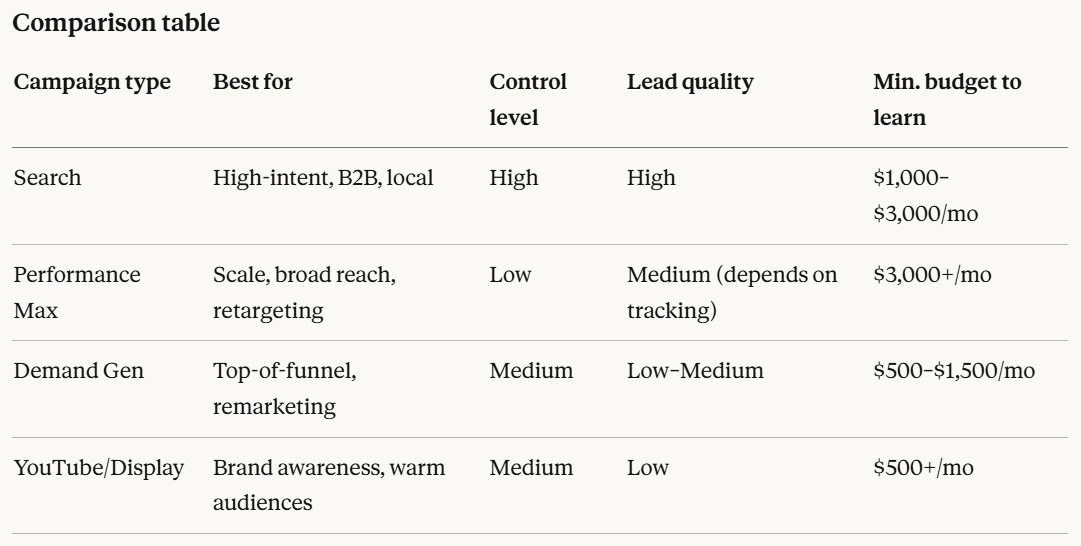
The practical takeaway: start with Search, layer in PMax once you have clean conversion data, and use Demand Gen for remarketing. That's the sequence that works for the vast majority of Google Ads lead generation step by step implementations.
Measurement Setup You Must Get Right First
If there's one section of this guide worth reading twice, it's this one. Every bidding decision, every optimization call, every budget allocation in a Google Ads strategy for lead generation depends on the quality of your conversion data. Bad tracking doesn't just give you wrong numbers — it actively misleads Smart Bidding into optimizing for the wrong things.
Conversion architecture
Before you launch a single campaign, map out your conversion architecture on paper. The core question: what actions on your site or in your CRM represent real business value, and in what order do they happen?
A typical lead gen conversion architecture looks like this: ad click → landing page visit → form submission (raw lead) → CRM entry → sales qualification (MQL) → meeting booked (SQL) → deal closed. Each stage has a different value and a different signal strength for Smart Bidding.
The practical rule: use one primary conversion action that represents the highest-quality signal you can reliably track at sufficient volume. For most accounts that's the form submission at launch — then you upgrade to qualified leads or closed deals once offline conversion import is set up. Running multiple primary conversions simultaneously confuses the algorithm and inflates your reported numbers.
What to track: forms, calls, chats, booked meetings, qualified leads
Google Ads conversion optimization for leads works best when you track across the full funnel, not just the top. Here's what to set up:
-
Form submissions — tag every form individually. A contact form and a demo request form are not the same signal and shouldn't be lumped together.
-
Phone calls — enable call tracking through Google Ads call assets and set a minimum call duration threshold (typically 60–90 seconds) to filter out misdials and short calls that have no lead value.
-
Live chat — requires integration between your chat platform (Intercom, Drift, Tidio) and Google Tag Manager to fire a conversion event when a meaningful chat conversation takes place.
-
Booked meetings — if you use Calendly, HubSpot Meetings, or similar tools, fire a conversion on the confirmation page after a meeting is scheduled. This is one of the highest-intent signals available.
-
Qualified leads — imported from your CRM after a sales rep marks a lead as qualified. This is where the real optimization power lives.
Enhanced conversions: when to use and prerequisites
Enhanced conversions for leads is an upgraded version of offline conversion import that uses hashed first-party data — typically email address — to match leads back to the Google Ads click that generated them. It's more durable than GCLID-only matching because it works even when cookies are blocked or the user switches devices.
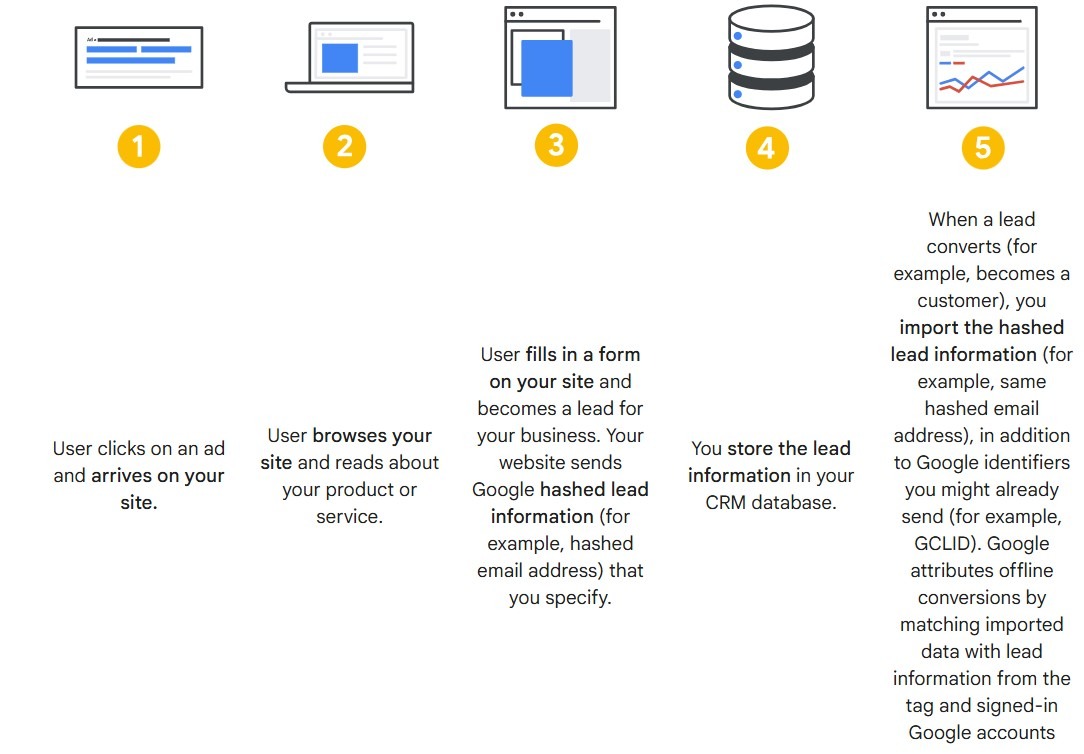
Enhanced conversions for leads offers cross-device conversion tracking and engaged-view conversions — two things standard offline import doesn't capture. Google recommends it as the default setup for any lead gen advertiser importing CRM data.
Prerequisites before enabling it: auto-tagging must be turned on in your account, your lead forms must collect either email or phone number, and you need to agree to Google's customer data policies. Setup is done through Google Ads Data Manager — connect your CRM directly or use a Zapier integration if your CRM isn't natively supported.
Offline conversions: importing qualified leads and revenue
This is the single biggest lever most lead gen advertisers leave untouched. The idea is simple: when a lead moves to a new stage in your CRM — qualified, opportunity, closed-won — you import that event back into Google Ads with the original GCLID or hashed email. Smart Bidding then learns which clicks, audiences, and queries actually produce pipeline, not just form fills.
According to Google's official offline conversion import guidelines, for Smart Bidding to respond properly to offline data you should upload conversions at least daily and maintain that cadence for at least one full conversion cycle before including the action as a primary conversion. Conversion names like lead_qualified or contract_signed — as Google's own documentation recommends — should be created as separate conversion actions with appropriate values assigned, so tCPA or tROAS bidding can weight them correctly.
You can upload any GCLID-based conversion up to 90 days after the original click, and any enhanced conversion up to 63 days. Don't let stale data sit in your CRM — import it on a consistent schedule, or the attribution window closes.
Account and campaign structure for scale
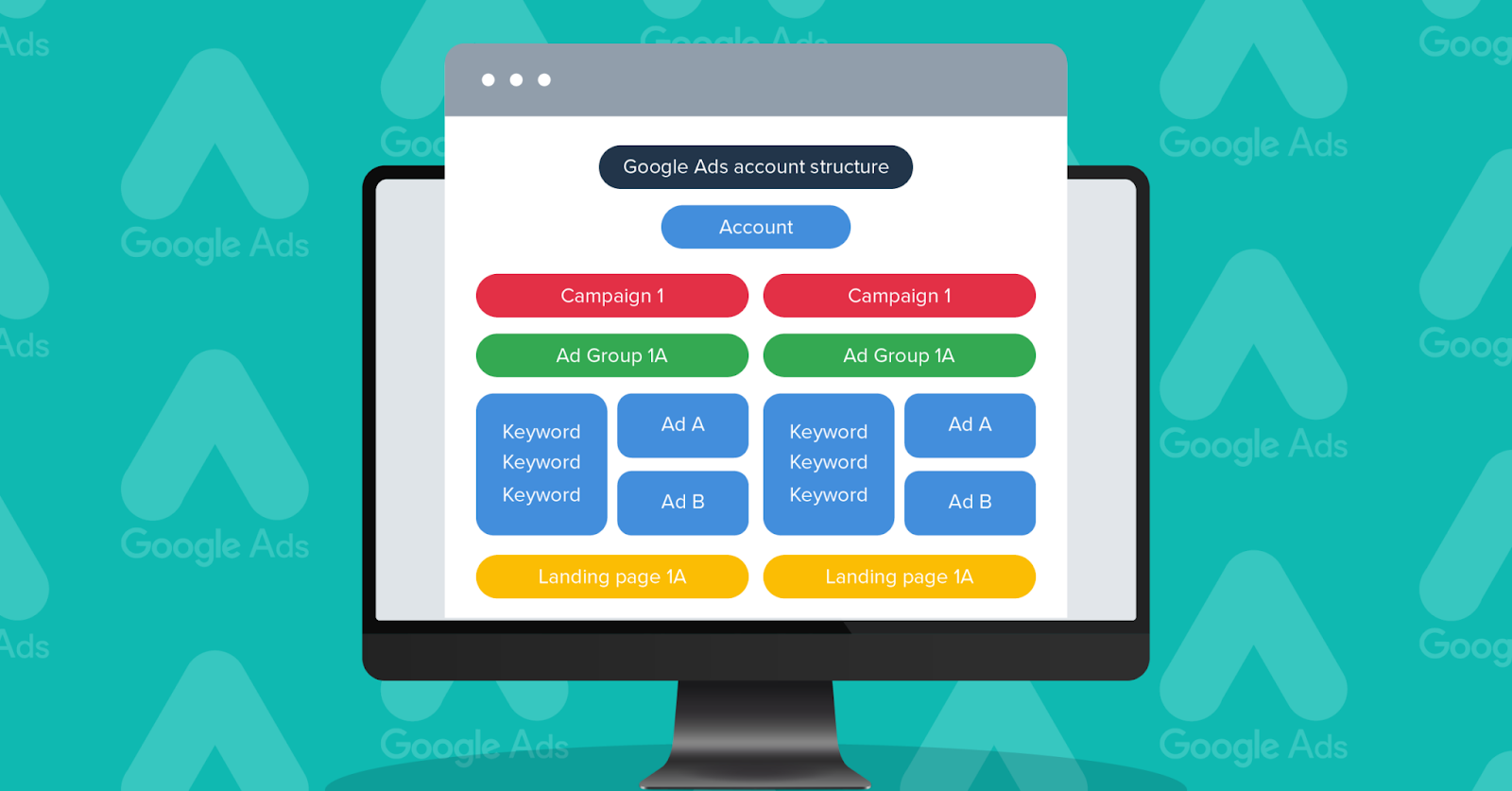
Getting campaign types right is half the equation. The other half is how you organize everything inside the account. A messy structure doesn't just make reporting painful — it actively confuses Smart Bidding, inflates CPLs, and makes scaling feel like pushing a boulder uphill. A solid Google Ads lead gen campaign structure is what separates accounts that scale cleanly from those that plateau and stay there.
Segmentation by service line, region, and lead type
The core principle here is simple: campaigns should map to your business goals. Separate campaigns for separate services, separate regions where budget control matters, and separate lead types when they carry different values.
If you offer three distinct services — accounting, tax advisory, and payroll — those belong in separate campaigns. Mixing them means your best-performing service subsidizes a weaker one, and you lose the ability to set accurate tCPA targets per line. Same logic applies to regions: for Google Ads local lead generation across multiple cities with different CPLs, regional separation is the only way to control budget allocation meaningfully. Budget and location are set at campaign level — you simply can't split them within a single campaign.
That said, don't over-segment. Google recommends a minimum of 30 conversions in the past 30 days for tCPA to optimize reliably, and practical experience from Ten Thousand Foot View suggests aiming for at least 25 conversions per campaign per month for lead gen accounts. Split campaigns too thin and Smart Bidding starves. This matters especially for Google Ads B2B lead generation strategy, where conversion volumes are naturally lower to begin with.
Naming conventions and governance
One thing that separates a well-run account from a chaotic one is a naming convention anyone on the team can read without decoding. Adchieve's naming convention guide recommends including country, campaign type, and theme as the core components. A widely used format looks like this: [CampaignType]_[Goal]_[Region]_[Service]_[Period]. For example: Search_LeadGen_US-East_TaxAdvisory_Q2-2025.
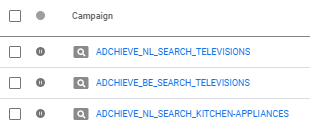
A few rules that hold up at any account size:
-
Use underscores as separators — they transfer cleanly into reporting tools and UTM parameters.
-
Keep abbreviations consistent and documented across the team.
-
Always separate branded from non-branded campaigns — they convert differently and should never share a budget.
-
Keep names current. A campaign called Summer2023_Demo running in 2025 breaks filtering in any reporting tool and tells you nothing useful.
Location targeting
The default location setting in Google Ads targets people "in or regularly in" your target location — which sounds precise until it starts showing your ads to someone physically elsewhere who's browsing content about your city. For lead gen, the correct setup is Presence: People in your targeted locations, combined with explicit exclusions for locations you don't serve.
PPC Hero's campaign structure guide makes the budget implication explicit: if you want to control spend by country or city, each market needs its own campaign. There's no way to split a budget geographically within a single campaign. For Google Ads local lead generation, this isn't optional — a lead from the wrong zip code is simply worthless.
Scheduling and device strategy
Pull your conversion data segmented by hour and day before touching these settings. Most B2B accounts show conversions clustering on weekdays between 8 AM and 6 PM, with a clear drop on evenings and weekends. Reducing bids — or pausing — during off-peak windows cuts wasted spend without touching campaign structure.
On devices: mobile traffic tends to be high-volume but lower-intent in B2B contexts. A negative bid adjustment of 20–30% on mobile is a common move when mobile conversion rate sits meaningfully below desktop. For local service businesses the opposite can be true — mobile calls often outperform desktop form fills. According to Store Growers, under Smart Bidding, device adjustments modify your effective CPA target rather than raw bids — worth knowing before stacking multiple adjustments on top of each other.
Keyword and query strategy
Keyword strategy for lead gen is not just about what you bid on — it's equally about what you block. Getting Google Ads keywords for lead generation right is one of the most direct ways to lower cost per lead without touching your budget.
Building the seed list
Start with your highest-intent terms: the phrases someone types when they're close to making a decision. For most service businesses, that's some combination of [service] + [location], [service] + pricing/cost/quote, [service] + for [industry/company type], and direct competitor comparisons.
Google recommends starting from core business categories, then expanding with specific modifiers. But the most underused source for seed keywords isn't a tool — it's your sales team. Phrases extracted from sales calls and support tickets often outperform tool-generated lists because they reflect actual buyer language, not assumed search behavior. A keyword like "outsourced CFO for SaaS startup" won't show up in Keyword Planner, but it might be exactly what your best customers typed before converting.
For match types: use a mix of phrase and broad match in established campaigns with Smart Bidding, and exact match for tightly controlled ad groups or when you're protecting specific high-value queries. Search Engine Land's intent-first framework makes the point clearly — grouping keywords by intent state rather than match type gives Smart Bidding cleaner signals and improves downstream conversion quality.
Negative keywords
Google Ads negative keywords for lead gen are where accounts either quietly save 20–30% of their budget or quietly waste it. The most common mistakes: adding negatives only reactively after spending money, or going too broad and blocking valuable queries.
PPC expert Adam Gorecki from Intigress, recommends prioritizing by impact: "If you don't have time to review everything, start with the search terms getting the most impressions — then move on to the ones costing you the most." A practical starting list for most lead gen accounts includes: free, jobs, careers, salary, how to, DIY, template, example, course, tutorial, and any irrelevant industries or locations you don't serve.
Structure negatives at the right level. Karooya's 2025 guide recommends account-level negatives for universal exclusions — things you'd never want regardless of campaign — and campaign-level negatives for campaign-specific noise. Ad group level is for fine adjustments only.
One thing worth knowing for Performance Max: Google now allows up to 10,000 negative keywords at the campaign level in PMax, which is a significant improvement from the previous account-only restriction. Use it — PMax without negative keyword controls is one of the fastest ways to accumulate low-quality leads at scale.
Also: KeywordMe's research found that a SaaS company boosted its qualified trial-to-paid conversion rate by 35% after adding negatives like free and no cost to their lead gen campaigns. The mechanism is simple — you stop paying for clicks that were never going to convert, and Smart Bidding reallocates that budget toward queries that do.
Search terms hygiene cadence
Running a clean negative keyword list at launch doesn't mean it stays clean. Search behavior shifts, broad match expands into new territory, and PMax finds creative ways to spend your budget.
TLC Ads recommends reviewing the search terms report weekly for accounts spending £5k+/month, and fortnightly for smaller accounts with tighter match types. WordStream's benchmark data aligns with this — new campaigns need checks every few days for the first two weeks, then weekly once the initial guardrails are in place.
When you review, sort by cost first — not impressions. A term with 1,000 impressions and zero conversions is less urgent than one that spent $200 with no conversions. Filter for zero-conversion terms above your target CPL, add them as negatives, and promote high-performing search terms to exact match keywords to give the algorithm a clearer signal.
Bidding strategy and optimization
Google Ads bidding for lead generation is where a lot of well-structured campaigns quietly fall apart. The wrong strategy at the wrong time doesn't just waste budget — it actively prevents Smart Bidding from learning, and you end up with a campaign that never gets off the ground.
Manual vs automated bidding
The right starting point depends on one thing: how much conversion data you have. Ed Goss, Managing Director at Ten Thousand Foot View, who has managed Google Ads for over 15 years, recommends Manual CPC for new campaigns: "For new campaigns, especially in accounts with low conversion volume, I recommend starting with manual CPC bidding. It provides flexibility by allowing you to adjust individual keyword bids and ensures your budget is spread out more evenly across a wider range of keywords."
Once a campaign hits at least 10–15 conversions per month, you can transition to Maximize Conversions without a CPA target — let it gather data first. Automated bidding has come a long way, but it's only as good as the signals you feed it. Without conversion history, Smart Bidding is essentially guessing.
Note: as of March 2025, Google has deprecated Enhanced CPC for Search and Display campaigns. If your campaigns were using ECPC, they've been automatically moved to Manual CPC — worth checking if you haven't already.
tCPA for lead gen
Google Ads bidding for lead generation at scale almost always means tCPA eventually. You tell Google the average amount you're willing to pay per conversion, and Smart Bidding adjusts bids in real time across devices, locations, audiences, and time of day to hit that target.
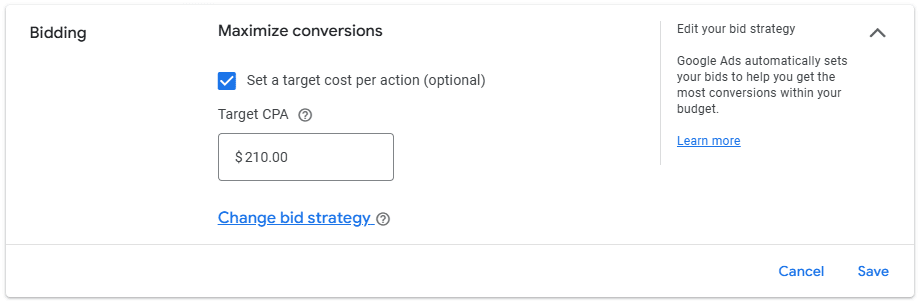
The critical rule when setting your initial target: don't set it too low. If your actual CPA has been $80 over the last 30 days, setting a tCPA of $40 immediately kills delivery — Google can't find enough qualifying auctions and the campaign stalls before it can learn. Jyll Saskin Gales, former Google employee and author who has optimized over 10,000 Google Ads accounts, puts it clearly: "For most brand new campaigns, start with Maximize Conversions and do NOT set a Target CPA. You may have a goal CPA in mind, but you have no real-world data to know if it's achievable. Setting a target that's too restrictive can kill your campaign before it gets a chance to learn."
Once you do switch to tCPA, Store Growers founder Dennis Moons — a Google Ads expert with over 12 years of experience managing $5M+ in ad spend — recommends setting it 10–20% above your recent actual CPA, then bringing it down gradually as the algorithm stabilizes. Increase budgets by no more than 20–30% at a time and wait 1–2 weeks between changes. Larger jumps force the algorithm to chase a much bigger traffic pool and typically cause a CPA spike.
Google's own tCPA documentation confirms that the algorithm needs time: budget spikes of up to 2x your daily average are expected while Smart Bidding explores auctions. Plan for a 7–14 day learning phase after any significant change to target, budget, or conversion action.
Guardrails
A few safeguards that prevent common tCPA disasters:
-
Set only one primary conversion action per campaign. Store Growers is explicit on this: "If you're optimizing for both purchases and newsletter signups in the same campaign, tCPA will average across them. The algorithm won't know which one matters most." For lead gen, that primary action should be your qualified form submission or booked meeting — not a pageview or button click.
-
Don't make structural changes during the learning phase. Changing ad copy, landing pages, keywords, or CPA targets mid-learning resets the clock.
-
Use portfolio bid strategies when scaling across multiple campaigns. Instead of managing tCPA campaign by campaign, a portfolio strategy lets Google balance spend across campaigns to hit your overall CPA goal — stronger campaigns absorb more budget while weaker ones get less.
-
Check conversion tags monthly. Store Growers notes that a broken or misconfigured tag will quietly wreck tCPA performance without any obvious warning signs in the interface.
Troubleshooting
Google Ads troubleshooting no leads is one of the most searched phrases among advertisers who've done everything right — or think they have. Problems usually fall into four buckets.
Tracking issues
If you're seeing clicks but zero conversions, check the tag before anything else. Jyll Saskin Gales puts it bluntly: "The first thing I check is whether conversion tracking is actually firing. You'd be surprised how often it isn't." Use Tag Assistant or Google Ads Conversion Diagnostics to confirm the tag fires on the correct thank-you or confirmation page — not the form page itself.
For offline conversion imports, Google flags two common causes of missing data: expired GCLIDs (they're only valid for 90 days) and missing consent settings. Check your offline diagnostics page before assuming the data isn't there.
Traffic quality issues
Clicks without leads usually mean one of three things: wrong keywords, wrong match types, or Search Partners serving low-intent traffic. Pillars Media's analysis of 12 common causes recommends disabling Search Partners as a first step when traffic quality is suspect — it isolates the problem to Google's core search network where intent is higher. Then pull the search terms report and sort by cost with zero conversions. That list tells you exactly where the budget is leaking.
Conversion experience issues
This is the most overlooked category in Google Ads conversion optimization for leads. The ad promises one thing, the landing page delivers something else — and the visitor leaves. Logic In Bound's research shows that even subtle differences in wording between ad and landing page cause hesitation that kills conversions. Check message match first. Then check page speed with Google PageSpeed Insights — on mobile, a one-second delay in load time reduces conversions by up to 20%.
For Google Ads landing page for lead generation: a dedicated landing page with a single CTA consistently outperforms a generic homepage. If you're sending paid traffic to a homepage, that's likely your biggest conversion leak.
Lead quality issues
You're getting form fills, but sales says the leads are garbage. This is a Google Ads lead qualification problem, not a campaign problem — but the fix lives in the campaign. First, tighten the form: add a budget question, a company size field, or a qualifying dropdown. Friction reduces volume but dramatically improves quality. Second, check which keywords and audiences are generating the low-quality submissions and apply negative adjustments or exclusions. Third, start importing qualified lead status back into Google Ads as an offline conversion — that's the signal that teaches Smart Bidding to find more of the right people, not just more people.
Practical checklists
These checklists cover the three moments where most Google Ads lead generation step by step implementations break down: before launch, tracking setup, and ongoing optimization.
Launch checklist
Before spending a dollar, confirm the following:
-
Conversion actions are defined and match your lead definition — not pageviews or button clicks.
-
Each campaign has a single clear goal: service line, region, or lead type — not all three at once.
-
Branded and non-branded campaigns are separated with their own budgets.
-
Location targeting is set to Presence only, not "presence or interest."
-
Ad scheduling reflects your actual business hours — especially for call-based campaigns.
-
Every ad group has at least 3 RSA variants with distinct headlines.
-
Google Ads landing page for lead generation: dedicated pages, single CTA, load time under 3 seconds on mobile. A law firm tested a multi-CTA structure — primary form, secondary PDF download, tertiary chat — and increased total lead volume by 56% while maintaining lead quality.
-
Negative keyword list populated before launch: free, jobs, how to, DIY, tutorial, salary, template.
-
Daily budget set at minimum 3x your target CPA.
Tracking checklist
Broken tracking is the most expensive mistake in any Google Ads lead generation funnel — it silently misdirects Smart Bidding for weeks before anyone notices. Prometheus PPC puts it bluntly: "Without precise tracking, your Smart Bidding strategies can spiral. You end up targeting the wrong audiences or over-optimizing for low-value leads."
-
Google Tag Manager installed and firing correctly on all pages.
-
Each form has its own conversion action — contact form and demo request are not the same signal.
-
Call tracking enabled with a minimum duration threshold of 60–90 seconds.
-
Thank-you or confirmation pages are tagged — not the form page itself.
-
Auto-tagging turned on in account settings.
-
Enhanced conversions for leads configured if forms collect email or phone.
-
Offline conversion import set up and uploading on a daily schedule.
-
No duplicate conversion actions set as primary.
-
Conversion Diagnostics shows green across all active actions.
Optimization checklist
Run weekly for the first month, then monthly once the account stabilizes. A good benchmark: according to North Country Consulting's B2B audit framework, the average CTR for B2B Google Ads campaigns in 2024 was 6.42% — anything significantly below that on non-branded campaigns warrants an ad copy review.
-
Search terms report reviewed — sort by cost, zero conversions first, add negatives accordingly.
-
High-performing search terms promoted to exact match keywords.
-
Ad strength checked — aim for "Good" or "Excellent" on all active RSAs.
-
Landing page conversion rate compared against benchmark — anything below 2% for B2B warrants a test. For reference, B2B manufacturer TriStar Plastics cut CPL by 74% and grew monthly leads by 231% over five quarters — the bulk of gains came from campaign restructuring and landing page alignment, not budget increases.

-
tCPA target reviewed against actual 30-day CPA — adjust no more than 15–20% at a time.
-
Device and location performance checked for bid adjustment opportunities.
-
Offline conversion data uploaded and visible in the Conversions report.
-
Lead quality feedback collected from sales and fed back as audience exclusions or negative keywords.
Conclusion
Developing a high-performing Google Ads strategy for lead generation isn't about "launching and forgetting". It’s a continuous cycle of refining your Google Ads lead generation funnel and ensuring that the data feeding the algorithm is clean. By sticking to Google Ads lead gen best practices, such as granular audience segmentation and rigorous A/B testing, the top advertisers consistently outperform the rest. This focus on Google Ads lead qualification tactics ensures you aren't just chasing the lowest CPL, but actual revenue.
By following this Google Ads lead generation step by step guide—from setting up solid conversion architecture to implementing strict search term hygiene—you move away from gambling and toward predictable growth. Ultimately, a successful Google Ads strategy for lead generation is about building a bridge between a user’s problem and your specific solution. Keep testing your landing pages, don't ignore your negative keywords, and always prioritize lead quality over raw volume.
FAQ
How do I structure a Google Ads account for lead generation?
A robust Google Ads lead gen campaign structure should be segmented by service line or intent level. Use a "thematic" approach where high-intent bottom-of-funnel keywords are separated from broader research terms. This allows for better budget control and more relevant ad copy, ensuring that your most valuable services get the highest visibility, which is a cornerstone of any effective Google Ads strategy for lead generation.
What conversions should I track for lead generation in Google Ads?
Your lead generation Google Ads campaign setup should include form fills, click-to-calls, and ideally, Offline Conversion Imports (OCI). Tracking the transition from a "marketing qualified lead" (MQL) to a "sales qualified lead" (SQL) is vital for Google Ads conversion optimization for leads, as it tells the system which clicks actually turn into revenue. This data-driven approach is what defines a modern Google Ads strategy for lead generation.
Are Google Ads lead form assets better than landing pages for lead gen?
It depends on your friction requirements. Google Ads lead form extension setup reduces friction, often leading to a lower cost per lead Google Ads produces because users don't have to leave the search results. However, data from high-ticket industries shows that dedicated landing pages usually provide higher-quality intent because the user has to engage more deeply with your brand before submitting their data.
How can I reduce cost per lead in Google Ads without losing lead quality?
Focus on your Quality Score and Google Ads negative keywords for lead gen. By filtering out "free," "job," or "research" queries, you stop wasting budget on non-buyers. Additionally, using tCPA bidding for lead gen helps the algorithm find users likely to convert within your target price point without sacrificing the integrity of the lead quality, which is essential for a sustainable Google Ads strategy for lead generation.
Why am I getting clicks but no leads from my Google Ads campaigns?
This is a common issue in Google Ads troubleshooting no leads. Many marketers ask how to generate leads with Google Ads only to find their budget spent on "bounce" traffic. Usually, the problem lies in a "message mismatch" between your ad and your Google Ads landing page for lead generation. If your ad promises a "Free Quote" but the page asks for a 20-field technical audit, users will bounce. Check your page load speed and ensure your primary Call to Action (CTA) is visible without the need to scroll.


